Lessons Learned from Building & Running MHN, a Crowd-sourced Honeynet
Show transcript [en]
big data and machine learning he's worked in security research for over 10 years and is a major contributor to several open source projects including the modern honey Network binary Pig elastic search and accumulo uh just a little Pro tip uh Jason is also apparently an actor director producer special effects artist and screenwriter who has starred in all of the films that he has written and directed uh he'll go check it out on Google uh he'll try to throw you off by wearing an eye patch when he makes public appearances outside of his open source uh infoset capacity but since you're at bsides you're all cool so we're letting you know and letting you all in on the secret uh please welcome
America's Next cinematic sensation Jason
tro thanks for coming out to my talk on lessons learn from building and running mhn or modern hunting Network the world's largest crowdsourced hunting net so he already introduced me so I'm just going to going to kind of blow through the slide I'm the director of threatstream labs which is the research and data science team at threatstream um previously at CIA National Labs Department of Defense bu Hamilton endgame and now uh most recently threatstream I've been working in security for more than 10 years now um focusing mainly on building distributed systems doing big data security analytics and then most recently moving into security data science I'm also a big advocate of Open Source and open source Technologies um
I'm a big open source contributor as well he mentioned the projects that are also listed here so I won't go over them again so who's threatstream threatstream is a cyber security company that was founded in 2013 and ventured back by several prominent uh Venture capitalists uh we have a sas-based Enterprise security platform that enables our customers to manage threat intelligence data our customers hail from the financial sectors um Retail Energy and uh technology okay so here's the agenda for my talk I'm going to go into a brief intro to honey pots for those you who don't know what they are I'm going to talk about the modern honey Network or mhn um I'm going to talk about the mhn
community that's been built around this this system I'm going to go into crowdsourcing security data through mhn and talk about some of the data that we've been able to collect and show you some some examples uh then I'm going to go into lessons learn about building this project in this community uh we have an announcement to make and then I'm GNA uh close with some demos okay so what are honeypots honeypots are software systems designed to mimic vulnerable servers and desktops with the goal of being used for bait for or to slow down or to to detect hackers malare or misbehaving users they're designed to capture data for research forensics or threat intelligence um in this talk when I
mention honeypots I'm talking primarily about low interaction honeypots not high interaction honeypots U the mhn system is built entirely around low interaction just so just keep that in mind all right so why honeypots honeypots are the cheapest way to generate threat intelligence feeds around malicious IP addresses at scale there's really three deployment models when you think of Honey Poots and they all have three different us uh uses so one is internal deployment so this is behind your firewall uh deploying like this is really good for uh contributing uh to overall security of your internal Network provides a low IDs sorry low noise IDs sensor um we have a company that we've worked with that have deployed about 50 honeypots on
their internal Network and they said they actually get two to three events per month which is really really low but the events are all high quality when they get an event um they act on them um local external deployment so this is deploying honeypots on your IP space but outside your firewall um so this is good for answering questions like who's attacking me um you're going to get some noise with this so you're not going to want to respond to every event um but it's useful data especially if you combine it with the third type of data which is global external deployment and this is what threatstream does and this is what the mhn community provides uh so
this is where you you know deploy these honeypots far and wide on rented servers Cloud servers other people's networks and uh this allows you to answer the question who's attacking everyone let you see global Trends and when combined with local external deployment it really is useful because it enables you to say is this IP attacking just me or are they in everyone which can guide your decision on what to do with them so another kind of justification for honeypots um did anyone here go to derbycon or see this talk at derbycon this year uh this was a talk given by Katherine tra and David Sharp they're from GE SE team who does uh AP hunting
for ge's Network so in this slide they talk about the types of attacks that their team responds to uh since 2011 and the by um the overwhelmingly overwhelming majority of attacks they responded to were from internet facing assets so I think this slide alone really justifies using and deploying honeypots outside your firewall on your network as a way to uh you know detect these guys you know trying to hit your internet facing assets all right so what is the modern honey Network it's an open source platform for managing deploying and then leveraging the data from honeypots either at scale or deployed on your Enterprise Network the goal of the project was to make deploying honeypots
and exploiting uh their data is simple as possible um I'm not going to demo the deployment today but typically deploying a Honeypot means you deploy the mhn server one time somewhere on your network or on the Internet and then from there you can deploy honeypots typically in about two minutes uh using a single command um it's pretty easy the system leverages several existing open source tools including HP feeds which is a transport mechanism for how the honeypots trans transer transport data back to the mhn server nemine which is an open source project provided by the honey net project that's used for taking honey net or sorry HP feeds data and indexing it into mongodb honey map same
sort of thing um project provided by the honey net project it's for visualizing this data in real time most of you probably heard of mongodb that's the database mhn uses and then we have several uh honeypots and then also generic Network sensors that we've written support for um including daa con poot which is an IC honey pot snort which is not a honey pot in sraak cotta um which are really good when paired with honeypots for seeing what sorts of tools the attackers are using against the honey poot kippo PFF or passive OS fingerprinting also really good when combined with low interaction honeypots for gleaning just a little bit more information about you know those that
are interacting with it glass off aund word pot and then shock poot shock pot's a honey pot that re-release around the week or sorry during the week when the shell shock vulnerability was announced publicly and everyone started scanning for it it's a Honeypot that's designed to respond to um shell shock attempts for exploitation and downloads the payloads associated and then brings those payloads back you know to use so you can do analysis on them okay so here's the architecture for what mhn looks like um the top you know section of this diag is the mhn server so this is what you would Deploy on your network um the bottom section are the other components so you starting at the
bottom with the sensors so for example we have compot daa you know all the other sensors I mentioned before those are you know sitting on your network collecting data and shipping it back to the mhn server using HP feeds uh from there HP feeds is sending this data in real time to Honey map for realtime visualization uh to nemine for indexing this into mongodb and then then also to HP feeds logger which is a component that we wrote that's useful for integrating this Honeypot data with external security systems and we currently have supports out of the box for Splunk arcite and then log stash so you could really build your own sort of system um you know moving around the doc
this diagram a little bit more I mentioned all the data is stored in mongod DB so it's uh broken out and normalized into a bunch of different models one for sessions uh one for URLs one for files um and a handful of other smaller ones U we built web apps a web app around all the data in mongodb this gives a a user an interface to explore this data as well as set up and deploy honeypots and then manage them and then we also have rest apis for exposing this data to other applications and then for integrating with third-party applications you know that one an API and uh threatstream actually uses the rest apis for our product optic that's
how we consume the data out of our mhn instance okay so mhn is also a community of mhn servers that contribute Honeypot data back to the community uh mhn servers and their honeypots are operated by different individuals and organizations ranging from uh students in Academia to um we have some energy companies some big retail organizations uh some technology companies and then there's a ton of users who deploy these on residential Broadband or you know cloud-hosted environments uh sharing data back to the community is optional but if if you do share uh you get access to our aggregated data on ATT taxs and we're currently working on a way to share data a more granular level
including the actual Raw event data uh we're just not there yet so here's what the community looks like so at the bottom we have all the honeypots and notice there's a whole bunch of different types of honeypots so um this these deployments are really up to the users who download mhn they can deploy whatever they want they can build support for a new sensor that we don't have support for um you know included mhn in um share the data back if they're interested uh these mhn servers get deployed really wherever you want um and if your data sharing is turned on it submits statistics about the attackers back to the community and those statistics are rolled into files which
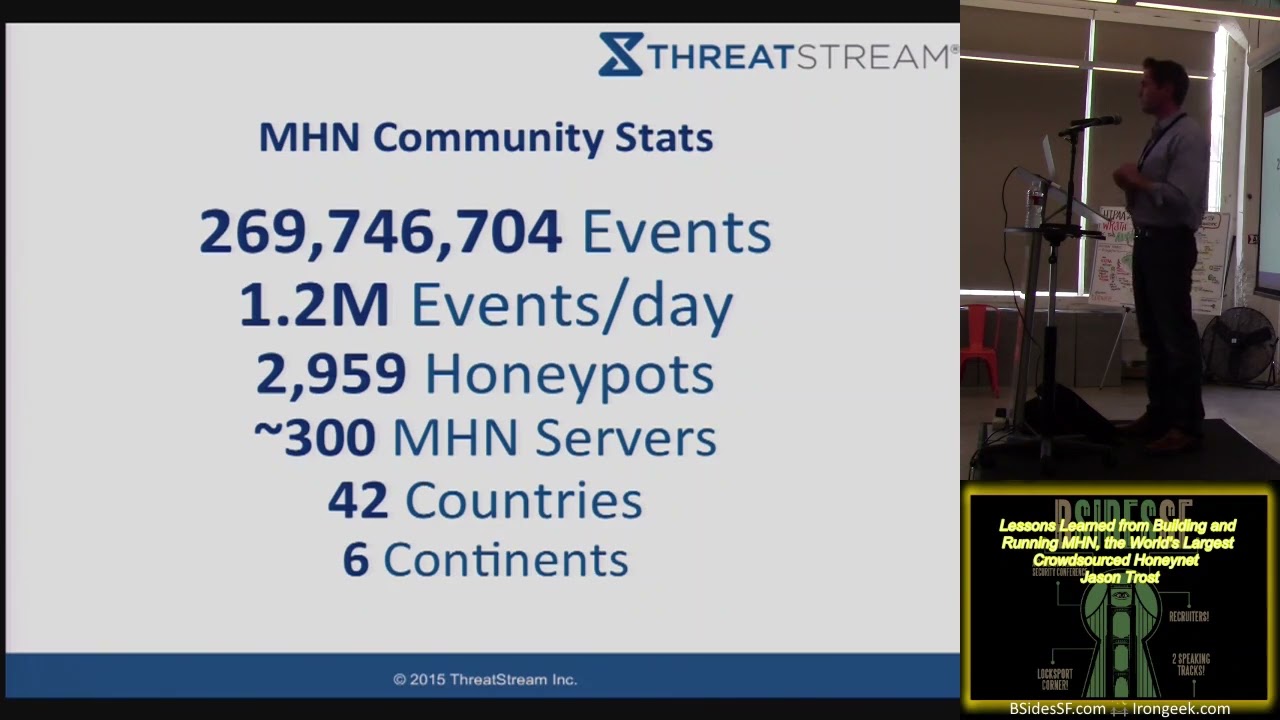
we share on open dat. threatstream dcom and anyone who is has deployed an mhn server we can verify that they're sharing and requests access we'll give them access to all this data we have data going back to uh June 1st 2014 we we intend to keep this going okay so now moving into some Community stats uh so just here's some numbers kind of centered around the community since this project has started in June 2014 we've collected nearly 270 million events from these you know heterogene heterogeneous honeypots deployed by other people typically we see about 1.2 million events per day um coming from about nearly 3,000 honeypots in nearly 300 mhn servers and when I say
nearly 300 we're not really sure exactly the exact number um if you we can see the IP addresses mhn server submitting data back to us and if you aggregate those by sl16 there's 286 of them if you just take the raw IP count it's 428 so the number is somewhere in between because of DHCP churn um so we're not really sure um these servers in honeypots are deployed across 42 countries in six continents which is pretty amazing if you think about the global spread that this project has gotten in really less than a year's time a little bit more stats on some of the sensors so we've had roughly 2,000 sensors submit 100 more events we've had
roughly 1,600 sensors give us a th000 events or more roughly 963 have given us 10,000 events 381 have provided over 100,000 events 62 sensors have provided more than a million events and then two sensors have Prov provided more than 10 million events back to the community which is pretty interesting uh here's some stats about the actual project so mn's an open source project uh using the lp L the lgpl license uh we have 12 contributors who've contributed code back and we've merged their contributions back in P requests there's 74 Forks on on GitHub 459 Stars we have a really active uh Google group for this project with 64 members 35 topics and 461 messages so
this we probably get a few messages per day um you know they kind of Spike here and there but it's very active group so if you're using mhn and you need help um definitely you know ping the group and we'll we'll try and you know get back to you um this slide shows the growth of sensors over time so this is the number of sensors added per day that huge spike is kind of interesting if you look at before the huge spike it was relatively flat and actually very low like only one or two sensors were being added per day um the time frame around that huge Spike was at the end of September early
October does anyone have any idea what might have caused someone to deploy roughly 200 I think we have it's about 220 over the course of two days 220 honeypots in that time period say it again uh it was actually the shell shock for own ability was announced people started scanning for it and then um you know really started things started picking up and we speculating as to why this is but the timing is just too coincidental um if you look at sensor growth of the project since then it's it's crazy before shell shock was announced sensor growth was really was really low since that day it's really gone up and up and up and up we have nearly
3,000 sensors deployed or we as a community have nearly 3,000 sensors deployed now uh here's a a stat or here's a slide showing the number of events contributed per day um that huge spike is actually not correlated with the growth in censors that I showed you earlier it's actually two weeks later and uh when I saw that I thought it was pretty suspicious and in fact uh if you dig into the data a little bit more and uh we look at the attacker IP address from those attacks that humongous Spike was from an RFC 1918 attack or sorry 1918 IP address or private IP space so looking into the data someone had set this up
locally and just had one server pinging the other server probably for some sort of a demo purpose but uh it ranged over the course of a couple days um so it's definitely some noise but you know interesting nonetheless uh events for honeypots so that humongous spike it was actually daa so someone set up daa honeypots internally and just started pummeling them um if you look at the these stats D is definitely the number one you know honeypop that's deployed out in the wild um at least contributing back to mhn kipo is a close seconds uh kipo is probably my favorite Honeypot just for the sorts of data you can get from it um I think it's really fun to kind of just
look at the command logs of what the attackers are doing um aan is the third one which I thought was actually kind of surprising since we added support for that fairly late and then uh snort PFF and then the others here's another view of the data so this is events by Honeypot showing percentage of the events so you know like I mentioned before D is number one uh but really I kind of wanted to show the purple you know 3.9% uh contribution is from or I'm sorry the it's one of the smaller ones it's from NS Focus honey net events so NS Focus honey events is not something that mhn ships with it's not a Honeypot we
support uh it's someone it's a Honeypot that someone added support for we don't know who exactly but if you Google that there's an Asian company here provides a product that's called uh NS Focus honey net uh so we thought that was kind of interesting they integrated it with their in instance of mhn and shared their data back events by attacker country um not surprisingly the US is number one China's number two you know France Hong Kong and other major countries follow notice the RFC 1918 spike is gone here because these are all uh events where we could correlate with ipgo uh events by attacker country you the same sort of information just displayed differently okay so uh from this project
we we've learned a lot um you know one of the goals was collecting uh security data and we were I'd say pretty surprised with with how large this project has grown in the time frame it has um but I think it really shows the Merit of crowdsourcing data especially security data um the term crowdsourcing was coined I think in 2005 so it's the process of obtaining services or ideas or other content by soliciting others to you know contribute to back typically either for free or for money um there's a ton of benefits to doing this so you know one of them is to perspective so if you were to think about trying to deploy 3,000 honeypots
deployed across the world the cost of one you know organization trying to do this would be pretty tremendous in terms of time and money to to you know get all these diverse locations but if you crowdsource it like we did we're able to get tremendous um you know distribution of these sensors with you know very little cost um diverse data collection so people are choosing which sorts of Honey pots they want to deploy so they're deploying you know what's most meaningful to them and contributing their data um so we get diverse data um we distribute the cost of this project in terms of the money the time and energy across a huge Community um like I
mentioned before without without the crowdsourcing of this this would have been a tremendously expensive project to over um to to work on and then lastly uh provide this data back to the community especially for research it has a ton of useful data all right so some lessons learned from building this project in this community uh so we found that a lot of people really like honeypots I've I talked to I think about five people so far just today that have deployed mhn have you know talked about how much they liked it like the ability to deploy honeypots quickly for research or for um you know integrating with their security um I feel like one of the primary
motivating factors behind this is the visualization it provides um I'm GNA I'm going to do a brief demo later but if you give someone a visual like a a threat map where they can put their own relevant data on it for free they're likely going to use it um because it's cool and because it looks good on their Ops floor lots of datas lots of organizations will share their data back with you if it's part of a community um I was also kind of surprised that this you know piece of it that so many people are sharing their data back I've only talked to a couple organizations who decided not to share their data back U there could be more
but uh it seems to be the the more rare of the the users using this project um and then lots of companies will deploy honeypots in production on their networks especially if you give them a way to manage them and and a way to integrate them with their existing security products so they can actually use the data this was a big piece that was lacking i' would say before our project uh started was there was very little way to easily integrate these with your existing security products um so people would set them up and they'd kind of have to um you know write scripts and duct tape things together to get them to work uh but we've our goal
is really to make that easy more Lessons Learned there going to be a ton of beginners um not just with honeypots but beginners with Linux or sec who who come to you when they set these things up if you're trying to start a project like this I would just recommend be as patient as possible um your the scope of support you're going to have to provide is going to go well beyond your project um we have done that here and there providing people who are trying to set mhn up with helping them troubleshoot their Network or they have a misconfigured Linux system uh you know things like that courtesy can be Lost in Translation because this project is so
uh widely spread there's a lot of people who use it that don't speak English so we've had quite a few people who've used Google Translate to write their question translate to English and submit it to our list uh and sometimes these questions can come off as tur or almost rude so I would say as you grow a project like this keep that in mind um don't take offense uh it could just be an artifact of Google translate um create a frequently Asked question as soon as possible and populate it this is something we did not do immediately but uh we we probably did it after about two weeks of having the project and it has save so much time in
terms of troubleshooting and responding to the same problems that that occur over and over um we had a teacher assigned their their class um setting up mhn and deploying honeypots as a class project and this kind of bombarded me in particular with um support requests so the the FAQ was tremendously helpful in that case um so keep that in mind um this is an obvious one to probably everyone here but make it clear users need to provide logs if they want help uh we get a lot of requests that's just say hey it's not working can you help uh as the first request when they really should just be sending their logs as the first request um we're still kind of
working on you know getting that right um be appreciative of people who report bugs so we are definitely mindful that uh people running this project come from all sorts of places from hobbyists to students to people in uh you know big companies and a lot of them are running this on their free time for fun so if they find a bug I imagine it can be tremendously frustrating to them so be appreciative when people will actually report bugs fix them um you know encourage participation and then get feedback from your users and try and incorporate it back into into the project all right so now I want to move on to an announcement that we want to
make so today we released an mhn Splunk app for it's free and open source um so what this allows you to do is take all the data collected by mhn um put it into your existing Splunk installation and then explore this data analyze it it um we have dashboards for for doing that and then you can also build alerting on top of swun which you if you haven't used swun for alerting it's it's really easy uh so this is a really awesome kind of integration piece that is if you don't have a tremendous amount of Honey Poots you can operate this all for free using the the free Splunk um addition I I think it's less than 500 Megs a day of
log data which that's quite a bit of of Honeypot log data um if you're going to start generating this the other thing it provides is pivots to virus total total hash and D so we have all this data coming in we figured we might as well give you you know other pointers of other places to go look and get more information um and then lastly we use splunk's common information model to do this so if you're using I think Splunk security or Enterprise security uh you should also be able to take the Honeypot data and use it with other reports and analytics so um all right now I want to drop into some demos and then uh after that I'll
wrap up okay so
okay so this is the image in dashboard so um before actually two days ago I decided to deploy a demo version of this really because in going through this demo I would expose some of the Honeypot IPS so I didn't want to have to worry about um hiding them from our production instance so um to set up this demo it took me about 1 hour including the time to install nhn install Splunk from scratch install our Splunk app install uh honeypots on five servers and um you know get it up and running this is the dashboard so this is when you would log into your mhn instance this is what you'd see so it gives you just a summary
of uh what mhn has seen from uh your honeypots so it gives you the top attacks the number of attacks in the past 24 hours the IP addresses that are involved involved in those attacks the ports involved and then if you have snort or cotta deployed the signatures of the top ones that is seen we also have honey map so honey map is uh honey the honey net project U project for visualizing this data in real time so uh reload this and hopefully we'll see some attacks come in in real time if not it's might be a little boring but uh here we go so so um this is the I would say thing that drives a lot of people to
actually set up mhn initially and put this on their sock or their Ops for you you can it's relevant data to your organization it's kind of a cool visualization um but it's just a piece of the project from here some other things that are available so uh we have the attacks page so this is just a very simple way to kind of explore the data search it um look up information about an IP address that might be you um attacking your network or showing up another logs that you have the goal of this piece was really just uh barebones and simple exploration the Splunk app kind of uh surpasses this greatly now so if you
want to do anything hardcore I would highly recommend either using the apis and um writing yourself or using the Splunk app and and using the dashboards this deploy page this is probably what makes mhn easy um so what we've done is we have taken all the top honey Poots that we're aware of and we've written installations for them so this will bootstrap the process of um downloading all the packages downloading all the pendencies installing the Honeypot sensor doing a key exchange with the mhn server setting up HP feeds getting data flowing and then lastly deploying the Honeypot using supervisor D so this is a python uh system that's meant for managing processes and if the
process dies it automatically restarts it so it's a way to kind of add another layer of uh reliability to Honey Poots uh so we've done all that all of that work for all these different honeypots all the ones I mentioned in the slides before um from here the way this works is you would select the Honeypot you're interested in deploying so say we want to do po so this is a not a Honeypot but a sensor you'd copy this command and then paste it into a terminal on the server you want to deploy this to and it does all the steps I just mentioned gets everything flowing and everything starts working we we also have just uh some
other kind of management type thing so this is the list of all your sensors you can see the the counts of the attacks that the sensors have seen uh this shows you really are the sensors alive are they collecting data if you see all zeros there it means something's wrong uh for example we have a zero here for my wordt Honeypot uh I'm not sure why that is but you know that shows that something's wrong uh and then lastly uh these charts so these charts were contributed by a thirdparty user so he wanted a way to visualize the kipo data I guess you can't see them very well um but these charts show the top usernames and
passwords entered by attackers into kipo uh and then the top attacker so it's kind of cool user contributed um looks nice now that we have the spunk app it kind of um you don't need this as much but um you regardless it's looks really nice all right so now I'm going to move into just showing some of the the spunk app okay so the spunk app's goal was to provide you dashboards um that show you you know what's going on with your honeypots uh the overview page shows you kind of at a glance what's going on with all of your sensors and shows you some stats um compared to two different time periods so at the top you'll see all the
you know counts of attacks or unique attackers or unique m5s or URLs or commands executed for today and then uh those little numbers or percentages show you a comparison to how they were yesterday just to show you some basic trending we also have trending of all the events going through all your honeypots we have a map that shows you where the attacks are coming from for your honeypots and then a bunch of charts and graphs hope you can see these uh showing the top attacking countries cities Honeypot types ports and then charts that show the top attackers the top attacker os's this is pulled from passive fingerprinting uh top usernames and passwords you know things like that I think this chart is
kind of interesting uh I'm not sure if you guys can see those green lines but that's an activity graph involving or involving these IP addresses so it shows you kind of at a glance um how much this IP interacted with your systems so this IP and this IP at the bottom you see have a pretty Jagged chart so this means they're they're pretty much constantly interacting with your systems and the bottom one uh When I Was preparing this demo I did a little bit more research and it's been pinging one of our our uh sensors on Port um 1095 every two minutes I'm not really sure why it seems uh like like it's just a misconfigured
system but uh it shows up in this graph it's kind of interesting uh you know moving down we provide a bunch of other stats your top sensors producing data the top mp5s we've seen um top URLs and then top signatur scen from all the you know snort or CRA cotta uh instances you've deployed that's the overview page we have a bunch of other Pages really centered around the specific types of Honeypot so if you deploy daa uh you'll see you know all the data that your DNA honey Poots have collected and um like I mentioned before for example for the top md5's you have pivots to Total hash and div virus total um and then for the top IP addresses
same sort of thing pivots the D Shield uh every page I'd say kind of looks the same or has the same generic template events event counts of the the top uh raw vents at the bottom and then highly relevant um graphs in the middle you know showing either tables or graphs with data um that's related to the Honeypot uh let me show you one of the other kind of interesting ones so kipo is an SSH Honeypot this allows you or sorry this tracks attackers to try an SSH into your system um you can set up usernames and passwords typically you want to make them fairly weak so in this case I think our username is root and
our passwords 1 2 3 4 56 and uh you know just setting this up we've had a bunch of uh logins and attempts to download various URLs and um I would guess execute them um we also see the top you know SSH version strings and then um you know top attackers the last one I want to show you is compot so compot is an industrial control system hyot um it's goal is to look like an industrial control system and have people attempt to run either commands or you know fingerprint the system uh it collect some interesting data and we we build a dashboard around that so let me go back to my slides okay so like I mentioned at the
beginning everything I talked about here is open source and free so um here's four of the projects that threatstream has authored uh for this project so the mhn mhn Splunk or HP feeds logger which is the integration with aride in um in spunk and then shock poot threatstream is really big on open source if you go to our our public GitHub page we have 24 Public projects 10 of them are original threatstream projects that we have released open source and the 14 others are projects that we forked contributed data to and then either made poll request to the to the original owner um you know or just put put the uh the code out in a branch for the public to
use uh before I wrap up I just want to say a big thanks to one DNS for hosting this this is an awesome place to host a conference and uh thanks for all the food at food trucks it's been great and then I want to thank everyone on this slide so everyone on this slide has either contributed code in some way um helped promote the project in some way um or has been a very vocal user who's provided us with a bunch of feedback and I I just want to say thank you I would say especially thank you to the honey net project um they produce a ton of awesome packages for honeypots in fact
most of the the stuff that we uh use through mhn is from them if you use honeypots I'd highly suggest that you make a donation to The Honey net project um you know and just thank them any questions we actually have a mic now finally for the questions so so question and a comment uh comment uh this is a great project uh using the scripts makes it stupid simple to set up a Honeypot and get it running so I really appreciate uh all your your work and your team's work with those scripts and then question you know theoretically if I was like a company I would be kind of worried about setting something up like this in my you know
company Network because uh you know what if one of the servers one of the sensors is breached and they you know an attacker uses that that server to launch attacks you know that the company could be liable or suffer uh damages so what would you how would you respond to that that's a good question uh a lot of these honey pot projects if you look at the code it's they're they're fairly well written and they're really designed to look vulnerable and to serve one single purpose so they do one thing and they do it well and they do it in a limited fashion so I'd say the risks are fairly low every one of the honeypots
that we deploy is a low interaction one so um they're not we're not letting the attacker actually get operating system access so it's not like we set up a real Linux server where they actually really get to log into the Linux server um so I I think the risks are fairly low um we've we've had a number of companies who have felt comfortable deploying these um and so far it's worked out pretty well we we haven't had any reports of vulnerabilities being exploited related to these Honeypot systems um doesn't mean it hasn't happened but uh we haven't seen anything like that um mic down here so uh I was curious you know right now it's done by
scripts that you just kind of throw on to a host I'm curious if you have any plans to integrate with uh things like Docker uh you know containers that sort thing to I mean that makes it even easier but um are there plans for the future for something like that so we've tried using Docker for some of these honey Poots and the installations fail for a couple reasons so one is a lot of these so daa Poff cata snort um they all need direct interface access and with Docker Docker has a way to do that but for some reason it is incredibly slow and you you'll drop like 50% of the packets um so we tried doing that and it
just did not work very well for the other ones where they're just really applications that listen on a port Docker would work really well we probably should go down that road but I would say until Docker has better support for raw you know packet sniffing that we probably want to wait so the comment about letting other people run software on your network applies to any software that you run on your network that's other people's and there's nothing that keeps you from putting it on a guest VLAN that has no access to your production facilities but you know just like your guest Wi-Fi wouldn't have access to your production facilities so you know don't worry about
that too much that's just my comment anyone else uh you mentioned pulling in information from U like virus total and other hash information is there uh any information going in the reverse are you guys providing any thread intelligence data or research from this uh to any kind of like threat streams or research organizations So currently uh with the community contributed data you have to be kind of in the community and a contributor to get access to it we're not currently providing the data to any other security company um if someone from one of those companies has set up mhn and asked as an individual we've given them access but as far as we know we haven't given it knowingly to another
security company we're definitely open to sharing this data with really anyone who's willing to share back um does that answer your question anyone else all right thank you very much thank
you
Related talks
 28:29
28:29 29:24
29:24 32:13
32:13 30:17
30:17 38:53
38:53 32:39
32:39