Microsoft at your BEC
Show transcript [en]
good afternoon and welcome back um I am pleased to introduce Richard Smith who's going to do our next talk I also would like to give him a a token of our appreciation for being a speaker Richard Smith is a senior consultant with security risk advisors working primarily on security data pipeline efficiency and onboarding clients into sras X xdr solution scaler this is his third year presenting at B Rock take it away hey all right yes hi everyone um so in case you um didn't pick up from from Kathy just there I'm with security risk advisers who are one of the sponsors of this event um check out our table out there after this talk it's a straight
shot from from this room uh we have stickers we have or we had socks um we have all kinds of goodies to uh to take home so make sure to stop by and have a chat with one of our folks there um and that's that's all the uh that's all the corporate Shilling I'm going to do um so um uh introducing myself my uh my name is Richard Smith uh I am a senior consultant with security risk advisors um on a day-to-day basis most of what I do uh is uh building secure data pipelines for clients um and getting clients onboarded into our xdr solution um and just basically helping clients to both uh save money and
improve their security posture at the same time um I have a presence on social media it's not a huge presence but um that over there is my uh that's my presence on Blue Sky and madon if you want to get in touch with me you can also email me uh richard. Smith sr. so um there we are so uh just a little bit of background to what I'm going to be talking about today um so the central problem that we're dealing with here is that Microsoft uh until recently uh hid vital logs behind a pay wall essentially until late 2023 uh the premium audit features um which would include things like access to audit logs sh when a mail item was
viewed or when a file was accessed uh were only available to customers who had the premium E5 or G5 or A5 licensing so if you were an org without E5 licenses uh which by the way cost about 60% more than an E3 license um and because of that other of organizations do not pay for that premium licensing so if you if you are one of those organizations and you had a cyber incident like let's say a compromised user account um a compromised user account that had access to a mailbox a mailbox that contained sensitive information you had no idea what the hacker had seen if you had that kind of a compromise uh so to reiterate without
access to the premium audit logs which are only available or were only available with E5 licensing uh you basically had to assume in the event of a compromise that the Intruder saw everything in that email account um you had to report that they saw everything and if you're in a regulated industry you will be fined as if they saw everything and that adds up pretty quick as I'm sure uh a lot of us are aware most data breaches that get reported are affected in some way by this auditing Gap um I'll just give a couple of examples briefly um one from May of last year Perry Johnson and Associates medical and transcription company um there was a major data breach that uh uh
it was estimated that over 8.9 million uh customers were impacted uh another one from a bit longer ago July 2015 medical informatics engineering uh suffered a breach and there were 3.9 million impacted by that however it's likely that in a majority of these cases these breaches the actual number of records that were accessed is a lot lower than what's reported because of the issue that that I've just talked about with log visibility and people not having access to uh the audit logs that would tell them exactly what was accessed um in July of 2023 uh the ca the government agency um recognized that Microsoft's premium audit level is needed in most organizations and I've just included a
snippet here of um the actual guidance published by CA um which says that in addition to regular audit logging cesa and the FBI strongly encourage organizations to enable to enable perview audit premium logging the very next sentence there is that this logging requires licensing at the G5 E5 level um so there we have it I mean cesa is basically saying here in official guidance you need this logging level and it's going to cost it's behind a pay wall it's going to cost you 60% more but you need need it um very shortly after that guidance was published um Microsoft was accused of having a pay-to-play approach to security um I've just included a screenshot here from AR Technica um that
says exactly that and this was from July 14th that was two days after cesa published this guidance um and uh over over the next uh short while uh both the press and the user community and uh you know basically uh a lot of different parties uh put a lot of pressure on Microsoft and by July 20th Microsoft had started saying that they are going to stop locking those security logs behind the E5 pay wall so Microsoft was basically they had their arm twisted and they were forced uh to expand access to those logs um they weren't very happy about it and they frankly weren't very chatty about it either um this little snippet that I've uh put here um just
indicates just the extent of what Microsoft had to say about it which is over the coming months we will include access to wider Cloud security logs for our worldwide customers at no additional cost um very carefully chosen words over the coming months we will include access to wider Cloud security logs um notice they're not saying immediately they're not saying you have this access we're saying we are going to at some point in the future enable you to gain access to these logs so summing up the situation uh since July 2023 Microsoft have been forced to enable access to vital audit logs for customers who don't have the E5 level of Licensing they however are in no rush to
turn this on for everybody and the details they've provided are thin on the ground to say the least but the logs are now accessible and they can be made useful and actionable with a little bit of creativity and that's what we're talking about next um so it's not as simple as it sounds so this is uh This is How we get the logs and how we gain access to these logs and start to see them first thing that you have to do is to make sure the logs are enabled there's a couple of ways to do this uh you can go to the purview compliance portal um the link is right there um and you can enable it via the the web UI
from there or you can achieve the same effect by using Powershell um using the exchange online Powershell module uh you can run this command L here to set admin audit log config and uh you you just have to set that to true and uh that will enable these logs to start ingesting um and the source of that is uh is right there at the bottom now uh we are going to make these slides available uh
sticky oh yeah um yes you would you would um yeah it you turn it on and uh yeah it'll remain true until you until you run it again and set it to disable yeah it shouldn't uh it it should not automatically you know disabled or anything well I say shouldn't because you know I mean Microsoft but um sorry I love Microsoft I really do um um but yeah so the source is there we're going to make these slides available so um you'll you'll be able to to get get all of the stuff later on but anyway um so I've I've got the sources there all right so we've turned on our logs uh the audit logs are there they're
being created and uh they're in the console but how are we going to see these logs um how do we interpret the raw data um and how are we going to store these logs now that we're they're getting generated uh there's a couple of ways we can do that uh first we can use the exchange online Powershell module again uh using the search- admin audit log commandlet um that's a a pretty good way to run like an impromptu query um it's not the most efficient way to get data into uh an easily exportable format though uh we can also get logs via the Office 365 management API um spoiler alert that's what we're going to be doing
here so um these logs are not natively exportable um there's no radio button in purview or anything some kind of slider switch that says you know forward these to CIS log server at this port um it's not as simple as that um they wouldn't make it that easy um to export the logs to a a storage blob or a DAT lake or a Sim uh we're going to have to get creative fortunately the logs are exportable via the API um so here we have it Office 365 management API is coming to the rescue um once we get the data from the API we are going to need to process filter and shape that data to get it
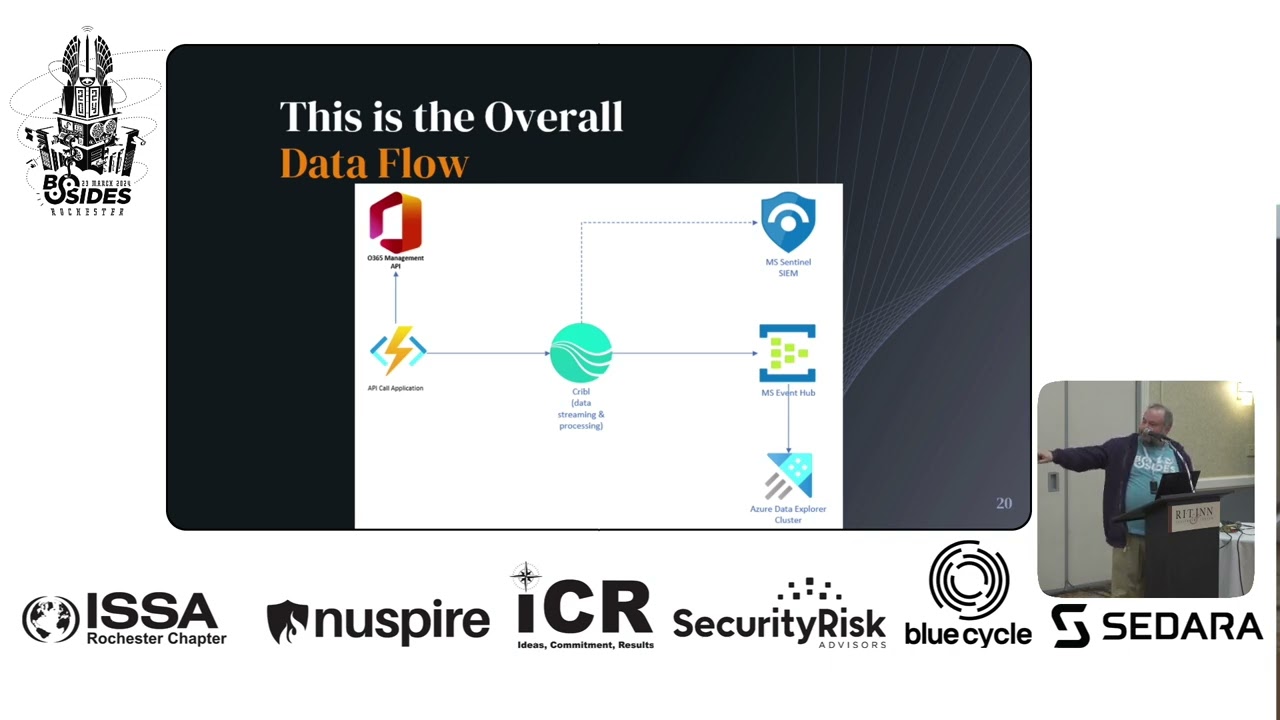
into the right format to to go into our data Lakers as a structured uh set of objects um H in in the use case that I'm talking about we use cribble for this I'm by no means saying that cribble is the only tool I'm not here to uh to tell you to use cribble I'm just saying this is what we're using it works for us we're familiar with it and that's what we used um to to process this data um so we have a rough idea now of how we're going to get this data and what we're going to do with it so our overall data flow looks kind of like this um if you see on the top left up here um
The Office 365 management API is represented there we're going to get uming which screen I'm going to point at let's go over here uh so the API web application is going to be on the left there that's going to reach out to the API it's going to get the data uh it's going to forward that into our data shaping solution cribble which is there in the middle uh cribble is going to filter the data process it get it into the right format and send it off to an Azure event Hub which is on the right in the middle there um uh and that's just serves as a sort of a hub it's just a location within Azure to collect those
events and then it forwards them to an adx cluster which is AES data Lake solution
yeah no you don't need a third party app we we did because we wanted to do some filtering and some processing on the data but I mean you certainly you certainly could just send it straight uh as as an HTTP input into a into a data Hub an event Hub sorry or storage blob um I'm just talking about our use case so no you do not need to use um that third party tool that that's just what we did with our use case right exactly yeah um I've got a dotted line over to Sentinel here as well because U if you're if you're using Sentinel as your sim then you can also uh if you're in
our case if we're got getting our data through cribble we can also send it to Sentinel Sim here we didn't do that in the isu's case our client just wanted to uh to get data into their data Lake but you could forward it to the Sim as well um just just saying that that that's an option too okay so we have a rough idea of what we're going to do we've we've kind of planned out our map of what what this project is going to look like so let's take a look at what the API responds with we're ready to start implementing um we can't wait to see the results of a post commmand to the API
we've cracked it haven't we right we've uh we we've got our we've got our our solution we're going to get these logs and we're going to get them in without E5 licensing this is going to be so simple are you ready we're going to hit the API endpoint with a beer token that we got using the API creds that uh that we have from the uh from the API and we ask it for ex audit logs are you ready this is what it's going to give us let's see those logs come on oh those aren't logs those are those are web addresses they're content uis they're just storage blob Uris so these logs are not logs at
all each line in the audit log that you get back from uh from the API isn't actually a log it's a link to an Azure storage blob the actual logs are stored in those storage blobs not actually called back from uh from the API so our application's going to have to do a couple of things we're going to have to send a post request to the API to get the list of storage blob uis for the time frame we're looking at then we're we're going to have to send a get request to those Uris and retrieve the logs from there and then forward them on to wherever we're sending them are you with me does this make
sense so far okay great go ahead
yeah not with the uh not with the API request no um as far as I'm aware the only the the only filtering that um that that API endpoint accepts is uh date and time uh time ranges yeah um Okay so we've got these logs and and we want to filter in Access logs and just drop everything else um because the AP API endpoint is going to return to us all Office 365 mail audit logs for the time frame we've specified um it's going to send us creation logs deletion logs logs of emails being sent everything we are only interested in one operation type for this use case which is mail items accessed that's the only
any type of log that we're interested in because we just want to see what uh emails and attacker accessed so in our case we used our third party app which is cribble to configure a route that only sent the mail items access logs to our data Lake and it looked kind of like this so um I don't know how well you can see that but um in this screenshot there's a line that uh that filters in the route only for um logs that uh that have the input ID of Microsoft unified access mail which is the name of the log Source that's pulling in from the API and also filters for only logs where the raw data contains the string mail
items accessed um and then we have an output of the Azure event Hub there so yeah so this route is basically saying only take mail items access from this source and send them into the event Hub Okay so we've got our basic um our basic architecture for this for the uh for the script now we're going to build this out from concept to reality and we're going to build a serverless app uh using node.js so now we know how to get the logs um which is we authenticate to the API uh the API Returns the logs and since the logs are just storage blob uis we then send another request to access the logs at each blob now let's send them off to
our data Lake um and this is our use case you could forward them to a storage blob could send them to a Sim um could send them anywhere you want depending on your organization's needs this is just how we are handling this uh in this use case so we can use a serverless function for this um the advantage here is we don't need to deploy and maintain a VM to run the app it just runs um as a function in the cloud it's cheaper than a cloud VM um in our case we used node.js running in an Azure function app um but you you know this would work as as an AWS Lambda function uh in Google Cloud
functions and you know we it can it can be supported really by any runtime whether you're using python or Powershell uh node.js is just what what made sense for uh for our group um and this is how this is how the function app logic is going to work we're going to get our token then it's going to list the blobs and then it's going to take a blob say blob number one it's going to open it up send it as a Json object and then it's going to check if there's blob number two and then it's going to go back and iterate until there are no more blobs then it's going to exit pretty simple stuff
so I've got here a screenshot of the actual code that we've got for getting the token this just calls the uh the Microsoft online uh uh token uh API endpoint um this function is how we are going to list the blobs so this hits the actual um audit exchange endpoint uh within the Office 365 management API we give it it sorry we give it our token and then it Returns the blobs we arrange those blobs as an array and we then take uh one blob from the list using the get Blob function here and we process it and post it to our uh our next our next hop in the process so we yeah we download it and then we
upload it to in our case cribble um once we've defined all of those functions this is the main function at the end which just invokes all those functions and makes it all happen and that's the entirety of the script right there um yeah David they contain multiple logs in each blob it's I'm not quite sure how they how Microsoft um uh delineated those and it seems to be like a random number and they don't seem to be fully uh you know arranged by Tim stamp or anything it just seems like it just kind of you know you you ask you ask it to give you you know all the logs for a certain time range and then I
think Microsoft just gives you these blobs that that that cover that time frame but they don't seem to be fully you know arranged sorry um I don't I don't think we did no I think I think it's clean I think it just um they didn't the Microsoft didn't seem too concerned about um you know making the blobs be particularly um sensible if that makes sense um so yeah um each blob comes in as an array and then it gets passed out as a Json array so summing up we get our barer token we use that token to get a list of storage blob Uris we then download the contents of each blob and we're sending it off to
cribble for processing and filtering then the data goes off to Azure event Hub and eventually adx Okay so we've now built our application we know you know we've tested it we know that we've we've got something that works end to end um let's put it to use and imagine uh what would happen if we had an actual incident how could we actually put this to use in a real life scenario so uh oh we got compromised okay we've discovered that an attacker gained access to one of our user accounts and uh was able to log in to their email inbox um from our organization's MFA logs we can see that they gained access even though we had MFA um by sending a
request from a suspicious IP address that was then accepted um and we know that the attacker had access from 7 a.m. universal time on March 14th to 1:30 p.m. universal time on March 18th what emails did the user access well now we've got these logs we can actually see that using join queries don't we have a good join query um the audit logs only identify the email by the internet message ID um the audit logs that you get uh from the API don't give things like subject lines uh you know they only give you the internet message ID so in order to actually get something human readable we're going to need to do a join query um that that uh joins our
email events logs which are which are an agentive source that comes in from Office 365 um with the audit logs and we're going to join on that internet message ID field as the unique identifier and then we can see the sender and the recipient info um as as well as uh sender IP information so combining those two tables and doing a join query we're able to see uh exactly which emails this attacker accessed and here we have it so um if you look in the top half there um I've obscured the data somewhat because you know I didn't want to I don't want to give away too much uh information here but um we have the client IP address up
there in the top in the query that's what I'm searching on that's our suspicious IP address that the attacker used and um we can see uh in the results here down at the bottom you got the internet message ID uh which is the same uh in both tables so it's joined on there and then you see that client IP address in the second field from the left there and you also get the sender and recipient address and the subject of the emails there I've blurred it all out but but it is all there so you have all the information you need here to um to basically uh determine exactly uh which emails a suspicious IP access during a uh during
a compromise attack so to sum up we knew the attack is IP based on multiactor authentication logs um we can search the audit logs for that IP address and then by joining the audit Logs with email events we can get the sender the recipient and subject information on emails that the attacker accessed and we can now report which mail items were accessed from the attacker's IP address and effectively reduce the breach scope um so in closing kids do try this at home um uh I'm just going to say we will make this function app code available on our GitHub um the link is there uh again we're going to make these slides available so you'll be able to uh to get
this but um that's that's our GitHub page and we will post this code there at some point not yet but it'll be up there soon and we're also going to do a full write up of this on on the SR blog so again make a note of that URL there and we'll um we'll make this available as a full write up there as well watch those spaces for updates one final recap then Microsoft is making premium audit logs available you need to turn on the audit logs to make use of them you can forward the logs to a sim a data lake or a storage blob using the 365 management API and uh as is often stated knowledge
is power so now you know exactly what I attacker accessed and you have the power to limit your risk exposure as a result that's all I have um ready to take any any more questions from people David yeah okay one
more no th those are those are already available that's part of um uh the uh Defender yeah Defender for office no it's not even Defender for office 3 it's just Office 365 um logs that you can you can connect to say if you're using Microsoft Sentinel you can connect them to your Sentinel instance using a a native connector and then what what we do in our environment is we replicate those logs into adx for long-term retention um so yeah but that that's that is out that has been available for a while that that's not part of what was just made available the only thing that's new is these uh unified access logs which uh which we can get from the
API um yeah I had a question from over here oh Google Google comes to the rescue as well that's
cool uh yeah well there's a bunch of them um uh the big things that I can think of right now are uh one drive file access logs um uh SharePoint access logs as well all of those things um are are now available via the same method you just hit a slightly different endpoint but uh yeah it would be the same method really it's it's pretty much uh pretty simple to to modify the uh the app to hit those end points too what who isn't oh well for oh for some reason I I I was like what there someone behind me okay um okay no it's all good it's all good um yeah uh any other questions I think right at
the back there yes
hi so yeah no good question um uh I'll be be honest this is this is a hypothetical situation right so this wasn't an actual incident the logs are real the incident wasn't um but you you could um certainly you could configure an analytic in your sim to look for you know um suspicious geolocation of an MFA request and you could you could monitor for that and your sock could could then you know investigate when when that kind of a request comes in even if it's accepted um that would be one way that you could tell um you know uh there's there's a number of ways that you could you could tell that it's compromised but I mean I think
that probably be the first thing I would think of was just to uh develop an analytic that would trigger with a a suspicious G location for a multiactor authentication request anyone else oh yeah hi
AV
I don't think they're natively uh made available via uh data Explorer anything like that the um the the way to access those storage blobs is to make an authenticated API call using a beer token so I think the API is probably the only way to get at those storage blobs
I believe so yeah yeah cool um any other questions going once twice all right well thank you very much [Applause] hey we've got a few minutes to get to the next talk hey awesome all right well stop by the SRA table on your way out grab some stickers thank
you I think
what
how I react
florid
Related talks
 38:33
38:33 23:15
23:15 46:38
46:38 28:50
28:50 39:30
39:30 42:51
42:51