MITRE D3FEND
Show original YouTube description
Show transcript [en]
um
government corporations
so i'm sure
that are used if you click into a technique you get more information such as which apts have been seen to use it what software they use to exploit the technique as well as ways you can detect it and possible mitigations [Music] so attack can be used in a number of ways as a blue teamer couple quick examples you can use it to aid investigation and threat hunting for example using the framework you can know what to look for what stage of an attack you might be in and what might happen next for example if you get an email with a dodgy attachment the next thing you could look for would be user execution of a malicious file
i.e the attachment if you get evidence of that happening the next thing you can look for would be scheduled task which could be used for persistence in this way you can use it as a cyber kill chain it can also be used for attribution because the framework gives information on which apts have been found to use which combination of attacks attack can also help by testing your defenses you can pick one of the techniques simulate it and see if you're able to prevent it with your current technologies as well as if you can detect it and if it's determined to be bad if you will alert it to your security team a good way to do this is using red
canary's atomic red team framework which will automate a lot of process so that's attack where attack focuses on the attacks that the attacker might use defend and engage are defender focus so defend is based around artifacts these are iocs observables whatever you want to call them and counter measures these are things you can implement to improve your defenses there's also engage engage is about adversary engagement this is ways to slow down your attacker and learn about their techniques when they're on your systems now both these frameworks are still in beta version 0.9 so a lot may change over the coming months and years but this is as they are now [Music] so what is defend i've only got 15 minutes
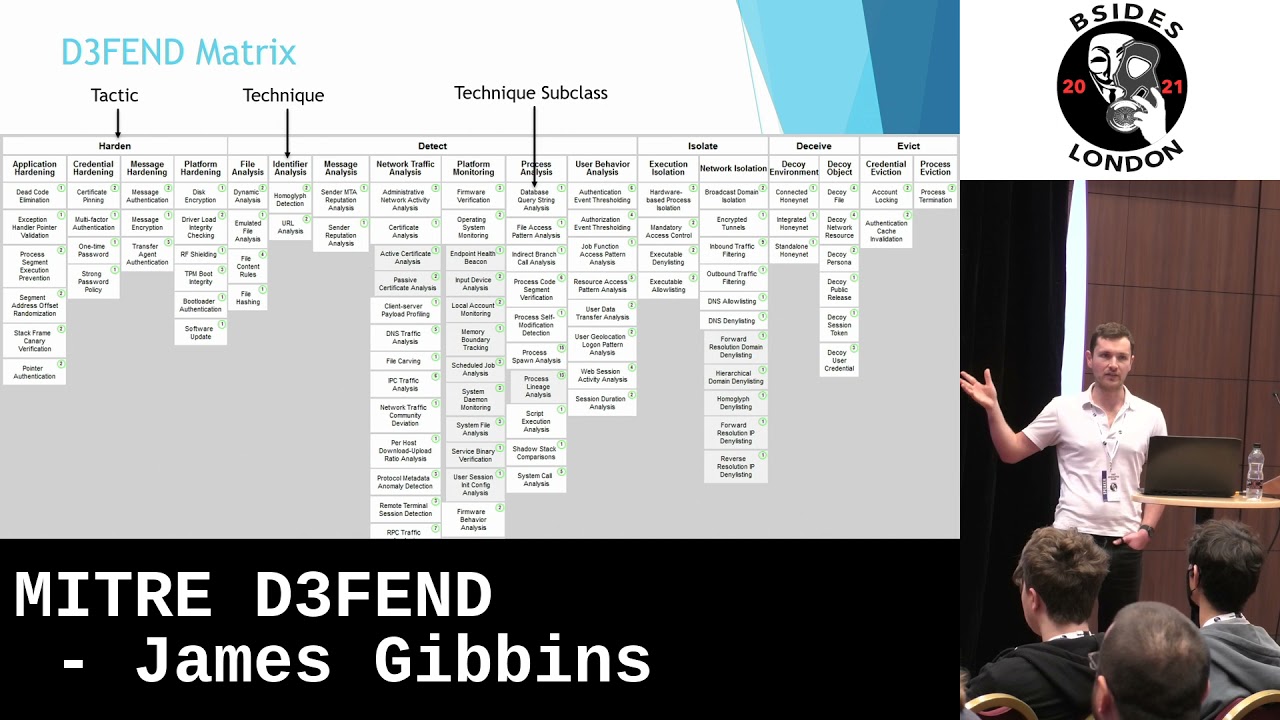
for this talk so i won't have time to discuss both defend and engage i've picked defend because it's the most developed of the framework so far and i would say for most people more useful so this is defend as it stands now hopefully you can kind of see like attack it's a matrix there's over 100 different techniques or countermeasures right now at the top you have the tactics so there's five they're pretty self-explanatory there's harden ways to make your system harder to compromise there's detect which is monitoring analysis stuff like that there's isolate so how to stop an attack spreading through things like allow listing deny listing there's deceive this is decoys honey pots honey naps stuff like that
and finally there's evict so a way to get the attacker off your system if they're already on do things like locking their accounts and terminating their shell processes so the next level down are the techniques and below that are the technique subclasses or subtechniques now again it's still in beta the terminology is a bit changes a bit but both of these can be just called techniques or countermeasures in case you're wondering if you can see it the number in the circle is the number of references the countermeasure or technique has which i'll get to shortly so to continue our explanator exploration let's pick one countermeasure and look into a bit further i thought strong password policy because
it's pretty easy for me to explain so it's good for me and i'm sure all of you know what a password is so enough to explain that and it's still very important to cyber security because that's still how a lot of compromises happen so this is the strong password policy counter measure page at the top there's some information in the middle some stuff to do with the attack framework and at the bottom of references probably can't see so luckily we're going to zoom in at the top this is just the information section a definition of what it is how it works which is how it works surprisingly enough and considerations are things you can think about before implementing it
below that is digital artifact relationship which i will come back to in a bit so you can see for strong parts of policy it's quite short the introductory section unlike for example this one you can't say probably but this is process termination so some of them have a lot more information but we're not talking about process termination strong password policy and how it relates to attack in this case you can see it's got valid accounts account manipulation and create account so all stuff to do with accounts as you'd expect and at the bottom are the references so these are things such as patents books web articles white papers anything that can give you an idea on
how to successfully implement the countermeasure in this case for strong password policy they have nist special publication 800-63-3 which is 75 pages on how to create a strong password so back to the top digital artifact relationships in the blue box is strong parcel policy this is the countermeasure the technique and the yellow boxes they are the artifacts so you can see here strong password policy the countermeasure strengthens the artifacts of password and user account so the logical next step is to look at one of the artifacts let's pick password because it's easy [Music] so this is the artifact page again it's got some basic information at the top and it's got the relations to different
countermeasures from the defend framework and offensive techniques from the attack framework so in this case countermeasure techniques strong password policy as we saw and also one time password which use limits uh the password artifact and in this case there's no offensive techniques we can see also there's a parent class of credential and if we look at that there's a lot more so for example there's the subclasses such as apparently screen but session cookies and encrypted credentials service tickets stuff like that there's more countermeasure techniques such as decoy tokens and there's decoy credentials and a very very very long list of mitre attack attacks such as credential dumping lsas secrets stuff like that hopefully by now you're starting to see
how the attack framework with the countermeasures and the artifacts and the well-established attack framework can work together to to be used to strengthen your defenses going to artifacts this is the total list as they are now there's 232 of them as of today or when i took the screenshot anyway if we zoom in a bit you can see there's four categories top level files network traffic software they're all quite self-explanatory things things like certificates commands files emails network packets browser extensions anything that could be left over from an attack which could give you some idea of what's happened what to look for next and uh for caution to take in the future [Music] so that's a quick overview of what the
defend framework is so how can we use it i've thought of three quite simple but useful examples [Music] one is picking a tactical technique you work through the framework learn about them and then you can make sure that you're following the counter measure recommendations by looking at the references if there are any new counter measures you can implement and to make sure everything's fully documented for everyone's favorite time of year audit season for example you've got hardened the first one you're working through application hardening and you get to process segment execution prevention when you get to the references you see there's an article by microsoft on how to enable data execution prevention on windows 10
and there's also an article by red hat on the no execute and execute disable bits which can be enabled in the bios so you can use this to make sure you're following all the guidelines to harden your system against process segment execution prevention [Music] another example is deceive decoy environment environment connected honey net in other words a honey pot do you have one if not the reference is uh patent by alkalvio technologies called modification of a server to mimic a deception mechanism in other words how to create your own honeypot another way you can do it is by picking an artifact so do you have ways to detect and log the artifact are counter measures in place to protect
against misuse for example files executable file do you have allow listing in place so that only known good executables can run if not you have deny listing in place to make sure once you don't want to run can't or failing that do you have dynamic analysis like a sandbox or emulated file analysis to check the file before it runs this could be good in combination with email attachments for example talking of email have you got homicide detection making sure the email comes from b-sides dot com not b5 ids.com do you have reputation analysis both for the sender and the sender's mail transfer agent and the third wave so i said at the beginning on how you can use attack as a
blue teamer now you can use defend with attack the uh defense framework actually has an attack look up in the top left corner and if you put in an attack such as t105 9.001 powershell execution you get a nice diagram relating power execution the attack with the artifact executable script and all the counter measures so do you have file content rules such as yara to check the script before it runs do you have hashing in place so again pick the hash of the script check it against virus total or something and make sure it's not delicious so that's a very quick overview of what the defend framework is how you can use it in summary
defend is attack for the defender it provides actionable advice on how to improve your defenses and you can use it alongside hardening guides such as cis controls and frameworks such as ncsc's cyber assessment framework if mitre keep developing the defend framework as they have with attack i foresee it being an invaluable resource for blue teamers in the future i would say any questions but we don't have time so i'll just leave you with a screenshot of what the friend framework looks like right now
Related talks
 38:25
38:25 33:30
33:30 48:34
48:34 41:49
41:49 45:48
45:48 33:15
33:15