From Kali and a Couple of VMs to NextGen Home Lab - An Approach to Practice and Develop your Skills
Show transcript [en]
hello everyone welcome to my talk from cali and a couple of vms to next gen home lab an approach to practice and development skills my name is bashar and i will be presenter for today here we go perfect i know you can't wait to hear this talk but let me first introduce myself my name is bashar and i'm a member of a blue team at the fortune 100 company in houston texas my current role focuses on threat intelligence threat hunting and vulnerability management i have worked previously in different industries for different service providers i have also consulted on many engagements and projects i have master's degree from the university of houston along with 4g x
certifications focusing on digital forensics and incident response i am excited to share my how i built my home lab with you all today i have a different approach and hopefully you will leave this talk with a lot of ideas that you can use to build your own lab before we deep dive into this topic i want you to keep in mind that this presentation is about the journey to build the lab the goal is not just to build the lab but rather it's about everything you are going to learn along the way hopefully the idea that i will present to you today will spark your interest and encourage you to dig deeper and continue the journey
because there will be no one specific destination or one specific weight or path to build this lab having a home lab will allow you to explore and develop new skills in various areas so by now you might be wondering how can a home lab enhance or improve my skills research has shown that we actually learn more by doing your likelihood to return information is much higher when you're actively doing the concepts or exercises that are presented to you versus for example reading about something in a blog or hearing about an audiobook where you actually do it it it sticks in your mind having a home lab will give you the advantage to practice what you learn
and experiment new technologies or even give you access to technology that you're not allowed to work on at your workplace don't let that limit yourself or worry about affecting people's workflow or causing business interruptions your home lab is a safe place where you can tear things apart and tinker with them but on that note just make sure your significant other or roommate can still access the internet i can't tell you how many times my wife got mad at me because our home dns server went down and she can't browse the internet that's why i wanted to create a completely separate next-gen home lab so now that we all agree on the benefit of our home lab
let's discuss what a next-gen home lab is when i started my career i always used my desktop or laptop with some vms to test and learn new concepts and skills and probably most of us have well also as well that worked for me for a while but then i realized that i want to take this to the next step next level right um so what i did is i created next-gen home lab which is basically a lab where i mimic the infrastructure of a small company or enterprise and virtualize it all in one physical box this allowed me to practice and explore an environment similar to a company's environment but a small scale as you build this next-gen home lab you
are going to enhance your understanding of many i.t foundational concepts from networking to virtualization building a management domain controller an active directory linux administration the list goes on this will also help you understand why applications and infrastructure availability is critical for business operations in my experience availability is sometimes overlooked by security professionals but it's something that we should always keep in our mind is to understand how to how the real world works and how to secure how security fixed fits in overall of the i.t picture in an enterprise so let's start building our home lab first we will need the hardware to run our lab on the beauty of this nixon home lab concept is that you can scale it based
on your resources the more resources you can give your to your lab the closer the lab will mimic a real company's infrastructure if you can afford it i strongly recommend having a dedicated machine to run the lab on with at least 32 gigs of ram but if you don't have access to such a machine it's okay you can still apply some or portion of this concept to any decent laptop or desktop also another thing from my experience when using solid state hard drives or nvm express hard drives it was worth every penny it speeded up the deployment process so much because the idea is we're going to keep deploying more vms and and that's time consuming with the
normal hard drive so if you can afford it please add those to your list and speaking of resources also most vms what i noticed is they would require more resources when they're being deployed so for example i would assign a windows server domain controller for virtual cpus and four gig of ram when i deploy the machine or the vm but then once i'm done provisioning i will just drop the resources to about one virtual cpu and one gig of ram and that should be the average hvm will need when it's just sitting there idling generally speaking though the heaviest resource consumers will be things like a sim that's processing events at all time if you have a packet capture server
running it will also require more resources since traffic is always going to be floating in our environment moving on to the virtualization component of our lab as you probably know there are many virtualization solutions out there both free and paid since we'll be deploying many vms in this environment it's generally a good idea to reserve as much resources as possible to run those vms and we can do that by running a bare metal hypervisor also called the type 1 hypervisor i personally like to use vmware a6i and that's just my personal preference even though it has some limitations like a maximum of four of eight virtual cpus per vm and a maximum of two physical cpus in a physical e6i host
i think the current three sxi features will be more than enough to build our home lab if you're interested in getting more enterprise-like features from vsphere things like backups uh api calls for automation using vcenter for cluster management you can pay 200 annually and sign up for vmark advantage vmac advantage will give you access to play with most of vmware products for a whole year so pretty much the whole line of vmware for a whole year which is not too bad honestly um there are also many open source virtualization software like zen server kvm proxmox i have heard many good things about proxmox lately proxmox gave you most of the enterprise features in a6i for free but unfortunately i haven't
had a chance to play with it or just experiment with it yet lastly i want to mention that this home lab can be built using vmware workstation or virtualbox also known as type 2 hypervisors just keep in mind that you will have less resources to use for your vms since this type of hypervisor will be running on the top of the os all right now let's get to the technical parts let's start with our home network usually there is a modem or router from the usb provider i recommend putting a firewall behind the isp modem so we can isolate our lab traffic i personally use unify because they are really user friendly but feel free to use the firewall of
your choice the goal is to have a mechanism to isolate our lab traffic in my setup i tag all traffic from my lab as vlan 100 i will explain more about vlans in next slides i use my home network firewall to block all connections from vlan 100 into my home network devices next i connected a physical switch that is going to be the main switch for my lab so any device that connects physically to this switch is automatically blocked from talking to any device in my home network after that i built and configured the hype the a6i hypervisor the hypervisor will come with the default virtual switch which is v switch 0. by default this virtual switch will be
connected to the physical network card that is which will give you access to the management console on e6i so for our home lab i will need to add two more virtual switches along with board groups one virtual switch will act as the one interface for our enterprise and the other will act as the lan interface once we added and created these view switches and ports now we can deploy pfsense pfsense is an open source firewall that can be run inside a vm in our case here it will be acting as the edge firewall for our enterprise one of the nice things about pfsense it has many packages that we can install easily with one click
we can easily enable a proxy a vpn server an intrusion detection system and so many other features the the important thing here is when we connect when we deploy pfsense and connect it on a6i we only need to attach two network adapters the when and the lan that we just created now that we have pfsense in place we will configure the web interface as dhcp so it can get an ip address from our home firewall automatically i like to use a dedicated network card for when so i can manage pf sense on the one interface and have a defined one zone for our enterprise you can also use v-switch zero as the one switch if you are limited
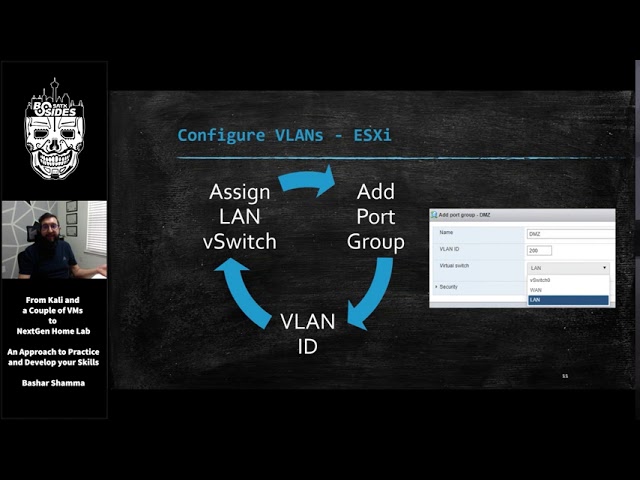
to one physical card on your host but for now i'm going to stick with the first approach next we will configure the lan with a static ip with no uplinks or physical cards attached at the moment so this lan interface will act as a single backbone to the firewall now it's time to set up vlans or virtual lands vlans will give us the ability to segment networks virtually by assigning a vlan tag id to each subnet this way we can use one virtual switch and define money networks or subnets and this is how we are going to segment our enterprise network so let's start by defining the vlan on a6i first we simply add a port group
in this case i'm going to create my dmz vlan so i give it a name of dmz i give it an id of 200 and i attach it to my lan virtual switch and i go through the cycle as many vlans as i need after that we need to define the same vlan but on pfsense and we do that by adding a vlan interface on pf sense and give it a vlan id tag so following the same example i'm matching the same vlan id of 200 that i created a6i npfsense and give it a name and then i'm as i assign an interface to activate it in pf sense once we activate it we can add a dsp
server to be defined on this vlan so any vm that is connected to this vlan will automatically get an ip address from pfsense and in this example any vm in the dmz will get an ip address of 10.10.200 the whatever is next available in other words pfsense is acting as a dhcp server for hvlan finally we need to add the firewall rule to allow connections for these vlans because pfs doesn't do it by default so just because you have the sap configured you still need the firewall rule otherwise that vlan cannot talk to anyone and again we do the same process for all the vlans that we need uh we go through the same cycle
so at the end depending on how many vlans you want to have we should have something that looks like this as you can see the vlan tag ids have been defined on both a6i and pf sense except for the lan and the promiscuous chord groups an a6i when you assign a vlan id of 4095 that tells a6i to treat this virtual switch as a port as a trunk port which means it can receive traffic from any other vlan regardless of which vlan id the traffic is tagged on the promuscus port will be used to get a copy of all the traffic that flows through our v-switch this can help us monitor traffic monitor analyze traffic in our environment
the promiscuous mode pretty much replicates a physical span tab or mirror port and we'll talk about this later on now it's time to start deploying and building the enterprise infrastructure let's talk about the technologies and networks we can build that we usually see at a typical enterprise or a company starting off with our servers this is where will we host all essential servers needed for this company to function most companies use active directory and domain controller in their environments so let's replicate that and by deploying a windows server and promote it to be the domain controller and also make it the dna server for the environment so it will register workstations as they come up
we can easily also get a free trial of windows 2016 or 2019 from microsoft the free trial can run up to 180 days which is plenty of time to experiment uh usually i would just hit the uh trial i'll take a snapshot before i deploy it and then i can just revert to that snapshot so i don't have to download it again every single time microsoft also offers other trials if you want to play with some databases sharepoint many more you can go there and find all kind of stuff that you can download and because no company can function without emails we should add an email server so we can send phishing emails for example
mail in a box is simple to deploy mail server that runs on windows and if you're interested in something that runs on win and uh i'm sorry made unboxings on linux and it's and if you're interested in something that runs on windows you can try html server and that's also open source we can also include linux servers to address some of the other technologies used in enterprises today for example we can use freenas as our file server that's where our employees can store and access their files in addition to the core servers let's also think about the applications used in this company things like the intranet where users can go and get companies internal information
you can run an intranet with any open source wiki or words press site depending on the type of enterprise you are trying to build you can add an in-house accounting software for example or an electronic medical records application if our fictional company is the healthcare system and to make our lab interesting we can deploy vulnerable servers like with exploitable two or three oas web goats these vms are vulnerable by design and have many open ports on vulnerable services running so this is how these vms would look like in our environment when we deploy a new vm we simply assign it to the network adapter in e6i and it will get an ip from pf sense and
according to the ip and pf sends firewall rules it be contained in that specific subnet this way we can easily move any vm from network or subnet to another by simply changing which network adapter its attachment is attached to an a6i now let's think about how to secure these subnets each subnet will see different types of traffic do we allow all traffic this subnet or should we identify which ports are required and only allow connections to these ports especially when it comes to active directory and domain controller there is a number of ports that should be open company-wide in order for users and workstations to functions the same things applies for databases file servers and
all the above also think about how to manage files permissions how are you going to make sure certain files and folders are only accessed by authorized users and another thing to think about is who should be able to access these servers over ssas or ssh or rdp to manage and maintain this core applications or servers finally what's the impact of leaving some of these databases or applications with the default configurations how can you check if the default admin credentials were never changed can you configure the application to run http instead of https why would that be beneficial just somebody has to think about okay now we have some servers and applications set up we will
need some users to use these applications and servers of course so let's add another subnet called user subnet i usually uh deploy just windows 10 vms using the same link as the servers from microsoft you get about 90 days trial with these and the same kind of scenario i just take snapshots and revert them once you build them it's going to be a lot of work to kind of create a lot of users so there's a really cool script out there which generates active directory objects for you script is called bad blood and you run it on the domain controller using domain admin and it will automatically create hundreds of users and workstations in your active
directory within like 15-20 minutes and you can have a more realistic active directory that way also another thing to think about for our users is if we want to simulate these users um there's plenty of options we can use uh web traffic generator which will run as a script on the vm on the list of windows 10 vm and it will just visit random sites all the time android all of web traffic the next option up is using invoke users simulator which on the top of web traffic it will also uh it will also run uh i'm sorry it will also open unread emails so if you send a phishing email to this user and is sitting in their outlook this
script will actually read it and execute it for us and it also will have the user access different file shares that we specify the last link for it's pretty much for a full-fledged uh simulation uh called ghosts this is gonna lead off work because you're gonna have to deploy a server a master server for all the different clients to talk to but this would do pretty much a lot of simulation from running commands to opening documents creating documents everything just like learning experience now since our company keeps getting bigger with more users we're going to need to hire some it admins and give them some access to all the servers we can use a windows server and add the
remote desktop services role so that multiple admins could rdp at the same time and to make things interesting in this subnet we can get an older copy of manage engine desktop central from their archive and we can run it as a free trial for 30 days this specific software has is widely used by it admins today to manage endpoints but many previous versions of the software is vulnerable and has been exported heavily
ok let's think about how do we allow it admins now to do their job one of the good security practices out there is to create a dedicated jump box for it admins the idea is it admins should not connect directly from their their laptop in the user subnets in this example but rather they connect to a jump box and use that jump box to manage or move around the environment so with that concept in mind how are we going to restrict access to the sensitive i.t jump boxes subnet are we going to do it by username or are we going to do it using firewall rules meaning should we allow certain users to be authorized to log into these
jumbox servers using active directory or are we going to enforce access control by limiting which machines is able to connect to these jump boxes also how the boxes in the submits is able to access the other servers should each jump box has two necks should we use firewall to restrict who they can talk to what's the implication of each approach which one would you prefer as an attacker and the last thing is with all these user machines being deployed think about how can you harden these users machines and servers also which gpos do you want to use which logging levels do you want to enable and so on now let's give our company some online
presence so we're going to deploy some vms in the dmz the dmz was originally designed as a buffer between the hostile internet and the internal network so what should we build in our dmz well every company is going to have a website and to make our website interesting we can go through the wp scan vulnerability database and find the a good vulnerable plugin or version of wordpress and use it and install it on our wordpress site to have it be vulnerable another thing is if we want to do e-commerce if a kind of our company sells stuff why don't we use oas juice shop which is a another application that is vulnerable by design and it's pretty much a store
that you go through and buy different juices and fruits and stuff that's another idea another good site to have if you want to have something vulnerable also a lot of companies will will have ftp servers running this is how they still store files exchange file their customers or their partners and so on why don't we have another misconfigured ftp server with reconfiguration or just run an old software ftp software on that server and see that as the initial portfolio in our dmz with a lot of the latest vulnerabilities going on the past two weeks citrix scalar f5 big ip what we can also do is we can go to these vendor sites and sign up
for an account and we can download actually free trials of this software so why don't we just sign up get these vms deployment our vlan in our lab and put them in this dmz vlan to pretty much mimic a real uh or a real scenario or a live scenario and go thrust to go through that and finally if you really run out of ideas and you're not we don't have much else to deploy there's always vulnerable hub vms where we can go download purposely designed vms vms and add them and again the the options are endless so now that we have finally brought in a higher risk subnet into the picture we want to make sure our internal
network stays safe many companies implement a firewall between the dmz and the internal network but since this is a lab i wanted to see if i can accomplish similar results using a dedicated vlan or the dmz along with the proper firewalls things to think about how should our ibm our it admins manage the dmz which could also credential what are they going to use how these connections are going to take place what if an application in our dmz uses a database where should we store this database
i also wanted to add additional subnets to my lab network to make it a little bit more realistic and challenging the first is an air gap network this network is usually dedicated for isolating high risk assets assets that can receive updates anymore or unable to apply updates or patches these assets are not supposed to be able to connect to the internet if you have some old copies of windows xp or 2003 laying around that would be really cool to deploy on your network you can also try to find any industrial control system or iot iot device simulator if not i would just use another windows vm 10 vm without any updates and limit that vm ability to talk to other
segments of the network using firewall rules another uh subnet that i created was a vpn connection so i can connect directly into this slab environment from anywhere i need it to and i also use this vpn connection to share with other researchers so we can all work together in the lab pfsense can help you build this easily um we just have to deal a little bit but have to learn a little bit about certificates and pf pfsense made it really easy to do it i also did create the guest wi-fi subnet for our fictional company since every company is going to have visitors pfsense also gives us the ability to create the captive portal and guest users registration and
tracking and so on in the last pieces i added a home wi-fi to connect directly to this enterprise from my laptop anywhere in my house so what i did for that is i bought a refurbished router and configured it to act as an access point and connected it to a third physical neck on the on the physical host since i wasn't able to assign a vlan id to the access point the vlan tag was automatically set to zero which means anyone connects to the asap will be part of the lan network but now the cool thing is i have a wi-fi network directly inside this enterprise so i can just open my laptop connect list ap or this
wifi network and i'm directly inside my enterprise that's virtualized in a box one more thing is the ap is useful for is if we want to test wi-fi attacks if that's what you're interested in and you want to play with wi-fi attacks that would be a great opportunity to mimic wi-fi attacks against our enterprise okay now moving on to the attacking side if you want to work on your red team skills you can add an attacker vm or vms for that matter i think most of you will know what kind of kalyanics is but uh if you don't it's an open source distribution that has many offensive tools and scripts out of the box if you're more interested in trying a
windows based attacking machine check out commando vm from uh fireeye and if you don't wanna do exploits um or manual band testing and your thing is more of hey i just wanna do some command and control traffic i want to i want to send malware and i want to not malware i want to control it from my vm then i would strongly recommend check out slingshot c2 metrics it has many different command and control frameworks out of the box and you can easily spin up the quantum control server and create your payloads and malware and send it to your victim okay i'm reading the question here's a great one to add to your list if you're
not one okay sorry i was getting the uh question i got an answer okay we uh next so let's talk about the red team we attach the attacking vms to vswitch zero so in this case they can get an ip from our home firewall and be blind to everything behind the pf sense this is how i define the internet zone which is the zone outside our wind but still within our home network now we can start attacking all the vulnerable vms that we have been creating throughout this environment let's think about how to attack this enterprise do we scan the dmz and compromise it first and then move to the internal network or do we send an
employee a phishing email and have a malware running in their vm and start from the user's network the possibilities are truly endless and this is where we really can get creative with our approach now we get into my favorite parts defending and detecting the attacks against our enterprise in simple terms we need three core components to detect attacks and attackers the first component is the logs things like your firewall logs your vpn logs we need a place to collect and analyze these logs second piece is network traffic data this will help us understand how packets move around our environment and the third piece and finally is the endpoint data input data will give us the visibility
into activities that takes place at the host level things like which process is ran or who locked into the machine and so on
so for our let's start off with our network security monitoring or how we can get network traffic first as i mentioned earlier we need to attach the promiscuous vlan port into this vm so it can get copy of the traffic that we want to monitor after that depends on what we're looking for we can deploy zeek which is uh it's an open source tool that's in between netflow and a full packet capture it's been used widely and it gives us a lot of logs that we can look at and see the traffic that happens in our environment another option that we can do is cercata which is uh intrusion detection system we can't compare it to zeke it's
it's different but it pretty much looks at signatures uh to detect attacks and abnormal unknown attacks actually or things that we can tell it to monitor next up is security onion which combines both zeke and circada out of the box and many other tools security onion is awesome because it's not a tool it's a whole distribution this troop you uh linux distro that we can deploy and out of the box it has zeke sorcata and elasticstack so we can get all the network traffic and full packet capture and everything else so that would be an easier route to go with if you want to have something up and running very quickly also for full packet capture i really
like malik malik will give us the ability to do a full packet capture and store it in an elastic search database so think of it as as you can as wireshark as the front end and then like elastic search or big database at the back end and you can easily hunt and look for traffic to the mallet what about our endpoint visibility we can use this one sessmon will give us additional event ids for windows so we can for example see which process is the child of which process or which process created center dns query and so on it will give us about 23 event additional admin ids that are very important and help us a lot to get a better
visibility of activities that took place at the host level uh if you're interested in actually actively looking into a machine and getting artifacts or data from a host check out client fleet and os query it uses sql-like language so you can write a query and it will go create that machine specifically and get back with you with the results finally is wazoo which is pretty much a host intrusion detection system um it's it will detect activities at a host level and also enable additional logging now with all these tools most of these tools are if not all regulate some kind of logs we will need to get these logs into some kind of aggregator so
that's what we call a sim sim is a place to store all the logs analyze them and make some sense out of them the most common open source tools pretty much the elastic stack has been uh very popular lately and for a long time actually um check out hulk which is hunting elk by roberto rodriguez that's uh it's a really nice elastic stack modified version it has many other components and he also added other abuses to use it like running new manual queries and joining different data sets together sof elk is also by phil hagen from sans um also another really good x stack i really like it because he also added the ability to
parse net flow data out of the box so check it out too another another flavor of open source is the gray log grid logs for gridlock is also also free and the interface for free i i prefer the interface for greylock i think it's more user friendly and it also uses elasticsearch as the back end so it's the same back-end as the elastic stack it's just a different gui if you will and the last option is splunk now splunk is commercial but you can get a free license for up to 500 mix of vlogs a day if you haven't checked out splunk you know it comes up everywhere a lot of job posts have splunk on them so
this will be a really good opportunity to have splunk deployed and working with the sam again think about how you're going to get the data right if it's a firewall that you're going to collect from how are you going to send the data to your sim is it going to be a syslog or are you going to deploy an agent to pull this data again for for an enterprise level operations there's going to be a lot of movement parts here that you're going to have to figure out along the journey and this will give you insights to it okay so some more additional security tools that we can play with we need if you want to understand the
vulnerabilities that you have in your environment you will need some kind of vulnerability scanner openvest is an open source monopoly scanner that you can use and it's uh it's available also another option that i like to use is actually an ss they have up to 16 ips for free deploy it scan your environment look at the results if you're an attacker you're probably already using some of these if you're a defender you will see what can you make what what sense can you make out of the data that you can get out of these scanners is the data what would you go how would you go about patching your environment and so on if malware is your thing you definitely
have to have a sandbox you can deploy a sandbox in our enterprise cuckoo sandbox is a well-known sandbox and you pretty much set it up deploy it you send it a file and it allows it for you and it gives you a report another good option to have in our blue team toolbox finally honey pots honey pots are pretty much traps that you can set up for the attackers that they might trip on the nice thing about honeypots is we can you know place them all through our environment with honeypots the things to think about is where do you want to place them what kind of services do you want to have them run teampots is an open source project by
t-mobile of t-systems and they uh it's about they have all kinds of services and options running and you should definitely stick it out another option is think of canaries um they have a combination of uh they have you can actually do different files and tokens and web uh honeypots and deploy them throughout the environment and they will alert you over the cloud
so now we have the full picture of our environment we have deployed the whole thing we have our attacking our defending our infrastructure let's talk about what uh some of the scenarios so we start off let's say from our calgary limits machine and we go through our kelly through pf sense and we compromise a vm server web server ftp server and our dmz subnets now how can we move this to the internal network and when we move can the blue team detect this movement if the t if the blue team did detect this movement then could they set up a layering on it or why was this movement while the attack was able to move in the first
place now on the flip side if you are the attacker how can you bypass this detection how can you do your attacking your attack in a different way so you don't alert the blue team that what it comes down to is pretty much building the truly the purple team at the end where you're you're defining your visibility gaps you're seeing what you're not detecting on and you're trying to enhance your logging or your your methods of getting the evidence that you need at the same time your their team trying to get better and figure out how to move around from a network to another using their tools and with that that would conclude my presentation and i welcome your
questions hey bashar thank you very much for your presentation you do have uh let me see a cup one question here says how can how can you isolate the internet in the lab so that other people you have training in the range don't accidentally scan the real internet if you are setting up this range for training so if you set up the race for training you don't want your um so let's go back here you don't want your players to access the internet well if your players are coming from the internet you can't isolate them right um if your players are you know connected locally uh depending on the range you're trying to build uh
if they're local and they're connected directly into your range they shouldn't need the internet unless they're gonna use google is that what this question is i think so it says how can you isolate the internet so that other people you have training in the range don't accidentally scan the real internet i think that's what they're saying if you have setting up in this range for training so in this range right i have my internet zone here so technically anything behind the pf sense and let me use a laser pointer so the when this kelly machine comes in here it comes it's getting uh 198 160 192 168 that 100 that whatever ip address so anything behind the pf sense the
the the attacker will not know what it is so i created this internet zone and it's not the internet it's actually inside my uh home and inside this virtualization box but it's being treated as the internet because about the pfc is not it so the attacker does not know what the ipad is so they can't access this box directly right there they're the truly the internet and to this pf synth and everything underneath it if that makes sense and then i have another question a person is asking do you have a deep dive step-by-step walkthrough on how you set up your home lab environment and that is in the works that's in work okay yep i will i will one day i'm not gonna
promise but one day i'll release a blog post on how to do it step by step it's a tedious process um and a lot of stuff i did on the fly and i did not document so i might have to go back and you know document the screenshots and do all that stuff uh pretty much but yes one day i will release it hopefully and let me see where can i find let me see if there's anything else interesting um we have people saying this was a great presentation do you have a blog i am working on it as we speak again okay yeah i will release it and uh follow me on uh elitebash on twitter uh and that's where
i'll release my blog post and everything else but i am working on it yes okay and will the slides be available at some yes yes i'll raise the slides definitely and let me see is there anything else that looks like it all right great prashar thank you so much that was very informative and someone said where for the slide you're going to post that i will put them on my github and put them on twitter and then i'll post them in discord and guys i'll be on discord afterwards yes i'll be on discord uh as well so you can ask away
you
Related talks
 51:46
51:46 47:47
47:47 30:07
30:07 25:06
25:06 57:19
57:19 34:35
34:35