DPAPI - The Spice of Encryption - Jacob Villarreal
Show transcript [en]
right good all right 11:00 right yes yes all right cool show R all right testing testing all right sounds good sounds good all righty we'll start right now okay good morning everybody my name is Josh here uh room monitor for Jacob Vel there our good guy give him a clap thank you thank you thank you thank you thank you thank you and uh presentation today see I can get a little closer to this presentation today is going to be the spice of encryption DP API he's going to explain a little bit more about all those details as well and then before we start here just giving some shout outs to the sponsors some of them we have is deoe we
have a centure USAA arctic wolf and swimlane the rest you can check them out of course inside your pamplet again this is Jacob B
hey everybody uh first thanks for for joining me so um I do offensive security work as a consultant um I was on a red team and our client wanted us to also do an assessment uh related to the password manager on Microsoft Edge so pretty much just kind of the risk of Microsoft Edge um so whenever I was looking into the Microsoft Edge password manager um I kept seeing references to dpapi or to papy um I didn't really know what it was but I couldn't just tell the client yeah uses the papy and so I had to dig deeper into what this is uh which led me into this talk and uh just a little bit about me
got a few years in it uh like I mentioned I do offensive security Consulting uh so pint test uh red purple teaming um and before that I was sis admin and then um GTO fashion helped us got a couple CTS and then there's my contact information as well uh LinkedIn and and Twitter um I also have a couple of uh offensive security uh YouTube videos that go like step by step on a lot of the common attacks that I do um in case you're ever interested in that just small Channel though uh so what we'll be talking about uh just an overview of how the papy works uh just some basic uh encrypt and decrypt
code uh and then we'll talk about how the browsers store the credentials and how we're able to dump those credentials and then uh real quick we'll talk about uh using that for possible privilege escalation and secm na uh credentials and then domain persistence by getting the backup Key by um the domain controller so uh what uses a papy I've mentioned a few which are password managers by browsers so Chrome chromium based browsers like Edge and um Brave uh keypass you could get Wi-Fi passwords uh the RDG files for remote desktop managers um openvpn so a lot of stuff and as you'll kind of start knowing more about it you'll just see this the papy word more often and you'll kind of just
realize it's out there more than you thought which is uh the case for me whenever I was learning about the SCM stuff uh so just to give a brief overview uh the papy is commonly used because it's a really easy way to encrypt and decrypt uh data on the machine so it's really easy for developers who don't want to create that whole process themselves that you use this built-in Windows U process called papy and uh it's really easy which is why it's pretty common there's two main methods which is the protect as you might imagine is used for encryption and the unprotect which would be for decryption and there's uh two Scopes or um values that you can set which will
either be the current user or the local machine so if you set uh the encryption to the current user then only that current user can decrypt the data and same thing for local machine so if you set it to local machine then uh any user on that machine on that specific machine can decrypt the data and uh another thing to note is if you start reading a lot of blogs sometimes there'll be a lot of confusion between What's called the master key and a session key uh so the important thing to know whenever we get into the uh more details is that the session key is actually what does the decryption and encryption not the master keys a very
bad name because the master key actually doesn't decrypt or unlock anything but it's a session key that does all the encryption and decryption um and then of course at the end we'll talk about the backup key and how it's used uh in domain environments um we'll go more details on that uh towards the end so one of the first uh things we need talk about is the credit file and this one has the name implies is a file that has a history of uh the user's credentials so every time that the user uh changes their password their new password goes at the top of the file and the file is encrypted by the user's password so it goes at top of the file
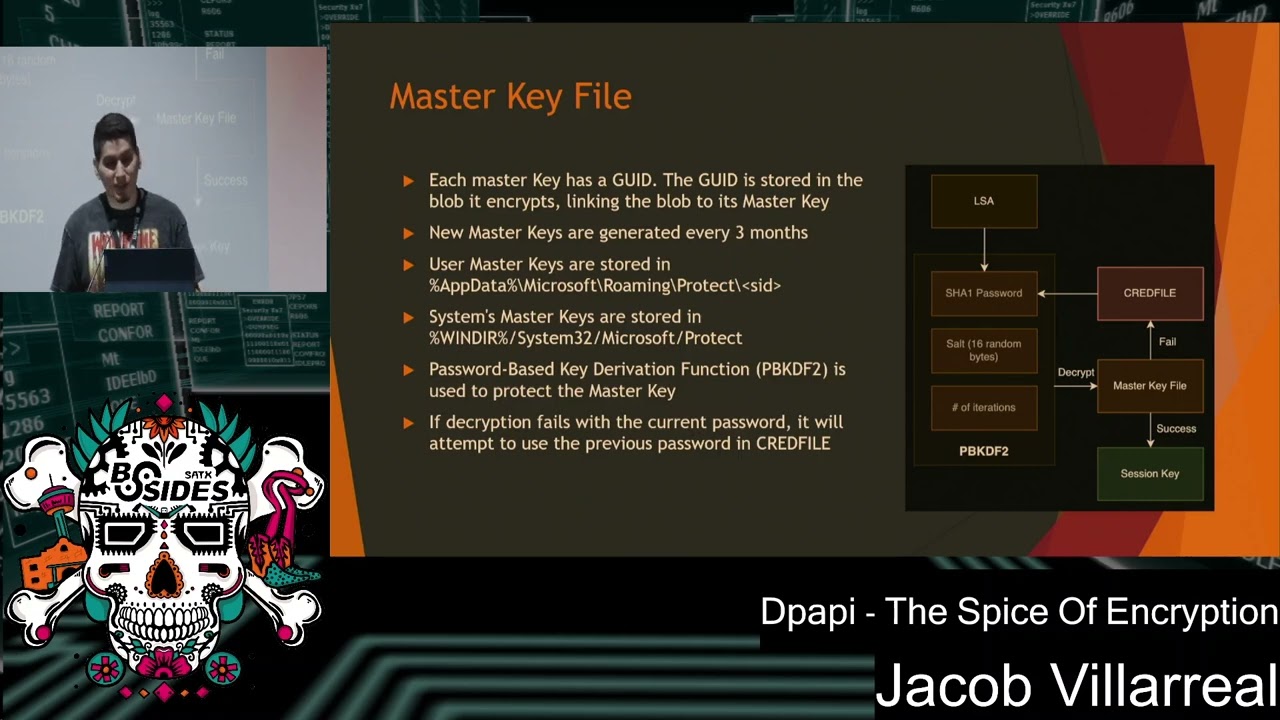
once they change it again the new password goes on top of the file and each of those are used to decrypt the previous one and also have the location of that as well in order to see the file it's hidden but you have to do the dash Force like even if you have the folders to show hidden it won't show us you have to do ls- force uh but it's there and then uh the master key and the master key file so there's a also another file on your computer called the master key file and inside there is the master key and the master key has its own ID or go ID number and that's how uh the computer's
able to tell which uh blob and whenever you do encryption it's called blobs The papy Blob so that's what the decryption of the data is called so each blob has an ID related to the master key that encrypted it so in order to find out which master key you need decrypt it you need to Du ID but the way the master key encrypted is it gets the password from the LSA process which is always running whenever you're logged in and it uses that and puts it into a password based key function which also adds um some salt and then a number of iterations so with that it creates or encrypts the master key and on the uh diagram on the
side that's the process for decrypting it so if you need to decrypt that master key file to get the master key it goes through that process in the diagram it uh gets the current password tries to decrypt the master key file if it fails then it goes back to that cred file gets the previous password goes through the process again F fails again just Loops backs around until the master key uh gets decrypted which will pass into U the session key so the session key like I mentioned is the one that actually does the encryption and decryption and uh in order to create the mass in order to uh generate the session key it uses the master key uh some
random data and entropy which is optional so entropy is just kind of like an additional secret or additional password uh that'll be passed into it and you'll kind of see that whenever we look at the code but that's optional um it does sound really secure but one thing to know is that if the process does use entropy um that secret is also stored on the computer so it's not super secret is just another layer of security and uh the random data that gets used uh gets stored in the blob so the blobs are um opaque so not completely uh unreadable if you look at the blobs you could get certain information out of it like the master key gu ID along with the
random data so every time it creates the session key it looks at the blob it sees what's the random data it uses that to uh generate the session key and uh gets the encrypted blob and then puts that to plain text so here's kind of a step back overview of the whole process so gets password from LSA goes to that um password based key function uh tries to decrypt the master key if it fails credit file Loops back and then um goes to session key decrypts the encrypted blob and so uh looking a little bit at the code uh here's those two methods that I mentioned the protect which uh encrypts the data and then the unprotect
which decrypts the data and those have a couple of things that you can pass through there such as of course the user data so the information that you'll be encrypting and decrypting uh the optional entropy which again would just be another string that you add to it another like secret or password you could think of it uh and then the scope which goes at the end where you'll specify if you want it to be just the local machine or the current user and also on the Bottom's a a link to uh more information about it as well and so here's a basic uh code for just encrypting and decrypting it's pretty straightforward which is why it's so
good to use for developers who just want something quick and easy and built in uh you just put the string that you want to uh encrypt in a variable this case would just be the number 1456 just pass it through that protect uh method that we mentioned a little while ago um in this case just null entropy so no additional secret and then the current user so only the current user can encrypt and uh decrypt it and then here's just a quick process of U how it would be so just at the top of that a secret value just 1456 we'll pass that into secret give that into the method of um protect and then just have it as a
current user to encrypt and decrypt and then print that out on the bottom is just a little print function CU it's a little fancy and after that uh we unencrypt it so just same thing but opposite uh just using the unprotect and then uh once we run it we'll see at the top is going to be the blob or the uh decrypted or the encrypted value which is that all those um values up top that'll be what saved into the file if um it's being stored and then on the bottom is just decrypting it which would be the 1456 so pretty easy um pretty
straightforward all right and so uh now we talk about how it could get abused so one of the things that um I like to do on engagements is um dump credentials that's pretty juicy thing to do uh whenever using password managers by the way password managers is good to use a lot better than storing it into just an Excel file which I see all the time in environments that don't have password managers so even though we are able to abuse it in D credentials any password manager is better than no password manager so um this case it's going to be looking at sharp Chrome which is a popular public tool that's used to dump uh chromium
based uh credentials and for this one um there's going to be two main files that we're going to be looking at which is called the login State and then the login data so the login state is what's going to have that uh key that we're looking for and the login data is going to be what stores all the credentials and even cookies so with that key that we get from the login data we'll use that to uh decrypt oh sorry the key we get from login State will'll get uh to decrypt the login data and so uh in the sharp uh Chrome code they just have pretty basic if statements if it's uh Chrome it
looks for the location of those values and if it's some Edge and brave it look for a different location of those uh but again it's looking for that login data and the loc local state file and on the bottom as a screenshot of your local state file so in there is an encrypted key so in the sharp chromium code it's looking for that encryption uh encrypted key value which is just um a base 64 encod it of the key that you didn't have have to decrypt kind of confusing but the key there in that local state file which one was oh the uh encrypted key so what I have blurred out I I should have
screenshotted on my uh VM that it didn't matter but this was my real key so I blurred out but that is the uh uh thing that's base 64 encoded um it's just a bunch of um letters but yeah it's in there uh so uh here's the next part of the sharp chromium Sharp Chrome code uh once it gets that key on the top is the query uh the SQL query it uses a SQL database um so that's the query it's going to be using and on the bottom and highlighted in yellow is whenever um it uses the key to start decrypting and and getting the value uh I was going to have a demo but
it's just straightforward pretty much you just use sharp Chrome uh pass in logins if you want username and passwords uh or cookies if you want cookies and then the browser so Edge Chrome Brave and then uh towards the middle in blue is the state file so that local state gets the key and then um it starts dumping credentials for free to try these credentials they may or may not work uh but they most likely won't work uh and then just real quick so uh another way that uh the papy is abused is just in some random documents that I found so before I learned about the papy um I learned about the secm NAA account
um and then once I started learning about the papy I was like oh hey that's like from that blog that I read a while back so like I said you just kind of see toy mentioned here and there so kind of like clear up some uh things you didn't know before but with the secm na account it's a network access account so whenever you have secm in the environment uh you need to add computers before they're actually domain join so that's where the NAA account comes in uh but what's really juicy is if the NAA account is a privileged account so essentially uh the there's a blob on this clients and it has uh the papy
encryption on there but you need to have um high privilege on that machine in order to decrypt it and you pretty much just get the plain text uh username and password of the NAA account um I first heard about it by Spectre op so I've link their blog on the bottom uh to check it out as well as step byep on how to follow it uh they did a really good job of um describing it but won't go too much into detail on it uh but uh my favorite thing is the uh domain backup key so at the beginning I mentioned kind of how uh the user's password is used to uh create that master key and the master key used for
session key which use for encryption decryption well on domain join machines it actually creates two back uh two master keys which is a backup key so while it's uh decrypting those uh data making those blobs with the user's password it's also encrypting it with uh the public key on domain control so the main controllers have their own private and public key specifically for the papy so it's using that public key to also make a backup master key and that's in the cases where users who call help desk and they need their password changed well help that doesn't log onto their computer and then change the password you know they're changing it remotely so uh through that way
credit file doesn't get the update so if it's looking at cred file since it wasn't updated on the machine it's not able to decrypt it so that's why there's this whole process for uh backup master key and using the public key of the domain controller to encrypt and decrypt it um and on the Bottom's kind of how it will look so with the DC master key it kind of just plots there and just proceeds with the session key um encrypted data and everything as well oh and also uh what makes this juicy is that the um this DC master key it gets created whenever the domain is first created but if it gets compromised there's no way to change that there's no
way to it's not like a password that you could just change um so once you have the master key uh that master key will always or that backup key will always be the same uh the only way and this is by Microsoft's uh documentation is create a whole new domain migrate all the users which nobody's going to do so it's it's great and here's just a quick example um so on this first machine uh here's just the workstation uh uh there's the uh workstation name and then the user Sam is just a regular user that uses the password manager a Google password manager uh those are the sites that he has saved and um he has his credential
store on there username and password so uh we compromised a uh domain admin which is Gandalf because he's powerful so he should be domain admin and he's on a server called rivendale so completely different from the workstation that he's on and uh in order to get the backup key you need to have um high privilege like a domain admin access so you got to get there first and uh so on here I have uh two tools which is going to be sharp papy and sharp Chrome sharp papy is used to get the master key or the backup key and then sharp Chrome is used to dump the credentials they're on the same GitHub as well and so first we'll use uh sharp the
papy just pass it the option I went a little too fast
I think we're going to have to start for the beginning anyways uh you use Shar to py there's different options we'll be using the option for the backup key um you could also do a search so uh you can search through either the registry or um the files and it'll just try to decrypt all the files that it could find that are blobs to try to decrypt stuff um but in this case we would be using the master key and then you just point it to the workstation or server that you want to Target to try to dump credentials on there and then it'll just start dumping credentials um on wherever you give it to
right there there we go and then uh the first option I have just dumping the key out so you kind of see what the key looks like uh it's uh targeting sorry this case the back Fe so it's targeting the domain controller which in this case is Mount Doom and it dumps the backup key from that domain controller and again this is just outputting it with the slash no wrap option so next we're going to save it to a file to make it a little bit easier to work with uh so we just start passing that key file whenever we're um dumping credentials so just pretty much the same command um and then we're just going to
save it to a file called key. pvk uh which it works backup keys written to key. pvk like I mentioned we'll use that in the next step to um start dumping credentials
all right and then we'll be using sharp Chrome again the logins to dump username and password you can also use the cookies to dump cookies uh pass it the key that has the backup key saved in there and then here's where you target the um server which is or the workstation or server which is going to be that first one that Sam wise was logged into that uh uses the password manager and then once we do that it shows the host that we targeted uh shows that it uses uh domain uh the papy backup key uh the files that it's targeting so there's again that local state file uh grabs the key from there and then with that key it goes
into the local data file that we mentioned which is that SQL encrypted file that has um all the username and passwords and then um it starts decrypting that as well so it provides the site that it's used that uh the username that was used for that and then the password uh that was used for there and it'll go through and try to dump all the chonos that I could find on that machine uh and what's interesting about this is uh because whenever we're targeting domains and there'll be certain sites like cyber Arc or if they have I don't know VMR Horizons or whatever um some users will have different accounts uh different passwords for those different
sites uh so this is great because we're able to get those credentials for each of those sites and um that's usually the case because a lot of the password timing is different so a lot of their um password for domain account is not the same as those sites so it's pretty great I like it as well um it's what we started doing it's also really hard to detect um I haven't really came across a solid way to detect it because it's using like an actual function um that's normal behavior so I have seen like some detections but I see that they get a lot of false um positives so if anybody does know I know there's a lot of blue
teamers here so if anybody does know a good way uh please let me know cuz so far I haven't found too good of a way and like I mentioned once you get this you can just change the backup key so it's it's a really good um uh way to uh domain um persist and then here's a link to the um slides as well as my contact and uh that pretty much covers it so I have a little bit of time left for a couple of questions if anybody has any questions or um comments or want me to repeat
anything how does how does that differ from like ruus or is is sharp [Music] chromium it it pretty much is uh whenever I was looking at sharp Chrome they're mentioned that they're using a lot of code from like MIM cats and rubius and all those um so there are different uh tools out there um this these are just like specific to these dumping so that's kind of why it's like it's own separate thing but like if you use rubius you could um also do similar things or MIM cats um since those like older so like the original ones but they pretty much same thing would you say those are probably more likely to be yeah yeah it would be a lot more
likely to caught and U usually at least like whenever we go into like red teamy stuff we kind of try to like narrow stuff down to our tools that just do what we need to do instead of like MIM cats which is like super hard to run run on the machine with like a C2 um these we did run through c2s so that's the only re we got to work so you can't just like put on a file but usually we like to use like tools like specific towards a certain task because of um those reasons little bit easier yeah any other questions yes you youreally after you told yeah uh so question was kind of how
we uh tell the clients for remediation whenever we dump credentials like this uh it is pretty hard the biggest thing uh and this is just general is having MFA on your internal sites uh so even just generally MFA on external and then internal is often overlooked because company's like well you know they're already inside so you know it's the same thing um but uh we usually recommend MFA on those sites so like cyberark for example um if they have the cenal sworded here and they have the username and pass password uh you know we could try to log in um then MFA that's not uh push so sometimes we do get in where we have the username and password uh and
they do have MFA but it's pushed so we just like spam them a few times and eventually like all right and then they accept it and let us in um so one that's codebase are pretty annoying on our side and great to see but yeah usually MFA on internal sites is our recommendation yep uh probably have time for one more if anybody has another question password manager that you find more difficult to exploit uh they each have like the pros and cons uh usually one of the ones like um one password I I haven't seen too many for organizations but like personally us like one of those where it's not like stored on the machine um
but it is stored somewhere but you kind of if that is the case wherever it's store you kind of just lock that down um but yeah this one's kind of like uh one of the lower like the browser ones are kind of one of the lower password managers so like I mentioned it's bar no password manager because without password managers I see files on excels all the time like their Netflix password and Bank passwords which I can't use of course but people store those all the time but um but yeah those are the passord managers would be better well that pretty much wraps it up but thanks everyone for joining um hope it was entertaining and feel free to
check out the slides if um you need to review anything or reach out to me if you have any questions but thanks everybody
[Applause] all
Related talks
 42:35
42:35 50:20
50:20 39:14
39:14 28:37
28:37 36:09
36:09 1:00:08