Simplified Home VPN Solution: A How To Guide
Show transcript [en]
so so so so so so and and this is my plan by to disrespect me would have access reserves and it's a multi-use hazard so let's say or I see these positive thoughts on keep walking Devon una so a minute so they take when we go in that and they'll argue disease using IDs and what they do is go this is so empty however tiny places in the base which is I don't want that for me so when I can do to hide my traffic yeah and so many more
so so so so as well so 33 two men with your lifetime to harbor admission for sir you know those harbors are limited in a Nazi tubes can travel and so your bandwidth
[Music]
[Music]
[Music]
[Music]
[Music] and also touch on the ethics concerns who mentioned we're talking about your Wi-Fi policy or whatever network you're on because sometimes they'll set up restrictions on what you're allowed to do in the network and a VPN will sometimes allow you to circumvent those and you don't want to accidentally do that so you must always be aware of what network you're on and the and the policies associated with that
so let's get into actually building one we break it down to four simple steps we're going to configure the pot we're gonna configure our router never have to install the necessary services and to configure those services so let's get into it first off let's talk about the hardware and software we're using we used a Raspberry Pi model beat with raspbian 4.9 Raspberry Pi these are pretty cheap plus they're really cool to use and there as being an OS is actually designed for the Raspberry Pi so it comes with a lot of cold preload of software that makes configuration easy the three main services we're going to use or open Swan and then the exhale to
TPD layer 2 tunneling protocol down as well as PPP which is our point-to-point protocol so as far as actual physical limitations involved we just connected the Raspberry Pi through an ethernet cord to our gateways are at speeds of gateway yeah we chose Ethernet because it seemed more reliable than Wireless plus it'll help you mitigate some latency and bandwidth issues run into it VPNs and of course each situation to be different you can use wireless for the so just keep in mind you can figure in it you configure the wireless interfaces so even the nervous as our configurations will say we use Ethernet interface so configuring the pint-size we're gonna start off by a segment a static IP because while
retaining system over out about using the equally applies VPN service we don't want it to often jump to different IP due to the HTTP so by assigning a static at peak that is at least candidates make it more lively next up run enabled SSH raspbian is really cool when it comes to this it's all you have to do is drop the file into SSH into the bootloader folder and a handles the rest for you if you launch the loop I and it has SSH already initialized and lastly we're gonna change the default credentials for the bottom loop because if someone is standing the board's when they bind 22news open presents age and they guessed equal credentials and they get
in what good is your VPN server it's not even your words all right now we're gonna clear the route for something on the port forward I have 1701 up there for UDP although that's coming with use for the layer 2 tunneling protocol you don't actually need up your engine because of or T 500 500 mu DP that's going to your IPSec protocol 20 to the screen for SSH we're initializing SSH finally you don't want to sign it static IP to the Raspberry Pi the same one you had assumed so they worked out I have the firmware dd-wrt online runner so this is what it looks like for me you may have different firmware and they they're
different to you I'm not sure company do you guys have for des portes before right show hands and when it's for the boards yeah not many people right but on the off-chance that you haven't we have a resources very end they'll explain how to do it for most routers so open swamp all right actually
[Music]
[Music]
work so so thank you
and it's gonna look like this the most important part about this configuration is you're declaring the server's IP and you're going to use the wild core percentile ending because and the ideal situation we're using this VPN you're connecting from some remote location you don't know where this is going to at least accept packets coming from any IP as long as they're dividing PSK we chose secure for example ironically that's a terrible password ideally you guys would be a better password purpose of an example we have secure up there so in this configuration file you're going to start declaring a left and a right side and as far as the VPNs are concerned it's just a lot of designation as left
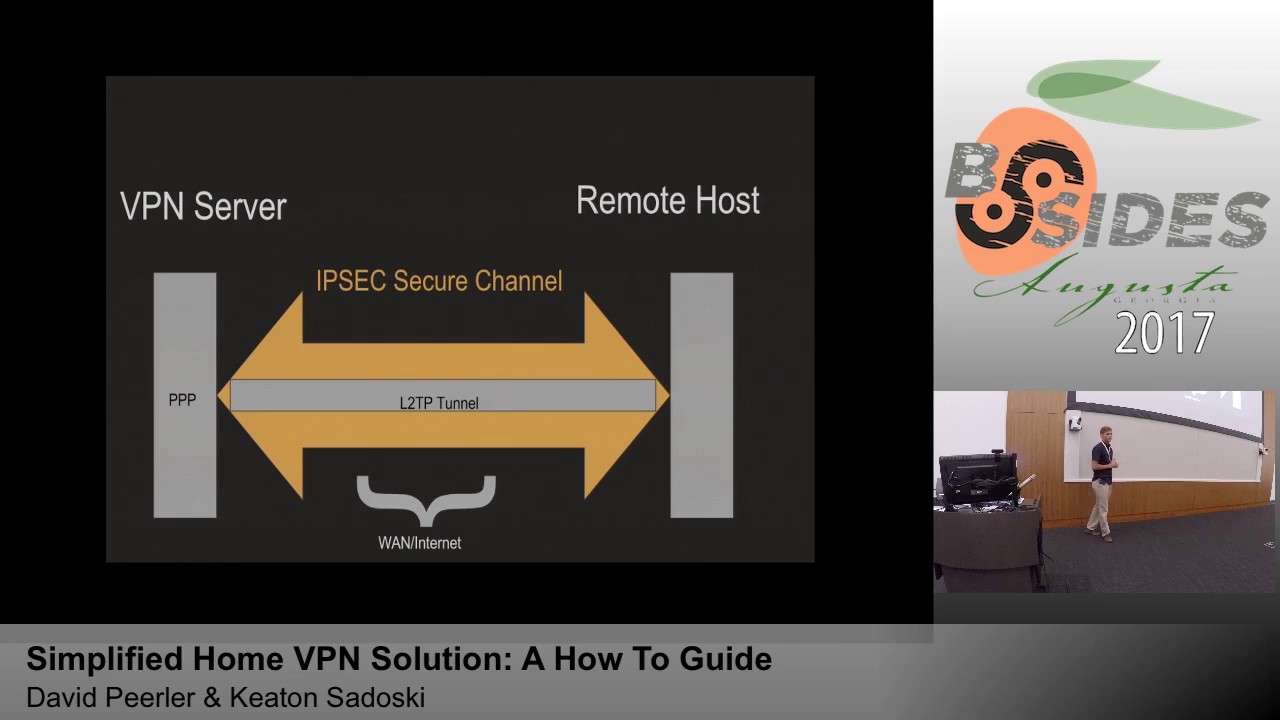
sides my server right sides my client so left we have the same like kids before from the server 2.5 - we've declared it left proto port so the protocol 17 this community and the for 1701 that's the logic important uses within the channel and one actually needs to go through the router supporting right side like we did before we're going to declare a wild-card percentile of mini and then authentication vs k and for 17/12 cord anything right so here's what I've set up looks like right now we have our VPN server or left side and it's going to be connected through an IPSec secure channel your emoto's across why I'm here but as of now it doesn't
look good because there's nothing to populate that channel your days to be disorganized put a lien correctly right so we're gonna add Excel to PPD that's where to tell my protocol team this by itself would work to provide any confidentiality in the encryption so when you're configuring this service we're gonna find out under the / XE / x l2tp d /x l2 BDD comp and the important part about this configuration is going to declare the pool of IPs that's been Viviana these are physical literal like B's but there are lots the ones that keeps up with ins configurations and then very prominent speakers it's gonna require chop that's a challenge handshake authentication protocol that's we're
gonna set up profiles of a username password combination if you separate different users on your VPN PPP which hold the bottle can chat rightz if you have different people used to be and not just a sub let's say your wife or coworkers you're gonna have to run user password they're gonna have their username password really well not unfortunately if someone were to shoulder surgery or get ahold of username password they would not have the authentication of your other groups on the VPN so this has another layer to your VPN security so PPP which is going to provide to chat up an occasion there's going to be figured under /p p / options dot excel - PD and most of these
are the default options for PvP but most importantly you'll see the MTU in our University you know funner that's your max transmission unit and your backs receiving you normally it'll be 1500 but in this instance because we're adding so many different arrows on you want to make sure it's smaller so you have a little bit more Headroom otherwise if it goes over the maximum private size of a Ethernet packet still fragment and you're not gonna want that so we said that the 12 pointer so right now it looks like dupioni looks like as you're people beautiful files on it there's an IPSec secure channel document you your answer in your photos and then within it
it's populated by several different data streams I ain't even funds that all goes over to win securely connect immune from whatever you are - so we just want to give a special thanks to our teacher Wendy Patrick she's also our seventh Patriot coach she's a fantastic and and I mentor mr. Matt Danko for helping us get through this we recognize for high school students and we're new to this field so if we didn't explain anything correctly or team just in the extra clarification what we men doing any questions back up to the resources
any other questions or things you sure
well assuming you're not all streaming at the same time it does pretty well for providing web pages multiple sources it does get a little bogged down and we start streaming just because a Raspberry Pi isn't as powerful as so popular but it is still pretty powerful so you can get by with just web pages yeah so when you're configuring that the left side on the VPN configuration will be the VPN server the right side is the remote client however if you were to set this up on a Linux distro on a remote client the left side would be the client on the right side of the server so left icon refers to yourself and the right side is
where you'll be nekked into excuse me oh that's all handled by the IV set and the left side and right side leave word figured by the two GD o the left the right side were configured by the L to TBD whereas IPSec phase one phase two were handled in the opposite configurations many more questions all right so we got some prize to the handout recognized are probably the speakers here we have a couple more Millenial questions first question first person answer will get a lockpick set I've heard that these are illegal in state of Virginia so yeah so what social media recently released a geomap feature that will show your current okay snapchat has that guy alright for our
next question we are giving now a land turtle drop shelves anywhere push through the which ports did we forward for IPSec there you go all right this is the first hand as he go up what was our terrible password hands up which service handled the profiles all right this is the blue team handbook incident response Edition a condensing little guy for the cyber security instant responder the question of this and it's calling you if is what was the other option other than IPSec recursion that we gave guns back back right blue shirt
well thank you for your time [Applause]
Related talks
 51:37
51:37 30:27
30:27 55:35
55:35 51:32
51:32 41:33
41:33 51:33
51:33