Security Automation Simplified
Show transcript [en]
good afternoon everyone apologies for the delay without further ado let's start with our Nets presentation by Moss's Swartz on security animations simplify hi everyone thank you for coming it's audio good everything that's ok sorry about the delayed start computers are hard I think most of you know that so I'm Moses I work at box as a security automation engineer my whole job is building automations that make our cert run more efficiently and we're running our whole big like DIY Python stack that we built over the years there are a lot of vendors out in the space a lot of them charging a lot of money one of them getting bought for five hundred million dollars but you
don't actually need to buy a big platform to get started in automation and I'm hoping to kind of give in an overview of you know how you can start doing this stuff in Python pretty quickly so this is a really generic high-level overview of the infrastructure that you usually see at assert or you know sock any kind of security monitor and it says set up you have a whole bunch of logs that feed into a sim which in my mind is basically equivalent to a database that can also send alerts somewhere those alerts usually end up in a ticketing system and then Freddie Mercury there goes and looks at that alert looks at the user
name in Active Directory it looks up hashes and virus total looks up their playbook documentation maybe it's some confluence or something and really just does all these manual steps that could be automated so if we actually want to go and start automating this there are a couple ways we can go you can look at us one of these centralized solutions you can go by a big platform or you know to start building something giant that takes care of everything or you could start building out like just little pieces of automation you know I call this distributed like just a couple tools that work together where you can point to a web hook at the other and get
one little task automated that's a fine place to start it doesn't really scale up to build more advanced workflows but it's there's nothing wrong with starting small now building an automation orchestration platform that works for everyone and every use case is really hard which is why there are these big vendors that are getting acquired but building one for your own environment is a much more tractable problem you'll only have a few tools that you need to tie together you only have a few use cases and you already know your exact workflow so you don't need to build that generic workflow engine you don't need to implement you know that one workflow so I'm gonna walk through an example kind
of end to end using the tools that I'm most familiar with it's gonna be Splunk JIRA and Python to build a basic security automation system so we're gonna start by just going into Splunk and developing an alert you do that just by going and searching developing a query to find the logs that you want to alert on this is the first step this query found some faked up data that I dropped in there we've got a host name md5 username things that we're gonna want later on then we're gonna go into the create alert page and we're just going to take that same query drop that in there put it into its own app that's
a Splunk best practice and it makes a lot of things a lot easier and then we're going to set it to run on a scheduled basis I like to specify this in the cron syntax but they have little dropdowns to help you choose and specify a time range this is how you know long back your query is gonna look it wouldn't make any sense to have something that runs every 10 minutes so it's at a 10 minute time range because then you have gaps and you don't want to double alert either we're gonna scroll down and we're gonna say when to trigger we're gonna said to trigger for each result because Splunk only puts the
result from the first entry in the actual webhook payload and then we're gonna specify a webhook trigger action and we're gonna put in here an IP address and this you know slide swung underscore webhook which is a server that we're gonna go and write on the next slide so here's version 0.1 of automation server PI we're gonna use flask which I really like it's a really lightweight Python micro framework for and it's commonly used for developing api's there are also a lot of projects that make it easier to build a POS on top of flask I might go more in depth on those in a later presentation so we're gonna start by writing basically our hello world
endpoint or a status endpoint these are super useful because you can check to make sure your app is actually up after pushing an update makes it easy to put a to integrate into a status monitoring system and then we're gonna write our spunk webhook function so this @ app dot route syntax is one of the weird things about flask but it's just the way you do it we're telling it slash Splunk webhook it's gonna go and listen at that URL basically and when it gets called it's gonna go call our function and it's gonna provide this request object so this is really just gonna be a few lines we're gonna go grab that request object
to pull the JSON out of it and then it's kind of an insight into my development process not what we're gonna get at as the end result we're going to dump that into a file just so that we can open it up we can read it in a Python interactive terminal we can figure out what data we need to get out of there and then we can write it in our next step so we're gonna go into our automation server here and I literally just bun up a droplet in digitalocean SSH tin it doesn't necessarily have to be a lot of setup and I run Python automation server dot pi and is that'll start up the built-in flask development
server you don't run around want to run that in production and you definitely want to have the debugging features turned off because they are awesome what they allow remote code execution by design so this server is now just gonna sit there waiting until we call it we could go a curl that status endpoint for starters to make sure it's but then we're just gonna wait until Splunk fires that webhook it'll print out the log showing that it we received that and I'm just gonna control see out of it and print out the first few lines of that JSON file and that is what the JSON coming out of Splunk in that webhook looks like so that's pretty cool
we got the first step working I'm gonna briefly kind of pivot into secret management this is a problem that balloons to be unbelievably complex but for the simple example what we're gonna do is just keep a separate Python file call you in settings PI and we're gonna put our user names and passwords in there you can actually use this approach in production and just push this file to your server manually or with configuration management bonus points if your configuration management has built in secret management then you know it all just works out kind of perfectly so in the code examples later on they're gonna be references to settings not username things like that I'm not gonna
come back here but that's where it's getting into those values from so we're gonna go back to this automation server dot pi and now that we've got that webhook and we know how to parse it let's just go and create a ticket in JIRA so to do this I'm gonna write a new function create JIRA issue and it's really just two lines just broken up because they'd be really long lines to use the Atlassian JIRA SDK that they provide for Python we connect with our username and password and then we just say create issue and we provide the data we're gonna drop the full alert body into the description field and we're gonna name the spunk alert : name of the
alert now right here we could go and start setting fields or assign this ticket or things like that so it's kind of already a step ahead of just having them send an email and create a ticket or using their provided add-on but we're not gonna add a whole lot to this function we're gonna instead do that in a couple steps with JIRA web hooks so this is what we get the next time that Splunk Save Search runs it will hit our webserver web server we'll reach out to gerrae and bam we have an issue created the first time you see this is always kind of magic to me like I wrote something that actually worked so that
it's pretty cool look there's JSON in that description it's not super useful but we can do something about that so we're gonna go into the JIRA web hooks set settings and create a web hook we're gonna give it a URL that's pointing back at our server and I just made up a name JIRA Marx can create a web hook and you can give it a filter to say only fire on these tickets and if you scroll down further you can trigger these web hooks on all kinds of ticket events like transitions closed opened assigned but for now we're just gonna only look at tickets being created just cuz that makes the problem easier so we're gonna go back to that
automation server pie oh I forgot to mention if anyone can't read this the slides are uploaded to sked so you can pull that up and follow along if you need to so this is kind of the biggest chunk of new code that we're adding we've got a JIRA comment function which is really similar to that pre at issue one it's just going to connect pull that issue out of JIRA and then add our comment then we've got another one which is going to receive that webhook from JIRA this one has a bit of ugly JSON probably gonna clean that up but honestly like ugly JSON parsing is half of my job doing security automation engineering so we're gonna pull that
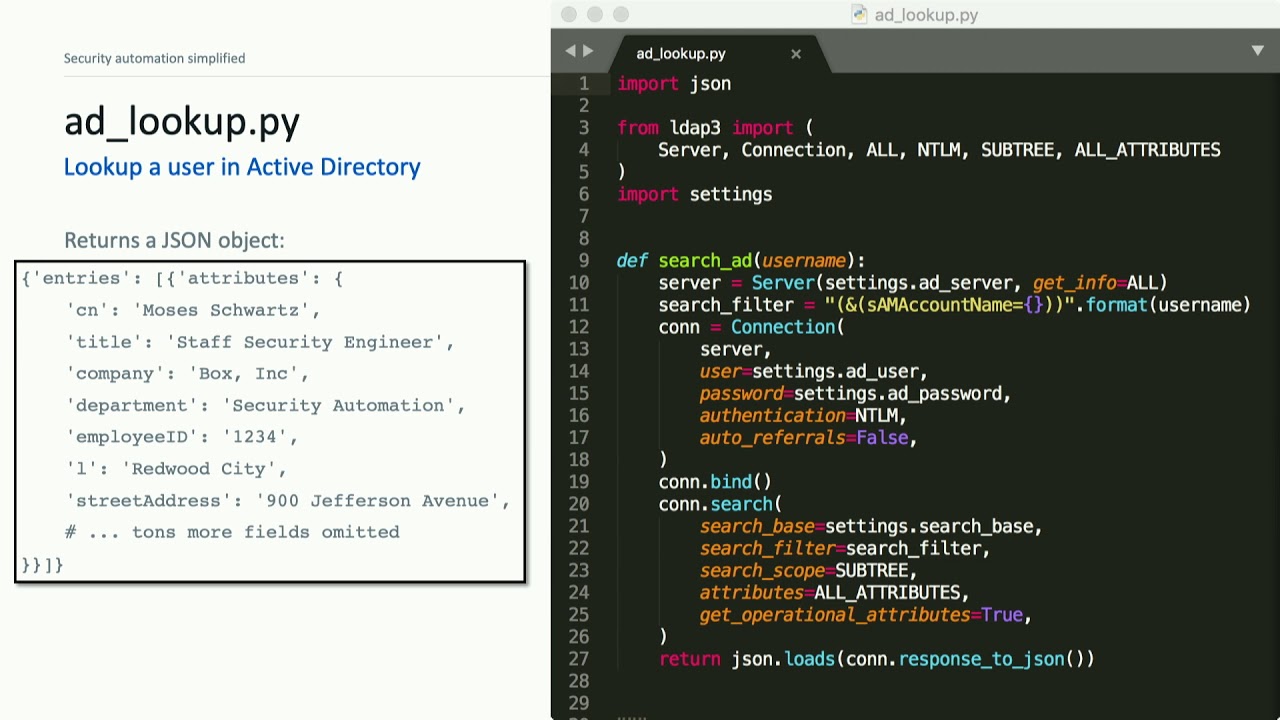
description out of the JSON and then we're gonna actually load the JSON that was in the description which was the original spunk alert and then we're gonna pull out a username and I'm d-5 and just post those to the ticket so now suddenly we have a couple fields being extracted and posted to our ticket we already had those in the ticket so this isn't super useful but we can go and make it a little bit cooler so this is a tea lookup pie it's just a little bit of code to do an active directory like that I won't go into details in the code here except to say that LDAP 3 is so much better than
Python LDAP if you ever want to talk to LDAP or Active Directory so basically we're just going to connect to our ad server sending that username and it returns a JSON object like we see on the left we're gonna go back to our automation server code and just add a function that's going to call that module we just wrote and that module was not tied in any way to flask or to the rest of the application we could pull that into other modules when in this case we're just going to do a lookup and then we're going to do a little bit of string formatting to build what we want those comment to look like and then up
in our mark skin created function we're just gonna add a call to that function the new one and now right away in our JIRA ticket we have active directory details for the user in the alert posted to the ticket then we also had an md5 and when I see a file hash my first thought is to go look it up in virustotal so we're gonna write another script virustotal PI again no dependencies on flask no no you know overhead really we can just developed us like we're writing a little Python script and this is pretty much copied and pasted from the virustotal public API documentation and if we give it that hash it's gonna send us back a
JSON object like that so I'm gonna go in pull out a few pieces that I think are most interesting probably the positives the total number of scans and link to the full results and then we're just gonna add it the exact same way as we did the active directory look up so this is where it actually starts to get pretty cool now we have tickets being created and then automatically those first two lookups that our analyst would be doing are already in the ticket when they get to it so this is kind of what our infrastructure looks like now right we have to recap as the the flow is a little bit complicated we have those alerts reaching out to our
automation server which reaches out to JIRA and creates a ticket and then that create create ticket part is done you could also receive a ticket via email and it could work the same way after that we rely on the Giro web hooks to let us know when I take it was created or changed to reach back to our automation server and then we run whatever functions we have to find for that web hook endpoint - and post details back to the ticket now the the nice thing about those approach is that we can literally automate anything that we can write a script to do so just the the really low hanging fruit we can go
and populate ticket fields search for previous tickets that kind of thing I know that a lot of the time when an analyst pulls up a ticket that's the first thing you do you've got to classify it as you know type of threat check a few boxes we could run a spunk search and post the results to it we can look up DNS and who is records I don't want to read everything here but you can definitely upload files to box you can connect to a smart device you can set up a light to flash if you have a critical alert I mean really anything that can be put into a script we could automate here
there are some considerations about how we're gonna run it though so you know in that example we had a single function that did an active directory lookup and a virus todo look up and the the one problem there is if that active directory lookup fails you know say just a network hiccup or they're rebooting the server then the whole thing is gonna error out and we're never gonna do that virustotal lookup so if you're actually gonna go to apply this you definitely want to think about ways to make it asynchronous by which I mean separating the job so that one failing doesn't kill all of them there are a few ways you could do that one kind of intuitive way
would just be to set up a JIRA web hook for each ticket enrichment that you want to run then you have to go and manage a whole bunch of JIRA web hooks but we can specify with that filter that you know we want all of our carbon black alerts to do an active directory lookup and we want all of our OS query alerts to do some other lookup and you know you can add as many as you need I'm not sure if they actually have a limit on how many Web books you can use I haven't tested that or you can build out your code to actually do this asynchronous stuff itself we could use celery and RabbitMQ
or something or we could use an async i/o which I'm going to learn about any day now or we could go and use a DevOps platform like Jenkins I've seen really complicated stuff built on top of Jenkins basically it's a service that just runs things when you tell it to that that's exactly what we're doing here so there are a lot of opportunities to use tools that are not actually marketed at security but could still fit in this use case we can if you're a cloud native we could also do this all in AWS lambda jobs it's actually a really good fit this entire thing could be lambda jobs and then you don't have to worry about your infrastructure for
the most part kind of a follow-on to this you know if one fails they all fail problem everything is going to fail at some point or another even if you think it shouldn't getting logging in and exception handling is vital the biggest thing is knowing when something breaks even if you don't actually fix it right away just having that visibility into your infrastructure of when things are on one thing to break it's it's really critical when you actually get this running in production so once you do have it running in production the next step is that you've really got to do some metrics you've got to start trying to integrate automation into your process so I think that security operations is
kind of converging on a model similar to the DevOps mindset we're part of your time always has to be spent automating and you've got to quantify quantify the impact quantify the time spent on tasks this little graphic in the corner is similar to something that my team actually sends out in our weekly status updates we go through the logs and say you know every time we ran this look up that saved about two minutes of analyst time and we got our cert to say yeah that's about right and then we just add it all up and end up with something like 81 hour is saved in a week that is really compelling to management and it really
justifies the time spent on those automation so takeaways the stuff I hope you guys got from this kind of basic intro talk is the security on a security automation isn't magic you can actually start building these things out pretty easily with a little bit of Python like for real there are a lot of analysts who could set this up and start using it in their environment and I hope I can kind of encourage that even if you can't do one by a super expensive automation platform you can use Jenkins if you've got Jenkins if you're standing up something new you could use a tool like stack storm which I've used before and I thought was pretty cool but there are
just lots of options and there's so much low-hanging fruit right so many opportunities in a lot of certs and socks and even other IT operations areas we're just doing some of these lookups directly into the ticket before analyst ever gets to it can save hours and hours of copy and pasting between browser tabs and then finally I just want to say I think this is like the coolest job in the world you know I spend my time trying to make the rest of my team more efficient when people say they have a problem I can go and fix it I can ask them the next day if they fix if that fixed it and you
know we can collaborate it so it's a really neat place to be it's different from normal software development it's different from normal Incident Response or security analyst roles but it's pretty awesome and it's a great way to get into secure for developers and a great way to get into development for security folks and like everyone else here we're hiring so I you know any interest let me know with that I think we've got about five minutes left and if you guys have questions I'd love to answer them we have this slide Oh thing and the questions they are is I agree that security automation is amazing and it's one of the best jobs my opinion awesome
do your metrics include the time that goes into building maintaining and troubleshooting so not quite as much as that hours saved metric but our actual status report shows that these are how many bug tickets we worked and how many you know new development stories and we have some graphs around that to kind of show the effort that's going into this as well as new lines of code added or removed from our repos can I ask well I'm gonna ask a follow-up question so then how do you convince leadership or management to devote some man-hours to automate well so at box I'll say I am unbelievably lucky we really built this out from the start believing automation
was important and we now have a four person full-time automation team I know that's not the norm across the industry but in another place I worked I actually just kind of started automating and when everyone loved it I was able to show you know the value and it pretty much became my full-time job so I don't know if that answers your question there's time for one more question in your site you mentioned that liking exception even the even the code is perfect is not good is it is it in the environment or production because basically be all logging in all the exceptions I'm talking you say that again louder or in one of in one of your
slide you mentioned that logging exception handling exceptions is not a good idea and even your code is perfect do you mean that we don't we don't have to like any exception oh so exception handling and logging is critical but what I was trying to say is actually fixing that exception doesn't have to be like automated you can go and fix it up later as long as you know that it happened okay on behalf of II sighs we thank you for your presentation Moses [Applause]
Related talks
 25:46
25:46 20:40
20:40 46:38
46:38 47:24
47:24 30:48
30:48 27:37
27:37