OAuth Third-Party Persistence: Bypassing Cloud App Mitigations
Show original YouTube description
Show transcript [en]
I'd like to introduce it is Gotti and Alan so give them a round of applause [Applause] thank you very much thank you all for being here with us today um this talk is about persistency or research of persistent Technologies or techniques used in OS apps and keeping inside organization even though the OS app itself is is disabled and will release a piece of code on GitHub that is the attack work through that we're doing um uh and we'll this code is uh shows a new technique we developed a watchdog technique to keep an app uh enabled even after an administrator disables it and will show the workflow so um first of all I'd like to introduce my
scenery research and teammate Xeno or Alone um I'm really happy to be here with him in the first talk in a security conference uh needs Steinberg CTO for unfortunate reasons he couldn't be here himself but he definitely pointed us into the right direction for This research and to put on a new finding that's even post-infection you can still persistent using OS apps um I'm Gadi uh it's my 42nd birthday today so I'm really looking this morning for the question of life the universe and everything I can share it later um I'm really excited to be here and I hope this session will gift you with some new proving points into a less minded field which is always a good place to look for
new vulnerabilities as the researchers and with that I'll give Zeno the stage to introduce the research hey everyone my name is Alon but you can call me Xeno most of my friends do um when you see me around here okay so I'm going to talk to you a little bit about oauth2 and why we're using it what's the challenging what's the challenges that we can face when we use it and then afterwards we're going to give the stage to Gadi that he'll explain more details about the actual work that we did and some of the um bypasses that we found on oauth right so why do we even use oauth 2 right so as we all know all the cool kids are moving
to the cloud right all the data everything is going over there so it may it makes sense that we need to go and find a standard that helps us work with the resources online all right follow us through provide this exactly that it provides us a way for applications to work with resources on behalf of users all right so why are we actually using it the actual reason it's already there most of the providers classification providers already use that and give that for customers so that's why most of us use it right so let's talk a little bit about how the basic flow of oauth works all right and I'm sure that once we go over it you'll
see that it's something that you're all familiar with so the first stage that we have here is actual the actual request for consent the application that we the application wants to connect to the environment has for consent for the user you might have seen this pop-up before that happens to the user it just asks you for consent easy enough you just press OK and you get the consent what happens actually be after that is that the user gives the consent the app text that consent that Grant authorization Grant to the authorization server and receives a token back this is the Holy Grail the token basically gives you the permission to access those resources as the user
repeatedly without asking any more consent without any other prompts for the user you just keep on using it all right so once you get the token I can just go and access everything so once you talk a little bit about why we use oauth and how it works let's talk a little bit about the challenges it presents we'll start with a quote that we have from Iran Hammer that made a decade ago right when it started working um as he says you can read there but basically what it means is it started as a good idea but even a run Hammer which was the chief editor of that standard decided to withdraw his name from it because he felt it became a
bit too complex and it doesn't deliver exactly what we need from it all right so it is widely adopted by most SAS platforms a lot of people use it there it allows us to use all kinds of really sensitive material sensitive resources but even the Creator felt they kind of missed something there right so this is the main challenge that we have working with it so once you have those challenges let's talk about why we decided to actually pick on all of two why we wanted to see if there's something weird there the first part is all the data is there the data up in the cloud most of the places can allow you to use all to to access
this data right and the second part which is kind of interesting to me is the whole idea behind it is you get consent once and then you stop bothering the user again right so this is like the main feature of oauth but it's also kind of the main vulnerability it has because if I got once the token I get one consent I can keep on working with it there's no way the user can't see it it doesn't it doesn't bother him as we say right so this is the worst part for this is the worst part for a Defender and the best part for an attacker so now what we're going to do is I'm
going to give Daddy backstage he's going to talk a little bit about some mitigations that we saw on platforms that they did already because they wanted to fix a little bit and then we'll talk to you about what we managed to research further and find some bypasses around those mitigations right so ready thank you Xeno was excellent introduction always glad to work with you um so about OSS Xeno said it's a kind of a young uh well it's used for a lot of security Wise It's kind of young and immature and in 2018 there was actually a worm using Google apps script called the Google Doc swarm so even Google sometimes method mess with the OS you can see here in the
slide that the app script was sending phishing emails from an infected user asking him to that his friend wants to share a file with him using Google Docs the logo is Google Docs the naming is Google Docs so it's in in a way impersonate the apps and it go goes over it gets permission to go over all your contact list and read your emails and send emails on your on behalf of you to all of your contact lists with the same phishing message this is a file I want to share with you and and it got over in a couple of hours got over a million years of in fact infected and until Google stopped it
um so uh about the after this case in similar cases with Microsoft Azure and Google implemented the different mitigations uh one of them is that the publisher needs to be verified so instead of just giving every developer to put his name and if published a credential there is a process to be verified by the by the platform by Azure by uh Microsoft and then to to have better permissions or allow higher permissions to be installed or even actually be installed and as you can see here in uh new up new application registered after 2000 are not allowed to be installed without an admin consent and and you can ask the admin for the relevant uh for
for consenting to you to install the app in addition the name the name is missing and the logo is missing so there won't be any way to copycare or mimic the application and look alike like the application make a user fall for the phishing additionally uh post infections mitigations were in place for example you can't send forward emails outside of the organization with uh in email box rules automatically um and now actually there's a process for with Microsoft they're saying they try to raise the awareness that MFA has to be uh enabled in all organizations they fail to do it and now they're trying to do some sort of uh default security rules and and make sure that at least
administrator has to have a multi-factor authentication and and definitely if if you look back on uh exploit mitigation techniques on on the PC I think it's a similar process we're seeing now new attacks cause uh the platform to develop new mitigations um is this our relevant mitigations we'll touch in our research how how first of all um still though the publisher verification process is in place most applications even ones that have email read permissions and email write permissions don't have this public publisher verification in place we see 60 of applications that are actually having this uh being verified for uh applications with the read permissions and and for sending permissions there is actually only seven percent of
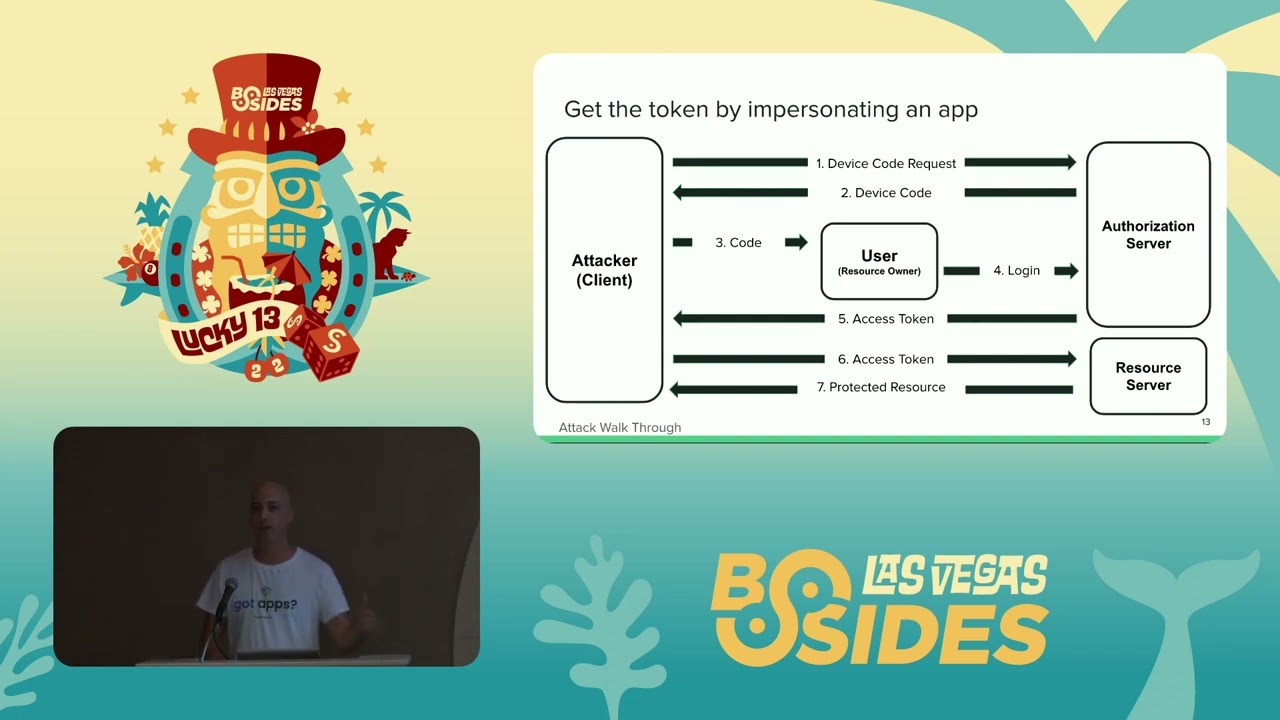
application um so it's it's a it's a good start but it still needs to be advocated and awareness should be reasoned to this uh vulnerability um we'll touch now on different attack vectors okay and a very common one is the device uh also code flow this is used for devices with lacking input devices and no keyboard so a user can use his own cell phone to authenticate to the identity access management system by Azure for example or any any yam or Google slack whatever and then the application asynchronically gets it can can request the token from the server this is how it actually looks like um first of all a user or in this case we put it as an attacker
that's actually because it's a device or for example a monitor and it's its code is available publicly because anyone can reverse engineer the code though there's no client Secret inside this process so there's no verification that the client that's asking the code or getting the token is actually the client so the attacker or the client asks for device code it then presents this code it gets the code from the yam and this allows the yam to connect the user authenticating and the application so it sends the code to the user in our case might be a phishing email we send please log into microsoft.com device code the user entered this the the code there and authenticates through the server
with this multi-factor authentication in in place so there's no need to buy to uh to uh to hack the uh cell phone Etc only only the the user need to be fixed and the multifacts of identification doesn't stop the attack sorry um then the attacker gets the access token from the yam and send the token to the resource server and gets the users own the documents or data or can do any functions in the name of the user this attack uh which starts as I said with this device code the user needs to go to a legitimate login page and just recently William overweight also noted that in addition to impersonating the app there's there's no
consent needed so in cases the user the first thing the user will see this is this uh login page on Microsoft it will enter the code and then in case that the attacker is impersonating Microsoft Office which allows this flow for a certain reasons and then all the permissions that Microsoft Office has which is a first party app by Microsoft so it's defaultly user has consented to the permissions there will be no uh permission or consent screen as as is the usual uh flow that there's in oaf so the user doesn't suspect it gets the same permissions that he granted the Microsoft Office so it's called the fishing without consent and we'll use it in our code the the
attack methods that we're uh we want to discuss here um is first is is persistence okay so if again we're moving from PC World to Cloud SAS same techniques okay so we want uh you've got the user to be infected or install your OS app now you want to be persistent meaning you can you want to have the access to the data without needing to re-authenticate the user or get any permissions delegated permissions by the user having him to do a multi-factor authentication again so first of all you can you can create a user or create an application you can update the user password or a password recovery email so you can actually have the user password
and change the multi-factor authentication number or device and then you can have access in any time you wish and there's also now was a reported a known attack with that allowed the Legacy protocol so Legacy protocols like IMAP do not support a multi-factor authentication you can enlist a user for such an application and then if you have these credentials you can use it without the need to multifact Authentication also our passwords is a legacy method to allow apps that do not support us to to have to use the app passwords and then allow this flow and have the user connected with a a username and password and you can add the username password to this app uh
what we're adding to this post exploit techniques is a watchdog a watchdog essentially means that there's a process that looks over other processes and make sure they are enabled even if an administrator tries to disable them again for the same terminology terminology of incident responders there's a lateral movement or pivoting from one user to another so one way is uh to uh to to get the read access and and put mailbox rules to delete certain messages by that you can read reset emails and for for example to monday.com or or other SAS platforms after you you reset the emails you get access and move laterally to the other cloud services you can also infect files with macros
and and app scripts and then make sure a user or other user in the same organization are are infected again and there's a very dangerous supply chain attack or if you if you are able to infect a user who is a developer and he creates applications and actually sells them and exports them to his customers if you'll add a certificate to this application which means the many times applications have application Level permissions meaning that they don't need the user to authenticate they can just log in with a certificate if you add a certificate to such an application you can buy that move uh to all the users of the applications that this developer created this was also used by nation state and
and now but of course it becomes more common so about the code that we have um and if there will be interest we'll have another session this afternoon and and we'll we'll show a live demo uh but I'll for now I'll I'll do an attack uh walkthrough with that code so first what we're looking for in order to allow our Watchdog is if we're looking for a application read write all permissions um which allows us to create applications so what we're trying to do is imitate or impersonate a security software in this case because security software for the cloud which lists applications needs to has this permissions in order to view um applications installed on in the
organization so you usually need to uh to to find a high privileged user that have them you'll be surprised that actually security software do enable some of them enable a device code flow and and as I said this is very good pointers for researchers and Pen testers to taste inside organization what the user can do what the administrator will get either he can consent on behalf of himself and and or be uh or or um behalf of all the users in in organization once he once he allows the permissions to all users in the organization then you can fish actually any any user in the organization and get the application read write accesses that he this user had which actually means
you can create applications on on his behalf and also control all the applications that user control add the certificates Etc as I I noted so in our case I'm I'm attacking with the device code flow um the attacker from you need to create a phishing email that will make him install this application security or impersonate a good application security platform and then as we said with the flow uh the uh we we create we started this flow so we'll we'll be we'll have the device code we'll send the administrator and then we'll get the token um Now using this token what we will do is create an internal app and we'll give it our own redirect URLs
if you remember in the normal flow if uh after user authenticate he is redirected to the actual app and and then the flow continues if we created the application we can create the redirect URL and then move it get any token to us we also create the secret and and and if you'll notice uh uh here is internal and if you remember what we touched before is that internal apps has different different bypass the mitigation techniques put by Microsoft there's no vetting process or a verifying process for internal apps by Microsoft so there's no no stating that this app might be risky and that sorry and that uh uh the name is given and any user in the
organization can install the app by himself it doesn't need an admin consent even though it's a newly registered app and this is just the the sample from our code once you get uh we we have infected admin uh we got a token for that mean and then infected the user what we'll do is is to keep that um that uh phishing application that the user was infected with live okay so this this code shows how we using the python interface for the Microsoft guide graph API to basically just keep an account enabled even if it was disabled for that mean uh this is the admin portal for Azure uh he if if not win atwin wants to stop an
app what he should do is not delete an app which will might even uh Delete all users using this app and might cause errors if it's a false positive but it also if a deleted app can be reinstalled so the best practice would be to disable an app which means that no user can log into it and no user can install it so that's that's the uh why this method is good and then we can restore using our the code we can restore the app to be enabled and um other other than uh so the app was disabled the token was not uh um the token was not revoked and we have infected user we had we can still get
get access into it we can also then disable the app and keep it persistent and keep it quiet and make the using the refresh token every interval we can keep alive and keep our app inside organization even though the admin side is that um I'll touch quickly on Solutions now if you have any question that touch or not I'll touch on Solutions and I I'd take like to thank you very much for uh for being with us and paying attention
Related talks
 22:02
22:02 17:21
17:21 19:46
19:46 21:52
21:52 23:03
23:03 3:30:16