Bypassing Anti-Virus Using BadUSB

Show transcript [en]
okay hello and welcome to to this presentation I hope that everyone had a good day so far uh we are coming close to to the final of the um the conference um and for for this presentation we'll look into some methods to to bypass the the antivirus using bad USB like this little device right here um but before going forward with the details uh just words about myself uh I'm a pen tester founder of zero tax security uh and also founded the Romanian cyber security training center of excellence uh I'm also a trainer for foreign institutions and organizations like uh Pentagon uh polish military research and much more uh speaker to to some conferences across the globe and
part of the SC Council ethical hacker scheme committee which means that I'm part of the group that creates the the exam and also the um the syllabus for for the course yes so the the agenda for today we'll look into some AMC bypass technique uh to impede on our device uh execution policy bypass on on Windows uh how to develop our own payload runner for for the Shell Code um and all of those will be put on this device this little device then some tips to to persist into the the device that will compromise using the the bed USB on a live demo to to see how the things work and then some prevention tips
foreign so we have the following scenario Bob goes smoking in the in the smoking place at its uh office building and he found a little device either in the smoking place or in the parking lot and what he thinks he will take the device with him and Bob goes upstairs to to his computer and just plug the device the little bit USB into into his computer once the bed USB is plugged um there will be a reversal back to the back to the attacker but how how did this happen because Bob has Windows Defender enabled uh Bob is a actually a low privileged user on the on the workstation and the company policy these allow removable media storage to be
inserted into the computers so how it is possible but before before going forward with uh with more in-depth technical analysis of the attack let me ask you one question how many of you do you rely on Windows Defender hands up okay so so friend plenty of you um how many of you are confident in this decision okay so today we'll see um another reason why we should not use some antivirus products that are free or trial and uh one reason why antivirus should not be our own uh our single defensive mechanism within our personal computers or work related activities so let's see the scenario of the attack basically we have the amsi bypass which is the main component of
um of evading the antivirus then execution policy bypass which is a logical issue at Windows level also was reported to to Microsoft but they didn't consider it worked there attention so I decided to do a talk about it then we'll develop the the payload Runner which will be actually our code that injects our malicious malicious um think malicious payload directly into the the memory then some post exploitation tips to to see how we can keep our persistent into the compromise device without being detected in the future so let's go firstly with the AMC bypass so before before looking how can we bypass this protocol we firstly need to know what is this protocol actually MC stands for anti-malware scanning
interface and it's like a middleman between our antiviruses or endpoint protection products and the scripts that we are running on the on the Windows workstation for example uh every time you you run a partial script the the ampsi will send the the Powershell script to the Windows Defender engine for example to be checked for any malicious signatures any malicious behaviors so um the DMC uses amc.dll Library and more specifically it uses the ampsy scan buffer to send the Powershell script to the to the antivirus so what we'll do in our bypass will actually manipulate the the function that sends the scripts to the antivirus in order to return every time that the file is legit
is valid does not contain any malicious indicators which will allow us to run a malicious script actually on the on the Windows Workstation so starting firstly we will need to Define some windows native API functions within our Powershell payload uh we will Define the get proc address load library and virtual protect we'll translate those apis using add type in Powershell because this structure is not known by by Powershell this is actually a c-sharp code which will translate to to Powershell using the add type as seen right here then the second step will load the the amc.dll library which contains the the ampsis scan buffer function into the into the memory will retrieve the the address of the of
the MC scan buffer function and then we will try to build a value that will um that will replace the the scan results of the function why are we building this value right here we'll see in the upcoming slides uh the explanation for for this value then using a marshall copy we will replace the the address and here is the explanation for uh this value so if we take a quick look over the documentation for amsyscan buffer function we'll see that uh it has a parameter called empty result uh if we dig deeper into the um see result uh parameter which is actually the result after scanning the file or the script for any malicious indicators
we'll see that we can replace the edge result which I skipped right here so actually the function returns s underscore okay if it succeeds into scanning the file if there are any like issues when scanning the script or the file it will return on error which is H result error code and we'll take a look over the values that can be taken into the H result score and we have one for invalid Arguments for example we can call the ampsiscan buffer right here we can call ampsy Scan buffer with missing arguments and in this case it will return this value as an H result but why do we want ampsiscan buffer function to return on H
result value we want to return an H result value because it will stop the scanning of the script or the file if it returns an H result which means that our script will be passed to execution whatever that it may be a malicious one or a legit one so uh this was taken from the official documentation of the edge result values and we'll building this value right here here it is the sequence where we we build uh our H result value and here it is our final MC bypass payload let me ask you a question what would you do in this case because this one is detectable any ideas okay yes basically obfuscation and do
some uh do some Replacements and mathematical operations on the strings and we transform the payload like this as you can see it is pretty pretty different and we have the strings are constructed during the runtime so they are not constructed as static payload they are constructed during runtime so we have the DMC payload next we want to take a look into execution policy bypassing um have you have you ever gone through this error when trying to execute Powershell this is execution policy on Windows and why um why it is disabled it is disabled because we are running the script as a low privilege account so in this case we as Bob as a low privilege account are not allowed to to
run the any Powershell scripts but Windows allows us to set our own execution policy for our current user to unrestricted which means that allows us to bypass by default the execution policy and this is like a flow in Windows by default and this was obviously reported multiple times to to Microsoft as I've talked with many people about this this issue but Microsoft doesn't consider this as a security issue so yeah what to say I I I had no words when they said this so we can we can actually run this Powershell uh Command right here within our payload in order to to bypass execution policy and to be allowed to run Powershell scripts as a
low privileged user next the the third step would be the payload Runner development which is one of the most important steps within our exploitation because um most most of the antivirus products will catch our payload as it is but here we can do some tricks in order to have a file less a file less execution of the of the payload and eject it directly into the memory firstly we'll Define a lookup func which we will use later within our Powershell payload in order to to search for other functions within um not functions but assembly references in in memory then the get delegate type function in Powershell why we do this because Powershell actually does not know about
some variables types that are defined in c-sharp like pointers or things of the nature so we must Define the get delegate type in Powershell in order to to use some of the variables types that are defined in c-sharp but we'll use them in partial uh will not get really into details for for those um for those functions because they are pretty pretty complex um then we'll just allocate uh the memory that we need for for our payload um using virtual alloc right here that we search for it in kernel32.dll library using the lookup func that we defined right here and after after that we use something like MSP Venom to just generate a metal platter reverse shell
which actually meter pressure and reversals are easily easily caught by any antiviruses nowadays so let's see if if our if our payload will be catched or not and then we Define our our Shell Code that we previously generated use it using msv Venom we Define it in in Powershell and using again Marshall copy we copy the the Shell Code directly into our previously allocated memory which is right here [Music] okay and then just execute it using the create thread function from kernel32.dll we we search for the memory address of this function using lookup func yeah and um that's that's our final payload we will see it once we execute from Bad USB but before putting everything on this
little device let's take a look how we can play with it so a quick introduction to bad USB what is a bad USB so it's uh it's not a removable media storage it's actually a simulation of a mouse and a keyboard basically it's an Arduino based USB that allows us to simulate a mouse and a keyboard and how can we put everything the whole script on it the payload that we discussed previously how can we compile it to our paid USB we have two two main ways to do it firstly we can use digispark scripts which are basically the scripts used on Arduino and they require a c plus note leech because the the syntax is actually C plus plus
um and I'm not that really good at programming so I found another quick way to to do it through docky scripts what are docky scripts uh how many of you heard of rubber ducky before so almost everyone uh so doc scripts are the scripts that are run on rubber ducky but why have we not used rubber ducky in this case uh the ah sorry it's pretty straightforward opent USB it's almost five times cheaper than uh than a rubber ducky so for example you can drop 10 of them in in a parking lot and it will be the same value the same price as you drop a single rubber ducky so that's uh that's the the answer for this one
um and ducky scripts are pretty beginner friendly and the Syntax for for them is pretty simple and once we we have a docky script we can use something like dakuino from from GitHub which is an open source tool used to convert the docky script into Arduino format and just a quick introduction to tutaki scripts to ducky scripts syntax so actually what we want for our bed USB to type on the on the computer that we compromise will be the string followed the string after the the string variable so as you can see in this in this example um you can you can type partial dot except but before that you should put the the string variable in order to to
type that one into the compromised computer we have delays we have comments we have also repeat loops and very important the the special keys on the keyboard should be right on um as they are on the keyboard for example enter control tab shift and so on uh the guy is the Windows key actually and we can make our our pet USB also to simulate movement of mouse like to to move the pointer to some coordinates on the on the compromised machine or to press the the mouse buttons and let's take a look at some post exploitation persistent tips firstly what you'll see in the demo is that we'll run a meter pressure reversal using matter Predator can allow us to
migrate our process to another process that is run by by the user using the migrate command in metal printer we can migrate into on explorer.x process or some other legit process that is run by Bob user um and now let's take a look over the demo hope it will it will help it it will run actually uh one second because I must connect to our Kali here [Music] okay
open okay we'll use oh let me make it bigger
okay um MSP console in order to open Metasploit we wait the Kali box is pretty slow
okay we'll use the exploit multi Handler module from from Metasploit as payload will set the payload to Windows 64. matter predator reverse underscore TCP pretty basic reversal um set listening host to 0.0.0 .0 okay set listening port to 443 okay let's check if Windows Defender is running okay we have real-time protection enabled will do like a quick like this okay we'll run our meta spline module and here is the the bed USB inserting this one one second okay let's see okay trying to run partial it's it's pretty slow here because to it is like in a proof of concept mode but in real life it can be like in milliseconds okay [Music] now we look to tormental predator and
here we have a shell and who am I okay and real-time protection is is running for um for the Windows Defender um this attack um I I used it in multiple real life scenarios and it's it's working pretty pretty good um let's see next prevention so some methods to to prevent for those types of attacks uh firstly Powershell should be disabled for end users um unless they are developers or they strictly need Powershell to be to be Run Access Control list on USB physical Port um and you should consider buying an advanced endpoint protection solution don't rely on Windows Defender um and user awareness security awareness training for for the users and some statistics regarding other
antivirus vendors I I'll took a look into the field trials from 20 antivirus vendors and here are the statistics firstly Microsoft does not consider this a security issue they allowed me to to do talks based on this issue so here we are but regarding other vendors which I cannot uh which I cannot disclose because we are still in in discussions um 7 from 20 spawn the meter pressure reversal and all those 20 all those 20 antivirus vendors are basically well known uh nine from twenties found a normal reverse shell and only four antivirus vendors actually blocked the the exploitation attempt and thank you very much uh foreign [Applause] do we have any questions or Curiosities
yes please yes yes yes yes yes yes yes
sorry can you repeat that one please
can you please uh I'm not a English native speaker so it's pretty pretty hard for
yes yes string call continuation and normalization yeah yeah and uh for the Powershell or AMC bypass the invoke obfuscation was used which is the a tool from from GitHub that you can use to to obfuscate another partial um script
questions
yes and for the MC bypass one second it's not only the strings that are um so the strings are not really in plain text as you can see here uh the strings also takes um other other formats and uh in during runtime they are converted and if you want to do more advanced you strip the arms discount buffer function and you do like a root or sword encoding during runtime
yes but when when it comes to encryption some antivirus products catches the the encryption functions in static analysis yes yes please
um so basically you can do the the osep um certification and uh syllabus from offensive security uh offensive security experience penetration tester uh it's a very good way to to learn how to abuse Windows um apis um and regarding exploitation of those windows apis was basically because I'm very involved into red teaming assessments for for different clients and I have to find solutions to to bypass their products and most of them uses Defender unfortunately yes yes you you have to have a little bit of knowledge into into c-sharp and very important to to know how to read the Microsoft official documentation for some functions because it's pretty hard sometimes to to read the the official documentation from
Microsoft sorry no uh so C sharp C sharp when it comes to to those to those things so any other questions or okay then thank you very much [Applause]
Related talks
 27:50
27:50 51:46
51:46 59:08
59:08 38:42
38:42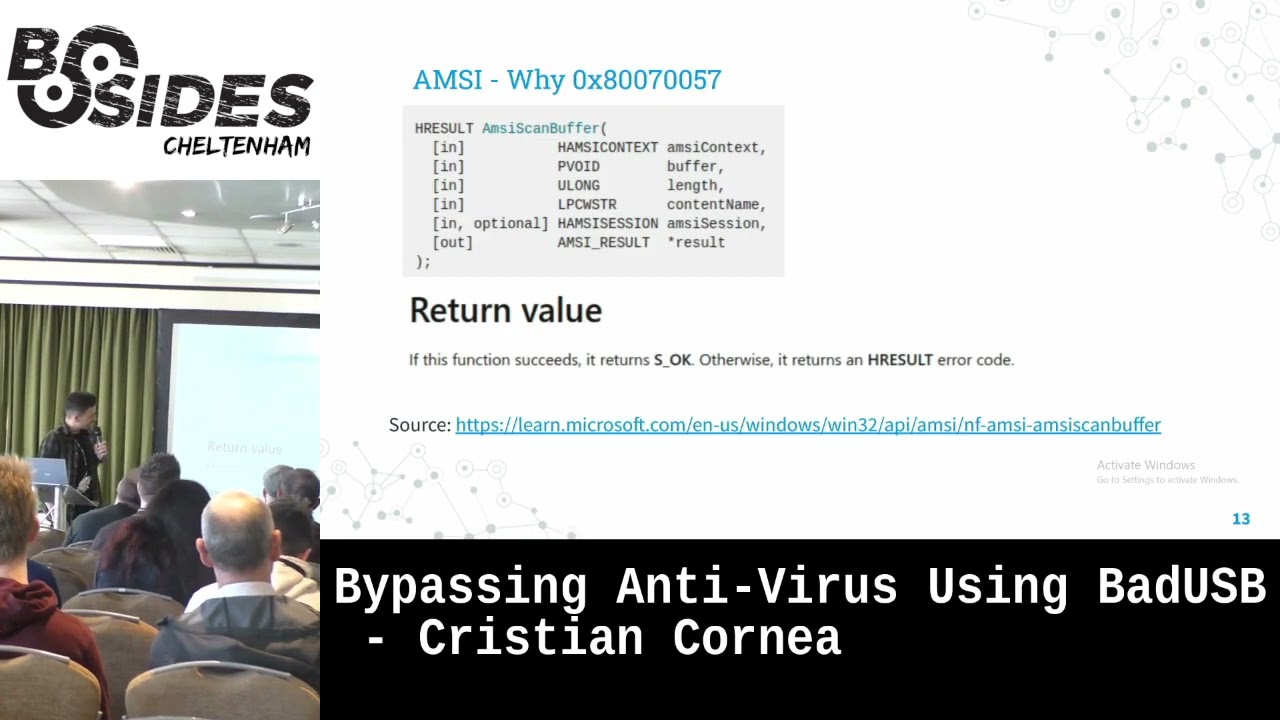 47:19
47:19 22:23
22:23