A Technical Evaluation Of Real-World Passkey Security: Why They're The Best Chance We Have
Show transcript [en]
Cool. Good morning everyone. So here here to go through a threat model for pass keys. Specifically I'm hoping to answer for you how do pass keys compare to existing or methods. To cover that uh I'm going to be doing a bit of an introduction. I'm going to be scene setting around credentials. Um part of this as you'll see is just how complex it gets with all the options very quickly. So there's some definitions needed. Um, I'm then going to walk through the threat model for a credential life cycle and finally finish up with, uh, NCSC's work and how you can help if you want to. [snorts] So, by way of introduction, um, I'm Dave Chisman. I'm the technical director for
platforms research at NCSC. We're the commodity tech research team. So, we look at cloud end user devices, commodity hardware, and um, you might have seen our work as such as things like the cloud security principles and the uh, end user device config packs. Um, for those who've not come across NCSC, um, we're the National Cyber Security Center in the UK. Our mission is making the UK the safest place to live and work online, and we're part of GCHQ. Um, because of that, feel free to take pictures of the slides. This will be recorded and available online, but grateful if you don't post any photos of myself online. Before we talk about what NCSC is, it's
probably worth quickly touching on what NCSC isn't. Um, so firstly, we're not a regulator. Um, we can't impose fines. We can't you know tell in you know tell sectors etc what to do. Um we can't make laws. So if we want to um influence a law ask for a law we have to work with a policy department like DIT. Um and uh we also don't have some of the powers that our US counterparts have. We can't issue binding operational directives. So NCSE has no powers at all to turn up and tell people you know you've got to do this, you've got to add multiffactor, you've got to do anything at all. You might reasonably be asking um uh okay so uh
like what can you do? And um we do um so one thing we can do is like truly deep technical research. We have um you know absolute world experts. Those experts have the time the uh the the infrastructure the things they need to look at big problems and look much deeper than other people would be would be able to justify going. Because of that we're the national technical authority in the UK which basically means that whilst we can only advise our advice is taken very seriously and in many cases our advice just ends up copied into regulations and things like that. I think one of our superpowers though is that we can talk to anyone. So something
I love at NCSC is that we can engage with uh vendors, academia, individual researchers, uh we can engage with government, foreign governments. Um we have this ability to just go out and you know whoever's got the answer, we can go chat to them. And I'll be talking a lot about this more later, but for NCSC, pass keys have become kind of a board level activity. A whole NCSC is working on this. And our mission is accelerating the UK adoption of pass keys um through research which I'm here to present today uh engagement uh across the industry and and having direct impact as well. So let's do some scene setting. I'd hope it's fair to say that we're all
worried about passwords as defenders. Um so pass passwords are the only security control which gets their own world day. While checking that this was true, I discovered that it is national automatic door day. But there is no patching day. Um, NCSC would go as far as saying that the majority of cyber harms to UK citizens happen as a result of abuse of legitimate credentials. So fishing, credential shuffling, brute forcing, all all these kind of good things. Um, I would actually go further back. I would say that passwords were a mistake from the very start. So a colleague at cabinet office, Dr. Charlie Smith, pointed out to me that passwords were originally meant to be shared. The whole
point of a password was you have a fort or you have a club and everyone who's allowed in, you tell them the password, they share it and then they they say it when they want to come in, you rotate it, you know, every time you think it's been compromised. And so you've got you've taken something that was meant to be shared and then we've used it to try and protect a digital system. And in the bottom right you see the first computer in the '60s in MIT where they tried to use a password to protect a digital system. Also shown in the bottom right is the first time a digital breach happened because of a password. So the
very first time we tried passwords as a species, they failed and we've been doubling down for about 60 years. Let's talk quickly about um specifically why passwords are bad. This is going to come up a lot. Often predictable um people picking poorly. Fishing is going to be the big one we'll talk about. And they're also constantly reused and we'll talk a bit about that too. Now so passwords, okay, there's a lot of pain there. It's not good. What do we do? Well, let's make users have bigger passwords, longer passwords, harder passwords. Then that's really difficult. So, let's try and do something like three random words and make it easy for them to uh remember. NCSC, we do a lot
of um surveying and like throughout the year to see how our advice is landing. And a pattern that's been coming out in the last year or so is that people do know how to create a good password. They just don't want to. They would rather use their password that they know and love. And this was tricky because we were working on the assumption that we just needed to tell people, you know, as soon as they heard the good word, they would do it and they do not. So, we've tried to add things to passwords. We've added um codes by SMS and email, TOTP codes, RSA, you know, physical TP uh pop-ups, all these things we've added,
but they don't actually solve the problem because all of them are fishable. So, you've not actually solved like the the core issue. [snorts] Something we're seeing a huge uh uptick in is the um prevalence of attacker in the middle kind of techniques for fishing. And so for those who are not familiar in regular fishing, you get an email, go to a page, log in, attacker keeps your credentials and tries to log in. As long as you have MFA, and you know, you don't have one where the attacker just keeps trying to log in and you eventually get tired and click approve. Um then you're probably okay. But attacker in the middle, um the attacker sends you an email which
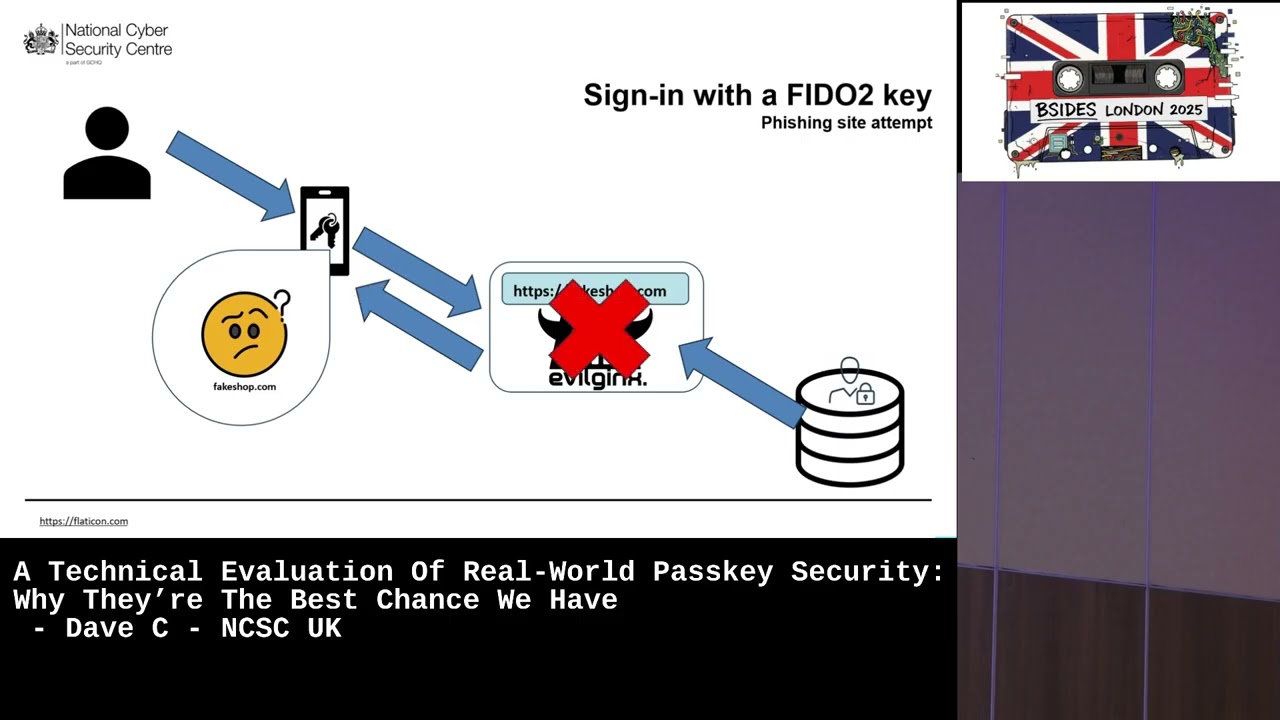
directs you to a website they control. um the website is going to probably be running uh evil jinx um sort of the the tooling for this. Now the diff the difference here is that when you go to login at the same time it proxies it and it goes to login to the real site. So when the real site requests a second factor it proxies that back to the user the user completes it and the uh attacker in so it completely bypasses um the you know all all forms of traditional second factor um and this like is a real technique that is out there. So, um, I thought this was excellent by Troy Hunt to publish. For those who don't know Troy
Hunt, I would argue he's one of the sort of leading lights, leading thinkers on password security. He runs Have I Been Pawned? And earlier this year, he got he got fished using this technique, using kind of attacker in the middle. And he was really good about admitting that, you know, if even he, you know, the world expert can do it, all of us can. our colleagues in Canada, so kind of our um Canadian equivalents recently published this paper in October which shows that um over the last year there has been almost a complete replacement of traditional fishing methods with um attacker in the middle techniques. You know, it truly is um a surge and I don't
see it ever going backwards. I'd like to cast some of this in the lens of one of my favorite security laws, which is the Levy theory on the conservation of pain. Uh Dr. to Ian Levy for those who haven't met him is was the previous CTO at NCSC and a theory of his which he sadly never wrote down was that security pain can't be destroyed you can only move it so we've got pain here you know we've got systems passwords don't work and the problem with levy's theory points out that the problem is if you don't choose where you move it you always put it on the users so we just add more pain to the users we add you
know harder password change them every 30 days add second factor third factor and we just keep doubling down on the pain on the users The alternative to this is to acknowledge the situation and take the pain yourselves which is what Fido did. the fast industry online um uh not for-p profofit industry alliance was like this is a problem let's sit down let's do huge amounts of effort let's develop protocols get it in devices get it on website you know huge amounts of effort have gone into this very complicated protocol to try and take the pain from users so a pho like you might you know UB key or titan key or something like that when you go to use one you go to
website uh website says like yep let's get you an account um the authenticator checks that it's you by however you authenticate to it. So maybe a PIN or bio or something. Um then your authenticator creates a uh public private key pair. Those are bound to the domain of the website. It then sends the uh keeps the private key and it sends the public key to the website. When you come to log in uh similar, you rock up, you say, "I'd like to log in." The website has your public key. It creates a cryptographic challenge. I kind of shown it here as a gauntlet, like a knight throwing down a gauntlet. Um, you then your phone's like, "Oh, yeah, I do
actually have a private key for that uh uh for that site." So, um, it authenticates you by however you authenticate the device and signs the challenge and you log in. Now, the reason this stops attacker in the middle fishing or is deeply fishing resistant is because let's consider it in this scenario. You've been fished. You go to the website. The website says, "Oh, let's log you in." Now, it doesn't have your public key. So there's nothing it can do to create a challenge. But let's say they either make up a public key or another website has leaked its public key so they have a valid public key for you. Um creates a challenge goes to your authenticator. The authenticator
goes I don't have any private keys for like for for evilside.com um for like evil shop. So there's nothing I can do to meet the challenge and so uh the the login doesn't complete. And that's 502. That's how that works. Pass keys um I would argue are an evolution of that. So rather than needing specific hardware, um you have commodity devices that you already have, phones, laptops, and a crucial element of pass keys to me is that they sync. So the pass key, you know, if you've got multiple Apple devices, we use iCloud. If you've got Google, you use your Google account and your pass keys appear on your your different uh your different platforms.
[sighs and snorts] Now, something we've learned throughout this process is that like 502 is is inherently it's a really good protocol. It's very secure. It's deeply fish resistant, but that doesn't sell to most people. Almost everyone we talk to who's running websites is like, "Eh." [snorts] So, um, what does sell is, um, like speed. A login with a pass key. Microsoft showed that across their billion consumer users, it takes 68 seconds to log in with a username, password, and SMS. With a pass key, it takes 8 seconds to log in. Um, success is higher as well. average success on on uh multiffac traditional multiffactor login is around like 80 fair 80 to 85% depending on website for pass keys it's
it's almost always north of 90 um in 90%. It also saves money. Um, so NHS have found that since rolling out pass keys, they haven't they've yet to find a support ticket regarding pass pass keys. So like they're already saving money on that and and SMS. So NHS actually has to pay a fair amount of money to send all those like you know this is your SMS code that's now saved. So you know there's actually like millions of pounds of savings of on the table for organizations who are doing SMS or and it's a lot easier for users because it docks into the operating systems. People with cognitive impairments, physical impairments often find pass keys much
easier to use than traditional. Um so now we're going to set up some definitions because the next section needs some like really tight scoping for us all to be on the same page. So I'm going to be talking about 502 authenticators which is anything which does 502. that includes Ubi keys, typing keys, um, uh, Windows Hello for Business, etc. [snorts] When I talk about pass keys, I'm explicitly talking about commodity tech that syncs. You will see these terms differently used out there. I have seen pass keys used to describe any 502. I've seen, you know, subsets, but for the talk, this is what we're saying. I'll also be using the term traditional multiffactor, and those
are all the uh, all the things on the right. I want to quickly baseline on attacker capability as well. There's a really nice paper by Rand which looks at attacker capability from an economic model I how much money can attackers throw at a problem and then they kind of walk through different types of attacks and I want us to fix on the for the moment let's fix on the lower end so amateurs and professionals and these are the sorts of attacks that rand uh see as valid and the final definition I'll introduce you to is um the sort of threat model architecture we'll be using which come from our German counterparts at ESI and you'll be seeing this diagram
and we'll kind walk you through it as as as we go. So, right, we're set up. Let's go through a credentials life. Um, first off, you've got to create a credential. So, in this case, you have a user device. You've got a client like a browser. You might have a security key. The internet is evil, dark, and untrusted. And then you have the relying party, which is the website you want to work with. So, first off, you need to establish a trust relationship. You need to set up an account and set up credentials. Now, for traditional MFA, the NCSC surveying the vast literature, like there is tons of evidence that pretty much everyone just uses the password
they they know and love, maybe with a variation on it. You know, they might include the name of the website or or something like that. Um, a upsettingly small number of people do something like use a credential manager or use like a more advanced pattern. And I would say perhaps a challenge we have in the security community is that whilst the vast minority at kind of population scale do this, I think probably the majority of people in the room and in the community do this. And so we can have a bit of a dissonance in how we how we engage on that. Um but let's say they use credential manager. You then hopefully have a second step and second
steps are likely going to be something like um a code by SMS or email um TOTP, RSA token, etc. So that's the that's the process of creating your credentials for 502 described earlier. You've got different pho authenticators through the magic of maths. Uh you end up with a uh public key on the uh on the website as I described as I described earlier. So if we consider the sorts of attacks that become possible at the moment of creation, there's a couple from the chart that worth talking about. We'll talk quickly about brute forcing. Um, for those who sort of follow Grey Noise and others, there was just a drum beat on the internet constantly of of people
trying to brute force passwords, typically very weak passwords. So, if it's incredibly weak, might get lucky. [snorts] Um, the more dangerous attack is what's known as credential shuffling where one website has had all their users breached. Um, attackers will take username, password, and then just spray it and see where else it's been used. And because of this recycling, um, that's incredibly effective. That does work well and leads to a lot of breaches. So TMFA is is is vulnerable to those things. Um [clears throat] pass keys are not they are large cryptographic keys that just cannot be brute forced or you know certainly within the realms of like this universe. Um and they are unique to each website
and hard bound to um to the website's domain. So they can't be shuffled. If you have a website you know you can have a major website that loses all of their all of the users accounts and pass keys. Um it doesn't help an attacker get into any other account. Um, one thing I wanted to touch on here was I'll have a few case studies that you might have heard of as we go through. This one um was quite big at Defcon this year. Um, it was kind of pass keys poned and like if you break down what their attack actually was, they were sort of saying that if you had a um a malicious browser, then you could
have an extension in the browser that once a user had logged in with pass keys, the extension tweaks the HTML and says like, "Oh, you need a new pass key." starts a new pass key flow and this time stores the pass key in the extension where the attacker has access to it and um you know now the attacker can can pull for it off. I must admit I'm I I don't lose sleep about this one because I would say that like I'll be having takeaways in the corner and bring them together at the end but if your browser or your device is compromised then there are things pass keys can do to help but like they're probably going
to be able to socially engineer you at some point. There'll be there'll be something an attacker can do if your your browser or your device is is untrustable. Uh so let's talk storage. You've got a credential. You need to put it somewhere. Um two threat models come to mind here that are important. The firstly is where the device gets malware. So you have your credentials device compromised. The second one is where someone you don't trust has access to your to your device. So how is storage done traditionally? Well, if it's your favorite password, you just remember it. Uh you might use a password book. Perfectly good way to store passwords. You um maybe use a
credential manager on your phone or on your laptop. This is where we start getting some of the nuance. So depending on the credential manager, they might just be storing all those passwords in a file on disk. Uh they might be adding encryption on top of that file or if they're particularly welldesigned and you you see this with first party credential managers, they use the operating systems kind of hardware protections to to protect it away from the OS. So on Windows, Windows Hello for Business or data protection API is used on like you know Mac OS you've got like keychain and things like that and you know it'll be kind of away from the OS. Um then where the second factor is
stored it will be an email account it'll be in a on the phone you know the TOTP will have um uh a softwarebased TOTP um will be we're getting kind of stored on the device and an RSA key is an RSA key. [snorts] Um so 502 is kind of similar to the credential manager case. So it the keys will be stored either on a physical key which hopefully you know you might have bought one that is validated and you know you you have some guarantees or some proof that it's not going to have the key extracted. Uh maybe it's stored on the device and then you get into the same thing as the credential manager
like is it just storing on a file? Is it using kind of the operating systems protections to store that key properly? So in terms of the threats you need to worry about the big one here is info stealers. Um this is something again we're seeing you know upticks at NCSC and we're seeing a bunch of breaches as a result of them where malware gets on a laptop uh Windows or MacBook and then is able to lift uh browser passwords session cookies but you also see them grab um file vaults for password managers. So you know them anything else that is in the password manager file vault will will be lifted as well. I want to touch on phones. So to my mind
I don't see a you know might be proven wrong. I don't see a risk of info steelers on phones for the simple reason that like on a laptop you can run arbitrary code when you run a program as a user it has access to everything else you have access to a user while out of the box an Android or iPhone device that's not the case it's very hard to run like arbitrary code on there can sideloadad but even then you've got the permissions model so one app you know can't introspect the the storage of another and so you know um I think you basically only got to worry about state level or no one with with with phones
you know someone can if there's a state is something like Pegasus then yes they can maybe get onto a phone but otherwise not really any other threat actors you have to worry about on the phone while on laptop you've got a huge range of threat actors to worry about something we've not seen yet but I think is possible and will probably happen at some point is a report that a credential stealer has stolen pass keys from a credential vault by a third party credential provider so there'll be you know you'll be using a you know Dave pass or something like that and it'll have stolen the the the vault and the pass key was in the vault and there'll
be a big story about infest dealers stealing and stealing pass keys but it'll explicitly be that that scenario. I think >> what I think is less likely is um where pass keys are protected by hardware. So where they are using DP API where they are using uh you know keychain all that kind of stuff. Um that is a whole extra level of difficulty and capability. So I'm I'm I'm I'm not convinced we'll see that anytime soon but um but we I'm pretty sure we'll see the first article. Other [snorts] one to touch on here is device theft. Um, obviously if you've got like PIN, password, etc., then someone stealing your device shouldn't give them access to any of your your
pass keys. Um, there are probably a few exceptions here. So, weak weak PIN, obviously a good one. Um, there's also the coercive control and um sort of domestic abuse scenarios where the adversary effectively has the has the PIN and is able to use use the device, which is one worth considering in this scenario. Um, the takeaway here is that you probably want to make sure you choose a well-designed authenticator and credential manager. you know, if someone offers like Honest Dave's credential manager and you know, it's free and you maybe get a voucher for something, I wouldn't I wouldn't use it. Um, synchronizing. So, this is one which people often worry about with pass keys. So, the credential is actually
synchronized off device to a cloud service. So, it can appear on your other devices. Um, you'll notice I've crossed out security key here. They can't export the keys. So, they inherently can't sync. Syncing is often thought about as a pass key specific thing. But one of the points I want to make is that there's actually if you squint there's basically like an analog in the traditional MFA space. So for part the password itself it kind of syncs because it's in your head like wherever you are you've got your password. Um it syncs by carrying your password book around. Let's say you are using a credential manager. It's probably cloudbacked. You can run something like key pass on your own um
own stuff but as soon as you put that in like a one drive or something then you know now it is effectively synced. if you're using a cloudbacked one like you know if you're using iCloud Google account it's being synced it gets funny with um second factor so whilst SMS tends to stay on the phone um email will be available anywhere you've logged in I have my email on my phone on my laptop on my uh tablet and so it's email tokens are effectively being synced as well um TOTP will be being synced if you're using a software that that supports TOTP um seed syncing in the cloud so that can be synced to RSA
keys obviously not and um uh push notifications I'd argue not to for 502 um yeah keys pho tokens on devices they won't be syncing but pass keys uh pass keys will be syncing so let's talk about what threat that actually um brings in because this is something where I noticed people can worry the first one is obviously that now you can attack the sync fabric that if someone can fish their way in or hack their way into the sync fabric then they could get all of your all of your credentials So that is obviously um a new threat that emerges. Um however like um you you can uh just have fish resistant or on that provider. You know
if you pick a good provider and if you use fish resistant authentication to your sync fabric then you're in a pretty good place. Um and I would also argue that in many cases what's being done currently today before pass keys is effectively syncing and is kind of like vulnerable to this technique as well. A minor risk that's worth being aware of with syncing as well is because it appears on your different devices, you might have a different threat model for each of your devices. Maybe your phone only you use, but your tablet your family uses and you know the kids have access to. And because of syncing and because it's tied to being able to
unlock the device, um suddenly anyone with access to the tablet now has access to the same pass keys as in your keychain if you're, you know, if you're doing a a syncing thing. Sharing is a niche case. So sharing, you basically give it to someone else and they get their own little kind of graph that pops up um on this um sharing the old way. You tell someone the the password, you send it in a WhatsApp or signal, you email them the password, you know, easier way share, you let them see the password book. Um and then uh maybe if you're using a credential man, password manager, maybe there's a proper way to share, but a very common way of
sharing is you actually log into someone else's device. So you go around their house, you log into their TV with your streaming creds, and now they have an active session, and as long as they weren't running a key logger, they hopefully don't have your your credentials. Photo um there's no real way to share um any of the sort of devicebound ones. Some credential managers let you share. So Apple will let you airdrop a pass key to a contact that is physically near to you. Um some other credential managers will allow sharing but with Pho the kind of the model they intend for sharing is the same where you you log into someone someone's device with a pass key in such
a way that they don't get to see the pass key. Uh how you might ask? Um so there's a thing called cross phto cross device or you might have seen where when you try and login it will say like login with uh a pass key on another device or login with an iPhone and you get a QR code. The phone scans the QR code. The two devices find each other over Bluetooth. This proves that they're physically close. And this is the main um uh protection against fishing because you need to be physically close enough to Bluetooth. Um and then they agree a server over Bluetooth and then they do the full login exchange through the
server in such a way that the laptop ends up logged in with a session token but the they never saw any of the uh any of the pho bits. Um there is some hypothetical attacks here. There was something from I think it was Usenix's conference earlier in the year where someone built a sort of a captive portal that started one of these flows and then was also Bluetooth and kind of proxied the Bluetooth off to the attacker. Um that was fixed by um changing how all the operating systems handle the pho URL kind of handler scheme. And so that one I believe is fixed. Finally we get to the big one logging in. So, yep, as we see here, the the model
we've got used to. Uh, yep. And, uh, logging in. I'm sure you're all reasonably familiar with how this works. Type in password. Maybe you have to get out your credential manager. Maybe the browser extension hasn't reckoned the websites. You have to recognize websites. You need to go manually find it and put it in and hope it wasn't a fishing site you just put your password into. You then do second factor. Um, pho, uh, as I've talked about earlier, you've got this sort of key thing. And a point I just want to dive in on again is that um it checks it's you before it au approves the connection. So the phrase we like is however you unlock the device um is is
how you approve the authentication. And because of this it's NCSC's position that a 502 authentication where user verification has been set is multiffactor. Um you have the uh what you have you have the key stored in the phone secure element. You have the thing you are you know you've done bio or you're using a pin. the thing you the thing you know um it was this is also NIST's position in the US so the American like body NIST so if you're someone who kind of likes to doctor regulations and NCSC say it n say it you know I I would hope we're we're able to sort of say this not an NCSC position but a Dave position is that factors are
an outdated way to approach the problem that kind of come out of that 60s thinking you know if you think about the modern world I'm on my iPhone I go to a website I my password's in my password manager so that's there my uh uh SMS comes through to the same phone like it's all the same device like how are those really different factors like to me what's important is properties so you know I want an authenticator that is fishing resistant that is you know unguessable you know and so one thing um we're thinking a lot about at the moment is you know do we come and directly challenge this idea of factors and multiffactor and instead think about you
know what is a strong authentication so logging in the main threat is fishing uh including attacker in the middle stuff um we've kind talked about like how that can be uh how that works and hopefully I've made the um made the conclusion that like traditional MFA is always vulnerable to this but FHO is never vulnerable to this. Um so let's let's look at some case studies. Um one of the big ways attackers are getting past Pho is um through downgrading to a um to to a non-fishing resistant method. So there's a good paper from push earlier in the year where um attackers are basically saying, "Oh, you've got a pass key registered, but you've also got
a username, password, and SMS." So um like uh we'll just trick the the system into thinking only oh they've not got their pass key, so let's let's have them do a fishable uh authentication. And that's that works pretty well for attackers. Um the takeaway is probably that passwords and pho are great, but you're not truly safe until your account is fishing resistant, until you have no fishing vulnerable methods kind of on the account. Um, we're not pushing for that straight away. NCSC see this as a journey. You know, we want to help people get pass keys first, then default to pass keys, and then, you know, down the line get to, you know, um, uh, get
to account fishing resistant accounts. A far more interesting case study though in terms of like Pho, which I think kind of got slept on, like it didn't really get like seen by a lot of people, was this paper by some Italian academics. Um, and their attack is pretty complicated, and I'll try and like walk through what it is in a uh, just now. So what they did is they take a relying party and they look for and they find uh exploitable cross- sight scripting in that relying party. So they can now replace the HTML with whatever they want. [snorts] Um they find explicitly a um what's the word a reflective cross-sight scripting. So they send a
user a link which the link contains the exploit for the reflective cross-sight scripting. So the user's browser is visiting the relying party. the TLS is good, the domain is good, but the HTML has now been interfered with by the crosset scripting. [snorts] Using that ability, they then um inject they remove all of the web page and they inject um a uh a connection to um a brow a VNC session running their own machine and their own browser. So the user sees in their browser the domain is correct, TLS is good, fine. It looks like the website, but that website is actually a VNC session to the website running in a different computer on the user's browser
because all of the searchs are good because all of the domains are good. Like this pho doesn't have, you know, this works, you know, like this this this this works with all the and it's one of the reasons we say PHO is strongly fishing resistant rather than like fishing proof cuz there will always be like weird like edge cases here. Um, they do some really clever work with websockets to make the pho stuff like all join up. Um, and uh and and yeah, the the attack works. Now, if you squint, this is basically the browser and browser style attacks that you might see in other places and something I would kind of if I was to hazard a guess
if I were a betting man, we'll see more of these sorts of attacks as people work out how to apply browser and browser style approaches to to this problem. Um, now the solution here and um shout out to James Kettle kind of for for some of the the help on this is that effectively cross-hatch scripting protections um on the website side become really important. Um so things like um trusted types, content security policy, you know, all these things to just make exploitation really hard even if there is cross- sight scripting. Um yeah, and so so I think yeah, we think that becomes then then really important. I I would say though that this is not
easy. You need very specific exploitable conditions and so I think this may be where attackers go in the future rather than you know don't don't run home. [snorts] Uh finally recovery. I'm leaving out a couple of other steps like um create uh credential deletion and and uh you know other things. They'll be in the uh the paper that's coming coming out, but we'll talk about recovery finally um where yeah, you need to recover. For traditional MFA, it's always an email link, maybe a code by SMS. So, you know, you've got all this excellent security and then it all comes down to, you know, yeah, can someone access your your your email or or receive an SMS? Um and
obviously SIM SIM swaps are a thing. Um, if you are using a credential manager, then you might be able to get back into your credential manager account and that will uh give you access to your passwords, but you've probably lost your second factors if you were uh um if you've lost your device. So, you're probably going to end up doing a a traditional account reset flow. For pho2, um for any of the devicebound PHO credentials, um yeah, you're going to be doing an account reset flow as well. So unless you've done something like bought two security keys and kept one in a safe somewhere, then you're probably going to have to recover each account that you you had a credential
for that was device bound. But with um pass keys, the whole point is they synchronize. So as long as you've got another device in the sync fabric, then you still have all of your credentials. So if you've got like, you know, um you know, an Android uh phone and Android tablet, you still got all your creds. Um, if you only have one device in a sync fabric or you lose all of your devices in a sync fabric, then you need to go through a recover uh account journey for the sync fabric, reenroll a device, and all of your pass keys and will will trickle in and now you've got access to everything again. So, let's compare them um like very
similar um with the difference that um I would argue that pass keys make it significantly like more likely you never have to recover an account. So if you're using pass keys and particularly if you've got multiple devices, you probably don't have to worry about an account recovery ever. Um attackers though, I think this is where attackers will go. Like if we start to get pass keys out there, if we start to remove old methods, if we actually make progress on this issue, um attackers need to go somewhere. And to me, this feels like the likely one. So um so I think there's going to be a lot of work needed to think about like recovery
flows and how to verify people um over the next few years. So, let's draw all of this together into a comparison. I'm hoping I've made the points today and that you would agree that for real world use cases, I think 502 um and pass keys are um equal or better at every single attack in every single stage as traditional MFA. [snorts] Um I think, you know, I've met people with kind of like I very genuinely met someone recently who told me that their password to their uh their email was a 64 character password that they had remembered over several years. um and uh that they uh that they were using kind of triple factor because they
had uh they SMS and they'd uh got um I think it was like TUTP but like it's still fishable like the worst pass key is still better than that you know that very complicated approach um so I'd say the reason I think this is because traditional MFA is always fishable inherently there is nothing you can do about that and pass keys are always strongly fishing resistant and that is just kind of out of the tin [snorts] um NCSC would say that 502 2 plus user verification is MFA. Um with the note that uh Dave has views on factors and uh pass keys or other devicebound uh sorry pass keys over devicebound pho authenticators offer resilience but give
you an additional attack vector. Now if your security model is you're like no I need my attack vectors like as down as possible then yes you maybe want to go to like device bound you might be want security keys and then you have to handle the resilience issues. So, buy a couple, put one in a safe, you know, all this kind of stuff. But that would be my premise. Um, to bring together all of the lessons that I've kind of had as we've we've kind of gone along kind of ordered into now and future. Um, for right now, I'd say that um if your brow like always bear in mind if your browser or device
is compromised, if you've got a malicious extension, if you've got malware, whatever you're doing, an attacker can probably do something to get into your accounts. Um, you probably want to make sure you pick a well-designed authenticator and credential manager just because there's a lot that can go wrong there and so you want one that you've got some faith in. Um, and you want to have fishing resistant or on your sync fabric. That is something I would probably say do today if you you don't you know like Gmail has it, iCloud has it, Hotmail, any any kind of email account and sync fabric will offer this. I would say that's the thing to go do [snorts] for
the future. Um, I think past keys will mean we have to do less recovery and maybe that changes how we do recovery. um I think attackers are going to go there and uh cross- sight scripting protections will become I think more important. I'm going to close quickly by talking about just what have NCSC been doing in this area. So um as I mentioned this is a whole of NCSC effort. So um every single uh department within NCSC from coms to operations to resilience you know we're all all working on this and thinking about how can we how can we accelerate adoption. You hopefully made the case for the harms we're seeing and that this really does seem to be a good
solution. [snorts] We have spent um a huge amount of time understanding the tech. So we looked at the crypt. We've looked at the underlying um implementations on platforms. We've looked at the the defaults and worst case scenarios for all the major sync fabrics. We've looked at the sociotechnical like who gets left behind if passes become a thing. You know what groups might it kind of disenfranchise. We've looked at vendor, you know, like we have um we have kicked this thing around for a while. Um as such the NCSC's official position as an international technical authority is on the left. Pass keys are the future of authentication. We acknowledge they have some rough edges mostly in user
experience. Um but we think that's solvable. Um there's a blog we've got which kind of lays all this out. We have been engaging frantically. So we've been working with all the major vendors. So like Apple, Google, Microsoft, Ubico, Bit Warden, Dashlane, you know, you sort of you name someone in this and we've been talking to them. Um we've been talking to a lot of RPs to kind of understand like why would a website offer it? Why wouldn't they? what are they like what are their um their sort of experiences of having done so. Um something really exciting that's come out of that is we're starting to collect stats and data and Google shared with us that um the UK is uh leading the
world in terms of active login with a password. So, you know, with a pass key, sorry. So, um, yeah, UK, you know, yay, we're we're already sort of like slightly ahead on that one. And we're working with both UK gov and international govs. And I shout out to NHS. If you haven't tried it, the NHS app, uh, I think pass keys are coming to the NHS app, but the website has had it for ages. They were the first government organization globally to offer pass keys, which I think is another really like awesome UK win. Their pass key journey is exemplary. Like, I think it is honestly how everyone should be doing it. And, um, they have seen so many
benefits from doing so. We've worked with central government. So, one login, so the authentication system where you go to, you know, pay your driver's license, do driver's license or tax or whatever. Um, they're working on it as we speak. And in early new year, you'll be able to log into government services with a pass key. [clears throat] Um, we're putting into NCSC schemes, so Cyber Essentials, um, things like GPG44 will very soon recognize pass keys as like a first party citizen. You know, it'll be like if you're doing authentication pass keys and here are some other options. Um, we've also been drinking our own champagne/ eating our own dog food. Um, so NCSC's own services
are rolling pass keys out soon to our our sort of external facing services and um, all of our all of NCSC's IT is we we all log in with 502. Um, a few of us are on password list as well and we believe we're the first department certainly in the UK to be 502 on our on our user fleets. [snorts] We're working at the moment quite heavily on guidance. So a security paper will come out in early new year which is basically this talk but but better. Um, we're working on implementation guidance to make it really easy for websites and apps to offer pass keys and we're working on board collateral to kind of sell the nonsecurity uh nonsecurity
benefits. We'll then be pushing this out and I'd be super grateful. This is definitely somewhere we need the community's helpful. When you see this stuff, you know, get it in front of people, tell us if it's not scratching the itch. Um, you know, just, you know, help us kind of have this conversation and, you know, just get as many websites as possible to offer it. Our thesis is that pass keys are so easy that once websites offer it and make the UX really good, people will just be using pass keys without realizing and you know that's the way to kind of get these out in scale. We do need to make sure people feel comfortable with pass keys and so
we're going to be doing more coms around pass keys you know help kind of you know average people uh sort of just feel safe and understand them. And finally we're working a lot more with Pho themselves to kind of try and buff out some of these rough edges. and we're working with kind of international partners um just to yeah is there areas we can kind of work together on this. So to summarize um please do consider offering 502 or pass keys to your users. Um please try them yourselves if you're not if you're not already. Um and you know do do you know grab me let us know how can we make any of the above uh much
easier. But um otherwise uh you know huge thank you for your time. Looking forward to conference. I'll be around all day. Uh thank you very much. [applause]
Related talks
 28:37
28:37 44:16
44:16 43:44
43:44 44:07
44:07 14:38
14:38 14:37
14:37