Cloaked in Pixels: Concealing Payloads with Steganography
Show transcript [en]
welcome to my talk CL pixels conceiving P loads with technography um before I get into it want to say thank you for everyone coming to this talk um so yeah let's let's get on with it um quick agenda I'm going to start off with obligatory who am I introduct to myself and then going to move on to an introduction to what stenography actually is what is this talk all about and I'm going to mention a few cases in history where stenography is being used to to achieve some objective um and then I'm going going to get to the heart of the talk which is a a proof of concept um Shell Code encoder and Runner I wrote
um a little time ago I'm going to explain the code and do a semi live demonstration and and then I'm going to switch seats move to the blueing side and do um an analysis analysis of a few samples of malware that abuse uh stenography or evasion so um who am I I'm Ben I go by the online handle polygon Ben I've got links to two blogs there and a YouTube channel I upload um CTF walk through sort of things and Mar analysis occasionally um in my full-time job I'm a senior Analyst at Accentra in sock um and I got into security around um when I was 14 or 15 there was a government funded scheme called cyber
Discovery there me there at one of their s of in real life CTF events um so yeah what is stenography the word itself um originates from the the Greek words stonos and graphia and that roughly translates to covered writing so that gives us sort of an idea what what it really is if you look at the official definition steganography is the practice or the art of concealing information within another message or another physical object or another medium um with the aim of avoiding detection so um let's have a look at a few cases in history the first ever recorded use of stenography was approximately 500 BC there was um a Greek ruler called hisus which I probably messed up pronunciation
um he was the ruler of a city called meatus and he was being held captive against his um cap he was held captive by King Darius um in a Persian court and he wanted to send a message to his son-in-law um Aristocrat um to tell him to start a revolt and start a revolution um but he couldn't afford for um this message to his son-in-law to be intercepted and to be read in the plan to um to fail so he got his most trustworthy slave shaved his head um and tattooed the uh the slave's head and let it grow back and then s the slave on his way um to deliver the message to start
the Revolt um if we go forward roughly uh 2,000 uh 2 and a half thousand years um we get to around Nazi Germany time and um German spies were abusing micro dos to uh smuggle photographs or documents on benign objects a micro do is uh a downsized photograph it is incredibly small literally the size of a a DOT can be small with 1 mm in diameter and um they had a fancy Contraption of lenses and it downsized a regular document onto let's say a doll or a object a letter and um it was used for Espionage to carry documents across borders um in an attempt to stop evasion uh um in in an attempt to stop uh it
being found or detected so we've got two cases so far one involves stenography to send a secret message and the other is used for um Espionage the remaining of this talk we're going to be talking about digital steganography um this is a subset of steganography which really only involves um embedding data or a secret message or whatever within a file and the context we're talking uh about digital stenography is is um malware or malicious code being embedded within an image um as an attempt to obey detection by antivirus so um that's what digital technography is um if if you're creative enough you could use any particular file type for stenography however um in the wild we see certain file types are more
prevalent than others uh like PNG jpegs I haven't included it there but sjs um are quite prevalent as well as your like regular word docs office stuff um we see that quite a lot so I'm going to be talking about a subset of uh digital steganography and this is least significant bit stenography and um B technography abuses the fact if you've got an image and the image is made up of pixels and each pixel has a number or multiple numbers representing the strength of the RGB components um if you modify the least significant bit of each of those uh each fin representation of the RGB components of a pixel it doesn't impact the image it doesn't impact the
color massively and you can encode data in that if that didn't make much sense it doesn't matter I'm going to explain this in a lot further detail um because it's important to understand so I'm take a step back I'm going to ask the question how are digital images stored and I'm going to generalize here and I'm going to say they're made from an array of pixels um this basic the question what is a pixel how do you define a pixel and a pixel is um the smallest unit of a digital image that can be individually controlled or manipulated and when I say individually controlled and manipulated I mean can we change the color of it um and yeah they're
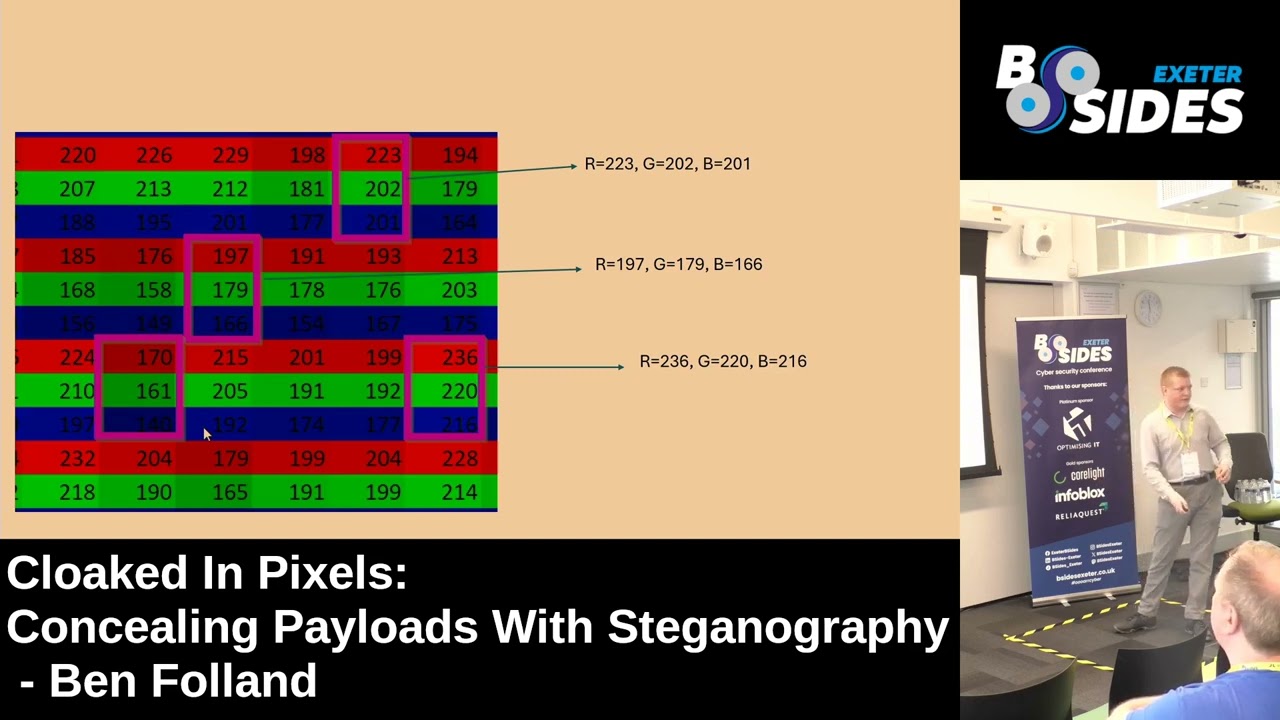
literally building blocks of an image if you have a high resol high resolution image it's going to have tens maybe hundreds of thousands of pixels and each of those pixels represent a singular point with a single piece of uh with a single color so I mentioned it again um pixels contain color information represented by a combination of values for red green and blue this is quite an important Point um there's a good analogy um of this sort of pixels and RGB and I'm going to show it here you can see there um we've got uh ex the cathedral it's a bit dark but you can you can see it is ex the cathedral we see this is open in
a Excel spreadsheet so what I'm going to do is I'm going to um play this and we can zoom into this um Excel spreadsheet and I do so and we can see this is um not an image it literally is an Excel spreadsheet just pause that um and what we've got there is a pixel this highlighted box you can basically think as being one pixel um and the pixel contains a number which represents the strength it contains three numbers which represent the strength of the red green and blue components so i' I've got another photo there each of these pink boxes is a pixel and each pixel contains three numbers um to represent the strength of the RGB
components um the strength can go from zero which is the weakest to 255 which which is the strongest strength so by the way that photo to spreadsheet um thing I showed you you can try it out yourself on this um link here um just upload a photo and you can it spits out the spreadsheet instantly um so to understand least significant bits technography um a very basic bit of binary is a knowledge of binary is necessary um very very basic what I've got here is a little web page I wrote um where it automatically converts from binary to decimal back and forth and it sort of shows you how it translates here so we've got the decimal
and decimal is what we C in this is um base 10 there is 10 symbols um 0 1 2 3 up to 9 UM binary is just another way to count but you only got two symbols available 0 and one um we can see at the moment we've got the uh the decimal number 157 and then we've got the binary um conversion of that which is 1 0 0 1 1 1 01 down here we've got powers of two starting at 2 to 7 and decreasing um if we start at the top here we can see we've got a one and that indicates we want to include this 2 7 power and then two zeros we don't want
to include two to the sixth the two to the fifth power um and so on and so forth what we could do is just play around with this and modify it and what I'm going to show you now is we can maybe change this one on the end to a zero and we can see it's 157 and it now goes to 156 and we can play around we can move it up and down um set it to zero it's all going to be zeros um or we can set it to the Max and there so at the max we've got eight conceptive ones um eight bits and it comes to 255 um if we change the last most right
hand side bit to uh zero this would go down by one so changing uh the most right hand side bit and it's called the least significant bit is going to have a small impact on the overall number in this case if we change that to a zero it would be 2504 so it doesn't make a big impact on the overall number um pixels I said it again I'm going to repeat it probably more times uh the color of a pixel can be stored as three numbers each number represents the strength of the corresponding red green and blue components and the numbers are stored in binary this computers understand binary um from the sort of minimum of
eight consective zeros uh to the maximum of all ones which translates to 255 so what we can do is we can got an another web page here which sort of demonstrates um how this RGB thing works what I've got here is basically an analogy of a pixel and then I've got the various components of RGB there um what we can do is we can play around with this um and let's say I want to change the red to zero and it goes to Black all our numbers are uh thing we can change that to Green it's only green and we can change this blue to Max and it's going to be only blue what we could do is we
could um potentially mix some of the numbers about and see if we can get a different color um and we can see after doing this we've got a pink color so what I'm going to do now is change all of these uh least significant least significant bits for the various RGB components and I want you to notice what impact this makes to the pixel color of the pixel so that was an originally one and it's now being changed to a zero and if I play this we're going to change the remainder we see we Chang the green one um and we change the blue one to a zero and it doesn't make a major impact on
the color and this is important to understand and once again here we've got two almost identical looking pixels and we've got the sort of the breakdown of the RGB components there all we've done is changed the least significant bit on each of the RGB components and it doesn't impact the color so if we've got an image which has a very large number of pixels and then with each pixel we can modify the least significant bit of the r g or B component um it doesn't impact the color of the pixel and by extension it doesn't impact the color or the overall image so what can we do with this we've got these bits here we can
change these least significant bits which we can change without um impacting the color the image um massively we can incode our data if you wanted to send a secret message we can encode it in binary using these least significant bits so least significant bits technography encodes the secret message or your malicious code or whatever you're encoding um within the least significant bit of each of the RGB components of the pixel you can see here we've got a a pixel here the RGB components and then the least significant bit on the right hand side um you'll notice uh you've got an image it's got a finite number of pixels um and each pixel can store three bits of data so
you can there's a upper limit to how much data you can encode and that is 3xy um because there's a total of um XY pixels and you can get three bits per pixel so three XY bits per image where X is the width and Y is the height in pixels um so get into the heart of talk now I wrote a proof of concept stenographic Shell Code encoder and runner in Python um this used least significant bit technography to encoder um encode the sort second stage pay which I'll get on to um I'm going to explain the code here I'm not going to do it in a massive detail I'm going to rush it so I've got two previous blog
posts linked there they go in uh quite quite a lot of detail explained in this and I've also got the source code there for anyone who wants to sort of play around with it on their own um I mentioned here this is just proof of concept this wouldn't be suitable for sort of a penetration test or um a r team operation and I'm a I'm a blue teamer so don't judge my code um so there there's two scripts incoder py and shellcode runner. py the encoder script um its job is to encode this second stage payload um along with all the things necessary to run this Shell Code um into an image that's the uh that's
this script's job this wouldn't be ran on your sort of compromised host your your target Host this would be ran on your attacking machine your Cali machine you'd want to sort of stage this image prepare the image for execution on your target host so let's break it down um here is the the the full script here first four lines or ignoring the import these lines here basically set it up so we can use it as a command line tool um I've then got this Runner string here and we import the C types module and we use uh quite a few different win 32 apis um this bit of code is uh so it's a string and inside the string is further
python code this string is going to be encoded within the image alongside the Shell Code this will be our basically our second stage payload that is executed on your target host on your compromised host um these lines down here we then read in the Shell Code from an external text file and then we combine the the Shell Code with and the Shell Code generated Ms Venom with these lines here and then we basically thr in code that and encode it within the image um we've got these functions encode LSB and text to Binary I'm going to go over these because um they're quite important um this is basically how we actually encode using this significant bit how we
do it in Python so the function takes three uh parameters as input image path plain Text data and output path image path is the file path to the image you would like to encode plain Text data is your secret message your second state payload which you would like to encode within the image and the output path is the file path which you would like the image to be written to once it has been encoded um we start off by using this uh image. open and this is from the uh pyth an Imaging Library here this allows us to basically surgically uh manipulate an image pixel by pixel um so we open the image we convert into RGB mode this
allows us to access those RGB components we then do some calculations to get the maximum data length um and then we call this function here text to Binary um it takes plain Text data which is your secret message as input uh and it is just plain Text data and it converts it to a binary string I'm going to quickly step through this um it's very basic simple function takes plain uh it takes text Data as input it then iterates through each character in this string um and stores it under the variable Char it then takes the or function of that to get the Unicode integer uh value for that particular character and then it uses format to
convert the unic code number to Binary AIT binary number um we then join to use join all those binary 8 bit binary strings together um so we got to this point here we then append a string of eight zeros what this does it acts as the uh end of the data so when we want to read this on our um other script when we want to execute it we want to know where does this sort of the data go up to and um we'll add a null character on the end so we can search for that when we're sort of um extracting and decoding it on the other script um you then take a copy of the image and store under the
variable encoded image this is the variable or this this is the image which is going to be modified and The Secret Message is going to be encoded within it we then get to the um where we actually do the least significant bit stenography um and I've basically got a triple nested Loop so I first of all Loop through uh all combinations of XY so all com combinations pixels um and then I use the image. getet pixel function to retrieve those numbers for the RGB components um we then Loop through each of the RGB channels to modify um well we modify the least significant bit and we modify it to be whatever our secret messages and
we've got this binary Index this basically tells us each time we encode a bit it counts up and if there's a check to see if we basically encoded all the data if we have the for Lo will stop if we haven't it will update the least significant bit um to what it should be um we then use theut pixel function to update this on our new image and then we save this so that was the script which takes your your secret message your second stage payload and it encodes it within the image this script um is the one which does the opposite it decodes it and then executes it um this one would only be run on your sort of
compromised host um obviously if you're doing a penetration test or whatever you wouldn't or a red team operation you wouldn't call your script Shell Code Runner um don't know what you but this one's a lot shorter and um it's got worse variable and function naming conventions um so we've got this function here b2t uh we had text to Binary before this one's binary to text and then I've got this decode function which decodes it um and then pulls out the plain Text data and then I've got some lines at the end here which basically run the code and execute the second stage payload so let's quickly go through this we've got this decode function it takes uh encoded image path
which is the file path of your encoded image um as input and then we open it we convert it to RGB mode once again to extract those um rgd component numbers we then do some calculations to pull out the width and height we then did what we did before and we looped through all pixels and then for each pixel we Loop through the RGB components and what we're doing here is just pulling out that least significant bit and then um I mentioned there was that no bite of eight bits um which indicate the end of our encoded data so we find that location we cut off all the data after that so we've only got our encoded data
and then we call the b2t at the moment it's binary string uh we convert it to a plain text string and we've got it so um you can see this decode function is called down here um and it's calling it for encoded image path which is set here to be po example PNG um this string to ex variable um once executed it contains our second stage payload and let's quickly go through this so we decode it string 2 uh uh contains our second stage uh python payload which contains Shell Code which is going to be executed um these lines here these four lines basically just call the exec function however I did originally just call the exec function
with this as input and when I did that and I uploaded it to virus total it got load of hits so I did some like very very basic trivial observation split up the exec into ex and EC and then proxied it through um compiling eval uh by the way exet is a function which allows you to execute uh python code in a string so if you've got python in the string and if you pass it into exec the python code will execute um so we got up to this point we've got this string to be exp varable and when we run this program it will uh pull out the second stage payload from the image and it will run
it and let's have a look at what that second stage payload is and sort of break it down so this is what the variable would contain upon execution um this is the second stage payload which is encoded within the image um this would flag is malicious if you save this in a text file or a python file whatever py and put it on your disk Defender would kill it um and using steganography we can take advantage of the fact that uh Defender is not going to be able to uh decode um the payload from a image and it just wouldn't do that antiviruses aren't that good um it doesn't get detected because it's not on disk and only when it's
executed it is loaded into memory um so yeah it bypasses the fender um we've got these first lines here the buff created and then we add load of he heximal characters this is Shell Code generated by Ms Venom this is machine code um which is just going to be loaded straight into memory it can't be read um and the uh the next lines down uh set this up we import the C types Library this allows us to interface with the c data types and most importantly the win 32 API functions so we can see there we're using the virtual aloc win 32 API function um this allows you to allocator allocate an area of memory and you can
choose permission level so we can see we've set the area of memory to be the length of the Shell Code which we want to execute and this permission this ox40 here sets the permission to read write execute um if this happened sort of in the wild a good EDR probably would flag this and at least lead to a detection um buffer um we basically take the um Shell Code by and put into the right format to be loaded into memory and these functions RT move memory create thread and W single object they basically just move the buffet into our allocated memory space move the Shell Code into our allocated memory space and execute it um I've got a live demonstration here
so I I first of all I'm going to show that um yeah Windows Defender is enabled and I'm going to show the processes is running and like I said this is able to bypass Windows Defender for a basic reverse shell um however it would likely get killed by any good EDR um so yeah the MS MPG process is running the sort of Windows Defender agent processes running and I've got two machines here one of them is my Cali machine my Cali box my attacking machine and my Windows machine here is my Windows machine and I've got the two scripts here V2 encoder and Runner and and then I've got a image B ex.png so let's take a look at the
image and um this hasn't been Stog graphically encoded yet it's just a banner for bid texter it looks legitimate it is legitimate um so we've got that and then what I'm going to do is I'm going to generate the Shell Code I'm going to show how it's done um and then I'm going to encode that PNG with the militia Shell Code and then I'm going to do a live demo of it running so on my Cali machine I'm getting the IP address of the Lo the local IP address of the Box using the IPA command and now I've got this IP address here 192168 0116 I'm going to use Ms Venom it's a penetration testing tool which allows
you to generate Shell Code do fancy stuff in this qu in this case I'm just setting up a basic reverse shell and then I'm filling out the lhost to be the IP address um of this box and the port I want to listen on is 31337 um this generates the Shell Code there and we can just copy that and we're going to move that over to the Windows host and we're going to generate this malicious image so I will uh save this Shell Code in text file shell code.txt um and we can move over to this side where we're going to actually uh create the image stage this um this this malicious image we can see the command
line arguments required Tac s for Shell Cod and Tac I for image you supply those and we Supply the image uh B x.png and it will encode and save to _ bx. PNG um let's open up these two images we'll compare the two we can see if there's any major differences whether you'd be able to notice it yourself um and then eventually get it up and we've got the two images there and you can't tell the difference the one on the right is the one which contains the malicious code and the one on the left is the normal one um what I'm now going to do is show you how we can actually use this sort of script to execute it
and get this reverse shell um going without getting killed by Defender
[Music]
so on my yeah so I'm I'm just looking at the script and I'm confirming I've put the the right file name for the image the sort of um malicious encoded image there pop bid XA that is all good um so now I'm going to get a listener on my Cali machine so what a reverse shell does it basically gives you remote access to a computer um and specifically access to the Shell so whether it's a power shell whether it's like a command prompt or um bin bash but we can see we can execute this V2 Runner script and we get a shell pop on this side here who am I Ben um host name whatever
so it unpacks the image so it when you execute the P python script um was it when you execute the python script it uh takes open the image and then it goes pixel by pixel and it pulls out the RGB components and extracts the least significant bit from all of those one by one until we've got a big string zeros and ones it then um finds out whe there's eight consecutive zeros to Mark the end of the data and it cuts all the data from that point so now we've just got our encoded message and it's in binary format zeros and ones so we convert that back to plain text and it's actually basic4 encoded string we decode
that and then we execute the second stage payload which contains Shell Code and normal python code to get the reverse shell and we get the reverse shell pop on this side um so so I'm going to try basically run some commands on the left hand side to show how it reflects I'm going to try use the touch command to create a file and then I realized that's a Linux command not windows so I'm going to think for a few seconds what else can I use what else can I use maybe make directory make D you being poned and you can see over here folder created so that was a quick demo um the Shell Code I chose to use act as a
reverse shell you could be creative do what you want with it um if you use certain Shell Code it may not bypass um just to show you you can upload both scripts sorry the the the runner script and the sort of image both come out with zero barus total hits um so enough with the sort of proof concept let's get into some switch sheets get into The Blue Team side and we'll do some an analysis um I'm particularly looking at a maare delivery campaign here and uh it involves a malicious Word document the hash is there if you need it and we can see this is sort of an image of what the word document would look like when
you open it and we can see um your typical macros have been disabled enable content um in order to get execution of the macro and do whatever the M does so we can use the O tools these are a set of command line tools for Linux which allow you to analyze uh office documents and we can use the only ID command to get a generalized idea of what this particular document contains so we can run o ID on gates. dox we can see interestingly there are no VBA macros and there are no xlm macros so I don't know why they were um trying to enable content there because there is no macro what we do see
is there's an external relationship and it says use the command only obj for details so we'll do that we can see it found in a relationship attach template with an external link so I've got the ioc there this uh this domain wxml schem format.com is hosting a word template externally so I guess the point of this was that um right if this template was in the document itself uh it would easily be able to be scanned and maybe there macers in it would flag up as malicious however if they sort of uh pull it down only dynamically when the user has opened it and downloaded then maybe it will bypass um some sort of a
that that's my guess um but what we can do we've got this uh template we can pull this down um and we can use the O ID command on the template itself and we can see um it is a uh file format it is a macro enabled template and it does contain VBA macros the hash is there once again um we can now use the O VBA command and this will extract the VBA macro from from um the the template so we'll do that and we can get the V VBA script here and just by looking at this you can tell it's malicious um it's heavily obsc um and I'm not going to bore you and uh
piece it all back together I'm just going to show you that is what it translates to roughly this is what is happening upon execution uh wscript shelder run is being used to run this command and it's actually multiple commands chained together with sort of the an symbol so let's break these commands down we start off by um so the users open the word document they have enabled macros enabled content this uh externally hosted template pulls down and executes this code it first of all changes the directory to Local app data it then uses the co which is a command line tool which allows you to interface with the HTTP protocol or maybe download web files whatever and we see Co being
used um to download a JPEG file from this dubd du XML scheme format domain once again um so that's interesting right there's a JPEG being downloaded we then see sech util so sear util is um a command line tool um it's totally legitimate it's it's uh it's it uses for sis admins whatever want to deal with certificates they will use this command line tool it's also abused by frat actors in the wild um they can do pretty creative stuff with it and in this case we can see they're they're decoding this JPEG and it's magically turning into an XE um and we then see there's this msdl update.exe binary which is executed so the jpeg goes to exe and then that's
executed let's sort of break this down um we can download this image ourself and we can use the file command on L to sort of verify is this actually a JPEG and it is and then we can open it and we can see this is a photo of the James web telescope in space so that's a bit strange because I thought something with a certificate was going on and we decoding it it was an exe but this looks like a a totally legitimate image which I guess if you saw it on your file system and you didn't download it that may raise concerns but it doesn't stand out as being malware or malicious however um
let's dig into this H we're going to use the strings command um this is another sort of uh command line utility for Linux which if you've got a binary file which isn't plain text you can pull out all the plain text strings from the file and we can do that and we can see at the top all the sort of strings you would expect to see associated with the header header of a JPEG file and then we scroll down and drown and then we've got this big bulk of text and we can see it starts with a begin certificate so this is what we're looking for and then it contains lots and lots of Base 64 um
encoded text and then it ends with n certificate so um when I eventually scroll down there we go n certificate there and it's base 64 encoded text so we can copy that b 64 text and we can open up cyberchef and we'll use the front based 64 function and we can see some recognizable strings at the top MZ and this program cannot be run in DOS mode so um if you didn't know this is a portable executable an exe file this is the file header you always see MZ at the the top here um so yeah it's a it's an EXE we knew it was going to be an exe right because we saw it was output to msdl update.exe so
um we've got this exe if we wanted to we could use the function detect file type within cyf and that will just confirm this is a sort of portable executable um we can upload this to virus total we can see um yeah it's malicious um this is actually part of the campaign uh dubbed go web web forcer um it's go compiled malware um it uses some interesting techniques for encryption and obic and it C2 is over encrypted DNS so interesting stuff um there are a few other sort of notable cases I should mention one of them uh these two both uh J and Izzy they both from the Hun team um really great team and earlier this
year a couple of months ago they were dealing with uh a particular campaign ma delivered bya email fishing um and it had it was a big execution chain um VBS to Powershell and then there was a download of a web download of a definite wallpaper and this definite wallpaper had an exus embedded in it it had a xwm uh loader embedded within the image interesting stuff um if you would like to read more into this in your own time uh there is a a repository here it contains uh a lot of different sort publicly reported intrusions in cases which uh use steganography for evasion um really interesting stuff and there are some really creative use of
signography in these so I would definitely check recommend checking that out and there was one last one I thought I wanted to add but um I'm not really sure if it counts technography but I think it's pretty interesting technique um so Talos intelligence they released a blog post um on the azero malware samples and um what we've got down here is sort of the assembly and the um associated with a particular azero B inary sample we can see some strings there uh representing YouTube channel so a URL to a YouTube channel and it looks like maybe different YouTube channel so interesting stuff um what we can do we can extract all of these uh sort of
links and we can see yeah there's a load of different about pages to the YouTube channels so what is going on here we can visit one of these YouTube channels and actually see the content of the about page or the description and we can see the description contains base 64 encoded data and um it's actually encrypted as well so if you decoded that it would look messy um anyway if you could decode it um they would decode to a list of uh domains so if you decrypt it sorry um the the malware pulls its sort of uh domain list for it C2 from um YouTube channel descriptions I thought this was really cool um so yeah that's why I I
added it in um so yeah I believe I'm finished is there any
questions show code um yes because it's like nor fix size I'm assume you have to have an image that has a certain amount of pixels how small the image that is a very good question um I don't entirely know how small the image should be obviously if you choose a big image you've um you've got enough space you can encode a lot of data just plain text you can encode a hell hell of a lot of it even on a a relatively small image but if it's a high high resolution image you won't have any issues you won't um get close to the sort of upper limit um yeah yes
will good question I would say look at the FR Hunt related to the process activity so if you see um maybe a curl followed by some C util and I mean if you see c y if you you could probably do a threat hunt based on the command line arguments of a c pro c u process if it contains in the command line arguments maybe a file type jpeg PNG that's going to um it's going to be dodgy nobody's actually um I don't think nobody actually sort of encodes secret text in images for legitimate purposes so um I would do something related to process activity it's quite hard to hunt for yeah else good would
capture is that uh just seeing the Shell Code once it's put together in memory or yeah I think it's a combination of that um if I expected they depends what P I use 31337 I think there's multiple things which an EDR it should catch it on um memory is one of them um makes the network traffic um they probably when you use this Ms Venom generated Shell Code there I don't actually know what the detection logic is it detection Logic for it is um I don't know whether there are certain DLS uh which are loaded or what actually happens but um I'm almost sure it would get killed just because um how sort of prevalent Ms uses
and if I dropped say a uh instead of when I generated the Shell Code I choose format to be in Python if I generated that as an executable and I've done this and you just drop that on on your Windows host it gets killed um so yeah any other questions all good thank you
Related talks
 29:55
29:55 40:38
40:38 35:42
35:42 13:22
13:22 53:54
53:54 3:19:17