Windows Search Index: The Forensic Artifact You've Been Searching For
Show original YouTube description
Show transcript [en]
so without further Ado uh let me introduce our next speaker falan Kerney speaking on Windows search index the forensic artifact you've been searching for I'll can take it away all right thank you so much can you hear me all right okay thank you for taking the time out and joining my session I will be talking about Windows search index and how it can enhance efir investigations and I believe that is the forensic artifact you have been searching for so let's get started I am Falon I work at Aon delivering straw freedberg insurent response and digital forensic services in my role I work on various cyber incidents such as ransomwares and APS and I'd love to come up with novel ideas
to perform research and enhance BFI as a and she is my colleague Julia uh we have co-presented this talk at multiple conferences like Sans hpci welon besides but unfortunately she could not make it to this one right so why should you listen to this talk we have been thoroughly researching Windows search index and have a good understanding of this artifact we were Amazed by the wealth of information we could recover from just a single artifact and wanted to share those insights with you to enhance DFI investigations by the end of this talk you will be able to answer questions associated with associated with files and folders present on a disk metadata associated with non-existing files as well as historical
activity associated with the users internet browsing activity all from just a single artifact Window search index
all right so let's set the agenda for this top I begin by introducing Windows search index and how it works next we dive into what data is stored and how it structured in the database we quickly go over the changes introduced to Windows search index in Windows 11 operating system next the most interesting part and I'm sure you're going to love this one is the for forc value held by Window search index artifact and last but definitely not the least U we showcase cider or search index database reporter it's STW freedberg open source tool to parse Window search index at scape so before I move on I wanted to take a quick minute and explain what a
forensic artifact is so Windows introduces features which are aimed toward enhancing user experience so let's say for example jump list can allow a user to switch between files quickly and prefetch can shorten the startup time taken by an application on the flip side jumplist can be used to prove file access or file knowledge in DFI investigations and prefet can also be used to determine whether an application was executed or not so similarly Windows search index exists on system for users to be able to search for multiple files but it can also be used as a forensic artifact and that's what we are going to see so let's get to know more about Windows search index Windows enables users to search
for multiple files or folders uh using the search box which is located at either the passar or the Windows Explorer but in the background Windows search indexers service Works to get results for your file search queries and some windows programs also use Window search index for example Cortana so it will query the windows search index database when you perform some file search queries in Cartana and that's how Cartana will have answers for you and it will pass on the information which it queries from Windows search index database and similarly other applications like Outlook and photos will utilize the database for answering your file search queries so let's see how this actually works let's consider a scenario where
you want to access an Excel sheet which you created at some point in time but you forgot where it's saved now you search for it in the search box and then the search box will query that particular file's location in the window search index database now before all this happens the search indexer service will extract metadata for that particular file and store it in the search index database and that's how Windows search index database will be able to tell the search box that this file is located at this location and search box passes that information onto you and you are eternally grateful for window search index to be able able to answer your file search
queries all right so now that we know how Windows search index Works let's get to know what data is stored and how it's structured in the windows search index database so basically metadata of files and folders from two directories M see users and start menu programs will be recursively indexed and that will be stored in a database now this database can be found at C program data Microsoft search data applications Windows directory so let's see how this database looks like so beginning from Windows Vista until Windows 10 the database sits in an ESC or extensible storage engine format and importantly the window Window search index service will be enabled by default only on the Windows endpoint
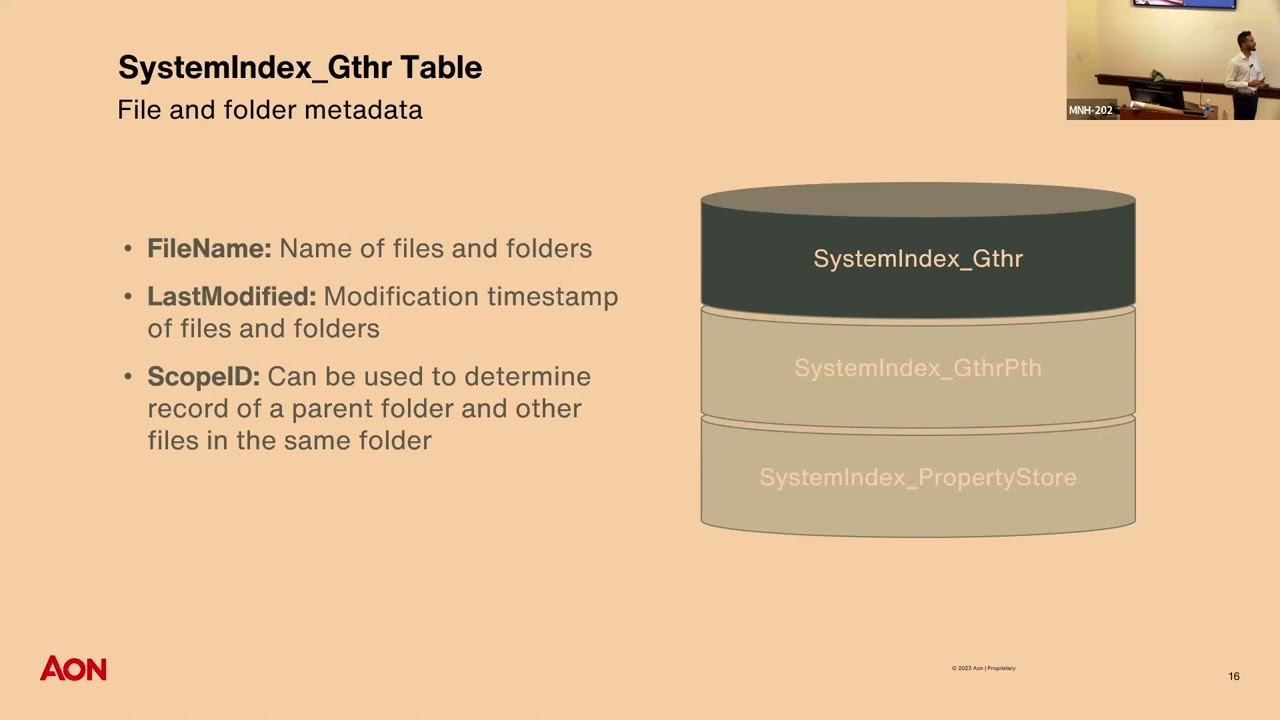
operating systems and not on the Windows Server operating system so it will be on by default on Windows 7 10 11 but not on the server 2012 16 19 Etc so this database is named windows.edb and like I said it will be in an ESC format windows.edb contains multiple columns but we have identified three to be the most useful from a dfir perspective and when I say dfir it is digital for in insurent response for folks who don't know what that is all right so let's begin with system index gather it's short for GT HR table so this table in windows.edb file will contain multiple columns and again we have identified three to be the most
useful ones we have the file name of the file or folder being uh indexed as well as the last modified time St next we have the scope ID column or scope ID values which is an integer assigned to every file or folder and we can use scope ID to determine files or folders parent folder next we have the system index gather path table now this table only contains three columns namely scope parent and name now we can correlate the gather and gather path tables to form a files or folders parent child relationship all right now let's get into the meat and potatoes of Windows search index also known as the property store table now this is the most
important table of all and it will contain like all the important data from a DFI person beginning with the search gather time so this is the time when Windows search index will create a record of file being created or modified so this will be another Tim stamp in um addition to the modified access or create creation time stamp so this can be very useful in determining where if there was time stomping in question we also get the full path and the file owner of the file or folder and lastly we get the most interesting feature which is the search auto summary what this feature will do is it will index partial file content so it can be important for let's
say if you are investigating a case and there is data exfiltration in question if a data xfil tool was used and it uses a configuration file you may be able to get that data or content of that config file without even having to access that config file we may be also able to recover deleted information and I will be talking more about recovering deleted information in the further slides so again uh the most important table the property store table so let's see how windows.edb file looks like we use noft es database view to open the windows.edb file and as we can see all the Ducks are in a row meaning that every entry or every record
will be a separate row and the columns will represent various file properties now let's consider a scenario where you are investigating a Windows 11 operating system now you want to pass Windows search index and you go search for windows.edb file but you cannot find one you ask why because Microsoft introduced changes to Windows search index in Windows 11 operating system now the single windows.edb file is split into three sqlite files namely Windows gather windows and windows us and DB Windows us and DB is still being tested upon and is out of the scope of this presentation so again basically all the data Remains the Same but the format is changed from ESC to sqlite so let's
quickly compare how the change looks like as you can see on the left side in Windows 10 all the tables are all the tables are contained in a single database name windows.edb but in Windows 11 the system index gather and gather path tables are stored in Windows gather D and importantly the property store table is split into two property store and property store m data tables again information Remains the Same but the format and structure are changed so let's quickly take a look at windows. DB file as we can see all the Ducks are not in a row now and every record may have multiple rows the work ID column will represent a unique entry or a unique
record and the column ID column here uh will represent values which can be mapped to the respective file properties so let's say for example uh consider the value 13 in row one which been mapped to the property store metadata table shows us that system is folder and that's how we know the work ID uh record record associated with work ID one is a folder and similarly we can map uh all the remaining column ID values the respective file properties right before we move on to the fun part the forensic value of window search index I wanted to highlight few important points about ESC databases or ESC formats so ESC databases are made to include file operations or transactions
happening in quick successions meaning that if a file is created modified and deleted fairly quickly all that activity will be stored in the ESC database files so you wonder that whenever file is created that record will be immediately added to the database but no that is not how things work with ESC databases so whenever a record is a file is created that record will be added to a log buffer or memory and when this log buffer gets full or memory gets full this data will be written to a lock file which will be stored on disk now this lck file in turn is applied to the database or ESC database or written to the database to capture
all the activity which happened from the previous commit or the last time when this loog file was written to the database and this may not happen immediately like there are few conditions for the log file to meet before it can write itself to the database meaning uh for example if the log file like gets full or certain time passes by then it may write itself to a database now importantly for dfir investigations if we perform a live image or if there is a shutdown event or a B BL screen of death event the log files may not be written to the database and that will render the database in an dirty or in an inconsistent or a dir State meaning that
not all the activity happen on a system will be included in the database but there is a built-in Windows utility called eent util which we can use to either recover or repair the databases meaning that we can make a EC database from a dirty to a clean State and we can use the flag R and P to either recover and repair the database files now importantly I would recommend you to perform the recovery first uh before performing the repair because the r flag stands for recovery and if you do p flag or try to repair the database it may not consider whether the database is in a dirty or you a clean State and if you
want to use repair just use the G flag which will check for the Integrity of the database whether it isn't it is in a dirty or a clean state if it's in a dirty state it will pause ask you if you want to clean it clean it and then uh repair the database another important point if you have ESC database from a Windows 10 system and if you try to clean it on the Windows 7 system that will not work you should not be using Windows 7 now anyways but uh keep in mind that the operating system from where the Windows start EDB file is coming from uh should be equal uh to the operating system
which you are cleaning the file on all right now enough with the boring part uh there was a lot of technical information uh let's get with the forensic value H by Windows search index and the use cases uh where Windows search index can help us in DFI investigations all right so let's let's see what Window search index can tell us about files and folders present on a disk as mentioned previously metadata from the index locations about files and folders will be stored in the database which can be found in the property and property store tables in Windows 10 and 11 respectively so the metadata will include but is not limited to the full path the modified access and creation
timestamps file type as well as file owner and importantly the search index gather time again this is an additional time which we get uh in in addition to the Mac time stamps and it will be the time when Windows search index creates a record of file being created or modified on a system and this will go inside the file's last modified time St so again you can you get one more artifact to check time stomping or cross verify your time stamps if there is time stomping in question you may wonder where this information can be useful for folks working in incident response may know that thre actors leverage directories present under C users to deploy malware or stage FS so
we can even enumerate that often times employees download malware thinking it to be legit files we can identify initial attack vector or initial access vector by exploring the downloads folder of any particular user sometimes M thread actors deploy persistence mechanism by creating startup tasks so we can find that in the start menu program startup folder and importantly we can also recover metadata associated with deleted files or if there was any activity associated with non-existing files again you may wonder why do I need all this information if I have a forensic image or triage data now if you work in DFI you may know that sometimes we do not have full forensic image or the triage data may
not have all the directories index by Window search index and importantly you do not need access to the file system to enumerate all all these locations it's there for you in just a single database all you need to do is par isn't this amazing all this information from just a single artifact talking about amazing features of Windows search index I mentioned that it also records partial file content so the search auto summary feature will record the partial file content of specific file types uh you may think is this feature built for us for instigators it is not the primary purpose of this feature is for users to be able to search for file content so we
tested by creating a text file and embedded the word pineapple in it and search for the word pineapple and as a result the text file got popped up and that's why Windows search index will contain the partial file content but for as forensicator it is a gold mine we get get the access to file content without even having access to that particular file and importantly for Windows search index to have that data the file type must match the extension so let's say if you have a text file and you rename that to the PDF or you create a PDF file Window search index will not be able to collect or record that data from that
text file because it will looking for a PDF file format and that's where it will fill but if you rename it from txe tobat or batch files Windows search index will be able to record the partial content because text and batch files are text format files the file format must match the extension and during our testing we concluded that in Windows 11 file content up to the first 1024 bytes will be recorded meaning that if a file is smaller than 1 kilobytes you get the entire file content and this can be really important in investigations if a file is deleted or you do not have access to that file right so you may have some
questions about which file types are indexed with their partial content uh we enumerated a list and this is by no means an exhaust list but important from a dfir perspective so you may be excited to see ASP or JavaScript files which can be malware Dro by Third actors uh we also have documents and one note files which are leveraged heavily uh to be acted as initial attacks like thir actors will include the doc files or one note files in fishing emails and uh compromise employees or systems in a network again uh by no means is an ex exhaustive list like a lot of file types are indexed with their partial content but again this is just important from a DFI
perspective all right uh let's talk about recovering deleted file metadata and content so whenever a file is marked for deletion it so whenever a file is deleted excuse me it will be marked for deletion and will not be immediately removed from the windows search index it is similar to that of deletion occurring on a Windows File system and if we perform a live forensic image we may be able to recover data associated with deleted files like the full path uh or even the partial content of that deleted file but if there is a shutdown or a reboot event uh you may not get that data because the logs will be replayed to the database and the files which were
marked for deletion may be deleted by the time uh after the system is rebooted or shut down but again there are few tools like bin search DB analyzer which you can utilize to recover uh data or recover deleted files from even a deadbox forensic image I think this is a great area for us and in our testing it was inconcl inconclusive so for at times uh when we deleted a file and collected a live image we sometimes were not able to uh get the deleted file data even if it was not a reboot or shutdown event at times if that was a shutdown event we were still able to recover that deleted metadata or deleted content without having to use
the wind sech DB analyzer so it really depends on uh various factors like size of of the database when it was shut down how it was shut down so that's one aspect where we are still researching and um that that gets me excited about Window search index even more all right uh let's talk about another interesting aspect of Windows search index and that is the ability of Windows search index to provide insights about a users internet browsing activity so at times investigators may need to enumerate browsing activity but they may not have browsing artifacts at disposal or they may want to cross verify their findings Windows search index will record activity conducted using Edge or
Internet Explorer browsers one quick caveat here is activity conducted using private browsing mode will not be indexed and interestingly in Windows 10 we found out that successfully visited URLs meaning that if a site was visited with an active internet connection or uh if it was a legit website then it will be stored in the item path display column of the property store table but if it was unsuccessfully visited meaning that if the URL did not exist like let's say for example 1 12 3 4 this website does not exist.com or if it was visited without an active internet connection then it may be either stored in the activity content URI or activity description Columns of the property
store table now in contrast in Windows 11 irrespective of how a user visits or traverses a URL that will be stored in the system link Target URL column of the property store tables in in our testing we found out that some of the unsuccessfully visited URLs May not be present at all in the database again we are not sure why this is happening because it was inconsistent and we were not able to replay or um recreate the same conclusions uh every time now that we know Window search index also records the internet browsing activity the question has to arise what if a user deletes their internet browsing activity Windows search and IND might save your day so we tested by deleting
the history from the browser itself as well as by deleting the ab data folder of edge browser that's where all the data is stored and as you can see we were able to recover the entire history session of that user including the system the web page title of the URL which was visited uh the time of access as well as the full path of the URL isn't this information I mean amazing you do not need browsing artifacts and you can recover deleted browsing activity of a user how cool is that it may not be cool to everyone but it is cool to DF F all right and in Windows 10 uh we had contrasting results so deleted browsing activity was
only sometimes present in the database again we do not know why it was only sometimes present we are still researching that particular aspect but that's what we have concluded until this point and some of the remnants or some browsing activity may also be present in the activity history feature you may wonder what is activity history so let's talk about it right Windows search index can also tell you when a user interacted with the file using which application so activity history will track file interactions for user and importantly if a file does not exist on the disk anymore or if it's deleted uh and if it was interacted with at some point in time that record will still be
present in the activity history feature so you will be able to recover or enumerate any activity which was cond conducted uh which may be associated with deleted files again like how how cool is that you don't need to use any tools to carve about slack space or slack space of the database or the file system to identify if there was a file present on a disc or the way we identify activity history is by searching for the activity history item string in the system item type field and important point is if a activity is not present in the activity history feature it does not mean that it did not happen activity history is a subset of the entire user activity
that's uh one important point to keep in mind and like I mentioned previously some of the browsing activity will be present in the activity history feature as well so let's see what exactly gets indexed in this feature let's consider an example like if I interact with the PDF file using Firefox browser so the full path of the PDF file including my Sid or security identifier as well as the start and end time or opening and closing time of the PDF file with the application or program used to interact with the PDF file and in this case the Firefox browser will be recorded in the active history feature so you will be able to tell what a user interacted when a user
interacted with a file using which application uh we observe that activity history start and end times may vary by few seconds sometimes so not the most accurate time stamp but um fairly close toward being an accurate time stamp so an important point to keep in mind so we tested by interacting with few common file types and few common applications used by average users on a day-to-day basis uh as you can see the text format files in when interacted with common applications like notepad wordpad uh PDF files when interacted with common browsers and our day-to-day files like Excel sheets documents photos will all be indexed in the window search index uh activity history feature and again Windows search index
also records metadata associated with Outlook or emails related to Outlook uh program so but that is out of the scope of this presentation all right so let's see how this actually looks like when we pars the data from a forensic perspective so we created a text file and interacted with using notepad and as you can see the text file contains an IP address so it's malicious right and we use wind search DB analyzer tool to pass windows.edb file and and we were able to enumerate partial content and in this case the file was very small like uh less than 1 kilobyte so we got the full file content without even having access to that file
and we were also able to enumerate the activity or the file interaction for that specific file so as you can see we get the Sid or security identifier of the user interacted with the file the program you to interact with the file the file name itself and the opening and closing times meaning the start and end time of the activity again all this information from just a single artifact all you need to do is first it all right uh let's talk about cider cider stands for search index database reporter it is our Tool uh open source command line tool to pass Windows search index at scale and effectiv so you may think like we already have
VCH DB analyzer why create another tool so during our testing we came across two major hurdles uh one is that we needed to pass ESC database one at a time we could not pass multiple databases at a time and second that is that we needed to use different tools to pass ESC and SQ database files that's why we created C cider will pass both ESC and sqlite databases at scale so you don't have to pass each database one by one or use two different tools to pass database points and importantly it will output three CSP or Json reports which will contain most useful information from a large data set which can be helpful in DF investigations so you don't have to
spend time extracting information from a large database file it's very fast written in Rust and we have it open sourced on GitHub under Apache 2.0 license you can compile it on your own system if you don't want to do it you can even download the windows build which is available on our GitHub all right so let's see how it works you call cider uh you give it the format option of the output you want meaning that uh if you want a Json output or a CSV output Json will be by default next you give it the output directory that's where the CSV or Json reports will be generated if you do not give the flag uh the current working
directory will be treated as the output directory and help will print this message version will get you the version number of Sil and importantly you need to provide a path to the input directory uh remember that it is not the path to the database itself but the input directory but the directory where the database files will reside so that's how cider will be able to pass multiple databases at a time uh let's see how it works so we run cider give it the output directory give the format and the path toward path where the input directory is and that contains the es or sqi database files as you can can see it will generate three
uh beautiful CSV reports and if you pass multiple ESC or sqi databases files from multiple systems uh we have it named in a such a way that you will be able to differentiate those different systems so we have the host name uh of the system begin with the host name then we have the type of the report whether it contains the file interactions or Internet history and the timestamp when the Report was generated all right and I mentioned that it is fast so we tested cider against a total of 5.9 GBS of windows. 10 and 11 Window search index database fs and as you can see it pass it under 22 seconds so yes it is fast and it will
save you time and time sensitive dfir matters right and if anyone uses Velociraptor or if is aware of veloc raptor in BFI investigations then we also have that functionality for you uh it is available on our GitHub page our GitHub repository and I would invite you to read the warning uh before using this artifact because it is important to know how this artifact Works uh before you use it with Velociraptor all right so let's see how cider can help you in your dfir investigations you can even uncover highs so the files report will provide full path of the file with the modified access creation timestamps as well as it will provide with the partial or full
file content now you know someone about private jets and Lamborghinis and I'm want Lamborghinis to all right uh the activity history report it will show you which user interacted with which files at what time using which application and the file in the question itself you can even catch employees who search for their crimes online how stupid is that uh you get the title of web page or the website which is visited with the Tim stamp as well as full URL of the website which is being visited and like I mentioned if there are any accident malware downloads or if there is um drive by compromise you will be also able to enumerate that if there is a new practor who does
not know how to do anti forensics and if they search for how to do anti forensics uh cider can also help you uncover that information and uh lastly for the internet browsing activity uh if there is data exfiltration in question or if there is sensitive side traversal in question uh you may also be able to recover that as cider will recover the deleted browsing activity for you as and remember I mentioned uh enumerating deleted file metadata so we created a text file uh interacted with it and hard deleted the file meaning that the file did not exist on dis anymore and it was also not present in the files and folders support of cider as you can see uh we get the file name
when it was interacted with the program used to interact with and the user Sid who interacted with that file and you can see that we have two entries for the same file meaning that the file was interacted file was potentially interacted for two times if you see five entries for a particular file it can mean that that file was interacted for five times this information can be really helpful in digital forensic matters and when a case goes to court um I don't think there is many there are many artifacts which can provide you information in such GL granularity so it's uh really amazing all this is done for you uh all you need to do is just
pass Window search index database using a very simple and fast tool all right uh enough with the boring part let's summarize what we talked about today we talked about how you can enumerate files and folders present on a disk we also saw that we can enumerate activity history or file interactions with current as well as non-existing files and we can also recover current as well as non-existing internet browsing activity for all the users present on a system all this from just a single art and again why should you use cider because why not it's fast and easy to use command line tool uh which verses both Windows 10 and 11 databases at scale and importantly it gives you the
analysis capabilities meaning that most useful information is presented to you from the humongous data set so you don't have to spend time extracting that information it's all done for you in three beautiful CSV or Json reports and these are some questions which still remain unanswered uh like for example what other user activities is track uh how big the windows search index can get we are still researching and uh we would encourage you if you work in dfir perform your own research and if you fell asleep during my talk which some of you did uh don't worry we have a blog post uh and you can scan the QR code this blog post will detail all the the information or all
the points which I talked about uh it's not a fishing attempt if you do not want to scan it there's a link you can visit right there right few PE folks I want to thank paraa Cari for supporting us in research and oali for developing cider and uh quick disclosures or disclaimers we used version 22 H2 of Windows 10 and 11 to perform our research if you do your own research uh results May Vary based on different build numbers and this is my LinkedIn and Twitter if you want to connect with me if you have any questions uh you are welcome thank you so much for joining uh my [Applause] session
Related talks
 28:47
28:47 41:59
41:59 49:41
49:41 54:05
54:05 27:37
27:37 41:15
41:15