Pensieve: Finding Malicious Artifacts in Container Environments
Show original YouTube description
Show transcript [en]
[Music]
thank you hello everybody thanks for coming out to my talk I'm Yeti I work at stack rocks it's a small start-up and we do containers security and container you're always on the bleeding edge of container security research so this is my talk and see if finding malicious artifacts and container environments so for all you Harry Potter fans out there this is a code from Dumbledore I use the pen sieve one simply siphons the excess thoughts from one's mind it becomes easier to spot patterns and links when they are in this form wouldn't it be great if we had a pin sieve for container environments as we should we shall see in the stock we really do need a tool that transforms
containers into a form that makes it easier for us to spot patterns and links so imagine you're running your workloads on AWS you have a bunch of virtual machines and you recently deployed containers to better utilize your resources you get a call at 2:00 a.m. in the morning and you just found out that you one of the containers is breached like what do you do for incident response so containers have become really popular among developers and devops it's much faster to run a container compared to your virtual machine and it comes at a lower disk footprint as more and more and infrastructures adopt containers the incentives to attack them also increases security is one of the major concerns
when it comes to deploying containers in production and industry is still gathering slow momentum there and this is even so true for Incident Response forensic analysis and you know tools and techniques in container environments are barely known or even explored so this talk is more about like how do we do forensics and containers existing tools and techniques work well with virtual machines but it's not so efficient when it comes to containers imagine having to snapshot the entire hosts memory in order to look at a single process or even when your workloads are entirely on container managed services like AWS Fargate where you don't even have the luxury to run host memory capture tools like Linux memory extractor for example so
existing techniques don't fundamentally change but they need adjustments to make sense of container artifacts so imagine having to like if you have to extract evidence from a single container there's no tailor-made solutions when there are hundreds of containers running on the host so in this talk I'll describe what considerations you have to make when it comes to containers I'll first give you an overview of docker containers and then outline some of the methods you can use to gather evidence and correlate them to specific containers so docker is an open source platform to easily manage your darker containers and what are containers containers are basically a bunch of sandbox processes they are given an illusion of isolation using
Linux abstractions called as C groups and namespaces in darkus terminology though a container is just an instantiation of an image an image is basically a file that encapsulate all the metadata you read and you need to create a bunch of processes and darker identifies containers using this unique identifier called as container ID and images are identified by image ID having these IDs makes it easier to correlate artifacts found in containers so what are namespaces namespaces basically implement resource I process isolation it limits water risk what a process can see in terms of resources such as files users or even file directories and so on for example like the bid namespace control speed mapping and the net-net namespace allows Network
isolation and so on you could list all the namespaces available on Linux under the proc file system here's an example where I create a new namespace and run bash under it if you run a PS command you will see that bash is mapped to PP ID one but it's obviously mapped to a different PID on the host imagine you're looking at some logs produced by a process running in a container the pits log in in those logs might appear differently different than the hosts so having the the context of hostname space makes correlating them easy and control groups or C groups are another real enix abstraction that have been there for a long time and they implement quotas for
processes so one can limit how much memory a process consumes or how much child processes that they can fork you know they get they they limit what abuse one can do and they also track resource usage there are almost like 12c groups in Linux today and they represent various subsystems like devices memory how many processes you can you can fork and so on here's an example of creating a memory C group and limiting it to hundred bytes it's an unrealistic example but it's just an example C groups don't impact forensic analysis so much but they definitely give you more context on how much resource your containers are using so it's important it's important to understand how files
are modified in darker containers so that you can perform forensic analysis and you can reconstruct files and correlate them better to a specific container docker containers use specialized file system drivers to access files and they're based on what is known as the layered file system so what is a layered file system layered file system is basically a file system driver that gives you the ability to create like a single unified file system out of different layers and on the right-hand side here you see an example of a docker image basically it's composed of various layers and when a container is instantiated a thin reader layer is created and it's set as a topmost layer and all the rights that go
through the container are actually executed in this topmost layer but all the underlying layers remain read-only and they they use the strategy callers copy-on-write to modify files that are present in one of these layers basically and on the hand side you see an example of dockerfile dr. fire basically is a file that captures all the instructions that you need to create a darker image here's another example of a layered file system known as the Ola FS and it comes as a default in the latest versions of darker an overlay FS is basically similar to a u FS but it's much faster and it comes with a simpler implementation here you see that it has basically two layers one
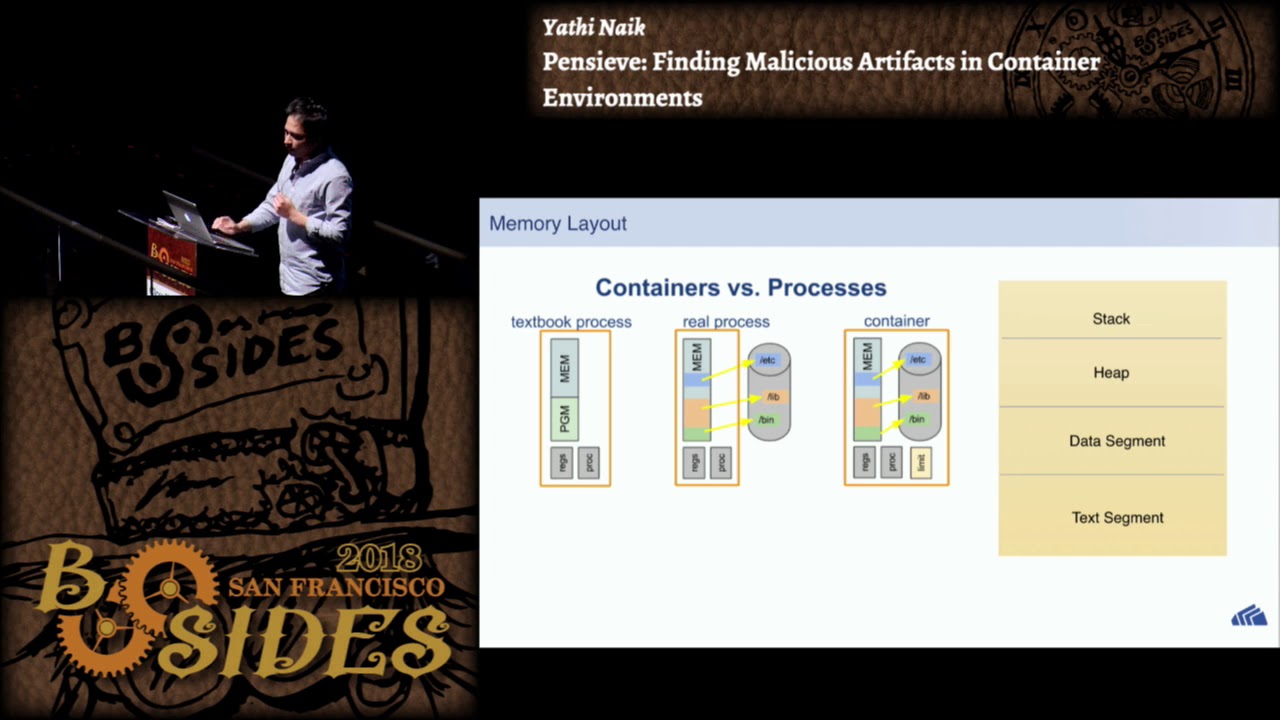
is called the lower directory or the image layer which remains read-only and the upper Dietary is readwrite and the merged directory gives you like a uniform view of the file system the memory layout of a process running inside a container remains pretty much the same it has the usual stack heap data and text segment like any other Linux process but we need we really need tools that can actually gather evidence from a single process rather than having to snapshot the entire host memory so when it comes to disk forensics on a docker host it's pretty much the same as you do it on a regular system you'd ideally create like a disk dump using DD
command and ideally the main memory but using traditional tools will not give you a complete picture unless the specifics or darker are considered so docker there are several issues one must consider when you perform forensic analysis on a docker host like I mentioned docker accesses files through specialized file system drivers which don't map to a block device and this makes mapping recovered files to a specific container tricky and files could be deleted from the readwrite layer or the read-only layer which must be considered and the dog the container itself could be dead which wipes out most of the metadata and this makes for insects really really challenging live analysis implies that containers are still running and you have several
options here basically a security analysis could like back up the continued file system and all the metadata on a regular basis and daca provides several options here one could do a darker export to capture or capture the containers file system into a tar file or one could save the in darker image into a tar file or one could commit all the changes that are happening in the container into a new image using docker commit command and all these files could be later used to perform analysis using docker import or docker load one thing to note here is that docker export and import command don't preserve the image history but the docker save and load preserves the image
history and knowing the image history becomes important if you want to find out if the image layer has been tampered with so like I mentioned having container metadata is really important when it comes to analysis when to perform correlation and docker usually by default stores all this metadata under wallop docker and if you can if you want to look at a specific container you could go into the container subdirectory and look at it and here you will see like various information related to contain layer image layers the container ID the image ID all the mounted directories and so on so if a file is deleted from a container there could be two possibilities the file originates from the readwrite layer
or the file originates from the image layer so when files are deleted from the readwrite layer it's actually deleted on the host file system and then to recover those files you need to employ a techniques that you would employ to recover files from a host file system there are two popular techniques one is called the file carving method and the other one is called the filesystem analysis method file carving method is basically a recovery technique that is employed when there is no file system metadata and what this technique does is basically it scans the entire disk and it looks for patterns and the patterns typically used our head of values from the from popular file formats like PDF
e.l.f JPEGs and so on but files are often fragmented on the file system and this technique does not guarantee full reconstruction of files with all its metadata intact and when you want to relay it files to its originating containers it becomes crucial that you have all the metadata like the file part and the file name that's where the other technique comes into play which is the file system analysis this technique is driven by its it makes much more informed decisions based on the file system metadata it uses the metadata such as the master file table the inode table the directory entries and so on and this technique actually provides you some guarantees of recovering the file with all the
metadata intact so this is much more useful when it comes to analyzing containers and correlating files to specific container if a file is deleted from the readwrite layer though what the file system driver does is attack such files and it'll Achatz a new inode and tax it as a character type character device and one could find such files using a fine command under the images directory so assuming that you record a file using previous techniques I'll describe how you can associate that file to a specific container so the first thing you will need is a docker ID and docker ID can be found by running docker PS command assuming the container is still running and this example is based
on the au FS driver and all the files in a EFS are stored in under wallop docker au FS and here you will find a layered subdirectory which has all the various layers of the image but the file could originate from any one of these layers and if you look at the layers subdirectory it has a bunch of a u FS IDs so you really need the AFS ID from the from the file path that you that you recovered and once you have the au FS ID what what you do is go through all the containers and look at the amount IDs and they the mount IDs are nothing but the au FS IDs and in order to associate a file to a
container you could match the AFS IDs found here to D a of sids in the layers and if you find a match you basically found the file where it originated from so traditional tools that are typically used for memory forensics such as memory linux extractor requires you to snapshot the entire host memory and this this is a time consuming operation and several cloud providers don't even allow you to run these tools you'd have to file a service ticket or something in AWS to have them retrieve the host memory so this makes it challenging for containers and even if you have the host memory dump you it it's really tricky to associate like specific evidence you find there to a
specific container and this is where newer tools like cry you offer much more potential you should see that in the next few slides so what's cry you cry stands for checkpoint and in restore and user space it's been around for a while and it's basically a tool that will allow you to freeze a running process and checkpoint it as a bunch of image files on disk it basically walks through every task of a process and it'll find out all the resources that it uses and then it basically converts them to an image format and these image files can be used to restore them back to a running process and this opens up a lot of
interesting use cases like live migration debugging load balancing and so on if you watch like the coop con like several years back they had a quick game and they could like literally freeze the quake game and they they would do a live migration from Singapore to London and they would resume the game back that was that was done through pry you actually but it also has applications in forensics as we shall see cry you also comes with the stool caller script or the cryo image tool and this tool basically helps you to analyze and decode the image files that you produce during the checkpointing process it is similar to volatility in that it provides you a few plugins that makes it
easier to retrieve the running processes the files that the processes used the network connections and the memory mappings and so on let's see this in a demo and how we can use cry you to perform on memory foreign six so in this demo what I'm going to do is I'll spin up a container and the container is running a web application it's a very simple app web application that's using a vulnerable version of Apache struts and this was basically behind the equifax attack a few months back and I'll use Metasploit to attack this container and we shall checkpoint the container and see what kind of evidence we find in the container so here I launch the container I'll take a
snapshot using cry U and here is here or all the image files it produces and here is an example of using crit and PS is basically one of the plugins that you can use to see list all the running processes that at the time of checkpointing here you see that there's only one process running and we can also find out all the network connections that were active during check boiling process there's two network connections active that's listening on 8080 and 809 and you can also see all the files that were open by the process sorry about that it's flickering and we can restore the continuum back so that we can launch another attack so I'll launch Metis flight and so
basically what Midas Floyd is doing is it's using one of the exploit I'm using the reverse shell here you could use any exploit and so I'm establishing a reverse shell on the container and just make sure we are in the container I'm running an IP other and the IP address is actually the IP address of the container and here I'm basically making another snapshot and here you see that there's another process running which is basically the shell process for the river shell and we can see all the network connections and there's another network connection and the four four four four is actually the port on the local machine and that's the IP address of the local machine and we can also see
all the files that were opened by the shell it's not doing much but get a point so that's essentially what cry you can do it has a few plugins but in future you can see this expanding slight volatility so to summarize my talk basically we saw that we need more container aware forensic tools to make them much useful and you saw that docker uses file system drivers which makes associating files to containers tricky we also saw that popular tools like volatility need more darker context in order to make them more useful we saw how cry you can be used for forensics we also saw that container orchestrators and container manager services makes and even deleted containers to make make
forensics really challenging and that's pretty much it yeah these are all the references I used and thank you thanks for coming out I know it's the last talk thank you if you have any questions take it yes yeah like Oh for the holster for the container itself the talking container so for the docker container there's not a lot of bigger tools out there but cry U is one of them that you can use to specific capture at containers memory it actually can it actually could captures a specific containers memory only the main memory not the disk memory yes any other question yes yes you can use a tool called contrac oh sorry so the question was basically if you
could use the proc file system to track network connections so yes you can use the proc file system used like because you have all the FDS in the proc file system and you can identify fan ft is a socket type and you can decipher I think there's a tool called contrac that basically like polls the proc file system for a specific PID and it keeps track of all the network connections there yes yes yeah you basically use the PID to associate a container spread to a hospital any other questions can't see Angie okay well that that's the final talk of the day thank you yeah here's a nice gift for you from b-sides and Autodesk
thank you and let's give him a hand [Applause]
Related talks
 49:41
49:41 27:37
27:37 1:05:41
 44:35
44:35 51:34
51:34 29:48
29:48