Walkthrough of an N day Android GPU driver vulnerability
Show transcript [en]
Scroll up. Put the mic on. Don't need. >> Okay, grab a seat. Get comfy. We'll get ready to restart. [Music] So, you're with Kylie and Sylvia. >> Yep. >> Yeah. >> Not Russia. >> Bosses will judge me all day. No, a little bit nervous, but once in the fall of it, it'll be good.
[Music] I assume it's one of the radio mics, right?
Nobody wants to cut into your meeting time. Although it gives us an opportunity to get them all in. Grab a seat, get comfy. Um I will hand over to Angus and stuff. Walker of an end Android GPU the arrival vulnerability. Uh Angus, take it away. Thank you very much. Can everyone at the back hear me? Okay. Is the volume good? Thumbs up. Awesome. Um so good day everyone. My name is Angus. Um I work at Infosct. Today I'm going to be telling you about um some bugs in the GPU driver for Marley, which is a type of GPU that it's made by ARM. It's used in a lot of Android devices and stuff. Um, and yeah, so this talk
was, first of all, I want to be clear, the bugs that I'm going to be talking about this in this presentation, I didn't find. Um, they were originally anonymously reported and the way I came across them was this blog post that I got sent a link to by one of my co-workers. It was published by a Singaporean company called Starabs. They publish a lot of really interesting research on a lot of stuff. Um, the vulnerability dates back to 2022. And when I was looking through this blog post, they did a really interesting job of describing how they exploited this vulnerability and turned it into a full Android exploit, but they didn't dive much into how it worked. And in my spare
time, I was just looking through it and trying to understand how it worked. And I learned a lot about the Linux kernel and the ARM Marley driver along the way. And I thought it would be really interesting to share what I learned with you guys so that we can all learn a bit about um Android GPU drivers and how they work and how they can be exploited. So got a lot lot to cover in this talk. We're going to go through the background of how drivers work um the Marley driver itself, how the vulnerability works and how it can be exploited. Um so let's start with a bit of background. So, as I mentioned, ARM
Marley GPUs, they're uh one of the three most common GPUs used in the Android market. Uh the other two being Qualcomm Adreno GPUs and um Imagine Imagination Technologies Power VR GPUs. Uh it's used in lots of different phones. You'll see there's that big diagram on the side there. That's a it's a screenshot from Wikipedia. There's hundreds of phones that contain it. your Google Pixel devices, your Samsung Galaxy devices, a bunch of Huawei devices, um, media tech chips used in a lot of lower-end Android phones, um, also bunch of embedded devices like Rockpie, uh, STM electronics, they use it in a bunch of MCUs as well. So, Marley is everywhere, especially in the mobile and embedded
market. Now, one thing to note about Marley GPUs and uh and better GPUs like it is that it uses an integrated shared memory model. So, it's not like if you're a gamer and you have like a gaming desktop with like a CPU and some RAM and then like a gaming GPU with like 16 GB of RAM that's separate to your main RAM for your computer. uh in mobile GPUs, they normally share their memory with the same stuff that's being used by the CPU and then it's up to the Linux kernel or whatever you're running on your system to manage that memory and share it between the CPU and the GPU. So, let's have a look at the Android
drivers uh driver stack for graphics cards. It's really complicated. When you look through the docs, you'll see there's so many acronyms everywhere. This is a screenshot of the Android doc somewhere. It says HL is defined in the AIDL and the H. Like what does that even mean? I don't know. There's like diagrams. They're confusing. There's arrows pointing absolutely everywhere. Um, look, I don't know about you guys, this doesn't make much sense. So, I spent like a day digging through docs and have tried my best to summarize it down for you. So, there's sort of five main parts um that are important in the Android graphics driver stack. So, the first part is your application. Um, say you're
developing the next Candy Crush or something. It's going to talk to your graphics stack using standard APIs like OpenGL, Vulcan. If you're a gamer, you probably seen DirectX on Windows. If you're on Apple, you might have seen Metal. Um, these are standard APIs that are used across all applications and all GPUs. These are going to talk to the next bit which is called the loader. Now the loader is responsible for working out which GPU driver to forward that API call to. So normally this is quite simple. There's only one GPU on your system. It just forwards it directly to that. And that's the case here with our Marley driver. But in the case of say a
gaming desktop with like a separate graphics card and an integrated graphics card in your CPU, it might forward that request to a different graphics driver depending on what your power settings are set to. The next thing it gets forwarded to is the user space driver. So this is where most of the magic happens. It takes those OpenGL calls and like translates them into instructions that GPU knows how to run. It like works out how to translate all your instructions to like coordinates or triangles and stuff. I don't know. It's a bit complicated. This is really complicated where most of the complexity happens. Um, but we're not going to be focusing on it too much today because the next step is once the
user space driver has sort of compiled your API calls down into something the GPU understands, it's going to forward it to the kernel driver, which is the bit that actually talks to the GPU. Now, the GPU kernel driver, it's mainly responsible for memory management, direct communication with the GPU, power management, handling interrupts, all that sort of stuff. Um, and then it talks to the GPU, which will have its own firmware for foring those requests to the right parts of the GPU to do actually useful things. And so in this presentation, we're going to be focusing on the Marley kernel driver, which is a driver that runs inside the Linux kernel or which is what runs on Android phones.
Uh, and the way we interact with it is using these IO controls, um, which are a way on Linux of communicating with device drivers. So why are kernel GPU drivers like the Marley driver subject to a lot of public research? Well, the answer is, and this is probably obvious, they're an attractive target for exploitation by attackers. But like why is that the case? So the thing about kernel GPU drivers is if you go back and you look through like your Android security bulletin and all the CVE records, you'll see so many bugs in all these drivers. They're big, they're complex, there's a lot going on, lots of room to make mistakes. So, attackers love them
because they're full of bugs. Uh, the other thing about GPU drivers um is they're quite a common attack surface across multiple different phones. As I mentioned, they're only really three main GPU manufacturers for Android. And if you think about like the commercial spyware vendors like Celite, Gray Shift, that sort of thing, they want to write one or two or three exploits that work on all the phones. they want to write exploits for. They don't want to write a million different exploits for a lot of different phones because that's really complicated and expensive for them. So when they're finding bugs, they want to focus on areas that are common across lots of different Android phones. The other thing about kernel GPU drivers
is because most applications want to use the GPU to, I don't know, play your Candy Crush game or something, they actually need to access the GPU, which means that the GPU is a very like unprivileged resource. It can be accessed from anywhere uh almost anywhere including untrusted app which is the standard um Android sandbox that normal apps run in. The other thing about um bugs that you find in kernel GPU drivers is that they often provide very flexible um exploitation primitives. So what's really common to see is page use after freeze um which are a really powerful primitive that can be used to turn it into a full exploit. Uh and finally, because the kernel GPU driver is running
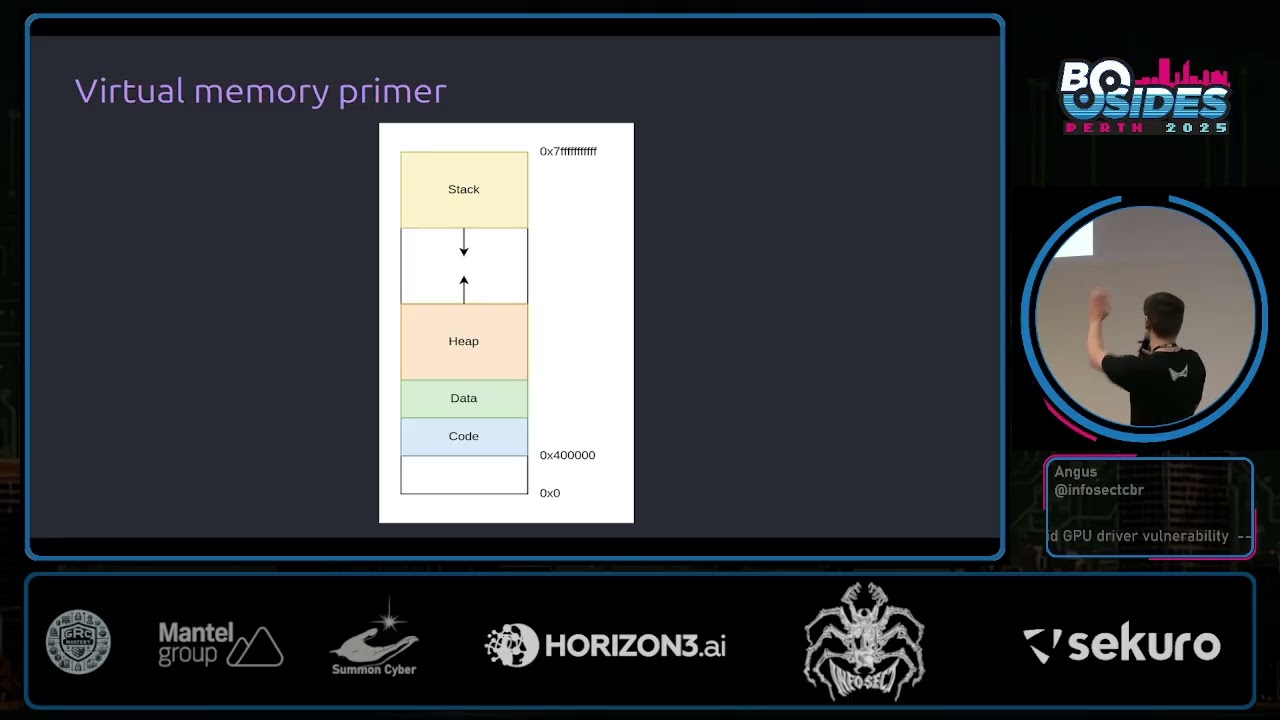
in the kernel, if you find a bug in the kernel driver and you exploit it, you get full access to everything the kernel has access to, which is everything. This is utterly catastrophic for the end user of a device because it means that everything happening on that device is fully compromised. Kernel driver bugs are kernel bugs, which are really bad. So there's a lot of research on kernel GPU drivers from both attackers and defenders precisely because they're really really interesting attack surfaces for local privilege escalation exploits. So I'm going to give a bit of background on virtual memory and physical memory and how it works because that's really important for understanding this presentation.
binary C course or something like that, you've probably seen a diagram looks something like this where you've got a process. It has a bunch of areas like the stack and the heap and stuff like that. Has its own addresses and this nice little diagram. We think the process is the only thing running and it all works and it's very nice. Under the hood, what's actually happening is the OS, the operating system and the hardware work together uh to give every process their own independent virtual address space. that's entirely isolated from virtual address spaces of other processes. These virtual address spaces are broken up into fixed fi fixed size chunks known as pages. Typically, they're going to be
4,96 bytes in size or hex 10,000 uh as we see in this diagram. And then what the operating system does is it then maps those pages to areas of actual physical memory. And whenever a process goes to access an address, say hex 2000, the hardware and the operating system will work together to translate that to the underlying physical memory that backs that allocation and returns that to the user. And this gives every process the illusion that they have their own independent address space. Now, one thing that virtual memory lets you do uh is this concept of demand paging. So, say you make an MM map call to map a file into a processor's address space. We might like to think that when
you map a file into your address space, it's going to bring all of those pages from disk into memory and then set up mappings to all of those things so that the user can access them. This isn't quite the case. What actually happens is when you go to map the memory, it'll allocate some virtual memory in your process for that file mapping, but it won't actually set up the mappings quite yet. You'll see here I've just marked them as not accessible with a star to say that the operating systems kept track of a bit of metadata here. And what happens is when the program goes to actually access this file for the first time, say it goes to access the first
page here, it's going to trigger a page fault in the hardware. And then the operating system is going to see that page fault. It's going to notice, hey, they've mapped in a file here. It's currently not accessible. What we can do is we can go and bring in that data into physical memory and set up a mapping for us. And then the user can go and actually access that page as they originally intended. The advantage of this is it means that only the pages which actually get accessed get brought into memory and they only get brought into memory when they're needed for the first time which can be a significant saving in physical memory usage.
Another important concept to know is the idea of the page cache and copy on write. So let's say we have two different processes and they want to share some file in memory. So say we have one process here and it wants to map lib C. So, lib C is the C standard library. It's used in basically every program running in your system because almost everything is written in C or uses a C interpreter at some point in the chain. Uh so, lib C say they map it into their address space. Due to demand paging, as I just mentioned, this mapping doesn't actually set up a mapping to physical memory quite yet until the user goes to actually access
that page for the first time, at which point the operating system is going to bring that physical memory um from disk into the memory. Now, if another process goes to map that same page, again due to demand paging, no mapping is going to be set up yet. But when it goes to access that page for the first time, what will happen is the operating system will map it to the same underlying physical memory. Because these two processes want to access the same data, we can save physical memory by sharing that data in what's known as the page cache. Now the problem here is originally these processes both wanted readr permissions to these pages. But if
the two processes shared that data with them both being able to read and write to it, they'd then be able to interfere with each other via that underlying physical memory, which would be bad. So what the operating system does is it marks those pages as read only temporarily. So both processes can happily go and read data from those pages. And when one goes to attempt to write to it for the first time, it'll trigger a page fault at which point the operating system is then going to go and make a duplicate copy of that underlying physical memory and update the mappings accordingly, giving them full read write access. And so by doing this, we've maintained the guarantee that two
processes which share some memory are not going to be able to modify it. And if they want to modify it, they have to get their own copies. So they're not interfering with each other. And this is a core security guarantee of the kernel which we're going to investigate a bit further. So back to the Marley driver. Um so how does the Marley driver work? Just like pretty much every device driver on Linux is exposed as just a character device in /dev. As you can see here, it has the GPU device context which means uh that we can access it because it's GPU. uh we can open open the file just like any other device file or any other file on
Linux and we get back a file descriptor representing that file and then the main way we interact with this driver is using IoT or IO controls. I don't quite know how they're meant to be pronounced. I'll say ioctals throughout this talk. Uh and so when you're doing an ioctal what you'll do is you'll pass it the file descriptor of the device file that we just opened up here. We'll give it an ioctal number. So here we're saying we're going to do the version check ioctal to find out what version our driver is. And then we give it some data. So here we're going to give it this version check which is going to fill out for us with the version
information. And so when we call it octal, it's going to fill it out and then we can print it out and we can see our version is 11.35 in this example. You can do more complicated things using these octals. For example, what if you wanted to allocate some memory? So, we're going to do that using the Kbase ioctal memocal. When we're calling this, we're going to pass it this octal mem allocruct. We're going to tell it how many virtual and physical pages we want to allocate. And we can also give the pages some permissions. So, we can say CPU is going to have read access to this and write access. But maybe and then the GPU is
going to have read and write access in this example. And then once we've allocated this, what the kernel is going to do is it's going to set um a GPU VA field in this strct. We can see it here, which is sort of like a handle to that memory that we've just allocated. And then what the user can do is they can call the M map sys call, which will map that GPU memory into the CPU address space. Now, this is all a little bit complicated. So I'm going to bring up some diagrams. I love diagrams. I hate code. So I'm going to have a lot of diagrams in this presentation. So when we call the memal, what's
happening under the hood? So it's going to allocate some under actual physical memory for the GPU and it's going to set up a GPU mapping in GPU's virtual address space. And it's also going to create a Kbase VA region strct which is used to keep track of GPU virtual addresses. The other thing that's going to happen is it's going to create a Kbase mefizz alstruct to keep track of that underlying physical memory that's backing the allocation. And then finally our user program is going to get that GPU VA handle that I just mentioned which is going to point to that via region strct. So the user has a handle to this underlying memory allocation via these strcts in the
kernel. Then when the user goes to actually map that memory, it's going to resolve that handle pointer to the VA region strct and it's going to set up a new CPU mapping strct which points to those memory. It's just mapped. Now due to demand paging, as I discussed earlier, it's not actually going to set up a mapping from the C users CPU mapping to physical memory quite yet. This won't happen until it actually goes to get accessed for the first time at which the kernel will follow through all these pointers, figure out what memory it points to and then set up the mapping for the user. So that's an example of how um allocation works. Let's have a look at
the actual vulnerability. I'm just going to take a quick drink.
Okay, so let's have a look at the vulnerability. So the vulnerability is called CV 202276. I'm not going to bother reading the second one. Uh the description is quite short and not very descript. It says Marley GPU kernel driver may elevate CPU readonly pages to writable. Oops. A non-privileged user can get right access to readonly memory pages. Doesn't tell us where the bug is. how it works, anything like that. So, we're going to have to dig a bit more. Thankfully, there are a bunch of public writeups. Um, I found these really useful when preparing for this talk. Um, I'm going to have the links at the end if you'd like a copy. And so, this
vulnerability was disclosed by ARM in 2022. It was anonymous anonymously reported to them. It affected a whole bunch of driver versions for like 6 years. So, this is pretty crazy. A bug that existed in driver for six years and was exploitable. I I did a bit of digging, found the patch for this. It's not immediately obvious because ARM's source releases are not the best. Uh but we can see here that it seems to have introduced this like new write variable and it's like checking some flags and it's happening in this function called Kbase JD user buff pin pages. Not immediately obvious what this does, what it means. So let's dig a little bit deeper. What is this Kbase JD use above
pin pages function and what does it actually do? So this is all related to a part of the Marley driver that's used for importing memory into the GPU driver. So say the user already has some memory that they've allocated and they want to import that into the GPU driver so they can do useful stuff with it. So this is done with yet another octal called Kbase ioctal mem import. Now internally when you go to import some memory it requires two separate steps. The first step is we need to reserve some GPU virtual address space for that memory when we import it into the GPU. We have to reserve it so that if someone else goes to allocate some
GPU virtual address space in the meantime it doesn't clobber it. And this is imported in a function in the kernel called kbase me from user buffer. The second step is the memory that we want to import. we need to sort of pin that so that the kernel can access it and use it. Now there's two ways this can be done. It can be done immediately at the same time that we imported the memory in that same KBAS me from user buffer function or alternatively another way that it can be done is you can put off the pinning step until later on when we actually go to do a job with the GPU and actually do something with the data. And
this is where the Kbase JD user buff pin pages function that contains our vulnerability. This is where it's actually used. So let's walk through an example of how a user might do this. So say the user wants to map some me sorry say the user's already mapped some memory and they want to import it into the driver. They're going to specify the address of that memory that they want to import along with how big it is. They're going to pass that to this p handle value. And then it's going to tell the driver what permissions it wants to import it with. So it's here it's going to say we're going to give it CPU read and GPU read permissions
and then it's going to call the Kbase Ioctal MEM import and this will do the actual importing. So what happens inside the kernel when we do this? Once again loads the code here. I'm going to show you diagrams in a second. So the first thing it's going to do it's going to allocate a strct to keep track of the GPU virtual address region that we're about to create. It's going to create another strct to keep track of the underlying physical allocation. It's going to keep track of a bit of data about the memory that we wanted to import including the virtual address that the user wanted to import and how big it is and what process imported it
and stuff like that. Then it's going to allocate this pages array and this is eventually going to store all of the imported pages once we've imported them. Now depending on this Kbase red share both flag it might set this pages variable at the top to be equal to that array that we just allocated. Uh in this case the Kbase red share both flag is not set. So we can assume that pages is still going to be null in the next step. Then it's going to call this function called get user pages which I'm going to talk about in a moment. It's going to pass that pages variable that is still set to null. So what does get user pages
actually do and why is this important? So get user pages is part of a family of kernel APIs. It's related to another family called pin user pages. And basically the idea of this API is it's used for the kernel to access uh memory from a user space virtual address. Now by default in this case because the pages argument is null all it's going to do is it's going to take that user virtual address. It's going to follow along all the page tables and find out what physical memory that corresponds to. It's not actually going to pin it for use or anything like that. It's just going to find out. It's just going to traverse the page tables and it's fault
fault them in in case they weren't already faulted in due demand paging. Uh so after get use pages is called we returned from our me from user buffer function here and then actually adds that virtual address region to the GPU. Now as I said this is all a bit confusing. So let's look at a diagram. So say the user already had some memory that they've mapped in and touched. They call the importal which is going to create the virtual address region strct and the physical allocation strct. The kernel is going to call get user pages which is going to traverse the user virtual address and find out what physical memory it corresponds to and fault that in if it wasn't already,
which it is in this case. and it's going to set our fizz alex strruct to still be null in this case. And then we're going to add the region to the virtual address space to reserve it. So, so far we've kept track of some metadata of what we wanted to import. We've reserved some GPU address space, but we haven't actually pinned the underlying data quite yet. So, we still need to pin that physical memory so that the GPU driver can start accessing it and update the GPU page tables so that the GPU can access it, too. And the way you do this is with a this JD softX res map job. There are so many
acronyms and constants all through the kernel code. It's utterly disgusting to read, which is why I have more diagrams. Uh so the way the user can do this is they say, "Okay, I want to import this GPU address region that we just imported earlier. We're going to say we're going to do the soft x-res map job to pin it for us and we're going to call job submit to submit that job to the GPU and this is what's going to actually pin those pages for us. So the way the pinning is going to work is it's going to look up the user virtual address that it gave us originally and then it's going to call
pin user pages to pin those underlying pages for use by the GPU. Now, in this case, we saw that our pages argument is not null. It's our it's an array of pages that we can store to. And if we look at my description of what get user pages does, if we supply a pages argument, it's going to actually return a list of all those underlying pages that we've just pinned and it's going to bump a reference count on them so that the kernel can safely access this data while certain locks are held. And then finally, it's going to insert the pages into the GPU's virtual address space and update the memory management unit to handle it accordingly.
So diagrams again. So what the kernel will do is it'll call get user pages which is going to follow through all of these pointers to find out what physical pages the imported memory corresponds to. It's going to save that to our physical allocation strct. So now the kernel has a pointer to the underlying physical memory and then it's going to update the GPU virtual address space to point to that same mapping. So now both the user program and the GPU have access to this imported memory. So let's refocus on the vulnerability for a second. So why is all this import functionality important? So let's look at the patch again. So we can see here that the patch is in that pin user pages
function um pin user pages remote and what's happened is they've twiddled some flags and it looks like previously uh if only the GPU write flag was set it would set this full write flag whereas in newer versions it's going to check a CPU write flag and GPU write flags and then it will set the full write flag. Once again, this still doesn't make much sense because we don't know what full write does yet. So, let's have a look at that. So, the final part of my description of get user pages and pin user pages is to do with that full write flag that I've just talked about. Now, the importance of this flag is it's used
to determine whether a user can actually write to the underlying pages that they've just asked the kernel to import. It will check whether they have write permissions and if there's a copy on write mapping, it's going to break that. So let's have a look at an example here. So if we remember back to the start of the talk, if we have a copy on write mapping, what's going to happen is two processes are going to have mappings to the same underlying physical memory and the kernel is going to set them to have readonly access only until one process goes to write to its page at which point the kernel is going to go and create a
separate mapping so that the two processes aren't writing to the same shared memory. This is our core security guarantee. two programs should not write to the same shared memory. Now the way get user pages and pin user pages work is they obtain a reference to the underlying physical memory. So if I call get user pages on a copy on write shared page, it's going to follow the pointers and find that it's this shared physical memory here and the kernel is going to get a pointer to that underlying physical memory which is fine as long as you're reading. But if the kernel wanted to write to those underlying pages, this would be bad because it would be writing to memory
that's shared by two different processes, which breaks our core security guarantees. And so this is where the full write flag comes in. If the kernel intends to write, you should pass full write to get user pages. And what the kernel will do is it'll notice that it's a shared copy on mapping and trigger that copy on mapping to be duplicated so that each process has its own independent copy. This means that when the kernel gets a pointer to the underlying physical memory, it's a separate copy so it's safe to both read and write to without breaking any security guarantees. So once again revisiting this patch for a third time now and hopefully we're almost in a spot to understand what has
changed. Now we can see that previously what would happen is it would only set full right if the GPU write flag was set whereas now it's going to get set full right if either the CPU or the GPU write flags are set. So it looks like maybe we could set the C. So before this patch, maybe it would be possible to set the CPU write flag and we could pin a page without using full write, which would mean we could potentially modify some shared copy on write pages. So could we exploit this? So let's do a bit of an example exploit. So it's a high level idea of what we're going to try and do. We're going to
create a copy and write shared mapping of some shared file in this case lib C which is used in a lot of processes including root processes. We're going to import that memory into the Marik driver giving it CPU write permissions. We're then going to pin it using our vulnerable function which will hopefully call pin user pages without setting f which means the kernel will obtain a reference to shared memory. And then we're going to attempt to write it and break some of our security guarantees. So first of all, we're going to open the file. We're going to we're going to mm map it, which is going to set up a shared copy and write mapping. So here
we can see say we had a root program that already had a mapping of this file. When we m map it, it's going to set up um a region in our users virtual address space. And then when we touch it for the first time, it's going to set up a copy on write shared mapping. You'll see here that the user program has a readonly mapping for now because it's copy on write shared. Then the user is going to go and import that memory noting that we're going to set we're going to import it using the Kbase octal me import that we saw earlier. We're going to pass it that address that we just mapped and we're
explicitly going to set CPU read and write permissions but only C GPU read permissions. So we haven't asked for GPU write permissions. And then if we look through the code, it's going to allocate some strrus. Boring. It's going to keep track of what address that we're importing. It's going to call get user pages. Now the problem here is when we look at get user pages, although we're not actually pinning the pages quite yet, it does check both the CPU and GPU write flags. So we haven't even reached our vulnerable code yet. And unfortunately we're already calling get user pages. We're checking against the CPU write flag which we've set. So what's going to happen is get user pages
is going to get called with this full write flag set here which isn't good because what it means is that after we've allocated our strus kept track of the address and we call get user pages it's going to follow the pointer to the underlying physical memory. It's going to see that that memory is shared between two different programs. It's copy on write. And so the kernel is going to be like we can't write to this shared data. We're going to make a copy of it. And then the result is going to be saved. Even though we're not saving the result, we've already duplicated the page. They're no longer shared. So when we go to actually submit a job
to try and pin these pages for use by the kernel um using the pin user pages function noting that because it only checks the GPU write flag it's not going to set f in this case even though full write is not set the kernel is going to traverse the pointer to this underlying physical memory and get us a pointer to our duplicated copy not the original one that we were trying to modify. So our exploit isn't successful here. We've attempted to write to some shared memory, but along the way to our vulnerable function, we've accidentally duplicated that memory, which is bad. So our copy and write mapping got broken during import before we could reach the
vulnerable code. And in fact, if you look at the history of the code, you'll see that this line that thwarted us, it used to be the same security vulnerability where they only checked the CPU the GPU write flag. So yeah, we can see why they patched this because this would have helped us exploit it. So this vulnerability isn't reachable, right? Unless if we could do something a little bit special. So we'll note here that when we imported the memory, it keeps track of the user provided virtual address that they wanted to import. This is just a virtual address. The user controls their own virtual address space. And when it calls get user pages, it's going to call get user pages on that
address, but it's not going to save it because the pages argument is null. So we have a we have a reference to the user's virtual address, not the underlying physical memory. What happens if the user just like unmaps that data? They can do that. They have full control of their virtual address space. If they unmap it now, the colonel has a dangling pointer to some memory that's pointing to nothing. That seems weird. So we can call the unmap sys call. What else could we do? We could just like map some new memory in the exact same spot that was there before. Even better yet, we could map the same thing we had before. And this is going to set up a brand new copy
on write mapping all over again. So we see here we call mm mapap which is going to cause the memory to become unmapped. We're going to call m map again which creates a new mapping for the lib c library. And then we're going to touch that mapping for the first time which is going to set up a new copy on write mapping. So here what we've done is effectively by unmapping and remapping the memory all over again. We've forced it to become shared. Once again we're breaking the kernel security guarantees that there is shared memory but somehow we have a right handle to it via the kernel. This is bad. and then eventually following through
the rest of the code. So this has a handle to it via the user virtual address. When we call the job submit function, it's going to actually go and call get uh pin user pages remote on that underlying memory because we haven't set the GPU write flag. It's not going to set full write. So this isn't going to trigger an unshare. And so what's going to happen is the kernel is going to get a pointer to that underlying physical memory. And it's all shared still. So, so far so good. The exploit's working. How do we actually read and write to that memory? Because we want to write to it, right? So, we have a handle
to a GPU region that's mapped to a read only physical page. But the problem is we can't write to it from the GPU because we never set that GPU write flag. We also can't write to it from our CPU mapping because the problem is it's still a copy on write page. It's set as read only. The second we attempt to write to that CPU page, even though we have CPU write permissions, it would trigger a copy on write break um and the kernel will make a new copy which would stop our exploit from working now. So what can we actually do here? Well, if we remember back to the beginning of the talk when I was talking
through about how we could allocate memory and map it into our address space, we use this GPU VA handle. And the idea was that we could go and call map on that GPUva handle and that would allow us to set up a mapping in our user address space to GPU memory. Well, this diagram that we saw is pretty similar to the situation we're in now. In both cases, we have a GPU VA handle that we have that's a handle to the underlying GPU memory. So what we could potentially do is we could turn this into yet another mapping. So if we just call m map providing this GPU VA handle, what'll happen is the kernel will go and find the GPU virtual
address region corresponding to that. It's going to check to see if we have CPU write permissions, which we do because we set the CPU write flag and then it's going to map that into our CPU address space. So, we've turned this handle into a new mapping and then when we touch it for the first time by just like writing some data to it. Um, what's going to happen is it's going to trigger a page fault. The page fault, all it's going to do is it's going to insert that mapping into our CPU address space using this VMF insert pfn function. And so now we have a second mapping here that's pointing to the same underlying
physical memory except this time we have both read and write permissions to it. So this is a success. We have some underlying physical memory that's shared between a user program and a root process and we have both read and write access to it which is violating core security guarantees. And we can just write arbitrary shell code to this. We can start injecting malicious data. We can write malicious shell code. And because this root program also maps this page in its lib, whenever it goes to try and execute some lib code, it's going to start running our malicious shell code. So we can use this to pivot into root processes and do whatever we want. So yeah, so reading and writing to our
new lim map page will modify lib in the page cache which allows us to control what data root own processes will execute. So to summarize what we've seen here, the Marley driver has the ability to import pages into the kernel and they'll be pinned using either get user pages or pin user pages. The pinning can be per performed at import time or as we focused in this talk by submitting a separate job later on during the import if write permissions are requested get user pages going to be called with f write. Now this is correct and what should happen because if you're trying to write to some pages you should set f and this will trigger a copy on write
unshare to occur. The problem is uh because only the user's virtual address is saved during import not the underlying physical pages the user is free to go and do whatever they want with those virtual addresses unmap them remap them and they can reestablish broken copy on write mappings later when we submit a job to actually pin those underlying pages because of our vulnerable function frite is not set even though we set the CPU write like and therefore that means that we'll get a new mapping to some shared memory and then we can use this to write data to memory that's shared between root processes and unprivileged processes. So the two issues here the patch fix
fixes the second issue but in my opinion the patch doesn't actually fix the first issue here. The first issue isn't directly exploitable. Like it's not like the driver is vulnerable today, but I can see how this could potentially lead to unintended behavior in the future if they went and changed it further. So, how could this be exploited? Uh, I'm probably running short of time. H maybe not. Um, but I'm not going to get into a huge amount of detail because this is way more complex than even the stuff that I've talked about today. I highly encourage you to check out Starlife's blog post because they have gone into a lot of detail on the exploitation side
of it. I've only dived into the actual bug itself, but to give a bit of a summary of what they've done. Uh so for context on Android, it has a bunch of sandboxing and um like a lot of protections in place to stop apps from doing things that they shouldn't be able to. uh one primary thing one primary protection known as SE Linux um protects what like uh device drivers files etc processes can access and so a key step in exploiting a vulnerability is to disable SE Linux and so's chosen way of disabling SE Linux is they eventually want to load a kernel module which is just a way of running code in the kernel
now because kernel modules are really powerful the ability to load kernel modules is very very locked down for good reason. Uh so what they've got to do is they got to do this complicated dance to eventually reach a spot where they can load a kernel module to disable SC Linux. The way they do it is they inject some code into lib C++. The init process which is like the first process running on your Android phone. Um it has root privileges. It's pretty powerful. problem is even though that process is very powerful, it's normally sleeping and doesn't really do much except when it needs to be woken up to do some sort of specific task.
process which can communicate with it and tell it to wake up. Once in it has been woken up, it's going to run this like neural network service which has some more permissions that in it doesn't have for some reason. Um, we're also going to overwrite the lib log library so that you can inject code into that neural network service and get code execution there. Once you've got code execution in that neural network service, you're going to write a malicious kernel module to the folder where you're allowed to put kernel modules. Um, the reason why they use this neural network service is because it's one of the few things that actually has permissions to write to
this folder. Then once we've written a kernel module to this folder, we're going to use in it to run this script which has permissions to insert kernel modules. So that's going to go insert that module into the kernel using the binary called mod probe. And finally we've got code execution inside the kernel which is complete compromise of the system. One thing they do is they use that code execution to disable SE Linux checks so that processes can do whatever they want. And finally from that root init process they start a reverse shell. So, as we can see at the bottom here, they're able to run ID and they get root and SE Linux is disabled. So, this is just a very brief
overview. It's complicated. Please feel free to ask me about it later. Um, I encourage you to check out their blog post because they've done a far better job of it than I ever could. So, yeah, this is all I have to talk about today. Um, thank you very much for listening. If you found this interesting, I encourage you to apply for a job with us at Infosct. our emails there. Alternatively, if you have any questions, feel free to email that or ask me after the presentation. I do intend on writing this up as a blog post at some point. I've been promising Kylie I will write it up for the past 6 months and haven't done it yet, but I will at
some point. And all the talk all the blog posts that I mentioned during this talk are on this slide. So, please feel free to take pictures. Yeah, pictures. Yeah. Any questions for Angus? Questions. >> I know there was a lot there. So, welcome any and all questions. >> Yeah, >> I just want to say that I think your presentation was really good. Like it's very challenging to computer science topics like that to convey it in a way that's easy to follow step by step. So, the code you did really well. >> Thank you. >> Feel free to come ask me afterwards if you have any questions. >> Awesome. Thank you, Angus.
>> There we go. >> Just get your pill as well. >> Oh, yes. That seems kind of useful. Should I plug it in to charge? >> Uh, actually, we're going to go straight to the next A little squirt can't help. Uh
there actually um probably later.
If you take a photo of this, um, I'll upload it to this vlog at some point in the future. You can keep an eye out there. I'll Yeah. Alternatively, if you shoot me an email to us, I can get in touch and I can send them through. Thank you. No worries. >> Thank you. If you have any questions, [Music]
you give him a coin and boots. Oh, no. He's still around. I've got two industries. The prestigious beast. Thank you very much. Very cool. Sorry I missed the closing. Trying to sort out some fires outside. Thank you so much for allowing me. >> No, thank you so much. Appreciate it.
Related talks
 9:14:20
 7:10:54
 31:32
31:32 33:04
33:04 10:10:50
 41:24
41:24