PowerShell's Return to Power

Show original YouTube description
Show transcript [en]
myself i'm a self-proclaimed malware dev i like to think that i can build stuff but uh that's not always the case uh and because we're a small company shout out to me in my company we do advisory cyber defense offensive security products you know the good stuff so what is today's goal today's goal is to uh hopefully leave you guys with a healthy dose of paranoia when it comes down to having powershell on your end users workstations how we're going to do that well we're going to talk about like why uit admins love powershell why us attackers love powershell and then a little bit about bypassing some organic controls and then wrap it up with some malware deployment and how you
can protect yourself so why do admins love it what's everywhere it's on windows linux mac i have it on my linux machine i had it on my mac when i had a mac thank god i don't anymore um it's got a wide breadth of a market share so it's it's very powerful and easy to use which brings me to the next point it's easy use and learn this is the first scripting language i ever learned even before python or c it's it has so many resources and so many tutorials online there's really no reason why you couldn't learn it in a couple months and then lastly enables more functions around remote administration so taking tasks down from hours
to to minutes so why do attackers love it it's everywhere right it's on windows linux mac i have it on my calendar machine right now it's great easy use and learn everybody likes to bash on my chris oh what did i do wrong i'm sharing a wrong window what am i sharing am i sharing like the whoa look god this is terrible okay how do i stop screaming well sorry twitch you get to see me uh oh yeah you're right yeah microsoft too many too many issues too many problems should be good yeah yeah are we solid thumbs up thanks man all right cool so again why do attackers love it well it's everywhere right easy
to use and learn a lot of people like to bash on microsoft so uh they publish about it uh offensive cyber or offensive powershell scripting is is probably one of the easiest things to look up and remote functions right i don't need to use impact i can use powershell simple as that so when you start looking at this way the attackers really have the advantage to put it bluntly in over 95 percent of my engagements in the past we uh we've used powershell to gain code execution privilege escalation um you name it right some of the the big advantages here are scripts can be run entirely from memory right if you have access to a terminal you don't need to
put it on disk uh so with that it makes it very difficult for antivirus systems to detect that activity right they don't have a hook into what you're trying to call it's scriptable.net in the same way that python is scriptable c uh and organic functions are always getting defeated so you can just do a quick google search and find out uh what you wanna what you wanna beat and how to beat it so let's get into the fun part which is you know bypassing some organic controls for the attackers in the room you're going to roll your eyes at this but i get a lot of times when my clients look at me and they go oh you can't run
powershell scripts our sign script execution sets are restricted you're like oh okay yeah and so for most admins when you look at this screen uh this is what you see you go to try to set your execution policy which would uh try to change it and it's going to go no you need admin rights for those who don't know this is very simple to bypass you just run powershell with tac ep bypass or execution policy bypass and it runs it in that terminal microsoft has said on multiple occasions in their forms that this is not a security control yet if you read their actual documentation on it they write it as it is so it's very easy to get confused the
reason why when you're trying to set execution policy in the powershell command prompt you're trying to change the hkey local machine registry key which requires admin privileges but when you're just running a flag it only changes it for that temporary instance so if you exit out of powershell then it's going to go back to restricted you're not changing it for the whole machine so the the real stuff to bypass is amzi right the anti-malware scan interface for those who don't know amsi is a a good known hook that they provide or microsoft provides to security um what are they called applications like uh mccappy sofos kaspersky windows defender like duh on that there's probably more i really didn't research
too much on on who they hook into because they're not actively going out but it has a lot of hooked in functions for windows script hosts the vbscripts office macros the whole nine yards for powershell specifically it blocks malicious scripts and functions so uh you'll see a lot of times the iax download string is a very common method to getting scripts into your environment that's blocked by amsi as well as strings like minicats bloodhound power view matt graber you know he'll get blocked all the time so how can we bypass amsy well there's another really really easy method of doing this uh which is just use powershell 2.0 in the interest of having backwards compatibility microsoft
was like oh yeah this makes sense let's leave an old engine in there to caveat though uh you need net version 2.0 but if you run old applications in your environment that require net 3.5 dot net 2.0 comes with dot net 3.5 oh what did i do wrong again it's not showing the i share what the heck man all right so uh we're gonna have a lot of technical difficulties apparently um let's go back let's stop sharing i had i had a nice little like thumbs up and everything you guys lied to me all right we're gonna do entire screen again you guys can see everything maybe maybe maybe can i get a thumbs up
from the man up top not yet yeah i can't change the
how do i get out of this stupid presenter mode then i don't use microsoft products half the time sorry all right guys you can see how much i love microsoft right um all right yeah hit me up hit me up all right we're gonna go like this can i minimize this you can do whatever got out that is awesome i must say reception all right so we're gonna go like this i'm gonna do something oh you're gonna mirror it yeah display or you're in the wrong section advanced display settings this is mirrored we're going to extend it sorry everybody i'm nod [Music] oh you closed out of the um oh are we in the wrong screen no okay
uh downloads return oh god oh wow no wait this presentation just hit the presentation look
[Applause] [Music]
[Music]
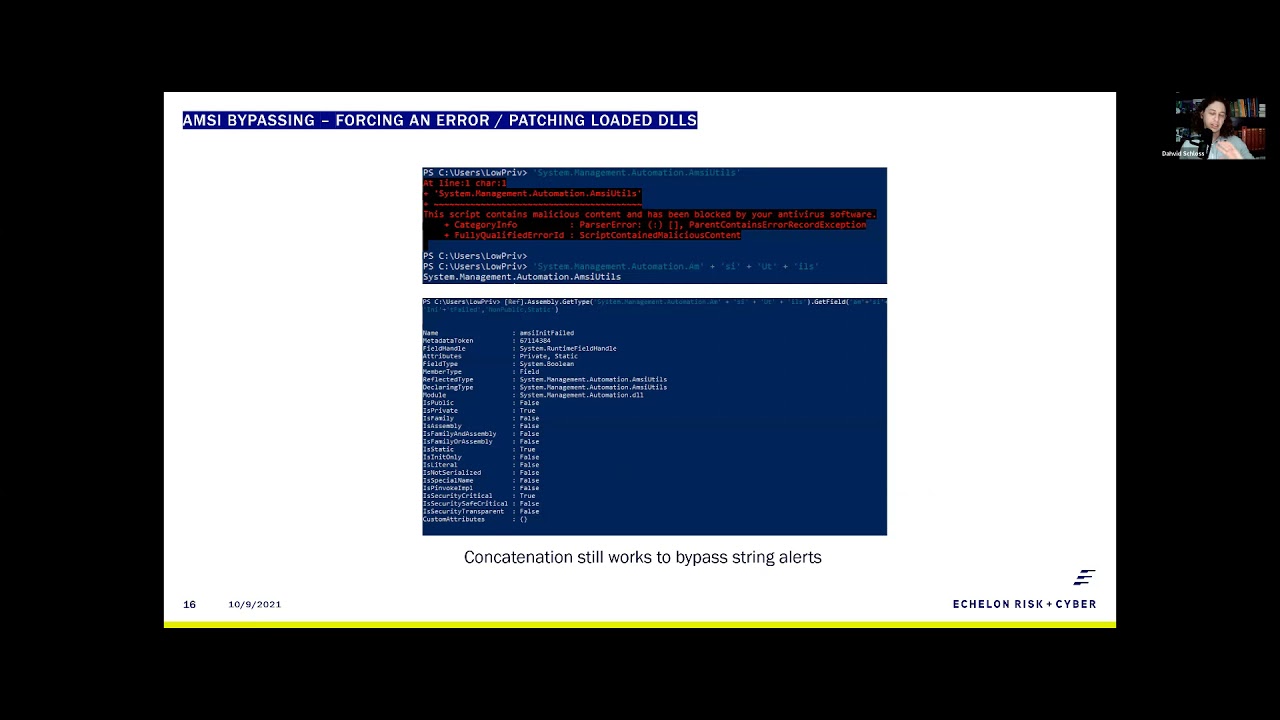
[Music] so skipping ahead if you want to actually see what this looks like it's very simple uh the first thing that we're doing here is we're running ps version tables you can see it's running as ps version 5.1 it's not running 2.0 i'm echoing amd utils the reason being is now you give me ptsd every time you walk up here i think i'm going to get in trouble um so you if you try to call amze utils it amzie doesn't like you trying to call itself so it blocks you out and that's a good way of testing to see if you've bypassed it or not so when you run powershell.exe version two you can now call amze uh another thing
to note here is that if you don't run uh script block script block logging within your environment uh when you disable amsi it no longer creates an event id for any sort of malicious or suspicious scripts so as an attacker that's really good for us but if you don't have access to version 2 then you need to find a way of putting it into a failed state the reason why we want to put amz into a fail state is because a amz doesn't self recover so if you crash it it stays crashed so matt graber back in 2015 came up with this really cool reflective method where he just calls the function or the the
value mz and it fails and then sets it to true and that was enough to crash it right uh and that was back in 2015 then up until about last year you could concatenate the string like so and it would still work right thankfully thankfully microsoft fixed this sorta and and i think this is a big standpoint to the talk which is we started moving away from focusing on powershell because everybody started making c sharp right uh and because of that we found other ways to bypass this so the first thing that we needed to figure out whether matt graber's function still works right if we can reflectively call the the items oh god that is blurry i'm so sorry for the
people here um the first thing we're calling at the top of the screen screen is amazing utils that's obviously going to get blocked then the next piece is us trying to concatenate the string to see if concatenation still works uh which it is which means amze still isn't doing what they promised which is concatenating strings before execution uh the next piece that we needed to figure out was exactly where is it getting blocked in so we went as far as being able to call the the field for amsie and it failed and printing out the information there so technically you can still get to the area that you need to get to which means macraevers method still has a
possibility of working [Music] the fun thing is and shout out to secure this [ __ ] because this guy has like a really good write-up on this but it turns out that amsi is doing some uh some regex so when you do get type get field and then try to set value then it concatenates the strings and goes oh yeah you're trying to call me not cool but the fun thing about amsi is rule number one when trying to defeat amsie when in doubt encode it out mz has no idea how to deal with this other than base64 so in this example i'm turning the text into hex and when we're able to print it out as
we can see it it does come up as amazing utils and mz and it failed so we are able to call it without it blocking that information and then the next piece is we need to turn the text into hex right so the hex and the text and text in the hex you get a nice little like dr seuss rhyme so you can remember that that's fairly simply to do simple to do in a one-liner you just split each individual hex code and convert it back into a character value and it'll come out as amazing utils so when you want this to run oh this will be interesting because now we're in a oh is it running cool yeah so um call me
util to show you that it's actually functioning as amazing utils i copy and paste in our macgraver method with that hex encoded text and now we've bypassed amsy right very simple very easy to do how do i go to the next slide oh god it's going to play again isn't it i think i froze my machine oh cool here we go yeah so then the next piece that we can talk about is ross mouth i know this looks like a lot of text don't copy it trust me you can find it on google a lot easier um but this is a really cool method because it's patching the live loaded dll right so with that same kind of
principle you can uh bring in you know or unhook edrs right you can just reload the dll if you wanted to with this same exact principle uh the fun thing about this is this is actually just c sharp code written for powershell uh they're using ad type i will recommend if you're an attacker not to ever use ad type because it does leave an artifact on disk that is then scannable by antivirus but for the purpose of this talk it's uh very simple to to use um another thing to note here that when you're trying to break amsy in this method you're trying to rewrite the first couple bytes in whatever function uh you're calling the reason being is
amzi has a static first four first five bytes which resolved to amz so if you can change that to anything else uh it'll break amze and that has been around forever and let's see if this actually is running it is cool same idea run amzee um i didn't make any modifications to this one you can find it purely on google you know and once you copy it in it doesn't alert it runs perfectly fine and when you go to call amze again it will call it so you've bypassed it in two different methods here and you know these are old methods things that we should have been paying attention to back in 2015 2016. let alone 2020 when we were all stuck at
home doing nothing but uh everybody was paying attention to c-sharp or go or rust and all these other applications so what do you do when you can't bypass amz right what do you do when you can't call this code um quite simply you can just build your own powershell and i'm not going to go too much into the code on this one so i just wanted to shout it out and show you guys it is possible you got to think of powershell as basically a bunch of dlls loaded on top of command prompt and that makes it a power shell right it makes sense when you look at it that way so the first one or the demo that i'm
going to show you here is from ms build shell ms build shell is using the dotnet 4.0 ms build.exe which is a living off the land binary provided by default in dotnet version 4.0 this can be found on that github page i have dropped this on disk on so many uh red teams that i can't even count them right but it's very very easy to do you call the direct uh ms build.exe and then your cs project file and just stop running it did then it should um execute into this fancy little fake powershell right but it's got the exact same functions of powershell um the only thing you don't get is tab completion but we never left the command prompt
right but this is this is just something to shout out because it is very easy a lot of people forget about living off the land binaries there are plenty of ways to load in different dlls that will just load powershell right uh here's some more ways to do it powershell dll project you can run dlls in multiple different fashions my ultimate favorite when it comes down to creating my own powershell is using the sync app publishing server this one's pretty fun because it's a reverse powershell so if you use netcat on your your host you can catch this uh this callback and then you got a nice little powershell shell from your from your kali linux
machine uh if you guys want to know more about this kind of stuff look at i read team for uh their writ their write ups they're they're pretty solid holy crap i realize i'm like zooming through this bad boy right now but i think we're behind time so that's okay so here's the the fun part this is what everybody likes to to talk about with me when it comes down to um offensive powershell so as i mentioned before powershell is just dotnet scriptable right and and that allows you to write c sharp code for for powershell and vice versa which is why we saw such a huge boom coming from uh what was it called coming from
powershell over to c sharp like sharp hound and all those other things if we want to run our own malware and this is kind of outside but if if you want to run your own malware you need a few libraries or functions the the first two functions are virtual alec and create thread those come from the kernel 32.dll and the last piece you need is really the marshall service to copy additionally even though we don't put anything on disk here we still need to avoid antivirus detection and we can do this by reflectively calling our dlls as well as some shell code obfuscation from within powershell so for the for the first part which is
importing our code that's very very easy in the in the top example here the uh the dll import that's on p invoked.net that's c sharp the one right below it is using matt graber's reflective method there's a few other methods offensive security built one as well which is really long and complex to read so i use this one as a good example but as you can see they're very very similar in the way that you would import them and then when you call them they're equally the same the the only difference here is the first example of virtual alex that comes from c sharp uh use a period instead of two colons and when you're doing it in powershell
you call the type name that you created and then ant pointer colon colon but you know if you can write c sharp you can write it for powershell which means that you don't actually have to have anything ever touch disk which is great the second piece comes down to shell code obfuscation and this is still pretty necessary uh the nice thing about powershell though is it reads bytecode in decimal instead of hex so 0x00 becomes zero zero zero and zero x f becomes two five five i don't know it it i don't know if it's the same for everybody here but for me it's like if you can just see those numbers it's like okay cool don't go
over 256 got it um so for shell code office officiation you don't have to do anything fancy you know you don't have to write your own encryption method or anything like that you can do an xor and a caesar cipher in this example we'll just talk about using caesar ciphers uh that's pushing your bytes to the right or the left in any number of order so zero zero zero would become zero zero five we have a caesar cipher of plus five uh but in this case also two five five becomes 260 which is a problem so another great operator that powershell gives you is is modulus which is just the percent sign so if you ever need to
use uh modulus for your shelf code office station that's exactly how you do it just 256 minus your offset or plus your offset whatever way you're going and then modulus that by 256 and that will make zero zero five become zero zero four so you know with all that it's very simple to create your own malware and obfuscate your own malware from within powershell right there's not a whole lot of difficulty when it comes down to this so what does that look like in this example i'm showing the full screen um so you guys can see it but i'm running a interpreter reverse https um handler that we've created the shell code beforehand one thing to notice ahead of time which
sucks that this is so small but um the process that we're running in for powershell is 11496 um and that amsi is indeed running in this case right i haven't gone and defeated this at all the next piece that i kind of want to shout out here which also kind of sucks is kind of blurry is we've talked a lot about copying pasting things into the the the terminal when you're running your own kind of management shell or script from powershell like powershell empire or something like that we can't use iex download anymore because uh too many people have abused that so fun fact is you can just use the.net web request function uh you know
scriptable.net and you can load whatever ps1 file you want into a variable and then execute iex against that variable and it will load in your malicious script so that's what this little piece here is doing uh it's reading the data stream into a net io stream reader and then loading that into a variable that will then execute so in this case it's bsides.ps1 that we're calling from i copy in iex content drop that in and now we can call invoke b-sides which is our malicious payload uh input the offset here as you'll notice there is no pop-up antivirus didn't discover it amzie doesn't care for it and when we jump back over to our kali linux machine
we've executed a shell a full interpreter shell mind you so if we get uid we can see that there's a low privileged user and then if we get the pit it's 11496 right so this should be a little concerning in itself right this 2021 we can still run really simple shell code execution methods without detection now of course if you were to use something a little bit more advanced than like windows defender or other static base analysis you're more likely to capture it but with your obfuscation techniques that you implement here it's still fairly easy to bypass so yeah i don't know now that you're paranoid hopefully um what can you do about this uh my first example or
pain disable power shell please like i i can sit here and beg against you guys all day you wouldn't give your your users um python would you so like if you don't have a use case why would you give your users powershell it's the same danger if you can't disable powershell maybe expand out your application blacklisting not everything microsoft gives you is actually safe i don't know if you guys remember dde auto but that was pretty dangerous and they just claimed it was a feature um use some ai based security products this one's a big one the reason why i say ai based security products is if you're able to unhook a dll like we
had mentioned with the roster mouth method a ai-based security product will alert that a bypass is occurring right a sensor bypass so it has ways of of telling that it's still loaded into a process memory and the last one is a little less for everybody here but microsoft kind of needs to fix their stuff it's 2021 right there's a lot of 2015 methods not just the stuff that we talked about here especially because it's only a 30 minute talk um but there are a lot of methods that that still work today that worked back in 2015 2012 even as far back as 2008 when it was first released and that's just because microsoft likes to have backwards compatibility
so they they still have a lot of inherent flaws in in that regard but with all that this is who i was and who i am i know this was kind of a hectic speech a lot of errors came up so i apologize for that but i will open it up to any questions anybody may have or comments concerns anybody else want to [ __ ] on microsoft for five minutes none sweet so uh that's that's my talk thanks for the time all and uh hope you have arrested a good b-sides [Applause]
Related talks
 34:24
34:24 47:29
47:29 42:15
42:15 27:59
27:59 53:40
53:40 53:08
53:08