PowerShell's Return to Power
Show original YouTube description
Show transcript [en]
uh good morning everyone hopefully you're all hyped up on uh mountain dew or coffee or whatever it is that keeps you going in the morning um my name is david floss i'm here to talk to you about powershell a little bit about myself real quick though i am the uh offensive security lead for echelon cyber and risk basically what that means is any of our emulation of criminal activity like red teaming pen testing web app testing i run our company's section for that i come from a red team background in the private sector and then prior to that i was in a special operations unit for cyber so i got to do this stuff for for fun
i have my linkedin up here in case you guys want to come check me out i post red team and pen test tips every week especially for october since it is cyber security month and then i do have a twitter it's at the beach loss but uh all i do is post memes there so if that's what you're looking for that's available there uh and just because we're a small company i want to shout out our company real quick we are a consulting firm in cyber security that does defensive offensive and advisory work but past that doesn't really uh not too important so what's today's goal today i want you guys to walk away with like this healthy
dose of paranoia when it comes down to powershell i think it's pretty important considering the fact that over the course of the the last couple years we've kind of gone away from paying attention to powershell as a whole as everyone started moving over to c-sharp for their malicious binaries so how are we going to do that well first we're going to talk about like why i.t admins love it and why attackers love it kind of set the stage right and then we're gonna go into bypassing controls some of those are organic like science script execution amsi and white listing some of them are are not so organic um like uh an edr's enumeration alerts then we're going to wrap it up with some
malware deployment and a few tips on how you can protect yourself let's jump into it so why do admins love it quite simply it's everywhere right it's on windows linux mac i've had it on my my mac machine i've had it on my linux administration machines it's perfect it has a really wide market share and it and it works across the board it's easy to use and learn this is actually one of the first applications or programming languages i've i learned or scripting language i guess in this case even before even for python and lastly it enables more functions around remote administration i originally started my career as an i.t admin um and powershell was taking functions
that would normally take hours down to just a couple minutes to run so why do attackers love it well frankly it's everywhere right windows linux mac you can put it on your kali linux machine and just negate the need for impact to interface with a windows machine easy to use and learn everyone likes to bash on microsoft so there's a ton of resources out there for offensive security uh powershell scripting right and then it enables more functions around remote administration quite frankly when you look at it this way it really shows that the attackers have an advantage um i think what a lot of people just don't seem to realize is that if you gain access to powershell
you can just run scripts from memory you can copy paste into the terminal uh you can import it via netweb requests there there is actually no need for scripts uh like mimikats from powershell or power view or any of that stuff to be on disk so it makes it very difficult for like signature based avs to detect this kind of activity additionally it's scriptable.net so this is the reason why we saw a lot of people go from powershell over to c sharp because it's basically the same thing and we'll get more into that later and then again organic security functions are always getting defeated people just love to on microsoft for some reason so they they find new ways of doing it
um quite frankly like in about 95 of my engagements when i was still running as a red teamer powershell was the the the major factor in how we gained code execution or privilege escalation lateral movement just by it being there you open up a lot of avenues for attack from an attack from a threat actor so let's jump into some of the cool stuff now that we've kind of set the stage the first one is kind of it's going to make some some of you attackers out there uh roll your eyes and that is a sign script execution and the reason why the attackers are rolling their eyes right now is because this is not a
security control uh but i bring it up here because a lot of my clients believe this is security control and if you read the documentation from microsoft they write it as it's a securing control for those who don't know script signing execution is just a policy that's placed into powershell that will force the the scripts that you're running to be signed or unsigned or self-signed right um and the reason why people think this is a security control in itself is that when you try to set execution policy which we can see in the screenshot uh to bypass it actually says nah you can't do that right especially if you're a low privileged user but the reason why this isn't like
uh security control is is this right here uh it's quite simply easy to bypass by just executing powershell with the flag ep or execution policy and then bypass and then you have a nice little uh bypass terminal and something to note though is that is only for this terminal right um when you're doing the uh code execution of set execution policy within powershell you're trying to change a registry key in the htlm uh hive but when you just run powershell exe tech ep bypass then you're just setting it for that that one time terminal so if you close out a powershell it won't affect any other terminal on the system but it helps um again i just wanted to throw this out
because it's really important uh don't treat this as a security control or stop trading as security control uh and that brings us into the cool stuff and this is going to be what a majority of the talk is going to be about which is bypassing amsi so amsi or i what i call amsi for short is the anti-malware scan interface it is a known known good hook into powershell and other scripting languages within microsoft for security products to use so they can monitor execution and like office macros windows script host things like that in powershell itself it it additionally will try to block malicious scripts and functions so the iex new object download string which
is probably the most commonly used command to import malicious scripts into your network is just flat out blocked like amzi goes nah this this is too dangerous additionally strings like mimikats bloodhound power view even itself amsi utils is considered malicious in its eyes and it'll block you from being able to execute if it sees those strings so it's it's kind of nice um some known integrated antivirus applications here like mcafee sofas kaspersky windows defender kind of a duh there there's probably more i really didn't dig too deep into it uh to be honest with you uh but these are the ones that are openly admitting that they use amzie as part of their tool so
here comes another really fun easy bypass powershell 2.0 for those who don't know powershell 2.0 is installed by default and even the newest versions of windows 10. and it has absolutely zero security functions uh which is why when you look at like matt graber's power view or other windows enumeration scripts they'll usually try to downgrade to powershell version 2.0 really quickly or right off the bat because then you don't have to worry about any of the security controls or script lock logging and things like that though to caveat all that dotnet2.net version 2.0 is required for powershell 2.0 to execute uh which doesn't come by default but if you're running old applications that require like.net 3.5 then net 2.0 is
is bundled with that for some odd reason uh which is kind of weird but this is really easy to downgrade to in fact all it takes is a quick little screenshot i don't even have to show you a demo of what's going on um and the first command up at the top we're running ps version table to show you that we're running uh powershell version 5.1 and then we're trying to echo ams utils this is like a test that we as attackers will use to see if amzi is still working uh and you can see that it doesn't like itself being called so it goes and blocks it but then you can just call powershell.exe tech version 2 and then
oh cool now you can echo amazing utils right so stupid simple and is actually like very widely used and is still widely available because most um most people don't realize that it's just sitting there right so what can we do if powershell version 2.0 isn't available we need to find some way of crashing it right so this comes to the fun part of where we're going to get to and why i think powershell is still so dangerous and when we left it or stopped paying attention to it it just kept working or our attacks kept working so when we want to defeat amzee what we're trying to do is put amstee into a failed state the reason being is is amzi
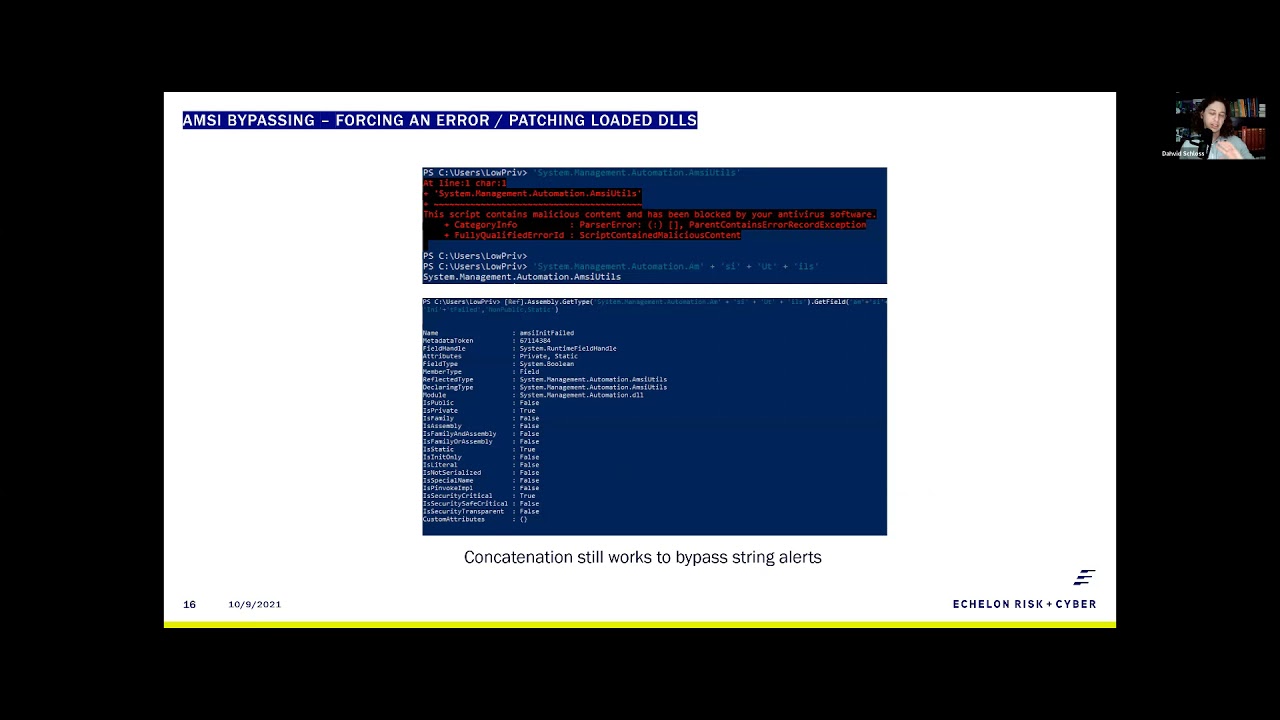
doesn't have a self-recovery function meaning if you somehow set it to crash and you get the field amsy and it failed to set to true uh it'll just stop working it doesn't try to reload itself which is cool uh for attackers it's really bad for defenders right so back in 2016 matt graber the genius of powershell found that you could use reflection to just call the mz and it failed field and set that to true and this is the reason why amsi utils is actually a band uh string within amsi uh thanks to mac raber and this was fixed relatively quickly uh the problem is is this line below it where you have the concatenated strings of amazing utils
and amazing and it failed well that worked all the way up until 2020. um i was using that on most of my red teams up until last year right that's kind of scary because they state in their documentation that amz does concatenate um before code execution which just wasn't true but this is actually a really good use case into showing you guys that microsoft really didn't fix the issue they just kind of pushed it to the side um we're going to stop through that real quick right so the first thing that we needed to do here was figure out does or have our we need to set the static right so we need to call amsetils and
make sure okay yeah it is blocking it uh and then we needed to see does concatenation still work right so can we call amsa utils with a concatenated out and we can so that begs the question all right how deep down the rabbit hole do we need to go before microsoft says this is malicious um so the next thing we need to do is figure out okay can we just call the field can we call amzee and it failed and it turns out you still can you can you can concatenate it and as you can see in the screenshot below we do get all the information from amazing it failed so something weird is going on that
isn't as straightforward as as most attackers would think well what it turns out is and thanks to secure this for writing up a great write-up on on what's going on here but when you uh call a field and then you set the value um ramsey does a little bit of regex from that and then goes okay i see a few things that are that are matching up i'm going to concatenate the strings within the the get type and get field and if they equal a malicious string then i'm going to obviously block it so it's kind of cool because now they're now they're thinking okay maybe if we do some rejects we can we can catch this
stuff uh the problem is is amzee this still sucks um my number one rule when when defeating just about anything in powershell is when in doubt encode it out uh i would avoid base64 as a whole because it is a organic command structure within uh powershell but what you can do is format to hex and so in the two screenshots below what you're seeing here is the concatenation of the mzutils formatted into hex on an encoding of uta utf-8 and we can print it we get our nice little hex code over here to the left and then when we do the same thing for mz and it failed we get this nice little hex code again
so from there we have to create a one-liner to figure out how to turn our hex back into text right because we already have our text in the hex so you're gonna sweet little like dr seuss rhyme there as well so the one liner is quite simple all we have to do is split each individual character and then convert it back into a um well a character right we take the hex code and we split it into a characters push that into a result field in that result field then prints mzutils so what does that look like quite simply it's using matt graper's method with uh with hex so the first thing we print out
zamasutil will show you that it is functioning mg is functioning we print in our macgraber method with our hex code and our single line for breaking apart or breaking back into text for both amz utils and amsi and it failed setting that value to true and now we can call amzi showing that amsi has been defeated using this method so this 2016 method really still hasn't been fixed right and uh i i can tell you this is probably one of my more favorite ways of showing clients that they uh they're not as secure as they think they are just because they have some organic controls the next piece and i wouldn't worry about writing any of this down uh is the
rasta mouth method mouse method oh it's a tongue twister the the reason why i wanted to call this one out in particular is because this is kind of an interesting way of doing it uh rossa mouth actually found that you could patch the loaded dll and that's kind of scary for people who are attackers because or even even those who run edrs because if you're able to patch the loaded dll you could possibly unhook the dll um and and load in something that's that's clean from from your edr from kernel 32 or ntdl232 right and this is just c sharp code that's running in powershell the only caveat i would say is when you run this kind of code is if you're an
attacker don't use ad type because ad type leaves a temporary dll on disk and it's an artifact so you can get caught from that but basically all this is doing is loading in the amz dll it's finding the scan buffer library and then it's overriding the first couple bytes and the reason being is when amsi calls itself in amsi scan buffer and z context amazing it failed it always looks for the first uh first couple bytes that are static and those static bytes uh translate to like amsi so it's just looking for like the first four letters of its name and if it doesn't see that then he goes oh i'm corrupted set it to
failed and you're good to go so this is a relatively old method as well i didn't do any obfuscation on this one and as we can see mzutils is running
i'll eventually copy and paste it in nothing's coming up from amsi we're able to load in our our c sharp code and call amse again right so this is a really relatively old method as well that just still works right out of the box the nothing has really changed in this way of doing things the only only difference is i think if you ever saw this in the wild it would be i am scroll wheeling um
all right i totally screwed that up give me a second there we go uh the only thing i would say if you saw this in the wild it would be done using like matt graber's method or the offensive security method for loading in dll imports so it would be reflectively loaded in so you're not putting anything on disk but for the most part this this technique still works right there is one other one that i kind of want to go over real quick and hopefully you guys can still see my screen but it's the offensive security method which is right here and the reason why i like the offensive security method a lot is this particular method um
reflectively gathers all the assembly types that are loaded into powershell and then it uses wildcards cards unlike iutels and context to find the address and then overwrite the address of amsi contact so if we just type in mgutils again show that it is blocked and copy in our script again it's going to allow us to print it but what i think is kind of cool here is we can actually kind of go out and look at each individual section so when we type in gather we can see all of the loaded function types or assembly types that are loaded in and maybe i just cancel it there we go
yep and we can kind of step down and see like where each piece of this is going so when we pull up delta we can actually pull up all the functions within the mz uh the mz dll mzcontext mz session mz and it failed amazing lock object and what i think is super cool about this is we can actually pull the address for amsi context right so if we pull up context here we can oh actually it's going to pull up the wrong thing but adder will work in the same way so when we call the address variable here we can actually see the memory address that it's dynamically loaded into and that's what we're copying over using.net
because net is available to us in powershell this is a very nice like red teaming little eight lines of code because uh it's very hard to detect and and see um at least i i haven't been caught in that regard from it but i just wanted to point that out real quick before we continue so what happens when you can't run code to bypass amz whether that's through restricted language mode like restricted or constrained language mode or app locker application whitelisting blacklisting whatever you're trying to do well quite simply powershell is just a bunch of loaded dlls on top of command prompt it's that's why it's called powershell right so you can just quite easily create your
own powershell using living off the line binaries or you can be lazy like 90 of us in in the pen testing and retaining world and just use this wonderful program called ms build shell which can be found at the github and what ms build shell does is it uses the net version 4.0 executable ms build i think it's ms build uh to uh build a cs project file yeah here we go so because.net 4.0 is installed by default build.exe is also a living off the land binary it is installed by default uh the first thing i did here is i wrote up ps version table so you guys can see that it's not running powershell currently
this is just a straight command prompt but what we can do is we can take this cs project file which doesn't get flagged by antivirus programs because in itself it's not malicious and if they started flagging on that kind of activity you would potentially start flagging on legitimate activity but very simply all we have to do is hit enter here and it builds us a shell the errors that we see coming up is is the application trying to disable amsi um quite simply as the old mackrevers method you could just edit the lines of code that are in there and then this would come up as uh or nothing would show but i left it in just so you can see
what it looks like as a default but now we can run ps version table and we get a ps version number but when we look at the top here we're not running powershell we're running ms build shell so when you look at that from a perspectival application whitelisting or blacklisting like this is not going to get caught the only functionality that you would lose inside this terminal would be your tab functionality that comes with uh powershell but i mean that's no big deal and then i think i just exit out of here yeah just so you can see it shows us a build exits uh it doesn't actually leave anything behind the only thing that would possibly be
needed on disk is the cs project file or you could host that at a distant smb server and it would still function the same way there are other ways of doing this i kind of don't want to get too deep into it because it would be a little bit more outside the scope of a powershell but there are other projects like powershell dll project which you can run the many different living off the land binaries to run a dll um there's my personal favorite which is the sync app publishing server which is a script that's given to you by default you can break out of that and and send a request to a distant server
be that your attacking server and you can use netcat to capture it and you'll get a sweep powershell shell from that uh if you want to learn more about this stuff i would definitely check out like ired.team they have some great write-ups on using powershell without having to use powershell and then the last thing on on bypassing alerts is going to be enumeration alerts this is this is something that i think is more red team focused but it is kind of an interesting way of looking at things um edrs have gotten really smart on being able to detect the heuristics of an attacker enumerating a dock or a workstation and the reason being is because most people just run like
jaws like which is just another windows enumeration script or other enumeration scripts that just call ipconfig who am i netstat net sh but those are all applications that are built and listed in system32 so if you go to system32 you'll see them quite obviously um we'll come back to our our powershell screen here so you can kind of see what i'm talking about but if we type in who am i right we get this nice little uh callout well if we don't want to use those system32 executables we can use net from powershell to build our own who am i using environment variables and net calls so in this case who am i turns into environment user domain environment
username and it looks pretty much the same with some better capitalization where it would normally be seen though when you start doing things like ipconfig this is nice and neat very cool to look at uh the.net library for this doesn't look as pretty what did i screw up oh oh there we go so it's not as pretty but it does get you the information right and you can use powershell to format out these strings uh to to make it pretty you know say you want the os build version you can you can pull the os version uh push the system environment for os version into a variable and then pull out version and build and now you have the build version of
the application itself uh and then you know there's some fun things that if you really want to get down to it like you can print out which edr or antivirus system you're using as long as i didn't screw this up uh and and format that out and because windows keeps track of most of that activity you can just print it out but this is this is stuff that won't necessarily get you caught well this this edr information might because you're going to call a cmi cim uh instance but the other ones are using system environment variables and dot net basically pretending to be like an installer so if you can change up the way that you
call things you start defeating the way that these edr products are detecting enumeration which allows you to live on the machine for a lot longer right this is just a screenshot of the same thing so we talked about all of that just to get to malware deployment um this is this is the fun stuff basically with malware execution on powershell all you have to do is take your c sharp code and turn it into powershell code vice versa it's dot net right to get basic code execution you need virtual alec and create thread from kernel 32 and you need the marshall service to copy your shell code into uh the allocated memory and then you do still have to do uh some
av avoidance like reflectively calling your dlls and um a little bit of shell code obfuscation just because you're creating a new thread so what i think is cool about malware execution is that if you're using the mac graber method which i think is the best for beginners in pen testing and attacking using offensive powershell the top line of code for where we're importing kernel 32's virtual alec is from p invoke and the one right below it is how we would import it into macrae's method it's quite simply the same uh just a little less information you know you're still calling out hey i needed to be an in-pointer or integer pointer i need an unsigned integer
um all that jazz and then when we want to call it it's it is pretty much exactly the same right this is how you call it in c sharp and this is how you call in a power shell very simple straight to the point another thing that's really brilliant about powershell is it helps out with shell code obfuscation right and it is still necessary you don't want to put just like meterpreter shell code on a um in a variable and just call it a day somebody's going to catch that but powershell reads bytecode as decimal instead of hex which is perfect if you like messing around with numbers i'm not too much of a fan of hex
code and trying to format hex when you when you start doing uh obfuscation so like zero x zero zero becomes zero zero zero and zero x f becomes two five five uh and say you to do something simple like a caesar cipher which is pushing a byte to the left or to the right in this case in this example we're pushing the byte five to the right zero zero zero becomes zero zero five two five five becomes 260. um but because 260 is over um you know uh by its maximum range we need to use another function within powershell which is uh given to us quite nicely as modulus right it's a mathematical function and the operator
is the percent sign so say you're trying to set your offset um to to not go over your 255 you just do 256 minus or plus your offset and then modulus that by 256. so then zero zero zero becomes zero zero five and two two five becomes zero zero four very very simple to work with uh especially when you're doing a caesar cipher so what does that all look like basically what we're going to do here is we're going to run our multihandler as a interpreter reverse https and we've already pre-encoded it with a caesar cipher of so i'm showing you oh let me not click the the wrong buttons here so what i'm showing you first is that
powershell is running under 11496 just so you are aware because we're going to execute within this process and that amsi is currently running and we've talked a lot about just copying and pasting things into a terminal if you have access but say it's like a ton of code you don't want to just sit there and wait forever what you can do is use dotnet web request to create a new rubric new web request and read that into a variable so if there are any people out there that want to utilize this code please do it's quite fun um it functions just like how internet explorer would minus uh you're not reading into a variable on internet
explorer but the cool thing here is once we have it into a variable we can just execute that variable with iex content so we're not directly writing it into the powershell application at first then we're going to call invoke b size because let's say the function that i called it give it a supplied offset of 66. one thing to note here is that there is an antivirus running nothing has popped up and we can call back and we see that there's a session running the uid the paid 11496 the uid is the low priv user that we've been using for all this time and i think that wraps that part up yeah i have a much longer explanation of of
this code too uh that we'll be releasing a little bit later just in this case the time limit kind of constrain this so now that you're hopefully a little bit paranoid like what can you do how can you fix some of these things quite simply like my number one thing is always to disable powershell uh you wouldn't give your users python so why would you give them powershell i get this doesn't work for everyone but what people seem to forget uh is that gpos do allow you to apply like these application blacklisting or whitelisting to specific ou's so your administrators can still use powershell i would just limit it for the the users also look at expanding your application
blacklisting you know not everything microsoft provides you is safe uh dde auto is a prime example of this definitely use some ai based security products because they are going to hook into kernel 32 and to ntdl and like i had mentioned like sure you might be able to unhook it within powershell but with a better ai based security product it is going to be able to detect when a sensor is being bypassed and alerts you on that activity and then last but not least and this is less for the people in the room but microsoft kind of has to fix their stuff right i can't say it's just a feature anymore there is a lot of
issues and and vulnerabilities within powershell that have been functioning since its release and because we've started to focus more on c-sharp binaries and other attack vectors people just forgot that powershell existed and they left it at oh we have constrained language mode or we have script signing execution or we have amz right they forget that this is the majority of the way that attackers get into your network and stay here fileless malware attacks utilize powershell yeah it might be through your registry but it's still calling powershell so any ways that we can start refocusing on these attack factors using the application would be beneficial to the security community as a whole so that's my talk
here's my information again for anybody who wants to jot it down or wants to download these slides from from our web page
Related talks
 25:53
25:53 47:29
47:29 42:15
42:15 27:59
27:59 53:40
53:40 53:08
53:08