Semi-Offline Attack on Android Full-Disk Encryption
Show original YouTube description
Show transcript [en]
all right so let's get started walk into my talk send me off for an attack an Android full disk encryption ass premature said I studied almost with him at Royal Holloway I think he graduated when I started her almost this is my Twitter handle for if you ever like to want to contact me if you want to follow me I not very active at the moment since I moved from being an external consultant to being a consultant in a corporate so today I will talk about full disk encryption on mobile devices I give you a short introduction into full disk encryption then full disk encryption in Android and then I will discuss three attacks all three attacks are brute
force attacks and they follow the stupid simplest strategy that you can imagine we start at pin zero zero zero and run up to pin 999 the first one is the baseline attack it's the online attack then we'll discuss the offline attack and last but not least my semi off run attack all the work is discussed in my MA thesis it's published on the website from the university if you care to read 80 pages feel free so yeah let's get started full disk encryption on mobile devices what is the situation when do we need or when do we want you have full disk encryption you lose your device or somebody steals your device you don't want them to be able to access your data
so you think about hey let's have full disk encryption but full disk encryption is theta at rest so storage decryption only works when the device is at rest and here's the first question for you guys who actually switches off the mobile device hands up well lost time at least one person protector okay so yeah that's it basically your full disk encryption is not really helping you because you never switch off you so all that protects your data is your screen lock that is the limitation number one limitation number two when I steal your device I have your device and I can do with it whatever I like yes or no remote wipe exists but guess what my basement
doesn't have cell phone reception so your remote wipe is done again so what are the elements that a full disk encryption needs obviously we need this concretion key in android 8 they call it master key and we need a cipher Android uses AES CBC and we need the process procedure to do the encryption decryption for us that is Linux famous T encrypt so those of you who know the encrypt know it is in fact a transparent encryption that means as long as your device is running your devices decrypt it a reread operation is decrypted every write operation is encrypted but a ass has 128-bit key and I don't know when I go to my mom or my grandma
and tell them you have to remember how many 28 bit key they think I'm nuts and honestly we would be nuts if we would try to remember hundred 28 bits I wouldn't even try so we need something better to come up with with a protection for our master key and that's the key encryption key now if you think that can be shorter than 128 bits you're fooled because Android uses the key encryption key as a pure key hierarchy it uses the CAC to encrypt the master key again with AES CBC so we don't really gain much by having a key encryption key because it's again on the 28 bits otherwise the security if the master key would be lowered
that's fine going have fun what is the solution to that problem the solution is a KDF the user has a secret value a password and we apply the KDF to it in the sense that at the end we have 128-bit strong encryption key so have a look at all these different elements in a bit more detail as I said the cipher is AAS AAS is a block cipher hundred twenty eight bit blocks that means the plaintext will be chopped up in hundred twenty eight bits we have three different key sizes available to us on the 28 192 and 256 Android uses 128 it needs a block cipher mode we have the choice between CBC and XTS
standard with CBC it's a traditional well-known mode we will see that in the next slide Axios is available in an Android but you have to sort of recompile the source code yeah you're not going to do that because then every update you would have to do the same again Axios is designed by Triple E it's a standard it got some criticism because the standard is not open so you have to pay a lot of money or a little money to actually access the standard or you're a student at a university and your university has access to the standard for free CBC hopefully everyone if you have ever heard of CBC because it's not really that new
it's a used in encryption B CBC mode is also used for different Tripta primitives for example CBC Mac it offers message dependency and you think the room is smaller than the last time because I think you can all see the the graphics we have plaintext 0 which is X sort which in your initialization vector then we apply the encryption on it outcome is the first ciphertext block and that one is feed back into the second plaintext block and so on and so on and now when you think about this for storage encryption that's not really ideal you have your Terra storage disk and you do that that means you start at byte 0 and you end up somewhere in the
end but what if you want to change a file at the beginning of the disk you would have to decrypt everything until your that position you change the file in yury encrypt that's not really efficient so they came up with another idea and the idea is six cryptids salt sector IVs so now actually full disk encryption is not encrypting the full disk at once but encrypting each sector individually and we have a factor IV so every sector gets a new IV based on the sector number and the key so now when you have to write a new file you just have to encrypt decrypt the sector change the file andrey encrypt the sector much better
so we are at the master key in android Masaki is created with the create encrypted random key function it's still in there I just check what it does is and that's actually quite funny it reads twice 16 bytes so that's one the 28 bits from that few random that's good the first one is the key second one is the salt those keys never change until you wipe your phone now if you work in a corporate and you have this nice policies please change your password and keys every 60 days you have a problem here because your users would have to wipe the device every 60 days they're not gonna do that but you need to know that when you bring that in your
environment that this happens so in your risk management you have to accept the risk or you really have to tell you users hey you have to wipe your phone every two months as I said it's protected by the CAC and we look at the KDF the ones that help is not to remember on the 28 bit keys up until Android 4 for Google used pbkdf2 it's also known KDF it has tweaked well use it only focuses on being processor expensive this is not a good thing to do today because let's face it CPU power is probably the cheapest power dude you can get moment so as a van dreadful forward a switch to script script is more than just
processor expensive it is also memory heart and what that means is for a normal task that you would assume it takes up more memory and more processor power for the user during the the entering of the pin it's not a big disadvantage he doesn't really feel it but if you were running your brute-force you get it it slows you down now that's what's happening until Android four four four you had a pin you had the password you apply to KDF you got the CAC with the CAC you decrypted the master key with the decrypted master key you decrypt it to full disk encryption but if you think about the term full disk encryption it implies the full disk
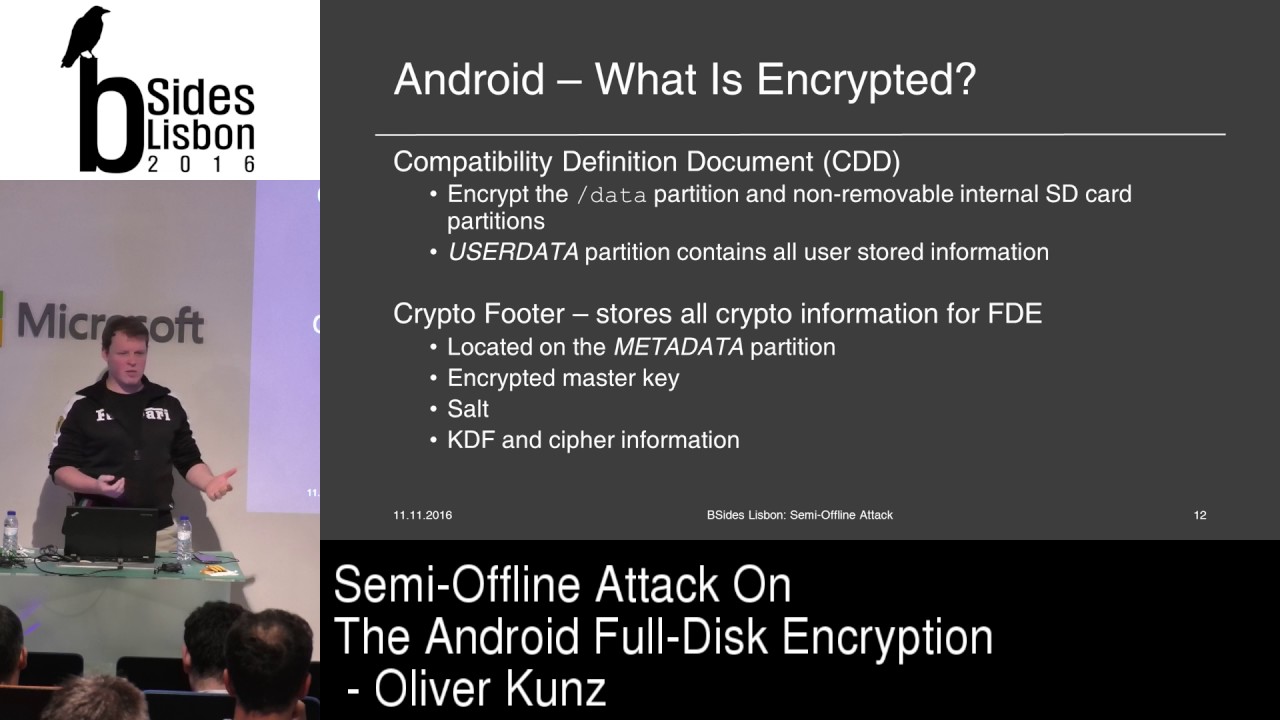
is encrypted right that is never true at least you will always have something like the metadata partition which is not encrypted it stores all the crypto material that he used for the full disk encryption so that is true for every notebook this out of all this encryption as well as every smartphone and in fact when you look at the CDD document which is documented and read every Android version gets you see there encrypted is only the user data partition and the user that the petition is the slash data mount point and the internal SD card which makes kind of sense because why would you encrypt the system partition of an open source phone everyone knows what is in there it's not
really secret and it's not bad either because everything that you as a user store and your phone is stored on the user data partition if it's an app if it's a document if it's a photo it's there so it's really do it efficiency so I run through the introduction I hope you're all with me we now start looking at the three different type of attacks the first one is the online attack and that one is quite obvious so I also use it as a benchmark the preconditions for the attack is you need to have the device so I either steal it from you or you lose it and I need for as long as my attack takes I
need a script that I can run or I need a physical attack machine like the one angler and vines demonstrated on Dec 21 which is kind of funny it's one of these cool super robotics so the problem is Google is not stupid and thank you so you have to enable ADB and you have to trust the hosts the attack host to be actually able to do that from a locked smartphone I did that I trusted my host I am able to adb for good and then I figured out okay what do I need what can I use those are the two methods input tap and then put text tap is very slow it's basically which really tapping on the screen and
it's also cumbersome because the Nexus 4 has a smaller screen than the Nexus 6 so I had to remap out the screen and basically MIT doing their task I thought I've been looking for another alternative method and that's Impa text it's much quicker I'm ten thousand pins took me 22 hours 40 minutes so that's my base level everything better than that is good it triggered 2,000 time ads and speaking of time ats the countermeasures now aside we use the KDF to get from user defined value to a bit key that protects the master key that's only true on the startup screen so when you start up your Android phone it asks you for the value that's
happening there but you use the same value to unlock the screen every time you use your phone unless you see in the table there are different countermeasures to that one on the startup after 10 failed attempts you where 30 seconds and you can do this 30 times until it wipes your phone on the locked screen you can do this practically forever I did it two thousand times and then didn't wipe anything and that's a problem because it weakens the screen it makes it more attackable so we could ask for them to bring us a wipe operation let's say after thousand failed attempts I got it that we don't doing that it's a bit stupid when you have a small kid and
they always press on your phone and stand it wipes your phone laughing you know the story so we could arguably say that's fine but let's do a different thing we could increase or decrease dynamically the penalty timeouts nevertheless no one is stupid and doing an online brute-force attack on on the screen just as I did conclusion the ADB is secured sufficiently enough we have authentication and we have to enable it physical attack devices is quite complex it took me almost a day to brute-force is 10,000 pins but there are some improvements now the offline attack and I call it your fashioned way so the preconditions change a little bit now I don't need to have access for the
full attack time to your device what I need access for as long as it takes to get these two partitions remember that one source your encrypted files and that one's doors to crypt information for do you fill full disk encryption so the purse the question how difficult is it to actually get two partitions of your device well there are two scenarios for me as an attacker the best-case scenario you have an unlocked bootloader who has an unlocked bootloader who likes to play around with Android phones no one one person at least ting good so it's very easy there all I have to do is start up is my image or any recovery image DD the partition and send it to my host
Alaska if you have a lock bootloader and you have a to be disabled that means I have to unlock the bootloader which triggers a user data wipe but the thing is when you read Simon and Anderson's research the wipe operation of the Android manufacturers is sometimes pretty faulty so it might be that you have some data residue it might be that you have the full user data residue and if you don't want to risk that you just image it with JTAC it's slow it's cumbersome it's error-prone yes it's possible and even if you don't have check tag or you don't want to do that you can unsold it a chip that's the attackers lost resort he can always unsold the chip
so there is another score that's initially written by Thomas cannon sake Bradford from why forensics I think why forensics not on the market anymore they were sold out the chips with center clinic right so them return Turkey Linux I didn't use stare script I used the version from Nikolay Allen cough he's the author of Android security internals very nice person I was in contact during my MA thesis with him had some nice discussions I used his script because he basically improved it a little bit I liked him more I built up on that it's handling only pin numbers that's fine my online script handled only pin numbers as well and the procedure is very simple we take
a Canada pin we applied the KDF we decrypt the master key we decrypt the header file which is basically the beginning of the full disk encryption did the user data file and then we check for the x4 signature that's the bit that I included in the script there because initially the script only looked for 16 null bytes at the beginning of the x4 partition table that's fine should always work but you know there is a metric signature number for a reason we know it's X 4 so let's look for that as well that's how you run the script and that's how long it took for the same amount of paints to run remember before I set everything lower
than 22 hours and 40 minutes is a win that's a big win that's less than an hour
so what are the count that we have for the offline attack well we could try to prevent the user from imaging or the attacker from imaging deportations but there is a problem with that and I just told you that you can eat always unsalted a chip it's complex not everyone can do it but still the possibility is there so that's a lost race we can try to make it harder to brute-force it offline and the only thing that helps us there is a strong KDF that's why they moved away from pbkdf2 to script from only being possessive expensive to also be memory but still my offline attack with 51 minutes that run with script not pbkdf2
so conclusion to that attack is we're much quicker but we still miss some security controls we need something to prevent that attack and actually Google thought we need something to prevent that attack and the responded with improvements they said they fixed it and I like that I like when people say I fixed it because then I look at it and I liked it especially because there was a time where chance Comey said oh we're going dark all the terrorists it's really bad to do full disk encryption so I wanted to look at it and that's why my Moses leaders was doing a security assessment of the full disk encryption so what are the improvements that Google
introduced well they said they want to do a horror binding of the crypto material used in a full disk encryption but let's be precise it's not the master key they bind to the hardware there is still reading 16 bytes from a few random they bind the key encryption key to the hardware and this is how it goes that's the old process we had pin and password available to the user we applied to KDF and then we had the CAC and you see the little gap there that's the new one so first of all to notice we have pattern you can now use your pattern lock on the screen as well and default password and this is really the string
that is used default underscore password it's written in source code by the way so it's no secret why is that there you may ask so we dandruff 5 and the whole FBI we're doing darks thing Google ah so sad let's ship every Android 5 device we default full disk encryption the problem is when you switch on your device for the first time it doesn't have any pin or password or pattern set but it needs it to start encryption and that's why there is a default password and if ever you decide after Android 5 to remove your screen lock value you divert back cue default password so if ever someone has a phone with no screen
lock and you have access to it it's very easy to find the master key all you have to do is default password script and do the other thing down there it's the known value it's the easiest thing but let's look what else is there we still have script the first KDF function then we get an intermediate key that used to be the key encryption key before and then we ask Android to sign it with the key master trust let the key master trusted runs in the trusted execution environment of the processor in Qualcomm that is q SE e so we bring the signature key material which is also in the trip to footer to the key master that is encrypted with
the internal key from the key master ask it to decrypt it sign the intermediate key and give me back to signature so this is where the horror binding happens we have an internal key master key that encrypts the RSA key for a signature afterafter signature back we have to apply script again and then we have to CAC so from one KDF operation we now have to plus a public key operation so the offline attack took 51 minutes I expect at least 102 minutes a little bit more because we have the signings still there so let's make it a hundred in ten minutes that the next attack should take and this is the offline attack so
when I drawed up this this line before I thought about good somehow there needs to be a way to attack it and there really is so this is the precondition for the offline attack and this is the precondition for the semi offline attack so you might remember that's the same precondition the yellow one is the same one from the online attack we already had this and it doesn't matter because I still have your device you lost it I stole it I am in possession of your device we still have to image the two partitions right it's semi offline and we still know how to do that so now we don't just have an attack script we have
an attack client-server application the server runs on the smartphone it's based on Krypton FSC that's the main encryption functionality from Android and the client is based on the offline attack script which add up bits and bytes for the communication so the server the phone really only has to sign the intermediate key and send it back to me receive signs and back receive sign sent back that's all it has to do and I'm back in the game if that works so that's a communication I have to initialize the key Moscow says I have to send the encrypted signature key and Anakin intermedia keys way to test and do that for as long as it takes until I
finally found the right key so let's take a step back we have the device we have an application we have two partitions and there is absolutely no reason why I should keep the phone in the state that you lost it or I stole it from you I now have everything off the device and I can do with that whatever I like so I wipe it I get a new master key that's fine I don't care I get a new era say keeper that's fine I don't care I send it over I sent the old one over I have it from the metadata partition so that's how it works we have to push the binary on the file and on the phone
we have to set up the communication between the phone and the attack host we have to run the server and we have to run the client two hours eight minutes I'm sorry hundred twenty little bit more than hundred twenty it's not bad but let's say a look at a demo it's the first time that I can do it it's actually cool so that's the server it's already running as you can see that's the client we don't see the fool come on that's a bit bad but sorry about that so what it does it sounds ever the keymaster keyboard and here it starts sending all the pins as I said it start from zero zero zero and this will now run for
I think three minutes and for as long we just continue where do we have that and we come back to that later so you might remember and of June there was this blog post from Gulf bits place and he found some exploits in the Trostle execution environment kernel and was able to read out the internal key Misaki oh that's pretty cool I didn't have the knowledge nor the capability to do that during my MA thesis so I was really thrilled when it's sauna because basically what that means is instead of sending over every pin and asking for a signature I only have to send back to key from the phone to the attack host and then I can run
everything offline again it's still a semi offline attack all the changes is the attack bit on the phone it doesn't have to sign it it just have to give me the key and then I can run both KDF application and the RSA application on my attack host so what are the countermeasures still all the countermeasures from the offline attack before apply here we can enforce lock bootloaders because in the CDD that's really not mentioned every manufacturer can ship a device with an unlocked bootloader hello Samsung Galaxy s2 we love it it's good for us to play around it's easy for us to play around but it's not really good we can remove the chat again to face I
have lots of friends who would hate that because they play around with chatting interface on the smartphone and it still gives us the option of Unseld during the chip we can implement the key change mechanism for the keymaster internal key that's actually something I discussed with Google back in 2015 when I sent them over my master thesis and we thought about when you do that so when you do that you either have to brute force the 60 byte AAS key have fun with that or you have to solve the RSA problem or brute force the RSA key but the real question is when do we change the key Misaki is it on wipe so then I read out the partitions which a
which a tag and right back which a tech I never wipe so the key Misaki would always be there so when we conclude the attack you will set the fixed the brute-force offline attack and yes they did technically they didn't because the problem was they had the conditions wrong I am in possession of your device and I can do with it whatever I like when I have the partitions off the device they forgot about that they work on or they worked on improvements as the more correct way actually to say it and the improvement is released in Android 7 file based encryption so remember when I said if you never shut down your phone your basically your
full disk encryption is a waste of your power that changes now like file based encryption all my work was based on Android 5 during my discussion with Google they said it should also work on Android 6 off the tune after the first talk that I gave him tuned I promised Bruno to work in a proof of concept for Android 6 and I miserably failed because they didn't have enough time so Google believes my attack would work in Android 6 I trust them I say we have 34 percent of smart phones running Android 5 we have 28 percent of smart phones running Android 6 so at least I know for 34 percent the attack still works for 26 for 28 after they yeah
probably yes an Android 7 is only at 0.3% distribution at the moment so not really lots of people have this countermeasure so before we actually look at this let's see if we are were successful so that's the server that's the client as you can see my pin and indeed it was serious $0.99 for that time that's my pin that used to be mimosa key I whacked it fits and so have fun write things down and taking a picture of it it took us under 28 seconds we were running a presentation next to it so works around fine we were successful and the good thing for me is it didn't took me more than 22 hours and
it taken it didn't take me much longer than the offline attack because remember we doubled to KDF applications and we have RS a signature operation on it plus the communication overhead thinking about that I must say I'm probably as efficient as the offline attack with the semi or an attack yes the attack is a bit more complex but still I think it's quite good and that's it I was very fast today any questions
sorry yes wait wait the mic so everything you
if I understood well your attack is a brute-force attack on the pain of the of the the the phone right yes so what if we increase the size of the the password that we use wouldn't that also be a contour measure to perform the attack of course yes it does and I think that that should be the first thing that they should think about before trying to do to carry asses and ensign the key and maybe that's easier solution now it's a good question I've never really figured out why they did to kts but it wasn't to to really slow it down I think it has to do when you look at will he receive as an output from the RSA
signature to really ensure that you get the same as he had before I totally agree with you yes make the password more complex but then again it's a smart phone how complex should I pause would be for a smartphone in turn it off between usability and exactly the pin obviously was just here for benchmarking it's the easy thing to do you only have to run through ten thousand numbers so for the research its fair enough I agree and I get this a lot but then really I have a company and we set out a policy to have a complex password for your smartphone and every time when I enter an office as a security officer and security consultant
I get shouted at because of that policy because people hate it it's very cumbersome to enter a complex password on your smartphone we could also argue you could have a separate password for the full disk encryption then you have for your device unlock for the screen unlock but then when we see how many people actually switch off the device probably everyone would forget the very complex disk encryption password but I absolutely agree we need to get the users to pick a complex password the strength at the end is the password complex ability is the fingerprint authentication just making it a much more complex user password there's that and do you know because actually what happens when you
do a fingerprint when you use a fingerprint reader it's it's retards all the the properties of you of your thumbprint and then it stores it as a bitmap so you have a series of bytes bits and bytes that represent you your fingerprint yes it will be longer think in iPhone it's it's over 2048 bits long it's harder to brute force yes okay but it's it's not really solution when you see that you can circumvent the fingerprint reader with a gummy bear
someone else
those benchmarks results were for the worst-case scenario right yes where I might pin would be nine nine nine yeah exactly that's why I said run through ten thousand pins so if I were to make your life a little bit harder I should set my pin to nine nine nine so it would take you more time right no because if I said it it's a quite stupid strategy to run from zero to nine and nine because in fact you would you would use in such a scenario when you have only 40 Japan she would start to look at pin distribution what are people using the most so first off I would start with every pin 1950 or 4089
2010 because people love to use their birth year yes pin I had one example in it I took it out for this talk today where it was indeed my birth year as an example because I want to look how long does it take and in my thesis you can actually see the results for how long it takes to brute-force 1986 so that's not a good idea but when I already I mean I think about these people so first of all you would do like you take the birth two years and then you take all the series here and then you take all the patterns on the screen and then you probably start from the top
and from the bottom so when someone has to pin five thousand you hit them in half of the time anyhow okay great it's all about I was wondering about that if you studied out people input their codes no I did not look at that specifically
have you talked about paralyzing your attack for instance using some kind of distributive strategy to accelerate actually brute-force attack not doing them awful faces but yes indeed to speed it up paralyzing is is one of the things I mean it's it's all serial nap so I take one pain I applied the KDF and send it over I could send our bunches of signatures and get bunches of signatures back or use several threats to do the chop for me or as in suruc a guy actually proposed how about we apply the KDF and store all the data first and then set everything over all the time to the device so it's it's about time time memory trade-off where
you basically come in there so you can calculate all the values all the KDF larry's if all the pins first and then you sent them over but you need a lot of memory to do that to store all the values first so as I said it's really keep it simple to be able to compare the different types of attacks but absolutely if you paralyze it you're much quicker
okay I think that's it then thank you very much [Applause]
Related talks
 31:30
31:30 41:58
41:58 44:28
44:28 51:22
51:22 58:37
58:37 47:26
47:26