BG - How I Learned to Stop Worrying and Love the Smart Meter - Spencer McIntyre
Show transcript [en]
all right so my name is sp M and I am here to present How I Learned stop Waring and love the smart meter it's my first time here at bide so like you was saying it's actually really really nice conference so really happy to be here and also like you was saying less so on getting fired but more so about getting sued with my particular topic a lot of power industries are really into this so we're g to talk about that in a little bit so uh first up this the agenda this what be what we're going over uh three main topics we're not going to spend quite so much time on the first two but
first off we're going talk about uh smart meters and the role that they play in the bigger picture bigger picture of this case being Advanced metering infrastructure we talk about what that is briefly go over that before I get too in depth into it is there anybody in the audience that actually works for a power company service provider anything like that you okay so just wanted to spot you out so to come try approach me afterwards have that in mind all right so um after we talk about what they are and the role that they play we're going to go over why why we care why we're here because this is the whole point of why we here
why do we want to attack them so we're going talk about uh the information that's being stored on the devices how it's being transferred and why why we care and then at the very end we're going to go over how we actually attack the meter this GNA be of course my favorite part so we're going to talk about um mechanisms uh over the wired and the wireless access and the tools that we need to to use and then at the very end I'm going to demonstrate uh Terminator which is the program that I released last week to attack smart meters over the optical interface and I'm GNA actually demonstrate that um if you've noticed I actually don't have a
smart meter with me there is a whole whole large problem with that I have about eight Smart Meters back in the office but between the ones that required a 240 volt connection into the wall like the type your dryer runs off of and the fact that the ones that just require the uh 120 volt to plug into like a normal it's really hard to find one that's actually a like smart meter that we could use that' be suitable for the testing so I'm actually going to run it remotely from back the office and I have a picture of one of the smart meters I'll actually be testing with once again I apologize that I would am not able to
have one here I was also worried about get it through the TSA but that'd be a whole another issue I was willing to tackle but so we're gonna go over that demo we'll be running that remotely all right so first off a little bit about myself uh my name is p m uh as I mentioned before I work for secure State uh used to be on their profiling team in which I did penetration testing I still do a lot of that um I spend about half of my time still doing profiling Works still doing pen tests uh web application assessments things like that so that's a lot of what I do but what I'm actually uh the team I'm
actually a part of is the research and Innovation team this is a team we just recently put together and it is to do primarily special projects so that is what I specialize in I do a lot of these Special Projects so when we have uh engagements coming from power industries places like that where we do have to do assessments on Smart Meters things like that we also do things with uh other uh tool development for the profiling team for when they come up with something that they need to have so I do most of the internal development um as well as the penetration test special project so all right so it's nothing about me we're
going to talk about the smart meter so first of all um have lots of pictures of smart meters in here because one of the points that I want to drive in this is that they are read accessible and they are not going away quite to the contrary they're currently still being deployed so this is why we care is that they are very easily accessible uh one of my friends back to the office and I have taken almost all of the photos that you'll see in this PowerPoint so they're very easy to get your hands on I'm sure many of us have probably noticed them back in Ohio I don't know if it's different around here but back in Ohio I
see them more and more in commercial sectors not so much on residential houses but they are there as well there's still being deployed I imagine some newer development areas you'll probably see them more on residential houses all right so what is Ami Ami refers to the bigger picture of the advanced metering infrastructure now this is the larger area a larger topic that smart meters play a very small role in so I just wanted to go over that to give you some sort of context as far as what we're looking at because I've been to these types of conferences before I've been to Devcon I've been to black hat before and they've had quite a few
talks on Ami Ami as a whole and they'll talk about the remote systems and things like that but we want to really just focus on the smart meters so Ami it refers to the infrastructure that allows gas Water and Electric meters to communicate back to Serv providers and I refer to as the service providers I'm talking about the companies that you are paying for your electricity or your gas or your water that's who I'm referring to as the service provider so there's the service providers that are actually utilizing the smart meter that are providing power gas the utility companies and then there's going to be the manufacturers the smart meters themselves so discuss those in a little
bit but I just want to let you know those are what I'm referring to uh the big thing about Ami is that we have two-way communication with the smart meter and Utilities company so the utilities companies can push out configurations to the smart meters as well as retrieve information such as readings this is a big thing because years and years ago before this infrastructure was in place someone would have to go out to the electrical meters write down the numbers because we all have or some of us have seen like the older electrical meters that have like the dials on them so we have to write that information down that's how you got build something have to
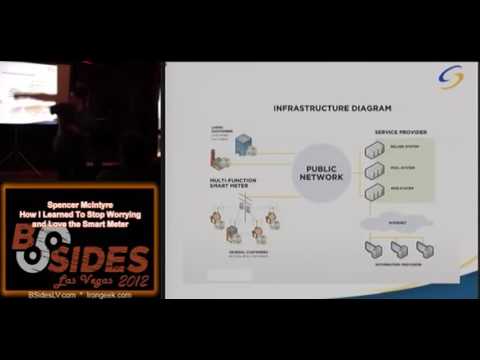
physically go out do these reefs we don't have to do that anymore this the 21st century and the smart meters that are being deployed are replacing that older infrastructure so that we can do this remotely all right so the smart meters like I said are a component in smart grid smart grid refers to the actual interactions of everything within the Ami infrastructure all right and and then like I said uh remote readings configuration is a big part of this so um here's a nice uh diagram this is very high level so what we have here is we have the smart meters over here on the left the large companies and here on the left large companies and the general
customers both using uh Smart Meters um the reason why public network and internet are kind of different here although I mean of course the internet is a public network but public network can also include uh cellular signals we'll talk about that a little bit more when we get into the wireless section but then we have our service provider which are going to be utilities companies so smart meters are communicating back via a number of methods to the billing systems uh web syst things like that and then those are all accessible over the Internet so um there's a ton of information out there about these we are just focusing on the smart meters themselves over there on
the left so that's what we're going to focus on we're going to focus on the security problems that they have and the risk that they can potentially provide to the service providers all right so not sure how much of you how many of you are aware of the older methods that were being employed to steal power um this is one of the older electrical meters you can still see the dials right there uh picture's really bad I apologize it's very old but um what people used to do to attack smart meters is they would put uh magnets on either side this is very very old but they put magnets on either side and what that would do is that would
slow down the amount of times that the internal uh mechanism would rotate which would then uh slow down how often you build you could use more power and you wouldn't be bu for as much so this is a picture I could find somebody actually doing this and um so the information that I found from USA Today while I was doing my research they were estimating that in the us alone about six billion dollars in worth of power is being stolen each year this was from I think it was about 2010 this is USA Today basically going off of how many times they found cases of people that were stealing power they determined those bets 6 billion and that's is just in the
US it's a much larger problem in other countries such as Mexico I know was one that I repeatedly saw in the news while I was doing my research and so other company other countries this is a very large po people stealing power so Ami is uh being deployed to a lot of uh different locations still so smart meters still being put out and the older meters are being replaced by these ones one of the reasons why these meters are being deployed is that they are being deployed under the assumption that they will make these types of very basic attacks very difficult um well not necessarily difficult but you can't do them anymore because it's a different type of
mechanism internally that's monitoring the power but all they're doing is making it more difficult and so hopefully when we release a tool like Terminator they're going to understand that you still have to put security mechanisms in place you can't just alter the internal device and assume that like the older style taxs are going work it's just making it more difficult for people so there's going to be a new generation of people out there that are actually capable of stealing power so this is another picture this was on the side of an apartment building uh this is a newer apartment uh complex and all of those meters right there are all smart meters those little gray dots that you can see
are the optical interfaces just freely available this was a gated community but other than that anyone in the public can walk over and connect to one of these devices and I did so I went over and I connected to one of them and I was working on it for about an hour hour and a half authorized of course but nobody said anything the police aren't going around they don't really know what you're doing nobody nobody's going to think twice and they see someone going there so all right why do we want to attack spot leers um I had to ask myself this question but it really comes down to the same two reasons that we attack anything
else it's either going to be the data on the device that we want or we want to alter or it's going to be that the device has some sort of access that we don't have that we want to be able to exploit and use to gain other information or other access so same two reasons we attack anything else um and like I've been showing with pictures consumers have physical access to these devices if it's on the side of your own house and you're one of the people that are lucky enough to have one of these I highly doubt that anyone's going to say anything if they see you there for hours and hours hooked up to this device
that's on the side of your house they assume that you're the owner of the house you're authorized to be there so anything any device that has physical access you we all know from from within computers that you can't they can't be trusted the security on the device is should be assumed to be compromised when people have physical access to and these smart meters are no different so all right the information that's being on the device so the meters are storing usage information it's the primary function so the type of information that's being stored on the device is how much electricity is being used and a lot of times at what time of day that's a very critical component
because a lot of the utilities companies are moving towards a toou or time of use Billy model and what that means is that I don't know the hours off the top of my head but between say 5 PM and 900 PM which are if those are the peak usage hours for when everyone's coming home everyone's using their stove to cook things like that they will charge you more money because that is when power is in the most demand so the time of use is going to refer to that so um why would an attacker want this information um there's a few different reasons uh fraud is for the first one that comes to everybody's mind if you can alter the
information that's on the device you can be build for using less electricity than you actually have been so you can do that um one of the things that I've actually found is that law enforcement companies are actually using the electrical usage information to find residential homes that are being used for drugs because what will happen is people that are growing marijuana will have a very high electrical usage because of all the lamps that they have to cul at plants so by finding that information out and seeing that it's very steady because they always have the lights on at a certain time uh law enforcement is using this to profile which homes might be potential drug
houses specifically for growing medical Mar uh marijuana or other other drugs so next up is going to be uh the access like I was saying the meters have two-way communication so there's uh two primary ways in my experience that meters can communicate back to utilities companies there's both going to be wire uh Wireless methods and that's going to be over a Cellular Connection and over zigg talk about zigg a little bit later on we actually talk about us accessing the device um in the case that the meters are communicating back over cellular signal The Meters will have a SIM card inside the device it's the same type of connection that our phones use they'll have a 3g connection back to the
utilities company and there'll be a sort of private network connection that allows the smart meters to Phil back and Report the usage information that they have as well as retrieve configuration files if there's anything new uh one of the companies that I've done work for they have their smart meters and they will any smart meter can be deployed and once it gets deployed and it turns on it'll phone back and for the first time retrieve its configuration to configure itself so uh sort of like um so it can also be used to automatically configure The Meters when they turn off so uh like I said they can have either direct internet access so be able to
retrieve the information back that way but what I see more often than not is they'll have a private Network through whatever sell their company using like such as for all right so case study this is probably the this GNA be the first vulnerability or attack case that I'm going to talk about uh once again consumers have physical access to these devices that SIM card that's inside has to be assumed to be comp so there's nothing to stop anyone from taking down their smart meter and cracking it open like I I've shown here in this picture and there's information that you need in order to be able to use your sim card to connect back to it as
the way the smart meter would essentially trying to impersonate the smart meter Itself by removing the SIM card from the device so the information that we need right here is uh the APN and sometimes username and password in the case where I was able to do this I was able to find that um in my particular case the username password was not set and I was very lucky that when I did my assessment the smart meter that I had had internal network access uh this was huge for me because what I was able to do is I was able to take one of their Smart Meters that they provided to us to perform the assessment on able
to open it up take out the SIM card and able to put that into my laptop connect up to their Network as the smart meter would have once I was on that Network I was able to contact their Building Systems via their IPs I I had essentially a VPN connection I was issued a private address I could not communicate with other Smart Meters because they claimed to have had that fireball off but I was able to communicate with their Billing System their Billing System had a very very common configuration error that was and there was a publicly available exploit for and I was able to exploit their Billing System remotely from the connection and point of view that their
meter would have been able to and the only thing I could possibly find that would prevent me from doing that is that the APN is very very difficult to find there when I was doing Google searches because the client had provided it to me I was trying to find if I was in taer how would I have been able to find this APN to validate this attack that a unknowing attacker could do a lot of times if you can guess that the service provider is say Verizon TNT Verizon TNT issues that APN to the uh customer in this case the utilities company and a lot of times it follows a basic naming convention so that was the
closest could find but essentially that APN is the only thing that's preventing someone from activating the SIM card and impersonating the smart so this is a very large problem now in this picture that I have right here this white chip right here my shadow is pointing on is actually a Motorola chip that is the chip that has the um commun uh the SIM card in it the communications back to the utilties company so I was able to just crack that meter open and take that out furthermore when I was done I was able put the Sim car back in and reconstruct the meter and he's able to walk just fine so not really that difficult and the anti-tamper mechanisms
on the smart mirors in this particular case was just a little metal twist tie I've never competed in the anti-tamper competition that they have a Defcon but I'm pretty sure if I was able to subvert this somebody else with some time that actually wanted to put into it could just as easily do the same thing so that was the first real problem that we had that we were able to find so now we're going to talk about uh additional attack vectors this is probably my favorite picture that I have and this is the picture that going to most closely represent the meter that I will be doing my testing fromom mod um so this is a uh meter that we have in
our test enclosures that large gray box and then we have our Optical interface little cable that's connected to it right there that goes off to a laptop and I'll be remoting into one of those to form a test on one of these devices uh this is one of my favorite pictures because I could I found that I was able to modify the data on it to show the dis information there's a table going through the standards that has display information so able to make make the reader me 666 but that just one of my personal favorites all right so when we're talking about accessing The Meters there's a few different ways that we can do this we
have uh the wired interface which is be the optical interface we talked about last and that's what was shown in this picture right here is we have the wired interface and uh the two different uh Wireless technologies that are typically being used there's zigg talk about next and cellular signal which we did just talk about um a lot of uh not all the time sometimes uh devices can have both the cellular and the zigg be but what happens a lot of times is that companies will have just one or the other because of course different additional Hardware cost and they're both kind of sort of used for the same thing so first off we're going talk about zigg and uh what
it is so zigg is a low power lowcost Wireless networ this is very ideal for using the smart meters because uh the mesh based architecture one of the meters goes down because somebody disconnects it or there's just some type of problem with it because of the mesh Network it's not really going to prevent the information from being distributed as it would so it's very redundant and then the low power and low cost also come into effect because these meters are going to be deployed thousands and thousands at a time um the low power is actually a really nice feature doesn't necessarily affect Smart Meters because Smart Meters have a internal power supply but on other devices in order to
pass the zigg certification and actually be zigg certified device your device has to be able to prove that it can run on on a battery I think it's for like 18 months or something ridiculous like that but it's they're really really serious about the low power that it has to be able to function for very long periods of time all right um like I said mesh Network makes it reasonably reliable for using with the actual smers themselves so why why is zigg on the devices zigg um although you can get a better Wireless signal for it and the distance is greater than that of Wireless or Wi-Fi it's certainly not good enough for a residential meter to
communicate back with utility deviders it's not meant to that so there's a couple of different uh reasons that zigg is on device and a couple different uses for it um one of them in the commercial sector is to allow uh meters to communicate back with uh consumer devices these devices will show your electrical uses after time and give you estimates on how much your electrical bill is going to be so if you get build on the 30th and it's the 20th and using a lot of power you can know that you should turn off your TV or not run the dishwasher and other electronic appliances you can lower that cost and so that it doesn't surprise you when you
actually do get the bill allows you to essentially monitor now you can get these devices down at Home Depot things like that that was just an example this one right here is a thermostat that is also Ziggy enabled so a lot of different consumer devices that allow you to uh communicate with other things so um not really uh used for inter meter Communications not directly not in the sense that one meter needs to communicate with another now because of the mesh technology if one meter needs to communicate with uh the target device like a data collector then another meter will most likely have to retransmit that information so the other meters are aware of the information but they're not
directly communicating with each other um what I was talking about with uh the data collectors is that um as an alternative to providing a Cellular Connection each one of the meters what a lot of utility companies are doing is putting zby radios in meters and then providing a single data collection unit and what happens is all the meters in the range will provide this data back to the centralized data collection utility and that will have a Cellular Connection back to Utilities Company reported back that way so makes it easier because they don't have to have quite so many cellular signal out there so it's a little bit less overhead so the meters are all talk back to the
centralized unit reports the data back to Utilities Company all right so it's all background on zigg so now we're talk about ACC actually accessing meters with zigg so these are a couple of things to uh to keep in mind so um in order to be able to communicate with uh devices of zy it's very similar to Wi-Fi in the sense that you have to associate with the device you can't just randomly send with the security implementations that have been put into place replaying packets is not typically a viable option in the employment that I've SE because a lot of the utilities companies are using encryption things like that so uh the pairing window and the encryption are
going be the two things that you really need to uh look at when you're trying to actually communicate with one of these devices assuming that you're not authorized of course um parent window is controlled by the service provider so if you go out to Home Depot and you buy one of the thermostats or one of the monitor monitoring discs LCD they have LCD screens on them you call up your Utilities Company say hey I bought this can I want to sync it up to my meter and your Utilities company will have to put your meter into pairing mode as if it's not already in pairing mode I have to put it into pairing mode that you can
sync this device with the meter and associate with that Network so that they can communicate with each other now the paring windows interesting because that is often configured by the service providers and not all the service providers agree on what a suitable time frame is to allow that paring window to be open because they control that uh some of the device manufacturers are claiming that the paring Windows should just always be on just be infinitely open and so anybody given the proper security key of one thing in place should be able to associate with uh devices over zigg uh other places are saying that's not good at all we need to decrease the range down to about one week or some people
are saying even like a few days but what I see a lot of times is one week one week seems to be the pretty standard size for the pairing so when somebody calls up and wants it to be open it's typically open for about one week all right um now on to the security that's in place on Zig so zigg uses a encryp uh uses AES encryption and it can be uh configured in few different ways it can have either no encryption and no Integrity check the data can be encrypted the data can be encrypted with an Integrity check or only an Integrity check you provided so the Integrity check is going to help to prevent
against replay attacks things like that but of course if information is encrypted then a lot of times that will suffice to prevent against replay attacks so uh using tools in the Kil framework um and to just like blindly replay information is not always going to be the most effective uh way to communicate with devices um keys can be either negotiated ahead of time or distributed a lot of times the meters will have a static key that uh in their configuration that's pushed down by service providers this is service provider control not necessarily from the manufacturer a lot of times service providers set those all right um next up so when we're actually looking at the zig on the devices um
most common Zig tactical Kil so I'm talk a little bit about kilb and can use that so ZB stumbler is going to be the utility of choice for actually finding the meters because when you have a meter without actually opening it up you can't really tell if ZB is available or not but by using Z stumblr we can see what devices are on we can determine the pan IDs and the information that we need to start to profile the network and also see if they are different mesh networks overlapping each other within the same physical radius and we can determine what devices are going we and what the the Z be ter for I believe it's the
router and the Z router is the lowest node that all the communication essentially goes through and also that device is also the one that controls the uh Association process all right and then uh finally we can look at uh talk briefly about ZB scappy so ZB scappy is actually a patch that I released about a year ago that allows more fine grain control and more fine grain packet injection techniques with the killer framework it's a SC plugin interface that allows access to the zigg layers and allows access to the zigby library or the excuse me the kbby libraries to inject and receive frames based on that so using that we can get a live capturing going and uh inject and
most importantly we have encryption options we can do both the AES with the CCM authentication check and without so we have bunch of different options there so this is a showcase that's kind of difficult to see can people see patch a little bit a little bit okay it's on the uh Killer B bug uh bug tracking the issues because whenever you submit a patch you have to put it into the issues if you want to take a look at it's up there but I'm just GNA go over like what all this information is up here so at the very top uh we can easily set the channel to what we want to inject on so once we use
ZB stumbler we determine what channel the Met are on adjust that in there and then right below that we're going through and we are sniffing the information off of that and using the internal scabby syntax and we're applying a function to it every time we receive frame so in this case we're actually decrypting the information so we pull that information or we pull those packets back out we're done we can show them and we can write them to a pcap file and we can replay those we can send those packets out and of course before we resend them we can modify any information that we want to need to adjust the pan ID or we need to adjust
the command that's being sent anything like that we can do that from within there so this gives us a very lowlevel uh way to interact with the uh devices and inject frames while also being able to see the responses back very quickly uh since this patch has been committed this is in the main killerby trunk they've also added in an additional utility that will allow you to use a ton tap interface on Linux that you can watch the packets uh in wire sh very very helpful because that can help you uh see the responses and things like that when you're injecting frames to see the smul responses and also uh the code that I used here for the decription
encryptions based on the wire Shar code that's all working internally very well so allow you really get that fine green control over the ZD communication all right so seen how we can we've seen how we interact with meters over zigg interface using the K framework we talk about the cedal flaws with using cards now we're going to talk about the wired access interface this is the area where I've done the most work in this is the area that my tool focuses on curring I'm going to demonstrate so first off how do we actually interact with the meter we have to get a ANSI type two Optical probe which sounds really dirty I know but it's better than the bus
pirate that allows you to uh dump the information off the device heard of the bus pirate that's probably some funni things heard anyways um once we are connected to the device there's a couple of different standards that we have to look at because that's the way that the devices are actually communicating to the to the system over the op interface there's c1218 which is defining the requests and responses the formats of how the data is input and output and then there's the c1219 standard um which is actually two different versions um working on there's the 1997 and the 2008 c1219 standards I believe and that is dictating and defining how the data is actually stored
on the devices within the table so not how the data is being transmitted but how the data is essentially at rest there's also additional uh standards that determine how the information can be accessed over modor connections believe that's c1221 or might be 22 but um those are going over over mod connections over telephone time uh um Telephone Connections all right so uh c1218 is pretty simple so I'm actually going to skip over that it's very much just dictating the codes for responses and requests to how how we can actually like discuss information with the device and pull information back out most of the information that we want to pull off is going to be stored in the c1219 table so
we're talk about that here and what that is is uh c1219 has uh all the different tables are broken out into decades Decades of T so these are the ones that I have listed right here are the ones that Terminator has the internal Library support for so there are the general configuration information is stored in tables 0-9 uh there's security tables which is number 40 through 49 and security tables are going to um control the access permissions for procedures and for other tables so what users can do what those are all set up in there there is the history and event logs which is 70 through 79 and there's the tel mode of control this can control how different
allow different procedures to initiate phone calls and also to control what numbers are being used you can control the backup numberers so the first one doesn't pick up move on to the next one and there's about 10 additional ones that are defined by c1219 standard the additional ones also revolve around how the information is being store about the electrical usage so because I am focusing on security uh issues Central flaws security testing devices in general I don't really have a whole lot of code done yet for actually parsing out say like kilowatt hours being used things like that so my focus has been primarily on finding security information auditing the access controls things like that so that's why you see
that reflected Terminator a lot of people are asking you know like how do I read how much electricity is my house use off can I use this tool to do that short answer is yes the long answers you'll have to parse out that information yourself so you can that let me know because I'd like to add that code in there all right physical connect uh physical equipment all that is really needed is the optical the uh optical cable so those are really expensive I got mine from company called Abacus Electronics I think they're based out of England I think I got mine on Amazon for maybe like $450 but I think they're marked on their
site for about $500 so it's really expensive equipment but it is freely available it's not regulated at all anybody buy one of these cables as long as you have as long as you have the money I've seen a couple of articles online that go over how you can actually create them they say you can create them for about $50 and in Parts if you have some soldering experience it's a little bit beyond me I'm not really much of a hardware guy so I just chose to buy mine but if anybody gets one of these works please let me know there's already somebody I've been talking to uh that wants to try to get one of these uh home
breu cables to work so these cables use the infrared transceiver uh uses an infrared connection to that uh that interface right there which is where the cable actually hooks up to once again I apologize for not bringing meter with me I planned on showing you a meter uh the cable in person but I wasn't able to do that because I needed store back the office that can be used for the demo uh inside this interface there are two infrared diodes and those just used for uh transmitting and receiving information so it's pretty simple that is about it for as far as the physical communication okay so finally we're gonna talk about uh Terminator this is
the framework that I have written been working on for about eight months and released it for the first time uh been public release last week anybody can get it it's completely open source gplv3 so anybody can get it modify it please do it's actually been downloaded a lot more than I was really even hoping for so a lot of people are very interested and I'm very very glad because it's been really hard to get out there so um jumping right to it this is the URL if anybody wants to get it please grab a hold of it if you have any questions comments concerns any issues uh using it uh please send me an email um I'm pretty
good about responding so um what it is is um being a pentester I'm a huge fan of metas framework metas is awesome and I don't want to learn to use another tool many of us here are probably very familiar with metlo so uh the user interface is modeled after metas and the internal architecture is truly a framework where you can add in modules and do things like that to enhance the functionality of it it's all written in Python though and it's got the full c128 stack to send uh request and responses we'll look into that a little bit in during the demo and it has a full c1219 library to um parse the information out
of the table so you actually know what you're looking at so you can get the procedures you can get the log information things like that okay features uh um like I said it interacts with Smart Meters via a serial connection so that Optical interface that you have to have has to have that serial driver so that's just how we use most of the ones I found out there I have one that's over USB but has a ftdi chip in it which allows me communicate with it over as like a Serial device so um the full version that we released last week because we did a private release about a month ago and that only had a couple different modules in it but
the one we released last week that's publicly available right now has all of the modules that I have um are in there so there's 12 modules in total which are ranging from uh different uh L to do different features and read information off device things like that U the modules mostly focus on reading and writing to C12 19 tables I say that because any type of interaction you do with the smart meter is really like 90% of it is going to be reading and writing for c129 tables um that's where the information is stored if you want to modify of course you're can have to write to one if you want to retrieve you're read from one but even getting
the uh the meter to do things running procedures things like that are is a series of reading and writing to tables there is a special table called the procedure init table which is in the general config decade and when you want to have the meter do something like up update the ID and things like that you write information to the procedure in it table andove the responses back from the procedure response table so you can tell um this also allows you to run procedures asynchronously because you can start the procedure and the response will come back to whether the procedure's been start successfully and then when you expect done you can read it out of the response table U couple
different ways you can control that but uh like I said everything is really just reading and writing to the device to these table specifically based on the dees all right so uh Bas a couple modules that we have in it is we have the basic information uh modules is the get info which is what's actually being demoed over here in the uh image um so when we run this module uh we can tell what mode the meter is actually running in um is running in meter mode neering mode which means that it's currently collecting information uh from the house or whatever it's connected to so it's recording that information uh we have the hardware version set by the
manufacturer uh we can tell this is an electrical meter as opposed to gas or water just stored right there um have the meter serial number which is hardcoded into the device I I've tried a couple different things to try to see if I can write this information but on my on the meters that I have tested on I haven't been able to do that because it always responds back that that's inappropriate action but with the companies that I have worked with they are would be very concerned if you could change the serial numbers and device idees because those are how the meters are actually being uniquely identified back to the company it's not by the uh by the meter uh by
the name it's by the the device ID so if you can change your device ID to say your neighbor then your neighbor will be build for how much information or how much electricity you're using that's how it's being uniquely identified back to the utilities no uh this is actually one of the meters that's very nice that um you can access a lot of these tables are in the general config table and in uh the meters that I have tested there been a few the general config information can be retrieved by an unauthenticated user so anybody can just read this information off the table uh from those tables um going back to the uh the decades that the information is actually
been stored in the c129 a lot of the modules are focused based on decade so the get info is going to be the general config decade uh be focusing on that one there's also one to retrieve back modem information blog information and security information which is all going to be ordinating to those decad specifically probably one of the first modules that people are going to want to actually use when uh doing some type of assessment with Terminator is going to be the BR forcing authentication module I uh Terminator uh comes with a list in it that has a list of default passwords that I have found on meters and found through the documentation that I've read
from the manufacturers of what the default passwords are being set to so you should have pretty good luck if you run through that it will find pretty much any password that's being set to the same uh character over and over again um one thing that I want to note on passwords is that passwords are not asking values passwords are actually the hex the only limit on the passwords is that they have to be 20 bytes long but um when we're going through theot forcing module in the demonstration here in just a second you'll see that the input list provides them all in HEX but if you want to do as values you can adjust that within the modules you can
run a normal word list and termin will just pad that value out with zero so beware of that to do that because the value has to be 20 byes because that's actually dictated by the c128 protoc for how did by how users authenticate sorry what was that no 20 byes exactly cannot be longer um a lot of times what I've seen is uh on some of the um some of the ones I've done is the first 10 bytes will be like Z One Z One Z One hex and then the last 10 bytes just be zeros so uh the uh default word list that comes with that uh will have those in there so it'll
have like 20 byes of like all the same so you can take what of that um and then also included modules that we have are uh basic Raw abilities to read and write tables so you can modify tables that you want read read their exact values things like that and finally okay so um the modules require some information from us because going back to what I was talking about where it's all reading and writing information to the device you really kind of have to know the proper format for the uh information that you're writing to the device and this is all controlled by the c128 c1219 standards so even with this tool it's not quite
script Kitty ready yet you can't just run through it and say clear out all my usage information for how much electricity my house is used you can't do that just yet because like I said um I've taken this from the perspective of I need to do a pen test on smart meter what tools do I need that's not exactly something that I need because as long as I can provide my client that I can read and WR tables bypassing authentication that's typically good enough for them because they can refer what that actually means so you have to have uh some good amount of knowledge about the internal workings and protocols in order to be able to use
the tool efficiently uh procedures like I said can be tricky um read the documentation from those there's a lot of them that are documented there are standard procedures that are documented by c29 and then there's a whole another section for manufacturer specific procedures those ones are not documented and I have not had a whole lot of work trying to find documentation from the manufacturers themselves of course being that I don't buy these meters they're not very inclined to work with all right um so some of the modules that we have some of the higher level modules is uh changing the meter's ID and uh setting the operation mode the operation mode one is kind of
interesting I'll show you that in the demo because certain tables can be read only when the meter is in a specific mode Let's go over that um this so uh common security issues with termin termin is very much focused on finding uh and that access controls and authentication is properly implemented um so going back to what I was talking about with the general tables you can read the information from the general tables without being properly authenticated is a issue that I found on a couple of different meters funny thing is though you still have to send a password the meter responds back that your password is inaccurate but then you can read the information out of the
general big table don't know how that works what sense that makes but that is one of the issues that I found um a lot of uh another problem I found is that ignore the user name and the user ID field so this is me running the brute forcing module and this is with the default word list so the username is the same and user ID is also the same but you can authenticate with different passwords this makes brute forcing a lot easier on these on these ones that have this particular issue you would assume that once the password was found that you wouldn't find anymore because only one password per user that's not the case and then something else that I've
noticed uh I not found any meter or I've not read anything about any types of meters that will walk out the users after X number of failed authentication attempts the worst that I found is that they will start to log that information in the logging table but if you're successful and you get access to the meter it's possible that you might be able to clear out the locks and unless that information has already been uh gathered by the utilties company should be oper so or if you remove the SIM card then it has no way to phone back to utilties monies anyway so the local logs on device not very accessible so the effectiveness of actually logging failed
access attempts to the meter itself my opinion not very good all right so now here's part that I'm very excited about is gonna actually demo
this
so
after
his
so
we
do
so
there
man
that's for
is
for
e for
the
you e
that's
Related talks
 51:51
51:51 32:48
32:48 33:48
33:48 54:33
54:33 31:06
31:06 20:51
20:51