Zero Trust
Show transcript [en]
all right everybody ready to kick this one off yep awesome all right come in sit down shut up you know the deal make friends with everybody all right I get to have a little bit of fun on this one as well um I get to introduce Dan uh Dan I'm actually going to read from this one because this is fun one Dan is the head of a cyber security for a biotech company so all y'all have got your tin foil hats on at this moment in time put them on um seasoned professional in other words he's pickle well pickled and has gray hair as well uh extensive experience in safeguarding the digital Landscapes across public and private
sectors uh which basically means he's been abused by both sets of the businesses um dedicated to practical Innovative in lots of good stuff let's just put it this way and likes the challenges of navigating the complexities of cyber defense in other words dealing with lunatics like me on the other side of the fence that go hey guess what we can break into while delivering robust cyber Security Solutions that align with organizational goals which hopefully means you can both geek and and business speak all right with that I'm going to shut the heck up get out of here have fun with Dan enjoy thank you thank you okay can everybody hear me okay all right great
um so this is titled uh zero trust Unleashed so we'll be getting into some um zero trust principles specifically around um conditional access in a Microsoft stack um I've done I've created this talk in a manner that there should be something in it for everybody whether you're let me start my timer here whether you're um new to cyber you've been around a while or really regardless of what role you're in there should be something in here for you um about half of the talk is technology agnostic I'll say kind of laying the foundation for it and then the second half is specific to uh Microsoft conditional access solution so there's a little bit in that
intro there I've been in infosec for 13 years now um currently I'm the head of cyber security for a publicly traded biotech company so I've experienced in biotech Pharma I've worked in medical device manufacturing on the product security side and security engineering as well as in the federal government predominantly doing it security audits my formal training is in computer science and I went through the scholarship for service program is there anybody here who no well if you haven't heard of it and you want to know more I'd be happy to tell you some more about it it's a fantastic uh program classic disclaimer the views here are my own I don't know who else they'd be but now you have it in
writing we're going to step through a few things today we'll talk briefly about the state of cyber um and MFA we'll go through a kind of a classic MFA attack scenario uh talk about the miter attack framework some of the ttps and mitigations go through a a highlevel risk assessment and then we'll get into entra ID conditional access talk about some of the common policies and templates that are available you to get started if you haven't gotten started in that already walk through an some um or at least think through crafting some custom policies and then how you should go about testing those and then we'll wrap up and go to lunch all right so state of cyber are we
secure how many people have been asked this are we secure you get caught launch elevator whatever it might be fantastic question should be ready for the answer right in order to answer that there's a lot that goes into that question are we secure so let's take a look at what the what the threat landscape is like so we'll pull some data from the Verizon DB dbir report from last year and again if you're not familiar with that report please go look it up check it out it's there's a lot of fantastic information in it so if we take a look at what um they have found from um real world breaches the majority of your thread
actors are external okay great they doing it for the money financially motivated and how are they getting in they're using valid credentials they're stealing them they getting them and they're using them and that's how they're conducting the majority of these breaches so that's why this talk is so important because conditional access policies are so powerful I would go so far as say they're the number one way to prevent things like this not only from an initial access but from a a persistence and a privilege um and we'll get into some of that but we have MFA right so we're protected yes for the most part you are protected if you have MFA that's fantastic and that will keep you safe
from the majority of account compromise scenarios some mfas are susceptible to being fished and some of the channels that some of them use are actually uh insecure or again susceptible to attacks um in the next slide I'll talk through a classic scenario of a real-time fishable MFA so if you are using you know they have fish resistant mfas now so if you're using things that use Biometrics um certificates with other factors so smart cards you know phyto tokens Windows hello for business you're pretty much good to go you know as far as we know today right if you're not using those there is some level of susceptibility to ATT tax that your accounts may be vulnerable to but again
any MFA is better than no MFA go take a look see what methods you allow is that what you expected is that what you want um if not you can sort of tailor those to what you want it's like okay well how serious is this are we really going to be hit you know maybe we're a small business a medium business are people is is this really happening well if you read more in the Verizon dbir report you will find out there's been a convergence of attacks these small and medium businesses are using the same Technologies and the platforms that these large businesses are so they're getting attacked the same no they don't have the same means to protect and
defend against it but they're all being attacked whether you're a small or medium business a large Enterprise or you're in technology or Finance or it it doesn't really matter the vertical anymore because those external threat actors that are doing it it's organized crime and they're doing it for financial reasons they're going to get in so let's take a look at a classic MFA attack scenario this image I not make this image I have the source here I'll share these slides after you don't have to try to read that but this comes from a fantastic write up about using this scenario and how it's a precursor to business email compromise which is another huge uh uh threat that's going
on um so I would really encourage you to go read that that blog from Microsoft on it but here in this scenario um and this does happen in real life a user gets fished and they get sent to a site that masquerades as a Microsoft uh you know authentication page they enter their username and password password and then the the MFA challenge or the response um goes over to the user who you know gets their SMS or whatever their onetime pass is they enter that again into a fake proxied site the attacker takes that and sends it to the legitimate site and now the attacker has an authenticated valid session and then they just say o you
know temporarily unavailable or redirect or whatever it might be that user may or may not know that their account is now compromised their identity is compromised so a lot of the a lot of the focus today will be around protecting the identities it's a good place to start you can use conditional access as we'll see to pull in signals from other areas to help make better decisions but focusing on the identities is is crucial to getting started and implementing the principle of zero trust so that identity's compromis the attacker is in what are they going to do with it well we know what they're going to do with it they're going to basically do whatever they want and what that means
current day is extortion ransomware whatever it might be right um but the reason we're kind of slowing down and we're taking a look at what the actual attacker objectives are is because we really want to be able to articulate what they are so we can formulate a proper defense against it so looking to the Enterprise miter attack framework we'll see This falls under valid accounts and again they're going to use valid accounts as we've seen to gain access to your network they're going to maintain a foothold in your network with it they could um Elevate privileges with it and they're going to do this and it's going to evade your defenses it's going to evade your
defenses because as an attacker if I have a valid account with credentials I don't need to do anything with malware I don't need to do anything that's going to set off a trigger an alert alarm or anything like that and I can just fly under the radar um there's a couple sub techniques around initial access specifically um as we look at conditional access it's predominantly around protecting Cloud accounts um but once they get in it can help with um persistance and we'll see how that can help too um and there will be time at the end for questions and then we will make sure we end on time for lunch all right so continuing with the miter
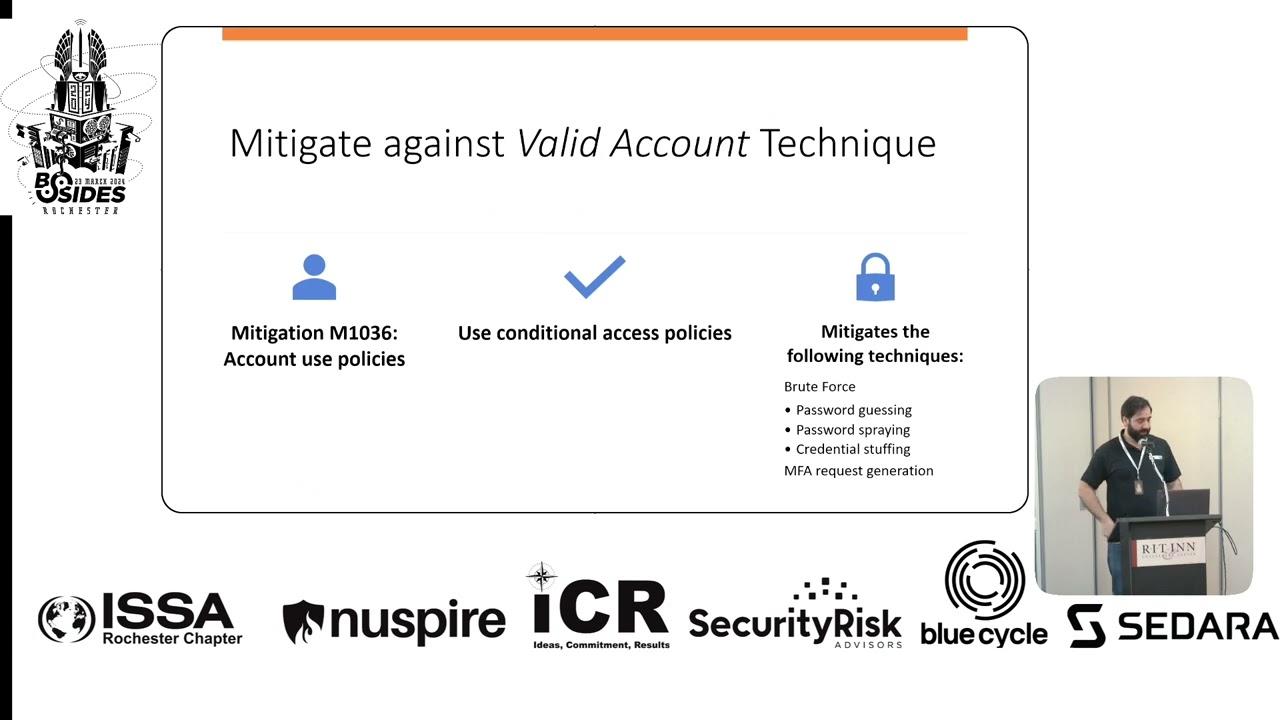
attack framework for Enterprise how do we mitigate against it let's just see what miter says they have a mitigation m1036 account use policies what's that well there's a bunch of them specifically I'm highlighting the one that says you it's going to mitigate against Brute Force different um password guessing spraying and MFA request generation so it's right there use conditional access policies okay great what does that mean we'll get into that so now you can sort of take a look at you know start considering in the context of your own environment um do you have mitigations in place to protect against these valid credential attacks do a very high level risk assessment okay so what's the threat you
can write it however you want this is how I chose to write it an external threat actor is going to use valid credentials to gain access to your network or systems or to further their access quick level set on risk this shouldn't be news to anybody if it is this is the formula you take risk you take your likelihood times impact and that equals your risk as we've seen from the data from the Verizon DB report and um what we just seen in in the wild in the real world this is going to happen if you don't have the proper mitigations um we're not using probabilities in this example or anything like that it's not super fancy
it's just to illustrate it's just for illustrative purposes right so we could say that without the proper mitigations it's going to happen it's very likely we could call it what would be the impact I would say hi you're not going to know that this this account is compromised until they start exfilling data or maybe after the xfill data and they start um encrypting files or whatever it might be right it'll be too late by the time you know um so we'll call the impact is high and if we take a look at um I just put together a very quick again just quick highlevel risk Matrix that you could use we take likelihood uh and
impact those are both three and three you multiply those your risk is a nine what does that mean well in this example nine falls into an unacceptable risk that's unacceptable okay what do we do with that now I know that I've done the risk assessment I know I have an unacceptable risk in my environment but it's like I don't have money for this this wasn't on my project road map this year I don't have anybody to do this that's okay if you're in that state you're definitely not alone but what you do with this is you communicate the risk and that's where the impact of this risk assessment comes in so you need to put this
together and you communicate your risk and you'll say we can say with fairly certain accuracy that this will happen to our environment either it has already happened or it's going to happen and when it does it's going to cost our company anywhere from1 to $2.5 million now we know breaches on average cost about 5 million and we've seen some extreme cases in you know the tens and 20 million um r but more often than not when companies are breached this is the actual true cost so then you bring to your Executives the cost to fix it this is going to happen it's going to cost us this I can fix that for you for then you
can put in your input $100,000 and it'll be done in six months whatever it might be it's going to be less than a million and is this something that you want me to do and if they say no great sign here and when it happens they say yes great and then you get you get the resources you want right that's why this is so important to go through as you assess your threats in your environment all right let's get into conditional access so that was a part of the talk that's kind of regardless of what tech or security stack you're running whoever your identity provider is all of that before here is is applicable it's into the Microsoft
specific solution so we run a Microsoft you know we use enter ID as our identity provider we run a Microsoft security stack and so you here's here's kind of you know what I've learned um so conditional access if you break it down into its simplest form it's just a series of if then statements if us us a wants to access resource B then a second factor to authenticate or come from a company-owned device right think of it in very simplistic terms if you could think of it in those terms then you can start creating policies that enforce those um it brings signals together to make decisions and enforce policies again you're the one who's going to
determine and dictate what those policies are and as soon as you do it it's going to do them automatically it will will enforce these decisions for you while you sleep all of the time it is fantastic um that's that's when it becomes so powerful so getting into entry ID there's a couple prerequisites you need um you will need at least a P1 license um and if you have a P2 license you'll get I don't want to say all of the Fe you probably will get all of the features but we'll just say the rest of the features that I'm going to talk about today um if you're running a hybrid environment you have to have a
connect agent or they have like a Cloud sync um capability now as well and the right roles to do this so there's a conditional access admin or a security admin or you know Global admin would obviously work and if you're running an entra free well you don't have access to be able to implement conditional access policies but you still have access to um the security defaults so at least go check those out and see if that's something that you want to turn on all right things to know before you get started don't get locked out um the good news is Microsoft has thought thought through this one and the account that you use to create
conditional access policies is automatically added to the exclusion list it will not apply to that user's account you're going to want to make sure you add any emergency or break glass accounts though the other nice feature is that when you create an account it automatically defaults to report only so it will not be enforcing but it will be gathering data um and we'll talk a little bit more about that when it comes to the testing methodology um and if you're just getting started you don't have MFA go turn on MFA but remember your service accounts and service principles can't MFA so exclude them and you'll have to protect them a different way or well you
can use this but that's a little more outside of this uh in the middle uh conditional access is not a firewall this is a this this is very important we can do things with conditional access that might make it appear like it's acting like a firewall specifically if somebody's coming from a country we deem bad and we don't want somebody coming authenticating from that country we can do that with conditional access but it is not a firewall conditional access only kicks in after the first authentication so after the username and password have been verified then your conditional access policies come in it's important to know almost as important as the next slide I don't really expect anybody to
know who this is but if they do especially with the context that would be awesome all of your conditional access policies are anded does anybody have any idea who this guy is in the context of ID no yes who said that yes George bull so that was good maybe if there were some students here that I but anyway so this is also important too because sometimes you'll be testing something you'll say being blocked what is going on and you can go through and evaluate and step through your conditional access policies and then you remember oh yeah they're anded it doesn't work by order of Precedence or it doesn't work if there's a conflict a block allows or an allow
allows they are all cumulative and they all get assessed all together at the same time the way that this this works is in two phases so first it'll collect your session details so about your device browser your network you know your IP those sort of things and then it will go into the in um the enforcement mode so the enforcement mode you can specify a series of Grants and if you specify a grant of a block kind of counterintuitive think about it but that's the way it works if you grant a block it stops if you don't Grant a block then it continues and you can grant a series of things for somebody to MFA or REM MFA force them to change a
password you can give them a terms of use that they have to agree to there's really a lot of things you can do and you can make your own custom policies pretty soon we will get into some of the templates that Microsoft provides for you to get started but beyond that I don't want to say that the sky the limit but it's if you can think of it you can most likely do it um using these tools then once all of those grants have been uh um assessed then it applies session controls and it starts taking other things like I have persistent browser but really non-persistent browser as well right um sign and frequency you
know token Lifetime and then I have up here signals from Defender for cloud apps again it's pulling in signals from a lot of places if you are using Defender for cloud apps this gets really cool and really powerful because in Defender for cloud apps there's Defender for cloud apps conditional access policies and you can use those to work with entra ID conditional access policies to do things like block people from coming from a tour node or a non-company VPN things like that so they could they could meet and satisfy username password MFA location or not not location I guess well maybe but um um and then they'll come all the way in but when the session control hits it'll
say from a tour node and that session will be killed there's a few things every policy requires name assignments and some access controls what's an assignment well it's think of it as a who what and a where so a user or a group an app a platform location
so Microsoft provides they're up to what like 17 they were 16 they just had another one in preview around Insider risk but there's 17 um depending on your licensing right um I would think it would vary um common policy templates that they give you to get started they kind of bucket these according to a few different things but if you come in and hit create new policy from templates and select all you'll see them but they haven't broken down into some secure Foundation zero trust remote Workforce all those sort of things and then you pick your template and you step through it yes this can all be uh uh programmed but the gooey works fine you
know why make it more complicated this is this is very easy to step through this is a breakdown of every single policy that was in there as of I'll say today right and just kind of mapped across how they see it whether it's secure Foundation zero trust remote work protecting admins or emerging threats and that's so we could see this kind of change as threats evolve the majority of them are do fall under the zero trust um you know architecture or principle of that a lot of them are really around using MFA MFA for admins MFA for users MFA for guests so this is less for you to kind of digest all this now and more
to kind of maintain this as a point in time and a reference to come back to without having to go into the Azure entra portal right and look at it that way okay so we kind of have some flows I put together here for thinking through how you can apply some custom policies so you can take your user and this user could be regular user non-privileged privileged whatever it might be it could be a group it doesn't matter this is just an an example of how powerful that this can become and some how you can create these different policies for different decisions or really how to enable how your organization needs to do their work if you have a uh P2 license you can
evaluate users realtime signin risk there's an aggregate risk level and there's a real-time signin risk level that is something where Microsoft takes I'll say enduser Behavior analytics for lack of a better term but it's it's it's a lot of signals around how that person has been authenticating where they're coming from their device their browser all those sorts of things has that account been being attacked or anything like that and it'll give them it'll give each identity a risk from none to low medium or high with pretty good accuracy if somebody's a high risk there's something nefarious going on with that identity and you probably don't want to allow it access to your resources but so in this example if something
happened to Identity it was being attacked it was there was might be even attempt you know attempted logins from you know pick a country right on a platform we don't use and we've never seen that before Microsoft will automatically handle that and Elevate that user's risk and then you can say when that happens I'm just going to completely block that person from all company resources you have immediate severed the threat that threat is gone for that identity period Well the the legitimate users is affected too right so they're going to be calling the help Des saying hey I'm locked out but you can automate and you can put them through a self-service password reset and that'll automatically
reset their their real-time risk and they will be back in as soon as that's done and they never had to call security right so uh but that's just one piece of it then you can pull in device signals do you want to have different policies if it's a company-owned device if it's BYOD we really have to support a lot of BYOD today that comes with its own challenges but you can of course we can support BYOD we want to support that right we want people to be able to work when and where and on travel but you can scope that think of this in the context of what resource or resources or apps you're allowing them to get
to so we could say if it's coming from a bod you can only access maybe 0365 apps you're not going to be coming in from a BYOD and admitting into any admin portals if you you could scope your admin apps into you have to be coming from a company owned device so you can start playing with things like that and if you're coming in we can specify the authentication strength using this it's just simple dropdowns in the policy template what type of MFA what type of strength we talked earlier that some mfas are susceptible to a tax you can specify what strength of MFA you require before that person is granted or that identity is granted access to the
resource that you have scoped into these policies regular users accessing non-critical business apps you sure you could allow SMS you can allow a phone call if you want whatever what really whatever the business wants but when it comes to financial critical apps HR apps administrative tasks Maybe you should strongly consider fishing resistant MFA company-owned devices with fishing resistant MFA it's up to you but the more you layer and the more you protect business critical applications the easier it is to stand up in front in a boardroom and say I can tell you with 100% certainty that our business critical applications were not impacted here's why super powerful and then you can throw on a geolocation you know in this example it
says not from an untrusted location right you can specify safe location you could use your external IPS of your Company locations shouldn't rely on it solely but it is definitely a signal that can be brought in as you make your decision so all of all of these conditions pass the user is allowed to sign in awesome but we're not just going to let them stay signed in forever okay we're going to continuously monitor that and there's a few ways we can do that session controls right we could set timeouts on session controls we could constantly take a look at the locations they're coming from and so this is where this is where you're if somebody were to
use a weaker form of MFA and they got into let's say non-critical business apps there the timer started okay and you maybe it's an 8 hour workday maybe it's 12 hours maybe whatever it is to allow people to do the work that they need to do but you could tweak that and change that for um other applications again administrative task you can come in you got your fishing resist MFA you're on your company own device all that's well and good you have two hours and then you're going to be prompted to reauthenticate you have 4 hours you are shortening that window you are shortening the ability for that attacker to have access to your environment and as soon as that session
timer is reached you're going to be prompted to reauthenticate if you are valid user you close your laptop you go to the coffee shop open it up your IP has changed with strict location you're going to be prompted to reauthenticate in normal circumstances that wouldn't apply right but you can layer on something as specific as that and just a side note that's not something you can run a report only which we're going to get to very shortly but if anything like that changes you just prompt for reauthentication regular users shouldn't have any issues re-authenticating attackers will have to start over Okay it's it's really really powerful stuff um pull directly from Microsoft you can go you can read this um they
have some built-in authentication strength as I was talking about and so you could see how they vary based on the strength so yeah maybe in a perfect world everybody would be using you know phto tokens fishing resistant MFA with biometric right whatever password list but for the majority of users that might not work for their workflow so it's really important to understand and talk to your business partners and hear how they do their work and what works for them and then just support it but always protect the business critical apps and have this in your tool belt to kind of be able to pull out when you're like we can support that but if you are
going to be coming from a BYO you're telling me you have to access this from home on a or while you're traveling we're going to up the strength of fishing resistant I'm going to give you this to you know this token to okay right as you turn these things on right you're going to want to do this not Silo you're going to want to do this communicate this right and uh test it so as I mentioned they do default to report only mode um run them in report only mode you can run them in report only mode and you can gather data on what the impact would have been if they were on it'll go back as far as 90 days
um you can go take a look at the insights and the reporting and you can actually see if this was on what would have happened and it'll come back with there's four possible result values the two I want want you to look at our reporton failure and reporton user report only failure something about a session control wasn't satisfied something happened that would have caused the failure there um the user action means the policy would have prompted the user to take an action so you can go run a report in 9 for 90 days come back to the Change Control Board and say I'm going to turn this on I've been running it I've been testing it and 0.3% of our
users would have been imped in the 90 days if this was on or you can go look and why was that account impacted what's that doing oh I didn't realize somebody legitimately works from country whatever it might be and you can create another exception policy around that and now you have no users impacted by a certain policy so it's just um it's just bringing more data to help get your changes through um we're going to start wrapping up here pretty soon but um leave some time for questions so Microsoft end the last year they have something called secure the future initiative um and what this means is they they are pushing out um Microsoft managed conditional access
policies the article I read said they pushed it to 500,000 tenants and they will push it to your tenant if you do not already have this protection in there somewhere okay um they used to run them for 90 days and then turn them on now it's for more than 90 days they say they will send you a message you'll get some sort of a notification before that goes on but if you're not aware of that if you haven't been in there go in there check it out you'll see conditional access policy there'll be a little tag that says Microsoft managed you cannot delete it you cannot rename it you can enable it or disable it um so you might
see some if you go in there and these are the three these are the three that they're rolling out now so you might see something in there like this but again it'll be very clear with um the mic roft manage tag and that is pretty much it uh my LinkedIn anybody feels trustworthy wants to scan and connect with me um that was about it I'd be happy to take any questions um and I hope you guys enjoyed the presentation yes so you you mentioned that the users that enable them will automatically be allow listed to not get hit with the policy do you recommend creating like a break glass shared account do all these policies so your
actual admins are impacted by the security control is there a Best practice for Microsoft on using a separate administrator account from their day-to-day activities is it a pseudo like escalation thing in a perfect world you would have your break glass account be the only accepted one right in real in practice that's probably not realistic um so I don't want to give too too much away but you know we're not there yet but uh yeah ideally ideally that's the state right is the break glass user just another Microsoft user that you create with username and password and an admin policy you pay for a license board even though you don't use it um I like I said we haven't successfully
set up the it the way we want it to be but I would imag and there's a there's a lot of um things you can go read about how to properly set that up um but yeah I would imagine it's something like that is there a you Google to find that to read yeah you could um probably just break glass account let see you're welcome anybody else yeah in the back um for entra in situations like entra B2B um does the conditional access fate from an account that it would be the parent organization so for B2B it so these conditional access policies will apply to every uh user identity in your tenant so if there is some Federated
um I know for a fact it'll be anybody in your tenant so if it is a B2B that way if that answers your question yes there any areas where uh privileged account management and conditional access intertwin where they intertwine
um this is not uh you would still have to use privileged access management okay um intertwine I don't think they would specifically intertwine um you still want to have good you know privileged Identity or privileged access management and again there's nothing stopping you from even overlaying privileged acccess workstations there's nothing stopping you from architecting your identity in a in a more secure Manner and still leveraging these things it's just supporting how do you work how do you want to work and then create your policy to support that anybody else yes um talking about B uh what kinds of policies would you see in place there uh you talked a little bit about you know only only
allowing access to ad portals from organization devices yeah yes so the question was about um best practice when it comes to BYOD you want to scope in kind of what your you know your business is comfortable scoping in right usually it's email it's the Microsoft Suite of apps those sort of things when it comes to Bood at least from an InTune point of view you know you can do what's called app protection policies and so you can use those app protection policies to wrap that so that that the data then becomes containerized within that BYOD and then you can get as granular as you want right they can't take it they can't copy it they can't
print it any it kind of just gets shared within the Microsoft ecosystem within their BYOD if that makes sense but that's what I would say app protection policies on a BYOD and then um you know limit it that way sure going once going twice okay great thank you thank you very much
Related talks
 49:29
49:29 53:02
53:02 55:21
55:21 28:47
28:47 47:05
47:05 51:46
51:46