Level Up! Practical Windows Privilege Escalation - Andrew Smith
Show transcript [en]
Um and so this talk was born out of just my personal experience in doing engagements. Um like when I when I do land on a machine, things that I see often or I work with clients often on uh as far as local privilege escalation goes in a Windows environment. So first we're going to talk a little bit about uh some relevant Windows security info. Um, and then we're going to get into some tricks, like I said, from my own personal experience that I think are interesting or I run into a lot. So, why do you why should you care about this? Um, if you work on the offensive side, uh, and you are doing engagements,
this can perhaps help you think of some new things or maybe it's some new techniques that you haven't seen before. Um, if you are on defense and you want to prevent this kind of thing, I get I get questions a lot like why should I care about local privilege escalation? That's that's not like if I'm joined to a Windows domain, I really don't care. It's a just a local box. Like why do why does it really matter? Um, and if that is you, I would encourage you uh who how many people in here have heard of mimicats? Okay, good. A lot of people. if if you're not really uh if the concept is lost on you that local privilege
escalation and becoming a local admin on a box that's joined to a Windows domain often results in the downfall of the entire rest of the domain. I would really encourage you to uh look up some talks or some papers on mimicats and um harvesting credentials from elsas for single sign on purposes. Um, it's like the uh the new hotness, I guess you could say, in lateral movement within Windows environments. I try and include this in every talk that I give because I think the quote is badass. So, I'll give you a second uh to read it. This is by Dan Guido. He uh runs Trail of Bits and he used to do the NYU Poly offensive security curriculum.
I think that I I really like that quote. Perhaps I'm a little biased because this is the kind of work that I do, but um I deal with clients a lot who are building networks without having any kind of understanding of offensive security at all. And that typically leads to not good situations for them. So I the uh the keynote was awesome by the way. Uh great job. Um the the fact that offense should inform defense and defense is offensive offense's child I think is a a particularly important fact to remember when designing defenses. So uh first we're going to do some a little bit of background Windows uh security information related to local privilege escalation. Um Windows is
divided up into securable objects. Uh and these can be anything on this list as well as a bunch of other things. But the techniques that I'm going to show in this presentation can be applied to any of these securable objects. Um, so one of the things we're going to get into is like files with bad permissions that can apply to registry keys as well and can affect uh the security model in an interesting way. If you can modify registry keys or modify data within registry keys that are used by privileged services or applications. Um, so just keep in mind that the method in which we go about trying to elevate privileges can be applied in more ways
than just the ways that I'm going to show you today. Um, another important piece of the Windows access control model is the security descriptor. Um, this is basically the security information associated with each securable object. And it contains a lot of different things, but for this presentation, I'm mainly going to focus on the discretionary access control list or the dackle uh as well as the access control entries uh that are inside of that. Um and then finally the access token is another important piece of information. This is going to be a uh blob of data that contains the uh users security info. Um it's going to talk about who what like what groups your user is in,
what your username is. um uh as well as the access rights that uh your user is allowed to go after. So anytime anytime you request access to an object within Windows, uh Windows does the thing that they call the access check function. Uh which is taking your security descriptor as well as the DALE for the object and determining whether or not you have sufficient privileges to uh read or write or execute that object. Um I like to think of it like this, a little more uh less abstract example, I guess you could say. So you show up to the club with your access token. Um the object is going to be defined by the dacle
and that object as well as your access token is checked by the access check function. Uh another important piece of um Windows security is the mandatory integrity control. This is a uh feature that was implemented with Vista forward to provide perprocess uh integrity levels that represents kind of the trustworthiness of each object. Here is a uh very Microsofty um graph or um list for the common integrity levels within Windows. Um, important to note is that medium integrity levels are mostly what we're going to be talking about, escalating from medium to high integrity levels. Uh, when UAC is enabled, by default, uh, processes will be spawned with medium integrity levels regardless as to whether or not the user is a local admin
or not. But I think that um Mario has a does a much better job of uh indicating the security integrity levels within Windows. Um perhaps even the designers of integrity levels played a bunch of Mario, I don't know. Uh but as you can see, it's fairly straightforward. Um system can destroy the glmbbas at will. Uh high integrity levels are kind of what we're going to be looking at. Um, if you need to go from a low integrity level to a medium integrity level, talk to James Forshaw. He's going to be presenting here in a second. Uh, he's done a lot of work with the Windows Sandbox. And it I'll admit that it feels a little strange to give a
presentation on this topic when James Forchaw is going to be presenting next, but such is life. um between between medium integrity levels and high integrity levels within Windows, you're going to run into this pesky little um uh I don't know what to call it thing called UAC. Um luckily for our purposes, UAC is not much of a barrier when we are running as a local admin. Which is why kind of in the summary of this talk, if you take away one thing, please do not run your users as local admins. I mean, I'm happy when you do that, but you you really shouldn't do that. Um, UAC is not a security boundary. So, here's kind of the setup for the
rest of this talk. Um, we're going to land on a workstation uh within a Windows domain as the Luigi user. Um, again, he is actually a limited user. He's not a local admin running with UAC. He is a limited user. He's not in the local admin group um via whatever method you choose. The most uh I guess the most recent uh popular thing is uh Office documents with macros enabled that ask you to please run this macro. Um and then we can hop on your machine. Uh and here we're trying to escalate privileges from like I said an actual limited user to a local admin. Uh because you never are going to run your users as
admins, right? It's like this is a necessary step for an attacker, right? You don't run users as admins. That is bad.
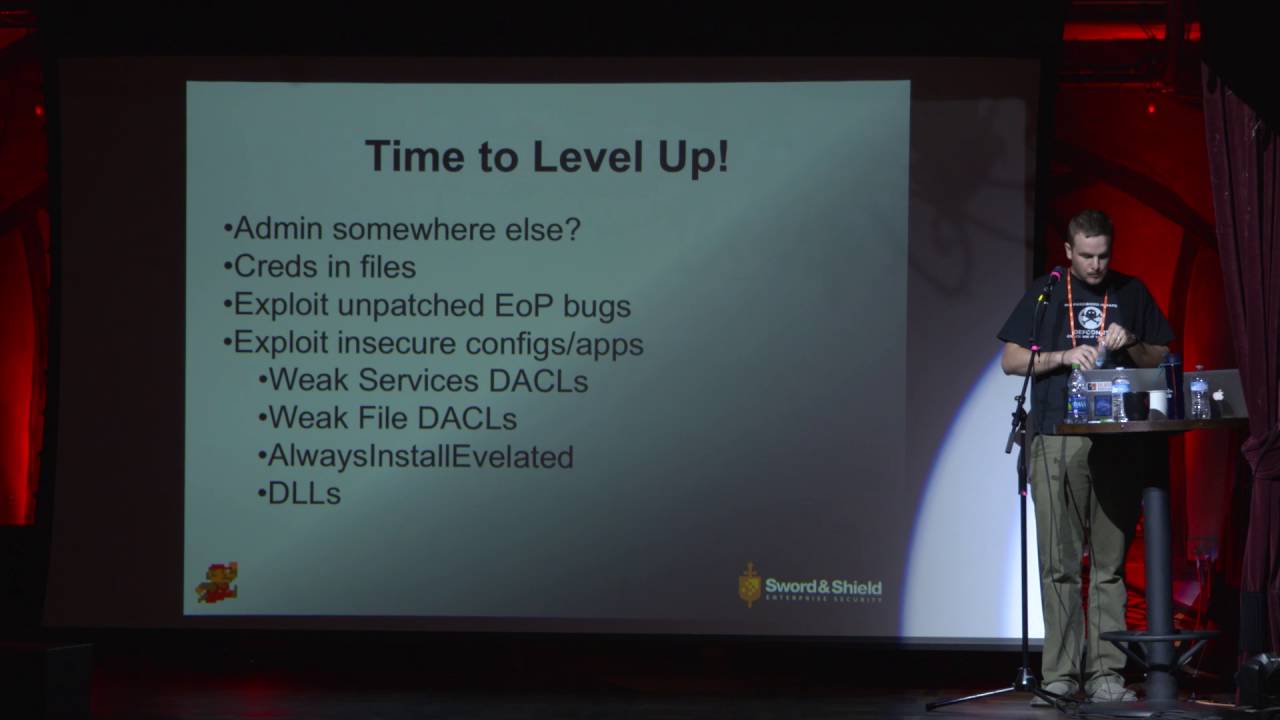
So, here's kind of our uh game plan. Um first, we're going to look for uh many misconfigurations somewhere else. I actually see this a ton. um a user that I have compromised. They're not a local admin on the box that they're on, but they've been for some reason configured as a local admin on other boxes within the domain. Um at that point, we can just psac or whatever your favorite remote command execution method is. Uh then we're going to just look for some credentials in files and show some uh interesting places that files can have local admin credentials in them. Is that rain? Um then we're going to look at exploiting any unpatched elevation of
privilege bugs. Um these are going to be guys like James or Travis Ormandy that have found bugs within Windows and it could be any any third party software that's running with elevator privileges but for these purposes we're just going to do Windows. Uh, and then finally, we're going to look at exploiting insecure figur configurations or applications, um, services with weak permissions, any files with weak permissions. Uh, we're going to look at a, uh, registry setting that can be pushed via GPO called always install elevated that always installs elevated. Um, and then we're going to look at some DLL fun.
So, first we're going to uh see about looking somewhere else. So, we've landed on a workstation. um a user that we've compromised via whatever method you so choose is running as a limited user and we want to continue to try and compromise the rest of the domain. Um like I said, one of the things you can do is try and look at other machines within that domain that have been misconfigured for whatever reasons. uh someone has allowed that user to become a local admin um for to install some software whatever it is and they forget to take them back out. Um so one one box in the domain that we're in is going to have the domain
users group which Luigi is a member of configured as a local admin. Um when we do this we can use a tool called power view. Uh this is a part of a larger group of tools developed by some of the guys at the Varys group. Will Schroeder developed this tool. It's a PowerShell script that will essentially query the domain controller with our current users token. Uh ask them, hey, where are all the different boxes in the domain? What are the names of them? And then it will try and open up a handle to the service control manager. If it's successful, that means that we're able to uh PS exec or whatever you want to as a local admin to
that box. Um, and you can see the screenshot there. We're going to load the PowerShell uh script and then um run the find local admin access. Fairly straightforward command. And you can see that we get one back back one box where our current user is able to uh log into that box as a local admin. And you can see here that we've got uh the configuration on that machine. We run a net local groups for the administrator group and the domain users group within the domain has been dropped in that group for whatever reason. Uh next we can look for credentials and files. Um this can be as simple as passwords.xls on the desktop. Uh web config files. I don't actually
see this on workstations as much but definitely on servers. I have also seen uh backups of web config files that users are able to access like on a say a network share or something like that. Um grab the credentials out of there, log into the database. the database is likely going to be running with either domain admin privileges or at least local admin privileges on that machine. Uh move from the database to the OS and then you're off to the races. Uh unattended install files. This is another pretty big one. Um here are some commands you can use to try and look for those on the machines that you're on. Uh and then yeah, finally the the p any
just any file that has pass in it is always useful. Um, as well as group policy preferences. Who who's heard of group policy preferences? Few people. Yeah, that's super cool for my purposes. Um, group policy preferences allows uh domain admins to specify local admin account passwords. Um, those passwords are stored encrypted on the domain controller, which is good, right? Um the only problem is that Microsoft has published the private key to decrypt those values. So any user with access to the domain controller which is going to be every user can look for those files and decrypt that uh encrypted value to get the local admin. And also um any just looking around on the domain control at all. Uh I find
hard-coded credentials in PowerShell, autoexec files, batch files, um those sorts of things. Uh next, we can look at uh any potential elevation of privilege bugs that we can exploit. Uh like I said, these can be Windows bugs, but they don't necessarily have to be. There was something I think like a week ago that came out with a Lenovo bug in some service that they run where a low privilege user can pass some argument to a service which starts the device manager. Uh at that point you can load a malicious driver. Drivers are um running the kernel which is good for us. Uh so here's these are two model modules within metas-ploit that can help you
quickly kind of run through hey what are some interesting patches that we have exploits for uh and are any of those missing on this machine. So I'm going to demo this one. This is uh going to be one of Tavis Ormandy's bugs um that was patched in MS13 053
So here uh we're going to confirm that we already have a session on the target. As a lowprivilege user, you could dump the privileges. You can see that we're don't have many privileges in our process. Load the exploit module. Configure it.
Exploit's going to run. [Applause]
Then we confirm that we have uh elevated privileges.
Um if the box is fully patched, we can look at service permissions. Uh most of the time services are run with uh system privileges. Um here we're going to use the CIS internals access check tool that can dump the DALE for a whole lot of securable objects within Windows uh registry keys named pipes processes or threads. Um we're going to look for any misconfigurations with any users within the authenticated users group, the users group or the everyone group and we're going to search through every service. So, a simple command like this can help you quickly identify any misconfigurations on thirdparty services. You're likely not going to find one on uh Windows 7. Well, you're not going to find one, but
I think it was Windows XP, an earlier service pack in Windows XP had uh maybe the UPN service was you could reconfigure the UPN service. Um I think that's right. So here in the screenshot you can see that uh when we run the command for the everyone group we get back readr access for a service named codemeter.exe.
At this point, we want to see if we can edit the um where the service points to, as well as if we can edit the binary that the So maybe we can't edit the service. The the service doesn't have rewrite permissions, but we could perhaps edit the binary that the service is currently pointing to by exploiting weak file permissions or weak directory permissions. I'm going to demo that one real quick.
So, here we're on the box again uh as the same user with low privileges. To confirm that, we're going to try and add a user to the machine and get an access denied. We've already enumerated on this box the service that we're going to go after. So, we're going to use the Windows SC command to reconfigure the bin path to point to uh the net user binary so that we can add a user. It's going to look like or we're going to restart the service and it looks like it fails. Do the same thing except this time add that user that we just created to the local admin group. try and restart the service again and it
looks like it fails. But when we run the net user command, we can see that a user has been added to the box and that user is in the local admins group. [Music]
Maybe.
There we go. So, next we're going to look for uh misconfigurations with files. Um, this is extremely common, especially in thirdparty software. Uh, here we're going to look for any files that we can write to with the current privileges that we have. Bonus points if those files are auto runs or they're kicked off by a scheduled task. Um, scheduled task can run with system permissions and an auto runs, we can uh backdoor the binary and wait for maybe a higher privilege user to log in if it's a multi-user system, which it likely is. Same same kind of commands here except we're going to change one flag. Use the access check tool again from CIS internals. Uh again, this is an
extremely powerful tool. I highly recommend that you check it out if you're responsible for uh Windows machines. I'm not going to demo this one, but I have perhaps an interesting story. So, sometimes I play games. if you uh haven't been able to figure that out by this presentation yet. Um sometimes I get bored of playing those games though and I start to look for bugs within the games themselves. Um in this case the main application binary was writable by anyone in the users group. In addition it was auto run on a login reporting it to the vendor. Um, I received this kind yet uninformed email in return, which essentially just says, um, we're good. UAC protects us or it
protects you rather as the as the, uh, user of this software. Now, like I said, this this highlights a very important thing to note about what UAC is, or rather what UAC is not. Um, UAC is not a security boundary. as a as an admin, the little pop-up box that you receive is not is not a security boundary. They're public ways, public uh publicly documented methods and techniques for bypassing UAC if you are a local admin thanks to uh a Windows feature called autoelevate. Um, and this is a really important thing because I run into a lot of cases where clients are designing their architecture on their systems with UAC in mind as a security boundary. This
is why it's very important to make sure that you're running as limited users and not local admins. Uh, and not making this mistake. So, what what would an attack path be for a case like this? um someone who's in the local admin group logs in and wants to play games because no one ever has games on their work computers, right? Nobody. That doesn't happen. Uh so an admin logs in, we have back door to binary or just overwritten it if we're uh sloppy um with something that is malicious. So at this stage we have code execution at a medium integrity level as a local admin. Um and I tried to go back and forth with
this particular vendor and say look this is still not okay that anyone on the machine in the users group can overwrite your binary. Uh but he or she was not particularly interested in that conversation. Um, and if up until this point you've been like, well, yeah, actually I think UAC is a security boundary, uh, don't take my word for it because there are multiple MSDN articles where Microsoft has essentially said UAC is not a security boundary. Um, a local admin in a medium integrity process should still be considered a local admin. So again, that is that is not a security boundary. Um, another interesting one is the always install elevated group policy setting that you can set. And I do I
sympathize with this one because this is a good idea at the start until you think about it and think about the fact that UAC is not again USC is not a security boundary. This essentially allows uh any any user where this is enabled. You can install MSI package files with system privileges. So, and I again I sympathize with this one because you have um your uh you know marketing person or whatever who wants to install patches or updates or something like that um and they want to do it without having to have a local admin come and do that for them. It's kind of an issue, right? But this illustrates the kind of proverbial trade-off between security and usability
because any MSI can be installed which means we can build an MSI to do something that is not good and try and install that and it will be uh it will yield us system privileges. You can check for this very quickly. Again these are not like crazy complicated things to do. uh you have to query two registry settings. Uh there in the commands to do that and then we'll demo this real quick.
Here we start in the same thing. We have a lowprivileged uh code execution, a low privilege user.
We're going to query these two registry keys. As we can see, the first one is set.
Second one is set. can build your own MSI to do as you wish but in this case I'm for the demo purposes I'm going to use uh metas-ploit as metas-ploit does have a module for this
module's going to check for the two registry settings that we just manually checked for to make sure that they're enabled uh run MSI exec with the package that it builds And then you can see we get back command execution with higher privileges.
Another fun one. This this one is not um not as common. I just like it. So I put it in this uh deck. Um, so Windows can dynamically load DLS. There's a decent amount of security effort focused on the spawning of processes, but not so much uh with the loading of DLS. Both places we can execute code from. If the application loads a DL and doesn't give a fully qualified path, Windows will execute the uh Windows search order. There's there was a lot of lot of talk about DL hijacking in 2010. Um, and again, I just think it's interesting, so I threw it in here. Uh, it's kind of my fallback, I guess, if I'm on an engagement and some
of the techniques that I just showed you haven't worked. Um, so first, uh, or yeah, so here's the search order. The good news for us is that the last two are potentially exploitable. Most of the deal hijacking attacks I've seen that are public are going after the current directory. Um there was a recent one uh Greg Lenerys uh reported a bug to Microsoft and Windows 10 will look for phone info.dll DLL when uh I think it's Edge maybe it's yeah I think it's when edge is launched or inner explorer as well as Skype a bunch of different applications that use a library that looks for this library um but in a lot of cases that's not really
privilege escalation. So why is that in here? if a privileged application and again this kind of gets back to the methodology that uh we've talked about before thinking about okay what is my attack surface as far as privilege applications go and then how can I influence that in a way that would benefit me. So, a privilege application can load a DL that's maybe missing. Maybe they um have updated the codebase and there's no longer the use for a particular DL and instead of commenting it out, they just say who cares? Doesn't matter. Um we combine this with uh weak directory permissions that so like a writable path for instance. Again, that's uh the path is going to be the
final location that Windows will look for DLS when it runs a search. Um, so we combine a missing DL with a writable path. We can potentially execute code with privileges of a higher application. Um, I actually reported an issue to another vendor uh that is of this nature that I was hoping to be able to show you today, but that is um still in u vendor land. Oh, so to find these kinds of issues, it's again fairly simple. Um, you can use CIS internals procmon tool if you haven't figured it out yet. CIS internals suite is extremely powerful. Go use it, learn it, love it. You want to include set a filter to include DLS
with name not found as the result as well as just a folder in your path and then launch the applications that you're interested in looking at. You might be surprised what you see. Demo that as well.
This is actually um this was discovered this particular exploit or attack was discovered by Parveves Anoir and Ben Campbell with MWR in the UK wrote a metasuite module for it. Um, it's going to look for, let me see what the name of the It's the Ike O IP IP set king module service in all versions of Windows 7. Loads a DL that loads a dependent DLL called Ike ext.dll that does not exist or no, it's called WLBSC control.dll that does not exist in any version of Windows 7. The only thing about this particular attack is that you're going to have to reboot the box to trigger the service because a low privilege user is not going to be able
to restart the service by default.
So here we're going to load the module. We've already determined that Python is installed on the machine that we're looking at and is writable. Again, this is easily done manually. It's just faster to use the module. So there, it's going to write the DLL to the folder that we specified. We're going to run it as a job and then reboot the box if we can run the right command.
When the box comes back on, the service will kick off, look for this DL. It's not supposed to exist, but it does in this case. It will load it and then we'll have code execution as if we were the service. So system privileges
So, some conclusions. I'm going to echo the NSA TOA guy uh that spoke at Enigma Comp. He essentially said that the biggest thing he can tell people who are on defense is know your network. Know what's on your network. Know the third party applications that are installed on your boxes. Um, if I can show up in a week and I can know your network better than you can, that's probably going to end up bad for you. Uh, again, don't at at all costs do not run as a local admin. This is a critical piece in the a successful attack chain in Windows environments. If if local admin I mean I don't have a statistic on it. That would be
interesting to do actually. I don't have a statistic on it, but admin access on a workstation that is within a domain has almost always led to the downfall of the entire domain. Um, so making that difficult for an attacker is an extremely important piece uh of breaking the successful attack chain. Um, patch your It's fairly straightforward. Uh and then again this kind of this I was hoping with this talk to give you some ways to look for some of the things that I'm going to look for uh if I show up on your doorstep. So knowing again knowing offense using offense to inform defense uh is an extremely important thing. Some tools to automate this kind of
thing um not everybody has the time to dick around with it like I do. Um, first power up. Again, it's going to be by the guys at Ver Varys Group. Will Schroeder wrote this one. It'll automate the enumeration of some of the things that I just showed you as well as a few other things. Extremely useful PowerShell module. Uh, script it out, run it across all the boxes in your domain, and fix whatever it finds. Uh, Windows prevest check. This is by Pentest Monkey. Yes, it's the porticolus guys. Um, and Bernardo Demale, I think he, uh, works at NCC Group. Uh, and then finally, the CIS internal suite. Again, it's extremely powerful for doing, um,
analysis of Windows boxes. Can help you out in many ways. Here's some other references and resources. Um, of note is this first talk. This was by Brett Moore, uh, I think at Ruxcon. maybe like talks a lot about Windows XP. So maybe four or five years ago. This is an incredibly good talk. If you are in offense and you haven't watched this talk, I would highly suggest it. Um as well as uh some of these other references that you can check out. That's all I've got. Questions? Two questions. First question here. A lot of larger companies are going to have automated patching and that's going to use Oh, okay. Thank you. A lot of large companies are going to use an
automated patching service or they're going to have monitoring and those are going to be running with administrative privileges. You didn't mention leveraging that to exploit boxes. Would you consider that to also be something of concern and and how could you protect against exploiting that if you could? Um, you're talking about like agents like a a monitoring agent on a machine SECM to deploy patching. Yeah. So, there was actually an interesting talk by another guy at the Varys group on using SECM um to infect the entire domain. Is that that's kind of what you're talking about? No. So in order to install the patches on the box, you have to have an account on the box that it can log into. And
that account has to have administrative privileges in order to install the patches. If you take local admin away, the users can't I mean if you Yeah. Then the users can't install their own patches. So now you have to manually push out patches. So you have to have an account on the on the that's active on the box. Do you leverage the account that's used by say SECM to go in and push that down with? Yeah. So most implementations of that I've seen are going to be service accounts within Windows and the main concern with those is just going to be weak passwords. Um I've seen service accounts uh for like application uh stack management where the the username
is the same as the password. Um, that's gonna be not good. Is that is that helpful or Yeah, I was just wondering if you had taken like if you leverage that account in order to exploit other than than cracking the password. Is there another way that you've leveraged that to gain privileges on the box? Yeah. If I if I um compromise that account, then I have access to everything that that account has access to. I don't know if No. So, what I'm saying is that you've there's an account on the box. Can't do you leverage the admin account that I now have to put on the box because I've taken the the administrative privileges away from the user. So, you log in the
box, you go in, you look and and you had just like Luigi before, right? But now you're going to have, you know, this patching account that has administrative privileges. Is that an a vector that you attack? Yeah. Yeah. If that if I don't have access to a Luigi and I have access to a service account or some account that's used to deploy patches or something like that, it's going to give me access to any machine within the domain that that account is used to login with and patch boxes with. Is there a way to protect against that? Um the large the biggest I mean the most common thing that I see as far as that
goes is just again weak passwords. use a use a really strong password for service accounts. Service accounts aren't necessarily bad. Um, if I'm able to compromise a machine that your service account is logging into, you've already lost because I've I've achieved local admin on that box, your service account interactively logs in or does whatever it needs to do. Scrape those credentials out of memory and then on I go. So the the biggest thing I would say with that is um protect protect your workstations and assume that the boxes that you're trying to defend are going to be compromised. Like assume um Kevin in in marketing if you're logging into his box with uh a trust relationship, a one-way trust
relationship. assume that you're on dangerous territory because he's browsing the internet with um an unpatched version of Firefox or he's downloading macros and execute or downloading word documents and executing macros whatever try and try and think of your perimeter not just as oh your firewalls or oh your IDS and your IPS like assuming compromise on those boxes uh is an extremely interesting and useful exercise to kind of run through right so what we do is we look or um is that account being used for like an RDP session which it should never be used for and that would be you know absolutely we look for those types of things but I was wondering if there was
any way else. Yeah the monitoring aspect is huge if you can if you can monitor and do some sort of like anomaly detection. Um a service like you said a service account shouldn't be logging in over RDP and it shouldn't be um doing doing strange things. Uh that that's definitely something that that is worth um checking out monitoring getting some sort of baseline for accounts that you have and what they're should be doing or normally do and then um look at that Microsoft advance it's ATA I forget the I forget the what the full acronym is but they're doing a lot of work in that area. I think that's a you have to buy that at this stage. But that is
trying they're trying to take that idea baselining Kevin only logs in during these times. Here are the kind of things that he typically accesses. Um are there deviations from that and if so that could be an indicator of compromise. Nice. Thank you. Yep. Other questions? Yeah, one in the back. um for for uh that demo that you did of the uh replacing the the service with the weak service ACL's. Uh have you heard of a serve check 3? Uh it's a executable that automates that process and and simplifies it as well as the enumeration. I just thought I'd mention that. Yeah. No, I I actually haven't heard of that one. That's awesome. Serve check 3.
Yeah, SRV check 3x. Yeah, it's a it's really useful. Awesome. Thanks. Yeah, I'll check that out. Any other questions? Hard to see the top. Cool. Thank you, [Applause]
Related talks
 45:08
45:08 1:00:09
 28:27
28:27 1:03:19
 47:45
47:45 51:02
51:02