App Scanner Galore - How do I choose one?
Show original YouTube description
Show transcript [en]
communication resources and faster and more reliable that go my name is Stacia I work for a start-up in the bay area called skyhigh networks I have a penetration testing background originally and then I moved in house to be a security engineer doing both pen testing for internal apps and also running application scanners running the security program for my company hi my name is Josh I was a consultant as well now i work for bobs where I do application security stuff which ranges from a wide range of things from scanning penetration testing and everything that has to do with our application so before I actually get into the talk I'm just curious how many of you guys you know run a scanner
internally within your company or for clients just doing some sort of pen testing engagements okay quite a few though so I assumed like a lot of people here would would be interested in deploying a scanner in some manner either be from a client perspective or internally we personally have had experiences you know trying to evaluate scanners and deploy them internally and scale these deployments and we learned a lot of lessons the primary thing though is we thought what are the questions that one needs to ask before choosing a scanner so the whole point of this talk is to help you ask the right questions and provide some examples of situations you might face before deploying when you
deploy scanner and a few useful tweaks that you you can make to make your lives easier because you know scanners are not really reliable sometimes they crash you use kick off a scanner and go away for two days and you come back to seeds it was stuck like an hour later so just things to watch out for some of some tweaks you know and what this talk is not about is not an evaluation of all the scanners out there we did not do any objective evaluation of you know every single scanner the scan coverage or the scan performance or false positives it's definitely not you know a recommendation of this at the scanner you want because
we want you to ask the right questions for yourself and we hope that we we cover about eighty percent of the questions everybody needs to ask and and choose the right scanner for you and also it's not a cost-benefit analysis I know there's some very good free open-source scanners but also some which are like forty thousand dollars a year and definitely not any endorsement to any particular scanner so let's get right into it before even getting to what scanner you want to use I would think you want to know what your application footprint is like and your company that is what are the objectives you want to achieve when using an application scam security scanner do you
want to just find vulnerabilities and fix them I would think so but you know there's different motivations in different cases some cases the scanners are purely compliance with when somebody wants a report and they use scanners which is understandable I ideally as a security guy I want everybody to you know fix all vulnerable ities but you know risk management is also a thing right and then sometimes your customers want you to you know produce some sort of scan report or vulnerability report and then the other question to ask is how many applications do you have in your org and how many of like or do you have only internal apps or do you have a
main product but which is actually a web app and how are you planning to use the scanner do you have dedicated security engineers running these scanners doing triaging of eliminating false positives and handing over these two engineers or do you have an engineer actually running the scanner for you and who owns the whole execution process so the first thing you need to ask is what's your deployment model is your application locally hosted is it on the cloud do you have multiple environments like staging a dev of production where do you want to scan stuff can these environments talk to each other can they talk to the Internet if they can talk to the Internet then you might as well go
for a club a scanner and but the different things you need to consider when comparing cloud base to locally hosted scanners cloud-based scanners or more like point and shoot give it a starting URL give it a set of credentials to authenticate with and then say should it go scans gives you back a result but with locally hosted scanners you have many things you can customize you can potentially integrate it within your SSD LC program in a much better way once you decide where to where to host the scanner or between a cloud-based and a locally hosted scanner you need to look at art in authentication how the scanner would be authenticating to your application you
would have multiple applications right over bap a set of API is a mobile application or even multiple mobile applications and they all use different models of authentication some may use tokens cookies HTTP basic auth and whatnot so before choosing a scanner you need to make sure that that scanner can support all the forms of authentication your multiple different apps have I mean if it cannot authenticate to one of your abs what good is an unauthenticated scanning and a deer right so once you make sure that the scanner can authenticate into your application you need to make sure that it stays authenticated there are many cases when scanner is log in and then they do something which logs them out within
like five ten minutes and then the rest of the 24 hour scan it does is unauthenticated that's not as much value many scanners have regex based or pattern matching you need to figure out if the pattern matching the scanner has actually applies to your application and it actually stays logged in if the scanner detects a logout it needs to be able to log back into your scan into your application and continue the scan another thing you might want to see is how many times does it log back n I've seen some scanners that do not have a good session detection mechanism and to avoid problems because of that you just keep sending log and requests like
once every five seconds this actually happened to me when I was doing an evil of different scanners for one of them i had like 35,000 or 40,000 concurrent sessions live on the test environment and guess what the DB crashed so you need to make sure that does not happen on production also after I evaluated a few scanners I realized that the scanner I was running did not support web sockets which was a functionality that our application used so it's it might be a good idea for you to check what protocols your application uses application layer protocols like speedy which is one of Google's or WebRTC which is usually used for a video or audio and
similarly input formats there are so many different input formats JSON XML GWT you might want to just check what your app uses not all scanners are good at fuzzing you know all protocols or all input formats I've seen some scanners which are pretty bad at JSON or GWT is that not even supported by many scanners but it's still one of the input formats used out there similarly custom test cases so I've seen several scanners struggle with sso or Sam always flows because there's whenever there are flows which involve dynamically changing parameters that are not just in your HTTP request headers or body or sorry HTTP request URL or body and there's additional parameters that change in the
headers a lot of scanners don't detect these changes and follow the flow so if you can customize your scanner to follow a specific flow if you can have have it act as a proxy and then specify which parameters to track that's that will help you continue the automated scan in a lot of different cases similarly web services I'm I'm not really a huge map any scanner really that does a really good job of just taking the web web services visible pilon and does a great job of scanning but there there are a few different ones which at least can take a Wizzle file and you know start scan automatically so some some things to watch out for one
important thing you need to look at when evaluating scanners is crawling if the scanner is not able to crawl your whole website how is it going to scan how is it going to find one that abilities right because it does not have the whole surface area itself when you're looking at the crawl engine of a particular scanner for multiple things you need to look at these things will help you a lot and some of these things you might want to look at our does it love a user to specify the starting URL I mean you might not want to start the scan at the homepage but you might want to start it at the login page where the scanner
would authenticate and then we want does it let you do that does the scanner support addition or removal of other domains or sub domains or some specific links you might or might not want to crawl or scan one important feature you might want to see for is manual crawl and by manual crawl I mean the user doing a crawl using a browser and then the scanner listening as a proxy and then recording the whole crawl once you're done with the manual crawl that would be the whole map application map that the scanner takes and just scanning part of it so one thing I would highly suggest is when you do like comparison and scanners do not just look at the end
results of how many vulnerabilities that scanner a fine and I'll need it's kind of be fine you would want to look at the crawl results and make sure that the scanners are finding the same number of unique URLs there are cases when I when a scanner would find the same URL again in a different format and it would mark it as a different URL so you might want to watch out for duplication of URLs as well next is the scan engine scan engine is well it's the bread and butter of the whole scanner system right I mean that's what you buy it for for scanning stuff there's a lot of research that has happened on the various can engines
being used so we're not going to go in depth of how different scan engines work and which one is better which one is not we provide resources at the end you could look up the research but there are some things which you might want to look at for example say your application is returning a JSON blob and that contains a cross-site scripting payload but the response current correctly specifies that the content type is application / JSON does the scanner look at the content type before specifying or before it actually flags that response as a vulnerability specifying that that particular response is vulnerable to a cross-site scripting attack these things would actually save a lot of time
because these are a whole bunch of false positives you would not have to look and evaluate each of them manually another good example I have which which actually a free well very local scanner justice so for remote code execution testing what the scanner does is it has a external server and the RCE payloads that it sends to your application if correctly executed send a ping to this external server and then the scanner talks to the server and then confirms that the has been received and then it actually Flags the vulnerability this way it's quite certain that it's an actual bug and not a false positive so we have covered scanning scanners how they log in how they stay logged in the crawl
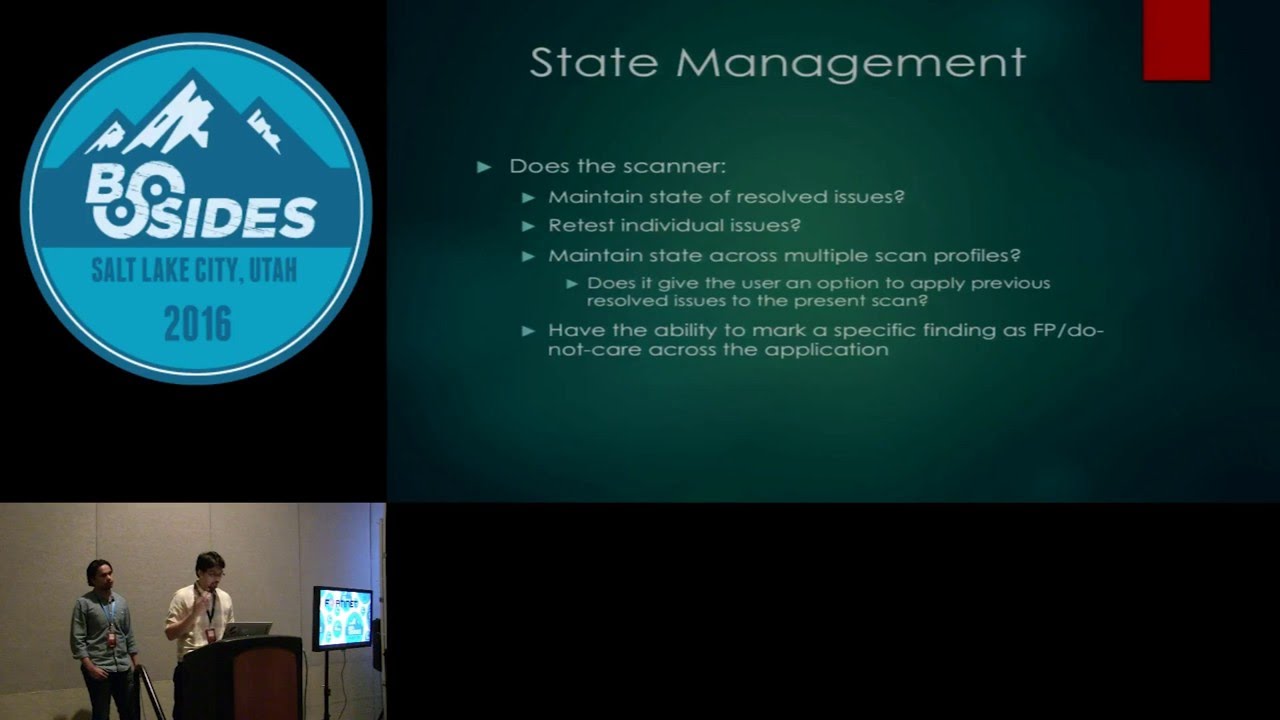
engine the actual scan engine as well so state management is next so by state management what I mean is how the scanner actually stores the state of the manually tryouts vulnerabilities so by that what I mean is when an engineer or you in your company opens the scanner up opens up a scan and then mark some of them as false positive or fixed or like risk apps accepted is this state reflected among different scams is this reflected among different profiles of scams as then you might have a light scan you might have a profile for complete invasive scan something marked as false positive within an invasive scan should also reflect among the other scan profile see you have again another
thing you might want to look for is dusty scanner let you mark a set of vulnerabilities as not applicable to a scan profile for example say you're scanning your AP is and the api's use token-based authentication so these api calls would not be vulnerable to see surf attacks right because they do not use cookies so in that scan profile can you mark csrf as non non applicable to the whole scan but that feature would actually save you a lot of time because once you mark these things as not applicable to the whole scan itself you would not have to look at false positives there are additional features like a light dish mention everything about authentication or session management
those are I would say must have features but there can be additional features that you are interested in and compliance checks I would regard them as one of those bonus features compliance standards usually are not very prescriptive right there they just say you have to follow the basic security principles like Elise privilege but you yourself in your policies the that you define to comply with those standards say hey we want a 15 minute lockout or account lock door session timeout or a specific password complexity requirement so we've come across scanners where we could configure those checks and they can the scanner can also help us stay compliant but if you know you're you're trying to scale your scanner in a large
organization with 50 applications it would be nice to have a scanner just check these things in and tell you when you're out of compliance instead of you know wait for an auditory to show up similarly other features that we have seen in scanners and we thought were really useful our scan throttle to put a lot of you know scanners support this but we've also you know had our applications our QA environment crash because some of the scanners didn't support throttling or request timeouts and a report format support also I guess this is more important for consultants if you can actually customize things but also in house we have used scanners where we could actually put in snippets
for remediation guidance for example you know if you internally have a library to fix cross-site scripting and you just need to make this method call then you add that particular snippet that says use this library in the report and every single time you have cross-site scripting you have that so how how much can you really customize your report upstream proxy support is a huge one I have personally used this so many times because I use one scanner and I'm trying to scan and it's continuously logging out or it's just stopping and it's a session not detected what do i do i chain another proxy I see what the scanner is sending out so I used like
some some pre proxy Charles burp whatever you want and look at what that's kind of ascending and where it struggling to stay alive in and then I do match and replace at a place just to make it work so just a tiny hack but it has saved me a lot of times you know which is just a lot of time and and custom checks like selenium scripts or any sort of scripting ability within your scanner has been a huge help similarly if you can define environments but for example if you can tell your scanner that this is your dev environment this is your staging environment and then configure it accordingly you that will also save you
a lot of time so automation who here does not love outta me so in security everything needs to be automated as much as possible right we want to reduce as much manual work as we can so when you come to automation with scanners it's more of a financial com manpower related decision all the features listed here you would get them in an enterprise level license but that would cost way more than a basic license with the scheme same scan and crawl engines so it's again a very different question for each enterprise if you have a big enough budget you could go for the enterprise version but if your budget is limited you would want to go for a basic version
and most of these can actually be scripted out based on the command line capabilities of the scanner so if you're low on budget you might want to look for a scanner which has very good command line interface capabilities and good API supports so that you could spend like a week or two and automate most of these things but in general even if you automate or you want to buy these things some things you want to look for with the scanners or does it have JIRA integration that means can it file tickets automatically and once the ticket is closed can it automatically save the state in the scanner single sign-on integration can it integrate with your single sign-on so that you do
not have to worry about authentication and authorization for specific group of users in your organization can you schedule different scans at different times and have them automatically click off do you have like a time limit say you want to run the scan only during the weekends so can you have a automation rule which says start on a friday night and end by sunday night does it give out email notifications you might want a mail notifications when a scan starts stops or when there is like a high critical or a blocker issue found those are some questions you might want to ask before you choose which sort of automation features you want these are some useful tweaks which we have noticed
during our whole play session with scanners that we had in our respective organizations so one thing we would suggest is to just blacklist all log out pages when you're evaluating them because you do not know how good their session management engine is and then it's more of a precautionary measure right you don't want to knowingly make the scanner log out during the scan then the session management mechanism itself i would say spend some time on it build a good regex which covers all the different scenarios so usually scanners have like logged in or logged out regex as in a regex matching a pattern which would show only in logged in pages or something which would show only on
logged out pages so make sure that the regex you have covers all the edge cases you might have in your application use a single thread once in a while using a single thread yes I agree it's painfully long but it would cover more surface area than multi-threaded crawling and then coming to custom flows there are some flows which might use different protocols it might be like a mash-up of things which the crawler might not be intelligent enough to crawl through so you might want to do a custom flow-based can disregard multiple sessions are multiple flows for different things and then just integrate it with the scanner defining custom 404 pages that's actually really important because for
scanners only a status code which says for 400 something is an error page but your application might be sending our 200 pages with an error message in the body so if you do not define custom pages some things that can happen is say for example the scanner try stacy's of attack and it get it gets back a 200 okay with the body saying there was an error with the token but that would not make sense to the scanner it would just see the 200 message and then think the attack executed and it would list it as a vulnerability so if you have custom 404 pages that would mitigate a lot of false positives then you would want to
have logs in your system right this these are attacks against product production or development and things might break once in a while what I've noticed is having a custom user agent is very easy to enable or a custom header and those are very easy to parse through and locks and make sure what the point of failure was and again using a proxy a stage I mentioned is a very good debugging but methodology which we have followed time and again but again with crack of proxies behind heavy scanners there is a chance they might crash so just watch out for that these are some things we have noticed go wrong terribly multiple concurrent sessions so if the session detection
mechanism is not good enough as I mentioned before you might have multiple sessions which is not a good thing because that would put a lot of load on your database again your application might behave differently to say a hundred or two hundred concurrent sessions at the same time then rate limiters rate limiters are very useful when used for abuse prevention purposes most of the applications have great limiters right you have different kinds of great limiters you might have read limiters by IP by username and things how they can go wrong is say for example you kick off a scan before going home and then the next morning you come open the scan and then like you got rid
limited by IP and guess what your whole company's rate limited at this point those are some things you might want to watch out for I can't log out is one account lockups so most of the applications would have a CAPTCHA which might be applied after three or five wrong attempts at login so and once they logged out it's a manual thing right you need to capture the scanner cannot do that some scanners have noticed do have an option where you can set the number of bad attempts before which the application logs to user out and then the scanner would not do more than the X number of bad attempts before it actually gives in the correct password
yes a few other issues I'm not sure if you guys have played a lot but with scanners but burp suite for example has a you know a command-line argument where you can change the amount of memory uses similarly there's a lot of other commercial and opens their scanners to that sometimes they are actually options in your settings sometimes you just have to use some command line options but definitely be aware of memory issues if you act if you especially are running scans that run for days you might want to just check that you have allocated sufficient memory to your scanner similarly turn off all notifications in your app this can be really dangerous because you can flood everybody in your
organization with a lot of emails depending on what sort of notifications you have configured data destruction is one classic thing sequel injections can drop a database even though if you're testing in your you know QA environment dev environment there there are still people doing manual testing there so you don't want to completely destroy environments another thing is disk space constraints be careful of how much disk base your scan is occupying I've seen scans crash just because you haven't like I haven't checked before that I have enough disk space for the scanner to run so basically this like they're the I guess last three slides or things that we have run into while running scanners and we have had hours of
productivity loss because this canner stopped in the middle of the night for some reason logged out couldn't login because they account about locked out or it didn't have enough memory allocated or I had some drop state or just kind of ransom drop statement which basically dropped the whole database so that's basically it we this setup useful resources so there's a couple of websites that are papers or that we have referred to before to look at scanner comparison there's one called sec tools sec tools market which is the first you are there which actually compares different scanners and and another paper which I believe was presented a couple of years ago this is actually in a comparison
between different types of scanners some of the information is there there is outdated but most of it is is pretty decent that is actually all we have
yeah but we have uploaded our talk at that URL and Clive box com2 so do you want to take a look or a welcome to
Related talks
 29:54
29:54 27:23
27:23 51:57
51:57 50:35
50:35 16:09
16:09 52:23
52:23