BSides Sofia 2022: Securing Kubernetes with Open Policy Agent
Show original YouTube description
Show transcript [en]
Hello everyone! My name is Anton Sankov, I work as a software engineer at VMware Carbon Black, where we develop containers and Kubernetes security products. You can find me on LinkedIn and Twitter, as well as on my blog. At the moment I am the only one who is eating lunch between you, so I am trying to be as efficient as possible and not to waste too much time. So let's start the lesson. Today we will talk about how and why we secure Kubernetes with Open Policy Agent and Gatekeeper. Before that I will tell you what Kubernetes is, why Kubernetes Security interests us and why we should use exactly these projects. Before that, how many of you
use Kubernetes or know what Kubernetes Chely are? Let me go up on the screen. Okay, great, a big part. For the others, Kubernetes is an open source container orchestration platform, developed in Google, open sourced in 2014. and in the last 8 years it has become the standard for deploying, managing and containerizing applications. And having something like Kubernetes, which manages the entire infrastructure, has both pros and cons. The pros are different, because that's not the purpose of the lecture, but one of the big cons is that it greatly increases the attack surface, and therefore the surface that we need to protect. This is a pretty simple picture of what a Kubernetes cluster looks like, but we
have a number of nodes in the community. As with every node, they run like our workloads, and there are Kubernetes components that do the whole thing. In this case, most of these components are public, including the API server, because we need to communicate with it, our developers and DevOps need to be able to communicate with it, to deploy things, to see what's in the cluster. and even our application to be secured by all good practices and standards. If Kubernetes is not protected and someone manages to enter an attack, it can cause a lot of damage, because Kubernetes is something that manages all our applications. Some of these failures are, for example, that you can make a DDoS attack, like downscaling
some workloads, you can steal some secrets that we have in Kubernetes, you can deploy an additional workload that will snif traffic and again steal some information, deploy a crypto miner who uses our infrastructure to mine cryptocurrencies. In general, you can make a lot of failures. And that's why it's important for Kubernetes to be as secure as our applications. And here the first question that someone can ask is: "Since Kubernetes is such a famous and popular project, it is used by so many companies, there must be some kind of security, right?" And the answer is: "Yes". Kubernetes has RBAC security. RBAC means Role Based Action Control, where we have some roles in practice, assign the roles to users and each role has the right to perform a certain number
of actions on certain resources. The actions are the standard CRUD operations: Get, List, Watch, Delete, and the resources are the resources in our Kubernetes cluster. Pods, deployments, services, ingress and so on. So, for example, we may have the role of a developer who has the right to see what is in the cluster, but he doesn't have the right to deploy because only the DevOps server has the right to deploy, for example. However, there are some problems and more likely shortcomings. Actually, before this looks like this, we have some kind of user code that interacts with the Kubernetes cluster through kubectl, tries to create a deployment, this thing goes to the API server, it is parsed
there, it passes through authentication and authorization, the role that this user has is checked and if he has the right to create this object, this continues along the route, some validation passes again and in the end it is created in the database. If the user has no right to create a deployment, we just reject the request and return a mistake. But there are some problems, more or less shortcomings. For example, a user who has the right to create deployments, has the right to create all kinds of deployments. There are no restrictions on what images these deployments can use, what resource limits they can have. A user who creates deployments can create all kinds of deployments. Another problem is that every organization that uses Kubernetes has some rules
and standards that it wants to enforce on its resources. For example, if a big organization has a big cluster in which many teams deploy workloads, the organization can want each workload to be labeled with a label that says which team owns this workload. This way, the workloads and teams can be numbered, to see which team has how many workloads, how much is this on the component, and so on. And it can also, for example, if there is a problem with the workload, to see on the label which team owns it. and to know who is waiting to search. Another use case is that in Kubernetes when you create a workload you can give them limits.
This is what kind of resource limits. This is what kind of resources the node can use for the given workload. This is a common thing in Kubernetes, but it is strongly recommended, even almost mandatory, because if you don't do it, and the workload has a problem with some memory leak, a workload can affect both the CPU and all the workloads of the corresponding node. And in this way the problem in a workload will be reflected in the entire system. While if we have resource limits, the problem will be only with this workload in which the problem is. And the last use case is that we may want to show only images that come from some
Docker repository that we are using. For example, some private repository that is private, we keep it and we know that everything that is inside it is scanned and so on. This, for example, solves the problem with the CryptoCopier, because even if someone tries to access clustern and has the right to create workloads, he won't be able to deploy any CryptoCopier from Docker Hub, but he will be able to deploy only something that exists in our future repositories. And here the next question is: why is this a big problem? Kubernetes needs to have a solution for it, right? And the answer is: almost. Kubernetes has something called validating webhooks. This is a way we can register additional logic to validate the objects we create. This is
not something that is built in Kubernetes, but a way Kubernetes allows us to migrate something we want to migrate. When we interact with our resources, Kubernetes sees which validating webhooks we have registered, calls them all one by one and if a validating webhook refuses to create a specific resource, Kubernetes does not create it, it returns the error to the user. The picture from before looks like this. We have a user who creates a deployment, this passes through HTTP handler, authentication and authorization. If the authentication and authorization are not passed, it goes to the validating webhooks, which can be many. Kubernetes calls all of them. If even one of them refuses to create the resource, Kubernetes makes a mistake again and does not create this resource in
the database. If no one refuses it, it continues on the track and is created. Accordingly, the communication with these webhooks is standardized through API, there is a standardized request that Kubernetes gives to the webhook and a response that the webhook has to return to Kubernetes. If we want to register a webhook in Kubernetes, we have to create an object that looks like this one. In this case, we have two important things. The first is when to call this webhook. we can have different webhooks for different types of resources. We have one logic for deployments, another logic for services, third logic for ingests, etc. This way we tell Kubernetes that the webhook we register is only for deployments and it will be called only when we create deployments. The second
important thing is where is this webhook. This URL is actually a webhook. This URL will be called by Kubernetes when we create deployments.
And here the next question is: Should we all sit down and write our own webhooks? And the answer is yes, but it is not necessary. Why is it not necessary? Because we have Open Policy Agent or OPA. This is a general purpose policy agent that receives some input like JSON. There are some rules that are written in the language of Rego, which we will see in a moment. And based on the input of these rules, it returns some output that is again JSON. But here there is nothing Kubernetes specific. The language I write these policies on, Rego, looks like this. This is probably the simplest Rego policy I've ever written. We have a package, then we define a variable allow, which by default is
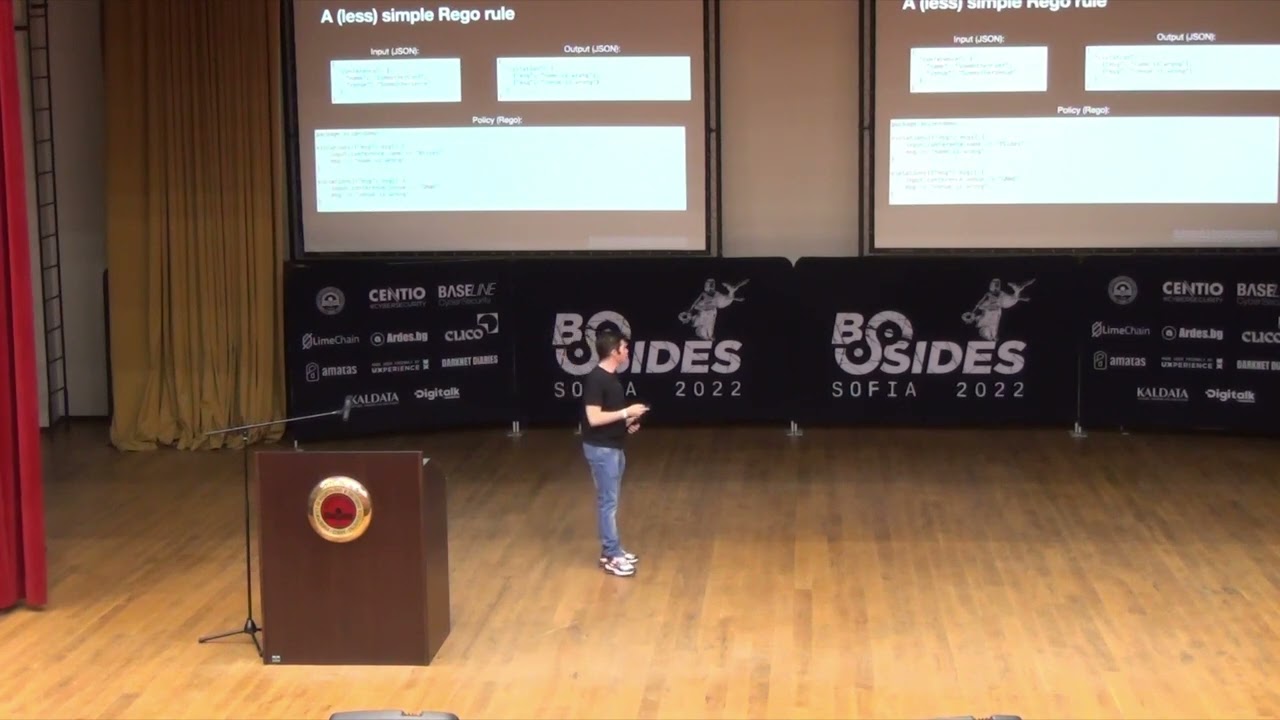
false. Then we have a rule. The rule is that if we have an object conference in the input, which has a PULLEN name which is equal to Bsides, we will perform something which is above, i.e. we will remember that allow is equal to true. It's a bit like the inverted if condition, where the condition is in the body, and above is what will be performed if it is correct. That is, when we give this input, we get that output is allow equal to true. If we change the input, The output will also change because the statement below is no longer true and we don't execute, the author is never executed. A slightly more complicated regular
rule, but still relatively simple, is when we have more than one check. In this case, we check for the name and the venue of the conference. If both are not true, we follow a message that is formatted in some way. Accordingly, at this input, where we have two values are wrong, we will get this output. But there is a specific rule here, and it is not very true. Why is it not true? Because the rules that are used here are simply end-conditioned. So, the rule we saw a while ago, if we write a pseudo code, it will look like this. If one and the other, then the message to the one below is set. This means that if at least one of these two is correct, we will never
get a message and we will think that everything is fine. Which is not what we want in this case. We want, even if one is wrong, to have some error. That is why we have to rewrite the rule in a slightly different way and this is this one. Here in the policy we have two rules that are independent of each other. First, we check if the name is correct and if not, we set a message, which we add to an array. Then, regardless of this, we check if the venue is correct and again, if not, we set another message. Accordingly, at this same input, we will have output, where we have two objects in the
Result Array. And if we change, for example, the name to be B-Sides, in output we will have only one object, that the venue is wrong. This is not a bug or a problem in the Rego language, it just works this way and we need to be familiar with it if we want to use it. We have come this far, but we are talking about Kubernetes Security, and so far none of these things were related to Kubernetes. And the other thing is that in these Rego solutions we have seen a lot of hardcoded values, which in some production environments is not the ideal option. Let's see how to solve this problem. The solution is called Gatekeeper.
Gatekeeper is a Kubernetes adapter for OPA. It is a real bridge between Kubernetes and OPA, which is a general purpose policy agent. It implements a validating webhook, it gives us this ready-made. It also allows us to store our policies as Kubernetes objects in our cluster. And accordingly, when we create some resources that show these policies, Gatekeeper calls the admission controller, and if the defender calls the mission controller, Gatekeeper validates the policies and if there is a mistake, we won't give the object. When we write Gatekeeper policies, there are two specific things we need to know, two main objects we work with. The first is a constraint template. which describes the logic, that is, describes the rego-politics and the data that
we need to submit. The second one is the constraint, which shows when and how this constraint template should be called. In a slightly more programming language, the constraint template can be presented as a function which describes the policy and some input arguments and returns a response. And the constraint shows when and how this function should be called, that is, with what arguments.
I hope you can see it. This is a constraint template. Down in green you can see that this is a rego policy, similar to the ones we saw in the previous slides. It is a bit more complicated, but it doesn't matter. What does this policy do? It checks if the Kubernetes object we create has labels that we want it to have. And up there are some Kubernetes-specific things.
This is the constraint that already refers to the constraint template and says when it should be called and with what arguments. In this case, we say that this constraint template is only interested in creating deployments. In the same way that we said on the admission controller that it is only interested in deployments, we say that this constraint will be called only for deployments. And the other thing These are the labels that we require to be remembered by the object. In order not to hardcode these labels in the policy, we submit them through the constraints of Rego. And the other thing we see in the policy is the Kubernetes object we create. We get this from Gatekeeper, which is the link between
Kubernetes and OPA. When we create a Kubernetes object, we can find it in this object - input.review. Let's make a short demo of these things. I'm not going to see them very well, but I'm not the only one. How to zoom in on this?
Ok, this is the demo. I hope it's a big enough font. Tell me if you want me to increase it. A little more. Ok. Ok, so here we have a Kubernetes cluster, on which I have previously installed Gatekeeper. Now I will show it the deployment. So, here it is, Gatekeeper. And here are the pods of Gatekeeper, somewhere here. So, I have previously installed Gatekeeper and now I will know these objects that we saw in the presentation. First, I have the constraint template. Here you can see it. It is the same as the presentation. I create the constraint template. Now I create the constraint itself. It is the same as the presentation. Deployment and label are gatekeeper. So, I
already have the constraint and now here in the folder I have two deployments. Let's see the first one, which is called Non-Component Deployment. Objective deployment on NGINX. The important thing is that we see that these labels have an app label, but we don't have a gatekeeper label, which we want to have and we have policies for it. So the creation of this deployment should fail. I try to create it. This is CubeCTL, by the way. I try to create it and I get a server error. Deployment must have GK, this is the name of the constraint. Then there is a message "You must provide labels" and it tells me which are the labels we are looking
for. This response we got from the validating webhook of Gatekeeper. Now I have another deployment, which is the same deployment, but we have one more label, which is GatekeeperLabel. And when I create it, I see that this The deployment is created because it is already responding to the policy, it passed the same check, just the gatekeeper missed it because we have the label we want. And if we check again, here it is, the deployment is created. So, before we finish, what are the alternatives to what I showed? The first is to use what we already have in Kubernetes, RBAC. For some use cases, I think it's ok. If you don't want to enforce some strict security, you can just use what you have ready.
Another alternative is to limit the visibility of your Kubernetes cluster as much as possible. That is, to hide the app and server in some VPC, in some private network. And the disadvantage of this is that you have to think of another way to communicate with the cluster in some way. through some kind of jump box or some other way. They won't be able to deliver the money from their machines and access the cluster, except maybe through some VPN. Another thing that we have built in Kubernetes is pod security policies and pod security standards. This is basically a set of templates that you can create. And again there is a set of rules that you can activate through these policies and standards. This is the old policy,
it is already deprecated. Under Security standards is the new thing that is recommended to be used. The drawback is that you do not have this flexibility to write a code that checks the objects, you just need some ready templates. And the last alternative is to use some proprietary solution. There are many that either implemented OPA from scratch or just wrap OPA and give you some stuff from above. If this was interesting to you and you think you can use OPA in some way, the next steps are: First of all, to check the links I have left on each slide. There you can find more detailed documentation about OPA, Rego and Validating Webhooks. I leaked three articles about OPA. Some of them are
in the context of Kubernetes, others are in a totally different context, because OPA is a general purpose. And today, last but not least, go and write some politics to see how it works. And if we have to summarize what I said, that Kubernetes RBA security is not enough for most organizations that use Kubernetes, that's why there is a plugable mechanism, Validating Webhook, by which we can deploy additional logic. OPA is General Purpose Policy Agent, and Gatekeeper is Kubernetes Native Adapter, which bridges Kubernetes and OPA. And time for questions.
Thank you. These are my contacts. Down to the right there is a GitHub repo where I have written the whole presentation. There are instructions on how to do the demo. You install Gatekeeper. These objects that I created are also there, so if you are interested you can see them.
Related talks
 1:02:51
 33:46
33:46 40:34
40:34 30:04
30:04 22:40
22:40 28:59
28:59