TPM Is No Silver Bullet: Pitfalls In Embedded Device Security
Show transcript [en]
Thank you very much. So I'm going to talk about uh TPMS and especially TPMS on embedded devices um which is something I see rather often uh in my line of work. So what I do is I as I've already been introduced I'm I'm pentester auditor security consultant whatever you want to call it and we do in our company do a lot of that and we also do uh a lot of embedded Linux devices so um basically everything around Linux and a lot of it is uh embedded Linux and um yeah we sometimes uh and lately increasingly more uh get approached by customers who um come for various reasons to us and some of them uh talk to us about TPMS because they
have embedded devices um and with regulations like cyber resilience act n too or something like that um they are now forced forced thankfully forced to take security more seriously. Um and they have yeah various goals like getting uh secure storage in place and working and then they they often come to us with yeah but we have a TPM that will will solve everything right. Uh we we already have it on the device we just have to enable it. Yeah. And the the answer we usually give is yeah well it depends um and you have to take care of a lot of things and that's the goal of this talk to give you an overview of
what things can go wrong what have gone wrong um and what one can do about that. So it's intended to be a guide for if you do that so if you have an embedded device and want to use TPM but also if you're pentesting one. So if you if a test device of that kind in front of you and it uses a TPM, maybe you can find some pointers here uh which will give you a hint on where to look. Okay, let's start. Uh what is a TPM? I assume most of you know or have heard of uh just to briefly recap cap. Um a TPM is either a dedicated chip on your uh device on your uh mainboard um or it can
also be implemented in software. Then it's often called an FTPM. So firmware TPM, but it's just one kind of of software TPM. There are more um it there's an open specification by the trusted uh computing group. Um we are now at version 2.0 0 of of TPM of the TPM spec and basically every modern Intelbased or AMD based laptop especially if you're running Windows you have one in there and it need it is used by Windows for example but also Linux uses it has a a bunch of buses or a bunch of bunch of connect connections which it usually uses uh uh LPC is the the regular one for for Windows PCs or standard Intel PCs but there's also SPI
I2C uh which is more often used on embedded devices. Yeah, they're rather selom on embedded devices. It's it's not that common to use them in an embedded device because emitted devices, especially IoT, uh you want to produce them very cheap and that's uh where the the price of every little chip matters and so they often skip away and and do not do not add a TPM chip or something like that. uh but often also the the system on chips also have some type of features that TPM offers already in the in the chip itself. So the vendor offers a vendor based solution. Yeah. But let's let's talk about the core features of TPMS. Um a TPM implements a bunch of uh
crypto algorithms. So it it supports elliptic curve crypto. It supports RSA. You can do m message authentication codes HMAX. You have a bunch of hashes, you have a symmetric ciphers. Uh it also includes a bunch of weak ciphers which you should not use. Uh but it's in the specs so they have to implement it. Um it uh has a cryptographically secure random number generator. It it also includes multiple and that's basically the core of of a TPM chip. It has multiple key hier hierarchies. So you have like multiple ways or multiple sources where you can secure your data with um TPM and I'm talking about TPM 2.0 here. The TPM uh the older TPM spec
is a bit different but uh with TPM 2.0 it's uh platform storage endorsement and null which is not really used. um uh key hierarchies um yeah and you also have authorization you have we will get to that platform configuration registers PCRs you also have a bit of persistent storage in there and a bunch of other things but these are the main one ones which are usually used okay let's briefly recap or talk about what the common uses of a TPM chip are especially on PCs or or laptops um it's used for sec secret storage Right. So mainly dis encryption. This it is what it boils down to. You have a you have like dis encryption enabled on your
system. Either it's it's just one partition or it's the whole disk. Um and then you have a key for that. The key is either derived from a password or you have it randomly generated. Um and you want to store that securely. And this is where the the TPM comes in. You can like use the TPM to encrypt your key and then you can store it on your normal disk and only with the TPM you're able to decrypt again decrypt it again. Yeah, you can also include or include a a PIN so a low entropy password in there. So you when you boot up your laptop you have to like enter the PIN and then the TPM will allow you to
decrypt um the key. You can also do the same thing for TLSVPN or SSH. So you can secure those keys also with a TPM chip. Yeah. The key hierarchies are here here are used to actually protect the keys. So they they the those keys itself are used to encrypt your keys. Um and these uh root keys are not able to leave the TPM. So the TPM protects them internally and it will never give it them out to you. This this protection is called binding. So just when I use the word binding, you know it's it's that yeah there's also small internal storage storage as I mentioned. So you can actually store your encrypted keys on
the TPM um or you can derive new keys and store them in the TPM internally. But usually you want to scale and you want to have multiple keys and then the storage internally doesn't suffice. So you can store them outside of the TPM which is fine because the TPM encrypts them and will give you the encrypted data blob which you can store and without the TPM you cannot decrypt it. Yeah. The client will then as I mentioned during bootup take the blob give it to the TPM which will unbind the key basically decrypt it and give it back to you. And I should also mention it also verifies it right. So it's it's not just
encryption it's also authentication. Um, so the TPM will know if you've tempered with your blob and changed some bits. And the second main use of a TPM is measured boot. Uh, that's not to be confused with uh verified boot, which is the common marketing term for this is secure boot. Uh, verified boot, secure boot is you verify signatures, right? uh with uh measured boot each boot component uh will actually measure the next boot component into the TPM which is basically we'll take the binary produce a hash and this this hash is added to or appended to a PCR register in the TPM which will not allow one or the client which is the PC or the CPU uh
to modify that register again. So it's it's a you can just append data there. You cannot change the value directly but you can append measure data into it and it will change its value depending on the data which you give it give it to it and this is used to ensure that once you've booted up everything the TPM will have certain values in the PCR registers and you can verify those values. So in the end you can look when you have booted your application you can check if those PCR values match what you expect them to be and then you can ensure them thereby you can ensure if the whole boot chain is the same way
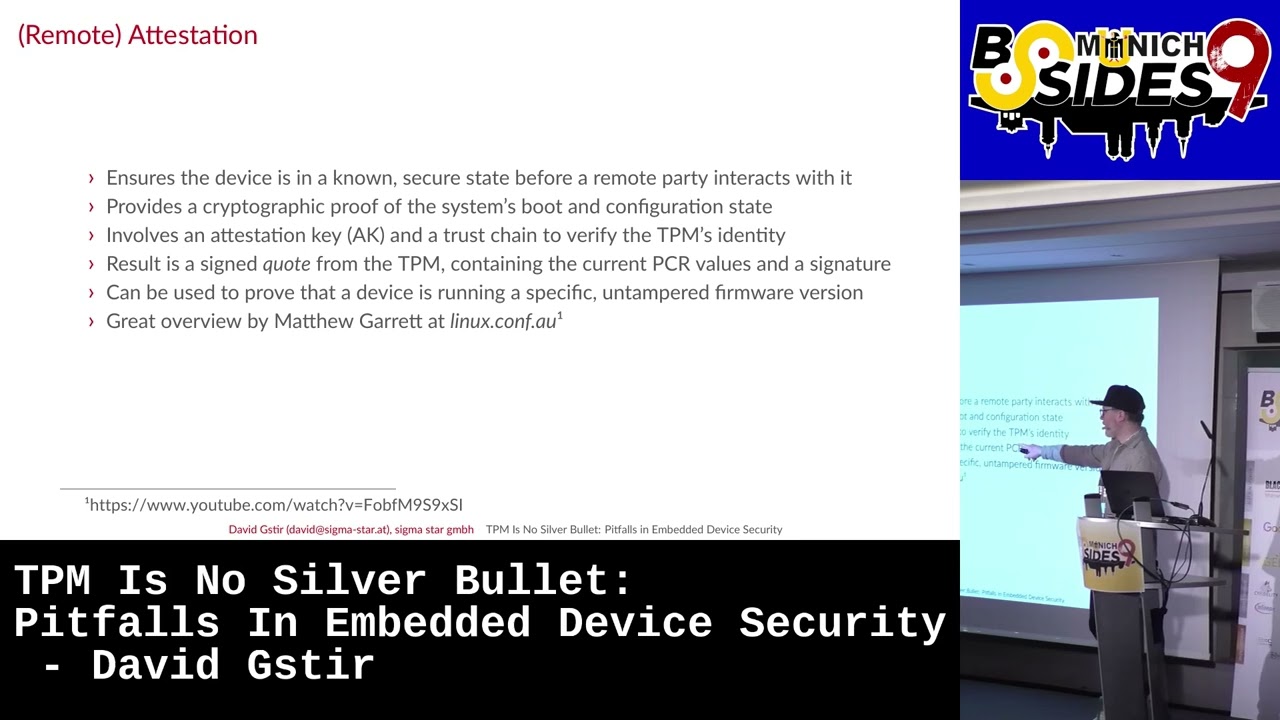
you've set it up to be and also you can combine that with secret storage you can use that um PCR values in the binding process or during the encryption so that you tell the TPM those PCR regist ers have to have these values for those for that key to be decrypted. If they don't have the value, so if somebody's let's say changed the kernel or change the the bootloader, the TPM will not decrypt your key. The third one and I'm not going to talk about it in full detail is uh atestation or remote attestation. Um basically um you can ensure remotely even that your device is in a known secure state uh before you interact with it. So when
a device wants to connect you can run a whole protocol of ensuring that the device state is actually what you want it to be before you interact or let it access some some secure resource. that also involves a PCR registers that involves a lot of uh features from TPM like the attestation key um um yeah and the trust can chain which you verify to actually ensure that the TPM is the right one and TPM state is okay and as a result you get like a signed quote from the TPM which you can verify on the server side um if you want to know more about that there's great talk not only one by Matthew Garrett who's done a lot
of work on that uh for for Linux. But now let's really talk about TPM on de embedded devices. As I said, it's not very common, but it's possible. Um it's actually with embedded devices, you have about a bunch of things which are different. We've seen here before there's there's BIOS or UFI here on a on a standard Intel PC. With an embedded device, you don't have that usually. um you have like some special boot ROM which is specific to your system on chip vendor uh which then will load uh next stage bootloadader and maybe even another bootloader before your kernel actually runs. Um so with an embedded device you have to somehow if you want
to use measured boot have to somehow reimplement all of that and have to find ways uh to do that. often it's ARM based chips um with embedded devices so you don't have UEFI as I mentioned um you need to ensure that whatever starts as UFI or whatever comes here is verified too um on embedded we usually have Uboot as a bootloader which actually implements UFI so it can act as somewhat UFI uh itself so you just have to sign the Uboot and then verify the signature using vendor specific tools, but then you can start the whole measure boot chain like you do on a regular intel based PC. Yeah, you can also use you don't really
need a TPM chip. You can also use like a softwarebased one. So, FTPMs, you can run them in the with ARM you have a trust zone. You can arm in run them in the trust zone which is like a dedicated trusted execution environment on your chip. Um so the the OS there which is open source variant is Opti emulates a TPM chip and for the the main CPU or the kernel it looks like there's a regular TPM chip there and you can even run the whole um measured boot chain from Uboot's emulated UEFI. So you load the necessary blobs and go all the way up to your kernel. There's a a great talk uh by Manuel Trout from All Systems Go uh
last year uh which exactly explains how he did that um in full detail when we talk about TPMS and that's the the main thing we we usually talk about with our customers. you you have to compare your threat models for I mean TPMS are mainly used and understood on on laptops or PCs or on on your desktop uh hardware and for embedded devices the threat model is is a bit different. First one is um on a PC you as a user so I as the owner want to protect the data that's on there. So I thankfully I'm in control. I can configure everything and I want to secure that uh data which I put there on an embedded device. It's
usually it's usually the producer. So that the company which creates the device which then gives them out to users but it's not the user who wants to protect data on there but it's usually the vendor of the device who wants to protect their intellectual property or or some secret keys to access their back end for example. And that makes the whole setup a bit different because as a user um I can ensure physically that nobody gets easy access to my laptop. But as a vendor I sell it, right? So I can go to the store, I buy one of those devices and have all the time I need with that device to temper to to try and and do
everything I want with it. So that the TPM is put or the whole setup is put under much more scrutiny. Um yeah, you also have no physical presence on especially IoT devices. Think of your camera. There's no physical presence. There's nobody who can input a pin once the camera boots up. Um which is also an important factor because you with the TPM I can ensure that when once that thing is booted up I have to enter my my PIN or password before the TPM will even unlock or unbind the the key. and and embedded devices that's not possible. Usually embedded devices are usually run 24/7. So it's it's not like it's shut down. It's it's booted up again. And that
makes a a major difference with measured boot. When you go back here, as you can see, measured boot goes up into the kernel once the kernel is measured. Measured boot is done. So everything that happens at runtime, measured boot will not care. Oops.
wasn't me. Ah, thank you. So, at runtime, measure boot does not work or does not is is not active. Once it's it's measured the kernel, we know the states of the PCR values. You can in fact actually do stuff here and produce new measurements for the TPM chip that works. Um but you have to active actively act actively do that and you have to implement that. Yeah, you also have longer life cycles. So usually an embedded device is at least uh out in the market for 10 years or more. Think of your PC that's 5 years usually. But the upside is you have a lot more control on an embedded device. On embedded device you control basically
everything. You control the hardware layout. control what is run there. Uh it's not the standard generic PC where users decide what they run on there. Uh as a producer or as as a vendor of such devices, they really decide what's running on there. So it's a bit easier to lock down and to throw away certain use cases which they don't need. Okay, let's um come to really pitfalls and common threats with with TPMS on embedded devices. One major thing is is performance and also called boot attacks which go basically hand in hand in this case because cryptography on TPMS is really slow. A TPM is not like a crypto accelerator which can do symmetric ciphers really well or fast. Um it's
slow. So it's good enough to do asymmetric crypto. You can give it data. It will encrypt it for you and will give it back to you. But it cannot run like uh your symmetric TLS cipher. So it does not run AES in at full speed.
Should I Should I try turning it off and on again? Yeah. Let's Let's get a white board.
Nothing.
Oh, there it is. Okay. Okay. Okay, as I mentioned performance. So the main thing here is for using the TPM, you have to get your encrypted data back to the CPU. So at some point it's in memory. So cold book cold boot attacks are actually an attack vector with TPM protected keys because you will have them in memory once in a time. Think of uh full disk encryption. You boot up your device uh your initially you enter your PIN. the TT TPM will decrypt the key and then you your kernel will load the key into main memory and then will stay there because you need it when you write to the disk or read from
it. So you need to add and think of dedicated measures against code boot attacks otherwise uh and the TPL will not do that for you. You will need to handle that extra. Then there's runtime integrity. I also mentioned already that uh measured boot is done once the kernel is running usually. Uh you can also add more and measure produce more PCR measurements uh later on but you have to actively do that and have to consider which PCRs you want to measure into and how to check them. Um for disk encryption there's one thing you can do and which is usually also done by things like systemd um they produce a new measurement once the disc
is mounted. So once the TPM has unsealed the key and the key is used for dis encryption they produce a new measurement into one of those PCR reges which they which they bind the the key to. So the TPM after that will not I didn't do anything.
Okay. So the DPM uh will not after that produce uh the key or decrypt the key. This way you can at least ensure that during runtime your key will EP in memory but somebody who gains uh code execution on the device cannot really get it out of the TPM directly but has to first reset the device and maybe try to get in before those measurements are are done. Yeah, you can also have a bunch of additional measures which are also common sense. Uh pretty much you limit limit your privileges per process. So don't know that run everything as root. uh set proper file system permissions, get stuff like SA Linux app armor running. Uh use IMA EVM which is
really giving you in runtime integrity. Uh and also main main thing which sometimes uh vendors do forget, use unique keys per device. Do not use one key for all devices. Then there's direct physical attacks. Um, you can with the TPM chip and especially with embedded devices as I mentioned, you have all the time you need. You can open up the enclosure. You can attach pins or probes or whatever everything you want to the TPM in uh directly and you can try and see if the power it uses somehow gives you a clue on on the key. So all the the side channel attacks are there. With a TPM, they usually have something like a bit
of protection, but a lot of it is, from what I've seen, a lot of security theater, they they tell you it's it's protected, but often it's just coating over the chip or it's some temper evidence, which will just show you that somebody has tempered, but it will not give you full protection against tempering. Um, one tip is to look at the uh FIPS 140-2 or -3 certification of the the chip itself because that level which the the vendor gives you will tell you how good the chip actually is uh in in doing physical protection. But there are actually easier ways to temper with the TPM chip and that is uh looking or listening on the bus which
sits between or which connects the TPM to the CPU and there's actually a bunch of research being done there and that there have been a bunch of attacks. I mean, Windows PC are are known to um I think every two years we get some new Bit Locker decryption uh variant for for how to get the key out of the TP TPM or listen on the bus and and extract the key. Um it's a lot more easier than it sounds there. They're really hardware you can just buy for a bunch of euros and and use that and then listen on the the bus lines what the TPM and the uh CPU are actually exchanging because often times vendors do forget to
encrypt that the TPM offers features. There's something that's called HMAC uh or sorry session based uh commands or response parameter encryption which both both of those those things you want to use um in to ensure that once the TPM decrypts something it will not send it in plain text over the bus. Um there are multip multiple modes which you can uh configure and but the client as I said needs to enable those specifically um when you use I think systemd uh and the encrypt so the systemd loops uh too and the encrypt integration does that for you um but not not all other clients so if you have a custom application usually you have to take care of that
yourself um then there's active in power attacks the previous one we were just listening on a bus Now we're trying to also talk on the bus and be faster than the TPM and and launch a man-in-the-middle attack uh between the TPM and the CPU and uh have the CPU talk through us to the TPM. Um for that again you have like encrypted authenticated sessions which are which are when used properly are good and help but they're not perfect. Um system D already tries to do something like that. um it it places uh a metadata or a hash of this storage root key which is one of the keys inside the TPM um in the on the
disk and uses that to verify if the TPM it's talking to is actually the TPM uh which it set up. Um that works u but it also has a bunch of caveats uh and a bunch of things you have to take care of. Um I think it's solved now. There's an uh GitHub issue uh where they talk about in length about that but I think they they I think they ironed out most of the the issues right now. Yeah, the problem is still um an interposer can reset the TPM. So once the TPM is reset, all the PCR values are reset. Uh which means again measured boot can be bypassed and you can after you've reset
the DPM you can produce new measurements to the DPM and if you know what you need to measure into the TPM, those measurements can reflect what you need it to. Uh so in the end uh if you have an issue, you produce an update, you can reflect if you reset the TPM, you can reflect an old state in the TPM and maybe decrypt an old key which may likely did not change during the update. Uh the Linux cattle is is one of the the parts which needs support for that or which helps you in that. Uh it recently with 610 gained the ability to partially detect this. What the hell is going on? Um but it still uh requires user space
to do full attestation of TPM's uh EK certificate which is again a certificate in the TPM or a key in the TPM and there's a uh certificate which you can verify. Uh if you want to know more there's a a great talk by James Bottomly who does all or many many of the kernel side TPM stuff and he this year he talked at Fostam about that. Yeah, there's TPM and and firmware flaws. I mean, TPM runs software. Uh it those firmware uh stuff can have issues as well. Uh this has happened before. There's the famous TPM fail uh CVE from 2019. Um sometimes you can fix that by update, but sometimes you don't. So if
you have an old chip and consider lifetime, you have an old TPM chip there which might be still used in they say 10 years and it it has one of those issues. Uh it will have that until the end of its life. Yeah. There's also been uh another vulnerability there so-called ROA vulnerability which where they really have hardware vulnerability itself inside the chip. um what you can do there is not much really but you can try to do additional harding of the whole system and back end and as I mentioned unique keys might be a good idea then yeah then then there's softwarebased issues if you use an softwarebased TPM um it's nice actually because it's a bit
better than a physical TPM because it prevents the whole listening on the bus uh thing because there's no bus uh it's basically the same chip it has a dedicated execution environment. But uh those things can also be vulnerable. There have been uh trust zone flaws. Um there have been uh there's a the fault TPM vulnerability for I think AMD uh CPUs which is uh has been pretty famously gone through media uh some time ago. Um so they still vulnerable to some kinds of attacks like side channel timing leaks and so on. Um when you do it on an embedded device um you might run opty there. There you also have then take to take care of I mean opt is running your
TPM. So the TPM is responsible for securing keys. Um so you have to uh somehow store the keys again which the TPM internally holds. Um there's solutions there. opt is something that's called with an eMMC you can use the RPMBB um feature which is a dedicated hard hardware feature from an eMMC where you can store the keys but again that needs a key so it's it's a chicken and egg problem yeah and let's come to an end here are alternatives to TPMS I mentioned a few there are often vendor specific solutions a bunch of industrial um embedded devices use system on chips from NXP. They have really their own products which they sell you with the
the chip itself. Uh which offer similar features but maybe even better ones because they sit on the same chip and so there's no bus. Um but you need support for that in the color side. Yeah, there's as I said custom based solutions which you can work on with ARM trust zone. Uh you do not have to use opt itself and you can also use dedicated hardware. I mean Apple is doing their own thing with secure enclave. They really did not use only a dedicated chip but that chip is actually um holding everything internally and even they pipe through a lot of uh hardware uh connections through that chip so they can authenticate everything. Okay, let's come to really an end here. Um
TPMS are definitely an option for embedded devices. They are not that common. Um but uh we can reuse a bunch of features from from PCs like this encryption. As I mentioned multiple times, systemd uh really integrates with TPMS already. So you can use that on a embedded device as well. But the threat model is slightly different. Um and in some areas a lot more different. Um so the TPM alone will never solve everything for you. You have to do additional uh things and you have to know them and take care of them yourself. Yeah, thank you. That's it. And sorry about the issues.
Related talks
 32:10
32:10 11:33
11:33 30:34
30:34 27:26
27:26 29:33
29:33 9:40:42