Cloud-Based Contextual Analysis as Code
Show original YouTube description
Show transcript [en]
all right so clicking show so my name is Oracle I'm the founder of Jupiter 1 and the C is o of light ohmic so I actually did a similar talk last year at besides salt lake city in 2019 that talks about how we internally build our security operations on a graph database a graph based CMDB this is an extension to that and you know actually Jupiter 1 is the product that we built that supports that but I'm gonna talk about this in more general kind of concepts of the graph C and DB and and using some of the examples of our own product to to highlight that and just just so you know I'll be sharing some code examples and
this is doable yourself with with any graph database like neo4j and other things as well so a little bit of the recap from last year so for folks who has not seen my talk last year here's here's a link to it and I'll go through a couple of the recap so people have some kind of shared background and common background so it's not kind of so abrupt when I jump into the use case I'll go to despair quickly and there's links at here and at the end you can kind of get more details about this graph DB itself now first of all the reason that we build a graph based CMDB or a upper in your model building or on
the graph is because of this and because we want to analyze not just the resources and their configurations as a traditional CMDB or a configuration management database we do but what we like to do is to be able to analyze the relationships and the contexts that are derived and from these relationships because as this statement says defenders thinking lists and attackers think in graphs and that's why attackers win and we don't want them to win we want to win instead so a few things that we can do with the with a graph and first of all this is the data that we collect into a graph data model or a graph database and is not just a typical IT assets that
people think about and we actually have to graph objects represents anything that we can think of that's related to our security operations to our compliance programs and and just overall our digital operations we are very much cloud native and digital so this is relatively straightforward for us to do there's a lot of api's that we can leverage to build this and anything that's not you know API driven we can still manually using a script to create ease in the graph database so like you see here it covers anything on this list from policies to risks to organization users accounts even vendors and vulnerability findings and endpoint resources network resources agents on those hosts and servers and of course as
well as our resources in the cloud in the AWS infrastructure so what can you do with this crop right so once you have this graph there's so much that you can do that we find that we end up doing with this graph now this becomes our core and our almost our operating system for for our security analysis and the compliance program so here are some use cases I'm gonna focus on on one in my exam going a little bit that has to do with access review but these are some of the use cases that can be realized with this data in the graph and the the pattern it really is pretty straightforward and we have one single
pattern which is you know doing security as code and in an engineering pattern where we can use api's to collect data and then use query to analyze and get insight from that data for any of these use cases now let me describe a little bit more what this graph looks like so a graph for this particular use case with GRC you know policies controls and which is overall program management may look like this so you got an organization that has policies which you have procedures and in controls that implements policies and then you various compliance standards that you have to meet and the recruiters each stander has a requirement and the procedures and controls implement those
requirements and so and so forth right so this is a high-level view of what the graph data model looks like for for this area of things and you can see the the gray boxes where from here it connects to other sub graphs and there's a graph for user management a common agent and vendor management and here are some of the interrelationships of how the organization owns the account and which account has what service and has what user or user groups and so on so forth now this ties into the previous GRC data model and also ties into the vulnerability management data model which is presented here that everything in here surrounds with the vulnerability findings which can impact a variety of
different resources like a host or application or Co repo and this graph like here for example right allows us to answer questions like what's the pattern in these findings right so which which weakness is probably the most predominant in our environment in other words right so if we have a hundred findings that that's all exploiting the same weakness so we know that is a weak point in our ecosystem so that's what this graph represents and then we have the graph that represents network and important infrastructure of different hosts and resources and in different entities in AI in the AWS infrastructure and so on so forth now I'm going to use a specific example when you see you know
what questions can the graph answer here's some example questions specific to AWS and I'm gonna ask this particular somewhat complex questions and how we answer this with a graph query and the question here is are there internet-facing ec2 instances that are allowed access to non-public as three buckets now it's a long question and and in order to answer this question actually has seven different criteria that it has to meet and these are the seven things that we have to check for in order to answer precisely without noise or without false positives the answer to this question so first instances are active there life there are security groups in those instances allowing Achuar from the internet and
instances are publicly routable and then there's network and you know VPC access allowing the the network access to the internet and security gurus and I am policies and I am rows and so on so forth but you can read this in the slide so all these conditions has to meet in order for for this particular for this particular question to be answered right so this is what this looks like with the grout quarry so imagine that if you are to try to answer this across multiple environments at the same time if you have maybe 50 or even 100 or more AWS accounts and you have thousands of instances and you know hundreds and thousands of a.m. policies and rows and
the equal amount of s3 buckets so this just becomes a classic security problem where you're trying to find the needle in the haystack now with a graph right so assuming that we have this data collected and we have mapped out those relationships and how things are related to each other so we can run a query like this right basically traverse the graph and starting from the internet and you know looking for connections to security groups and then looking for connections to I pay WS ec2 instances and here's a cluster of them and then looking at the I am rows assigned to these instances and then the policies signed to this rows and their access to the s3 buckets
and if they are labeled or classified as public or not so this particular example where I saw showcases you know how you can use a graph quarry to do a graph traversal and this type of threat and risk analysis or configuration auditing or whatever you call it so this is a bit of a recap of you know why we build the graph CMDB and you know how we're using it internally to identify risks now I'm gonna move on to a particular use case that we've just recently did for for our user access review so the question is is really this is you know how do we get cross environment context out of the graph right so it's not just within the AWS
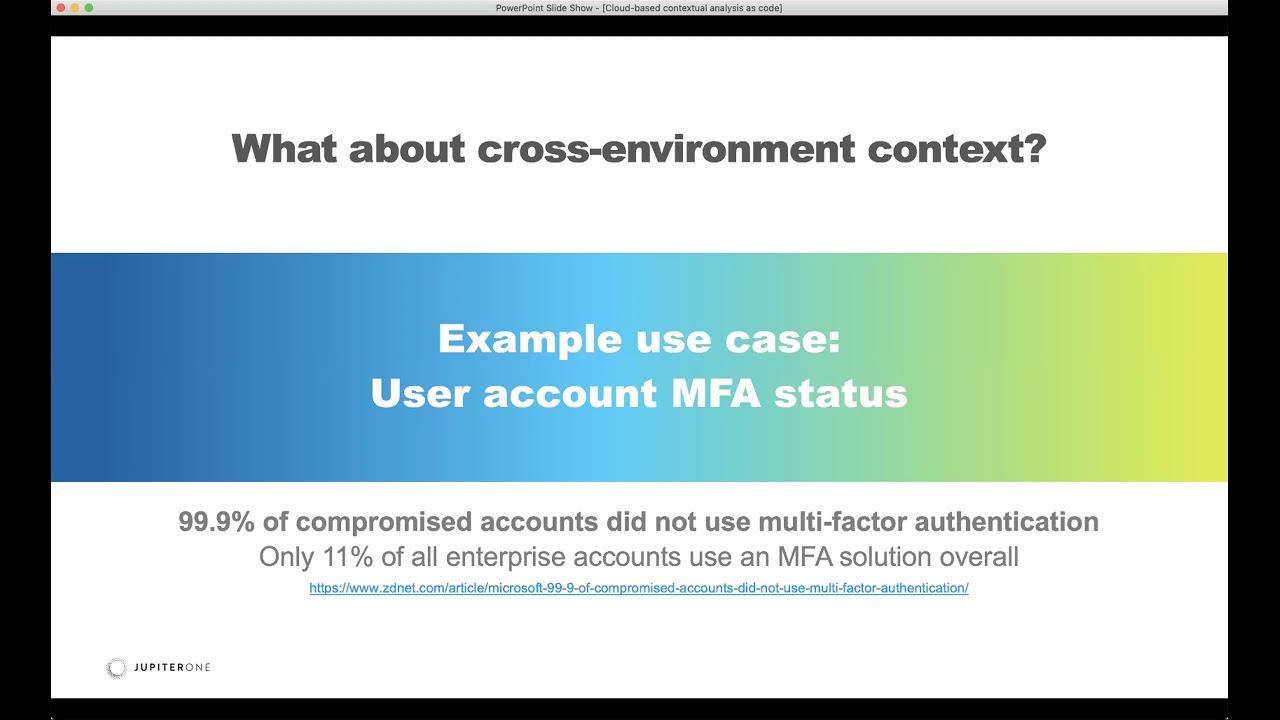
environment itself right how do we connect the tot the dots across multiple environments so from you know one user forum user accounts from one environment to another one so let me describe this use cases for you a little bit in a recent article from Microsoft that that you saw here below actually was from their RSA presentation just a month or so ago and they've put out this report that says 99.9% of the compromised accounts did not use MFA and only 11% of all the enterprise accounts that they have visibility to actually have an MFA solution overall so for us internally it's the natural question is our MFA enable for all of our user accounts right now with the graph this can be
answered pretty easily so first we thought that we have all the users right so we collected all the user informations from the different accounts you know we have accounts in bitbucket and github and octet and so on so forth right we have all those aggregated into graphs so we can easily run a query and something like this that says you know find user with MFA enabled not equal to true that has not been assigned or is not using or does not have an MFA device so this quarry actually have two conditions and one of them is saying that if the user itself doesn't the MFA enabled flag as we've analyzed a configuration from the provider and
additionally if that's the case and and also the user does not have a separate MFA device that we know of attached to the user account that's you know configure this way so this checks for both of those conditions well the result of that quarry when we first ran it says you know 569 user accounts with no anthem no MFA and they what that can be right we have actually we're a small organization we have less than a hundred employees and you know cost multiple environments you know maybe we have a thousand or so user accounts right assuming that each person has ten accounts and that's roughly a thousand accounts so more than half of those have
no know MFA in a boat and that can't be right because I know that we we that's not a case for us so what was happening why would there are so many false positives exactly because of single sign-on so these users they never login directly to the provider instead they log in viet we use octopus would be a single sign-on so as you can see here that these provider user accounts right as we call the provider EP is to get information about those users and the provider is gonna say yeah they don't have em fama enabled so we asked github and you know give me the list of users whereas JIRA or Google or office 365 or
no before and these these environments they're all gonna return and say yup here's the list of your users and they don't have MFA enabled now in reality they actually do go through MFA because the login flow is via octa single sign-on using sam'l so here's an example in this example I run a quarry just for my only user and if you look at the quarry cell I said you know give me the bitbucket a user with with my name as user a and that has an account which is just bitbucket account and it connects an autop occasion which is Atlassian JIRA application and that is assigned an octa user which is my octa user right here and show me if my octa
user has assigned or is using an MFA device what turns out I have four MFA device configured so what this quarry is showing you is that I am actually logging in through octa and into a bucket and I am you know using anything for my octet account but bitbucket doesn't know that right so and the biblical user doesn't have that property for MFA so what we end up doing is well we know we have to seem for making a graph you know we just want to enrich this bitbucket user entity to have that property you have to know that I am in a single sign-on user and I have MFA enabled if this graph condition is met
so here's well here's what we did but we also don't want to assume right so we don't want to assume that's always true so we only want to do this type of connection or we only want to update my bitbucket user entity only if this condition is met so we don't want to make the assumption that because we're using octet that all of our users are going through this flow so what we have to do for accuracy and a level of assurance is to do some correlation using the graph so for each user we have to run that query essentially is to say I have to correlate for each user that is not an octa user an application is
assigned in Rakta and the user has a matching I have a matching user by email or whatever case that might be that is assigned to this or that application the single sign-on application and then my my octa user has the MFA device configure to our site so that's the condition now how do we do this we can do this with corian with the code so the first for the first condition so this is the quarry we ran rather say you know find a user where the unique identifier being a key as the first user that has this account that connects to whatever account that might be or it could be in a juror account it
could be a github account or know before account whatever case they might be so these are generic representations of user an account now we say we want to find that account that specifically connects to a corresponding JIRA application and I want to find the users that are signed to the octet application then the user must be active and then I'm gonna compare this first user and the second user and if their username or email or some other condition is met then I can know with some level of assurance that this first user right here is actually a single sign-on user so if that is met then we set the single sign-on user SSO user flag on our user day to true
and then secondly now as you can see here so we added a condition and say for that same user if that is a single sign-on user I'm gonna run a second Cori and to look for any of the MFA device that's assigned to that author user if this is found then we're gonna set a MFA enabled flag to true on that version of a user so what this should allow us to do is to filter out all the noise and it turned out that actually worked so after we went that script so this is the same example for my user so my bitbucket user now has a MFA enabled flag and a single sign-on user flag both set to true and
that's what we use graft contact right so this is just one example use case of how we use the graph context and use code and use Cori to enable and reduce the noise in our security operations and in our threat analysis and in this case for access reviews and when we run this quarry again this is the exact same query that we we run again we identified instead of 569 so now we actually have 47 user accounts with no MFA and we've went through these the results of those 47 and that is actually correct and remember previously we said we don't want to make any assumptions right so and this actually caught a bunch of system accounts that
these system accounts were not SSO users and they should not have MFA enabled flag set to true as intended and then they don't and we also in the process actually identified a handful of user accounts that actually need remediation so that's the end result and I want to share with you some of the resources so this the code that we did for this particular exercise is available in our graph enrichment example repo we also have I've done a number of different setups automation examples testing a different repo that you can check it out and of course you know check out some some of my other talks at this is the last year's talk at besides and then
there's a talk that goes a little bit more deeper into the vulnerability management use case of using a graph database at RSA this act this talk right here was actually joined by the CEO of Reddit so this might be interesting for some of you so I went through this very quickly I want to leave you with this right is that the the reason we built everything into the graph database is because we are consolidating our data into a knowledge base and this knowledge base allow us to be able to quarry things and be able to take action with confidence faster using code and using quarry and using automation built from that I I think I went to everything very
quickly and I want to give it a few minutes to kind of go through any Q&A if there is any
all right how do we do Q&A here they can post it in QA and it'll pop up in the bottom of your controls as Q&A questions okay alright I don't see any in there right now oh right then well thank you very much and that's the end of my presentation
Related talks
 43:50
43:50 24:38
24:38 45:34
45:34 46:38
46:38 13:24
13:24 37:14
37:14