ASP.NET Cryptography
Show transcript [en]
Hello, my name is Sebastian Solnica, I am a .NET programmer for over 10 years, and I specialize in diagnostics and security. Of course, in this part I will talk about the security of data storage, hence the cryptography. I am also an open source contributor and I run a blog, the address is visible on the slide, lowleveldesign.org. Today I would like to tell you about cryptography in the ESP-Net. How does ASP.NET deal with data encryption and how is it done? How was it done? What is the history of cryptography in ASP.NET? And at the beginning, who was involved with ASP.NET? Not only from the hearing, but did you do anything in ASP.NET? I suspected that many people here will not
be connected to the platform, so I will say a few words about what ASP.NET is. For those who know Java, PHP, Ruby and other languages, ASP.NET is a collection of libraries that allow us to write web applications on the .NET platform. We had the .NET platform as we have a virtual machine, but .NET is something similar, but only in Microsoft's development. And this ASP.NET allows us to write web applications. There have been many versions of this ASP.NET since 2002, I think. Each version introduced some changes. But apart from the normal versions, we had variants. changed how .NET programmers wrote ASP.NET applications. The first variant was ASP.NET Forms, also called Web Forms, currently hated by .NET programmers, because Microsoft tried to implement
The state-of-the-art applications in the web. I tried to convince desktop programmers to write in the web in exactly the same way as desktop applications. This of course was due to the fact that the state of the application had to be serialized to something like cookies, sessions or hidden fields on the ASP.NET websites. Another step was that these pages were very heavy and slow and generally FONUs have very bad reputation. Another variant is MVC. You've probably heard about it. Luckily, Microsoft has done what they should have done. They've slowed down the web application writing model. It's become non-standard. You could write good applications. Of course, it was possible in forums, but it required more gymnastics. But the core part remained the
same, i.e. the main engine remained connected to IIS, i.e. Microsoft Web Server. And it could be that forms existed from MVC in the same application. Another breakthrough was ASP.NET Web API. Microsoft released a separate framework for creating web apps. such "little" REST applications, or rather services, which did not render the views, did not render the pages, but only rendered JSON or XML. And why it was not done in MVC? It was actually the first step when Microsoft tried to get out of IIS, that is, to break away from IIS, to allow hosting applications on a slightly smaller server, such as Nginx. At the same time API changed. Many changes were introduced that were requested by MWC programmers after they started using
it. The last variant is ASP.NET Core. It's a new version. a bit crazy. Microsoft releases these versions by itself, and sometimes the second name of this version is MVC5. But there are a lot of changes and really cool ones. Among others, that this ASP.NET can be run on Linux. using a Microsoft server, a very thin Kestrel, or as an Apache mod, or through an Apache mod, or this Kestrel can be set up via Nginx. ASP.NET Core can work on both this Windows-based dotnet or on a dotnet core that has been moved to Linux. Now let's move on to cryptography in ASP.NET. The whole cryptography in ASP.NET is based on something called ASP.NET Master Key. This Master Key is a pair of two keys. The
first is used to encrypt data, and the second is used to validate data, i.e. to create signatures, MACs, of what has been encrypted. Or it was not encrypted and it is supposed to be a signature. These keys are used in many places, for example to encrypt viewstates. Viewstate is the secret formula in ESP NetForms that allows you to keep the state of the application. But these keys are also used to encrypt cookies, for example those used to hide claims and identify the user in the application when it logs in. We will have a demo later, I will show you how it looks like. We also have an AXD script resource. This extension is also associated with the forms. It
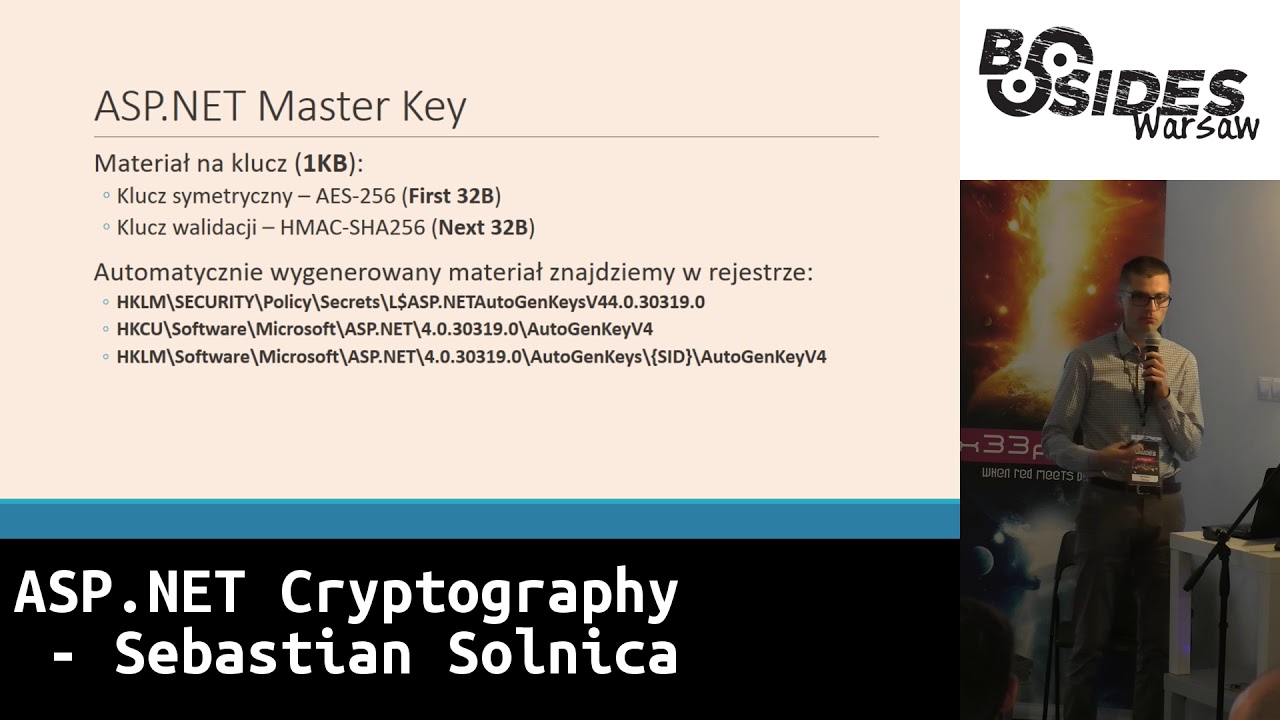
was a handler that allowed you to access the encrypted path. It encrypted the path and passed it as a parameter to the handler. It then allowed you to extract any file to which this path was related. These master keys can be configured using WebConfig file. It's an XML file that contains the entire configuration of the ASP.NET application. WebXML is probably the equivalent in Java, if someone is a Java programmer. And there we can clearly define them in the form of hexes. If we don't set the master key in WebConfig, it will be generated automatically. And when generating the key, not the pair of keys is generated, but the material for them. And this is one kilobyte of random data, which will be saved later. I'll tell
you where in a moment. In the default configuration of this modern SP-Net, the first 32 bytes of this 1 KB are used to draw the symmetric encryption key, and the next 32 bytes are used to draw the validation key. The place where this key is stored, and you won't be surprised if I say it's connected to Windows, is the registry. There are three places in the registry. The first one is under the HKLM key, which is Local Machine, then Security. This is the key you don't normally see when you log in as an administrator. Access to this key is only available in the system account, with the highest permissions on Windows. And this account, or data under this path will be encrypted using DP
API, which is a Windows data protection API, which is a standard mechanism available through Windows APIs for data encryption. It is quite strong and it seems to me that it is a good security. I will tell you how they are still opened. The key is in the register, but only if the process owner is an administrator or a system account, i.e. with the highest regulations. Another place where we can look for this key is the current user's HACKI, which is in the section connected to the user profile in the registry, i.e. the registry section connected to a specific user. The key material will be there if the application works on the user's account with a profile in the system.
For example, accounts like Network Service and Local Service have profiles, which is a bit interesting, but it's a feature of the older versions of Windows. And of course, every account of a normal user of Windows also has a profile. The third place where we can look for these keys is again in the Local Machine key, but now there is software and as you can see at the end, this penultimate element is a seed. This seed is a seed of a virtual account in Windows and virtual accounts in Windows are a quite interesting mechanism. An example of such a virtual account is an account that is automatically created for a Windows service, if you add it to the system. It is created
as a pseudo-domain, nt-service. An example virtual account can be nt-service, but it is named after a certain service. And every service you create in Windows, every service, has in it It has such an account attached to it and thanks to that you can set up the authorization for this specific service in the file system, in the registry or in any other element of Windows. IIS registers a similar pseudo-domain when it creates an application pool. This is what appeared from IIS 7.0. It appeared to better set up the settings for web applications and to isolate them better. We have a virtual pseudo-domain called IIS-AppPool, and then broken down into the name of the pool. Interestingly, in the last two paths, the key material is not encrypted
in any way, it is available in plaintext. You can just pull it out and the keys will be there. Now, answering the question of a colleague, how did encryption look like in ASP.NET? What configuration options did we have? I tried to distinguish a jump between version 2.0 and 4.0, because it was so... The first leap that was made. As for the configuration of this master key, as I said, you can do it in this webconfig. You can clearly give these 16-digit characters, which 64 characters, which will be 32 bytes for AS-256. But you can also choose, and this is the default option, auto-generate. Additionally, if we give a comma and write the flag isolate_apps, then these keys will be generated, that
is, the original keys will appear, depending on which virtual path the application is deployed. Validation algorithms that were available in version 2.0 are quite interesting, because SHA-1, MD-5 and then we have symmetric algorithms, so we could sign with symmetric algorithms. From version 4.0, the right algorithms were added, i.e. HMACs, and all SHA-2s are available. And you can also add your own implementation, if someone would need it. No, there is no SHA-3 and I don't think there will be any. Microsoft said that they won't add it to the configuration. You can install it through customization, so you can install a DLL that will have this SHA-3, but the framework itself doesn't support it. What has changed in Core, but in the end I will
tell you how to do it. As for symmetric encryption, there is no big surprise here. We have DESA, Triple DESA and AESA. You can also add your own algorithm if you need it. AES is default. In versions 2.0 and 4.0, Microsoft has also made it possible to access AES. Crypto pipeline, which is the internal encryption mechanism. So it's not us who have to create this code, but we could use the machine class and the encode method to encrypt. And interestingly, we passed on Byte tables that we want to encrypt and then the enumerator of the Protection machine in which we determined what we want to do. Whether to encrypt, validate or do both. Actually, the first one should not be
available, because if we encrypt, we should also encrypt with a signature, but it was available and that's what the problem was a bit related to, which we'll talk about in a moment. When it comes to user data, in the forms version, or rather in the older versions of ASP.NET, there was a mechanism called "forms authentication", which was based on memberships. The default implementation was based on the surprise of a large SQL Server. It was a Microsoft proposal where users could store this data. We could define how the membership would store the password. There was a problem with the membership being very weakly expanded. If someone wanted to store the users in a different way, using claims instead of rules, it would be problematic.
You could store it in plain text, I hope no one did it, but you could set it. You could store encrypted passwords, and for that you used master keys. You can also use hashed passwords. But as you saw in Jarek's presentation yesterday, it was wrongly done. It was done in a way that there was a simple hash, I don't remember what shat was used there, but it was glued with a 128-bit salt. What problems did we have with ASP.NET 4.0? In 2011, about 6 years ago, A group of people took part in the ASP.NET game and it turned out that Microsoft made a lot of mistakes when it comes to encryption in ASP.NET. One of the first was, as I
mentioned, not signing encrypted passwords. The developer could configure ViewState to appear encrypted in the form in the formular, but it was not signed. Another place where this was not signed was the scriptX ScriptResourceAxD. I have it here. It adopted the encrypted path that allowed access to any place in the file system, which was accessible by the owner of the ASP.NET process. What's interesting is that it wouldn't be so bad if we could distinguish the situation when the padding was incorrect, i.e. if we sent the encrypted view state and it had an incorrect padding, we would get a different error than if we sent the view state The data was incorrect and the padding was correct. Of course, this is something that requires a lot of work.
I have a demo where we will start it. And when we have this kind of vulnerability, the researchers started to dig a little further, they generated encrypted routes to Script Resource AXD, and then they could go crazy. They took web configs, they took places in the system, which in general, these ASP.NET processes Back then they had access to many places in the system, because it was quite common that they operated on network services in Windows. Another problem was that the same key was used for all the mechanisms I mentioned. ViewState, user password, cookies. Everything was encrypted using the same encryption key and validated using the same key. So if any of these places had any liability and the key was recognized by the attacker, then all
other places were compromised. Interestingly, as Microsoft also provides API for encryption using machine key encode and decode methods, if someone wrote the application wrong, the key could also be lost. And now a little demo. Yesterday Jarek talked about CBC-AS attacks and he said it very nicely. I will just talk about what he said yesterday, i.e. the substitution of one byte in the preceding block in this CBC-AS mode. The same mechanism is used to run a Padding Oracle attack, but then we replace bytes from the end. As you can see on the slide, we have our code divided into 16-byte blocks. It goes through the S-box and here is the middle state. We replace the red square and try to hit it like this. We
have 256 attempts, right? We try to hit it so that the padding here is 1 in the first case. If we know that it is 1, we also know this value, then we automatically know the value in this intermediate state. We go to the next byte and try to generate padding 2:2 on this plaintext. I tried on the latest ASP.NET, I will try to use this tripod, I hope I won't break anything. I tried to restore the mechanism of the old operating mechanism on the newest ASP.NET. I tried to restore the old mechanism of operation and Microsoft has it for themselves.
It tries to maintain compatibility, which is probably hard to see, and in the newest ESP-Net application, the latest framework, it is forced to support the old encryption mechanism. You can add a special flag "use legacy machine key encryption" and then the generated encryption programs will not be signed. This is a very simple ASP.NET application written in a forms mechanism. I will just change it to C#. This is a C# code that renders a formula with one hidden hidden field and to display this... To display this form, if nothing came from it, we use machine key encode mechanism, encrypt a string of characters, this one here in B64, so that we don't see it right away, render a form with hidden hidden field, We will send it to
the next post and decrypt it. If the secret is correct, we have "I know the secret", if not, we have "Something is wrong with my secret". But of course, the encryption was successful. If it doesn't work, we get 500. So I tried to recreate what happened in the old version of ASP.NET. Let's run the application. It looks like this, so you can see that it's a very simple application. Here is the form. Let's do a test. This is the encrypted value. Let's change some byte in this first block, so there will be some garbage, but it will decrypt and we will send this form. The first block was not a good idea, because in a moment you will see what it
is. but I would have to replace it in the middle block, I can try. If I don't succeed, it doesn't matter anyway. Let's try it. Sorry, I can also zoom in. I can do it like this, it will be maybe better. Oh, okay. Yes, scream if something goes wrong. Oh, well, the 500 has flown. Okay, I won't try it anymore. In general, I wanted to show you that this third case, but I won't get into the block. To hack this application, to attack it, to use Padding Oracle, I wrote a script in PowerShell to encourage you to use PowerShell. PowerShell is a really cool language. I know that many people here probably have more to
do with Python and this PowerShell component probably irritates you a bit. But in PowerShell you can do a lot of things, for example, run attack-padding oracle. It works like this: I make the first request, extract the value of the encryption program from the form, i.e. our vstay that we will decrypt, then I divide the block of the encryption program and attack it in turn, sending two blocks to the application and replacing the bytes as you can see on the slide. And we will run this script. As it usually happens. It will probably not work as it should because we are on the battery. This is the view state that he received, which he will try to decode. Now, when we run the script, what
happens here is that, well, it's not that clear, but here we see a byte that has been changed during the attack of this padding. So we go byte by byte and here we see another byte of this measured intermediate state. So, as you can see, it takes quite a while. Of course, this application is hosted locally and you can see how it's going crazy here on ES Express. Most of them are 500, but since some time there are also 200 and we are interested in these 200 to get this green "bite". In a moment, when it decrypts, you may wonder why such trash appeared in the first block. This is an interesting thing, because Microsoft came up with something like this. The initial vector in the
encryption program is not sent as it is usually done, i.e. in the form of a public before the encryption program as the first block. but the initializing vector is always 16 zeros and 24-byte vector is added to the plaintext. It is no longer an initializing vector, I don't know what it is exactly, but a random string of characters, so that the first block of plaintext of this property is different for the next attempts to encrypt. As you can see, what was encrypted here is besides Warsaw and we decrypted it in a short time. I will share this PowerShell after the presentation, so if anyone wants to play with this application and the SPnet, it will be available. Yes, I will also share the presentation. Okay, let's move
on. Microsoft, fortunately, took a strong... I will stay with this statue because it is very comfortable. Microsoft took to heart what they found in ASP.NET. ASP.NET 4.5 was a big revolution. The whole cryptographic system was rewritten. The old pieces of code are still in ASP.NET. There are no more in ASP.NET Core, but in ASP.NET MVC and WebAPI you can still access it. Just like I did. But version 4.5, as I mentioned, gives all the errors corrected, not only all of them. Additionally, there was a flag "Isolate by App ID". This is for applications that wanted to have the origin key generated not on the basis of a virtual path in the web server, but on
the basis of an ID of the application, which is always different for different applications. Then Microsoft started using the original keys and the algorithm used to generate these keys is the NIST algorithm SP800108. I don't know if it is very popular, but apparently it is not bad. And the encryption API was also mentioned. These encode/decode methods were given the attribute "absolute" and the "protect" and "unprotect" methods were created. And if you look at the parameters of these methods, for example, the Protect method, which is used for encryption, besides accepting bytes to be encrypted, it also accepts a table of purposes, that is, the goals we are encrypting. And based on these goals, the origin key based on the master key is generated.
Even if you give an empty string, it will be different than the default one. The user information storage mechanism has also been changed. It's a library collection, it's already been taken from the framework, which exists under the common name ASP.NET Identity. It's quite well designed. Of course, this can be said about .NET programmers, but generally it's easy to get into it, you can expand it. any of those interfaces that they talk to each other about, to implement. An example of such an interface is, for example, iPasswordHusher. Microsoft provides the default implementation, which is also quite good, because in the default version, PBKDF2 was used in 2, with SHA-1 and 1000 iterations in HMAC, in the current
version we have HMAC SHA-256 and 10,000 iterations. to generate this hash stored in database. Not necessarily in database. What I didn't mention is that there are quite a lot of storage for storing users' data. It can be some SQL databases, of course SQL Server too, but Postgres and so on. And we have another demo. I wanted to show you how how to decrypt such a cookie and what it looks like. I have another application here. It's a standard ASP.NET application. If you create a new template, it looks like this, as it will start in a moment. Very nice. I've created an account for this demo. The user data was left in the default SQL server storage mechanism, which is what
I was talking about a moment ago, about the ASP.NET Identity. I hope it will log in. If it does, I'm logged in, you can see it up here. We'll pull out the cookie now. There are several cookies that are automatically created and what stores user data is .aspnet application cookie. Of course, you can change the name, but it's not often changed, so if you go on the Internet and see such a cookie, it probably means that the creators used ASP.NET Identity to store and verify users. Here we have a cookie that we will want to decrypt. I'll turn on my favorite editor. This is base64, only encoded URL. The fact that these are trash, that
it's not a normal text, we can see it even in this editor. We'll paste it as base64 and as you can see, it's probably encrypted. But we'll try to decode it. And we will go through the steps that ASP.NET performs during this decryption test. I will just go to this PowerShell, a path higher. Okay, I'm here. I can enlarge the font of this command line. If you want me to enlarge it, can you see it at the end? Okay, that's cool. The first thing ASP.NET does The first thing we need to do is to extract the material for the key. I'm not working on the admin account at the moment, so this key will be in the public form, as you remember, on some slide. It will be in
this place. I use AS Express, so I work on an account with a profile, so I have this key "hacky_current_user" in the registry and I can reach it.
This is the key material. As I mentioned, the first 32 bytes will be used as encryption keys, the next 32 bytes as validation keys, the rest is not used for anything. To speed up the work, I have already pulled these data before the presentation. I'll just drag them to the editor. As you can see, this is 8F124, 8F124, this one, is valid here. And now we have to create the first key, the first robot that ESP-NET makes, first of all, it creates a source key that depends on the path in which the application is located. In the default configuration we have the setting auto_generated_isolate_by_path, so our source key will be created on the basis of the path and...
I forgot the tracks, but we'll try to... I wrote two applications, one is ASP.NET Derive, it's for creating the origin keys, which implements the SP800108 algorithm. And here we have to give our key that we need. To decode it, it will be this one. Next, we have to give context. Context is the first purpose. And I have to pull something. I forgot to pull it out, because it's a machine key, Derive, somehow. I'll make sure of that in a moment. Sorry for the interruption. OK, machine key derivation. Machine key... What's going on here? OK, once again. ASP.NET derive, let's paste this key. C key, machine key derivation. And then we have label, and label is our
isolate. By... Isolate apps. And since our app works under a virtual path, which has no sign-in, it's just... I don't know, backslash. Backslash. And this is our derived key. As you can see, I've prepared it before so that you don't have to copy it live. And it's correct. We would have to do the same for the validation key. So the keys we've got after this step are the basic keys for the next origin keys. Now let's try to decode this cookies we've downloaded earlier. I've written another application, ASP.NET Crypter, which takes a bit more parameters. The first one is a validation key, only the derived key which is the one we didn't do, but I did it before. Decryption key, which is
the symmetric key, but also the derived one, based on the application path. Then purpose, and here as this goal, It will be Ovin Cookie. Ovin is another name that appeared there in the meantime, I didn't show it yet. It's a variant in ASP.NET based on which ASP.NET Core was created. I'll copy the base64 that we've coded. Thanks. I think it should work too. I'll fix it. OK, thanks. Let's copy our base64 that we've coded. Oh, I've managed to decode it. And this is what the cookies contains. This encrypted cookies, if you look closely, there are a few such trashes. And these trashes are actually the ones that define When you look at the urls for XML schemes, you can see the
claims names. Microsoft, as I mentioned, has completely changed from ASP.NET Identity to the claim model. Even roles are implemented with the help of claims. The claim is my login, Identity provider that is using this cookies. Additionally, the first 4 bytes are the version of ASP.NET Identity. As you remember, there was the second version with these changes, then the third version. This is what defines it. And at the end we have information about when it was created and how long it is important. OK, we have a moment. So what has changed in ASP.NET Core? There have been some changes. ASP.NET Core has, among other things, brought this mechanism to store master keys. So now you can write, if you need to, you can write your own
data protector, this is the name of this mechanism, which will store these keys and you can also turn on the encryption as you wish. Fortunately, there are a few libraries available from Microsoft. I forgot to mention them. The ASP.NET Identity model is still available. It worked quite well. We can still use it in ASP.NET Core. There is an iData Protector interface, which we configure at the start of the application through Fluent API, which is a base word in .NET. But it's quite simple to configure it. We add Data Protection and then define. For example, here we can choose the option to save the keys in the file system. We can add a path to this file system. We can
save them in the registry, as it was done before. We can also only store them in memory. This is the default implementation. Then, in the next step, we can define how they will be encrypted. Even if we save them in the system file, we can say that DPAP or DPAP-NG will be used for their encryption, i.e. the new generation. Then we also have the possibility of encrypting these keys with a certificate that is in the cert store. Windows installed. Additionally, we have extensions that allow us to store these keys, master keys, for example in Azure Blob Storage, also encrypted, and there, for example, with this SaaS token to get to them, or in Redis, where this idea of implementation is without encryption, or in Azure Key Vault.
Then, or any Key Vault, you can actually store it. And to sum up, I would like to I would like to say what I would like you to bring from this presentation, as it concerns encryption in the SBA. First of all, there is no need to describe our own encryption algorithms. A good example is Telerik. Telerik is a company that provides control systems You can put such a controller on the website and it looks nicer, it expands the standard set of controllers, and Telerik made it possible to encrypt the state of these controls. So you could say that this Telerik control, some NIST, can encrypt this data and put it in some kind of a view state, a hidden field next to this control.
And unfortunately, Telerik did something like that. Instead of using the encode machine or protect, which was the encode, but at least it worked, they made XOR from the state of their controller, the serialized XML, or JSON, I don't remember how they stored it, XOR with the key. And now, if the user created this Telerik key in the settings, in the app settings, then it was fine. It was absorbed with this Telerik key. Of course, the absorption itself is a mistake, but even if it was broken, this key was recognized, it was the key to these controls. Then maybe it would survive somehow. But if the user didn't set the key in these app settings, then
the master key would be taken. And xoring from the master key the state of some control is a bit of a bad idea, because this state can be generated in some way, and the easiest way is to xor it and learn the application master key. So it's a terrible mistake. And Telerik released two patches, of their controls this year, where they wrote it down, but there is still one error, but it's better anyway, because they use algorithms that we know. What I would like to encourage you to do, those who write in the ESP-Net, of course, and probably more people are listening, is to use the origin keys, so if you use API, Machine Key,
Protect, then be sure to give this target table, which you encrypt. If you encrypt, for example, user data, which are very sensitive, then some business data, which have a different level of sensitivity, use other to make the key-traveling different for different purposes. API really helps you with this, because the classic ASP.NET provides the Protect and Unprotect method, which I've mentioned, and ASP.NET Core provides IDataProtector, and maybe there's no string table here, but it's provided in the constructor. So we create a few of these data protectors depending on the section in the application we need to encrypt. I have some questions, but I will see how much time we have left. There are 10 minutes left, so I don't know how many questions are left. I
have a question. When I asked about the patching, I wanted to ask about the systemization. I had a scripting, but there is AS, but what is the program? CBC is only available. No, it needs to be done through this expansion mechanism, or possibly... If you want to compute the mass of algorithms, you need to find the parameters. It's not exactly that. I mean, no, actually, I was more concerned about these algorithms, as if not standard cryptography. Everything is outside of ASCB, what is standard? You can say that. It's a bit like following the shortest line of resistance and choosing the most popular algorithm. It's true. Thank you. Yes. Any more questions? I can show you how to extract the keys from the
memory of the ESP-Net process. I don't know if anyone will be interested in it. Ok, a few people nodded their heads, so we'll extract the keys. The ESP-Net application works here, where I logged in. We can make a dump of it. Where? This is the best tool on Windows. We have our process of ISExpress. We can create a dump. I'll write it here: ISExpress dump. Oh, okay. I'll use the procdump in a moment. Sometimes the process hacker, unfortunately, when making dumps has some... but I think he created it. Sometimes he has problems. I don't know what it's caused by, but sometimes it happens. Oh, now it went well. And this dump appeared here. We'll open it. It's
a 32-bit application, so I'll use a 32-bit WinDebugger. And... If you haven't seen dotnet, then here are a few magic comments. We will load an extension that allows us to move around dotnet memory. It's called sosex. This extension translates dotnet virtual addresses to native addresses operated by WinDebugger. WinDebugger is a native debugger, not a dotnet debugger. What we need to find is the class instance. I will also delete it. I won't type it in. Something like this, that's what the class is called. And to find the instance of such a class, we need to locate it first. First we need to locate something called method table, which is the class identifier in the ASP.NET domain, in the app
domain. And here we have this identifier. I will go into details. What is important now is this command, so we search for the dotnet stack in the search... I've missed something.
Interesting, I think in the wrong place the garbage collector worked and burned me. Okay, I have to make one more dump. We won't find anything here. Where? No, "go out" went out because it wouldn't open, there would probably be some kind of error. Or okay, I'll reach the backup. Unfortunately, this is always risky business with garbage collector. Some time ago we launched this app and if we didn't use this class, and it's not static class that exists all the time, it can disappear. And unfortunately it disappeared. We have a moment. We should have a backup of this somewhere. Here is a dump in which this class should be. Is it closed? Yes, yes, yes. Have you used this? Good memory! You're lucky.
This is interesting. I see I have a whole series of errors now. I won't show the demo in a moment. One demo must not work. Let's try this. Oh my God. Okay, I'll refresh this app again. I'll reload this garbage collector. I mean this class that I'm trying to get to. Okay, let's do one more dump. Oh, okay, I think I know why. I think I dumped the wrong IIS Express. Yes, because we still have the one from cryptography that doesn't do anything like that. And that was the one I... Okay, I think it's clear why this instance wasn't there. Okay, so now we should have the right dump at this pace. And again everything in order, so loadSosX, MX,
our machine, masterKeyProvider. Okay, we have to download this method table again. We will extract instances from the heap. And this time it is finally there. This is the address of this instance. 32-bit, so now we use commands to list what is in this instance. And note that what we have here is the main class that stores information about master key keys in memory. And it's derived in this form, so we have the encryption key that is used and validation key. If you go deeper and click on the Encryption Key, you can see that it is the 32 bytes that we extracted and created the origin key. As you remember, it started with 1545, F6 and so on. This is the origin key that we generated on the console.
And you can find it there. As I mentioned, all these materials are available on my blog. So anyone who wants to experiment can have fun. Thank you very much.
Related talks
 1:00:08
 50:11
50:11 46:00
46:00 41:40
41:40 28:37
28:37 36:09
36:09