Build Yourself an Elastic Threat Hunting and Monitoring SIEM
Show transcript [en]
uh noc environments also working as an i.t consultant he is working on becoming a security analyst flash soc analyst and he has his hands on experience with splunk elasticsearch plus cabana siem firewalls etc he is forever a student of instant response and triage of security incidents a quote to live by give a man a fish and you feed him for a day teach a man a fish and you feed him for a lifetime remember to be courteous to our speaker and keep your mics muted um ronnie it's all up to you all right thank you appreciate that good morning everyone um welcome um to this elastic build i mean elasticstar build yourself an elastic threat
hunting and monitoring sims so uh just a little background on this platform is something that i was experimenting with and let me share my screen it was just an experiment and i wanted to try out a new sim technology and oh wrong spring sorry uh let me go back to another one i got the wrong screen
okay all right good okay i'll see this game right here yeah looking good man all right thank you yeah so as i said i was just starting off with trying to find some available sim technology to use also in my work environment and also in my lab environment as well because there's other competitors like splunk um there's security on yen and i'm trying to find something that is scalable something i can learn as well as using my work productivity environment as well but so i'm just going to jump right into the demo portion not going to hold john expense and just go for that so this is the platform that i built in my lab environment running on vmware
um server so this is based off of ubuntu 1804 debian server build i have um a github repository on all the links i use the code the commands and everything all that stuff is on my github link let me go find that right quick button as well but so instead of me trying to learn how to work on somebody else's platform i wanted to use something on my own and that's what led me to want to go through elastic which a big background about elastic is like elastic surge will take raw long datas from different components where it has log stash it has beats it has cabana and with logs that she would take the
logs and put it inside of its actual system but then elastic search would take those logs and parse them into json files which will make it easier and manageable throughout the dashboard for searching performance indexing speeds etc so i have this just an overview of the platforms this is just a build i did they also offer paid services but you on the downside is that with paid service you get support but when you build your own version of it from their website it will you know you have you don't have the support features for it so you got to kind of troubleshoot it and build it on your own but they have different modules so they
have the security portion down here that's going to be one of our main topics they have the cabana feature then the elastic search so i'm gonna jump into the security portion right quick and they just came out or in a recent blog a web um i think it was yesterday or a day before yesterday on doing the edr portion i have not set up the edr portion in this but i have set up the pacquiv module for geographical location data and um all the type of other stuff we want to look at different type of hosts event logs etc so i actually got two of these running this is just my first one that has most
of my data so right now you can see we have flow traffic we have file traffic processes ping replies dhcp um traffic as well so i do have a couple of modules like i said it's different modules you can use one of this rdb when log b and one of the ones i like the most for the network portion is packabe and if i go to detections there shouldn't be nothing here but if you want to set up the edr portion which i was trying to go through and build that out it was not letting me configured it for some way so i got to go back and tinker with that and learn that some more
but we have the host information that will give you how many hosts that you have enrolled in your platform how many successful authentications how many fails so this would be a good way of determining if like i got about four or five computers just a little small um section of computers and i got over 200 and some authentication requests and all of them failed that could be an indication that somebody's trying to do a brute force attack on one of your devices and you can quickly look at the event logs and you can see what type of event logs you have but then you can see the authentication with my mouse for outside you can see
the authentication portion as well it gives you a timeline on to which one of those processes or those systems or the usernames that they were using and how many times it was successful and how many times it failed and there's some more yeah that's that's about it for that one but there's also uncommon processes that showing you stuff that's abnormal but most of the stuff can be normal like my showing adobe um lenovo because i'm running on the lenovo system the microsoft photos so it will give you information about that that you can look at and discover more what's running and what's going on with your system so this is you know here i have a
powerpoint open onedrive microsoft edge and one thing i like about this the most is that the network portion with the network portion it gives you the geographical data so that may it may be in this one let me see if i can move this out the way okay cool so i have two of them so this is the one that has right here no it's this one this one that has my data for the graphs i think it's this one all right yes yes i'm sorry like i said i had two of them running because certain ones was acting wrong so i'm going to go back to the same portion but the network part so i had this one set up on a system
today that will show geographical location data so this is actually data from the system itself showing that i'm on my windows 10 pc or um surface and i actually when it says ceo t801 tablet on one destination 52.114 so it's actually telling me the destination and where it's going to so it's pretty good when you have the package module set up on your systems which um elastic is rolling out a new feature called fleet and when you install fleet it gives you the same option with packing b rdb file b it puts all of those into one but the downside is like the network portion with packybee you have to individually install that one on your designated host
with uh npcap there's a module i mean that's a software you have to install as well so it's more than one step to get that working but once you do install that it will give you the geographical coordinates of where your system is trying to connect to i think i have some connection in netherlands united kingdom um i think you can scroll down right quick yeah i have some way over here together sorry yeah i got some in south korea which i don't know what the heck that was it's just your system connects to so many different destinations at one given time but it's a good way to give you visibility basically you will get a much larger scale visible
graph of what your core critical whether your servers your workstations if you had the uh mana scale to deploy these packages to those systems when startup as in new desktop setup new server setups you get these pages it's all start monitoring your transaction with data connections seeing what's going on on your network gives you more of a perspective of like okay i know where they are i know where people are connecting i know where my destinations are and i can kind of drill down in and find out who's talking to who so like i had like 9 000 events dns queries 11 sources seven destinations and this will give me a drill down on the actual ip addresses which is in my
home lab but this is just the destination that is going to and showing you how much data is being consumed and if i click on one and drill down a little bit more it'll tell me who is information and also got virus total information if i want to click on that and let me see if i do have that setup which it may not be yeah i think that's what yeah if you click on the virus total it can take you there and give you reputation data where it's bad or it's a good known ip address and that's a real cool feature that i like about that even the cisco talos let me see if this
want to go through
let me change my filter right quick because i got on dark mode so yeah it will give you real good source information about what the ip address is and then that work owner which is alchemy fam level you know this is from talos but it's kind of good and it's a good feature that this is actually integrated into the elastic um security center portion showing the ip address so the source and the countries are not there yet because i just built this arm like last night but there's another thing that i like as well and that's going to be with hosts and the event log and i was in this early something to expand this portion
and this is really good when you want to look at certain processes and break down the packet on what they're doing so for this one i have let me see if i can find a real good one so this is just some actual ipv6 connections but then i got tcp connection let's see if i can find an application this basically this is just gonna be the network portion so this where we can see where the destination the source address destination address and see it gives you a lot of information i'm still trying to explore this platform myself i have not even touched the surface of just exploring it i'm still a noob in the beginning and learning this whole
platform but it's really really cool once you get it set up and get it running and get it ingesting data you can basically get all type of visibility on your network so if i reel down with this and click on that it'll give you a json view as well so you do have table view but those logs that you get it still could be parsley and json so that's just showing you the structure on how it broke down the packet and which i'm saying elasticsearch takes all that data and converts it to a json file to make it more readable or better for performance from what i was reading so there are other components like let's
search other ability and if i go to cabana let me go back to the one that i have with cabana so with cabana have different package beats that you've installed like log b measure beats are going to stay in the package and this is the one that i had installed for the discover so it gives you a dashboard similar to splunk it's it's basically the same thing almost but you can see how you got your host name desktop name destination um addresses where we see source mac address destination address so it's basically the same thing as the other one but it drills down a little bit more deeper showing you the net floor flow the
traffic the ip address i know i think the duration sorry the duration and source mac address let me see if there's the ip address in here no it's not so let me go to another one let's see in a filter for find ip address i'm just gonna visualize those and you can create different graphs with those and just show you how many of those you see in account and let me go back to discover right quick
trying to get to where i feel down for the ip address see why not p address same thing [Music] whatsapp address let me try that one here we go server now storage so it's just different modules on different fields you could use for it and this was just showing the source ip address which was coming from our lab environment and just going back to the same view as well showing the network traffic to flow and everything showing you the process arguments i mean it really really breaks down the location where it was what i was using the arguments um man just this is a really really cool platform so uh let me go back to my dashboard i
don't think i have nothing in my dashboard me bring this up
okay so this is from the actual website elastic.com so this was just the film portion and it's very very nice like i was saying and it has a lot of stuff in here so this is part of the the um alerts with all hosts authentication failures some of the stuff we was looking over the events and looking at the endpoint activity we got the audit logs as well which we was looking over showing you the destination ip addresses the authentication portion we was looking at the dns traffic and we was also looking at the netflow and let me go to this other one right quick this is something that is really cool that i just
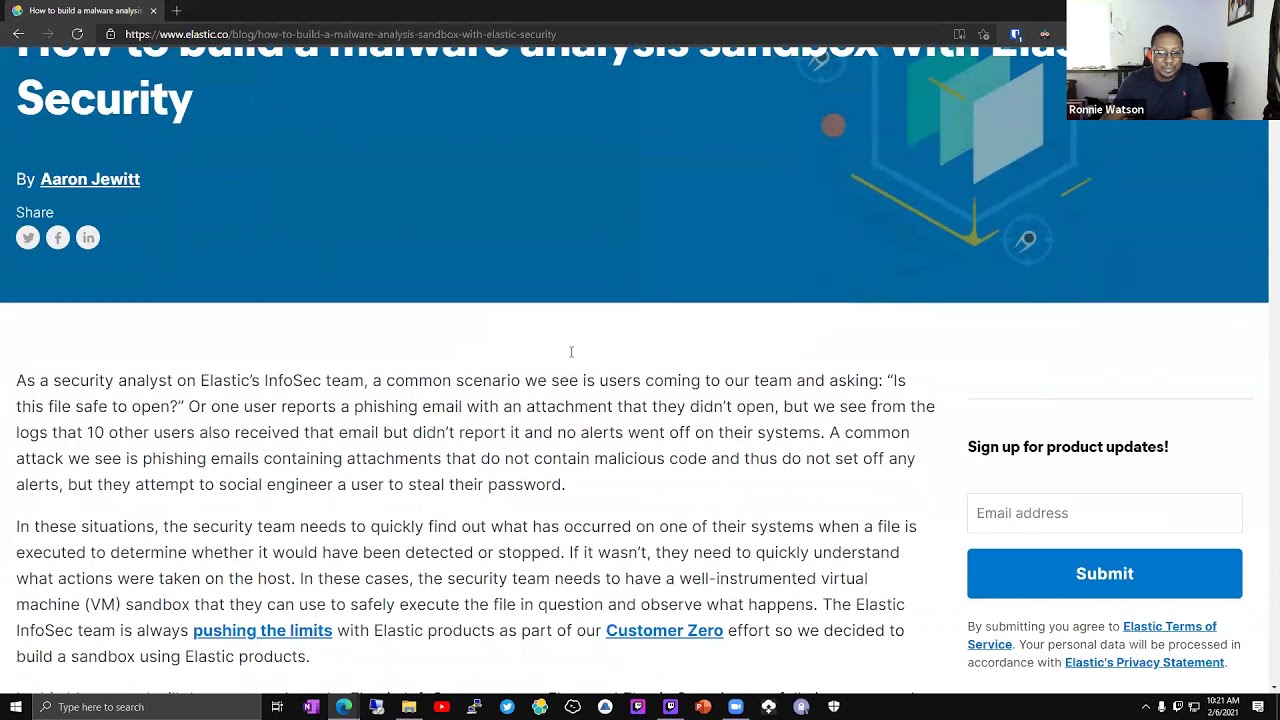
found out about this program for me this platform so let's talk about building analysis with um building malware analysis sample with elastic and this is the edr portion that is built into it that i have not figured out how to set up so if you was compromised where somebody opened an email attachment and they clicked on the exe file and they ran that exe file and it compromised that system it will give you a timeline analysis on that specific file and what all the chain of commands that it was using when they rant on that so that they were using um reconnaissance or lateral movement type engagements they trying to use powershell which is a common thing
that they'd like to use a lot of reconnaissance using powershell trying to enumerate smb shares network resources that will show a timeline on all of the commands and processes that they were trying to spawn when it was on that box you know and they would just walk into how to build that um sandbox but like i'm saying just showing you a bracket this is a portion that i did not learn how to set up but this is a lab environment i'm still learning this platform it's a lot of a lot of uh interesting cool things with this platform it's even used by t-mobile it's used by walmart i mean it's used by a lot of major
people i think this platform was even featured on mr robot um as well when they were using their whole um hacking scenes it's somewhere in there they were doing a talk on that on youtube and they showed how they was doing different investigation portions with elasticsearch but they were just walking through the endpoint configurations and let me see if i could scroll on down and get to the actual process trees they got malware prevention detection and prevention so it has a lot of good features in here that i still haven't learned how to set up let me see if i can get to it yeah so now it was going through analyzing the emoji ransomware and i say it has a timeline
of the textures with that analysis analyzing event and just a whole triage of information because you also have case management as well in this so if i go to security and it was a stock analyst working on something they could build a new case put in their case notes as tests sample and go through they could tie in their links that was connected to it and they could create a case and description um or create a case for whatever they're working on if it was a compromise and they could go through and work that case so they can add comments tags the reporter who's working with it and um i mean it's just really really
powerful i like it a whole lot and triage triage events whether it was incident response or just an um issue something happened they could document and process all of their activities so if somebody want to come back and look at those cases then they have that option to come back and look at we had a triage event where the ceo tablet was compromised by ransomware they add their notes they can add comments and basically they want to close the case delete the case or et cetera so this is the portion about like adding data to it and like i was saying this is the fleet module that is now in beta version and that's one of the things i'm trying
to try out it's a fleet version but this thing is heavily integrated with barracuda cisco i mean a lot of stuff crowdstrike uh core dns google um long stash record which is built in it ip tables microsoft defender atp uh office 365 burakana i know there's a lot of ids and ips's people that have their system set up so this is heavily integrated with that as well you got zeke which was uh bro you have windows event logs i mean sonic firewalls some of everything you know that you could want to ingest into the system monitor your host look at the package running across that network and basically build a sim technology that is viable and
useful even if you have it for production you want excuse me even for production you'll say as well it's very helpful especially if somebody learned how to deploy it configure it and set everything up and get everything to working properly and getting data to talk and communicate this is very very useful and there's a lot of stuff in there for law metrics logs mitch i think i also do machine learning as well so that's something i haven't really explored but this is a real real powerful system to use and get going and it just incited me because it was a theme platform technology um was there any questions anybody had about this
let me show my creators yeah i think i think i saw a question pop up in the chat there we go i think i think it's cool for you to sort of check in and take some questions if people want to ask their question i think the system might allow you to omit yourself or can kate can relay it but yeah i'm enjoying the presentation and i'd love to hear some questions yeah let me see if i can find the check there goes chat all right cool no i don't know let's see i'm gonna read some of the questions drop the question here is this session of course thank you okay cool so from daryl how will you use the
search feature in elasticsearch is a similar splunk and you're right it is similar to splunk especially when i go to the cabana and i go to the discover you see there's the right machine it may be on the other one the team yeah this is the right one so if i go to discover it is similar to flunk because splunk has a similar interface that's something like this where you can search and everything and let me take this off and get back to the view so it's similar to splunk but it's a little bit more powerful than splunk basically you can ingest a whole lot more data versus flunk you set up your net flows for
whatever port that you want to set it up on and you ingest that data and you go through timelines and you know you filter out those events and you put in search queries you know certain type of crews you want to search for and equal to and i'm just going to say equal to this ip address and nothing to come back but it's similar especially with search queries so it has different languages where they want to use kabbalah query language or it can use lucid uh query language as well so it's different ones you want to use but it's similar to splunk space basically when you want to go through and use the search portion
uh let's see i do not know there you may need to answer this one i'm hoping my hands off okay cool um pretty much that was it this is something that i was trying to learn and get a better understanding for and this all started to where i met now with a twitter post that i made on twitter about this um platform and i've gotten a whole lot of buzz for it and i'm very appreciative and thankful for the community but i was just building a sock hello sim dashboard and somebody went into the comments to say hey what about a bill guy and i went through created a github bill guide on it and
posted it there and so i went from just an experiment trying to learn something back in november 25 just playing around with something to being here on this part to this stream right here uh oh these sides and like wow this is very humbling experience but i do have this whole uh build guide as well that i will post in the chat and if anybody wanted to take a look at it you can't be feel free you know there's more than one way to deploy this guy and oh thanks there you know i'm just blessed that i had employers to you know help me out because when you're hungry and you're humble for technology and your employers see that
they will help you so i had an appointment like look you go through pick out some monitors set up and stuff like that and i help you build your station now so i'm very very blessed and fortunate to have people that want to help out so yeah and i did have this like i said this uh github repository so it walks you through the whole process of how i built it which you can use send our server which is bad that they're moving the stream but it was on set r7 and it's heavily based with ubuntu um i mean it's a lot of pro platforms you could build i think it's got a docker container you can use
kubernetes um you could use windows as well and i think you use like i'm saying with red hat which is you know sent off to as well so it's a very diverse program but um if that's it i'm pretty much done with it you know it's just an overview of it and i say it's very powerful once you set it up the way you want to it also monitors tls connections as well you see the shop fingerprint the subject the common names and i mean it's very very intuitive and powerful once you learn how to go through and set everything up i don't have any external events so i have no edr response in it
at all but no timelines no templates just generic but you know one more thing i want to cover before i get out of it is the adding agents one more time and see if i can find the fleet version and elasticate so this is the new portion i was telling you about the fleet module and you have different ways of adding an agent if you want to enroll it in a fleet which is going to have a policy tied to it and you could have different integrations whether you want to have uh cisco etc tied to this but since i just got these two in there they're symptom in the endpoint security you have your
token that you have set for it and it can be installed on a mac and windows right now that they got going on with fleet and you would just copy that command config and paste it into the terminal of your uh powershell or go to the old school way and set it up on a standalone which is more advanced but i mean thank y'all so much i mean this is a blessing you know i appreciate it but that's all the little talk that i had to present you know i'm still learning this platform i'm still new about this thing appreciate that david thank you i mean that's that's great hey um i kind of missed a little bit of
the beginning sort of doing these duties bouncing around and um i'm guessing you talked a little bit about yourself and maybe what got you into this project um is that right yeah uh so you know what got me into the project is like i was just experimenting with this whole setup and you know splunk has a 500 megabit cap on it where you need just that much data of the day and i was looking for something that i can use to try to work with my lab environment because i'm trying to be an inspiring stock analyst i transitioned a little bit from the red team getting my ejpt certification i got my security plus so i'm trying to
learn the blue team then switch over to the red team you know get my roots together but this was just a lab demo post i just posted it and i did not think it would go this viral and one of the guys that was from cisco uh champions or from cisco devnet dejuan lightfoot um he was the one that said what's your resource so that prompted me to build a documentation guide on this and led me to write hey let me document my process you know that's gonna share what you learned for sure yeah right right and i feel like because i've took it so much from the security community i learned how to use certain security
tools kali linux learning different ends and now i want to try to give back some type of way i even have a youtube channel that shows me how i did this whole process and it's amazing too like how much how much you learn how much more you'll learn if you document what you're doing right because it makes you realize and keep track of what went right what went wrong and um you start getting other people asking you questions and that's pretty key for even your own learning so so my follow-up question then is what's next man i mean not even just with this platform but like what are some other things you're interested in in this uh
under this discipline or umbrella you think you might be messing around with next well uh trying to learn a little bit incident response that's going to be one of the things i want to kind of focus on more incident response triage uh documentation process you know get into that a little bit more so i can understand how to triage how to discover whether this is an issue or an incident escalation paths you know going through that whole prosecutor that's if you're going to be a blue team member that's going to be one of your heaviest skills is incident response because you're going to have issues and incidents that pop up in your organization and depending on your skill level and
your ability to triage things is going to make you a more effective and better stock analyst for cyber security analysis at the end of the day and that's something that i kind of want to focus on more i also want to learn a little bit about malware analysis using like rem nugs with me um and stuff like that just trying to take malware apart but i'm not a good programmer so i don't know how to write coding but i know how to read it if i could be compiling stuff like that but i mean the sky's the limit i'm going all the way to the top you know i mean incident response malware analysis forensics
um never forensics anything that i can learn with the blue team side and get my foundations with i'm all with you know and it's just a learning curve you know that's why i got my home lab set up and it just motivated me to want to keep going you know because that day i'm going to turn around i'm still the network administrator right now so i haven't breached into security but i'm trying to get my foot into the door and getting all this experience so that i have something to bring to the table so that when they look at me they'll be like he may not have x y z of professional but look at all this labic environment
experience that he's getting look at all this stock environment demo type model people want to sell up you know yeah hey um we have someone in the chat window who has a dis discussion item and it sounded sounded like travis was willing to say it out loud is that right travis you want to yes sir um so i came and i know i know you're a little bit new to the elk stack however i wanted to get your your opinion um i came into back into an environment that i had worked out and left and then came back um in my time that i was away somebody had implemented the elk stack i don't know if it's still called
security onion today but that's kind of what it was called was security onion and the back end of that was the elk stack um the problem is is it it was such a niche a solution that when i came into it the guys who are the one guy who it was let's see i was the third generation to come into it so the guy who knew what it was who implemented it fantastic but he left all his knowledge left and it's a niche product so then it went to the next person then i came in and then i um i became manager on the team and it's such a niche project pro you know product that nobody can really make
heads or tails of it but what i'm hearing is that it's it's getting easier they they're they're making it to where it's more plug and play um it's possibly more it's just easier to figure it out because right now we have rogue boxes throughout our data center and throughout a couple other places where we have sensors with no central manager anymore like the central manager went by by a long time ago so i'm just wondering from your perspective when you were building that build dock um can you see that perspective that i'm coming from and even in the short time you've been working on it have you seen where those improvements in the community are being made i used to be on
a list serve with them for the elk stack i used to use bro a lot and stuff like that so just trying to get your perspective across that discussion yeah because i'm also on the elastic black um channel as well and they're making it more better because when you want to ingest data from your endpoints you have to install the b modules so if you want to get packing information you got to install packing b that requires you to download the package you know install it run this command which is more of a hassle to be honest is much more of a house because think about if you're trying to deploy a scale it's nothing like where
you can download the exe file tied to group policy push it out to your network and everything can be monitored afterwards or you use some type of software deployment in your environment and push it out to your company so it it's getting better i just noticed that since i started using it they're coming out with fleet but the whole ought to be packing b file b it can't be housing when you want to deploy it to a thousands on computers but if you're just monitoring your critical servers and stuff like that in the infrastructure you know it just depends but at scale yeah it can't be helpful you know and then especially if you're not knowledgeable but knowledgeable
about it and to me the impression that i've gotten is that if i want to learn how to use a i need to learn need to learn to need to know something about c and d but that's like you know the documentation there is kind of a jungle but i had to combine resources with youtube with googling with the staff i mean with the elastic on forum community as well as going to their documentations and you know it can i feel your pain the frustration you know have to manage something that is so tedious to try to configure and set up because it has all these pieces that's working into the puzzle and yes i
feel your day it can be painful but once you understand it and once you kind of go through setting everything up you'll kind of be like okay if i want to make a change in this node i need to edit the diagram file which is going to have the whole source build of the platform so the packing beads the elastic surge all of it running off of yama configuration files and you edit those configuration files to display whether you wanted to have a cluster you tie all of those into it with those ip addresses so i get you out of the thing it is frustrating if uh it just real quick if is it does it seem really siloed still
um again i haven't i we've it's like i said we have rogue boxes um but i really have not paid attention and they're actually reporting into our splunk which was the exact opposite of what we were trying to do was have a separate environment um but is it still really siloed meaning the problem we had is like with the elk stack you had um you know elastic search uh uh forget with alex and then cabana um each one of them required like expertise in each one of those just to get them to work together is that still seem to to be how it works or has there been more integration to where you kind of have just a sweet you know
it's just like a a suite of things you you install something and then they'll automatically have some kind of connectivity given you know that you have to configure the parameters and stuff like that yeah and that's what i'm hoping for in the future is the one thing i'm hoping is that they can move away from the yama configuration files because if you did want to deploy that it would have to be those files and yes that will be a tedious process you know it's trying to scale but they're getting better since i use it they introduce the fleet so you don't have to go back and get all of those other files so if i go to
elasticsearch right now and i'll pull up one of those uh configuration files and you know it's it's it's really really intuitive let me see it's in my install guide i think it's my instagram no it's not my song but yeah i know what you mean like that whole configuration stuff i mean it's it's very very tedious when you want to install it i'm all over the place my phone deployed i'm all gonna play so yeah download and set up like this right so i wish that they get more of how they got elastic search where cabana elasticsearch you can download for different platforms whether it's debian msi beta for on windows i wish they'd get like that with the
beats modules if they get like the beast module where you had like alienvault with offset it was a file you downloaded and installed on the windows client and then monitored the whole thing you had the vulnerability assessment you had visibility into the platform but with this one it's more of downloading individual modules and those modules can be really tedious trying to deploy at scale if i can't find them so i know what you mean it's it's it's very very speedy but i'm hoping that they do build it to where it's just a single file to use and then deploy and that's what they're trying to go through with fleet if i could search in here and find fleet
right quick yeah i think i'll start looking that up might be a good way for us to get some control again yeah i think they're trying to use fleet now so uh that's gonna be something but one thing about fleet is i cannot find this word to save my life but with fleet if they use fleet and everything then it's it's there you know saying it's there and everything but you still gotta download a configuration file and go to the system so if i go to my process right now i think i had it pulled up i'm just gonna show you on my system and show you exactly what i'm talking about so if i go to
filebeat that's one of the b modules and you would have to download the file unzip it put it into the program files if it's a window system and then turn around and edit the diagonal configuration file and when you edit the file let me see where to pop up it so if you edit the file i'm going to paste this in a notepad so you can see what i'm talking about and you edit the file you have to go through and make these changes to where let me see if something that's going to be useful there i know i recently changed so you got to add it to ip address to get commander to talk
other than that it you know it's not going to send in data that is getting built the actual interface for the visualization of you know even elastic search you have to set all this up and these are all demo passwords so i'm not worried about it but you know you got to point these file configurations to where you wanted to send the data to so that's it that could be a real hassle and that's why i'm hoping that they kind of streamline fleet and rolling into more of a single package where you don't have to go through and install these configuration files that run these type of script whether it be a badge script or a c plus plug file they generate it
or if it's a powershell script and it'll go through run the powershell script give it execution privileges and you know it'll go through and install what it needs to install for it so this is just what the power steps we're going to use to install the fleet uh i mean the 5b module on your system and get it to work you know different type of arguments that it was um set up for you so that's one thing i'm struggling with is struggling with that that's why i want to learn more about the fleet but i'm actually going through deploying it module by module so i'm just only doing critical system like at work i would do my
surface and just monitor those and get information about that because i can't do it at production scale if i got over a thousand some systems one of these today that's a nightmare you know i think they realize that that's why they're trying to come up with the fleet so if you did have a help desk that was installing software this is something that could integrate into that process instead of having four or five different files you just got one so it's getting better it's getting better i wish it were more of a portable file you run it boom it's done you know what i'm saying the interface pop up you you give it the ip address you
give it the username you get a password you points where you need to go that'll be more better but you know i'm working with i love it and they're getting better since i noticed this fleet but it's just like um security on you but security on it is more resource intense and it has more add-ons to it but it's still using the elf stack you know right and while you know wildlife is another platform it's still using the f-stack as well so it still goes back to elastic so i mean it's a it's an experiment process for me it's a learning curve all right i appreciate your your your input thank you
so i'm gonna go ahead and my stream i'm in my uh share and just give it back to you david and just go from there if anybody had anything they want to ask you know i'm feel free for that but that's basically my little presentation and appreciate besides for having me on to even talk about this you know it's an opportunity you know i'm humble all right thank you very much we will start our next
Related talks
 58:36
58:36 50:53
50:53 38:29
38:29 53:35
53:35 52:46
52:46 41:39
41:39