Pentester++
Show transcript [en]
all right we're good to go
myself all right good morning welcome to our first routine talk of the day if you are um you are here for the blue team talks you're in the wrong room um but welcome everybody glad to have you here uh our first speaker is chris trusser uh chris is one of the developers of the mail framework he's gonna use uh he works for the ferris state paris group um uh pen tester plus plus so welcome chris thank you uh this is actually my first time down here at uh augusta and it's easy side so i really like it so far i'm really looking forward to your different costs today so this talk is called 103 plus plus
it's kind of going to go over my journey from this admin where i've had no development experience to the veil developer where i still basically heavily rely on that guy right there uh it's also one of the other developers for available framework but um i've learned a lot and in my opinion development or being able to work on squarespace and tools is a major way the fantastic and to be able to help carry out more effective tests so i kind of want to stress that i think people really should get into doing some sort of development a little bit about myself i am a team leader for varus groups uh adaptive direct division that's kind of our
vulnerability analysis and head pass team i am one of the vail brainworks code developers along with that right there and uh i'm also security when i can and i'm
so what does this talk about i firmly believe like i was just saying before that scripting and development work is essential to performance everyone can run the tools on assessments and give their feedback but uh you're always going to encounter situations where they don't or like give you 100 coverage of what you're looking for i think being able to write your own school or modify an existing tool to carry out what you need is essential can really help you perform your assessment i'm going to go over this talk's going to be a little case study working on different scenarios that i've encountered but i've been on assessments and i'm going to talk about the tools
i've either had variety or scripts that i've had to modify to help me meet whatever it is i was trying to do facebook and finally this is going to be largely python based but it really is pretty easily uh transferable to whatever language that would work best for you so why does someone want to learn language in my opinion there's a ton of different reasons but some basic uh different things that you can do are you can carry out boring repetitive tasks that are going to suck to do manually always automating write a script and get it done it's going to make your life easier and it's going to get some stupid stuff out of the way
you can perform actions against large data sets so if you're given a giant xml file that you really don't want to mainly go through it's pretty easy to write or i say that data personally but uh you can go through xml files if you know what you're doing pretty easily and get uh get out the data that you're looking for significantly faster than a few tragedies it's a great learning opportunity to actually try to figure out and learn something new it's it can be fun and you get a sense of satisfaction once you actually complete whatever it is you're trying to do it fix your problem so finally i think the coolest thing is you can
make computer do exactly what it is that you want to do so if you want to have it performed like go out and text the website you can do that you want to have it operate at lower levels of lens intersect packets and uh maybe manipulate them in a certain way to do things it will do that too anything that you want like that computer to do writing your tool or writing script you can make it easier so what are some areas to start off with there's four great languages in my opinion that people could look at uh to maybe get their initial foothold if you haven't really gotten into [ __ ] um who here like uses like python or
movie or bash or powershell awesome so everyone's kind of at least still around certain things so in my opinion i love python python was the first thing that i started first language that i started off with it was fairly easy for me to pick up i thought that would be a great documentation which is really helpful to me and uh because i need a little bit of everything and there's some really interesting schools out there that are written in python such as tim zone's recon angie you also have sql map um these a lot of tools are written in a variety of these languages so i think it's great to use bash is another interesting one obviously if
anyone here use linux you're probably gonna be in a bash shell obviously it's not 100 but it's going to be what is possible being very polite uh it's easy to start off with scripting you can just write a script using basic commands that you've already run and uh it's fairly easy to cut ruby is another great one obviously in the pen testers cool kit uh the biggest groovy product that anyone probably used right now is medically so being able to pick up ruby as a language is interesting on itself plus you can use that knowledge to actually write your own logic or maybe and finally powershell is another awesome language uh not only does it have
you can also use it for sysadmin capabilities and try to help manage your domain or gather information on the domain but uh there's also a variety of different topics of capabilities they'll power you to power up or use written power shell to actually uh help perform and guess systems from a security standpoint another awesome tool is obviously power supply so that's another great reason to start looking into powershell as well in my opinion any of these languages are relatively easy to start off with and probably a good area for people to first start some basic intro to development tips i think is you want to start small it's if you try to create an extremely complex
project right from the start like you're going to hate life it's going to stop it's going to take too long it's probably going to be complex start small figure out tasks that you commonly perform or encounter problems that you constantly run into and maybe use that as any area that you want to start off so let's say you need help identifying different systems that are have a certain name within their hosting or something like that you can probably easily write a script uh try to enumerate closing across a uh an id space something like that was a small task but easy to do and not extremely complex it's a great area to start off take a language that you're interested
in if you pick one just because someone else tells you to it's you're not going to be as incident it may not fit towards like your domain area that you're working in such as obviously you're not going to run bash on windows systems so you want to pick something you're interested in whatever fits exactly kind of like what the environment you're offering google and stack overflow are going to be your best friends this is you're going to drop this off probably the first that i took for every single scripture tool that i've ever tried to write it's going to make kind of help at least push you in the right direction so it's something you really want to get
into start looking at first and then finally just dive into it you want to try to actually force yourself to write it out make it make yourself have like an hour a day or an hour to work on whatever it is that you're looking for and then once that'll give you that much closer to actually completing your task like fixing whatever problem you started so that's kind of the beginning intro says i'm sure everyone had a ton of different ones but um my personal development philosophy outside of stat is i like to try to create a proof concept script that meets my goal at first so i'm not trying to make anything pretty i'm just trying to
figure out can i actually do this in whatever language that i'm working in i'm going to like hard put values into a script it's not going to be easily like usable but i want to know that it works after i've actually found your my group of concept scripts the next step that i think you should try to do is clean up your code and comment it's really going to help when you go through and start looking at your code later and you try to expand upon it and make it easier for other people to use it or maybe also stand on and write for it if they actually know what you're doing i can't tell you willing myself that i
probably looked at parts of the veil framework a while ago and we were like we have no idea what this line does like it's it's interesting so i mean we try to comment everything and it's really going to help save you some time later on as well the next step is you want to make your script or your tool usable by someone other than yourself uh if if i i may know how to run a script but if i need it like my manager jason who needs to a little bit help with technical stuff then it's going to be a little bit harder for him to try to figure out how to use it so you want to try to figure out how can
i actually make this easy for other people besides myself who wrote it to actually use it uh the next thing you probably want to make some uh if you can make your scripted pool publicly available the infosec community is a pretty small community and a lot of people try to help each other like i mean everyone here is probably using tools working by people other than themselves that have been freely uh released for anyone's use it's it's really nice because it's like information's like a commodity that people are providing for each other and it kind of just helps everyone do their job and hopefully make everything and finally maintain it uh you interacting with users is always
interesting um but you want to maintain your posts they're going to give you some really good feedback sometimes you're going to encounter buzz it's a weird edge people do they're going to give you ideas for certain features that you never would have thought of that really helps and can make your script feel better this is a great picture because you pretty much want to do exactly this you want to code like some crazy psycho app that knows where you live you're the one that's in charge so where did i start i really didn't have i was like you said i came from a cis admin background didn't really have developments uh i wasn't a cs major uh and so i
didn't have s13 knowledge really really any sort of development knowledge and on the nova hacker and on our adobe hacker mailing list some people actually came out with requesting for pen testers for retainers to help carry out a practice ccdc event and so they wanted us to basically just volunteer time go on site and then just act as a ccdc and so i was like i volunteered for that but i thought it'd be really cool and just something to do with that i talked with rob floyer phoenix who's actually on the national team for some pointers but i've never been involved with ccdc at this point and you do some really interesting stuff such as you want to get scripts ready to
go ready to fire up basically right some of these things that you want to do is maybe just have the most commonly used exploits that are still built into a system 67 or anything like that it's very basic because the faster you can get it off right from the start the more likely it is that you're going to actually keep your showers uh so at this point i started working to try to build scripts that would help us out and uh get us prepared for at least myself prepared for when we're actually going to practice another commonly used tool that's on cctc's and when we actually go on pen tests is rnas or cobol strength within our
amazing cobol strikes raphael built this awesome language called cortana this horizontal is a cyber fast track project that he worked out was like two years ago and it's just really awesome event driven language so i don't know if anyone here has had like irc blackboards or like created like irc scripts it's really similar to that where on an event you can make it do something so this is another interesting area because uh this and my best boy resource scripts that i can use just automatically and send stuff off to actually start ponytails so i was then so i kind of tried to break everything down like a probable solution and at this point my problem that i knew
i was going to run into that i was told about heads on are glutathione or bluetooth for ccdc constantly so i wanted to figure out how to create a script that automatically grabs system hashes at a maybe an attacker or myself divine interval and just constantly keep running constantly get passwords and patches in case so my solution for doing that was to create a horizontal screen so i needed you want to start smalling your writing script and in this case i want to figure out what am i actually going to need to do to perform these uh constantly numb hashes so i know i'm going to need to get system privileges i'm going to need to be able to figure
out how am i actually going to develop the system and i need to figure out how to do this at a set interval at this point i knew how to do none of this i had never worked with cortana at any point and so this was all out of getting full so rappy actually has an awesome github revo which is linked to i'll release these slides later so you won't see them um that contains a ton of different core classrooms seeing as i had no idea what i was doing this was my first place that i actually wanted to go to and i realized that not everyone's probably able to read this so i'll try
to just do the gis of what it is um this top uh screenshot here actually lets me know okay there's an event that's out there called seven so whenever like a pentester receives a session that's like your first uh compromise that machine made so i i'm able to figure out how when i as a pen tester receive a session there's a check that i can run is hey is this session actually like windows interpreter awesome okay if it is then i i also was saying figure out hey i can run certain commands on here like i can figure out what level of privileges that i have on that box i can then tell if i
try to get system on that box i can then check my private again real quick management system then i can also actually hashtag from that box so literally from this single the single picture i was able to figure a single script i was able to figure out how to check if i actually do receive a session then once i hit that event is that windows interpreter and if it is then okay let's start running this next uh screenshot down here below actually so there's a command called heartbeat of 30 seconds so what this actually does is every 30 seconds it'll run whatever i'm telling it to run underneath that so that's awesome because i've probably
figured out really close actually how to do what it is that we're going to do figure out how to check if i have a session coming back it is windows interpreter and uh actually then git system dump hashes and then do it every so often and that's kind of i just look for a few more examples on how other people were doing it and i can check right here so that this is more than there's more than just like 30 seconds 50 seconds i can do it every minute i can do it every 10 seconds um and so forth and then finally here's also another way of how you can run like a nest play post module
such as hashtag so i had a pretty good idea of what i was going to be doing i knew that there were a couple uh sample skirts out there and i tried to basically just combine it all in one yeah i know this may be a little bit hard to read about that so what i just did is exactly that is if a session opens a check or first check per session when that session opens check if it is actually windows interpreter assuming that it is then try to get system privileges then once i get system done so matches so it's awesome i got that first part done uh but i still need to do it every
so oft i then figured out okay we can use that on heartbeat command that we saw earlier and then for every 15 seconds do that same thing just or not get a system but actually go through dumb hashes and uh it actually performs that important so it's really interesting to me because i got my feet wet in a language or certain language i've never worked before i've met the goals that i had outlined where i figured out how to obtain system privileges how to actually dump hashes how to do it every so often and i also made life a little bit harder for uh so it was fun and it was a quick thing this did not this probably took maybe 30
minutes to about an hour just trying to figure out how other example scripts are using it or doing this out there that adapts this is a great way to first get a quick win when trying to write a script is pick something super small that you can based off of or based off of other examples first out there and then just re-package it and make it easier and perform what you need to do so that was awesome i got my first time script on but i knew i wanted to learn a little bit of python because i probably knew about 10 lines of it and used basic questions and that was more than any other language that i
knew out there at the time so uh i decided to do a shout out with that said uh i think when you when you try to work to write something from scratch again you kind of want to go back to the philosophy trying to find a minor column that you that exists at work let's say you commonly are given a ton of xml data or like tool results and you want to put it into an excel file well it's going to suck if you have to do that manually against a large set of data but if you can do something small like that or relatively small and figure out how to automatically script creating that into
an excel document it's going to make it the next thing that is also important though when writing this is you want to figure out kind of like what i just did outline exactly what you need to do so like in the previous case just just don't dump hashes do it every so often you need to kind of figure that out for your problem and finally take the language of your choice so but this is also important that you're going to need to somewhat recognize like the environment that you're going to be operating so if you're in a linux environment you're not going to typically run at this point this is kind of like the fng phase of your development period
which sucks um it's not a lot of fun but you need to learn some of the basics of whatever language that you're operating so at this point you kind of need to figure out how to write your first like hello world script uh just in whatever languages that you're operating you want to learn some like basic data types like hey this is a string okay this is an integer i can do math with integers and not strings you want to figure out how to do certain basic things such as math concatenate strings how to create a function how to loop through stuff multiple times et cetera and when you do this is you're going to
learn the syntax of your language also it's really going to help to start trying to figure out hey python does this one way ruby does this a different way bash and powershell do it in various different ways as well so it's going to help you get that initial syntax and at least a quick understanding of maybe what language operation does so at this point i was on multiple assessments and we realized a lot of people probably one of the fastest ways to check a hash that uh maybe we had a hatch when you had a guess of what the plaintext password was password is uh in order to check and see if they match up people submit this
stuff online as a major optic file like you your customer is going to be pissed if they're going to find out you're submitting the password so that that was our problem i think my goal at this point was to try to create a script that's like super easy and super basic but generates hashes right on my box and also uh that can i can then compare uh uh hash with the plain text string that i think it is and check and make sure and see if they match up if they do awesome if not at least so my solution at this point was hasher which is totally awesome uh so the first thing that i did when i
actually tried to do this is i went to google and google is my best friend and pointing it right to python their documentation and stackoverflow and there's this well you know library called liv there that actually does exactly what i needed to do so in this case like you can kind of see i'm just importing this library i'm telling it hey i want to create an md5 hash so that's going to be pretty simple i then give it the plain text string which in this case it's a lot of api or you can put json crack or whatever it is that you want inside of it and then just output the apps and i have exactly that so
i have my proof of concept script essentially right here like it was it's not easily useful but i know it works so that was my first step that i that's really important to make sure that you're not using your time when you do something so at this point i kind of figured out the basic functionality of how to do what it is that wasn't um i the next step that i want to do though is to try to figure out okay how can i make this usable by others not just myself so one way to do it is i can add a menu structure where hey i want to what do you want to do you want to
generate half compare with a plain make texture okay um i also wanted to generate functions that would hurt so like the functions excuse me that would be what's picked in the menu i also wanted to give the ability to generate multiple different hashtags and so you can pick that from the menu also one of the biggest things that you need to do when doing this is prepare for users in their usability hearing what they're going to do and their people out there your users are going to figure out how to craft your scripts and how to make it break in ways you've never imagined you've never thought of it's it's going to happen it's amazing how people use that
um so one thing you're going to end up doing and probably seeing is error checking within your code is going to be probably half of your code like that proof of concept script right there are probably four lines but it's probably going to be like 20 or 50 to actually check hey are they actually doing like a valid menu option if i have one through ten and they give me a letter q like i need to test that um you don't want a user to be able to crash through your program especially if this is something that you're going to be publicly releasing because in my opinion the lack of usability or uh making sure that it actually does what
you wanted to do is going to get that overpriced because if online assessment and i need something and it doesn't work i'm not going to rely on that in the future so i kind of look at this look at how as an attacker like could i use this script like what would make things easier for me and so one of the things was having command line arguments because i didn't want to have to go through a giant menu every single time just to generate a single pass or a comparable um doing so makes it easy to actually just quickly use whatever your program is and then uh you can actually people can script up your tool and make it
run really fast and do it all right perform whatever you will supposed to do over a large set of the uh within a short period of time which is having to go through and spend 10 minutes uh operating for the minute or go into the menu so at this point i want to figure out okay how can i add handline arguments to this so i go right back to google and google takes me right back to python.com there's this library out there called hardparse uh it makes life really easy where you can really easily define basically like your command line options so i figured out hey i can actually give it like tell it to either generate a hash or
compare and i can do that all through um that command or figure that out based off the commands that the users and so this is kind of like a quick example script that i found where it was actually right on the documentation for doing that but so by figuring out and like just looking at this it's fairly easy to like look at where you just give it a name you give it a description and then when a user runs like dash h they don't know what tool does uh it gives a really easy to use menu and prints it out and so this is what i did i basically took this sample code that was there and just
changed it instead of the ad just like generate and then i gave another option for like hash type where people could act like mp5 and then one more final option for like playing text string and so then the person would enter their generate they would have hash type of like 25 then the string is like i'm here and it'll pop out your actual class cash so at that point i figured out how to hide command lines in school and i did so it was actually really simple to do it actually then can support multiple hashtags because when looking further into hash lit it was just as simple as changing md5 to shot one but i could get
a shot was super simple to do and their documentation made it really easy for me to look at figure out i also then had added the ability to not only generate the hash but then actually compare the plain text hash or a plain type string with the hash itself and one thing that i thought was important was i was not actually trying to uh crack hashes i'm not trying to be hash guy out there because that would be a losing battle but what i want to do is just a quick like i said simple way to actually just do this all locally on my machine analysis at this point though one thing that is really important which i'll hit on later
i realized that i needed to use version control in my case i used it i typically put everything that i have on github i highly recommend if you're going to be getting into scripting or development use some sort of version control uh there's like git there's a version there's cvs there's microsoft like visual sources i don't know there's a ton of other different like pops that are out there for you to use pick one of them and use it because i guarantee you and speak from experience you will mess up your code you will delete your tools and your scripts and you will be thankful for actually having your code checked in somewhere i can't tell you the number of
times that guy has yelled at me because i deleted branches of bail code and it was terrible like people you got pissed and rightfully so it probably took like two hours to figure yourself out you will be thankful for using this do it it's gonna save you time okay all right so at that point i had like my kind of semi like basic tool done it was just super basic but i wanted to figure out okay how can i do something a little bit more like complex i i've got this like basic understanding of the language now i wanted to tackle something a little bit more interesting uh at this point i kind of got into i
was on pets so one thing i'm fantastic people out there when you're going on fentanyl you're going to be given a large like set of data out there or like id reach um within that you're probably going to need tons of different web servers whether that's printers or web applications whatever it is owa who knows so we needed a way to generate further to figure out how what all the different web servers that are out there and how to quickly go to it uh tin tone back there actually was kind of my inspiration for when i first started this because he wrote the tool keeping tom which is awesome and uh that was what we first started because
i didn't know if you could necessarily do that python and at that point he created basically an obvious tool so i knew that's possible um so one thing when i my goal that i set out when trying to do this was obviously to create a tool that will screenshot a variety of urls i wanted it to generate a report i wanted to actually try to identify default threads of web applications so what i had like or a printer has like a password had an ad by default i wouldn't have the tool actually give that to me in the report so i don't waste my time actually having to look that up for that printer or each
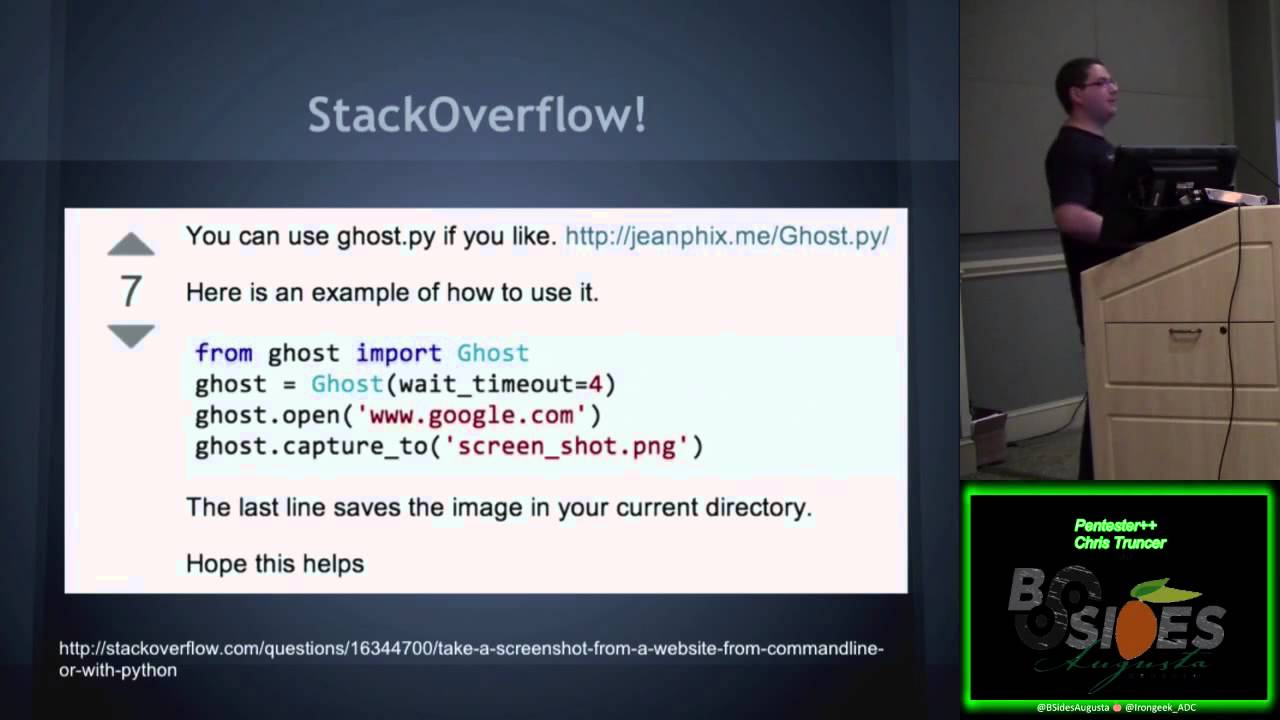
prospective application and finally i kind of wanted a challenge i wanted to try to figure out how to do this myself and it was my talents to do at the time so at this point again i went straight to google i wanted to figure out how to take a screenshot of a web application in python one of the first things that i sent me to was we know stack overflow stack we'll talk about hey this is awesome library called ghost ghost makes it super easy especially looking at this thing right here where i can just import the library i just give it like a time out of like four seconds let's say in this case and i saw hey go to this
website so in this case it's google and then capture uh that image of that website to me that was super easy and exactly what i wanted for something when i was first trying to get this for something a little more complex so i checked out those plus sites and they you know they have a lot of great like example code out there that i can look at and i figured out that they have exactly what this was the capture cube function right in it where all you do is once it's actually gone to a website you do have to then i'll save it off so my next step is creating my proof of concept or proof of concept i needed to
know that this actually worked and so that's exactly what i'm doing right here is where i'm importing goes i'm just giving myself some debug information to make sure i'm not failing on the enforcer saying hey i'm trying to actually screenshot a website i've hard coded in a url don't really see right down here um it's um i'm going google and then i'm trying to actually then capture that website and make sure that it works so here i am running it it's going to the screenshot google so i never got there i know the screenshot captured so you gotta stand on my script so you know if it actually works and what do you know on my all my computers and stuff is
this screenshot of google right now so it's awesome i have a really basic proof of concept that works and uh i wanted to kind of explain that so at this point i want you to figure out how can i actually expand upon this to make this easier um one of the easiest ways is probably file i don't want to have to hard code a website into my source code every single time so i need to figure out how to give it files that contain url so in this case like text file which has every url maybe on a new line and then just goes through all that uh i wanted you to figure out n-max nmf
has this awesome ability to put out get about xml code uh from its output and if i can figure out how to parse that then i can take that data and find all the web servers and have that automatically generate my url list and that's that's often because i run an ad on every single assessment so that's going to already contain my data without me having to do anything else really messes also you can output a dot ness file which is essentially just a giant xml file also so you can basically take the same concept of nmap parsing and i mean i'll dr taylor kinesis but uh you can do the same sort of thing at this point i hate
xml parsing with all of my life like it is probably one of the worst things i've ever had to try to figure out that guy back there tim like had a great example code that uh i looked at and tried to figure out working on another guy and it saves me a ton of time because i it's not fun for me to figure out if every time i think i've got it then i realize that it's like nested two more levels deep and everything's crashing really is annoying so that actually really helped have me figure out testing file input is really interesting so the first thing that i want to do is okay i think i have this loop working
now i want to give it like a file that contains a lot of url so it's like okay where can i go to get this hey they have this awesome website like a top million websites so i went out there downloaded this it was like a csv quickly parsed that goes back and got all the urls what type of websites do people think are among the most heavily trafficked on the internet yes doing that at work is not a good idea i don't recommend sending your tools to porn sites while you're at work uh somehow i didn't get trouble but it was interesting so uh yeah so that was some basic improvements that i wanted to add to this tool but i
also want to figure out a couple other things okay so i had a suggestion where i can do some basic course gaming where again mmf does this a million times higher than i would ever try a boat to do but if there's a quick and easy way to check if like 80 and 443 is open hey let's add that in and then i can use that if i need to i need it i want to do the report generation still i still needing to add signatures through the fall threads and i was actually given a suggestion for user agent switching which i hadn't initially thought of was an awesome idea i thought so but in this case um ghost i believe
that i haven't configured right now set up uh it impersonates an internet explorer however what it was suggested what happens if you tell it or watch if someone goes through like programming does the webpage change at all like this does it change in any way so there's a really interesting ideas i figured out how curved was going to look into how to impersonate different browsers and then perform a comparison of all the results of like the pictures and the source code that came back and i could know this website actually changes for the browser you're using for then you can actually expand upon this so you're not just like website or computer browsers but you can compare like what
you get you can compare browsers of like your vulnerability scanners and see if those are coming back and so that was something that i started working on and uh added into school so some the report generation i just wanted something really simple i didn't want anything crazy this is very similar basically exactly the same as uh peeping tom back there i just wanted to get something out and so i basically created an html table which just has like server header information and then let's say was that the credentials that a person may be there for that website and then like screenshot the other thing that i thought was important was i went to multi-page reports so what blending that
sucks is if you give eyewitness initially like a thousand urls you try to put a thousand screenshots and information on a single page it takes forever it crash browsers so i wanted i eventually figured out that i needed to create a multi-page report and uh so some basic eyewitness stats that i had was originally the very rough proof of concept with a lot of the different features that i talked about came out to about like right about 400 y's uh right now it's actually i think 1762. so some of the reasons for this were like again i wanted to add some of course gaming like specify the directory that the results go into different logging signatures who's the best guess
of the real reason why i actually did this why i got someone figure yes yes comments and errors from users comments trying to get stuff out and document and then error checking there you go it sucks uh actually if you want to come on up here thank you for uh i have a southern or southern uh
so her checking like i talked about earlier was one of the main reasons in addition to commenting and trying to figure out how to like actually document what i'm doing that made this code so scanned i needed to check what they were doing what they were providing to me and then if it actually caused my stuff to crash or not so finally uh i think for your probably your most complex like scripts and tools you're going to work on you want to find something to be really interested in really passionate and um that's actually what i was looking at to do recently where i try to find my troophole the veil framework uh for us we want to test and almost i'm
sure many different pet investors or people out there encounter the same thing that antivirus sucks it doesn't catch malware malware is always still getting around everywhere people are still breaking into it but it does catch pen testers it's ridiculous it just doesn't help at all so we need to try to figure out a way how can we get around antivirus solutions out there as many as we can as easily as professional malware authors and what ended up being a solution was a python based framework that we use that uh generates payloads that can either ingest shell code into memory or act like an interpreter stage or unlocks so at this point i was in way over my head like i knew
that what i was going to be trying to do was going to be fairly complex and i could get some of it but i knew like the concept of doing everything was going to be beyond so i actually had the opportunity to team up with will right there and another guy that i work with all the mike right who also goes by some important things that we discovered when teaming up is that version control is going to be really important because all three of us are going to be working on codebase at different times from different areas we need to have a central area to manage everything so we need to know how to make sure we don't overwrite
everything where you can get again whatever works for everyone else make it work but do it another big thing that we had to paranoid state is when working on a project and a team prepare for directional differences people are going to want to have different goals and this is something you need to figure out like everyone needs to sit down and actually talk about what it is that they want to do what it is they want to write and what goals they want to make sure that they achieve so at this point mike and i have started looking into doing antibiotication as like real low level like assembly sort of work and uh we had limited success but it wasn't
like it wasn't perfect it didn't work constantly all the time and we were nudged by will hey look into a different area like instead of trying to work that little level why not figure out like how to just execute shellcode like different languages like python so it was the first thing we did hey let's check out google google actually says i have a google search for how to execute shellcode with python and there's this awesome blog post right here i went to that uh i didn't take a screenshot of it has been way too tiny to show up on this in the slide deck but uh you can do that search the same block doesn't come up
it's literally a proof of concept code on how to execute shell code in python there it's completely written out and you just copy and paste your shell code right in and replace what he has in there and it doesn't so it'll run everything and the funny thing is it works it bypasses antivirus like this simple thing this is changing the language that you're doing something to python works and we bypassed mse we bypassed like kathy like symantec i mean i can't remember what else there's a ton that actually showed us hey this actually might work right now so we had a really rough proof of concept of what we wanted the final life output to be of our table
so what was next we wanted to research different obfuscation techniques that we can actually use to try to hire shelter and some of the ways that you can do this is hey check out the existing malware what are these guys trying to do are they trying to encrypt your stuff are they trying to like just change something around um and we can also do some research on like encryption routines that are available like in python so in python it's fairly simple to aes encrypt stuff so hey we can hide some of our shell code or the unique of the code and that will help bypass like superficial detection of our payload we wanted to figure out how to generate
files off the template now at this point we also obviously knew that we couldn't create two templatized other i don't know um but uh because if it was too much based off of the template that's something that obviously people are going to have event is going to tech offer so we didn't want that and really i was i was basically told hey a framework is probably going to really help make this easy at this point finally we also wanted to automate as much of this process as possible and i probably really use the framework so what did i do i released for we released 1.0 and it wasn't a framework it was a single small script that had a
limited amount of payloads but um it they worked and it worked probably better than it should have because the stuff that we were doing was super basic and simple okay again it was just either having the raw shell code in the file or just like abs encryption this outfit so at this point we need to figure out how can we actually improve upon this and make this better uh the first thing that we realized we didn't want to make this a single script maintaining a single script across everyone can be a pain and it's not extensible like at all it's just a giant pain i have to work with and so again we're like hey framework might be really
nice and at this point like will really kind of acted as my mentor because doing like i was still learning python at this point i probably have been using python and like trying to write in it for about like six months maybe a little less than a year and i had i was still right this guy has a lot of time like development knowledge that i didn't have and so he really acted as like my mentor and helps make writing stuff significantly easier then that's something that i highly recommend everyone do for writing a complex tool is find a mentor like having someone to balance ideas off of is going is invaluable like you're going to learn a lot from another
individual it's just if it is only in how they approach the problem or whatever it is you're trying to do like they're going to see it in a different way which is easy to look at so at this point this guy didn't sleep mike and i had our own code he had another code base where he was doing everything there's nothing else to tell us to do he combined just both of our code bases into a single framework over a week it was incredible i don't know how he did it that fast but he figured it out i took this as an opportunity to try to learn from existing code and by that it was really looking at the result of his
output and uh trying to understand how frameworks are made and look at it and figure it out and so that came out but then we had bail 2.0 which this was june 17 this was actually um some of the main things that were huge with us when we did this was uh veil was actually a modular framework at this point it wasn't a single script uh you can actually drag and drop your payloads into certain directories so let's say you create your own payload you just drop it into our folders and it will get picked up by the framework it's language diagnostic so it wasn't specific to just python we did do stuff in powershell c-sharp c
etc um check out actually his talk later today because he's going to go over some of the stuff we figured out on like how to hide and update a lot of the different things that we were looking at that we were coming across and our engagement capabilities in order to veil was also now easily accessible because it was something that we did we created functions in libraries that other payloads could actually use within the framework and we had big ui books where we try to make it usable through tab completion command line flags etc so at this point it was interesting because i learned a lot from existing code that existing code is basically again the framework that was created
you're going to learn a lot from having to figure out how to develop as a team and you learn proper version control don't delete branches so the video framework ended up available was actually range of veil evasion um because we moved more toward a framework that we're trying to create where it associates a large uh variety of tools so again what we're trying to achieve now is we're trying to take pet testing tools and try to bridge the gap between red team capabilities what they have try to meet somewhere in the middle or get close to it within availability or the veil framework we have catapult which has since been dedicated but is uh was our
payload delivery tool they owned power review which is a powershell network situational awareness tool and then villages was actually just released by will at that point last year which had the whole talking of themselves like i'm not even going to get justice by trying to talk about it now but it's a modular post-exploitation uh framework that you can actually use and so the state of debate elevation right now is where it's still maintained this is the final thing that i've been talking about is you want to maintain your project we still do it we have what we call b day where the 15th of every month we release a different payload it's our victory over in our actual antivirus
we always extend data by extended parent by adding a new payload giving it a different capability something always comes out on the 15th very much and we're still hoping for community involvement and so if anyone wants to submit a payload you will actually be the first person from the community to add something to the daily focus that's kind of the end of it it really helped me get into development by trying to figure out something that i'm passionate in and i'm interested it made life a lot easier because i was actually interested in it versus being told um you want to start small and friendship because starting small you're going to get those quick wins of
actually having finished your scripture tools make it usable and stable again the depth of your project is going to be just crashes all the time when people need to use it and finally maintain it enjoy doing it like you're going to deal with users you're also going to learn a lot and add some new features that you never would have thought about because you're users out there if you have any questions you can hit me up on twitter a lot of the scripts that i have i kind of went over are on my github which is right there you can always shoot me an email and for anything questions uh fail framework related you can just check out
our website here what's up
Related talks
 51:37
51:37 30:27
30:27 55:35
55:35 51:32
51:32 41:33
41:33 51:33
51:33