Breaking into Android IPC Mechanisms Through Advanced AIDL Fuzzing
Show transcript [en]
Thank you. Hello everyone. Good afternoon. Uh so we'll we'll uh initiate the session with uh breaking into Android IPC mechanism using AIDL uh fuzzing right uh just before we begin a bit uh about us. So I I'm Hardik and I have with me Radnish my colleague. We we both uh work at uh KAM and recently we have started digging deeper into embedded security more prominently around Android operating system. And what uh really motivated us to kind of uh select this as our uh topic of research is uh mainly due to the adoption and popularity of Android platform which is prominently being used in devices and IoT devices and in uh mobility uh as well and any
any potential vulnerabilities which are uh discovered uh in Android as a platform can impact or potentially have a larger impact to millions of users around around the globe, right? Um in in particularly IPC and AIDL are uh very complex and sophisticated uh data structures, right? And their implementation is equally as complex as it gets. So we thought this would be a a good good potential for us to kind of uh look into it and how it really functions right and see if we are able to identify any any issues around around these uh implementation right usually when when we evaluate any uh any of these devices or plat platforms we tend to overlook these components and these
are very underestimated ED attack surface when doing uh such evaluations right and it has a real world impact wherein it it will affect uh a lot of uh users who are using it. So we'll we'll quickly go through the objective of uh today's session. uh first is we'll look at what is IPC mechanism how it is implemented how it is used u how different applications are uh utilizing this mechanism in terms of interacting with each other then we'll uh dig deeper into the fuzzing framework how we have implemented it what is the existing uh implementation of aidl fuzzing and what we have done to kind of uh enhance Hence its uh capabilities and providing us
with the with the uh issues that we kind of get using it. Then we'll also look into the framework which is created and the setup which is uh which is there in place following that uh with a interactive demo and then we'll open the floor for uh your questions. So now I'll hand over to Radnish who would probably dive deeper into the IPC and following points. Thank you Hardik for taking us through a brief introduction of what we're going to present today. So as Hardik mentioned that uh IPCs and AIDL on in general are a very you know complex implementations of Android. So when it comes to uh IPCs and aids you could see that this is an
overview of the entire Android architecture. So there are system maps, there are Java APIs, there are native libraries and Android runtimes, hardware abstraction layer and in the kernel there's a small bit which is called IPC. So when you look at that small bit, we cannot undermine the importance that it has in our day-to-day operations or uh our day-to-day usability of Android. For example, you guys have have you guys ever wondered that you open your camera app, which a lot of us are doing right now, you click a photo and everything goes and gets saved to your gallery. How does that happen? Has anybody thought about it? I'm sure now everybody will give a you know thought on how it happens and
you'll be able to understand the implementations that basically is you know responsible for making it happen. So the binder IPC or the IPC mechanism is a very small bit. It's part of the Linux kernel and this is responsible for interprocess communication. IPC stands for interprocess communication and it's as the name suggests it's very clear that it facilitates communication between two processes. So when we look at an overview there's a process A process B both of them want to communicate with each other use IPC and you're sorted so there are different IPC mechanisms that Android as an operating system provides binders are kernel level IPC's we have intent which is application level IPC and for uh complex
implementations we have aid which is uh for complex IPCs. So as security researchers you know we have a very intriguing question that why is IPC security important? Why does it matter? So as it says that IPC basically exposes an attack surface of a trusted application to non-rusted entities. So the service are exposed inside an operating system and anybody residing on the operating system that could be third party apps, malicious apps or even malicious services can directly invoke those IPCs and cause a lot of havoc that includes uh process hijacking, manipulation of data, uneven capturing or seeding of data in some cases. Next. So our talk revolves around AIDL. The reason why we chose AIDL is as hard
mentioned that it was a very complex implementation of IPC and as we proceed forward we would know that why it is so complicated and as mentioned earlier AIDL uh facilitates communication between two apps. There is a simple structure of an AIDL interface. It's just two lines and when you guys sees this you will say that okay there is no logic in place how does this happen so we would dive deeper into how an aid is implemented by a developer how the underlying framework is responsible in creating a stub for it and then how a client and a server interacts with the aid. So this is a highle diagram of two processes trying to communicate or talk
to each other. So let's say client application has a process which wants to generate a random numbers and the server application has implemented that aid that generates random numbers and returns it back to the client. But to do that there is an underlying uh framework in place that is uh implemented by Android which makes this happen. So to do that client application cannot desiredly go and ask the server application that you know provide way with random numbers. There is a process in place which has to be followed. So the client application would create a service which would be rewrited through a proxy that would convert user input into a Marshall data. The Marshall data would be routed through the binder
proxy routed through the underlying kernel which would uh have some security mechanisms in place like UID separations and uh intent filtering and then that would go back to the server application and perform the required task. So for example an ont transact method would be called that would uh generate the random numbers send it back to the client and the client would then display the random number generated by the server. So this is how an interaction in aid happens and as easy as it seems this gets complicated. So as I told you that EIDL itself is a very complex implementation and there's a complex data structure involved that works in the background as we saw in the last diagram
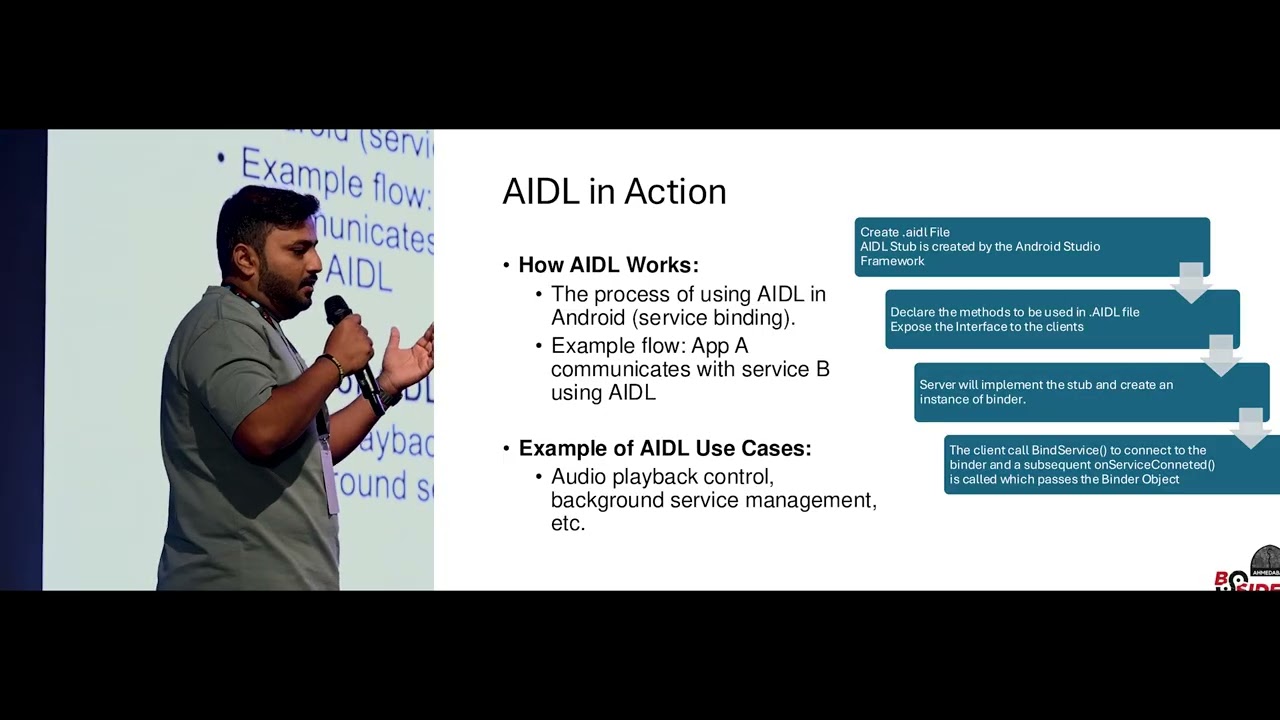
that there is marshalling and unmarshalling of data that happens and when the user input is said it is converted into parcels marshaled sent to the binder proxy and then unmarshaled processed and returned back. So when a developer implements uh aid interface they have to create just go to your Android Studios right click on your project and create aid file. When you create aid file you declare a method uh you declare a method which you want to call and the underlying framework would create a stub. When you say stub, stub is an implementation which has the methods, the underlying uh marshalling and unmarshalling protocols and even calling the binder IPCs. So that would implement Android Studio would implement
that underlying stub and when this is declared server would implement the logic that would be required to be used by the client and the client would call onbind service. When the onbind service is called from the client side, the server would wait for the connection from the client through the binder and when on service connected call is reached, the binder object is returned and whatever the implementation is uh returned back to the client. So when we say client and server, it's not like you know something on the cloud and something uh on your device. Both the services reside on your device and both communicate internally with each other. One facilitates and other is the receiver. So a simple example of a ideal
use case is the audio playback control which basically you know increases the volume or decreases the volume of your uh speakers. Next. So when we say aid in action it's uh what I explained in the previous slide that uh okay it's not very clear but when you create on the new go inside your Android project and create a new aid interface you have a very simple looking aid file with no logic implemented and when you compile the app the underlying framework next slide the underlying framework would create a stub which will have basic ically the complex logic implemented. So as we can see here the Java and it has in the parenthesis generated is something that is a code
generated by the framework to facilitate our IPC. So it is the same thing that I mentioned earlier that the binder client would go through so many underlying layers to interact with the bind binder driver and then invoke the IPC. So the data flow that happens is birectional and there is a lot of uh you know uh underlying intricacies that caught our eyes because you know uh we've worked with certain clients who implemented custom services in their application or in the phones and when we looked at those we could see that there are certain exposed uh interfaces which can be interacted by an untrusted application. So that gave rise to our interest in aid fuzzing. But before
going to the aid fuzzing part, what are the security mechanisms in place which are already there implemented by Android? So as you all know Android is one of the secure operating systems in uh in play. So there are already certain security measures that are already implemented by Android. Few of those is application sandboxing and UID separation. So when we say application sandboxing, two applications cannot communicate with each other without you know uh a white list in place and when there is uh process isolation there has to be intent filtering in place to allow two processes to communicate with each other. So these are there uh as uh precautionary measures but if the underlying architecture implemented is
flawed this can lead to a lot of vulnerabilities. So the common vulnerabilities that we can see uh when it comes to Android IPCs is process hijacking uh unauthorized access to the system services and also in some cases privilege escalation. So and the most common vulnerabilities that we see is data leakage between two apps that you can you know send a stub and you can get a response that would give you uh access to some juicy data. So this is what basically caught our eye and we started with uh fuzzing we started looking for resources on the internet and because this is a very uh less explored topic there was not a lot of information or substance
available on the internet all we could see is a sample pseudo code which was uh provided by Google's uh AOSP that is Android open source project that told you how you could fuzz uh aid And the funny part look the interesting part with AIDL fuzzing is it is a grammar based fuzzing that you cannot randomly supply anything and expect it to work fine because a has its own syntax. ADL has its own uh set of uh uh variables that it accepts and if that is not met it would just reject the parcel and it would wait for the next one. So as uh the AIDL complex increases we thought of you know diving into it
looking at it and uh fuzzing it. So this exposed deep rooted IPC issues and also helped us automate certain process to you make sure that you know the system that is developed is thoroughly secured and handles edge cases really well. So as any fuzzing process works, if anyone of you has uh done binary fuzzing, they would be pretty familiar with how it is done. So we start with identification of the target, then determining of the inputs of course, then generating the fuzzing data, execution of the first test cases, and then analysis of what happened when the first input was sent to the target of evaluation. And once that is done, we look at the logs that have been
generated and we analyze those logs for any security uh implications or vulnerabilities. So this is what it looks like uh from a point of view. So we had an ondevice aid ideal fuzzer uh created which we would be putting it out in the open source so that you guys could try your hands out on any service that is out there. So this is an ondevice AIDL fuzzing framework which is a simple application that generates seed inputs uh that interacts with your IPC services underlying IPC services on your device and starts fuzzing it saves the logs on the device and helps you analyze it further. So the tools required is not like you know state-of-the-art uh
hardware that you need with 100 GPUs and something. It's very simple. You need a mobile phone. You need Android Studios to compile the app for sure. You need ADB to interact with uh the phone to see the logs that are happening that have been generated on the phone and the service you want to fuzz. So we go to the next slide because I've been talking a lot of aid and service and fuzzing and everything but uh how do we interact with those services? Do we have to create applications? Do we have to you know do something which would allow us to interact with the service? So if you go back to the slide hardik you could
see this is uh uh ADB shell interface of any phone that you can have and there's a utility called service call. So service call is something which allows us to interact with all the services that are there on your phone through the ADB interface. So ADB stands for Android debug bridge. So you can just shell into your phone. Use this utility to interact directly with the service call. So Hardik would show you an example of uh how you can interact with the service call. So, you'll have to display the
phone. So, you have a physical Android device and we have a simple oneline command that says ADB shell service call activity 1. What does does like you know imply like if anybody's reading this what do you think that this can happen to so I think demo gods uh have so basically we're trying to you know interact with the underlying uh service which is there on the Android. And uh no, so that's not the command. If we just go back to the
slide. Yeah. So again like you know the previous one that you saw didn't work is basically UID separation in place and this allows the under this showcases the security mechanism already implemented by Android. So we were trying to invoke an activity which this application does not have access to and that was not part of the demo but got showcased in the demo. So it's a good example of how a secure implementation is there in place that doesn't allow you to interact with the activity service and invoke an activity which is not allowed by the app. So as we can see we call the status bar and with certain numbers we can interact with the status bar to you know
just pull it up and down. This would look like a gimmick but this is everything in place that I just told you guys. So this works on the entire implementation of IPC and AIDL that I'm able to call the service make the service pull down the status bar which is one of the features exposed by the Android for applications to show notifications and by that we are able to interact with those service. So now we know that okay there's a service call that allows you to interact with the service. Now what are the services which you can interact with just again ADB inside your phone and there's another utility called service list which will list down all the services available on
your device. So when you talk about custom devices Samsung's OnePlus or Huawei's like you know which are which have some off-the-shelf features so they'll have some off-the-shelf self-implemented services which could be interesting to look at and those would be the services which you would like to target. So when you list down the services you have list of all the services available. Pick whatever service you want and you can just start fuzzing into it. So as I mentioned that the only resource available on the internet that tells you what to first or how to first aid service is this piece of code published by AOSP that is Android open source project which says that you know create
a binder uh object that reference to my service first that service by invoking the object with the first data provided. So this in two lines gave us a lot of uh insights that what we could do. So we could invoke the object. We could create a uh a corpus of data and just start fing that service. So that's exactly what we did but with a bit more of uh creativity. So the first service that you see on the right has basically the list of all the valid data that can be processed by an aid interface. There's a combination function on the top which generates all permutations and combinations of that available uh data. And then we have a
first service which combines this first combination and calls the service call which is the second last line that you can see in the third image with the code and the arguments which are generated by the combinations function and that's how the fuzzing starts on the device. So we compile this app we deploy the app on the device and I think hardik would take you forward on how this would happen. Thank you. So as we saw that uh we we did a walk through of what is IPC, what is AIDL, how to have the fuzzing from framework uh uh up and running and here is a quick demo of uh how how it really works. So on the left we have the
Android Studio which actually has the application uh and it can be uh it is on the user lane. So this is without uh it it can run without root privileges and on the right you have the device and on the bottom you have the uh load which is uh running. Here we have the application wherein we can just go to select uh service list services. So there we have all the services which are currently running on the device. Maybe we can select one of them NFC or connectivity for example. Yep. So now we we have selected connectivity as a service and now you see that the the fuzzing has really begun on this wherein it is sending the packets to the service
uh call itself and hopefully after some time we should see some some uh crash. Meanwhile, if we go through the LO file, we already see some panic happening at the kernel level because indirectly you're calling the binder uh which is uh a kernel driver, right? Uh so if you move down, you should start seeing the crashes and panic on the kernel side. And if if uh there is something which the kernel cannot handle uh it will initiate a crash on the device itself. So yeah so one of the sample uh uh logs that we have here which points out at null pointer exception which was identified. Similarly, there are lot of memory corruption related issues which
are uh highlighted using this uh technique. And towards the end the last uh two lines you if you if you notice it's mainly around binder which clearly states that uh the kernel becomes unstable at at some point in time wherein it is not able to handle the payload which is uh sent across and eventually it will uh it will crash the device or it will open or open doors for potential uh exploit development. So that way you can actually chain the entire uh exploit and then it can impact uh more users right there. So we when we were uh uh when we started looking at this topic we we came across multiple challenges. Firstly on the complexity of
of the structure itself on on how it is implemented on the device and then uh understanding the structure and understanding how it uh really works and how we can uh implement this idea into uh execution. Also there were a lot of uh challenges around the restriction and the sandboxing between the communication of two applications or uh the between the client and server in this case and then the workaround to that was uh you know having specialized uh characters in play which in a way bypasses the the security which is uh implemented and a lot of times when you have aids in in A the structure itself is so complicated uh when implementing these services there there are potential chances of you
missing out on uh the configuration part. So there may be a lot of misconfigurations and lot of uh input validation related flaws which kind of help uh in identifying issues using uh fuzzing. So yeah, best practices is to uh like I mentioned like uh to have uh since it is complex to have a structured approach to have list lease privilege principle or these days we call it zero zero trust right and we have input validation. So lot lot of the test cases that you would have noticed it is primarily data structures right we are playing around with the structures wherein if say a boolean is uh is configured we try to fuzz it with say a float value or
something else right so we are playing around with the data structure in order to receive or come across that uh imbalance in in the at the kernel level right u also So strengthening using SE Linux policies ensuring that uh only the the two applications only speak uh to each other in the set in the set uh u in the set policies right which are which are defined and plus then you keep on having regular fuzzing activities or regular uh test cases to ensure that the mechanism which are in place are good enough or if there is any need for further further announcements. So yeah, that's uh that's us now. I kind of open the floor for
questions if you have any. So I think I think we we we did a good job in kind of uh sharing sharing this information. Uh so yeah, thank you. Thank you so much. Thank you Rajanish and Hardik for the amazing uh session. All right. So, uh we were about to uh like we have uh lunch I mean sorry hi tea. Uh so that that's starting from uh 4:15 and till like 30 minutes. So yep uh we can meet again stand up uh stretch a bit. Stay hydrated.
Related talks
 1:06:07
 1:03:19
 36:35
36:35 33:53
33:53 5:51
5:51 37:31
37:31