Secure Key Management in the Cloud
Show transcript [en]
the besides DC 2017 videos are brought to you by threat quotient introducing the industry's first threat intelligence platform designed to enable threat operations and management and data tribe a new kind of startup studio Co building the next generation of commercial cyber security analytics and big data product companies good afternoon my name is omar farooq and i work as ISC independence acuity evaluators in baltimore and we are we are a security assessment security evaluation company based out of baltimore focusing on assessment of web applications and infrastructure and cloud and web and mobile applications at the same time I particularly have a background in typography and background in embedded software development I've been doing security about evaluations
and security work for last couple the last five years today's talk is about secure key management in the cloud and so we'll get started so this particular talk is divided into four different sections since we have a pretty large crowd we have probably started with a little bit about key management talk about what key management and data encryption at rest or in storage means I'll talk about HSMs a little bit then talk about key management in the cloud and what what we are talking about in terms of either native client clouds native cloud applications or parking solutions or custom applications hosted in cloud then we're gonna talk about some of the core stuff which of the of the of this
session and which would be how to secure your native key key managers in the cloud and at the end we will talk more about specifically about some work floats and those workloads are from media entertainment or graphic rendering so there's a lot of compute there's a lot of storage going on and there's a lot of networking components so pushing and/or meshing in a key key manager in there it's quite interesting so it gets all the flavors majority most of the components that you find in any cloud platform and at the end we do have a vendor specific as or specific or microphone as your specific reference architecture talk about specific deployment hardening guides and things like that that we have I have
worked on and I know that's a huge push and there was an AWS as a major player so we do have an AWS reference architecture at the end also what this talk what this talk really is about is securing key management the cloud and we want to make sure that I I want to say up front that we are technology vendors agnostic we're not pushing any specific technologies we're not pushing specific vendors or cloud providers that's not the point of this talk though there is some kind of reference architecture work in here but it is - it is pretty generic and it can be adapted to any cloud platforms majority of you guys who've been working with cloud platforms know
probably that all the components are pretty interchangeable with different names and if all these guidances can be applied pretty seamlessly what this I just want to be upfront disclaimer that was what this talk doesn't talk about or is not about any kind of deployment of PGI server or things like that or compliance or regulation or specific things about NIST or FIPS standard this is more about technology implementing a key manager or using key manage in the cloud
at the same time the key management as a talk of the topic is a quite large and I'm pretty sure that it can't be covered in 50 minutes so we gonna specifically talk about key management and data encryption and how to how to encrypt data at rest specifically but at the same time there I will refer out a lot of information here that could be used to store to secure or use key managers for compute resources like using encrypting using key managers and your applications or embedding how to make the API calls to run for specific purposes besides storage so before we get started I like to I like to get started with before we get started I
like to just start with a little bit about encryption why encryption is very important and why we are why we're talking about this today so given the reason given the recent data breaches and data and hacks and and in the news with Equifax or Home Depot or OPM and things like that in an industry wise approach has been to protect data using encryption and the idea that encrypt everything use encryption to to protect is something that's thrown out quite a bit what what really isn't talked about more isn't about the infrastructure that goes around protecting and having data encrypted along with it so I want to start this conversation today with a little bit of a basin since we have
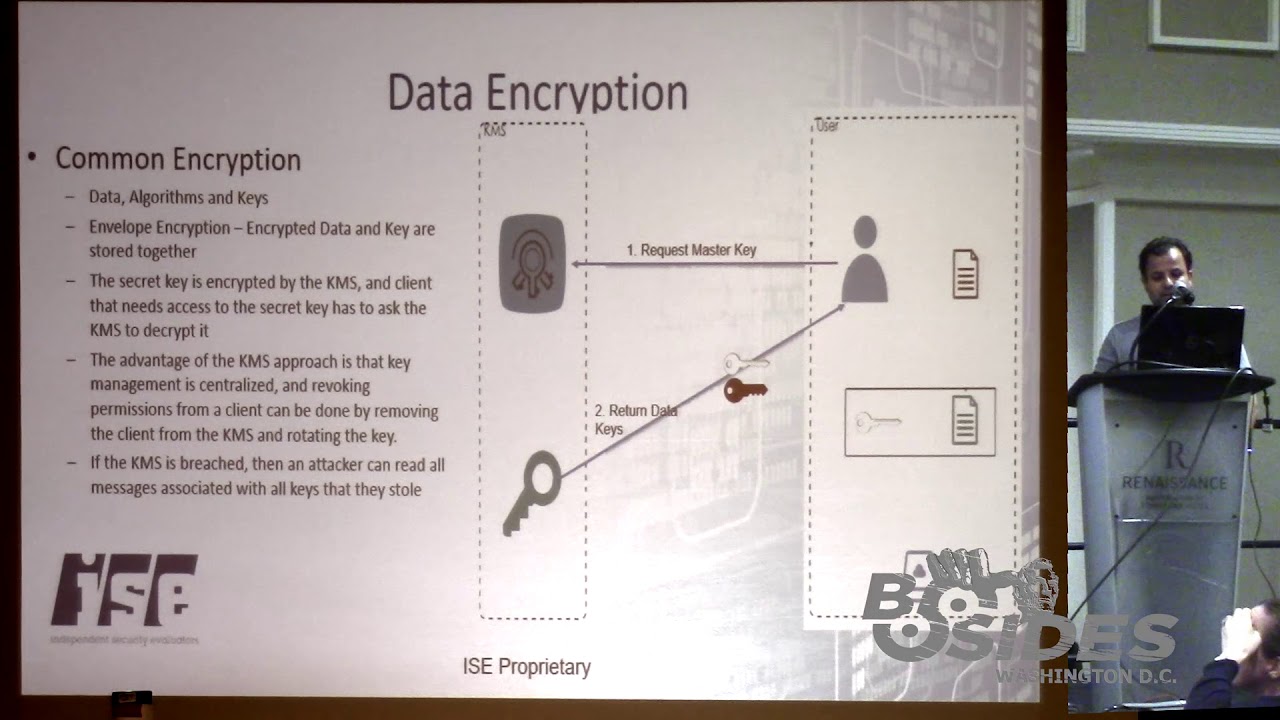
various up various we have a pretty diverse crowd here talk about encryption first and how it works and what is or the components involved and then introduce key manager and key management into it so a common and a common a common method of so you have data you have tools like data encryption algorithms and then you have keys those three things are used to protect on plaintext data you take the tools and you apply keys and you scramble it with different algorithms and then you have protected or ciphertext how does that work so one of the examples that we should we should actually introduce right up to the front is something called envelope encryption this is quite common in say in a lot of
cloud computing or about applications these days where there's a lot of objects where data and data keys for objects per object is stored along with the keys with the data itself and the keys along with it and the way it works is that the way it works is you have you have a user or you have an application which requests a data key or request a master key to be created and then you have some kind of Cloud key manager or on-premise key manager that creates that key which which in different worlds is called cm C CK M which is customer master key SCM CM k or master key or master secret and then based on that
essentially the key manager will return you a data key which is essentially a key that was generated that is derived that is internally generated for by the kms both the ciphertext and the plain text version of those keys are returned and those keys and the user takes those keys to encrypt the data with the plain text version and then stores encrypted version along with that the data itself into a storage of its choice either that could be back in the cloud or it could be back on premise so this is a general idea of one way of how data data encryption works at rest so as you can see from this example your key managers
quite involved in this if this key manager could be more it could be on all location on Prem or it could be in the cloud or it could be hosted in some kind of hosting site or whatever now if the kms is breech you do an attack on treadle and all the data I'll read all the keys they potentially can get all the data so that's why protecting the key manager is pretty important another concept that's pop very very very important to understand or I think we should go over its key hierarchy that how key how hierarchy works in data encryption and how that could be you is used quite prominently into secure objects and data so like in the previous
slide and the previous example we talked about having key manager deriving keys and giving keys out based off of a master key what the key manager can also do is you can create keys our data key base and then encrypt that with the master key possibly and then use multiple keys from that it can it can create master data key then it can have encrypted data key to the master key and the master key being it could be encrypted for the silver master key and a silver master key could be could be encrypted with end level gold key the idea over here is that key managers are used to protect data and object level possibly at region depending on how you
have your environment set up or how your workflow works you can you can encrypt and protect data at region networking subnet application tier database even within a database you can protect data at a row column or even item level so you can have an item with a data key you can have columns with a master key or in the role with a silver key and the whole database with an end gold key so all these concepts of key hierarchy and envelope encryption or different encryption algorithm concepts are possible because you have a centralized key management solution or you have a developed one so what is the key management and so now that we know what
key manager is part of why is important and what it does is it really why people use it most likely a lot of a lot of times the key managers are actually required by compliance and industry regulations so a lot of a lot of folks talk about you know having a key management solution then they go out of purchase one usually because the fact that they need one because the industry they are in if you're in medical and medic or data records keeping for health records you have HIPPA HIPPA and if you're processing payments or any any any kind of thing like that you need you have more regulation from PCI DSS kind of thing now for key management
operations so what is a breakdown of a key manager or key management solution what are you what are you really getting or what is a key manager do we understand how a key manager does things from a logical perspective but from a component point of view what is the key management is built of or what is the core functions of a key manager so going into more into that they're the key managers basically starts with how a key manager is deployed and and from there well how its basically creates keys so first and first first and foremost what is the key management solution what does it look like what is it well it could it
can be or it can be a software based software based solution that's deployed on appliance or a server or it could be a more more of a hardened server that has a physical device that's part of it which is like an HSM we'll talk about that in a bit after the after the key management solution is deployed you have to you have to you have a task of generating keys itself and generation of keys and your key material or secrets or however you like it's not interchangeable but generation of key material is not trivial it requires you to have specific pretty good random number generator or pseudo number of random generator kind of function in it
and once you have implemented that you quit you can develop you can develop key material and part of that key developing key materials sometimes also requires something called KDF which is key derivation functions so all of those functions regarding key generation or key generation are part of a key manager and they're on the core functions part of another function of key management is key managers to store the store keys how to make sure the keys are stored in a secure manner with with this integrity preserve and then you're keeping track of the keys themselves if they are if they are associative it's some kind of application or they are associated with some kind of external entity some key
managers do that so you base a core component of a key manage and key storage is to on that confidentiality stored in approved protected environment and those are some of those things that are defined actually by Phipps I'm not going to get into it but FIPS 140 standard - - talks about levels of four that by one to four and one of the cool component or one of the core components of key management is to make sure that the keys themselves are in a container that is has some kind of hard security standards around it it's it has it either is a level 1 or level level 1 where it can detect or not detect but
log some kind of act ampere activity or even up to level 4 where you can just not only detect and but it can also try to prevent any kind of tamper or veve assistance to a tamper so there's a lot of different level 1 to level 4 there's a lot of areas in there another function of key managers is key rotation and part of key rotation is more like what crypto period and goes along with criminal period and there's a hole in the fifth this standard about that how to determine what your crypto period or crypto rotation time should be and that falls into maintenance of keys so you can have a key manager that actually
rotates keys for you or you can have it or you can go ahead and do it manually but that is one of the features that core key managers have another part of key managers to have it talked about is how key managers associative is usage so protecting protection to sure that key are used correctly and and the in the end part of some key managers of associating with access of keys and for encryption or decryption is that they are associated with things like what application they should or some access control built into key managers so certain application can access only certain keys this will become quite clear when we get into the latter part of our discussion about
hardening key key managers associative keys with specific key usage and key applications is is a function that basically gets to the security you need because at the end of the day not every key and the key manager should be available to every application and not at the ABI application should be able to access every key and and basic idea of any security functions are that you have to prove that you and you are doing something correctly you can log it you can monitor it you can actually you can communicate that you are handling this the handling the material the way it should be done so logging and monitoring of keys and possibly doing externally out of the key
manager having an export function or having a function that can can notify about possible evidence of tamper and things like those become very important when you're when you're multi-tenancy environment when we get to the cloud key management lifecycle I'm not that's pretty much what I describe but there is an actual scan there's an actual formal definition of key management lifecycle it's defined by NIST and I think it's part of 852 part 1 and I I won't talk about that here but there is like four or five to four four to five different key States and if you guys are really interested about how key managers work that's in there now how does like I talked I started this talk about
platforms and what key managers and how they've hosted and then how they're run so you could have you can run them on Prem hosted you can do the HTM s you can buy specific devices to do that you can virtualize them or you can use cloud providers including cloud-based HSM so you not only you can get a cloud-based software solutions but you can get true cloud-based HSM they'll see that in that and a lot of slides so I put a real-world example in here and I put a home depot because ironically they were also part of a data breach but recently I've been working on my bathroom and like I've been running to Home Depot quite a bit so I will
always wonder you know how they're actually doing their transactions and and securing the how the handle returns and how they handle payment transfers so they're probably what they do is they're probably even I go there and I buy the wrong part for the mic all the plumbing that I'm doing I don't know and then they run the transaction and then the transaction pop pretty much gets request encryption key like we talked about before from a key manager they probably have in their data center or possibly in the cloud and then be at the end of the day the transaction the the data key comes back to the point of sale POS thing and then it probably encrypts it
and sends it to the payment chance paper payment processing people or returns department at pack at the Home Depot which it possibly might be different it might be by the same and obviously I go back to Home Depot to return stuff so when I go back and I'm returning stuff I am I pretty much what happy what should be happening or could be happening as an architect is that the requester payment info info and it goes to return which requests the same key from the key manager and the key manager gives in the key which allows them to decrypt a date data and comes back in plain text box the return POS so in this real-world
example is kind of obvious the fact that what the benefits of a key manager are where multi-departmental environment you have a key manager that segregates key usage from key operators and key data so you might have key key our departments that you use the material but it's not in their hands as it's kept out and it it Dean the keys themselves are centralized without without this without this IT infrastructure for centralized you you will not be able to track the lifecycle of a key you cannot be able to restrict access or you might now that you to meet with regulations and standards for PCI for payments transact how do I suppose secure payments so this was a
real world example of key management so I think at this point I pretty much everybody should have an idea what key manage been to what we're trying to do here then there is something called HSMs they're pretty much a hardware device for crypto operations and key storage so they're just they're an extension or software based key managers and they basically go ahead to next level and they are physically hardened hardware devices which might be at level 3 to level 4 though not always true some of the cloud providers and we'll talk about later in a source or thing or not level 3 to truly but the concept is that the HSMs focus more on the key container in
the storage of the key material itself there then they want to make sure the data can't confer confidentiality is preserved when the data and key material is in the HSM they provide strong protection of keys within the storage they have physical access protections to detect evidence of problem of an evidence of tamper and sometimes what they have also is what secret sharing like Shamir where they break down keys into multiple parts and they recover them later when the key is needed that way if a part of a part of HSM divides from one of the HSM devices that is part of a cluster HSM gets compromised you don't lose all the key material and similarly to not software based key
managers they do have not more but possibly more more sophisticated audit and log phase functions so let's talk about now let's jump until a little bit of key in cloud and so this slides a little bit of kind of pushes the idea why we still use key managers on premise but obviously there's a lot of reasons for that too so typically key management devices and sophis solutions are pretty much locked down into into a building with physical access controls and things of that nature but at the same time this talk is I should have started that talks uses graphic rendering workflows as a reference for a lot of the reasons why cloud computing is to use because for
graphic rendering workflow which is something that I've been working a lot is very fits very well the model of cloud computing where you have elastic elastic elasticity so you are you have a you can you can seamlessly scale out and use cloud resources when you need so you have an orchestration tool for specific for clouds for specific graphic rendering which can essentially instantiate machines push out graphic rendering jobs to the cloud nodes push pull back data from there from the storage and put together the frames it's something that happens quite a bit it has it is it is one of the major no more one of the large use cases for compute in cloud and part of the reasons is
because a lot of CGI a lot of graphics are being used for M&E movie and entertainment industry from regular commercials to full-length feature films being developed in using too heavy cgi graphic rendering is kind of one of the larger and more interesting use cases so going back to the why be using to moving from on-premise to key management in the cloud so as you are developing and scaling out applications using on-premise key managers is viable but at the same time it's very restrictive you are use a lot of those key managers are air-gap and isolated and you can you can leverage any any kind of specific scale out cloud features a function that you would like to have you looked at lose
losing the lack of scalability and mobile and mobile device it's kind of like the reason why people use the cloud so point being is as if the as the processing and the compute and the storage is moving to the cloud there is a really good need for moving the key managers from air-gap networks on the on-prem networks out to cloud so when we keep when we talk about key management in the cloud what does that mean right so we talked about key managers generally we talked about what they mean as a solution to what they mean as a as a software entity well cloud is a multi tech Multi multi tenancy environment natively or not
so essentially everything is shared your resources are shared your compute machines might be instantiated for you for your use today and there might be instantiated for some other use or some other customer or client or even your own workflow for at a different time so the key questions to consider when we talk about key management the cloud is how the keys stored where are the keys stored and who has access to those keys and how do those keys use so when we look at these questions we can also look it back and what we want to log and audit and what how we want to monitor is so we want to make sure that we want to
look look at we should have a capability in the key management the cloud that can track every possible key usage key storage and key access now when we talk about when we talk about loosely about having cloud key managers there's multiple multiple models there's there is no there's no specific about you have to use one key manager or one key management solution so the obvious solution is to or possible solution is to use your current key management solution from on-prem and move it out to the cloud so if you have written a key management solution from scratch I hope not or if you have bought one you can literally take that and host it in a
cloud and to cure it you could take a cloud what's called cloud vendor partners solutions so essentially you're leveraging a solution by a cloud vendor that cloud infrastructure rendered that they have looked at poured it over validated that it works in their environment and then you can use that as as a possible solution so those it like things like tenable or so or safe net solutions that are out there that you can literally go out there licensed on the cloud and start using those today then you can also have a hybrid model where you can take the current partner solution MA or or any other key managers you have and scale it out and then have multiple
copies of kms or key manager and in that way you are scaling out and you might might have some sophistication of having mirroring or some kind of region based key managers or splaying keys using Shamir or any kind of various different models and the last and the thing and the focus of this particular talk is native key management service or cloud HSMs so these services are what google cloud as ur an AWS offer as a product and as a product of their own so here they're essentially all all three major vendors of all vendors on at this point have a solution of their own either license from and exists as somebody who's been who's been in the industry
for a while for example as is uses tile talus and AWS uses safe man so essentially but they are their products they've been then there are natively can be instantiated as a server as HSMs in the cloud and you pay per ki per usage per access model you don't have to license the actual software that's underneath it you don't have to license the software that develop a third party you just are dealing with AWS and and and them and the access model for the native key managers are is different from if you were using third party model or vendor there is an API defined by AWS or the cloud vendor they talk about how to
access keys how to protect keys and essentially the access to those keys is through their CLI and their or the console or their or the other other's SDKs is so we will be talking about when we talk about in this talk what's how to secure key managers in the cloud we're talking about the native solutions that are offered by cloud vendors so before I get to next slide so things like key Balt by yaz or KMS key management service so before we get to this slide you might say oh I don't need a key manager in the cloud because I use some kind of storage mechanism with some kind of client-side encryption with cloud storage so why do I need key manager
right well next couple of slides will show the fact that you already might be using a key manager transparently that it's that is being employed underneath and it might not be you might not not might not be dealing with the key managed directly but the way you are using server-side encryption or client-side encryption for storage means that you are actually accessing you already are touching key managers so one one thing you can do initially the slides in Auto order but but what you can do is you can have your data and your local key management solution your local info on Prem and then you can just use your key material and you can store it interest into into into shared
storage into some kind of cloud storage here you're not using any kind of encryption method but you might be you might actually have the encryption tool I don't know the mouse I don't have a pointer but your encryption tool or your encryption data storage might be an instantiation of an ec2 machine or some kind of storage in the cloud another possible possibility is that you have the key materials that is actually in in an ec2 machine oh not easy to but a virtual machine on the cloud and then you're encrypting the data locally but you're keeping the keys in the cloud but in that regard what's really happening is that the keys that you're storing is
technically you have a key managed in the cloud so even with a client-side encryption you are possibly using key managers in the cloud because you have soft and state you have instantiated a soft key manager on one of the virtual machines when you talk about server-side encryption which is more a lot of times people use to transparently store data in the cloud and multi-tenancy environments they like to they think that the most people don't think about key management but there is some kind of there's a major component key management going on and the idea is that you have your data go into some kind of ebb server with some some symmetric key and that plaintext and gets encrypted with
the symmetric key and then that gets encrypted data gets stored into the data storage now the symmetric key might be also generate was generated from your local storage of possibly from a key manager in the cloud but it gets encrypted by a data master key in the cloud and that master key in most class server-side concret storage workflows is actually stored in the native native key managers so when you're using AWS or using as or to do server-side client server-side server-side encryption for for data storage in essence what's going on is you are you are actually using the key managers because the master key is stored for those data keys is in the same key managers you might not be
paying for that directly you might not be charged for those but underneath the underneath the hood there is a key manager involved and that's being used so I think we have 20 moments but when we get to the so the key managers of the cloud are pretty a pretty split our key management service in the cloud over a specific kind of similar to the key management on the pram where you have things associated with the usage of axis and and accounts and some kind of roles and users and things of those nature so I'm going to skip this for a little bit of time and get your next slide so cloud key managers you have you have
developers you have renders you have CFOs and I think I will skip this slide just to get to the main part so the same thing in the in in the way it works is that you have similar you have in the key manager you would have you would request the key data the key data goes back and then you encrypt your files and you put it back into the some kind of share storage and then you decrypt it you can also use disk encryption methods for cloud key management so what happens here is that if you have a BitLocker or if you have some kind of Linux machine with the to encrypt or you can you can
state you can set up your cloud and cloud cloud key managers to deliver the key material at boot up using some kind of API sandor built-in functions so this is very popular when you have ec2 not easy to but virtual machines or physical machines that you are running out in AWS or any kind of Google or any kind of cloud provider and that's what this is a different use case for volume storage so let's talk about the core part of what we here for let's talk about how we should secure key cloud key management and one of the hardening steps that you guys you could take to harden a key manager that you might be using in cloud
so first separate object key managers if you are having if you're using multiple clients multiple workflows or possibly multiple workloads in aw I don't want to go specific but if you are going to have one key manager for all of that reconsider that consider having multiple separate key managers in multiple so multiple different regions possibly multiple different accounts or subscriptions so words accounts and subscriptions is interchangeable depending on the vendor you're talking about but that kind of segregation between key managers can is one way to achieve some kind of physical not possibly physical but definitely logical separation of key data key data for us when we talk about in terms of rendering nodes or graphic
rendering we suggest and I have the AIA we suggest that if you are gonna have content from multiple vendors you definitely should be using multiple different accounts and keeping the different key managers separate for each high for high value assets so if you're gonna have multiple films you're producing or some things like that you want to make sure that those those those volumes are protected by key managers that are not on the same account in case if key manager account or in case an AWS or in case a cloud provider account is compromised you'd want to minimize the level of breach because you have multiple accounts or multiple key managers next thing segregate data and
key secret owners so the idea is I did go through this slide a little bit previous slide a little bit quickly to for the time but you have you should there was a definition of management and data plains idea is that you have people in the management plane who are managing and managing the actual kewal to the key managers or key key management so they are defining the instantiating and adding keys they are defining and instantiating keep keep waltz in the clot in the cloud and then there was a people who are on the data plane who are actually using the key vault to unwrap decrypt encrypt and those kind of functions using the key map
the idea is to essentially you would like to segregate access and segregate user responsibilities for data for data management for management and data planes so the way you could do that is having role-based security methods or tying it back to your directory service or some kind of I am user accounts and things like that but generally speaking it is a good it is it is a good set of practice and hardening guide to separate out the management plane from your data plane define specific rules for kms so when even looked at different Guga different cloud providers and then looked at the native solutions built-in rules are not sufficient they don't they don't have logical logical roles that
map very well to real-world and I think there's another slide later down the road that talks about specifically a use case where if you don't define roles all the kiemce if you don't define key roles or defined key or users all the keys that you create get assigned to the root account and essentially you have all your key material under one account and possibly one cadential could be could be breached and all the key material can be compromised so what are we trying to say is that use role-based security role based access control and define specific roles of key usage and key management for your workflows and in those cases you should have at least three different
roles you should have a role for your security team which handles the actual key management in the management plane you have your development operators do you have if you have a third-party applications that are handling your keys or accessing your keys or if you have your own applications that are gonna be accessing or storing keys you should have accounts for those and then you should have separate accounts of people in the compliance side and auditing side another part another another thing to consider is when you when you talk about access of management and data planes they should be different axes and points try to secure those endpoints and edition beats through the same axis they
should not be through the same access point so for example if you if you have a large data plane and you have a lot of applications coming to you two key manager that's okay but if you want to you shall lock up lock down your management plane to impassion server on on that you can only get through a VPN to into your v nets or v pcs and that way you you are ensuring that you your access points to getting your key manager are through different entry points another another another act another thing that we another another concept to consider is having key permissions for key access at key levels rather than having wholesale master keys
or key vaults or key managers think about having key permissions and access control at the each key level now that might sound a little too restrictive but in case you want to revoke access to a certain key or a certain application you want to revoke access of a certain application to data this will help you having that granular access you need to manage manage storage access now if this could this this goes back to the key hierarchy that we started out in the beginning of our talk that if you have he acts a key if you have keys to you have access to keys at a very granular level you can actually set up that your
roads or your database your regions or your subnets or your workflows or your your clients however you logically like to to make create components you can set up access at that level another thing is you should consider is multi-party controls an idea we're here is that if you are gonna have high-value assets that are store and they're protected by keys use multiple signatures on API calls to protect those access to those keys then that meant in that manner a single if it's for example an unreleased film content that you do not want to release before its release date you would like to have multiple people multiple signatures attached that API call before that data can you can you
can you have access to those keys this is possible in multiple Google multiple cloud environments do not use default key policies for example like I said before most use key policies allow that one user to access all keys and specifically I think AWS does this so if you have no key policy defined if create one for you default by default and every time you instantiate a key and the access to that keys are automatically assigned to the principal which is a root account so essentially all keys that you don't define a policy for are under the root control which which itself is against what most google most cloud providers say that you should lock down the root client a root account
another another method you can use to protect keys or gain finer finer access to key key management data is that if you have a key essentially what happens is that if you have a key use policy defining for a key manner for a key manager and we need instantiate a key the principal gets access to the full key itself meaning that they can actually do puts and get and through the rest api functions well what if you don't want that but if you only wanted certain only certain level of API functions to work on a some on a key well in that in that in that to achieve that you should be and I think generally
once a once a host once the key use policies define a single principle that principle should grant out access to those keys rather than you that principle itself being used for key access this will achieve the fact that most key material cannot be changed by one single principle and then you you can achieve finer finer control over the key operations we talked about role-based security access control before so use I am use directory service whatever you whatever your flavor of cloud provider is set up a set up a directory service locally or set up some kind of your own at the authentication server but define specific roles for key usage audit all key management activities so we recommend that you
enable logging of key managers in subscriptions in as or for example or specifically we also recognize also think that all key management data log data should be logged external who the key law key manager so not only the not only the key management data is logged into into a subscription or account but it should be poured it out or stored external externally to an on-prem possibly preferably or it should be stored out at least in a different account even in cloud and if you are going to some kind of use come because some kind of analytic tools and you should try to use those analytics tools outside of that cloud like if you're using cloud trail or I'm not sure what
as our users but if any of those products try to specifically use them outside of one analytics account outside of the main account that the key management is being logged into multiple key managers that name have automatic key rotations it is recommended that key management in is automated it is okey I'm sorry key rotation is automated to a certain krypter period i put 60 days in here 90 days is I think it's D standard defined by NIST but but but the end of the day that the time period the 60 days it's specific to how the keys are used in your workflow so it's it's it is important to do an analysis of key usage
and and understand of what level of key value and the what what's the value of the data and understand how long is gonna be used in being service and figure out a crypto period and enable the automatic key rotation and one of the last ones I guess is the remove key policy metadata access control of and key materials destroyed so if and this happens then you remove a key from a key manager if specific accounts are created specific metadata is created specific access controls were set up for specific users or applications they should be orchestrated to removed automated Lior by hand when a key materials use so keep track of the of the resources where they
were actually instantiate adjust for the key met just for the key met specific keys because he themselves have a defined lifecycle and keys most likely will go and expire and that if not associated correctly with some kind of resource group or tagging or some some of those functions that are built into the platform it's possible the some users are some some application access States stays active even when the actual key there was a the actual resource that it was assigned to use has expired or suspended or or destroyed so in the real world we we basically did Microsoft as a reference architecture and we talked about in this particular case how to scale out how do how to go
from your on-prem and expand out to the cloud seamlessly or not seamlessly but in a way that your your computing or doing some kind of graphic rendering or whatever your flavor of computers or whatever your function is and but in this particular scenario we're looking at graphic rendering so if you're doing graphic rendering and you need extra 15 machines because you can save time and you're in deadlines how do you set up that how do you set up those reference architectures what is those so on the left hand side on the right hand side I guess it depends how you look at it but on the left hand side you have your on-prem network with some subnets you
have your compute farm you have your Active Directory services things of that nature and your login servers you set up a gateway you set up gray zones in the middle for ingestion and ingestion of data if it's do set of DM Z's you set up a bash and server and manage so you a bash and servers for management of resources like key manager so that way the only way you can access key managers or Active Directory device machines on that as or network is through that Bastion server and then having those those red zones like zones for red gray and white zones is pretty important because now you have a grey zone that has all your appliances you has your
your network appliances or your firewalls and in AWS world as security groups because they're stateful firewalls but regardless the point being made is that essentially protect your appliances for your network access into grey zones have Bashan servers for access to your resources like key managers put your compute and storage forms underneath and behind the grey zones and from there you can add you can add you can instantiate gateways and and gateways and appliances to get to your computers and those subnets feeling of two minutes left so I'll just jump to the next slide this is a holistic list of approach of as our security controls so we developed a whole bunch of security controls to in
to secure an azure environment including the portal the networking the command line the compute the storage the batch the role-based access a hole every part of what as or offers we have we looked at it and we have come up with hardening guide for that we only have one minutes so we jump to the next slide quickly as a control wall things like I said use active directory to have our back segregate data and keys the owners using directory services manage access to secrets on key level pairs rotate keys using automation audit all activities restrict access to key vault using network security groups and things of that and things like that and finally we have AWS reference architecture which is
a little different but the idea is that similarly that you have your you have your regions I'm not sure if you have your regions you have your different subnets and you want to make sure that the access to the keys and I'm sorry access to key manager is through some kind of DMZ zone and you in it's not it's in the bottom right hand bottom in the bottom part you can see that the key managers are key management devices themselves to keep all the kms our region wide so they're accessible to all V pcs so you want to make sure that those access to the key met kms is only acts of accessible to certain V pcs
through using the SGS which is security groups and you lock those down and then you use protection you this is a larger architecture talks about all the features but you want to make sure they use you don't put no network gateways on internal internal subnets and things of that kind of thing things like that and then you have your on-prem on-prem network extending out to the AWS using some kind of VPN some kind of VPN devices and here if you're using one of the one of the recommendations that we see and we make all time is that if you are gonna use some kind of Direct Connect device or Direct Connect fiber link between your on-prem to your AWS
nodes that doesn't mean that aw and that Direct Connect is protected it's private but it's not protected so we make a recommendation of using VPNs and using DES separate VPN and not only using VPNs but using multiple VPNs on the same Direct Connect to segregate things like workflows and and clients and workloads so if you have multiple clients talking about working on the same AWS cloud you could have one single Direct Connect kind of thing and with dedicated fiber and then you have multiple instantiation of VPNs that end at a different end points in the AWS cloud similarly if you had things like eight key managers in the cloud you can set up a separate VPN for it so that it
only ends in an endpoint for management plane and you have a management plane that sends in you have VPNs that only end in the data plane side I guess this is the end so any questions I'll take questions we have 422 some does 50 minutes 50 minutes la talk so I guess at the end of the day it all comes down to how much what usability and security you want so locking down of things is very subjective locking down and hardening of appliances and locking down of workflows and how much you want to apply is specific to business needs and how much effort and work put on put in to to create policies in Ashland
mutations and going through all the switches and routers and configurations is it's something that you have to determine because at the end of the day you still have to get the job done that's all I have for today but I'm I can take questions afterwards or I don't know how long you have the room but [Applause]
Related talks
 28:59
28:59 19:52
19:52 28:19
28:19 46:27
46:27 55:29
55:29 47:55
47:55