Alexander Rymdeko-Harvey - RAT Reusing Adversary Tradecraft
Show transcript [en]
I'll jiggle re deeper hear about the second you hear me talk on al-qaeda my bro oh god I soldier you were here for a year my Harrisburg unfair screams and other described as long as hell he's asked your covers every single year it takes out pretty speakers service community financial years near the very person they had their half threat of traditionally they use her research tape em recent several tools that be my life penetration tester much much easier avail great work our way to empire PowerShell vampire
switched over at the bar which 12 at the head no job oh yeah you want your slides up ya got helpful we got that it's fun kids talk to the sponsor uh so like like yet he mentioned before the talk will be on repurposing adversarial trade crafton and as he said before I've been here before actually giving a talk and I'm really happy I want to thank mark first but just by letting me come back and give me this opportunity to come back and see all the guys and friends especially in the Gustav community so it's really nice I'll kick it off I do not have a clicker so hopefully it's like clicking there will be good so a
little bit of introduction overview over the talk ah Who am I where I come from what's my background you know what are we going to be talking about what are these TTP things and eventually get into the adversaries or actual going to cover and go over so in this case we'll just take it off by just a little introduction of myself as he said my name is ridiculously long Alexander room deco Harvey my parents absolutely hated me so they gave me that name I was just recently at last day of eros group was actually friday I was a pen tester and red team ER with them on a TD team and there's actually some guys here but i'll
be making a huge move over on to the sony side to help them help them push forward the red team capability on there sony's global threat emulation team so I'm really excited as you mentioned before previous soldier so for all those that are serving still really thank you and let's get started so some some background the development this is obviously extremely tool centric talk just as a title states it's it's based on taking adversarial TTP's and somehow emulating them in our red team tradecraft so in this case where I came from a heavy background in Python a lot of these tools are actually a very low level so they're going to be written in C++ and
that's a little enough level for me since I learned C++ about six months ago so hopefully the tools are solid they all run they all work but there's definitely room for improvement so if somebody wants to contribute push some some changes and stuff like that help me clean up code and be highly appreciated and second I was obviously with a team a TD and a couple buddies of mine and they're all listed down there but they went through through hell trying to help me and get this this setup is there's a lot of complicated stuff in here and a lot of techniques that I had no idea how to start or even get an entry point into
building some of these techniques so what is rat it's kind of a tricky name for or sly name for repurposing adversarial tradecraft and it stems from their traditional view of what red teaming all summed it all stems back to wargaming eventually it's basically taking your force looking at the enemies repurposing what they're doing and eventually advancing your tradecraft or it's from like a DoD standpoint you know elevating your capability as a fighting force so as red teamers we have to do this consistently the enemy or nation state X or whatever malva Tom whatever group is out there of malware authors have a lot more time dedication and resources then you will have in two weeks to sit on a pen test or a red team
and achieve the same amount of coverage as they will so why is this really important when it pushes the community forward and and most importantly you can educate yourself so that you can educate your client and also bring the newest attack angle to do your tradecraft so a little quote red teamers often differentiated cells from pen testers in that they emulate adversaries yet how often do we hear them talk about add actual adversarial TTP's based off a railroad threat Intel that quote was for me by the way so is that illegal to quote yourself I don't know but anyway so this is actually something that's like talked about quite often in the Red Team space
is that you know how often do you like as a red team or pen tester you have enough time to sit down dig into like a threat Intel report and actually go ahead and build those capabilities that probably won't even potentially help you on your test and that's something that will cover you know and and you have to make that decision as a tester to decide if that is worthwhile in pursuing so like I said before I'd kind of jumped over it taking tiny analyzed reports some of us kind of like hate on the threat Intel side and some say it's like boring or whatnot but it does play it's like role in developing these TTP's so
like the Dooku aborts and the stuff that kaspersky puts out like the technical reports are actually pretty extremely detailed for what they are and you wouldn't be able to replicate some of this without it to be honest so the first the first threat we're going to cover Dooku it's probably one of my favorite like now our families they have like tons of tricks up their sleeve and we're going to cover over some of the stuff that that they kind of like focus on one of the interesting things is for being such a like early thread actor in our space like they always say like the the red teaming a pen testing is about five years behind and it's like totally
possibly true like with me data collection these guys were doing like remote registry collection with women before we were even thinking about using women like offensively so these guys were on the cutting edge they label as an apt for a reason they have the ability to to you know have those resources to devote to this type of collection operations something really interesting about them is their network leveraging something as a red team er that I found out via LAN in the beginning was that while you have all these capabilities as a pen tester to sit in a network plug in and just rock their network with responder that's not the same or it's not even near true when
it comes to trying to do that on a red team engagement things like inve and stuff like that it made it a lot easier over the years with PowerShell but trying to do that natively before PowerShell you would literally have to roll and it cost them a complete custom application so that was complicated and they they do that they use w pad so apt x may have owed etudier immediately but why use that when the shortest path of resistance is just to use a w pad and not burn their potential O'Day so it's it's kind of interesting to see like this type of attacks being played out even though we're still using the pen testing role interesting enough tons of
driver management they have the ability start stop and we'll cover that actually that's one of the things we're going to covering and persistence so I'll show you a quote next on the next slide about persistence but one of the things that make them really unique is that they had the I guess you could say confidence that they didn't have to worry about in planning on a machine or server because they knew exactly where they were going to be inside a network and how to stay there at long term they could just stay in memory and not worry about the reboots or whether it be a you know they're not going to be sitting on your
average user desktop they're going to be sitting in like a server rack somewhere where redundancies in play for power and all that all those type of things shucks kind of shows you some of their TTP's and that's something that we can definitely replicate easily in our in our everyday life situational awareness and we'll cover this a little bit later as well the text running sniffers stuff like that so they had an idea that they knew that they potentially could get caught and they're going to keep an eye out for some basic situation awareness checks and of course 80 query 80s they were parsing a dsi and the JC enumeration to like a human readable XML
format and that's kind of what we've been doing with power view on on like our team is heavy PowerShell based well the team I was just almost at ETD was a very heavy PowerShell based so it's really kind of cool to see like adversaries using those same exact techniques and to think that you're doing the same kind of like emulation as them so the first thing as you can see this is like from the hacking team dumped the guy who basically said like hey I always use Dooku to style persistence and it's kind of true the about like I don't know two years ago staying in memory was was tough a lot of exploits like you know you generally
drop the disk you would almost always if you were going to lay in some type of persistence you do some type of like wind it one of the million ways that I persist on a Windows environment rather be registry keys or whatever so I wanted to like take this this type of TTP that they developed and how can I go ahead and poured it over onto my side that's like feasible one they did in memory too we talked about the location so this dictated like the survivability of the agent and basically where they'd want to implant and third if you're in memory it's a lot easier to avoid hips and things of those sort that would but like
if you're dropping let's say a binary disk or something of a sort you have a higher risk of getting caught so all those things kind of combined into a package of that I knew that I could possibly go after this the driver for this was I had a few long-term ops there were like 30 days plus which is really unique in the red teaming side because usually you only have like 30 like three weeks and that's pretty much so long as your new yet that's maybe with some out brief time too and I knew that like if I were to do this I would have the capability of maintaining long-term c2 out of a network and so this tool is
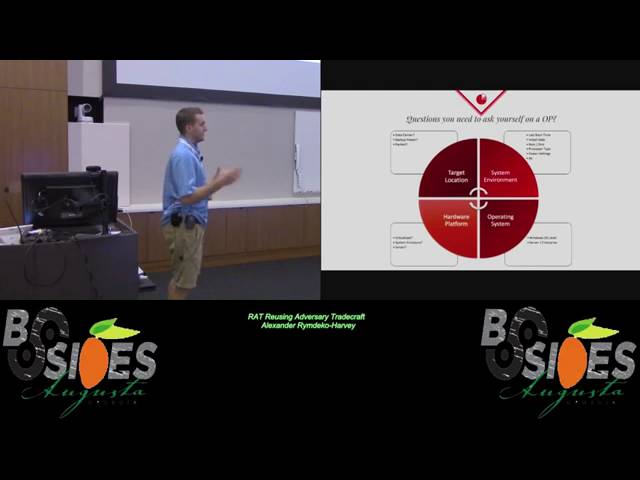
actually built and I'm going to show to you guys but this one actually came in like came in handy so that's kind of cool to actually see something you built have it be used excuse me so some questions you have to ask yourself I kind of broke into four different locations of how or four different segments of how I'd like to analyze the situation one the target location to the system environment hardware platform and operating system minus a target location I'm talking is it in data center is it like a backups power supply those type of things is it hardware is it virtualized or is it a system enclosure is it in a rack server all those things
we can query with women which turns out to be extremely useful and then system environment things that you would like rats have your head like the latest boot time like I want to obviously persist on the box that has the lowest or the oldest boot time and then operating system when it windows OS enterprise server stuff like that so I attack this room a few different angles I knew I had to be a PowerShell so this is kind of like the layout of it and I wonder I know I needed to be able to target specific OU's in a network so in this case I use power view getting a computer and I was able to
basically use that as my starting point to target specific net like server oh you stuff of that sort then I can basically tech check to see if the boxes up obtain all the women objects-- that I needed for properties and then calculate values do a standard deviation wait a calculation off it and then build statistics to see and like visually represent like a network segment for me to pick my location so it's kind of like every other standard powershell script out there has threatening built in so script blocking all that kind of stuff which makes it quite usable because obviously crewing like I don't know if you're a network 20,000 computers i wouldn't suggest running this but you
could I guess and as I talked about before that this is just some tips are like finding a custom owe you for servers or something of the sort and that came out to be really helpful this bottom one with the ldap query so that was helping me find like Windows 2008 servers so as I mentioned before I had a few different sections that I wanted to like go after an attack and I had to build like basically a persistent survivability rating which is pretty cheesy sounding but um I basically had a I knew I had to have like a couple of different properties and they had to be weighted because just because you have a
low boot time doesn't mean that I want to sit there and live there things that like ten percent would be the women's system enclosure I feel like that's quite important versus you know the women oh s class so I took those calculated the huge weighted value of them and was able to build basically a statistic off of each individual computer object and then I could pass that to a vm check and they end a desktop check and I could like split apart the network that way so i could say okay maybe I want to persist on the desktop side versus server side or if I want to persist on VMS versus servers so in certain cases this is like completely
my version of what i feel is important there's no like rhyme or reason specifically for those numbers except for I felt like those were the values that they should be assigned so as I talked about before just some basic calculations cackling the standard deviation and calculate the variance the reason why I use the standard deviation is it gives me a good idea if you know like how the standard deviation goes you basically have an average like baseline in your network so all these computers that are like let's say out of 500 restart like every day and that would be like a certain rating and I can basically pipe that in do a calculator in the variance and then find myself
locations in the network which have higher like outside of those standard deviation zones and those can find me spots where like okay maybe this computer is not part of the gpo policy that restarts every night and I just actually put together a quick demo just for time sake here so we can go ahead and play that fast so I'm just running through some like the the basic commands I'm sorry I think excuse me so I basically set it up to like Mac Sosa to I have a small domain as you can see it builds all the objects passes it through the pipeline like so you could do like raw data processing with it like off the
pipeline of PowerShell which is really nice and then I basically build those values and then I calculate the survivability mean so those are like 3.23 there's not much deviation in these boxes but you could see that they were detectives windows you know those were detected as VMs and and that sort so that kind of was really helpful for me in large data sets this becomes extremely important because querying 500 boxes by hand on a server like in a server like oh you would be really complicated so this makes really easy use easy use of it
okay or not that's not good whoops the second thing we talked about network leveraging so like I talked about before they did use network leveraging for their attacks so why couldn't we as pen testers or red teamers I knew that one thing that made Dooku and a lot of these like advanced pieces of our extremely unique as their modular build they have the ability to load up modules and then run those specific models in certain locations that's why if you ever read like somebody's high like some of the high-level technical reports they generally ask people or the reach out to community like hey if anybody has seen other modules and these ioc's please hit me up so I can analyze them and they
definitely have modules for different attack platforms ad query all that kind of stuff so that was really unique to it and a lot of these war modules inside a Dooku's platform and also the the stiffer portion something that that I thought was really cool was that they had the ability to do like pcap capture and network alteration on the target host which usually requires like a kernel driver things of this sort this will kind of lead us into this this this next section of of network leverage but um and and those types of drivers allow you to do some of the rote injections packet manipulations stuff that you generally can't do on a Windows operating system without the kernel
space execution so there's two options you either have user mode in our case we're actually going to go over both I'm going to cover user mode capture so using windsock two and then that's completely native to two completely native and C++ no external libraries all written so that you don't have to worry about like importing the pack of DLL from from when gap when pcap and then also kernel mode which obviously gives you full full full rights over the entire you know network stack and gives you the ability to do black capture the injection bar interface with end s and and some of the network monitoring that you would like want to see in a full full feature rap
so just like quick cover of how i went about doing this something new to this one's this side is that as i said it's in c++ so we have to have a deployment method my choice was reflective DLL just because of the portability of it it makes for easy integration with other tool sets like cobalt strike just had a question does anybody actually use called strike here ok so we seem to use that we were using a heavy on our team it has the ability to do reflective DLL injection so there's your modularity right there you have the ability to expand a rat without recoding the entire thing so in this case we're going to go
through certain capture building an IPC thread talking to that remote process and we're talking to that reflective DLL injected intimate in them into that process base so you can't just capture the output of that you can't just talk to it once it's like you create that remote thread it's gone it's like shell code injection you basically have no way of talking to it after that's you have to have some type of like IPC communication with it and then building the pcap receiving the actual data filtering it and then obviously writing it to disk so the windsock the windsock process is is a little bit complicated but it's also pretty simple like in the retrospective things finding the
documentation for this stuff is quite complicated though so the cool thing is i put together now all the there's a lot of bullets here and stuff of that sort I wouldn't really worry about those too much they're just more or less very funny wants to come back and reference some of these like actions and why did things you can come back and take a look at you know each step that I went through so the wsa startup which is the windsock application handle you have to obtain basically I'm obtaining 2.2 which is supported from windows 95 all the way up into Windows 10 which makes it cross platform which is amazing if developers for when you're developing attack like
attack platforms and stuff of that sort so once you do that it's kind of like you would see in any other application you create a socket you bind to it and in this case you're only going to grab IP version 4 and above so you're only going to grab layer 3 of the OSI model and above imagine so you're not going to be able to get the ethernet packets and that's a limitation of raw socket in Windows so that's really important to note you're not going to get full pcap and you're going to miss some things but for the most part you're going to get like all your HTTP and ICMP like kind of stuff anything IP protocol and then the
most important part is the WC octal which is actually telling like a call in the colonel telling the wsa application to turn into promiscuous mode and setting that up and that enables you to actually receive the IP version 4 packets that's really cool I didn't know about this before I didn't think it was possible but there's some interesting resources out there that are all spread out you know text documents from like 1995 then you could kind of find these things and then eventually receive just like you would call which is just a blocking function on on obtaining the packet data so then we talked about creating the the IPC thread I chose to go with named pipes because I would be
using them later on in in the development cycle so in this case I use like a language agnostic way of going about it so I create a named pipe and then I can also communicate with those same name pipes in PowerShell so however i get to communicate to that thread i can make it happen it gives you as an operator a lot of choices if it's something that's built into your rat if it's something that is also you know compatible with powershell like there's ways there was tons of ways of going about it so if you're in a restricted environment it makes for easy work and then finally as i said before you're not a lot of the functions all the filtering
all that stuff is negative in c++ and built by hand with custom struck sands of that sort that way it's completely nated you don't have to include the libraries of the Wimpy cap like development package so that makes it really easy for you to go and like take all this conglomerate of code and and like kind of tweak it for what your what your i guess like requirements are so in this case i just an example of like all the a couple of the strokes have put together for for billing the pcap headers and all that kind of stuff oops so and finally how do we deploy this we talked about this before reflective DLL
injection this is like this stuff is really really cool and Stephen fewer I mean the guys I don't know he's like a prodigy I guess it's amazing like to have that type of you know on your name to say that you build that type of like attack attack by form is really cool but so why why reflective DLL some of you might not know what reflective DLL czar it's the ability to load in memory a dll so traditional you have to load these things off a disk like you can't just generally load like a PE there's no call in the windows api like api sector might just a load a dll from memory like it
just doesn't work that way and so you get the basically build a reflective loader so that gives you a really big stealthy advantage that allows you to load the libraries without registering to the peb that process an environmental block and also allows you to hide from like a numeration of the process itself that and it won't yield on the process modules so that kind of gives you in memory stealthy and it allows you to deploy it with ease because you can you don't have to worry about writing this deal out of disk so you you just protected yourself from potentially hips and all these other different antivirus solutions it also allows for that module design that we talked about before DLL
patching all those kind of things are in tons of projects metasploit uses it there's tons of projects i use this but there's the kind of like a basic of how it works you basically obtain a byte array shove it in the memory you read write execute the memory first obviously shove in the code for the dll obtain the offset for the dll export create remote thread in the process this kind of probably reminds you if you've done shell code injection kind of reminds you of something of that sort and then from that point on you basically reflectively load functions that are needed for the thread itself so finding kernel32.dll so that they can call those functions for
the load library and then finally you can execute dlm and here's actually a quick demo of the of it actually taking place and I think this time I'm going to
just got to do that so I don't have to deal with that again so with the reflective DLL package that you peeled and all that comes with inject you see which is awesome so you can basically inject right into itself that's for quick testing in this case I basically just ran the project it started up the pcap started and built debug pee-pee cap at the top powershell is actually talking with that reflective DLL and starting the packet capture at this point I'm basically just capturing some network traffic you can kind of see it grow or it's like 17 kilobytes this point I set in a command to reset so now went back down to zero and you basically
can do all these types of different like post I guess like you wouldn't just want to throw this dll up and then not being able to stop it like you could just have a box just crash itself by running pcap for like entire life of the box being up so that would be a problem like I said that's that's why you have to have some type of thing like this so then right when you're done whatever toolset you'd want to use maybe you like you write a custom encoder to drop this to like a I crossed an encrypted store and that store could be later on decrypted which is what these which Duke who did with
virtual file systems and boom you have full pcap just like you would you would see with with with like a with wireshark the one thing you're missing if you notice is the check sums for the ethernet headers do not match up and that is the only function that I did not get right with crc32 because it requires a secondary function I just haven't gotten to it but if someone wants to help with that that'd be amazing and that is how you do the win pcap
and this is this is really cool this all led to basically driver loading at the end of the day one of the main things that I wanted to do was being able to deploy winpcap and have that ability it in a red team environment to deploy a package that could be all self-contained and actually execute this code so that leading into kind of like why would I want to be going about this well one critical design like we were talking about before Dooku has a ton of platform like capabilities right so they need like these help our capabilities of loading drivers like traditional signed drivers of course you can't get in the kernel mode without having like a sign
driver if you didn't know that so I mean there's still like legitimate functionality but there's different ways of going about it like we're going to cover both there's like a service creation where you can we can use SC to create a driver or you already can gaze NT load driver to get it in the kernel space so we're going to cover both of those and somehow like how this capability can kind of integrate into your red team testing methodology and and finally unsigned drivers this is something like not a lot of people are talking about but it actually just popped up in projects are in and they they actually used a vulnerable driver to get code execution in kernel space
and then was able to move there on sign NP FF driver with the modification driver for wind pickin to into a kernel space and get code execution that way so that's really cool it it shows you that just because you have the latest patches whatever maybe if they get system and they can drop a vulnerable kernel module which getting system is not hard any privilege escalation will get you there and it happens quite often you basically get in a kernel mode without without too much too much of an issue because those those code signing starts are good for that that driver and there's nothing you can do about that point currently with the remote but like how or he could just
revoked a whole driver but then you would break tons of like that compatibility so like I like to start out with every other capability I kind of built like why would I want to do this and I think one it's really cool to have full pack capture and the ability to potentially build like a w pad like a tack platform when reflective DLL and two because you know building like direct replication is pretty cool and so that's kind of why the two methods that we talked about for SE driver loading that's using a service control or manager to basically start and stop the kernel driver and basically you go through a small little set of
events that to make this happen it's not it's not complicated it's easy to implement its dirty though it leaves behind a lot of artifacts it's a service creation it's registry edits it's everything that happens from the time of loading and also requires like it requires you to basically drop your your path known to to the service controller so like if somebody were to look at it and see like you know evil drive it out assistant or whatever they're going to know that it's basically loaded and then finally the NT load load driver which is an undocumented windows functionality which actually is being used by su driver loading to in to load that driver from user space into kernel memory and
this allows for the full n desk like application that we were been talking about with winpcap so how do I go about building the SE driver the building nests key driver version first the first thing I had to do was obviously I had to come up with a way to weaponizing it we talked about reflective DLL so I just kept put this through the entire talk weaponize it wrapped into a reflective DLL it basically decodes a large base64 char array and drops the required files the disc opens se manager creates the service deletes the service starts the application that's required for whatever p Kapoor use Remote application you're going to run and then cleans up after
itself so just like a little background knowledge on when winpcap what's actually happening there's quite a bit of layers of abstraction of taking place to get you into that point where you're actually going to be interacting with the kernel as you like i said the packets are coming in house abstract it sdio interface between the nic driver then the nds interface itself which is like the networking portion of this of the stack basically talks with nds protocol drivers which interfaces with the upper edge of kernel space which is the npf driver and then from there you have to require to have two different dll's that are in on disk in the system32 path which are packing
dll and WP cap dll packet dll does all your driver communications and then WP cap abstracts all those with API calls for easy application code execution something interesting is it's quite complicated as in every single OS has a different type of DLL and different type of driver depending on architecture so if you actually go and extractor MSI package at does the Installer you can tell there's five different DLLs for packet WV cap has two three different drivers so I've only tested on x86 710 and 64 so those are the required ones just for the matrix if someone to fill in the rest and go do the testing that'd be great there's probably a lot of
operating systems that need to be tested and and figuring out which ones are dropped as for the service creation as I said before not all of its relevant particularly to you but if you ever want to go write reimplement this is the kind of stuff you need you need to be able to open the SE manager with all access giving full privileges to the SE manager you need to basically create a service you need to have sent as a service kernel driver and then you basically need to have it on start demand which is manual start you can basically set it up to start the service control the service so you're basically sending in a stop
signal and then finally deleting the service and this is actually the demo
so first thing I do check for EM PFF NP of F driver not loaded yet we're going to actually go ahead and I built these three applications that basically do like an interface listing using the wind pcap libraries all compile it all set up for you so if you want the visual studio packages or they all they're easy to use and easy to deploy so I'm basically going to set it up as ms colonel service I'm going to go ahead and inject that in that deep reflective DLL and and try to get those those three the driver setup and the two DLLs drop the disc so once I know I'm good from the debug messages
which you can just remove if you wanted to obviously probably leave them in there I'm going to go ahead and do a driver query to make sure that it's actually been loaded and at their correct name so even though its network Packard filtering driver I basically you can set the service query as a different name so it sets the register Keys as though so it kind of gives you a little bit of a little bit of ease their setting those up which is kind of nice you can just name whatever you want to that way if something is actually doing driver monitoring they would see that instead at this point I'm basically going to get the interface once i have
the interface do it for that i'm going to send it to the packet dump which is just actually a built-in example package that you can get with the wimpy cap driver collection and send it the the device and actually collect right from the box
and that's from going from no driver to obviously full pack capture which is I think is pretty cool
and finally the NT driver driver loading with the reflective DLL as well so this one's a little bit different you're actually calling undocumented functionality this one took quite a bit to get right and there's just not a lot of resources out there obviously it's on document it's not supposed to be used this way these are functions that are being called on the back end that you generally as a like operating with the win32 subsystem would not be able to call so the first thing I had to do was basically enable privileges if anybody has ever looked at like malware the first thing it probably does is sets up like every privilege it could possibly imagine just runs those like se debug
privilege is probably the first one just so you can do process injection all that kind of stuff so i basically need SED driver low privileges i need to go ahead and write the register keys that we talked about actually fine NT dll get the handle to it run the command and then finally unload the driver with the same exact the function so this is kind of like a step-by-step the code is is not too complicated but the first thing you're gonna do is enable this privileges like I talked about you obviously you're doing it locally to the process that you're in so you just open handle to your process you you obtain that the the process token you adjust
the token privilege and then you send it the privilege that you want to to load up so once you obtain that and you're going to go you have the right like admin rights on the boxes they're all high context obviously you create the registry keys that you're required for the services the system past system type service start and the error control which are just D word values and a bin path basically that you would pass to a service creation the service creation manager and then you actually go down to the next step which is loading the driver the first thing you have to do is you can't just include the NGF well I think some there's like one example out
there that does it like none of these the other examples on the internet right now compile like you can't find an example that compiles with actually doing this function so what I found out is you have to actually get the module handle for NT dll then you have to get the process the proc address which our point tuenti unload NT load on load and the Unicode string then you pass the the sub key that you just created to the Unicode function which then gives you a pointer to a char array of your your actual you're like you're stringed path and then you can pass that the NT load driver which then loads the driver and
returns an NT status of 0 if complete and if it doesn't it passes some numbers that I have no idea what they do probably will never figure it out here
so as I talked about before there's some of the code I'm going to be loading it as evil driver just so just so you kind of have an idea of the registry key and creating going to go ahead and use the same exact method that we use before which is the service creation to sorry the inject dll for weapon weaponization
once the the driver is loaded as you can see basically I'm just going to equip driver for you to make sure the driver actually made it into in into the kernel mode I'm just going to quickly search for just just to prove that actually worked nothing too fancy happening here and then obviously once you have this all set up you can go at about the same exact way as you would be for with with anything else so that you could you on the pcap or whatever you need to do so this could be an individual module that does the just the loading of the driver and then you can reflectively injection our driver that does all the pcap stuff
so that's the NT loader method and that is all gonna all this is gonna be open source so if you want to go check it out use it for Kate whatever you got to do and it's all already pre pre built with the reflective DLL project so everything is almost near weaponization ready and think we're getting close last ten minutes here and finally apt 29 so as the last built the last group we're going to be looking at they have a unique basically a unique set of skills that's that's pretty cool there's been a lot of research on these guys and they have some crazy stuff out there if you've ever read like hammer toss and
some of the methods that they use the dulce to is just crazy they'll use anything anything and everything which make them really hard to hunt down so what makes them kind of special one Winnie if you've ever read anything about them they utilize women heavy and as somebody that's been getting deeper and deeper into internals I want to like replicate some of that ability with C++ which like you probably think it's pretty daunting and it absolutely is like something in powershell it's extremely as you get with me object and their rock and rolling and and with with with that in mind they use a lot of PowerShell so it makes sense for them to use a lot of women it's easy to
integrate you shell the script I've built before yes it's big a lot of prot of objects but it's easy to use like the return types are easy to pass properties the pipeline that makes like life so easy and then finally the most scuze me the knowns about them they had it had people talked about it before Mandaeans talk on on like basically hunting these guys down is insane if you haven't watched it's like from shmoocon i got to see it live is really cool and then obviously Matt graver has and some of his buddies have talked on why am I so sexy so definitely good talks if you haven't looked at them like kind of like
deep you're diving into many operations themself and then persistence not agent persistence not like where I'm going to store but these guys are well equipped and they're producing samples by the day like if you r it like a listen this talk it's inspiring like these guys are generating 10 samples like a week pretty much and one of them is completely different than the rest of them so as you can imagine the re efforts to like figure these guys out figure out where they are and like get rid of these guys on your network is insane and then finally agent development which is something I'm going to move into next in something that they do well multiply
Oh Sees make it really hard to hunt them down and it makes them be able to persist in a network long term if you're only rat is a cobalt strike and that's all you have developed once it's burnt you're burnt it's done but if you're using like backup agents just like you would think see to structure if you're going to build see to structure for your command and control you're going to have a initial fishing access server a operational server and then a long term or a long haul server for your backup they do the same thing with their malware so I wanted to build like a long term agent it's it's really POC at the
moment but it has a lot of really cool stuff in it that think that people would love to see and have examples on some of stuff out there like there's some code out there but I have it all in one good place for anybody to take a look at it basically the entire Asian itself is built the shells bill it's in C++ in memory logging off you see a shin of all the strings standard calls for everything you'd like want to see an age and like sleeping jitter all those basic stuff vm detection AV detection so i'm using WHMIS i'm using the standard API calls and process listings shell commands the whole shebang everything you'd want in the standard agent and
then since it's a long term agent the only thing I really needed was some method of getting secondary code access or code execution so I built in full show Khalid ejection and process injection with the token manipulation stuff so if you actually wanted to go look at this code and have like you know like see actual running code it's all there there's a lot of this stuff like you can get a peek into it like hacking team dump and stuff they have some dumps out there someone might be complicated a lot of the comments are all in like you know french or wherever like you know there's tons of different languages like you're operating on that that code base
and eventually the coolest part will be monitoring which is something that the defense of the defensive side is using heavy service creation process creation and driver loading so why should I care about those type of things if you're a hyundai our guy like that's like bread and butter right now the ability to go and detect these kind of things are our priceless you know things like uproot which is built by Jared action I got caught on an OP like a training up with that and with my pants down so it sucks when you get caught by these types of things but it makes you like think as like an attacker what can i do to dislike to
text them doing this back to me so think about how you capture memory from a compromise machine that you as like an IR guy we're gonna bring over USB stick with memorize on from and Ian you're going to plug that thing in you're going to get a kernel mode dumped onto the USB stick and you're going to take it back but when you plug that in you have you have some risk that you're obtaining like you're plugging USB Drive in your potentially you have to load a lower kernel module or a kernel driver into kernel space to get that kernel memory dump so as an operator these things you need to think of and all those kind of
things lead into like service creation like silence if you read the OPM reports they got if they were to detect the service creation of silence being created or installed on the system's maybe those maybe big hackers and opium would not have gotten caught just thought like you know because they got call it the corner of the port by kishore blogging and eventually like driver creation all those have things that you want to see so i don't have much time so i'm going to pound through this basically the core agent has three different threads that do all the collection pushes it into a monitoring thread which it has a JSON array of vector of JSON array rules better then
basically have like agent panic modes that are set so here is actually a rule creation taking place that on the side left side you have an actual JSON rule like detecting let's say Wireshark exe or the executable path has Wireshark in it and then it has panic settings for sleep exit the agent true and report the trigger obviously if you could call it by fire shot Wireshark you'd probably want to stop all like communications so I had false so all those type of like granular things you can set up and then you eventually have a rule trigger handler which then handles like zeroing out the agent cleaning your heap and doing things like that so that if you
get caught and you do have they don't know how like one thing that as memory is like analyst you want to know how far they got right so if they have my memory logging outlet and they can detect it well they might just know everything I got that I did but if I can get rid of that first and they got my agent not too big of a deal and then finally here's a here's actually a process creation event taking place on the command line a service creation event as you can see like this is the pathname of creating a windows system32 cmd.exe service that would spawn a spawn a service at a given time
and then finally I'll rule triggered which actually is inside the agent so I'm just going to do a quick demo on this I think I have enough time I'm really close but I think it's about a minute or two so I have a POC handler anybody knows anything about the Empire side i'll actually be trying to integrate this with Empire eventually or the universal control will be coming out soon and this will give me the ability to actually like use this on a usability scale like like right now it has all the core agents bill everything's there as you can see actually just received a command to do a run a shell command which was a derp and the other side it's
just receiving out but so anything like you would see on a normal like agent handler you have that ability it's all there for you using the cryptic illogical api's that are building the windows all the encryption basics before it's all built there it just needs the the core orchestrator handler now um right there you just kind of cool an example of the process monitoring taking place inside the agent itself and it's just kind of set up to print to the screen right now just for for you know aesthetics so you can see the task list HC prop executed and then also with the command line arguments the process name the event type where it came from the
path all that type of stuff so you got really granular activity here's a service creation and we talked about before it's on it's an event filter set for like every second so basically I can receive all that stuff for service creation all that all the fancy stuff and this allows me to do that type of post-processing of the actual I are functions taking place on the box and respond accordingly it gives the Asian itself it gives it leverage the to the operator that they could not do situational awareness and give it like at twelve o'clock at night so things that like you would generally do your safety checks when you get on a box you
might not be able to do at twelve o'clock at night or that might be sleeping for a day at a time that aging that agent has to have capability in the back end to survive and this is kind of what I built so in that case it monitored a Wireshark being and it triggered an execution and it basically exited the agent and that is the women monitoring agent and finally the last slides you take aways all the techniques talked about or kind of like they're used and you know they've been talked about their documented some of them are well documents of them or not hopefully the mass amount of C++ and powershell could have put together helps
somebody all of them are written in Visual Studio 2015 on a Windows 10 updated image and all compile perfectly that's like I don't think like if you were to go looking for some of this stuff getting something that we compile is literally the hardest thing you can imagine like it's insane like unless you're looking at some forms from like the 90s that's about it some of the key takeaways obviously the techniques and the GT PS are awesome really awesome to kind of integrate kind of show off you know some of like the team's Perales and all that kind of stuff so I think I think overall it was a great experience I got to learn a lot about coding got to
learn a lot on a low-level operational level that stuff that has an operator you can debug issues even if you have like a paid tool set and finally all the code is going to be open sourced and they can be all found on my github at kill switch attack GUI with this basically just a list of somebody wants to take a look at them later any questions
yeah no questions okay thank you
Related talks
 51:37
51:37 30:27
30:27 55:35
55:35 51:32
51:32 41:33
41:33 51:33
51:33