BotProbe - botnet traffic capture using IPFIX
Show original YouTube description
Show transcript [en]
good afternoon everybody I'm told that there's nobody someone comes in and introduces us but there's no one here so I'll introduce myself I'm mark Graham I'm a lecturer from Anglia Ruskin University in Cambridge yes there is two universities in Cambridge the other one you've probably not heard of so we won't talk about them so my day job is I teach information security but angry we also do some research into threat detection so I want to talk to you about that today um hopefully this looks ok I'm seeing a little bit of a weird font effect here but hope for you guys are ok so fingers crossed the fonts won't go halfway through the presentation if they do
we'll worry about that maybe it's because I'm so close that I'm seeing a little bit of a funny font going on ok so what I wanted to do today is talk to you a little bit about bot probe now bot probe started off as my PhD project to detect botnet communication traffic specifically within network traffic but post PhD bot probe has gone on to become a way a way of tackling the big data challenge in threat detection so I'll start off talking a little bit about what Pro and then will then become we'll end the presentation talking a little bit about the other things that that we're starting to do in our research so just very quickly so we're going to talk
about I'm going to give you a very brief background to my PhD it doesn't really make a huge difference to the talk but it's nice to have a little bit of context then I'm going to give you a beginner's guide to IP fix who knows what IP fixes ok good it's more than I thought I was expecting absolutely nobody who knows what NetFlow is ok good ok all right so we'll talk a little bit about the two then we'll talk about what we found from or what some of the research that we've been doing but particularly in my PhD and then for this last bit what do they sought me and I'm gonna hand over to my
colleague here Adrian winkles also another lecturer from Anglia Ruskin University and agents that agers going to take us through some of the kind of next steps that we're doing in our research so as I said just a real quick background to my PhD it's not critical to the presentation but it's nice for you guys just to know a little bit about why we started to do this so my PhD was called a botnet needle in the virtual haystack so what we were doing we were trying to come up with wanted to do something with botnet detection and there are absolutely hundreds of botnet detection algorithms out there so right and most of them are absolutely superb
algorithm so rather than work on a new algorithm to detect botnets we thought is there something we can do about the actual capture process itself so we came up with a mechanism to capture botnet communication traffic so this is the traffic where but everyone knows what a botnet is I'm hoping you probably shouldn't be here if you don't but everyone everyone knows what a botnet is okay so we're looking at trying to capture the traffic between a C&C and the bot or between a bot and another bot or so we're talking about update traffic we're talking about downloads once the botnets done it stuff that kind of thing ok and we wanted to give ourselves an
environment to do that in so if we do that in the Internet there's a lot of a lot of good solutions out there that look at DNS record analysis and black holing so the Internet's kind of been done so we thought well why don't we try and do this on net on a network so the example that we set ourselves was a cloud service provider ok I'm not going to get caught up in whether it's IIAs SSIS it doesn't a generic cloud provider wire cloud provider wire cloud provider network will clearly care providers of staff has become the building block for the Internet of Things because we can centralize the storage they make an ideal platform for for central storage
for remote devices but we're also starting to see a lot of in devices offload their intelligence to the Internet as well so where we had expensive home routers expensive Internet of Things devices by offloading their intelligence to the cloud we can start to reduce the the cost of that device so the cloud platform is is only going to become a bigger target we've already seen over the last 10 or 15 years cloud posters or service providers actually sting botnets because the cloud makes an ideal breeding ground for BOTS if you put in a C&C and it gets taken down you just spin up another virtual machine with a new C&C in it so it's an ideal
hosting platform for it for cloud but also he gave us two really interesting build environments one was the the cloud service providers absolutely work on tenant isolation so I could have all my services on one server and I could be sharing that all those are the same server with my competition or with a adversary and it's also about date data privacy so can we go and stick a some kind of probe in a tenant environment probably not because the tenants gonna say what are you actually looking for okay so it gave us two nice areas too as a challenge for the PhD but also we're seeing a lot of vulnerabilities in hypervisors that means that malware now
can jump in and out of virtual machines to attack the infrastructure of cloud providers so that gave us our scenario if you like for why we wanted to do this so we're looking for a way to capture malware botnet traffic so the most obvious way of doing this would be something like packet capture pcap we've all used Wireshark we all know what Wireshark does and how it works so in this particular example here where I've got two pcs on two separate core switches traffic from PCA to PCB is probably going to go for the core switch so with Wireshark we'll pick that up if I had to sweet to two PC's both on the same edge switch if the switch is doing
its job properly it shouldn't touch the core switch so that means why sharks not going to see any of that traffic so what do we do we've got something like mirroring will span if we were talking in Cisco parlance so mirroring we take an exact copy of every single packet and send that over hopefully over some kind of VLAN some kind of management VLAN to third party probe so we can get visibility if we've got if we've got smearing ports on each one of our switches we can get visibility of the full network we may have a remote site that we're also monitoring and at some point we're collecting all that information and probably sending it
through the internet maybe to a third party managed sock it might be in-house it might be third party but all this data that we're going to capture all this mirrored data we are going to send it somewhere for analysis otherwise it's probably not much point actually in our analyzing in the first place so for us that gave us three kind of drawbacks with this one through this scenario mirroring port does exactly that it mirrors the traffic when it comes in so that means effectively I'm doubling the traffic going across my network okay maybe I'm doing some compression in my span VLAN but effectively you know there's a lot more traffic going on there on the network
because of the port mirroring so if I've got for example a one gigabit switch here maybe maybe linking into a 10 gig network we're talking gigabits per second so over a day of capturing pcap especially if I've got a big network I'm going to end up with terabytes of data ok and I've got to do something with that I could throw it all away or I could store or I could analyze it okay so mirroring is if not doubling it's certainly increasing the amount of bandwidth from my network secondly it assumes that all the devices actually have some support for mirroring if I've got a cheap IOT hub without a bunch of IOT devices off off of it probably isn't
going to support mirroring and be lucky for them if when we talk about industrial control systems we're lucky if they're managed let alone mirrored so we can't assume that we can do mirroring on every single switch and then the third big issue for me in doing it this way is with this terabyte of day or terabytes of data that we're capturing at some point we've got to send this to be analyzed somewhere so that could be one hell of a lot of traffic going somewhere so what are the alternatives we so so so we've said pcap has these drawbacks what can we use instead of pcap so a very very quick history lesson hopefully this
is not new to anybody but it sets the scene for what we're going to talk about so back in the 80s I'm reliably informed the SNMP was kind of a de facto standard for network management so with SNMP we'd have some kind of proprietary myth in a device an SNMP would pull that nib every X number of minutes you decide how often it pulls it and it would poll that device and ask that device has anything changed so we're looking for mainly up and down of it is a device there is it still working yes or no and there may be a little bit of management device from the management information from that now the problem with SMP is that it doesn't
really give you a huge amount of information so if you wanted more granular information what you would probably do is use syslog alongside it's now a problem with syslog syslog isn't structured so that means that you've got an analytic there data into some kind of structure before you can analyze him so to get around this the ietf back in 1991 proposed a method of packet aggregation and this was for internet accountancy accounting and it was looking at ways to try and improve them network management and the statistics that we were getting from network management 1993 they disbanded that because of the lack of interest in 1996 cisco patented something that you all know because nearly everyone put their hand up
NetFlow so i probably don't need to do this slide because you will know about net flow so the way that net flow works is if I have 10 streams of data and they've all got a similar tuple so in this example I'm using the five flow five field flow tuple of source address destination IP address source port destination port and protocol so if I have ten flows and they all match the same 5qi pools I advocate that into one flow so effectively where those those ten individual flows could be a Meg each there now aggregated into one Meg okay so we're seeing a way of reducing the traffic on the network reducing the bandwidth of them of the monitoring
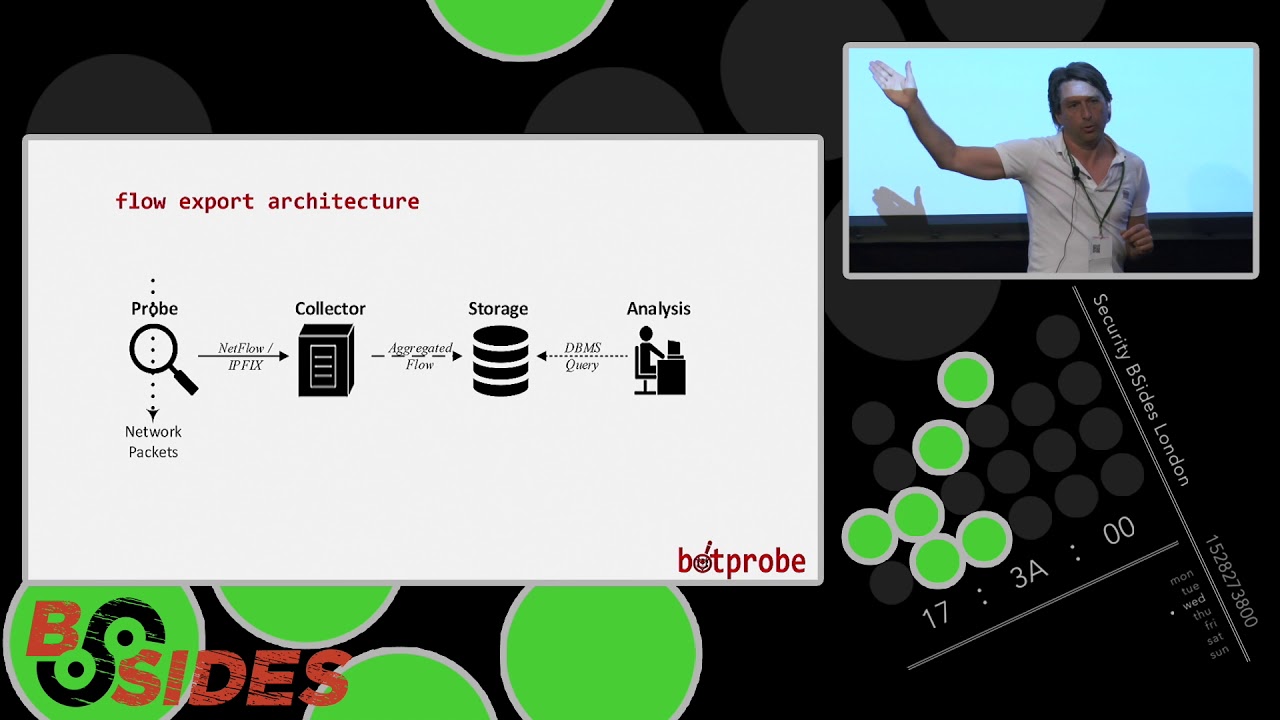
traffic so this is mainly used for almost exclusively used for network management so the way I kind of look at it is if if pcap if packet capture is the full phone call the content of the phone call net flow is like the phone bill so who called who and when so with pcap we're getting the header and the packet with net flow we are just pulling out a bunch of attributes from the header only we're discarding the packet how does this work I have a stream of network packets I have a probe now this probe isn't the mirroring port it's a tap port okay so that's the first to put important difference between pcap so because it's
a tap port we're only pulling out the information from the packets that we need we're not mirroring the packet completely and resetting the packet the probe will then send it the infirm that in from that flow information via net flow or IP fix whichever protocol you're using to to a collector collector probably hopefully then does some aggregation saying there's a storage and then you query that okay now we're already seeing reduction in traffic by or a reduction in traffic volume by pulling out the network statistics that we're looking for if this is a good probe doesn't happen so much with net flow but certainly with IP fix the probe itself will do the aggregation before it sends
it to the storage device net flow some versions of net flow will aggregate on the probe some of them will send everything to the probe to the collector and let the collector do the aggregation but a good probe should again reduce the traffic even further for us because it's doing the aggregation for us so back to a history lesson 1996 Cisco patented net flow net flows one two three and four not a great deal happened with them the first commercial version was net flow version 5 in 2002 now as I said net flow was designed for network management and don't get me wrong I'm not saying there's anything wrong with net flow for network management it is a great
protocol as I'm sure a lot of you of are using it you find that it does what it wasn't for net firfer never management so we look to try to apply that to threat detection and we soon found that there were some limitations when we tried to take net flow out of its kind of core design area now if we take an fo version 5 for example which is tends to be the most common version with net flow version 5 there's probably a read a report a year or so ago said about 97% of network devices now support net flow version 5 so it's pretty evic wa tiss now the issue with that flow version 5
is it captures 50 that captures 18 fields ok so we saw some of those fields earlier source IP destination source port destination etc etc because it's network management it also captures things like input/output ports autonomous system numbers type of service that kind of thing which is great for network management for threat detection probably we don't care about a lot of that so there's been some research done or said that actually out of the 18 fields that net flow 5 captures only about 10 of those are any good for threat detection so with NAT flow 5 we're capturing 18 fields regardless of whether we're going to use them or not so we we're capturing type of service we might not care about type
of service but we're going to capture that every single time now net flow 5 packets itself is 48 bytes long as I sound like a very big packet if we're capturing thousands and thousands and thousands of these we're soon going to start to add up ok bear in mind that it's 48 bytes of which we're using probably 80% of the information so we have this fixed field fixed 18 field that we cannot change how we're capturing those we're taking those whether we want them or not NetFlow 5 again because it's network management information is header information only we can't use anything from the packet we're talking about layer 3 statistics and we limited to that it's also UDP only which is good
because it's fast but then we lose anything like reliability replay and all the good stuff associated with other protocols and the thing with net flow 5 is it doesn't support some of the more common networking topologies especially the topologies we were looking at in cloud service provider so there's limited support for MPLS ipv6 MAC addresses etc etc and what you tend to find in because going back to the previous slide about about these probes if these probes NetFlow probes aren't doing the aggregation then then they cannot physically keep up with with with with capturing the traffic they tend to kind of limit the net flow to about 1 in 50 sampling okay so we're picking out
one in every 50 packets again for network management that's probably ok because we're looking for usage statistics or maybe billing information for threat detection one in 50 samples we know if if our botnet traffic is in one of those 49 we've missed it okay so there are some limitations with net flow version 9 if there's anyone from Cisco in the room which hopefully there isn't but if there is they will tell us that net flow version 9 gets around all of these yes it does the problem with net flow version line is its proprietary all of net flow is proprietary so if I have a Cisco switch and I have a juniper switch they may or
may not be collecting the same information so we've looked at pcap we've looked at net flow where else can we go so onto IP fix so 2013 IPP ITF standardized IP fix as the standard for flow export under RFC 7:01 one through to RFC 715 i've got here in italic in in bold italics IP fix is a flow export protocol in its own right a lot of people when you mention IP fix they say oh that's just let flow version 9 or net flow version 10 IP fix was taker used net flow version 9 as a building block but the whole point of IP fix was to address some of these issues that we've seen with net flow and that flow IP fix
10 was designed from the ground up so that meant things like security were designed into it where we don't have some security features in net flow so for going back to our cloud service provider detection system one of the biggest things about IP fix for me was its vendor-neutral okay so that means if I'm running IP fix off a Cisco switch an IP fix off a juniper switch this should caveat should if they're a barring the standards talk to each other now the other thing about IP fix and in to some extent NetFlow version 9 is something called template extensibility so all I mentioned earlier that NetFlow version 5 is 18 fixed fields you cannot
change those fields ok so you know going back to what I've said to you a few times already only 10 of those fuels are any use to us NetFlow version 9 introduced the idea of using a template so that meant that I could take away those 18 fields and put something in there that might be useful for me to actually capture now if you're talking about Cisco's version of NetFlow version 9 sorry if you're talking about the regular notice I didn't say standard because it wasn't standardized the regular version of NetFlow version 9 at 79 fields so we took those those layer 3 fields that we talked about and we added another 80 odd lay a three fields to those Cisco's
version of course because it's cisco had 104 version 104 fields IP fix also does template extensibility yet has a hundred and forty-four fields now all these fields are standardized so again if i'm using field number one in my template on a Cisco switch field number one on a Juniper switch should be exactly the same thing so that's a big thing because we're going back to this vendor neutrality with NetFlow we just don't have that if I get a net fo9 template with field one capturing field one might be IP address on a June on a Cisco switch on a Juniper switch that could be port number so when I'm taking all this data and I've got to sort that data
before I can actually do anything with it now if a hundred and so these 144 information elements are used to make up a template so I can have a template that's anything from one field to as many fields as I want it I've had a template collecting about 100 fields before these 104 these 433 are not just layer three they're also layers layers three through to seven so I can start capturing stuff like in the case of a botnet detection system HTTP information which I cannot do that with an airflow now if these 144 information elements aren't enough for you and there's something else that you want to capture you can create your own enterprise
element so that is a bespoke field to me that I can public I can send that information to IANA and they will look at standardizing that field so if I want you to capture something like a a piece of cookie information and I wanted that in my in my template but it wasn't one of the standardized fields Ayana would look at standardizing that so that so again Cisco IP fix would use the same as juniper would use the same eccentric setter center so we've got this flexibility now so we've got two things now we've got this vendor neutrality and we've got this flexibility to create our own templates and capture what we want to capture and in effect we
capture any field you like within the packet so if it doesn't exist we create our own and also as I said IP fix was was developed to address some of the security issues in NetFlow so we've got security by design so that means the traffic is encrypted when it's being sent over the network it's not with NetFlow not all NetFlow Cisco's Cisco's does we've got things like replay protection and good stuff like that that you would expect in a modern protocol and of course it supports a whole bunch of of features that we wanted for our for our system so so it looks like IP fix is going to give us a lot more flexibility
compared to simply NetFlow but the main reason here that the main difference for me between IP fix and NetFlow is NetFlow was designed for network management IP fix was designed for threat detection so that's why we're seeing these added advantages okay so what did we actually do so in my PhD I looked at something like 25 million botnet flows and I did some very rudimentary machine learning to pick out from those flows what are the most common attributes used by botnets and I came up with this I think it's a nineteen field IP fix template so we had the the five field the don't if you can see that the back with the fire the five tuples that we discussed
earlier so source address destination IP address source port and protocol we then had some other interesting things like TCP flags but we also were able to because we were because I looked at in my 225 million botnet flows there were different types of 30 different botnet families I looked at irce botnet so I looked at HTT botnets and spam botnets as well we we came up with a bunch of application or layer seven fields in our template as well so both so so what we're saying here is this templates would allow you to capture it's not about botnet detection I'm not saying we've come up with an algorithm to say you have a botnet or not we are saying
this is the important information that you need which will then go on to an algorithm to say whether the whether the traffic is malicious or not okay so the important thing for me to the takeaway from this is we've got 19 fields here versus NetFlow 5 which has 18 fields we've increased the field NetFlow 5 is 48 bytes if we ignore these fields for the moment because these are variable my standard template is 43 bytes so I'm now capturing more useful stuff stuff in inverted commas for a smaller packet size and the interesting thing with IP fix is if there isn't any IRC text message information in the flow it just doesn't fill it in it doesn't
pad it it just doesn't fill it in so if there's no traffic I'm still keeping that 43 byte field if there's traffic coming in but I'm the packet gets bigger to cope for that so this curses NetFlow version 5 to me we're starting to make a big difference in terms of actually doing the capture piece making the capture more efficient so what does all this mean who cares what this graph is showing is on average and I've got some more figures in us in a moment on average versus pcap we we are able to reduce the amount of traffic that you need to capture by 97% what does that mean so I took a Peter this is
one example of a hundred Meg pcap with a malware stream in it I run it through across the network replayed it across the network captured it in pcap I then wrote a piece of Python code to download that pcap and analyze that pcap I think I've looked for one or two just like IP address and a few bits and pieces to say whether I thought it was a botnet or not so the hundred Meg pcap once I've captured it it was 100 Meg once I've captured it it took me almost three minutes to load and analyze okay something in the arbitrary analyst there's nothing special but I was looking for one or two pointers that
might suggest it's about that with my IP fix template that hundred Meg had gone down to three Meg bear in mind we still got the same traffic we just got rid of the traffic that we don't want so I've gone 100 makes a three Meg and those three minutes to load and analyze was now 0.2 seconds which to me maybe gives you the significant advantage when it comes to detection okay so this was just an example we did this with many different flows and we found on average around about a 97% reduction in data volumes now what this is showing is because I pee fix is structured and my template is going to have the same
structure every single time it means I can very easily put that information to something like a graph database and start graphing the communications rather than unstructured data which first will I need to saw then put into some sort of order and then upload to the database so this is an example that we did we put Zeus on the network okay Zeus is a little bit old but it does the job so we put Zeus on the network we had bot probe capturing the traffic and this is showing Zeus doing some sniffing just this has taken us through the four different life cycles of the Zeus malware so this is Zeus enumerate in the network this is an infection going on so
Zeus in one one one is infecting one one three and one month three is sending some information back to say yes I'm now a bot this is a maintenance so this could be just a her live packet or an update packet and then this one is an attack okay so what we're seeing here is where the traffic is going so from in this case the maintenance is coming from one month three back to our command and control center but this size of the packet of size of the arrow is also showing us the size of the the traffic so here we've got the commander control center sending an HTTP packet to the bots to tell them to attack and the
bots are sending a 5,000 ping packets to one to five so we're actually getting some granularity as well beyond and above just the layer three information so we were able to see with bot probe we were able to capture the four different phases of a botnet attack so well this is shown again I'm sorry it's a little bit small you may not may not be there to see this in the back but from my literature review I found that there were 30 significant botnet detection algorithms out there there are many more than that but a lot of them are not as good as the others okay so we had 30 of these botnet experiments so this is this
table is actually 30 along so this is showing the detection algorithm going right back from 2014 and what we can see from this table is that a lot of these algorithms use NetFlow version 5 to capture some basic statistics but where they need non NetFlow version 5 attributes they use pcap so not only are they using NetFlow and getting a net foe traffic they're augmenting that with pcap on top of it so we're getting loads and loads and loads more traffic on top of that so we repeated or we built templates for all of these 30 experiments and we were able to demonstrate that we could repeat each one of these experiments with IP fix
capturing again about 97% less traffic but more importantly because of the template extensibility because we could create our own fields if they didn't didn't exist we didn't need to change the algorithms here so these algorithms could be the best algorithm in best algorithms in the world we can use those algorithms we're just looking at though to capture information that week at the the network attributes that we put into the algorithm doubt the algorithms themselves we were able to produce all the attributes that these that these needed so hopefully this showed that all previous experiments which tended to use NetFlow 5 and/or pcap I think 2 used IP fix version 9 and none had used I'm
sorry NetFlow version 9 and none of these two IP fix in the past that we were able to show that we could replicate all of those with IP fix so my last slide before I pass on to Adriene I just wanted to summarize the difference between pcap and IP fix and why I think IP fix is is hopefully going to become the future of export export so pcap is an inline tap which means we are not getting the the mirroring information we're not mirroring the traffic we're not getting this redundancy in in additional packets across the network IP fix is a software probe which means I can deploy on any device at the moment if we wants that flow that device has to
support a net flow and be able to send net flow itself we've got the good old stuff around security encryption protection everything that would expect in today's environment it's structured versus very much unstructured pcap so I am able to feed Nonie can I collect my data quicker I can feed it a lot easier and unlockable quickly into some kind of analysis and engine maybe most importantly we're now talking megabits a set of terabytes of information and whilst pcap is the full packet we are able to put to pick and choose what attributes we want between layer 3 and less ever ok so hopefully that's giving you an exact an idea of what I did for
my PhD Adrienne is now going to come and talk a little bit more about where we're going with this work okay so although the initial work was on bob was on botnets there's a number of our areas that we think we can apply IP fixed oh we have some rudimentary names about some other types of template that we would like to deploy we've got a case study where we're trying to look at SMTP capture for spam generation for example within campus organization environments we've got the customer that was looking at us wanted to run a template for HTTP so deploying IP fix on the edge of a load balancer is up for example to look
at some of the HTTP fields that might not be picked up by a Web Application Firewall for example there are applications we believe in the Internet of Things whether it be in home hub environment or in industrial Internet of Things and particularly within industrial control systems in Scala type environments we're thinking that in those environments were very old technology maybe we could have templates that will pick up any deviations in abnormal writes or abnormal reads our installed environments the important thing is as Mark has already said is that if a template attribute does not exist we can write our own so we can make up templates to do this capture what we're reticular interested in is if
other people want case studies investigating we'd like to extend our research projects to write more templates to capture data in these environments and show that and show the ability to use IP fix to its full potential
so mark briefly mentioned that the collector the exporter side of IP fix is a very small software footprint what was honest only studies we could put an IP fix exporter on to small end devices it's a small footprint to go on in devices it could go on a ot sensors IOT hubs we could put it into ICS devices or small device within the ICS environment potentially we could put an IP fix exporter onto an ASIC basser direction we'd like to go but the footprint is very small because it is effectively an open standard we can write our own exporters you could open source the idea there's a lot there's lots of potential in this area essentially you can make software
probes you can increase the endpoint protection because you now have more flexibility where you can put probes you can have increased visibility and that goes hand-in-hand with the idea of this lower capture volumes we've already talked about a 97% reduction in data volumes we can now target the data we want in a whole number of areas one question that we're off glass is ok so you've created the template but threats don't stay the same threats change you need to be you need to be able to adapt what you're capturing an area of work with doing something we'll call adapt to capture through sort of machine learning genetic algorithms what we're intending is a real-time template so we can adapt on
the fly if you like one of the things that would like to do is okay let's say we're capturing in this case a B and E but some new form of threat detection information comes in some external stimuli says actually the threat has changed slightly now we want to change our template we want to capture a and D instead of a B and E so we can change the template on the fly the template does not remain static you can change it in response to your changing threat detection needs which is applying to machine learning to make that intelligent
another aspect when we're talking about threat detection we'll talk about typically three phases we talk about the actual infection you talk about when that detection so when that infection is detected and the organization's response to it now Gartner have made no bones about the fact that the average time to detect a cyberattack is 205 days we believe that we can use IP fix infect detection to narrow that down please remember the cost of a cyber attack is reputational it's not just financial that period of time between the infection and detection is the longest what we are saying is we can reduce that infection to detection time because when target what we're looking for essentially one of the minds
of things were looking for is looking at the whole area of network big data and reducing it so we know what we can target so if you imagine this is Network big data somewhere in there it's the threat that we're looking for it's obscured there's too much data it's part of most organizations big data challenge how do we reduce that well by using our IP fix approach and 97 potential reduction and threat Intel and data volumes means that we can get to identify the threat that bit sooner so we have this 97% reduction in threat Intel and data volumes it means that the sock team can react faster the cyber attacks thus presenting business assets
and reputation so much better in other words were able to scrap the crap so we think we have a whole new realm of opportunities this template extensibility the idea that if the fields aren't there we can add them we can increase the size of template we can decrease the size of template and tend to do that in real time with this big data reduction we can do automated mitigation there's less traffic to feed into our AI systems so there's more traffic when learning there's less when we're detecting we can automatically determine what to collect for lawful interception in the past for lawful interception with probably collected just NetFlow v now we can target what might be what we want want
to collect we can do some new things though we can do pre event forensics lots of organizations collect pcap for five or ten minutes and then discard it we can now collect a subset of our data a much smaller volume so we can look further back what happened before the event how can we use that data can we learn from it so pre event forensics becomes a more possible possibility if you like we can also do peak app indexing in other words we've now seen that we can start to identify the fields in in the packets which start picking out what we want so we can actually add a structure to each flow and we can actually create new detection
algorithms effectively it isn't just the boss botnet anymore that was our initial starting point we can actually create algorithms based on the fields we need which means faster response times essentially in our next phase of research we need you if you're interested in collaboration please come and have a chat with us my colleague mark Graham myself a drum winkles if you want any more we have more details on the website thank you very much thank you [Applause]
Related talks
 12:02
12:02 42:21
42:21 34:52
34:52 42:18
42:18 21:33
21:33 53:27
53:27