A Hackers Guide to Using the YubiKey: Adding Inexpensive Two-Factor Authentication to Your Projects
Show original YouTube description
Show transcript [en]
Hello folks, Geek here. Not exactly sure what happened here, but um we don't actually get live feed until six minutes in. We had to stop start it and we don't get any audio to about then also. So, fast forward to a little bit before the 6 minute mark and sorry for the inconvenience.
key and you send it back to the server, the server unravels that, looks at it, and says, "We're good to go or you're no bueno." So that's the idea behind PHTO. The Ubi key will do PHTO, but that's not what I'm going to talk about. But that gives you an idea. It's a PKI challenge and response against a private key that's held in a hardware token. OOTH. This slide is even worse than the previous one. Please don't try and read it. Hang with me and I'll just hit a couple of highlights on this. OOTH. OATH is another one of these massive initiatives that's got a lot of players behind it. Great ideas. They're talking about frameworks and all this kind of
stuff. Really good. Let's see where it goes. Oath has got some real strengths to it. Basically, they support three different flavors of one-time password or authentication or multiffactor authentication that um that that they that they support and they talk about. The easiest one is is what's what they call HOTP and it's this HMAC one-time password algorithm. And effectively what it does is there's a fixed seed in your hardware token. You may or may not be able to program it, but there's a fixed seed and then there's an incrementing peruse counter. So every time you use this little widget, that counter is supposed to count up monotonically, linearly increasing, so that that way you can go back and prevent some replay
attacks. So that's the idea. You take that, it's hashed, truncated for the code, typically six to eight digits. And you may see this in a bunch of different forms. You may see it as a USB token that sticks in. You may see it as something that um as something that uh is a collection of like six digits, six numbers that you go through. So that's OOTH uh hotp to the same kind of thing only uses time instead of the fixed seed or uses time instead of the counter. And OC is essentially the the uh HMAC onetime password only with a specified challenge. So, I send you a challenge. You take it plus the counter and and
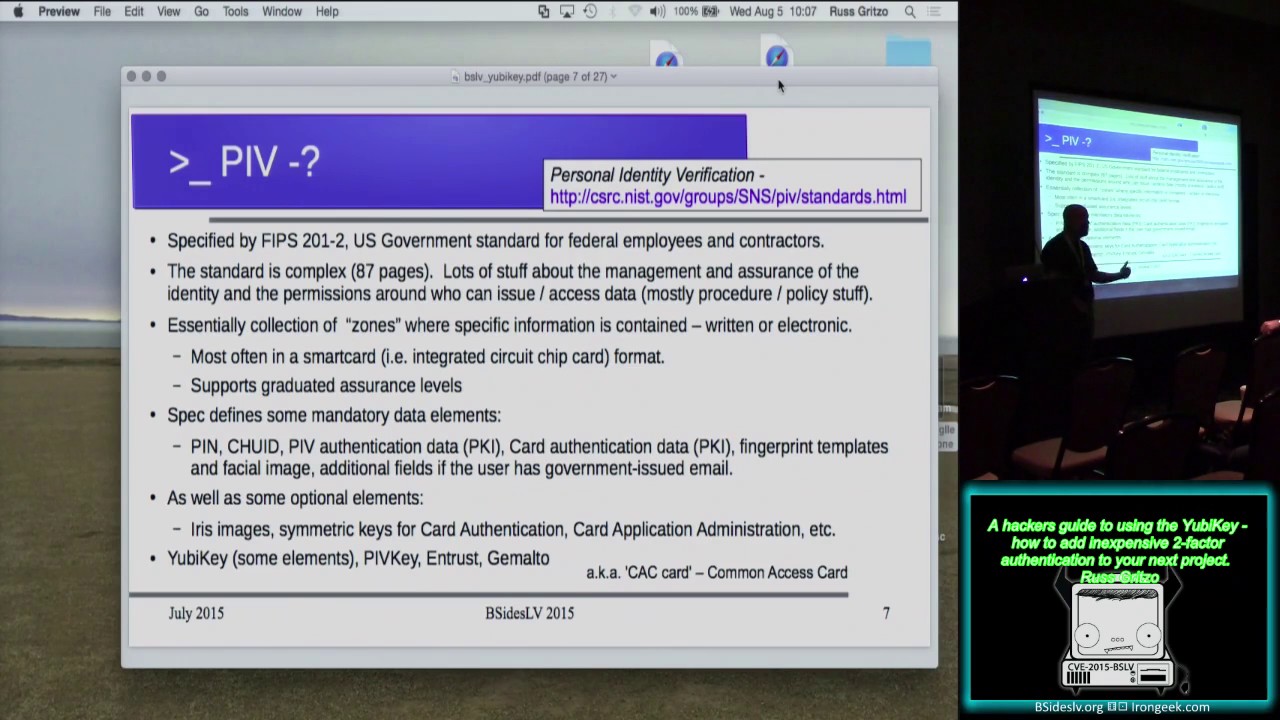
mash that together and send it to me. I parse it apart, look at it, and say, "Yeah, okay." or no, that's OOTH. Here's where it gets I don't I don't know about you guys. If any of you guys really understand the whole PIV standard and everything's behind FIPS 2011-2, I pity your sanity because I opened up that spec and that is like, okay, we're going to close it and we're going to set it and I hope to never see it again. It's the government into this personal identity validation kinds of stuff and they have run a muck. The standard is horrible. It's got value. Okay, if you're going to implement this in a government enterprise, you got to
do all this stuff. But if you're a hacker and you're looking at implementing a PIV solution, I I I got to ask why. So, cuz it's cuz it's a really really thick solution. Not what I'm looking for as a uh as a hacker solution. There's lots of other choices. Uh you've seen software, there's mobile apps that you can get that do some kind of a one-time password and there's onetime password cards and tokens. There's some that are usable with Amazon Web Service. There's services like Duo. And I'm going to ignore all of the really thick enterprise solutions like cryptocard and RSA. I don't know about you guys, but I can't afford an RSA token. It's not going to work for me as
a hacker working on a personal project. So, what I ended up find what I'm going to end up focusing on is this Ubin. I'm going to talk about it in one-time password mode. The Ubi key, as it turns out, supports, at least the Neo, the higher level guy, supports all of those earlier one-time password generation schemes that I just talked about, the the OOTH, HOTP, TOTP, the PHTO, U2F. supports all of those as well as elements of the PIV standard, but those again represent, yeah, that's that token, but it represents a really thick solution. And I didn't want that. I didn't want something that was that thick and hard to work with. So, I sat down and I said,
"Okay, I'm a hacker. I want to put on my little Raspberry Pi. I want something that I can, like I said, I can put it on my Raspberry Pi. I can put it on a little project that I'm working on. I can put it on a little malicious Wi-Fi thing that I'm building all the way up to when I stand up an AWS instance, I want to be able to put this on an AWS instance. So, I want something that's usable all the way from minimal hardware all the way up to something like a cloud solution. So, what do I got to find? So, you start going on Amazon because if it's on Amazon, there's a good chance I
can afford it. So, you get on Amazon, you start poking around. There's all kinds of different toys and there's all kinds of different alphabet soup of different different uh devices out there. But the UB key kept showing up. All right, fine. Smack me with this thing about nine times. I'll go figure out what it is. So sat down, went to go figure it out. So here's kind of a quick info on what the UB key is. There's a lot more to it, but I don't want to sink into any kind of the, you know, marketing talk. I want to really stay focused on what it means to us as hackers. There's a couple of different
models or four different models and there's a couple of different form factors that you can use. These things are not all that big. I mean, they're basically about the size of a USB thumb drive. So, here's mine. It's kind of hard to see, but there's a couple of mine. So, that's this guy there in the corner. And that's their primary form factor. They also have one that's basically just the size of the USB connector. I guess when you stick that thing in, you got to have fingernails to go retrieve it. Either that or you got to put something on there to go fetch it out. I don't know. Paper paper clip works really well. There you go. So, all
of the paper clips that I used to have for popping open uh floppy disc drives and CDROM drives. There you go. That's why you don't throw that stuff away, guys. So uh there's there's several different models and it's basically depending upon the level of complexity. There's a line drawn essentially between the standard the edge and the neo. The neo guy has a Java card environment in it. So the Neoyu is actually really a fully capable able to support and be programmed in multiple different modes. If you want to go something that just does the standard one-time password, something pretty simple, you can get away with the simple little standard guy. There is also a phto only model. I
haven't played with it. Your mileage may vary. Offer void were prohibited. Not available in all areas. I haven't dked with the phto guy. I mainly have been playing with the Neo because, okay, it's 50 bucks. So, yeah, it's a little expensive. the cheaper model, the standard model, I think I get it for like $20, $25, something like that. So, that's fine for just generating onetime passwords. And so, I can I can buy a handful of those. The Neo does have nearfield communications uh capability. So, if you've got a tablet like an Android or something like that, you can go ahead and stick this thing up against the back of the uh back of the Android
and do an NFC onetime pad or onetime password. So, that gives you kind of a quick idea. There's also a hardware storage module for the key info, but that thing is 500 bucks. That's a little out of my uh price range for a hacker toy. So, I had to go look say who is this Ubico guys? I've never heard of them. They've been around, you know, maybe 7 8 years. Uh currently got about 50 people in it. But here's the reasons why I picked this guy. I picked this this token here because, like I said, I can afford them. They're not all that terribly expensive. They seem to be pretty rugged. I've had one for about 2
years now. Used it a lot. It hadn't failed yet. I can use either cloud or local one-time password validation. And see the one the local one-time password validation. This is key for me and I suspect it might be for a lot of use cases that you guys are going to be talking about. The one the local one-time password validation is important because that way I own the entire infrastructure. The only place where I have to go and really trust anybody is I have to have some element of trust of Ubico when they when they program when they send me that key. But I don't even really have to do that because as it turns out and I'll get
I'll I'll talk about this in a little bit more. You can go reprogram all of the programmable values in the Ubi key. So, I can take this device and I can own the whole thing from the key I hold in my hand all the way to the one-time password validation infrastructure if I want to. So, if I'm paranoid and I want to keep all of my keys and everything in my own hand and owned to myself, this is an important aspect of it. The other thing is is that a lot of this stuff basically everything is open source. So I don't have to take somebody's word for it. Ubico or anybody's word for it that
they said trust me this is the crypto you're looking for. It's like uh I can pry the thing open. I can go look at it. I can develop the code. I can do whatever I want to with it. I got the whole thing. So that attractiveness of having either a cloud validation service all the way to a local validation service and I can I can sit there and hold every single bit and bite of this infrastructure. I don't know about you guys, I'm liking that. So that's one one of the reasons why I wanted to go this route. No special drivers required to interface to the key. This is also a cool thing. When you plug this little
guy into the USB, it actually looks like an HID. It looks like a keyboard input. I'll talk a little bit more about how they about a couple of tricks that they use in order to make this work on different um keyboard mappingss and that sort of thing. But when you plug it in, plug it into your Mac, plug it into the PC, plug it into what whatever doesn't matter. It's USB, it shows up as a keyboard. So if the thing that you're plugging it into supports keyboard HID, you should be able to put this thing in and and pop the onetime password in. Uh the other thing is is that if I wanted to, I could go with different solutions.
So right now the onetime password the Ubico onetime password generation scheme that's good enough for me. I'm okay with it. Uh you in a super security application you may find some flaws with it. That's great for me. This is good enough. This beats the heck out of having no one-time password. This beats the heck out of having no second factor. So I'm going to go ahead and utilize it and I'm going to and it's the easiest lowest bar to entry. So that's what I'm going to focus on today. All right. So, this slide is a little bit more complex, but we got to kind of want we got to kind of wade through it here. Uh, and and give you an
idea of how this little guy works. Again, let me mention that this is in the Ubico one-time password mode. So there are other there are other modes that may be uh sorry about this guys other modes that may uh have different operational results but let me go through how the one-time password mode works. So within the one-time password mode the guys up here in light blue these elements here in light blue are things that you program with the personalization tool. Ubico gives you a personalization tool that looks kind of like this. And you bear with me while I try and drag these things over and make sure they all fit. So this is the personalization tool. And they give you
the ability to go in and program all of these elements of the key. So if you even though you get the key when you buy it from Ubico, it's going to be configured and programmed to work with their cloud onetime password validator. And I'll I'll explain what that means really here in just a moment. Even though it's configured to work that way, you can wipe all that out and you can program all the elements yourself. One thing I probably should have mentioned, it may have been on that slide and I cruised right past it. Each of the Ubi keys has two elements inside of it. So they call it slots in the Ubico nomenclature. The so each key has two
slots. So you can effectively have two keys in one. So, what I've done, in fact, for this demo, what I've done is this key right here has Ubico's pre-programmed uh cloud values in it. So, it's it's it has uh been programmed at Ubico factory with a private ID, a public ID, and a private key. And then they've also registered that information with their cloud service provider, with their with their cloud validator. So, that way I can use this guy for cloud validation anytime I want. However, I've gone then and programmed my my private values, the things that I want for my local one-time password validation in slot two. So, with the same key, I can either chose
choose to say, oh, I'm going to validate against cloud or I'm going to validate against the local infrastructure. So, either way, I can I can do this. Yes, sir. How do you tell it which slot to use? That's a good question. I'll show in a little bit. But there's the way that you activate the one-time password in one-time password mode. Different modes operate differently. It's kind of hard to see, but in the middle of this key is a little metallic disc. That little metallic disc is the sensor that you touch to activate the one-time password. So, you just touch that little sensor. If you do a short touch, it generates the keystring out of slot one.
If you hold a little bit longer, it's about, I don't know, a second and a half or so, then you wait and you see a a key string come out again. That's out of slot two. So, that's how you distinguish between slot one and slot two. And it took me a little bit of time to get used to to to doing that, but now I've got my finger timing down so that even in a case when you can't see the characters, not even stars, come up on a password field or something like that, you get really used to that. They've set the time window such that selecting between slot one and two is actually really
pretty easy. Now, that's doesn't have a button like that. So, I I think you actually use that um that copper uh that copper gold pad that's out on the very edge of the key. That's that's the that's the trigger for it. Yes. And if it's in your desktop, you can use paperclip chains to uh to There you go. There you go. See, I'm seeing a theme here. Paperclip chains. I should have added that into the talk. Yes, sir. Yeah. Could you talk about You've referred to OTP mode a couple of times. What What are the modes? What are the other modes? So, are you going to get to this? Well, yeah, I've kind of hinted at
it a little bit. All of the other modes that it can operate in is it supports the OOTH. So, it supports the OOTH authentication that I talked about like the second or third of the of the different one-time password or two factor methods. It supports that. It supports PHTO. It supports PIV modes, at least the Neos do, the highle keys. Other ones support fewer of these modes. It also supports just plain old long password. And so you can actually take a long password and throw a long password in there and you touch that and it'll go ahead and spew out that long password. And it and the keys are effectively write only. So once you put these values
in, you can't read them back out again. All you do is when you press the button, you get the results of the calculations or the results of the operation based on these pre-programmed values. You get that result out. You can't read these elements by themselves. That's a security feature. So, so can I think of it as five modes, the four you showed plus a fixed long-term or one long password. Yes, sir. That's right. Yeah. So, the comment is you can think of it as five modes. the four that I've talked about here plus a fixed long password. And the answer to that is yes. So, what I'm going to focus on though is I'm going to focus on this one-time password
mode because again, the barrier on this guy is the easiest to enter. Uh the the rest of these modes, they're complicated and they may or may not be hard to implement, but this is a known way to go. So, again, back to the purpose of why I'm trying to give the talk. I'm trying to give the talk to lower the barrier to say, okay, I can buy a Ubi key. I can download a little bit of software. I can go out, I can start hacking on this thing this afternoon. And it may not be my ultimate insolution, but at least I've got someplace to start with. And so that's the purpose for the talk. Let me go back
over quickly the operation. These things here are in the key. This is in the key. The private key is in the key. You can think of the key boundary is basically right here. It barfs out the one-time password right about here in this in this infrastructure or in this slide. You program the private ID. If you're buying a key from Ubico, it'll come with a private ID that they a unique private ID that they've programmed in. You program in your public ID. You can or cannot use I mean, let me let me change that. You may or may not use this. If you choose not to have a public ID, you don't have to. I
think it's silly. Why not use it? So, I use my I use a public ID. And then you program in the 128 bits of private key. We'll talk a lot more about the private key, but I don't want to dwell on it right now because I want to cruise on and get to some of the other content before before I I risk running out of time. But those values you program, there's a usage counter. So every time this thing powers up, that usage counter increments by one. Yeah. Okay. It's 16 bits. So there's 65,536 times, right, that you're going to plug that thing in. And at that point, you're going to have to reprovision it. So, if you're plugging
it in and out and in and out and in and out, but so far I ain't done that 65,000 times, there's an eight hertz incremented counter that runs all the time that the device is powered up. When it's in the USB key, it's powered up. Or when it's in the USB slot, it's powered up. No battery in it. So, when it's sitting in the USB slot, this time stamp is incrementing it up at about 8 hertz. There's a session counter. Every time you mash a one-time password, that session counter is incrementing. There's a random number that they add into the cryptography year into the 128 bits basically just to try and build entropy into the system. It is not a they they
tell you, look, this is not a super, you know, tinfoil hat random number. The idea is just to add some entropy into the system so that you've got a little bit less predictability in being able to try and do some kind of a back uh a back uh calculation if you've captured the crypto text to go back and go try and extract any of these elements and then there's a check sum to validate that the thing all looks okay. So these are all concatenated together. AES 128 in electronic codebook mode, ECV mode. That is now the crypto text that comes out of here. And then there's this thing called modhex encoding. Remember that I mentioned that this that this
device looks to the world when you plug it into your USB slot, it looks like a keyboard. So the problem is when you got to do these scan codes, if you've got depending upon your keyboard's interpretation, if you got a German keyboard, you know, local or a US keyboard local or something like that, you may have your results may vary. So you so what they've done is they've gone through and they've come up with this thing that they call modhex encoding which they they've sat down and looked and they've said okay across the majority of the keyboards that that they cared about German, French, uh US I can't remember all of the other all the
other ones that they talked about. They said we have common scan codes to characters mapping and so we'll take the 16 values of hexadimal 0 through F and we'll map to 16 characters or 16 scan codes that we pick such that no matter what your keyboard mapping is, you should get the same character out whether you're plugging into, you know, a US keyboard or German keyboard. I've not tested that. If you guys test that, great. Um, I've not played with it much. I keep all my keyboards the same, but that's why they've got this kind of strange mod hex encoding. When you get the token out, what you end up with is you get your public ID which
is in clear which is in the clear and then you get your encrypted one-time password which is 32 characters uh 128 bits and it is encoded in this in this um in this mod hex encoding. So you take the key the Ubi key and let's see let me make sure I get the right UB key. Once you get a whole collection of these things, it gets to be a challenge. So, you can't really see it, but I plugged it into the USB port. And then I'm going to go ahead and just press a one-time password. So, there's So, there's a onetime password comes out of slot one. Press it again. So, there's another one that comes out. So, you can actually see
here in the operation, you see that everything after this L is changing. That's because that's the different one-time passwords that are coming out um that are coming out in the system. Okay. So, showed a little bit of that. Let me show a couple more things here. Uh before I do, let me let me pause for just a second. I know there's a lot of details behind here. I don't want to really go into too much of the details. I just want you guys to kind of get the the you know thousand ft approach pattern view here of the airport. And so does this does this sound any questions on this before I roll on? Okay, cool.
Um, so I won't show because I I want to make sure and leave plenty enough time for the rest of the stuff. I won't show a lot of this stuff, but uh let me give you kind of a quick overview of the personalization page. Uh the personalization tool. So, this is a personalization tool and it allows you to go ahead and program the Ubi key in a number of different modes. So, you can program it in the one-time password mode. You can do quick or advanced and you can go through and set all these things up and and program the key and do Oh, thank you. Yeah, it's appreciate you guys reminding me about that. So, you can sit down and go
through all of this and program all of these elements up. When I talk about the security, I'm going to talk about a wrinkle on this on this personalization tool that I that I want to talk to you about. If you want to test the key, remember I said that there is a key that is um there's a key that comes from the factory pre-programmed. See, if you got a person that likes to be left justified and the screen is right justified. Thank you. So, here is Ubico's tool to be able to check and see if the key is working. And remember, they got to know those private public ID values. They got to know all
that. So, this only works with the slot that's publicly registered with Ubi key. So, I'm going to go ahead and insert myself here and I'm going to press and off it goes. It automatically appends a carriage return line feed at the end. So, I don't have to press the carriage return line feed. And so, it comes back and it says, "Woohoo, you're good." So I take a peek at it and here's the technical data. So this is a little bit of what's happening underneath the hood. This nons is being used in the in the handshaking between the uh between the um the web page and the validation server. Uh you can see the time code.
You can see the uh you can see the identity of the key and um the particular serial number. The serial number isn't necessarily very private. I'm sorry. I don't recall. I looked at it. I read the protocol and I don't recall what that that hash is right off hand. I wonder if that's tied to the uh the keyboard set. Uh I don't know. I don't know. I we can we can look at it. I've got another tool that lets us see uh the details of the keys operation. We can look at it again here in a little bit. Um let me go through how it works in the big picture though. Once you've got so
you've seen the key generate some onetime passwords what do you do with it? So in a case where you're going to validate yourself to a local system I put this into a web page but you can also validate against a local system. So like for instance in a PAM module and that's what I'll show is I talk about the VMs operating in two different modes. So username you put in your username you put in your password you append the UB key for the way that I've got the PAM module set up. you append the UBI key at the end of your password. Type your password, press the UBI key. And so at that point, the PAM module
that's resident in your in your uh system will go ahead and pull apart and do the validation of your username and password with the specific O directives that are in the PAM module for that. Then it'll take and using a URI that either you specify or that is built in for the Ubico's one-time password validator, it will strip off just that one-time password piece. Your username and password don't leave the machine. And I've checked this a bunch of times, so I'm satisfied that this is working right. Your username and password don't leave the machine. All that leaves the machine is the onetime password. Onetime password flies across the cloud. The validator looks at it and all it returns
back is okay or not okay for one of multiple different reasons. And the multiple different reasons could be it got crapped up. It was it was uh the the transmission got garbled, the check sum didn't pass. We don't know about your identity or you've tried to replay. Remember there's all those incrementing things, those incrementing counters and timestamps in there. And so if time permits, I'll go back and show a couple of these replay things and show that mechanism working and not working. But um but that's the purpose for all of that is to make sure that you don't try and capture a key and then replay it right again. Uh so that's kind of the
highle piece. Now if you're going to go and implement your own solution, this is the piece that you got to really work hard on because you got to make sure that you have your validation server. All right. So, I've talked about it a little bit because I already mentioned PAM modules, but what are the highle steps? The highle steps to go and add this solution. And I just I had to pick something. I've done it for Mac OSX. I've I've written how-tos for Mac OSX, CentOS, Gen 2, um, Red Hat, of course, uh, and YUbuntu. So, I've got all of those how-tos written. Two of them are up on the two of them are up on the on
this uh web page here, cy cyber simple. So if you go to that web page, my how-tos are there and and so I'm not going to try and walk through it in detail, but the how-tos look like this. So this gives you an idea of the local validation for example. So I'll walk through it's a little long but hopefully you can sit down with what you hear in this talk. Look at the slides if you want. Walks through everything that you need to do to stand this up. Starting with start with your Ubuntu box. Okay. So hopefully I've given you guys enough resources that you can sit down and implement that. Two how-tos up there. One of them
is for the cloud validation. One of them is for the local validation. I will when I finally get a few consecutive micro moments, I will go ahead and try and get the other ones up like the Mac OSX how-to and stuff like that so that you guys have other resources. But essentially at the high level, what you got to do is install the lid pam ubico. So this is a PAM module, pluggable authentication module that and Ubico distributes it, but it is open source. So you can go drag it down and modify it and tweak it if you need to. But best thing to do is install it from the Ubico PPA repository. Don't go pull this bad
boy down from from Ubuntu's repository. I explain why in the how-to because the one in the in Ubuntu is out of date and if you try and do some of the debug features, it don't work. So, you really need to go grab the latest one out of the out of the uh Ubico PPA. Test your key. Now, keep in mind, I'm talking cloud validation right now. Test your key like I just showed with that demo page. Then you need to get your own API and key because there's an API there's a signing and a cryptography process between your PAM module and Ubico's server. So this is over TLS but it is also a encrypted and signed uh process
so that it's validated to make sure that your channel and your your channel and your communication is valid and hasn't been tampered with. I haven't pried that apart and done a lot of studying in it. Some of the other guys have. Uh, and there's resources in there to point to how to do that. Do you know if that certificate doesn't check? I don't know for a fact. And the question is does it does it check certificate pending and that sort of I don't know the answer to that right off hand. So, that's a good topic that I'm going to go back and go look at, see if I can figure out what happens if you if
you if you dink with the certificate. Yeah, I understand. Um the uh let's see, where was I? Okay, so you get this. You set your keys public ID and username in a authorized UB keys file. And this is this is a place here where you can easily go wrong. Remember the Ubi key is a onetime password. So you've got your username, password, you got the onetime password valid coming back. The question is how there's an additional not question let me make the point is that there is an additional validation step that's done by the pam module and that is internally within the host the pam module goes and looks at this file within the user's home directory looks
at this authorized UB keys file and says is the public identity of that key in the authorized UB keys file so how I use that is if I've got multiple keys, I'll go ahead and put multiple authorized keys in. So, if something happens and I walk off and leave this key here, I can still get into my machine. So, I've got that. The other thing is is that if I'm using this one-time password, two-factor authentication to su to route, follow me. So, I'm already logged in. My Ubi key is is is put in here into the authorized keys file as a user. But I got four of the guys on the box that I'm willing to let SU to root and one of
them I'm not. So what I can do is I can take and map the authorized UB keys into the root directory for the people that I'm willing to let sudu to root but not the people that I that I'm not. So it gives you a little bit more of a granularity of control. I use it for that granularity of control, but I have also tripped over myself multiple times and set everything up and wondered why it doesn't work. And so I forgot that step. So in the how-to is is a lot of discussion about that as well as a little script that allows you to go and configure that. You just basically run the script, press your UB key, goes and
puts it there. If there's multiple ones in, it warns and barks and says, "Hey, hey, hey, there's already one in here. You okay with that?" And so it walks you through that process of getting those keys set up, configure your PAM module if there's any additional configurations, and then test it. Okay. So, let me give you just a quick deal here. And I uh I don't want to I don't want to risk running too much out of time here. You're not going to be able to see everything in this VM, but let me at least give it a quick try here. Come on. Grab the grab the piece and right justify it. I got most of it
here. Okay. So, I'm going to go ahead for sake of brevity, I'm going to go ahead and just SSH user localhost. Now, in this particular case, I've got it set up for either onetime password or physical password. But I'm going to go ahead then and press my Ubi key. All right. And off it goes. And bang, I'm in. So, what happened under the hood? So, under the hood, here is the the common off PAM module. Here's the piece that's meaningful to you. I'm going to have to move it over some more. Here's the piece that's meaningful to you. Off sufficient Pam Ubico. This is the PAM Ubico uh invocation mode client try first pass. This is parts of
just making the uh this is parts of making the PAM stuff all work. This is the API ID, not the ID of my key. This is the API ID and this is the key that I use to go ahead and sign my transaction between me and Ubico's cloud. So that's what's happening. Now you'll notice I said Osufficient. I've got this guy because I want to favor the demo gods and not make it off required because I figured re-entering my password was going to go badly under the but you can change that. You can make it off required and then that makes it true password uh to factor. Here's a little bit of information and I've
turned on the debugging so you can kind of see a little bit of an idea of what's happening underneath the hood. It's parsing out the token, saying the mode, looking at the software version. Here comes the one-time password. And then it goes in and takes and runs out my user, sends my uh looks into my file, sees I've got multiple tokens that are good, and comes back and says that the So, here's the one-time password going out and it comes back and says that it's success. Ultimately, my token is successfully authenticated. Let me cruise on to the one to the local validation because I want to try and keep enough room for for um for questions and things. If you're
going to implement local validation, all that process up front that you've gone through to make the cloud validation work, all that's good. Keep all that, but you got to have some kind of a one-time password validation server. So here you could be in a maze of twisty passages that all look alike. So you got to sit down and think for a couple of minutes and try and decide from a security perspective what is it that you want to try and accomplish. Where are you going to do your one-time password validation? It's important because the one-time password validator is going to have your key in it. Your AES128 key that's used inside the Ubi key is going
to be in your onetime password validator. Be careful where you put that. treat that carefully because that is the if you've got that and you can decode the key. If you have that information, you can forge a key. So, we'll talk about that again in a little bit. Same kind of process. I use this tool called Ubiserver. And so, this one's got a little bit of that. It works great. It's being constantly it's being constantly um updated and things like that. It works great. Couple of little gotchas in it. It's in my how-to. I won't go through this in more in much more detail just for the sake of time, but there are several other projects.
You can look at Ubico and you can see some of these other projects. They didn't meet what I needed. I wanted something thin and lightweight that I could put on a small little Ubuntu distro or I could put in a Raspberry Pi if I wanted. And so the Ubi val and the KSM thing in PHP, those are meant to be kind of thick enterprise solutions with multiple validators and that sort of thing. Nah, not what I wanted. Ubi server, there's a project written in in Go. I guess I'm too dense to make Go work. I couldn't make Go, so I gave up. So there's something fundamental I missed. this UBS serve program is uh is
doesn't seem to be um active anymore or there's C libraries roll your own be careful you have to it's going to take a little bit of work but you can roll your own so for now I've gone ahead and used uh this guy Christos Nanukos anyway it's in the how-to um highle steps everything the same build and install the validation method restrict access to the validation server the server this particular server is a network socket aware it's listening to URI to do the onetime password validation you got to make sure that you don't expose that to the internet so restrict the access to the validation server provision your keys this is going to be an extra step
now because you provision your key and you provision that same information into the Ubiser UB servers validation model you can't go take your cloud stuff your the the what you programmed into the slot one or what's ubis Ubi key has programmed into the slot one. You can't take and use that with your local validator because you don't know the private ID and you don't know the private key. So slot two, program it up, provision it, and use it for your local validator uh your local validation system. Um I've got, like I said, I got a lot more backup, but I want to try and wrap up here in the next seven minutes or so. Let me talk a
little bit about the security. If you're going to be doing local validation, protect the one-time password validation server. Again, your key is resident in that. Uh isolated behind the network, firewall, whatever. Uh test it for SQL injection, things like that. Um are there the the local validator has a SQL light database in it? particular solution has an SQL light database in it. If you've got somebody with root access on your box, they're going to read the database. So understand that you may need to go and depending upon what solution you're trying to reach if you're going to have a one-time password entry into your Raspberry Pi malicious Wi-Fi portal. Probably you're willing to have put your values in a in a burner Ubi key
locally authenticate it there and be done with it. If it gets stolen and somebody hacks into it, you just reprogram your key. If you've got a virtual infrastructure where you have a dozen VMs all checking in and you probably then want to take this UB server, this one-time password validation server, put it in a dedicated separate VM, tie down the communication such that each virtual machine only talks to that validation server over one specific port, one specific isolated virtual net and lock that down so that if your VM M get compromised, you haven't got your key compromised. Never expose that key server then to the open network. Always have a bastion host to get into it. So,
there's a lot of there's a lot of choices that you can make in order to be able to put this in a little bit more secure location. I won't bother you guys with the demo on that because again, I'm running out of time. Let me get a couple of caveats here. If you lose the key, you got problems. So you got to have yourself multiple ways to go back and get in a second set of keys is a good idea. The keys are not the keys are not failproof. I during the prep of this I've actually got one my UB key standard model quit. The time stamp doesn't update. I don't know why it doesn't
update but that really makes it such that the first key authenticates. Everyone after that is a replayed op. That's bad. So you know check it out real carefully before you go. If you overwrite your the Yuba cloud issued or the Ubico issued public ID, if you overwrite that, you can't recreate it. So you can't go back and re and get those values back again and reprogram that back in. But you're not you're not completely hosed because what you can do is you can go in use the personalization tool. You can program that slot with information that you've set up. You've picked your public ID. You now have a restricted range because since Ubico is going to be doing that doing the
validation on their cloud server, they give you a restricted range on your public IDs to make sure that they don't have a collision. So, they're going to move you off into a different range of public IDs. And you could go ahead and provision there. You can go ahead and put your AES key. go ahead and put your p your private ID in and then you can go send all that up to Ubico and in a few minutes their cloud servers go ahead and authenticate or go ahead and and load all that information up and your key will now work again with a cloud solution. You've reprogrammed it. You've reset it. Everything should work again. That's fine. However, your public ID is
no longer the same. So if your only way into your Amazon web service is with that original public ID in your key, you're now kind of hosed. So that's why set yourself up a second key if you don't have any other way to get into the system. That just is a caveat. Ah the tool when you use the personalization tool by default it leaves a CSV file with your key public ID private ID and AES key in it. So you don't want to save that file. So when it gives you the option to save your file don't and or do but then take that file off and go archive it somewhere so that you have
it. All right, talked about a lot of these features. The um uh if you're an attacker and you're looking at it ahead of time, you don't know the private key, you don't know the counter, you don't know the private ID, you don't know the time stamp values, reversing this is going to be kind of hard. If you reverse it and you get to the point where you get all of these IDs, let's just say you do some captures or you get it, you get the you've compromised the uh validation server and you've got those keys. It now you can go ahead and forge a key. But if the individual has gone on and keeps using this, you're going to actually
have to sort of get an idea of what their session counter is and hop ahead of them. Or else every time that you put your forged key in, you're going to wind up with a replayed OTP. And so I've tested that and it's workable, but it's hard to do. Keys can be protected with a passcode as well. So you can protect a key from being overwritten. Um I think there's some some interesting uh attack modes that you can talk about. Uh one of them is um if I get into the box and I've and it's a UB key infrastructure, I'll just associate my key with your account. So you know that's fine. Uh or I'll go ahead and uh
and and do a denial of service and remove your authorized UB keys. So there's some attack modes there that you can think about. There is a method there is a man-in-the-middle intercept intercept take reply back and and tell the uh user that um that one particular key didn't go get a second key replay the or put the first one to the validation server and then you've got the second one. So there is some there are some attack modes but they're actually not easy to set up. I already talked about the server. Um, as far as ways to misuse it, uh, I haven't had a chance to play with this very much, but one thing I did is I used
it in static password mode, and I went ahead and did a wget and and and, uh, you've got you've got 38 38 uh, characters times two, two slots. So since it is a keyboard, if you walk up to a box, you can go ahead and inject keystrokes in, but it looks like an authentication token. So be aware of that. Uh I played with that a little bit. I didn't have a lot of chance to cover a lot of things. Um other modes of operation, the NFC, that kind of thing. Let me wrap up by saying, uh I realize this is kind of a quick whirlwind. I put off this whole two-factor one-time password thing. I didn't think I thought
that it was like, you know, the cockpit of the Concord. Okay. I mean, I thought this was going to be really complicated and hard. As it turns out, it's not this easy, but it's kind of more like this. the the barrier to to enter the barrier to entry to put one-time password validation into and granted I focused on a Linux infrastructure and a lot of hackers use Linux so that's cool the the barrier to entry to put that into your into your infrastructure is really pretty low you just got to know about it so that was the purpose of the talk so there's a good way to put it into a pass to to just using passwords only you can
start using two-factor widely I use it Everything from embedded solutions all the way up to, as I said, my Rackspace and and AWS servers are all Ubi key because that way I worry about them a lot less. So UBI is one solution. You got a quick overview of how to do it. Got more resources on my cyber simple website. Pick one, do it.
Thanks. I got a few minutes for questions, right? Okay, questions. Yes, sir. In the corner back there. Hang on. So, you mentioned a few attack vectors for uh uh getting ahead of the the user with their key. Yeah. If as an attacker, if I use a counter that's ahead of the actual physical key, does the physical key start failing because the counter has been increased? Yes. Okay. So there's there would be a a point at which the actual user would effectively realize that something's wrong. Yes. That's correct. Yes. So his question is if I'm an attacker and I've forged a key and I've gone ahead and I've said okay this problem about me putting in
starting with the the uh session use counter time stamp and um the session the use counter and the time stamps all reinitialized. If I've overcome that and I've put in higher values either generated that key by software because you can actually there is a tool to generate the the keys mock keys in software. If I've done that then I've gone ahead now and I've jumped ahead of what I think the user is and I've gone ahead and validated. Yes. Have I hosed the user? Yes. Because now the validation server has got that further advanced counter in its memory. And when the user gets ready to go validate, it isn't going to work. And it's going to
show up with a replayed one-time password or a delayed one-time password error. And that's when you know if you're if you're on the defense side and you see that you're getting replayed one-time passwords, you better go reissue that key and think about it. Okay. Other questions? Yes, sir. Here. Here in the here in the front. Any Windows support? Yes, there is. The question is, is there any Windows support? The answer is yes. I'm not a Windows guy, so I apologize in advance. I cruised right on past it. There on the Ubico forums, there's a lot of discussion about integrating UB UB keys in as local authentication, getting them entering integrating them into active directory. There's a lot of
discussions. My recommendation would be start with the Ubico technical forum. Look on the technical forum for people that have said Ubico's documentation on this subject sucks. Here's my how-to. And you'll find on the forum a few how-tos that are like that that says it's not well documented. Here's my how-to. So that would be my my suggestion to you as a Windows user in in the far back back there. I know you focused on uh you know hackers for this but like from a a commercial perspective how many keys can you associate with one ID that you register and at what point does Ubico want to start uh charging for your cloud use of their cloud service?
So let me start with the questions backwards. Um I don't know there is a Ubico commercial cloud offering. I've not looked at it but I know they do have one. So they're they are they are working towards the enterprise. My understanding is Ubico is here at Black Hat. So if you've got access to the Black Hat vendor uh booth, go talk to them and find out. Back to your other question, as far as IDs, it really isn't, if I understand your question correctly, it really isn't a matter of associating. Let me back up and answer it two ways. I've never tried taking one public ID and associating multiple keys with one public ID but with different
private IDs. I've never tried that. Uh I think the intent is is that I I think you can do that. I think that's an option because it would give you a a public ID for a r or a range of public IDs for a company. Not tried that. I've just ended up taking and focusing on the fact that that public ID is pretty broad and the private ID is pretty broad in terms of key space. So if I've got a company of a 100,000 or something like that, I'll just go make keys and the cloud ID actually. Yeah, the cloud ID. Uh I I don't really know. I I think that's going to be a question you just
have to talk to about. Any other questions? Yes, sir. One more and then we got to quit. Yeah, are these being commonly used by companies at this point or so the quest the question is are these being commonly used by companies? I understand that Google and some other folks are using them that there are some some enterprise level deployments of it. I don't know if they use them in one time password mode or if they're using them in PIV or OOTH or whatever. I don't know the answer to that. Um once it worked for me, I didn't care, you know. So anyway, thank you guys. I appreciate all your time. Have a good rest of the
conference.
Related talks
 51:51
51:51 32:48
32:48 33:48
33:48 54:33
54:33 31:06
31:06 20:51
20:51