Baited Canaries: Monitoring Attackers With Active Beacons
Show original YouTube description
Show transcript [en]
okay good afternoon everybody and welcome to BCI's vegas proving ground these talk beta Canaries by Gregory Otto Caswell and a few announcements before we begin we would like to thank our sponsor especially our inner soul crews sponsors criticals stack and Valley mail and I was still a sponsor Amazon Microsoft and paranoids is their support along with our sponsors donors and volunteers that makes this event happen these talks are being streamed live and as a courtesy to our speakers and audience we ask that you check to make sure your cell phones are set to silent if you have a question you Saudis audience microphone so you too can hear you please raise your hand I'll bring it
over so let's get started cool oh hello everyone my reg Caswell i am i talking some beta Canaries monitoring attackers with active beacons i'm a manager of application security at indeed.com my team is primarily responsible for collection of bug bounty red team engagements vulnerability assessments design reviews yada yada but when I'm not doing work stuff I enjoy automating aquaponic setups beekeeping or gaming so indeed purpose is to help people get jobs and we've been successful enough at it that we have over 250 million unique visitors every month but running a popular site has its problems obviously for today's talk I'll be talking about two different scenarios where that you can see fairly common in tech companies and how you can
use Canaries to try to address those problems historically speaking Canaries refer to as allusion to Canaries in a coal mine where miners would take down a bird in a cage with them and if silent but deadly get undetectable or you know - gasps you could not smell but was deadly such as carbon dioxide was down in mine it would kill off the bird before the human and give the miners time to escape before also passing out so this was within InfoSec it's referring to typically a single single fire detection mechanism it's you can consider it a type of honey pot the main distinction between Canaries and most honey pots that Canaries are used primarily in production systems whereas
honey pots it usually simulated systems just a quick primer on canary tokens or honey tokens those these are typically unique strings only exist in a single location they're primarily useful in that if this string is ever found in any other context other than the place you put it then you know someone has asked access that file of location the downside of canary tokens or any tokens is they are single-use so active Canaries at least what we're talking about today is basically you the canary trigger kicks off some persistent object that allows you to monitor gain additional context on the environment that it's running in there's just a slight modification so how can we use Canaries generally speaking attackers
like most people are typically focused on just the function and of trying to do something and aren't super careful on what kind of information they ingest to perform the function they need to they need to perform and we can abuse that laziness by injecting some some blogging or beacon functionality and to what they were performing so for the first attack scenario a common way to steal account credentials is a phishing site that looks exactly like a legitimate login page as an example of an efficient site if you'll look fairly carefully that's tank ly not indeed comm it's our good friend Ellen now attackers can use these indeed look-alike domains to target both our jobseekers and employers since both
accounts can't have value beyond just collecting credentials that they may use in attacking other sites or applications within our platform itself a compromised employer account could be used to scam job seekers for example maybe it's a some iteration of a fake check cashing scheme or maybe they're just trying to steal people's personal information but the even though it even with compromised job seeker accounts you could still spam employers or at least it's a solution solicitation spam of some sort so it's something we want to avoid either way protecting the trusting safety of our users however is difficult when the the attack or is not even occurring on a domain we control so you may not even
find out about someone being phished unless some of observant victims alert us to it after the fact that hey I enter my creds on this phishing site and I don't think it was indeed calm could you check it out but and then even once you find out that aside is phishing your users remediation is at best trying to you know guess which users might have been affected maybe taken the legal route and try to take over take down the site that's attacking your users but it's not a great situation so what can we do about this
this brings us to a javascript canary the JavaScript Canaries basic idea is to include a piece of script and either JavaScript or CSS that phone homes when it's executed in a unexpected domain to bring back the previous example let's say our login page was the page at attack or was trying to clone and then subsequently fish our users from this piece of JavaScript would execute at the moment that they cloned the page and dropped it into any other domain even if it's localhost or their the new new domain they've spun up for it the specifics of getting into the this particular implementation DNS is a fantastic option still for getting information back out from the from the
canary just because especially in a browser context you usually expect you mostly HTTP traffic and if you're just trying to clone a page you're not usually breaking out Wireshark to see what sort of traffic is coming from this clone page as far as the actual mechanism of sending out a DNS lookup there are several options available the most straightforward one is just DNS prefetch it's legitimate use is just to pre look up in cache a DNS mapping we however will use it to send data via the domain itself it would look something like this we've got your link rel for DNS prefetch and then in the sub domain of a domain control a domain you control
you actually ship back the data be it a canary token or something more active there are a few constraints to keep in mind when working with DNS it is case insensitive so you probably want to take your payload and maybe basic to encode just ensure that it ships nicely there are some max character lengths in both the URL as well as subdomains or even number of subdomains in the URL that can get you up for the trigger have the jobs canary that's pretty straightforward you just do a test to see if it's not operating and on and expected the domain it's normally hosted on as far as if you want to add some additional functionality to detect for example the
victims that fall to the fishing site you can add event listeners to the forum submit on your login form after the fact and that will let you log which users have submitted information through the phishing sites form the extra cash pause there's really only four and that explore compatibility but you know do what you will and so at its simplest you might have something that ends up with something that looks something like this you've got your test at the top for the domain you create a DNS prefetch link element you add your payload to the domain and finally append that element to the body the moment the element gets pinned to the body that's when your DNS
request actually good gets sent out if you are implementing a more active canary your payload should likely include a few more elements than just a canary token however to ensure reliable transmission and collection and our implementation it looks something close to this as a few different fields we'll go through here quickly first field is just a nonce just a random nonce it doesn't really matter what it is so much so long as it's mostly unique across your victims it doesn't yes there's no need to guarantee uniqueness it's just used primarily for cache busting but then a secondary purpose is to restage multi packet payloads back together for multi packed payloads if your if the information you
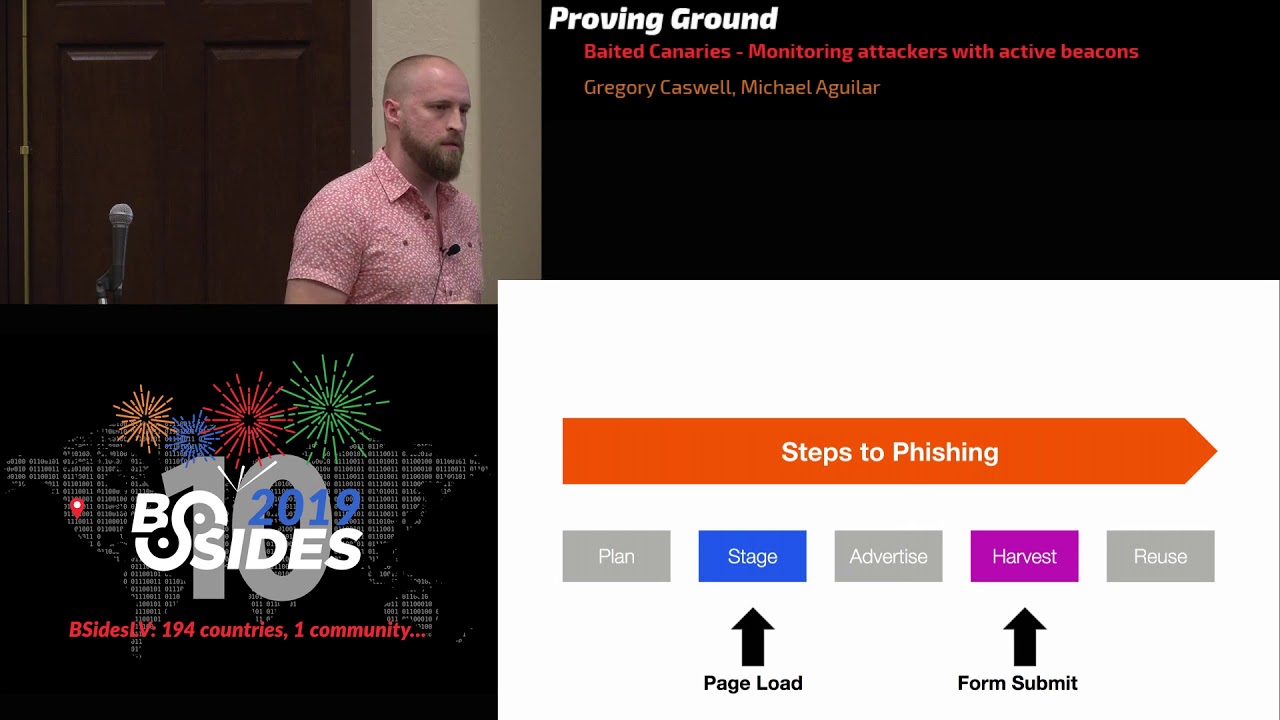
want to send back is anything more than a trivial amount of information then you're gonna have to break break it up into multiple DNS requests this is just indicating this is packet 105 and then finally the payload itself is just some base w2 broken up see realized object and then spread across as many packets as you need and then the domain needs to be something that you control the record of so you can point it to a custom by and server you control to then collect those DNS requests and process them however you please to review how this JavaScript canary helps us let's look at the typical time line for a phishing attack so normally the attackers creates
their plan they staged the phishing site they advertise or try to solicit the victims they harvest the creds from the victims and then finally reuse those creds in whatever way they want to use them prior to having a canary as mentioned before the best way you really have to get at this attack chain is via inconsistent fishing reports or if you've got a little bit more complicated a suspicious login detection maybe you can detect and the increase of suspicious logins for a period and you might suspect something is going on with a subset of your users but neither of those those signals are great and but with the canary you now will get a signal back the moment the attacker even
loads it up on their local machines you test it out that gives you the IP of the attacker it gives you some fingerprint information about whatever machine they may be running on as well as when they actually load it on to a site and test it you'll get the phishing domain site that they've loaded on before any victims actually follow the fall victim to it and then once people do start the fishing site if you added that additional functionality to collect the people that have submitted the forms the usernames that have spit it through the form you can immediately take action on those accounts to either you know lock them or rotate their creds or whatever
you think is appropriate so for the second problem that that you may see fairly often is third parties misusing G Suite permissions this is a fairly particular context but it's a fairly common context for most large companies it is the the core problem is that it's hard to know what over permissive integrations or apps actually need and to ensure that they're behaving appropriately as an example some of you may remember the Google Doc fishing event that happened a couple years ago affected nearly a million users as reported at the time and the basic problem was that since people were used to just trusting any ooofff permission that was requested of them they didn't even blink when an app was
requesting full read/write access to their emails so this spreader all across the world and every time that someone approved this permission it would scrape the contacts and and spread it to their their contacts - to further this attack now even if the attack is more obvious than this it can't even even if it's not as obvious as this when a third-party application is misusing the credentials it can be difficult to do anything about for example it may be a legitimate service that your users used to snooze emails in their inbox or to edit workflows in their Docs and it's very difficult to which of those apps are behaving appropriately and which maybe Seiken information off from you users so how
can Canaries help here probably the most straightforward way is the Google Doc based G suite canary or Google Drive Google has actually come a long way from the 2017 incidents as far as their admin audit audit controls go and I'll cover one of the things that implemented and how you can use that to protect your users start off with you create some bait files and these can be titled anything that seems tempting to attack or maybe mergers and acquisition plans for subsequent year or some finance credit card copies anything that may be attractive to an attacker is as fair game I take those bait files and you load them into users drives and they need to create an alert around accessing
that file within Google admin there is a drive audit feature under reports and the basic idea is anything you can filter on you can also create an alert on and so in this case you would take you do a filter on the files that you added maybe it's the audit readme file here and the for the trigger you do a view and then for the action to take you just you can email that alert to an account that you're monitoring the one constraint to note is that this alerting functionality only works within drive and not within let's say Olive G suite once an alert has been set you can dig a little further if you want more context
on related activities zoom in a little bit on this redacted a report this is the the token report so base for any Roth token you can see which account is accessing which event and on behalf of which user you can even see the application name as well as the IP address that it came from this gives you a way to kind of filter out false positives for example if someone in your organization opens the file you can you'll have that IP that may be associated with when you're up sighs and so you can disregard that alert to review the basic flow here is to create some bait files and drive add them to users drives filter down to your bait
files in the admin audit view and then finally set an alert on the view action for that file ideally this gives you the ability to detect certain misbehaving IG suite apps so hopefully you were able to get a few ideas of ways to use active Canaries as you think about various paths attackers may tap taken your systems you may come across a multitude of other ways that you can apply Canaries in your everyday usage special thanks to Christina Mitchell and Adi Ajit for going through the pain of a Java Script and G suite canary implementations and finding some of the edge cases any questions [Music] so I work at a place where we deal with
you know account takeovers things like that so from the fishing perspective like we have we have some pretty good visibility into you know attempted credential stuffing attacks things like that I guess we have some visibility on the fraud side you know customers call in and they have you know they report their accounts been hacked or whatever so so we have like some stuff on either end but I don't think we really have a lot of visibility into like you know phishing sites targeting customers so I'm curious if before you implemented the solution if you had much of an idea of what it was like and then since you've implemented the solution like how successful it's been like I'm kind of
curious if it's better than you thought or if it's worse than you thought like you know the phishing problem in general yeah as far as before we implemented it did we think it would work well or what our thoughts were on it it's the I my thoughts there is it's it gives us a different place to get signal that we didn't have before and so regardless of how it ended up being after the fact it it is some signal at a time where we don't have any other fantastic way to to measure these activities as far as what's how it's been since we can talk we're after but it's not something I can go into you right now
so this seems like a pretty good method for detecting phishing attacks as they're being used do you have any sense of how widely this type of mitigation has been adopted in the kinda in the wild I I can't imagine it's a unique ID idea but I also haven't seen seen any companies or applications utilizing this mechanism if anyone has heard of any I'd love to talk more to swap stories and get some ideas on better implementations though I really like the the JavaScript stuff at the beginning have you have you thought about whether or not this is fall into the category of hacking back are you guys I'm sort of thin ice a little bit I I would categorize this as
blogging I mean it's it's the same as any other logging mechanism that you might have on your site you if you added additional features of a more malicious or intrusive nature then perhaps you might get in that direction but for the most part this is just passive data collection of clients of your of your website yeah just to be a little bit argumentative but you are executing code on somebody else's machine without authorization and you could have put a you know a shell web shell into your code just as easily yeah we're not I mean yeah it's it no it's it's a really good question about yeah the the barrier I like to say is is
this is we're just passively collecting information that you would normally pass we collect on your own site we're not making them put it on their site they're cop if they're copying their power code and drop it on their site it's just a signal that something that's happening is this something you had update your privacy policy on your site to do like with gdpr for example when you're collecting data like this what would be the concern I mean just user agent and IP I'm pretty sure is covered in privacy policy last question so the JavaScript example that was very basic but it shows how powerful it can be which is great but at the same time have you guys started looking into
essentially the reverse of it of if it's so simple why can't I just start scanning for that kind of stuff if I were to scrape your website as an example sure right so like what thoughts if you put into how can I try and and hide this right the the biggest I guess haystack to hide it in to begin with is just the fact that a lot of our pageant pages are and react I don't know if you've ever seen react front-end pages but it's a giant blob of JavaScript already as far as looking for particular key points that you could maybe try to find this sort of functionality in there's I know if three mechanisms in
JavaScript that all worked for DNS exfiltration that's only if you explicitly want DNS exfiltration you could just do an HTTP if you really want to do and then it'd be indistinguishable from any other log action there's two possible CSS implementations as well they're a little less feature-rich but I feel like the the escalation of trying to prevent people from finding and stripping out that code is not top on our priority list that we're already relying on the attacker to not really inspect the code before drop it on their side so I think we're fine with a partial partial solution in that case okay thank you very much give it up for the speaker
Related talks
 8:26:49
 49:21
49:21 47:22
47:22 50:37
50:37 50:01
50:01 37:36
37:36