Come Together, Right Now, Over Mesh
Show transcript [en]
so hello everyone thanks for coming to my talk um come together right now over mesh it's my fake attempt at being all clean with beatles puns um for what i'm going to be talking about but you'll probably figure out what i'm talking about as i go so skip over that so who am i i'm vic um list of credentials there to try and make it sound like i know what i'm doing uh most important ones probably being a qualified falconer so i'm interested in a bunch of weird things currently i'm very into weird protocols come chat to me about stuff i'm so lonely with the pandemic please talk to me so overview of the project and what i'm
going to be talking about today um i've got going on this project looking at mesh networking with raspberry pi's and i've gone down several weird rabbit holes i keep getting distracted i keep finding holes in my knowledge so this talk is going to be a bit of a breakdown for i guess my stream of consciousness of what i've looked at what it's led me to where i'm going to be going in the future with my little research project i apologize it does go into the osi model at some points which i know some people have trauma around so there's a warning so first up what's a mesh network it's uh well with your home wi-fi you
normally connect your phones laptops etc to a router there's one central device that all of your traffic will go through in a mesh network you've got none of that any device can talk to any device they can be configured in lots of different ways like we've got this diagram here where they're kind of chained together so if you want to get to this node in the bottom right you've got to go through the one next to it which connects to the other ones the exact configuration depends on what you're going to be using it for you can get ones which are just for you know your home network you've got various um like something that controls your light
temperature that sort of thing or you can get ones that are distributed over large geographic areas it it depends on what you're doing with it really ad hoc mesh networks are the type i've been quite interested in which are mesh networks which automatically reconfigure themselves so if a node drops out of the mesh network it will automatically just reconfigure itself traffic can be routed around it you don't have to worry if your node drops out so what are they used for um there's pretty much any time you want data to be able to be transferred between nodes without having it having to go through some central point so something i've seen them used for is
these explosive ordnance disposal robotics um that is me i promise in the picture it's a bit low resolution button um so you've got the big robots which are the ones that are actually doing the bomb disposal and then you'll have smaller ones which are just basically you know a camera with wheels and they use mesh networking here where the smaller ones can pass the messages along to reach the actual eod robot at the end because you don't really want to worry about losing signal to your eod robot at the crucial times i've also seen them proposed for use in future connected autonomous vehicles so in the future all of the you know cars on the roads they're going to be
very connected with each other they're going to be sharing data with each other about their position the direction they're heading just various things really but you can't really connect cars to routers by the side of the road because cars go quite fast so you'd have to be keeping connecting to a router every you know 30 seconds or whatever it's much simpler if the cars can all just communicate with each other and you know essentially transfer the messages by propagating them along roads through the mesh network of all the vehicles so attacks on mesh networks this is a bit of a cop-out slide because there's just so many there's just so many different things you can do it depends
on what type of mesh network you've got how it's configured what protocol you're using to actually handle the routing um the vehicle mesh networks that i mentioned they're likely to be susceptible to replay attacks um so in these proposed um mesh networks were connected in autonomous vehicles they proposed that the vehicles will send out these heartbeat messages that are hey i'm an ambulance i'm this big i'm going here i'm a car i'm this big i'm going here so the road conditions will be changed depending upon what types of vehicles are on it if you've got an ambulance approaching from one direction traffic lights up ahead might be more likely to make that route green so the ambulance
can get through quicker and the proposed protocols that they've been using for um or they want to use for these giant vehicle mesh networks there's no actual unique value in them there's no nonce value so they're likely to be susceptible to replay attacks so you could just you know record an i'm an ambulance message and play it as you're driving along and then the traffic lights will change and be green for you so it really depends on what exactly you're trying to do with the mesh network what types of attacks it's likely to be susceptible to packet flooding attacks those can be quite useful interesting when you've got low-powered devices which are only expecting to get a message every you
know couple of hours or so if you're sending them constant messages it might keep them in a state of wakefulness so they'll burn through their battery much faster than they should do um yeah you can also just mess with the contents of packets to cause weird routing issues between the nodes you know you can force them to root through nodes which have actually got very poor connection strength or a high rate of data loss you also get attacks for fancy names like byzantine faults which is where no node in the mesh network can actually tell where the issue is it just knows there's an issue so no day might think that node b is having connection
issues and route around it but node b thinks that node c is the issue node c thinks that node d is the issue etc it's just because no node is actually obviously the one that's causing the issues it's really hard to route around them so building a simple mesh network i've been playing around with raspberry pi's at home because they're cheap and easy to work with i've been using the batland routing protocol um it was a fun name and turns out it's actually a really interesting protocol i've been loosely following the guy there um people take photos of it if they want but yeah if you google just wi-fi mesh raspberry pi you'll find it
first up we're going to talk about what is batman um yep batman so batman stands for better approach to mobile ad hoc networking i'm never going to remember that but it's for creating multi-hop ad hoc mesh networks the mesh networks will automatically reconfigure themselves depending on what's in the network what's in range so if something if one of your nodes gets moved a bit further from the others and it's now you know a higher latency connection it will automatically re-route to avoid that node that sort of thing you can also connect your mesh network up to other things like connect it to your home wi-fi so you'll have like these bridge nodes which interact with
the whatever other network you're connected to you can go to the internet you know you've got options um so a lot of network routing protocols sit layer free in the osi model for as batman sits at layer two so lower um and that's why we're gonna have to look at the osi model just to give you a bit more of an understanding of what that actually means so in the osi model i don't really care about five six and seven they're too high up to really bother with um i'm more interested in four and below so at level four you've got things like tcp and udp at three you've got ip and two you've got things like ethernet so
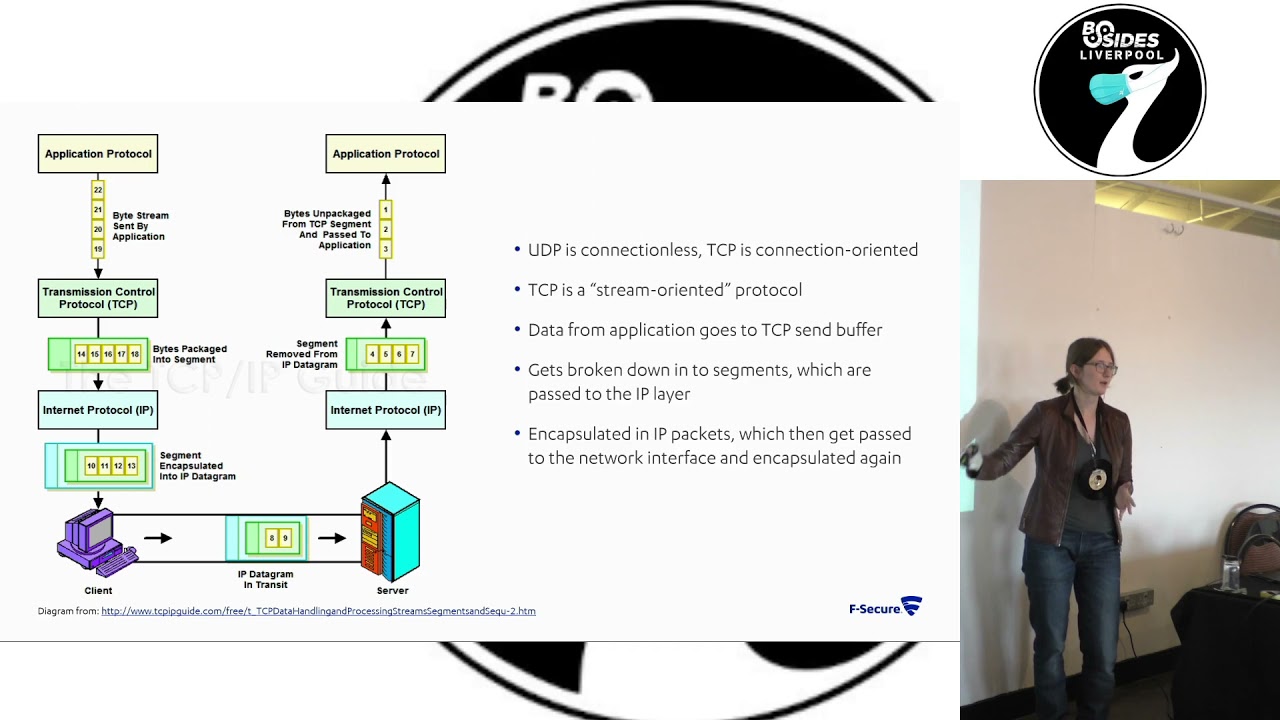
because batman sits at layer two it basically simulates the nodes actually being directly connected to each other so the nodes see each other as linked local to each other it makes the routing a lot easier a lot more efficient um it does mean that when you're playing around with them it's a bit more of a faff because you know you're kind of having to recreate what ethernet would normally do um to give a better bit of a better opportunity for explanation i've stolen a graph off of someone which shows how data comes from the application gets passed down and ends up transferring so you've probably heard of udp and tcp i don't know if i'm making assumptions
um don't ask me what they stand for i can't remember but the key difference really is in udp it's connectionless you're just sending the data out you're not getting any acknowledgement back on if it's been received or not whereas in tcp it's connection oriented so you do know if your data's been received or not so you get the classic uh joke around this of um i tell you a udp joke but i don't know if you'd get it terrible um so with the data that you normally send it comes from the application it goes down to the tcp layer where it's divided up into little tcp segments it's then passed down to the ip layer where
it's encapsulated in ip datagrams which can then be sent on to whatever medium you're using to transmit your data so ethernet wi-fi whatever it's going to get encapsulated there and that's the layer at which batman operates so it'll be encapsulated there center cross then it goes back the other way basically unpacking it all and then it can pass it back up to the application so yeah going back to this you can see we are dealing with layer 2 or ethernet it is a bit just my brain process of how i where i've been going during this project and this doesn't look good on the projector at all but this is just me running isconfig on one of the nodes in
my mesh network so you've got your standard interfaces you'd normally see like if0 your ethernet interface you've got you know your loopback you've got wlan 0 which is wireless at the top you'll see bat 0 which is the virtual network interface that batman protocol creates so other actual legit you know big real network interfaces like e0 wlan 0 can be assigned to bat zero and then any data going through there in the back using the back probes batman protocol will you know it'll go through the bat zero interface which simulates being local to each other um so the implications of doing it in layer two you can within reason use lots of other protocols that sit above it you
know you don't really have to worry about um writing special software to transfer data in a batman mesh network you can just you can just do it it's fine um it's carried out in minutes by the batman adv kernel module um that actually makes it kind of more efficient because everything's being handled by the kernel you don't have to read and write to user land on linux so it makes it a lot faster which is quite good if you've got a mesh network where you actually care about the speed at which data gets transferred i mean in like the connected autonomous vehicles example there's been some proposals that you could have um remote control vehicles in the roads and to do
that they've said you'd probably need under 40 milliseconds latency so potentially something like batman could be suitable for getting that latency um i generally think that it's a bad idea to have remote control vehicles on the roads but it's something that people have proposed um there are some pains with how batman works i think normal tools like ping and tracer just don't work with it they just it just tells you weird stuff it goes a bit screwy but they've got equivalence of them like um bat ctl ping bat ctl traceroute where it does the same functionality that you're used to but works with batman so that's nice um so about batman routing protocol features it started as an improvement to optimize
link state routing protocol which is another mesh network routing protocol it aims to decentralize the information about the nodes so each node only knows how to reach the next best node and this is done by each node sends out these little ogms which are little heartbeat messages and any node that picks it up reflects it back to it so you can say okay i sent this message at this time i've received the reflection from that node at this time i've got it back from that node at that time well that load was faster so i've probably got a better connection there and these will get propagated throughout the network to a degree where you know no
no day i'll send it's heartbeat that gets picked up by node b no b or replay it will get picked up by node c and they can kind of when that gets reflected back to node b node b will know that it was um the one that sent that message to c so it won't start repeating it again but it'll have that link information which it'll then embed when it sends a message out to um like no day um so that basically each node knows the best kind of next step next hop within the mesh network um it can lead to some weird rooting black holes but there's some frankly there's i don't have space to
fit all the features they've put into batman on here there's so much complex stuff going on in it to try and create the best routing decisions that you can it's um yeah it does a lot of stuff where it penalizes multi-hop connections because it wants them to be shorter just to increase the efficiency um it does a lot of fancy things to reduce the risk of interference so it's designed to use like you can use ethernet connections wi-fi whatever it's been they've tried to make it so that you can have wi-fi devices or wireless devices that can use multiple frequencies so you might have one device that can communicate on 2.4 megahertz gigahertz 2.4 gigahertz and 5
gigahertz and you don't want to be like sending and receiving on the same frequency because you might jam yourself so batman will automatically if it's receiving on 2.4 it'll send it on five and then it'll kind of do that um propagating forward so if you've got the next node you can only transmit on 2.4 or so i can only transmit and receive on 2.4 the node before will try and receive on five so that you don't get actual uh accidental jamming they do some very fancy stuff with this a lot of effort has gone into this protocol um so this is the worst diagram in the whole slide uh i have a touchscreen laptop and i like to finger paint with
it um so here's my little mesh network um i'm using um raspbian buster light i believe for the raspberry pi's i've just got them in a little daisy chain right now i've got two connected on wireless too connected on ethernet um the one at the end raspberry pi 3 can't use wireless right now because that was kind of my way of guaranteeing that the traffic will be going through raspberry pi 2. because if i had all three of them in just a wireless mesh they'd probably just go directly to each other so yeah i actually want them to be going and doing some routine stuff um i've also just got a router that i can
plug directly into them to debug but once they're all on the mesh network i can do things like ssh from my laptop into the bastion node which is raspberry pi one and then from there i can ssh into raspberry pi 203 batman encapsulates and handles all of the ssh traffic which is quite nice and don't have to worry about getting into stuff too much um top tip that i've got a thing on linux called terminator which lets you just break down your terminal window into lots of smaller ones you can split it vertically and horizontally and it's been so nice on this project when i'm dealing with like four raspberry pi's at once i do have five in total but
i've only got three of them in the mesh right now and so here's some top tips of random commands that you might want to use when you're setting up a batman network uh in the top left this is just some random networking stuff that i found useful um so if in my setup i've got the bastion node which i'm just it's plugged into a router that my laptop's plugged into so i can communicate with it directly but that node can't actually reach the internet and i'm dumb and i forgot to patch things before setting everything up so i'm like oh god i need to get this on the internet i don't want to pull the
sd card and do stuff so if you um run those top two commands on you know like your vm or whatever you can use to reach the internet it tells it to forward any data it's receiving on the if0 interface and if you then use the second two commands on your raspberry pi it will then let you just basically send all the data through your um virtual machine so that it can get to the internet and then you can update stuff and it makes life easier another top tip explain shell.com really good website you give it a shell command and it will just it breaks it down it tells you what all the flags mean it's really useful
another one that's useful with raspberry pi's is rf kill unblock wi-fi because as default wi-fi is off on them uh i got a bit confused with that once to why it wasn't working before realizing oh yeah i should read the disclaimer that it posts in the terminal when you start starting up um top right we've got just some core batman commands so bat ctl if add wlan0 that's assigning the wireless interface wlan zero to bat zero so that interface can effectively be controlled by batman um gw mode client is just gateway it just means that it's a note that's part of a mesh network they use a separate command to set up something that's designed to be the connection to another
network i've just kind of worked around it with my slightly janky network setup um you know once we've also got like if command i have config wlan up to bring that interface up and bring the batman interface up um i've written them in that order but i recall having issues where if you assign stuff to the bat zero interface well um like say wlan zero you want to assign it to the batman interface if you assign it while it's down and then bring the interface up it goes scream batman just does some very strange stuff but it doesn't tell you why so top tip bring back zero up bring w land zero up then assign w man zero to fat zero or it'll
do weird stuff also uh stop dhcp you don't wanna assign an ip address to any of the interfaces because again that makes it just does weird stuff it just will not send traffic correctly but it doesn't send any errors there's no indication of what's going wrong it just it just doesn't um bottom left network definition for creating wireless interfaces if you're setting up a wireless wireless mesh network with the raspberry pi's you just want to create a file at that location i'm using bim because i hate myself and that's a list of what you'd want to put in that file i've just got a little mesh network called vic.net it's not very secure because i'm lazy um but
that's what the mesh net that's basically the wireless network that things have been inducted into um here which you can't see because it's bad resolution just ba fat ctl if tells you what interfaces have been assigned to batman and bat ctl n tells you what neighbors you've got because um you still even though it's like using batman you're still contacting other nodes based on their ip address so it was useful to just check bat ctln to see the ip address of the near of your neighbors because every time you re if you bring down and bring the mesh back up it reassigns the ip addresses so it's useful when you're trying to work out how do i reach that node
um yeah and we've got the bat ctl trace route which is just traceroute but for batman it's a useful command because if you try to verify that you know stuff is pathing through the middle node correctly it's it's good to be able to see it uh status report where am i right now right now i am in scappy hell scappy is a python tool which lets you manually craft network traffic and mess around with packets i've been spending way too long crafting packets and then looking at them on wireshark and being like why god is it doing this weirdly um so because batman is at layer two it's basically you know normally you'd have your ethernet packet and then inside
that you've got your ip packet and inside that you've got your tcp packet in this i'm replacing the ethernet stuff and scampi doesn't doesn't know how to do batman so i've just been manually creating ethernet frames and overwriting all the data in it and sometimes that seems to work sometimes it makes it go really screwy here's just a screenshot of uh one of the packets i attempted to make where yeah she's added a bunch of x to the uh i guess it's still on broadcast um i think that was when i was trying to send out packets using the wrong command on scapion so it was actually encapsulating them with a malformed ethernet frame um another top tip if you're trying to
get into networking stuff just wire sharp view is really nice like it breaks it down by you know ethernet ip whatever and you can click at the top and it will highlight the bytes at the bottom which are you know relevant to that packet or that aspect of the packet you're looking at so you know generally top tip play with wireshark is a cool tool [Music] um so yeah right now i've just been um recreating the heartbeat messages which makes stuff upset a little bit to do um i need to actually start doing more targeted stuff so either trying to simulate a malicious node that's sending out you know stuff that it shouldn't be or trying to intercept and manipulate
any of the datagrams that are being sent around the network as part of its normal operation the creators the batman protocol created a tool called the joker because of course you're going to call it that which is designed for penetration testing batman networks and it can be used to send out things like packet storms to simulate a malicious node it just lets you do a lot of interesting stuff so i need to play around with that i want to test out some of the hypothetical attacks on connected and autonomous vehicles i've basically just got like so many ideas of things i want to do with the mesh networks that i've not got around to it yet i also want to have a little
play around with attacks on the tcpip stack um and you know i could do those on just a standard network but it's much easier if i can guarantee the traffic's being forced through my system as it would be in a mesh network so seems like an easier way to do it um yeah thanks for watching this has just been a bit of a brain dump of what i've been up to recently and where i'm going um if you want to read stuff i've got the blog where it is just more of me rambling about stuff uh i'm also on twitter at bitcartness or i'm about here um if anyone wants to chat about mesh networks come chat to me or any just
random um also i'm like i think i'm contractually obligated to say that f-secure consulting is recruiting so come talk to me if you want to work at f-secure consulting yeah thank you
uh have i done any speed testing with it this i went down a rabbit hole as i do on that where you've got like um you know your normal ping command where it tells you the time um for some reason i missed that there was the bat ctl ping command and so i started trying to recreate ping um but using like it was done at tcp level i was using python sockets and then i had issues with time synchronization so then i went down a rabbit hole with ntp to make sure that the time was synchronizing on them and that wasted way too much time and then i got bored and realized that ctl ping
existed and then i lost track of that project so a bit of the project so no i'm not um i've not looked at speed tests but it does seem to be quite fast um i need a bigger flat i went through another stage where i was wrapping all of the raspberry pi's and tin foil to try and the signal strength a bit and it was bad my flat looked like it was full of bombs because there's all these wired things with tin foil and it wasn't good um but maybe in the future i'll play around with that a bit more
[Music] so can i do attacks between them um it's not something i've looked at because there's not really well with the batman mesh network i've got set up right now there's not any authentication like i've literally just got the vic net that's just there there's no pass
[Music] um so i don't think that they really i don't think nodes really say i'm leaving they just disappear because all of the nodes are constantly reaching out and trying to see what they get a response from then that's how they work out the mesh so something that i want to play around with is because these nodes are reflect uh sending out the messages they've received could i selectively target one of the nodes so i don't know node a ascending to node b no b sending to node c if i could control node b could i make it drop all of the packets coming from node a but pass on every other packet that it receives from every other node
because in that scenario all the other nodes would think it's fine and you know if you had say you required 95 um packet you know a packet lot loss i don't know what that's five percent packet loss is acceptable anything above that is bad if i could target that five percent on one node you know that that would be an interesting attack to play with that one's not really a batman specific one that's i guess that one's almost more of a tcp kind of stuff i think in tcp there are various provisions for doing reliability of data transfers but yeah doing targeted drop packet dropping to make something effectively be left out of the mesh network is something that's on the
lengthy to-do list of things to try [Music] designed just for the batman protocol so um i mean you can use it to it's a penetration testing tool but it's very it's it's a hammer it just it spams out a bunch of traffic which will make your network freak out there's no kind of you know fine-tuned nuanced attacks it's just designed to make a mess and make everything freak out i guess that's why they call it the joker it's um yeah so it's just to upset mesh networks i've not got around to playing with it yet but it's it is on the to-do list of various things
like in some routing protocols you get they'll each have like a little table of roots which is well i guess as i am traditional ones which gets propagated throughout them but in batman no it just goes these are my neighbors i know i've got this metric of connection to it i know i've got this metric of connection to that one i'm just going to send it to that one [Music] oh yeah absolutely so that's one of the goals of this project is if i did just plug another device into it and assign it because yeah like you know if it is just a random mesh network it's not very secure i can just connect to it and i've added
my node and i start sending out malicious stuff what can i do if i could somehow you know become a better choice than another load and then have all the data be rooted through my malicious node i can then start doing the selective packet dropping or just you know do whatever really it's all about um i guess malicious compliance i think for batman attacks you want to not be penalized by the network for overtly misbehaving but you still want to be able to do nasty stuff to other nodes anyone else [Music] there's so many different things that it uses yeah so it's got it's got like this link strength where it looks at the amount of time it takes
for the next node to set reflected but in the in the reflected packet the node will also contain data about my connection strength to the next node is also this and if you've got like it'll also give an indication like i think there's just this one value they use for a lot of it that's controlled by a lot of things so if you've got like a node there's a couple out it'll then reduce the num the value associated with that node every time it hops because sometimes you think you end up with scenarios where it's preferable to hop a b c than to just go a to c for whatever reason um honestly there's just there's they've
written like so much on their website of all of the weird different things that they do to make sure that it's making the best routing decisions um some of which are designed to try and avoid things like rooting black holes because i think that's something they had issues with in previous versions
yeah so far as i know they've not had any but i'm pretty sure it's a background in rather than an acronym but yeah i guess because it's just a random linux project no one probably wants it yeah there's no money to get out of it anyone else cool thanks for your time
Related talks
 25:11
25:11 10:18
10:18 17:35
17:35 51:12
51:12 26:31
26:31 30:52
30:52