All Your Firmwares Are Belong To Us: A Guide To Successful Acquisition
Show transcript [en]
good morning I uh I have hop off so I will kick off now uh so my name's Stephen uh I work at a company called Foundry zero which is a small local cyber security firm um and my day-to-day job is is a vulnerability researcher um and I kind of love all things firmware um so this talk today is going to be a very Whistle Stop tour over a bunch of tips and tricks uh that I picked up along the way of how to deal with acquiring firmware and then how you might be able to unpack uh those firmers so then you can start uh doing your uh vulnerability research or uh um reverse engineering um so a very brief uh what
is even firmware um so firmware is uh the kind of software logic uh that makes your Hardware do stuff um so kind of everything has uh has got some sort of firmware in it uh particularly if you look at the last like 10 15 years um stuff has now become more and more connected uh more and more attack surfaces uh and therefore the the firmware has become more and more advanced um and as I mentioned um I I do a lot of this as projects uh and kind of in the first uh couple days maybe a couple hours but sometimes a couple weeks uh it's my job to sort of tear down bits of bits of Kit and try to extract the
firmware so that when we can start looking for for bugs in it um and you'll notice there's a there's a degree of time there from like hours to weeks that really depends on how complicated uh the particular the piece of kid is and whether there is any sort of firmware protection mechanisms that we need to bypass those which is sort of encryption or weird sort of compression that they might do on there um so quick note on here um that sort of kind of True Hardware bugs are really rare um quite often uh or for the most part it's going to be bugs in in the software um so an example of this is like the
Checkmate Hardware vulnerability for older iOS devices um is is actually a software bug that's just in kind of a read-only section of flash um and as I mentioned firmware is now everywhere um so here's me uh plugging a USB port stick into the back of my lawnmower uh to uh to go and update the firmware in it um and and yes I did go and fully reverse engineer that firmware um and now I have sort of custom firmware running on my on my lawnmower um but uh yeah that's the world that we live in that uh stuff like this um I think the weird one that I came the other day was a new toothbrush that has
a Bluetooth firmware in it that you can go and update from an application so it's it's everywhere um so uh one of the uh kind of easiest and first steps that you should do to grow firmware is actually go and look at the vendor website uh these can be absolute gold mines uh if you're if you're trying to pick like a wide variety of patches for a particular device um so go look at the support Pages for um for for the particular model you're looking at um there's also a tool uh that firmadine have have created uh which is a part of their scraper where they've gone and looked at a load of different vendors uh
and gone and uh sort of built these these python-based scrapers uh to go and pull down all the firmware uh on a periodic um uh nature from from the vendors um it's worth noting that the tool is is out of date for a few um few vendors but um if you go and sort of look into um the tool you can actually get some key insights of you know where uh which uh web servers they might be hosting them on or are there any other pages that you might miss um you know either are there any International versions of the firmware that that you might be able to download um so they're really useful um and I'd also like you to like look
beyond that firmware download page um so a lot of vendors will perhaps only display like the first uh the the most recent version of the firmware uh on there whether that's to kind of make it easier for consumers they don't accidentally put a vulnerable old firmware or maybe it's to make it my life difficult to uh stop me from finding those those old bugs um so um Google slew thing is is one of the first techniques that you can use to to get around this so um if you just in double quotes put like the model and then do site colon and then put the the vendor's domain name in there um you can get a whole load of information that may
be in like slightly more difficult to navigate pages on the on their website um you'll get a whole load of junk with press releases and all sorts of stuff but uh it might Whittle down to like maybe 10 to 15 uh Google search Pages uh where you can look through to see if there's any links on you know potentially um vendor forums that they might put a beta version out or something um the other thing is archive.org go and type in the uh in the model web page in there and then go back in time to see if you can pick up older links those links are often stored on on CDN servers so they might still be active
um even though they've deleted them from the uh essentially the front page um and the other thing is is looking at um other sort of non-http based um sites that they might host their firmware on so a lot of places will use FTP as a backup uh even in 2023 um so they'll have uh easy to access FTP servers with Anonymous creds that you can go and look in and get not just the model and all the all the versions of firmware that they've ever released for that model but also every other model that they've got um will be will potentially be on that on those pages um and uh once you've kind of reversed
some firmware you might be able to look at some auto update servers which are typically different from the kind of consumer portals um because they're meant to be read by their their update scripts uh and the final thing on this one is is looking through changelogs um so you might be able to find a common theme amongst their download links um so this is an example here where they might use the the model or the build date and the build number to construct their links and even if they've deleted uh their um the the actual links to to their previous firmware as I mentioned it might be on a CDN and you might be able to guess uh the the previous
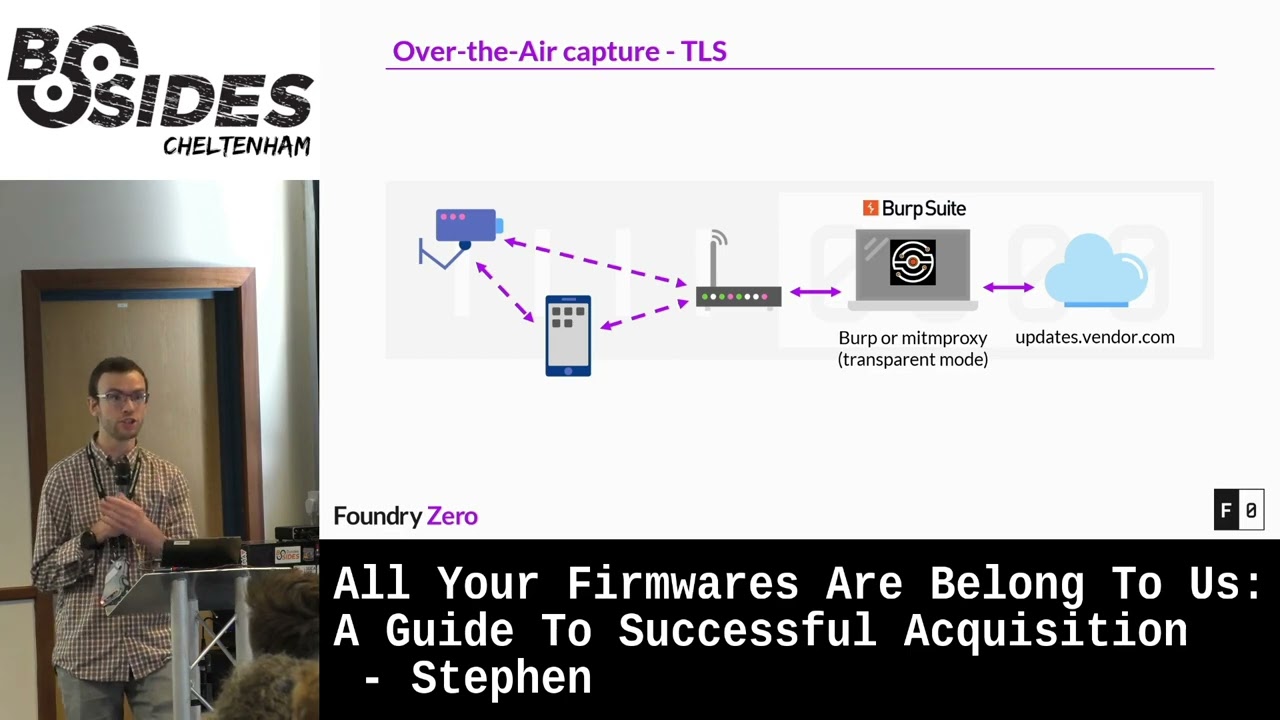
firmware URLs um in particular like the build dates you might have to Brute Force around a few dates to actually get them um so what happens though um and we're seeing this more and more that uh vendors won't provide manual firmware updates um so this is where you need to actually go and uh try and capture those auto update servers that your devices are calling out to um so in the simpler sense um you you connect a some sort of laptop or computer in in the in between your router and the internet um and you use a tool something like Wireshark to go and see what's what's happening um so this will get you all the DNS
requests which are particularly useful uh in this case from your iot device or whatever it is that's connecting up to the Internet and that might get you some sort of update page that you can go and either browse on your on your on your local machine and if you're if you're fortunate it might use unencrypted HTTP and then you can actually get the for uh blobs that firmware blobs that are being delivered back down um it's also useful to note that um a lot of devices now will proxy their updates through a mobile app um so again here we've got a mobile app uh the mobile phone in the in the process um so that we can actually capture the
DNS request through there but of course you know what about Stephen if they uh they use https based firmware updates uh which uh to try and prevent us from capturing them through over-the-air mechanisms um well fortunately he developed on the sync TLS is really difficult um so a lot of vendors I'm seeing actually use kill Dash K to go and perform their firmware updates um so kill Dash k for anyone unaware uh runs curl in a uh completely unverified State uh so it will ignore any certificate that you provided and just accept that as a as a valid one um so that is uh great for a security researcher like me because I can go and
fake being their update server um so how we go about doing that is very similar to uh to the example above um we go and actually replace our Bioshock instance with something like birth or or Mission proxy um so these are https uh Inception proxies which will terminate the TLs connection and then create a new valid connection up to the firmware update server but that crucial bit in the middle will be completely unencrypted so you can go and extract uh whatever's being downloaded through there um so as note before it needs to have a a sort of a curl Dash K or equivalent to disable verification uh if it's uh your iot device which is calling out to the
the update server um I reckon I'm getting about a 50 hit rate on on devices at the moment uh so it's pretty pretty good and it'll work um but you're actually more fortunate in the case if your device uses mobile devices to proxy those updates um because it's absolutely trivial to go and get your mobile device to go and trust your certificates you're providing through burp or Mission proxy submission proxies are a great great example it provides a wire guard server so you don't even need to do any sort of complex nap rules to go and redirect your traffic through there and it also provides a web interface that allows you to download a provisioning profile which
has your certificate Authority baked into there so it will then just trust your fake update server um or the the real update server that's got a got a fake certificate associated with it um and and start downloading it in through there um so now you've captured or acquired your firmware from from some sort of website um how do you go about unpacking it um because a lot of these firmware's uh will will have some sort of compression uh there'll be a follow system that may have multiple layers of of different uh encoding applied to it uh to create that one one blob um so the first attempt uh there's two really good tools um so there's uh
binwalk and unblob um and these tools operate very similarly where they will detect uh Magic bytes uh within the file and then they will try and carve so we'll try and split up that file into those into those sections uh and then uh they can automatically extract sort of known known file formats um I stress these are these are good as a first attempt um they they do have their limitations um so um bin walk is a good example of like a really basic wrapper around some existing tools um for doing sort of the extraction side of things um so those there only really support kind of like the default parameter state for um you know decompression uh and that
sort of stuff um and the other thing uh with both of these tools is they are confidently successful even when they are completely utterly wrong um so I had the other day a encrypted firmware that I passed into unblob and I wasn't expecting it to do anything it was a bit of a YOLO attempt um but uh I was surprised um that it had um managed to extract a file which was my image name dot decrypted um and I thought whoa okay this is good I'm out of a job um but uh on especially the file it had done absolutely nothing it was like a bite for bite the same as the original file uh and no indication that it failed
any uh decryption or or uh or decompression at all um so do watch out for that um make sure that you have some reverse engineering skills uh so that you can actually do uh sort of format extraction from from scratch um so you need to uh have in your tool set things like um Ubi reader and uh unsquash fs and know how to use those sorts of tools um and also be able to look at um look at your binary in like a hex editor and be able to like see oh cruel this is clearly wrong this has clearly got some sort of other uh mechanism in there um I'm still on the lookout for a really
good hex editor by the way uh there isn't one um so um uh vendors be vendors uh and they like to do really non-standard things uh and this is going to trip you up uh massively um so I've come across vendors who will use um slightly modified uh compression uh utilities so they'll take something that's open source they'll go and modify it slightly and compile their own tools for it now whether this is for obfuscation reasons or whether it's for optimizations for also the embedded Hardware that they're going against um I don't really know I don't have a clear answer on that one um but it certainly makes my life difficult because then you go and think
that oh cool I've got this really nice archive format I've got a tool that will just extract it and then the tool will try and extract it and either do a really terrible job and then you're left with a load of global mess or we'll just error out um so that can be really annoying um and they also can use sort of custom encryption and encoding schemes um and a lot of these uh above two things are wrapped in a kind of a post boot unpacking routine so there'll be some sort of Linux operating system that will boot up and then through some sort of init script they'll actually go and do uh so the second stage
um unpacking of of the firmware um fortunately if you can unpack that first stage then you'll have all the utilities that you can then start reversing and going after those uh those custom compression and and encoding schemes um so this is this is where your your standard tooling um bimorg and blob and blob will completely fail um they might try and attempt to do some uh some decryption uh sorry some decompression and then as I say completely fail um so this is where you need to perform your reverse engineering you need to do some sort of emulation maybe to to try and uh extract that firmware using their own tools um you might have to build your own
custom tools custom uh decompression utilities um and then you get to Revel in the success uh you might be one of the only people outside of the vendor who's managed to gain access to those those binary blobs uh which for me this this last point is the most exciting bit of a of a project when I get to do something where um you know I've not just run Bim walk on something and got some nice uh nice firmware out I've actually put in some effort to go and um get uh get the get the Royal firmware um so quick note here on handling encrypted firmware so I've mentioned it a few times in this talk
Um this can be a real stumbling Point um sometimes the the encryption can be trivial can be like an xor key that you can really easily um figure out um because I'll often leave like zero bytes all over the place uh so you could go and get those get those keys but often it will be something that's actually like good encryption um so at this point um the first thing you should do is just Google it uh start googling like the first magic bytes of the uh of the binary blob that you've got um because somebody might have already done the hardware for you or at least if they've started to reverse engineer it or for a slightly different
older encryption format uh they might have the the building blocks that you can go and use to to expand it and and decrypt your firmware and the other thing which is um particularly useful to look for is to try and find really uh old versions of firmware um these may not have had encryption applied to them or may have had weaker encryption applied um or sometimes vendors will accidentally leak uh encrypted decrypted versions of their firmware um particularly on forums that's that's quite common uh if they're just trying to get a user to sort of test a a new beta version of the firmware um and the other thing you might be able to find is these kind of full install
images um which again are designed to kind of install on a fresh system so therefore they can't have uh have any encryption applied to them um in the kind of Enterprise Appliance World um you'll quite often get uh VM appliances or cloud images these are another really useful resource to try and extract the binaries that you need from them so these might have the the firmware and Packers um and all the decryption utilities on them and these are two typically by the very nature that you have to install it on your own VM or in a cloud instance that they're not going to be encrypted um so um you need you need to have a bit
of caution here because the um the binary is on there might be very similar to what your say your your target Hardware is but they might be like a completely different architecture so you need to take in mind that when you're looking for vulnerabilities and it's best to kind of use these as a way of unpacking your firmware for your actual Target device um and the next one's a bit of a bit of a chicken and an egg um so you want to try and like actually extract uh keys from a device that you've already got um this is particularly useful um you know it might not be useful to get the original firmware blog because
you could just get that out of the device right if you've got the device in front of you um but it might be really useful um to actually unpack those uh set of firmware images for for a device um because you might want to just analyze a completely clean image uh you might want to uh try and reverse that update mechanism to see if there's any Bonds in it um or you might just be trying to do some sort of patchative things therefore you want a really clean set of patches for the entire lifecycle of that device so I mentioned it just there um about extracting uh keys from advice um so how do you go about doing that um
well you need to find some sort of debugging interface on the on the device um so one of the most simplest most common ones is the uart interface which is a Serial um interface uh this is commonly uh four four pins on the device um so you'll have a voltage pin you'll have a RX and TX data lines and then you'll have a have a ground and if you look at the picture in the top right um so top middle uh that would be my first look at that's probably you art uh it would require a bit of testing but that's that's probably your art um and although there's four pins you almost never need the the voltage pin
um you definitely need to find a ground though but you don't have to use the ground that's uh the next to the pin um I quite often just go to like the RF Shields if it's a um if it's a wireless interface or like the USB shielding because that's a lot easier to attach onto and then once you've found that ground you can go and find your find your data lines with a with a multimeter pretty pretty easily so once you've connected to that your art interface with a with a uart adapter then you may be lucky you maybe get a root shell and I'm certainly seeing this a lot on uh severity devices where you know they put
lots of encryption around their firmware and they don't want to get to it but you know they don't think about the uh the close access uh attack on the on the devices um they might have a a really trivial password as well which you might be able to guess um if if you can't get that you might be able to get into some sort of pre-boot um shell so u-boot uh bootloaders might have a pre-boot show and then you might be able to use the tftp or something else to actually uh get uh get stuff off the device um a note here um I was originally going to call this talk um how I destroyed a 1500 pound
vacuum cleaner with five volts um definitely um what's your voltages when you're looking at uart so they'll have voltages ranging from 1.8 all the way up to sort of five volts um test several times with a multimeter before you actually uh hook up to it um and I recommend using uh one of these sort of DSD Tech adapters you can get for about 15 grid on it on on Amazon and so these have a selectable voltage so you can be sure that you're only going to be putting 3.3 volts uh in there and not 5 volts um the next uh thing that I I want to highlight um say you haven't got a uart interface
um and there's nothing easy to attach to um so I've started getting really interested in PCI Express um so I'm seeing a lot more devices that contain um sort of a PCR Express interface and now that not that might not be what you see in your your standard desktop PC which is a you know a one by or a 16 by PC Express interface um but typically it's things that have sort of modular uh wireless cards uh Bluetooth adapters um or they might have like a cellular modem in there um so those those sorts of things will be running sort of PCI Express um bits uh the other thing is some of the microcontrollers um quite often have unused PC Express
pins on them uh the hardware developer decided not to use and these are things that uh over PC Express you can do something called uh direct memory access um so this is where via Hardware you can actually gain read write access to to the memory that's uh that's on the running system um and this will get you access to uh whatever's running on that system it won't get you access to the flash storage um but once you booted up the device and it's accepted your PC Express um interface uh you can then use one of these uh special cards um so this here is a PCR Express screamer I think this device is the squirrel
um these are about 450 grid um which sounds expensive but it's actually really cheap for what you're getting uh so you're getting a fpga on here which does all the PC Express dma and then you get a USB interface that you control via another computer to actually uh perform those uh those dma actions um and they're they're so cheap ish um even with the brexit tax here um because these are now being used a lot in online multiplayer games uh cheating um so it turns out that uh software-based uh memory rejection technology uh is being picked up an awful lot by anti-cheat um so therefore they're moving on now to Hardware based attacks to kind of Buy
pass that um and I mentioned you control it from another computer you use a program called PCI leech um which allows you to to get that um so one of the best attacks that I use is I try and find something uh I dump dump the running memory and then I'll try and find something that's going to cause a system command so ping utilities or other network dinosaur utilities that you might have some sort of web interface for on the device um those are really good ones to go after and then you can do a basics of command ejection through this uh to spawn a shell and then you can go and dump whatever you like uh off the off
the device um so I mentioned it uh look for all the sort of PC Express interfaces um it starts getting really messy uh so this is the Sonos one on the left-hand side and we've taken out the um wireless Bluetooth module which is a mini PCI Express interface and then we put that up into a a series of adapters that you can get on AliExpress uh which gives us a there's a PCI Express switch in there which allows us to uh convert our one PC Express interface into two and then we've got um so we've got the original wireless card so we've still got network connectivity and Bluetooth to to the device and then we've got our
screamer on the on the right hand side and all of that connects up to another laptop which performs our actual sort of memory attacks uh on the on the device the final final point that I want to make here is is chip off um so this is where you take um the memory chip off the device you know you failed all other other ways of getting it through through so debugging faces and so you have to remove that chip and then you can read it um through external means um I mentioned this is the last resort this is particularly the case if you're dealing with expensive or difficult to procure Hardware um this is uh quite uh risky uh so you
don't want to do it on something that's that's difficult to replace um so you have to desolder it and this you need a sort of a hot air rework station now this sounds really scary um but uh it's very similar to cooking chips in the oven uh so cooking chips in the oven is what 200 degrees for 20 minutes and that cooks almost anything in the oven um so instead it's it's about 300 degrees for 30 seconds um and you just wave the desoldering uh hot air gun over it and then the chips will just pop off um that's the easy part then the Reading part is really difficult um some devices are trivial um so they'll be sort of your emcp or
your emmc memory those uh those protocols you can easily use like an Arduino or a Raspberry Pi to hook directly into the chip if it's kind of a raw Nan ship uh it depends on the chip and you'll probably have to get a really expensive flash programmer and an even more expensive adapter to try and uh access those uh those uh raw that can be really difficult um this um on the right hand side is as uh with a with a small uh nor chip um and the actual tool that we're using is called a PC byte um so this here has a load of uh very fine needles that you can probe devices so this is really
useful if you're doing anything like this or if you've got sort of really small pins on the on the board that you're trying to you know access uart or uh or JTAG or something like that so that's a really cool tool um so that's kind of my very brave version of this talk and very Whistle Stop so also I apologize for how quick I've gone through that um but uh like everyone else in the Jack sector uh we we are hiring um if if you're interested in getting paid to hack stuff uh and having a good fun time at the time at the same time um then maybe consider us for your for your natural uh we got two open positions for
uh experienced cyber focused uh developers and experienced researchers uh thank you very much thank you
Related talks
 9:40:42
 33:56
33:56 43:54
43:54 40:53
40:53 42:28
42:28 59:11
59:11