ZFS okiem hakera
Show transcript [en]
Hi everyone, can you hear me? You are probably hungry, so I won't be too long, because the whole conference is a bit late. So I would like to tell you about the best file system on the market today. Not only when it comes to open source, but also commercial solutions. In my personal opinion, there is nothing better and we can actually use it at home on any platform, which we will talk about later. My name is Mariusz Zaborski, I work in the company Wheel Systems. We generally produce nice network appliances for analysis of traffic, for administrators. If you are interested, please visit our website. I am also a project manager for FreeBSD. This means that I have direct access to the source code, I can
modify it and so on. So if you want to change something, you can also contact me on this matter. So, the main issue we should discuss is whether the disks are indestructible. That means that we never have problems with them, disk exchange is always smooth, we always write down what we want, these disks can just live and live and live. Unfortunately, it is not like that. One of the main problems is, for example, disk replacement. If we want to replace a disk in a large folder or even in our computer, it may take days. Because we have to copy all the blocks from this disk to another disk, because in fact our current file systems do not know which blocks are used in a given disk. Therefore, we have
to make an exact copy of one disk to another. If we want to change the size of such a disk, This is a disaster. If we want to change it to smaller disk, it is practically impossible to do, because file systems will start to go crazy, we will lose data, it will stop working at all. Another problem is, for example, microcontrollers on the disk. The processor can tell us: "Hey, I would like to save this and that and that." The controller on the disk can say: "Okay, but I made a mistake and I won't save it." And the disk will say: "Okay, I saved what the controller on the disk wanted." It is also interesting
that in fact, at this moment, the controllers on the disk are so powerful that they can run the operating system. I don't know if you've heard, Someone managed to run Linux on a disk. The Linux kernel on a microcontroller on a disk. For me it's crazy that we have a computer in a computer. Control is one thing, but due to all the changes of magnetic field in our computer, it can happen, it rarely happens, once in a billion times. computers or situations, it may happen that we have a cable failure. Something will go wrong, we have a bit flip on the cable and the bad data will be saved on the disk again. Do you know what this man is doing here? He is screaming, exactly. This
man is screaming on the disk. Does it matter? It turns out that yes. Even small vibrations like a scream can slow down the disc, or even cause the data on the disc to be saved differently. And again, here it may happen that one bit will be changed and our data will not be saved as we would like. And the question is whether it matters. One of my favorite examples is that one bit also has a meaning. There is a mistake presented in OpenSSH. This mistake is almost 15 years old. It was a bad comparison. The programmer made a bad comparison. Instead of checking the channels, he compared the bigger to the smaller. And it happens. Because of this
comparison, the user could get a root on the machine. Let's go down. We have an assembler here. It turns out that it was one assembly instruction. Ok, nothing big, one instruction in this or that. If we go even lower, it turns out that it was one byte. If we go lower, it will turn out that it is one exactly bit. One bit separates us from a safe and unsafe SSH. Does all the changes on controllers, disks and the screaming of the disk matter? In my opinion, they do. It's a bit paranoid, but in fact one bit divides us between a safe and a dangerous binary. So ZFS appears. In 2001, work on ZFS started. ZFS was created by Sun
Microsystem. There was also an interesting story that Sun had a large macer and one of the administrators, I don't remember if he wanted to add disk, remove disk, replace disk, he wanted to do something with this macer, he made a bad command and the whole macer went... It lasted another week, when they had to leave it. The problem was that there were all catalogs of all employees in the company. It would be a bit expensive, but it also gave a reflection to Bill and Joy, if I remember correctly, to create a new file system, to think about how our current file systems work and he said that this is not the best solution. In 2005, ZFS was
published by the wider Open Source group together with Open Solaris. In 2007 Apple decided that it was a cool idea, that they also wanted to have ZFS in their operating system. In 2008 ZFS landed in FreeBSD. In 2008, work on ZFS for Linux started. In fact, this support for Linux for many years was quite weak. Now it is much better, mainly due to Ubuntu, which put a lot of effort into making ZFS work on their operating system. In 2010, the time for open source and open Solaris came, because Oracle decided that they won't support open Solaris anymore. Fork Illumo OS was created, which continues working on ZFS. And in 2013, Matt Ahrens, the main designer
of ZFS, started the project called Open ZFS. It's a short story of ZFS, if anyone is interested. Let's move on to ZFS. Let's start with the name. Why ZFS? ZFS was supposed to be a file system that would allow us to keep zbyte information. a bit much information. I remind you that it was a file system designed in the early 2000s and then 160 GB cost about $275. It was quite a lot at that time. However, engineers at Sun Microsystems assumed that Z byte will be enough, it will be OK. In this time, for example, if I remember correctly, there was already EXT2 file system, which allowed for some terabyte or something like that. So it was a big step. They assumed
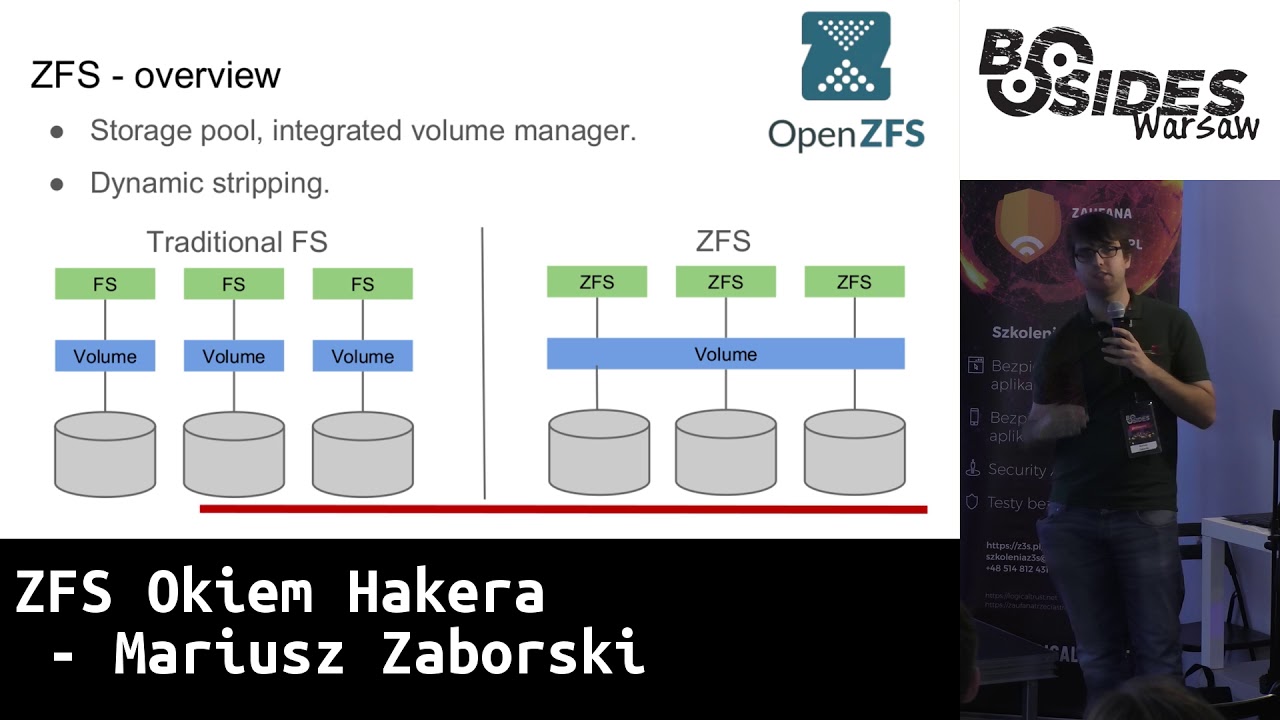
right away that there will be a lot of information stored on disks. At the moment, ZFS has moved one step further, you can keep more than even a zettabyte of information, other file systems are overrunning it. So what is so special about ZFS? The difference between ZFS and traditional file system is that we have disk pool. It works a bit like malloc. We have our memory and we want to give to given file system some space. And it is done dynamically. So we don't have to decide right away if we want 160 GB for our host, or home director, but we can decide about it later. In traditional file systems we have to create volume, so we have to create our
file system on it and then we have to assign its size, we have to say that this file system will have this much, it will be mounted there and if we want to change it, we have a very big problem. It's different in ZFS. We can connect these disks, we can disconnect them. It's different with disconnection, but we can add more disks to the motherboard, which is a very, very big advantage. And we can expand our pool. We can say: "Okay, I need a new file system." I don't know, a new user comes to us and, for example, a new user wants to create a new file system, a separate file system. No problem. This
is my memory that I can use as I want. So here we can see Maloc's approach. We have some space and we have it at any time. And as we can see here, if we make such a command df, which will display us a free space, we see here that the available space for all file systems is exactly the same. So we have our pool and we have 155 gigabytes and we can use it as we want. Each of our file systems has access to this Here, of course, everyone can take a different place, but all have exactly the same available access. This can also be limited in ZFS. We also have some quotes we
can put on a given file system or some other restrictions, for example, the minimum size of a given file system, which ZFS must guarantee us. we can very dynamically manage how our file system looks. And in fact, ZFS gets rid of my first hated problem when I installed Linux or any other file system, how to partition it. I just never knew if 50 MB per boot is enough or not, should I give 200 MB? I never knew that, there was always a problem, it always ended up that everything just landed in one partition and let there be catalogs. ZFS solves this. We have one disk, we have a pool in it and we are just creating systems files in it and we can
dynamically decide whether we want it this way or we want it differently. That's why I love ZFS among others. The same goes for Swap. We can configure Swap on ZFS and we don't have to worry about it. Ok, so other interesting features in ZFS. I've mentioned those unfortunate one byte, which can make us sleep at night, because we will be afraid that our disks will change SSH. ZFS solves it. We have checksum. Every block in ZFS, every data that is saved in file system is checksum. We can choose which one, we can turn it off, but default checksum is on, so all our data is checksummed. Not only data, but also all metadata. If we have any information about the block, they are also checksummed. An
amazing solution is copy on write and transactivity. ZFS never overwrites live data. If we want to change a block, it makes a copy of it. If we have a problem that our system suddenly turns off, there is no electricity, then we have no problem that our data on the disk is inconsistent. If we try to write something, ZFS takes this block, copies it to another place, changes it and only when all operations succeed, this block is used. So if at any moment we run out of power or there is a error, our data in the file system are exactly the same. So either the transaction succeeds or it doesn't. That's why we don't have FSCK checks anymore. I don't
know if you've ever turned on your computer and waited for a few minutes because you have to check if your computer data is correct. It's not like that in ZFS because the data is always consistent. You either managed to write a transaction or you didn't. There are no half-signals. There is also no journaling. It occurs in XT3 or UFS. It consists in writing metadata somewhere on the side, in the file system, I write metadata about the records I made. It is used during FSC to retrieve all the information that could have been lost. So he writes: I tried to write here, I tried to write here, I tried to write here. And FSTK goes through our daily and checks if it can recover or not.
In ZFS there is no such thing. So, as I mentioned, we have this copy on write and it consists of trying to write, modify, for example, two blocks, we modify it, but we make copies. These blue data are still on our disk, we have written the green ones. Then we write some metadata and only then we write the uber block. our current state of our disk. When we write only the uber block, our data, the ones we tried to write in green, are available to us. If we get a disk in any second or third moment, the green data is saved somewhere. But it was not blocked that uberblock points to it, so these data do
not exist for us, we do not have to perform any FSTK, we do not have to do any journaling, etc. There are simply none. That's why our data is always available to us. One of the problems that we have is that we decided to configure mirroring. We have two disks, precise mirroring of disk by disk. and we try to get data from this disk. It turns out that our cable has cheated us and there are some wrong data on this disk, but on the second disk the cable did not cheat us and we have the correct data. The problem is that when we use such file systems as EXT, UFS or others, when we try to read data, it is transferred to the volume manager,
for example, it can be a disk controller or some hardware solution. It may not even know what is there, because it does not know the file system, it does not understand how File system writes data on disks. It doesn't know that. It only knows that it's a write, I have one disk, another one, I want to ask write about this data, here, these are your data. So file system gets wrong data. File system maybe knows that this data is wrong, maybe doesn't know that this data is wrong. If he had some kind of summary, he would say that the data is wrong, but what to do with it. He doesn't know that it works in the mother, because our volume manager is on a different level.
So he will either return the data to the user of the application or say that he failed to read the data. In ZFS it looks a bit different. Because we have integrated Volume Manager and File System, when we try to read such wrong data, ZFS will say: "No, these data are wrong, I know that I work in Mirror, that I have several disks that have copies of these data, or I know that these data have some kind of parity and so on, so what will I do? I will read correct data from the second disk, I will check that they are correct, using, for example, checksum, and I say: "OK, there were wrong data, so
here I have correct data, so I will write this correct data on the second disk, so that there is no problem". This mechanism is called self-healing in ZFS. It is done automatically, you don't have to turn it on, it just exists. And the correct data is transferred to the application. So we are sure that if we have a problem, the disk will be damaged in some way, for example, we will have blocks in the disk or the cable will be bad for us. Still, if we try to get to these disks, the data will be saved automatically for us. Here you can also use something called scrubbing in ZFS, which is checking if the disks are consistent, if checksum matches all blocks. But
it's optional, you can do it if you have any doubts, so that self-healing is done automatically. Now, ZFS supports several types of redundancy. One is Stripe, which I told you about earlier, where we have a disk pool and we connect more disks. It works like a malloc, so every new disk is a new space for us. We have mirroring, which is the first RAID, we connect a number of disks, exactly the same data is on all disks. And we have RAIDZ. Here we have RAIDZ1, 2 and 3. And it is based on the fact that we use a number of disks, Any number of 5, 10, 20 and 1, 2 or 3 disks are used as parity. So if it turns out that there is
some inconsistency in the material, then we get data from this parity. Here we can see the rides, the recommended number of minimal rides, I mean the disks we have, the parity disks, it is actually correlated, for ride Z1 we have one parity disk, for Z2 two, for Z3 three, and here we lose a little bit of space when it comes to data. If we have three parity disks, 1 TB and we have RAID Z1, then we have only 2 TB for data. This third disk will be used as parity. And also, depending on the number of parity disks, also so many disks can be damaged or completely removed. If we have a z1 raid, then if one
disk is damaged, nothing happened. If two, then unfortunately the mac will stop working. If we have a z3 raid, then three disks can die. Other features of ZFS are, for example, that it is Indian independent. That means, if we have, nowadays it is a rarity, but if we have Spark, and we have AMD64, AMD64 is little Indian, Spark is big Indian, if we want to send files between these machines, everything will work. There is no meaning for ZFS whether we write it as little endian or big endian. And compression. We have several types of compression, we can turn it on on any file system. We can turn on LZ4, it was one of the most popular
types of compression for 2-3 years. It is also interesting, because if we have server solutions, often the disk operations are the most time-consuming. Sometimes it is said that the disks do not work. This compression also causes that on the one hand We load the processor a little more, but we allow the mother to cut off a little more. Because if we have a lot of data, it is compressed, which means that we have to perform fewer operations on disks, because there is simply less data to read or write down. So this compression can also help us when it comes to the lack of IOPS. And a very interesting last solution is Z-Standard. Has anyone heard of Z-Standard? It's a
new compression created by Facebook. It's on BSD license. Generally, Facebook wants to use this standard widely. And as you know, Facebook sends a lot of data to users every day to render that a new friend has appeared on our pages. So they want to implement Z-Standard in their engines. So it's open, it's on BSD license, everyone is happy. The question is what does Z-Standard do? As I mentioned, the most popular to use was LZ4, because it had relatively good ratio compression and it was very, very fast. If we needed to keep the place but it was not interested in encryption and decryption of data, we used Zlib, which is a popularly known Gzip, which had
very high compression but was very slow. Compression and decompression of data was extremely slow. Zstandard is a new type of compression, which has higher higher compression level than Z-Lib, but it is almost 4 times faster. In case of compression 4 times, decompression 3 times faster. So we can still, it is not as fast as LZ4, but with such ratio we can, it is a big profit for us. What is interesting, in Zlib, Gzip generally has 10 compression levels. We can choose between the fastest or the slowest. If we choose the fastest, we have a lower ratio, if we choose the slowest, we have a higher ratio. In Zstandard we have over 20 compression levels. Here it is given for the fastest Zstandard and the fastest Zlib.
When it comes to snapshots, we can make snapshots in ZFS and they are very cheap. Generally, it is based on the fact that we only record the time of creating a given snapshot. So we write down the number that determines the time when the snapshot was created. And now if a block is removed from the ZFS, for example we want to delete a file, it is checked whether this block is older or younger than our snapshot. If it is older than our snapshot, we save it to the snapshot. If it is younger, we just slow it down because we don't have to hold it longer. Snapshots allow us to go back in time. If we
have a snapshot of a file system from a few days ago, we removed some different data, then we can go back and see what the situation was on the file system a few days earlier. And this can also be an interesting solution for a very popular problem with ransomware recently. So malware that encrypts data on disk and asks us to pay or you won't get your data. We can easily do snapshots in ZF. They are practically free of charge. They only cost when we delete data and we can go back in time and get back the data even if it has been encrypted. For example, in my company we do snapshots every five minutes of our main machines. We can do it, it's
not very expensive and we can save our data from any malware. Here are the commands, if we want to make a snapshot, we give a file system that we are interested in, and this is the name of the snapshot that we created. If we want to recover, that is, to go back in time, we can use the "rollback" command. We can also refer to snapshots through a special file system. This is a catalog that is invisible, but we can enter, if we have a ZFS file system, we can enter .ZFS to the snapshot catalog and there we will have a list of all snapshots that we have created and we can normally go through the catalogs, review what
the current status was. So, we can not only create snapshots, but also send them. So if we have two machines with ZFS on both ends, we can send a snapshot and have a detailed image of ZFS from this machine on another machine. We can also create clones. Clones are snapshots, but they are also for saving. Snapshot, as I mentioned, is only for reading, but from such a snapshot we can create a new file system, which we call a clone, and then we can also modify this file system. For example, we can create snapshot of file system on which our database exists, make a clone of it and run the second instance of the same database.
If there will be some new operations, this clone will save all the new information that was saved on this file system and we have two instances of the same database. It may be useful if we want to upgrade such database and check if it will be cost-effective. We also have zVols. ZVols are special file systems in ZFS that are block devices and we can create new file systems on such block devices. So if we would like to have ZFS and all its benefits, but for some reason, for example, we need EXT4 for a moment or we need a disk to mount it to a virtual machine, we can create such a zVol. We also have deduplication. In ZTFS, deduplication is when
we have a nice hash map of all the data on the disk. If a given block repeats itself many times, we don't save it on the disk, but we save references to that block. So that block is only maintained once. We have two types of deduplication: verify, which verifies Byte by byte, the accuracy of these blocks, or we can use checksum, for example SHA-256 and on this basis decide whether the blocks are correct or not. We can also use both techniques, i.e. first we check the checksum, and then we check whether the block is correct. As I said, we can set quotas in the file systems, we can say that this system can have only
10 GB and not more, it is implemented in the file system, we don't have to use any other mechanisms. We can reserve a certain amount of space for a given file system, we can say that this file system will use 2 TB and all others have to be subordinated to it, so that this system will leave 2 TB. ZFS has implemented NFS, so we can also share our data through this protocol. There is something called re-silvering. It's about when we have a mac, and we have a disk that we want to change for some reason, we put in a new disk, an empty disk with ZFS, and only the data that was actually used in our previous file system will be copied to
a new one. ZFS tracks which blocks it uses, so we don't have to do DD, and push it to 2TB disk, if we have 2TB disk and we used only 10MB of this disk, we don't need to push whole 2TB. ZFS will easily solve which blocks are used. As I mentioned, we can use ZFS for backup, here is an example of a command where we send a snapshot, here we have an incremental snapshot, so we say that we are only interested in the difference between two times, we pick it up on some other file system. There is a very specific thing for FreeBSD. FreeBSD has its own virtualizer called Behive and we will keep the configuration of Behive in the We can create
our own metadata in ZFS if we want to say that this file system is to be backed up, we can create our own metadata in ZFS and say that zfs_backup = yes and in other file systems = no, so we will back up only one file system. Thanks to this we can use it for example for a Multimaster cluster. So if we want to have access to data on multiple nodes, it's again a very administrative thing, but if we have some raw data that we want to keep on multiple nodes, on multiple machines, then we can use snapshots We can create and send data to other nodes and thanks to that we can have access to data from another node. It's
a very easy way to transmit data, much easier than for example through rsync. Other interesting features that may interest us are, for example, Centraceive continuation. When we had this SSH command and we sent a snapshot and we received it on another file system, if we run out of network, we had to start all over again. At the moment, ZFS has implemented the possibility of continuous sending. ZFS also has native encryption, we don't have to use any Lux or anything like that, we can say which systems of files are to be encrypted in which way. And what is also interesting, we can send compressed data blocks. Previously, in ZFS, we had to decompress the system first, Now we
can send compressed blocks. Unfortunately, we also have the dark side of ZFS, i.e. problems with RAM. ZFS really likes a lot of RAM. It is said that we need about 1 GB of RAM per 1 TB. It is a lot. That's why embedded systems do not work, because we do not have access to such a large RAM. Another problem for ZFS is defragmentation. Because we use this mechanism, These blocks are always copied, then changed, our disks are very fragmented. We have a lot of places where there are gaps between live and non-live data. Generally, it doesn't matter much, but it is so. If ZFS has a very large occupancy, i.e. about 90% of the disk space occupancy, it starts to
work very slowly. Because it is defragmented, finding free blocks takes a little more time, but the solution is simple, we can easily add another disk and that's it. ZFS is available on Illumo OS, as I mentioned before, OpenZFS is based on this operating system, it is available for FreeBSD, it is available for OSX, it is used a lot by FreeNAS, and also Linux. It is used in Linux. Why am I talking about Linux at the end? Because there is a bit of a war for freedom here. ZFS is licensed for CDDL, which means that the source code must remain CDDL, all the headings, all the rights must remain exactly the same, but it says that the binary can be licensed at will. We
can take such a binary, we can sell it, we can license it as BSD, we can license it as GPL. So Free Software Foundation came and said that it's not really freedom, we think that our code must be also on GPL 2.0. If it's not, then you can't mix it with our binaries, it's not freedom. Fortunately, Ubuntu has a slightly different view on this, it said that OK, but ZFS is actually a kernel module and in fact this ZFS is not part of Linux, but it is separate, so we want to have it with us. So if you want to use ZFS, you can use it on Ubuntu, it is quite simple, Canonical supports development
I recommend ZFS on Linux. Sorry, I've already said that. OK. Is ZFS for me? So if we are paranoid, then checksum is a cool thing. We are sure that everything we have written is definitely consistent. We have native encryption. We don't have to use any luxes, any other truecryptos. We have encryption in ZFS. We can do easy remote and local backup, snapshots every 5 minutes, sending ZFS to another ZFS, or even sending ZFS to other files system, but then we have it only as binary blob. We can also save space thanks to built-in compression. whether it's LZ4, if we care about performance, or Z-standard, if we care about place. And most importantly, if we don't have a
problem with GPL, or we agree with Ubuntu, or it's not a problem for us not to use GPL solution, then I strongly encourage you to use ZFS. I also wanted to recommend three books. 3BSD - The Design and Implementation of the 3BSD is the only documentation about ZFS implementation. This chapter was written by Matt Ahrens, the original creator of ZFS. If we are interested in administrative part, we have two books by Michael Lucas and Alan Jude - 3BSD Mastery and Advanced ZFS. I highly recommend it, a very pleasant reading, if what I have presented is not enough for you and you want to read more about either InterNAS or ZTFS services, I encourage you. Are there any questions? Thanks for the presentation. Two quick questions.
One, can you change the volume parameters during the life of the volume, for example, change compression scale? Old data that was compressed as it was will remain, all new data will be compressed in a new way. If we want to compress it, we can use the snapshot system and we just have to replicate the data for a different file system and then all data will be compressed. And the second question is about support for SSD disks with their specificity. Yes, ZFS supports Trim in the latest version, so generally this problem appeared at the beginning of SSD disks when ZFS was killing SSD disks because it performs so many of these operations of writing. However, at the moment there is no problem
with it. Ok, so I have a question now. You said at the beginning that ZFS is good for home use. Ok, I have big files, for example, some movies from the camera, I don't have too many discs, I wouldn't want to carry large deposits on these disc materials. I imagine that I have to have twice the space for the largest file so that it can be copied, because we have copy-on-write. If you want to copy a large file to another place, right? Yes, and I don't have too much space because the file, for example, has, I don't know, 120 GB, and I only have... I mean, if you don't modify it, right? Because, again, ZFS works only on blocks, right? So if
you don't modify it, then simply metadata is overlapped, that it's in another catalog, right? If you wanted to modify it, it's not like these transactions, you know, work If you want to modify 500 blocks, it's not like 500 blocks will go into the transaction. They are divided into smaller transactions. I understand. And the second thing is that the main solution of the problems you presented was to add a new disk. If we are short of space, because this is a common case, if we have ext4, what will you do if you are short of space? You have to take a bigger disk and copy all the data. In ZFS you can simply add, you can't
expand ext4, so my solution was to add a second disk. In AX4 you have to have volume manager on it, so you have to rebuild it all. And here you just add another disk, if you just lack space. Is it possible to add disks to RAIDZ so easily? That's a very good question. In RAIDZ 1, 2, 3 you can't add disks. There are works that are taking place to add disks, Matt Ahrens got grant from Intel to do it. However, you can have RAIDZ1, create RAIDZ1-2 and connect them in Stripe. or simply add a mirror. We can simply create a certain hierarchy of these disks. If we already have one matrix, we can add another matrix to this
matrix and expand our space. More or less? Ok, then maybe I'll go back to this slide a little bit. Here, right? If we assume that these two disks are in RAIDZ1, we can create a stripe based on these three disks and this disk will not have redundancy. We can connect these macers at will.
Another question from the other side. You say encryption. Does it allow to have the whole system encrypted? Individual system files. If I remember correctly, you can't encrypt the entire pool, you can only define individual system files. Sorry, I missed a fragment. So, once again, you can't encrypt the entire pool at the moment. If I remember correctly, you can encrypt individual system files. So if you want to encrypt your home catalog, or boot, or something, you can, but there will be a part of Zpool, information about the pool, etc., which you can't encrypt. For each system file, you can define separate passwords.
The question was whether you can set separate passwords for each file system. Yes, for each file system we can set separate passwords. Two short questions. One, data corruption. It happens to me and scrubbing doesn't give anything. What to do with it? The guides say delete, go through the progress again, but if I don't have a copy, where from? What to do? Is it possible to do something with it? I understand that you didn't have any redundancies on the disk, right? No, there is RAIDZ2. And despite the scrubbing, you still have... Yes, and what could be the reason for this? All three, I mean, you know, the only reason is that all three disks were damaged
in the same way. In the same sector, I mean, not in the sector, but in the block. It's the same data, blocks, right? This is the only explanation, but it's... It's a very strange situation that something like this happened. And the second question is, is there any idea, as it is already the ZFS on Ubuntu, let's say on Linux, are there any projects like an alternative for FreeNAS, sensible? - Do you know anything about it? - No, I don't. If we wanted to use NAS solution, I would recommend FreeNAS. I don't know any other Linux based alternative. - TrueNAS is, but it's also FreeBSD. - Exactly, it's about FreeBSD. - Question, what is the compatibility of ZFS
between San and Oracle, because there was fork and later ZFS. So ZFS is versioned. When it comes to new features, it's versioned and probably by 2029 they are compatible. Then, what I said, OpenSolaris was closed, Oracle closed the project and it develops its own ZFS, so it's not compatible with version 29. But OpenZFS has increased its version to 5000, so you will see that it's not compatible with itself. So unfortunately you can't use OpenZFS and Solaris ZFS. Developers have no idea how it changes. I understand that the alternative is that you could force it to be on a specific version. Exactly. It also depends on the features you use. Every new version is a presentation of new features. Let's say in version 29 you won't
have Z standard compression. One more quick question. Is it possible to use ZFS in practice? I'm a big fan of it. On Solaris it was a joke for admin to use ZFS, but later on Linux it started. I mean, I stopped 5 years ago. So I'm wondering if I can take Ubuntu as the main file system, take ZFS and enjoy it like a child, or will it be a sculpture? If you want to enjoy yourself as a child, I recommend FreeBSD. It has great integration with ZFS and it's... Perfect solution if we want to use ZFS. I must admit that I still struggle with Ubuntu and its integration. It is much better. I was looking at integration
of ZFS from Ubuntu 5 years ago. It was a massacre, sleepless nights and so on. Now it looks much better. Much, much better. However, it is still not perfect. It is a bit off. Some time ago I tried to configure Ubuntu to fully encrypt disk on Lux and on ZFS. I don't recommend it. It's just a week taken from my life and I couldn't do it. But does TrueCrypt have support in Grub to decrypt full encryption? I haven't tried it, I've somehow accepted this luxury. Maybe I should have thought more. For now I was only thinking about Ubuntu and full encryption and ZFS was very difficult for me. However, if you would like to have just ZFS without any full encryption, but for example use
the encryption provided by ZFS, it should be easy. I have a question that is so enlightening, ZFS or ZFS? This is a very good question. I don't know if you know, but in FreeBSD environment ZFS was exported by a Polish, Paweł Jakub Dawidka to FreeBSD and he was saying it ZFS, but again all Americans were saying ZFS. - Z-bytes. - Exactly. OpenZFS says: name it as you like. - Z-bytes. - But in Polish, right? - Z-bytes. - Exactly. So it's a problem of Polish and English language. Are you linguists? - Any more? Ok, thanks a lot.
Related talks
 55:53
55:53 7:56:49
 51:33
51:33 38:46
38:46 43:55
43:55 57:24
57:24