Mobile Penetration Testing Hybrid
Show transcript [en]
before we start so today we have uh buddy smith uh presenting with mobile penetration testing hybrid applications for code elbow and front grab after spending 15 years developing firmware for secure reliable embedded systems buddy transitioned to the information security space as a penetration tester passionate for protecting the devices we use on a daily basis his experience has with extensive work on low-level network protocols hardware analysis and cryptography enabled him to quickly take on a full range of engagements as a penetration tester his primary focus is internet of things embedded devices mobile appliances applications i do apologize threat modeling and cryptography with that being said i present buddy smith hey guys thanks for taking the time to be here
today uh so this presentation is basically intended for anyone who is either a developer of a mobile application or a penetration tester that is going to be testing a mobile application that's based on cordova so if you've never tested mobile applications before then you might find some value out of this if you've tested a lot of applications and you're starting to see a few of these cordova applications i hope it'll give you some ideas of things you should look for and ways to get more value to the clients when you're doing these sorts of engagements so this is my background i was an embedded systems developer i moved into security and uh found that i had a knack for
certain things like social engineering and red teaming i got trained in physical penetration testing but for the most part i focus on embedded systems and mobile applications are sort of essentially embedded systems so i've done you know on the order of 100 or more mobile applications in the last couple years so i put this together as i was testing a bunch of cordova applications and i decided you know what let's come up with some standardized ways of doing this so that we can save some time and do a better job so the first thing you want to ask is what exactly is a hybrid application when you've already written a mobile application in html and javascript and you say okay we want
to put an app on the app store well now you've got to hire developers to write a native application for ios and a native application for android that's totally separate from the mobile applications you've already written and that's expensive right so a hybrid application is designed to allow you to take your existing html and javascript and bundle it into a native application that someone can go and get from the app store so essentially it's a way to save money save development time because now instead of having to develop an apple application and an android application you can develop one and use most of the same code across both platforms so cordova is an open source framework uh written
originally by apache that lets you write these mobile applications exactly the same way as you would write your web applications uh and phonegap is or rather i should say was an adobe implementation where you could use a cloud-based build system so you didn't even have to have you know a mac to build ios applications and an android system to build applications for that you could just do it all on the cloud uh phonegap has been discontinued so that will change things a little bit but the open source implementation is still there and it's still really actively used um and another one uh ionic is a commercial platformer environment that's also based on cordova so throughout this presentation i might say
phonegap or cordova or ionic they're sort of interchangeable for the purposes of this presentation one thing that i want to talk about here that i don't think you hear a lot when you're talking about testing mobile applications is actually the process of pre-pre-sales uh the pre-engagement checklist and then our actual testing and some reporting so i wanted to give you guys a little bit of an insight into how i scope these so that when a client is asking me to test an application and i want to figure out how long it's going to take or how deep of a dive i'm going to have to do that's the pre-sales and pre-engagement stuff so a lot of clients really don't like
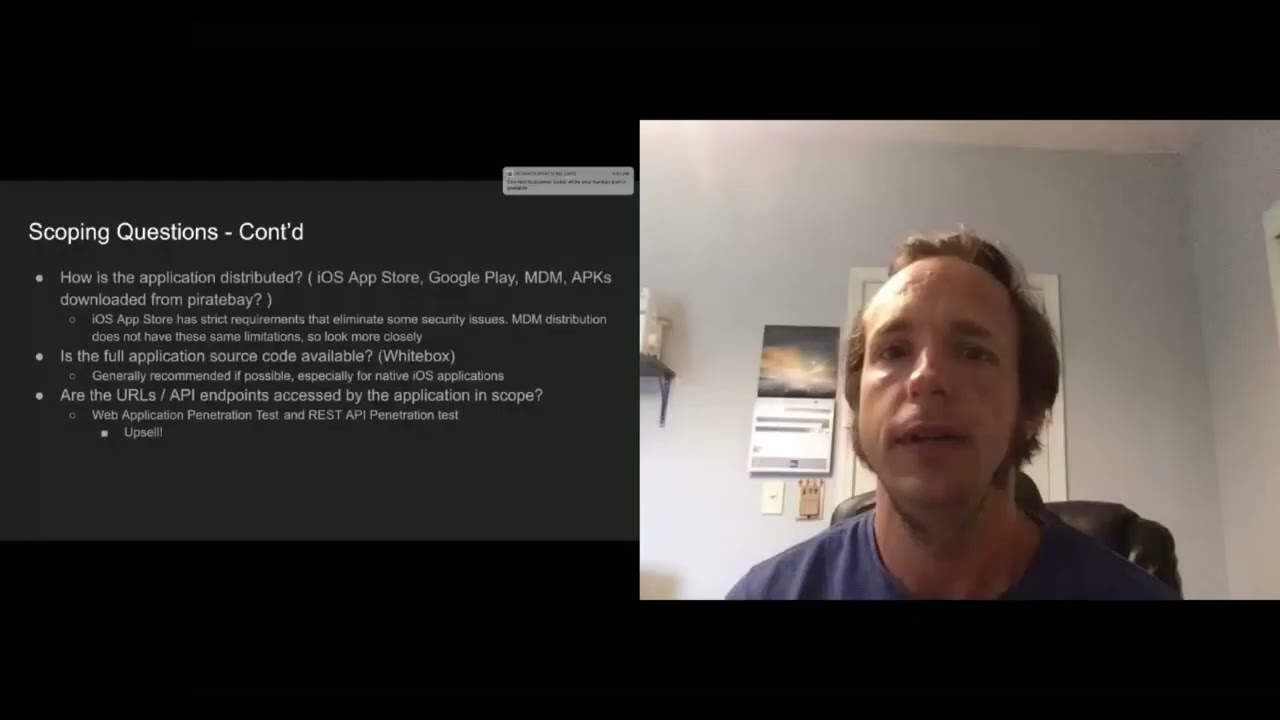
answering questions about their applications because they say we're cheating but i feel like if you can ask these questions up front you can get an idea of the level of effort you're going to need to really evaluate the application so these are some questions that i always ask if i have the opportunity when i'm working with the sales team we're working with the client before we put together a quote i'm going to say hey is this application built with a cross-platform framework because if it is then i know that it's going to be lower complexity if an application is written in a native language like java or swift or objective c then i know that if
i have to test android and ios i have to put a lot more time into that because those are two entirely separate implementations the next question that i like to ask is is this just an apple application or is it android or is it both and again if it's a hybrid application one of the advantages is that i can test both at the same time and give myself a little bit of extra time for testing the platform specific components of each one but i don't need to do as much as i would if i was testing two separate applications the next question that i like to ask and this just helped me determine how deep of a dive do i need to do is
does this application have any sensitive information if it's doing credit cards any sort of personal identifiable information or health information uh if it's a banking application then if the answer this question is yes i'm most likely going to double the amount of time that i would estimate uh in order to really do a deep dive on this application so if you ask these questions you'll get a pretty good idea of how complex the application is there's a few more things that you can do the next set of questions how's the application distributed um if you're not familiar with mobile applications especially enterprise if you're building an app for the app store especially for the apple app store
they're pretty picky about a lot of the security settings and the security posture of the application for example if you have an application that wants to talk to any url over plain text http apple won't allow you to do that unless you can very strongly justify why your application has to be able to do that but if you're distributing it through enterprise distribution like a mobile device management then a lot of those security controls aren't present so that means that we have to look a little bit more closely patient has a secure posture likewise if you're say downloading it from pirate bay then you have a whole different conversation the next question i like to ask is are
you going to give me the full application source code as a penetration tester i always recommend this especially because it makes it much easier for me to dive right into the application without having to reverse engineer it so if i have to spend two weeks reverse engineering an application before i can even really get to the meat of it then it takes more time and especially when i'm testing an application i have a limited time frame and my client has a limited budget the source code is much better to give me a heads up and allow me to provide better remediation the next thing that you want to ask is you know what urls and sort of apis does this application
access and are they in scope so sometimes you'll do a mobile application test where you're just testing the mobile application itself sometimes you'll do a test where you're only testing the api back-ends uh but i like to do them both at the same time and it's a good opportunity to upsell so you know if you're asking you just to test an application then you might not end up catching everything that you would if you're testing the application and the apis at the same time this is also really important to establish your scope you know what are you allowed to test and what aren't you allowed to test during the engagement so as my rule of thumb here a hybrid
application is always going to take less time to test than a native application and we'll get into some of the reasons of that later but most of the logic it's actually in the html and javascript and it's going to be the same between ios and android there's a few differences but for the most part there's a lot of overlap so we don't need as much time if we're testing especially for testing on multiple platforms and the third point here is that they're easy to reverse engineer again because the code is javascript and it's typically not obfuscated and one thing that i like to talk about when i'm doing a mobile application assessment is what do i need from the client
before i can even start this test and i do recommend that you get debug and release builds and don't be afraid to tell your client i really need a staging build of the application so that i don't have to test into production don't have to risk causing outages and it makes my life easier another thing that i've seen a lot is clients will say oh we're doing qa testing at the same time during your penetration test i like to ask them not to do that because i don't want to cause problems for their qa team i don't want their qa teams to cause problems for us so if you're talking to a client you have
the opportunity to get a debug version i highly recommend it but you also want to have the release build so that you can look at the configuration as some of the findings that you might have in a debug version won't be present in the release build so to deliver a good engagement you want to have both and again like i said if you can get the source code i definitely recommend it it makes life way easier uh and if your client says well that's cheating i like to say i have two to three to four weeks to look at this application your attacker has six months to five years to look at it so you want to give me as much of an
advantage as i can and again you get much better results that way for applications that are coming through the app store i also asked the client to provide me the unencrypted ipa file my ipa file is basically an application bundle that's sent to the app store if you're not familiar with apple's fair play basically in order to get a decrypted bundle from the app store i'll have to have a jailbroken device and as we know apple tends to not like jail broken devices so it can sometimes be hairy especially if you have to test on a brand new ios version and there are some workarounds for this especially if you have a surface like corellium
that allows you to simulate a jailbroken device the last thing for the free engagement checklist is test accounts and any access that you'll need so you want to make sure especially if you're testing in a staging environment that they've created the accounts and that you're ready to go so one of the reasons that i wanted to give this talk is that testing cordova applications a little bit different than testing native applications if you guys are familiar with mob sf it's a binary static analysis framework and it's really good at catching some things that are commonly um that it's good at catching some vulnerabilities common to native applications especially android it'll look at the binary api calls that the application is
doing and it'll give you some red flags it'll also pull out some sensitive information like if it finds api keys it's a great tool but it's really designed for native applications it's designed for all the business of the application to be in those native binaries but for cordova applications the the logic is all in html and javascript so the static analysis tool is way down here at the binary level but all the stuff we want to look at is way up here at the application level and similar tools like frida work great at modifying application calls again at a low level but they don't really know anything about html and javascript so we want to try to find a way to
actually test the logic of the application not just the native part of it so we'll just go ahead and give you a bit of a heads up on how to start looking at a cordova application there's this really advanced reverse engineering tool called unzip i don't know if you guys have heard of it or ever used it but if you have an ipa file you can use this tool and if you find something like this where you have the cordova.js that's going to tell you that it's a cordova application for an android application i use apk tool to decode it and here's the command line that you can use and you'll see a very similar structure
you'll see this www folder with the javascript source code as well as html files
i will note that a lot of times the javascript code can be packed with webpack or it can be obfuscated with tools like arcsan which can make reverse engineering a little bit of a challenge but there's a few ways to get around that we'll talk about a little bit um cordova applications can use plugins so if you have to use some device functionality that's not really easily accessible in javascript you can write your codover plug-in that's going to use native code and javascript and there's a bridge there that is a place that you often want to look for issues when you're testing these applications so one of the things that's neat is with all this bundled you can look at
this file cordova underscore plugin.js and it'll tell you what applications uh plugins are being used by it and you can actually go and pull those down and now you have the complete source code for them so you know a lot of those are open source and you can find them on github so one of the things that i came across when i was testing cordova applications was i really wanted to be able to test them in what in my web browser natively instead of having to have a android tablet and an iphone and configure the proxy servers and it's it's just difficult and the debug tools on those native browsers are not as good so i came across this plugin called
cordova.simulate that was created by microsoft and what i love about it is it actually allows me to run my android cordova application on my browser on my computer with all my debug tools and the javascript console and everything like that already present so i don't have to use remote debugging i will note that in order to use this you do need the source code but that's not too much of an issue as we'll see in a few minutes if the application is using a lot of native plugins then you might have to actually add simulate support to the plugin it's one of the reasons i say that being a developer does make you a little bit
of a better penetration tester the other thing that you might have to do is if you see a lot of javascript errors when you're doing this you may have to tweak code a little bit and again it just makes life easier so a lot of these applications actually use a sql database called web sql and i've found that when i'm simulating these applications chrome seems to work best it supports the sql libraries that safari doesn't seem to support one other note here is if you're using cordova simulate you can actually launch a browser configured to communicate through your intercepting proxy like burp and now you're able to proxy the traffic and you're also able to use burp static
analysis tools on all the html and javascript that's bundled in the application because the way this plugin works it stands up a web server with all those static files so again it just makes the analysis a little bit easier because you don't have to try to find a way to run all that javascript and html through burp because you can just use this plugin um and that especially if you have a white box assessment uh get a debug build and this is something that really threw me for a loop the first time i came across it uh any debuggable cordova application built in android by default ignores all ssl errors so you don't even have to set up your root
ca in order to intercept traffic for a debug version of a cordova application this is something that is really important if your application is distributed through an mdm with debugging enabled because now it is very vulnerable to traffic interception attacks so when i was asking earlier in the scoping how's the application distributed this is one of the reasons because i want to make sure that if that debug version is on that the application uh is not released you you don't want to ignore ssl errors another trick here is if you have a debug build the webview debugging will be enabled which means you can use chrome's developer tools on your laptop to access the web view that's running
the application on the device which means a lot of your javascript files are already going to be unpacked for you and you now have a javascript debugger that you can use so you might be asking well what if my client doesn't want to provide me with the source code and i can't do a debug build well there are some tricks you can do um as it turns out these applications are mostly html and javascript so cloning them turns out is quite trivial uh turn your blackbox assessment into a whitebox assessment what i mean by that is i'm going to create a cordova project i'm going to copy the files over add some plugins and voila i can now
build a new cordova application that is exactly what my clients is except i can turn on debugging now i will note that this does not always work especially if the application has a lot of native plugins you may have some trouble in getting this to work but it is a really good approach if you're able to do it and i have successfully done this several times on engagements has made my life a whole lot easier another alternative if you're not able to do this is if you have the ability to use frida on your device you can actually enable webview debugging using this little script here which i found recently and the nice thing there is you don't have to
necessarily rebuild the application you can just use the tools that are already running on a jailbroken application to enable debugging so this is a good option if you don't need to resign the application um if that doesn't work you can use the objection framework so if you don't have a jailbroken device you can use sensepost objection to resign the binary and include frida and then you can use frida to enable webview debugging so these are a few things that you can do to basically allow you to analyze and test an application without having to perform all of the analysis on the device itself this makes life a whole lot easier so the next thing i want to talk about
is a few vulnerabilities that i've seen throughout cordoba applications the first one like i said earlier is if debugging is enabled then by default ssl validation is completely bypassed this is a really big problem and i'm really surprised that it builds this way it it shocked me and i had to do a double take so if you're testing an application with debug mode i really recommend that you test for the ssl certificate validation before you install your rogue certificate authority uh you know for example if you're using burp you want to install burps ta on the device but i recommend testing it before you install that to make sure that this isn't happening um another really common vulnerability
is if your application is written in cordova there's a thing called the cordova bridge and that's cordova.js and what that does is it allows all of the device functionality to be accessed through javascript so if your application is allowed to navigate to arbitrary urls and your content security policy is set wide open basically what that means is any javascript code that executes whether it's part of an ad network or an external third has full access to the cordova bridge now this is a problem because if those external libraries get compromised or they're accessed through http then an attacker can execute javascript code on your user's device but what that also means is they can take full control of your
application so this is a problem because there are things like jailbreaks that can be executed through a cordova bridge so you really want to make sure that if you're building a cordova application that it's only allowed to access javascript sites which you control so you want to really restrict that navigation you want to make sure that it is not allowed to communicate over plain text and you want to make sure that that cordova bridge is only accessible from urls that you're in full control of another really common vulnerability is lack of certificate pinning so certificate pinning is a method of making sure that i as an attacker can't use an intercepting proxy to analyze the traffic of your application
but it's really sort of a known problem in cordova because there's not a direct way to support it there are some libraries that will attempt to support certificate pinning but in general it's a pretty difficult problem to solve but i also want to be clear here that certificate painting is not always necessary it's recommended for a lot of things like banking applications where they're high security or like we said in our earlier scoping questions you know does it access anything private but if your application is allowing you to do maintenance requests then you don't really necessarily need this so part of the recommendation here is to make sure that if you're telling your client they need certificate pending make sure
they actually need it and if they don't then you may include this as a low or informational finding if they do then you may consider it a higher severity finding another vulnerability that i've seen really often with cordova applications is external javascript includes so i actually saw this once where my application was pulling in javascript library over http not https http and that means that anyone who can intercept traffic so any public wi-fi network can inject javascript code directly into that application without having to do anything to the device so this is obviously a huge problem and in this case i actually called this out as a critical vulnerability to the application a way to test for that is to actually
look for the urls that the application accesses when you spin it up using a proxy server if you see any http you want to call that out if you see some https to external javascript libraries that aren't controlled by your client you want to call those out because if someone acts if someone is able to compromise a cdn that's hosting jquery 3.5.1 then you don't want that person to be able to take over your users devices so one good way to look for this is to just do a grep for the script source the other is to do an active analysis
the other thing that i want to mention here is that cordova applications are essentially web applications they're just bundled and running in a different context so all the vulnerabilities that you're going to see on a web application your cross-site scripting insecure data usage uh basically all of your os top 10 and your os mobile top 10 you want to look at all those when you're looking at a cordova application the thing that i think is important for these hybrid applications is that if you look at it only as a native application then you're going to miss a lot of the web-based vulnerabilities if you look at it only as a web application you're going to miss a lot
of the mobile vulnerabilities so it's really important when you're looking at these applications to make sure that you're testing both another really common vulnerability this one's actually interesting the app stores normally won't allow you to push updates to your application without going through the review process but if it's a hybrid application both google and apple will allow you to update those html javascript libraries without having to go through the review cycle now there are some limitations there if you turn your banking application into a jailbreak utility and web vpn for example they're going to revoke that but generally as long as it's security updates and functionality updates they will allow you to do this so
there is a plug-in from microsoft call called code push which allows you to do application updates on the fly and i do recommend that my clients use this when they're pushing out porto applications especially if there is a really long review process or if it's a sensitive application um another one that i have seen a lot is sensitive information stored incorrectly yes some applications when you click that remember me button you'll see this in a lot of web applications i'll just store the password in local storage you don't want to do that so i always recommend when you're looking at this functionality use your web debugger look at the local storage look at the web sql databases
and see how is that remember me function working is it using a session token is using sso and where is it storing that data and how is it protecting it so a lot of times you will see these session identifiers and tokens just stored either in the database or as cookies and you want to make sure that those are protected you'll also often see them encrypted but they won't be encrypted correctly so and i will note here there are some plugins to securely store data via cordova applications by default on apple the application storage itself is encrypted with your passcode so that for example when the device boots up the data stored inside your application
vault is only accessible after the device is unlocked uh on android that's not the case so if it's an android application you want to look a little bit more closely at how is this data being stored and again sql injection is one that is particularly interesting in this context because normally when you see a sql injection vulnerability you're talking about someone who can access the backend server and possibly execute code and extract the database but when you talk about sql injection on a cordova application you're actually talking about someone who's able to access just the informations in that local database they're not able to do anything on the server but it's still an issue because they could
access data that they're not supposed to be able to access or they could cause the application to malfunction one thing that i think is really interesting with these applications is like i said earlier those static analysis tools are going to look at your native calls so they might look at an aes encryption call for example but for cordova application it's actually using javascript to encrypt and decrypt things so i always look really closely for any sort of crypto calls in javascript once i've got these applications unpacked and i've seen a lot of applications that use an aes encryption with a hard-coded key and they use the same initialization vector for every single usage this basically means you may as well not
encrypt it if you're finding encryption that's being used in your mobile application you really want to take a step back and say okay what is being encrypted why is it being encrypted and how is it being encrypted is it being done properly or is it being done improperly if you have data that you need to encrypt that you're wanting to protect it before it goes to the server then maybe you should be using public key cryptography instead of symmetric key cryptography if it's something where you're encrypting something to store it locally and you need to be able to decrypt it later then you want to look at how is that key being generated how's that keep being stored and these
are things that you're not going to find in the static analysis tools that are tailored to mobile applications you're going to find this manually this is really a manual process i've spent a lot of time digging through javascript code trying to find stuff like this so when you're looking at a cordova application look really closely at the javascript that is actually running the application and i will note here if you're using static analysis tools on the html javascript itself it may catch some of this but if you're using a native static analysis tool for a binary it's probably not going to catch us so this is one that i think is particularly important and it's particularly hard to
find in an automated manner another really common vulnerability is integrity protection is really hard for cordova applications because you have all these html and javascript files that are part of your application bundle if i can modify them with a jailbroken device reboot the device in a clean state and it'll still run this is a vulnerability so unfortunately this one is actually really difficult to prevent because these applications don't necessarily have a good way to provide tamper protection from the libraries themselves but it is something to be aware of especially if it's a application that handles sensitive data so if it handles sensitive data you want to use some tooling that will make sure that no one is
stamped with those files and in a similar manner cordova applications have a hard time doing root and jailbreak detection uh there's a few libraries for it but you'll often find an application call that's like is device rooted and if i can edit the javascript code that is of course really trivial to bypass but not every application needs jailbreak detection and i think this is something that we penetration testers tend to overrate it does my application that allows me to check out a book from the library really need to stop me from running it from jailbroken probably not so i recommend that you actually look at the application security posture and decide does it need to detect this and what
should it do if it does detect it it may be the case that all you really need to do is warn the user that their device has been modified and let them know that you're not responsible for anything that happens to their information if their device was modified instead of just shutting down like i said bypassing this for creative applications is typically very trivial similarly the source code for your application is all there it's all html and javascript code so i've seen staging urls i've seen aws keys i've seen comments about disabled this for customers so and so inside the code there and i've even seen shell scripts bundled in cordova applications so one of the
things that you want to look closely at is what all is in that bundle and has any information about debug versions been removed so if i can determine that you have a debug staging and prod environment and you're using different keys for all of those as an attacker that's really valuable information and again this is one that's a little bit challenging to fix the best way i can think of to handle it is to minify both the html and the javascript before you release the application but it's also just a matter of carefully reviewing your code to make sure that anything that's not relevant to the production version of it has been removed so i want to give you some quick do's
and don'ts for securing cordova applications um this is a cordova security guide so anytime you're approaching a new technology one of the things i do is what does the person who created this technology say i should be doing to keep it secure so this security guide is actually really solid it's really in depth it tells you about all the settings that you should use to protect the cordova application so this applies to any framework find out what did they say we should do to secure it and you can even get a checklist out of this to tell you what you need to look for there are some commercial tools that can protect cordova applications i've not personally tested a lot of
these but i do know that arcsan for example offers a set of tools specifically for securing the javascript code in addition to the native code that's in a mobile application i don't as a tester i tend to be technology agnostic so this is not an endorsement of arcsan it's just uh just informing you that i know that it exists and i will say that's a little bit of security through obscurity and it's always a chicken and egg name of trying to make analysis harder and then a tool will be created that reverses it and they'll make it harder it's just it keeps going but you can consider that especially if it's a high relia application i do recommend that you use
static analysis tools on the html and javascript so all of your html5 tools you want to test those before you bundle them into a native application to make sure that you're not doing anything that could create a vulnerability i do recommend that you use the strong content security policy and application transport security to make sure that your application is only communicating to the urls that it needs to and it's only communicating using secure protocols you also want to remember that this is a web application everything you learned in web development 101 about input standardization and output encoding to protect you from cross-site scripting attacks that applies to your cordova applications too just because the code
is running from a local context doesn't mean that you don't need to worry about those vulnerabilities another thing that i think is overlooked a lot is the threat modeling so i recommend that developers before you start this process create a threat model the application what are the sensitive things that your application has to be able to do and how do you protect that application and of course make sure that you hire a penetration tester who attended this talk so for our don'ts and a lot of this is in the cordova documentation as well don't assume that your source code is secret don't assume that anything that's in your source code is not going to be available to private
eyes deprying eyes so don't put any encryption keys there don't put your aws s3 keys don't put anything that would cause you problems if an attacker was able to get access to it in the source code itself don't rely on the default cordova configuration to be secure as i said by default debug builds ignore ssl errors and the content security policy is wide open the application can access just about anything don't trust the user and don't trust the application so any of your security controls should be server-side just like they would on any web application don't include any external javascript libraries especially if you don't control them you want to bundle as many of those into
the application as you can don't allow plain text communication don't store any information that's sensitive unencrypted and don't roll your own crypto so if you do have to encrypt any data make sure that you're using strong libraries that are designed and tested and just i've seen lots of clients attempt to use cryptography incorrectly so they think their data is protected and it's actually worse because it gives you a false sense of security so um as far as what's next for cordova applications uh there's a lot of other frameworks out there that are similar to cordova that i'd like to dig into and see what kind of vulnerabilities are present in those react native is getting super common and you can
actually build a react native application with cordova flutter i have tried to test one flutter application and uh it's complicated if you come across one of those and they don't want to get the source code good luck uh flutter uses a weird virtual machine technology it's quite complicated but there are a lot of frameworks for making hybrid applications because they're trying to solve that problem of how do we avoid having to make two applications that are essentially two implementations of the same thing uh as i said earlier phonegap is dead but cordova lives and again phonegap was the adobe implementation but the open source cordova is still present it still exists and it's used in a lot of applications
uh if you look at the market share of these frameworks cordova actually has a 60 to 70 market share i think of these frameworks it's quite surprising um there's some other stuff i'd like to do like uh hooking a cordova application with beef i think it'd be really fun i haven't attempted it yet but there's a lot of really cool things that can be done uh to see what kind of attacks can we do against these applications so with that i will uh hand it over to questions and let me see if i can
all right there any questions
so uh digital overdrive asked one of the best resources when first learning from mobile testing owasp has some really good stuff out there uh there's the application security verification standard asvs there's also the mobile security testing guide which walks you through how to do a penetration test of both an android and an ios application it's really solid um in fact it's what i used when i was first getting started because it tells you how to resign ios applications tells you how to um inject the libraries how to decrypt applications so owasp's mobile security testing guide is a really great resource mob sf is another tool on github for static analysis of mobile applications um nes
asks about the powerpoint presentation yes i will do what i can to share it uh the talks also can be recorded someone else asks about i o testing iot testing is a side hustle um it's really hard to get access to a lot of these devices without working with a vendor what i do recommend is you know if you want to start working on iot devices honestly mobile is a really good way to get into it because a mobile device is an embedded device and it's a good way to start working your way down the attack chain to lower and lower level so another thing that you can do is just get these devices online
order something and have fun with it reverse engineer and see what you can find
so i think that's all i've got um i will hand this back over to our presenter if no one has any other questions
and thank you guys for taking your time uh you can find me on linkedin buddy smith um i don't really use twitter much so
thank you so much buddy um with that being said that concludes our presentation um if you'd like to go back into the lobby you're more than welcome we'll be back at 12.
Related talks
 47:39
47:39 47:03
47:03 51:22
51:22 43:03
43:03 41:58
41:58 47:08
47:08