Wild Wild Web App to Domain Admin: A Case Study
Show transcript [en]
Before my presentation, this is the agenda. The next slide is who I am.
I'm Nacho Sorribas. I'm a penetration tester working for NCC Group. Well, here you can find four consults at both three is part of our group.
I'm a penetration tester since 2004 and I joined NCC Group in 2015, like two years ago. And well, what is this talk about? This is a word story about a real job I had last year. It's just a tale about hacking. I'm not gonna show you nothing new, no zero days, no new techniques. So it's just things that we used to see on our day-to-day work, not every day because I hope I see every day things like this, but most of my jobs are not so funny. And well, it was just an interesting job and I think it's quite good to share with the people because It showed me some lessons about penetration testing. And well, this is what
I'm here to tell you. Well, the job was based in a web application assessment that finally became a red-teaming exercise.
It's based on a real job, so I tried to obfuscate everything and all the client information. And well, this is the background about the job.
It was a web application test. I got three days to test a web application and one more day for web services.
The assessment was on a test environment, so they built a test server with the application for me.
And it was a remote assessment, so the application and the server they built for me, it was accessible through internet, so I could do it from home. I found a lot of issues there, some of them high and one or two criticals. But the lesson here, what I'm here to tell you is that there's no small issue in a pen test. Later we'll see why.
Okay, the talk is... That's the summary of the talk. So it's chaining hacks until compromise, not the application, but the complete company network.
I'm going to show you my, well, I'm going to list my first findings on the test just to guide you through the process. So first of all, the web server was an Internet information server running ASP 4.0 on our Windows 2012.
They got a Filesia FTP server running on the server too. And one of the most critical findings that I found, and it was really quick to find, was that inside the application, users of the application can download reports. It's not important what was a report, it's just a piece of information. But the script they used to download reports allowed me to download any file on the server. So it was a Windows. I tried to download Windows Winini and it works. So any user with access to download reports could download any file on the server. This was one of the two most critical issues identified and this issue allowed me to find most of the vulnerabilities I'm going to explain.
I can download any file on the server, so I start downloading information from FileSilla. I try to download the configuration file just to look for credentials and all that stuff. So I found the configuration file. I just Googled about what was the configuration file of FileSilla. And well, I found the username. I found the password hash and I was able to crack the hash, okay, because actually they were not using the service, I think, because they had a default password. Well, and I was able to access their server, but the user just had read access, so I cannot use it to upload anything and it was not pointing to a path on the system that was
available from the web server. So I tried to download more information. We're talking about
a Windows server. So this file, inetserv.config applicationhost.config, has all the information about about web applications published on that server. So if you can have access to this file,
you will find all the physical paths of all the web applications published on that server. So knowing the physical path where my application was, I can try to download the web config from my... well, I didn't tell you before, but it was a Windows Server and the application was an ASP.NET application, okay? So ASP.NET applications have a web config file where you can find the connection string to the database server, for example. In this case, it was useful later because I didn't have access to the SQL server through the internet. Okay, but I had the connection stream with the clear text, user, and password. But the web config file has a really important information that
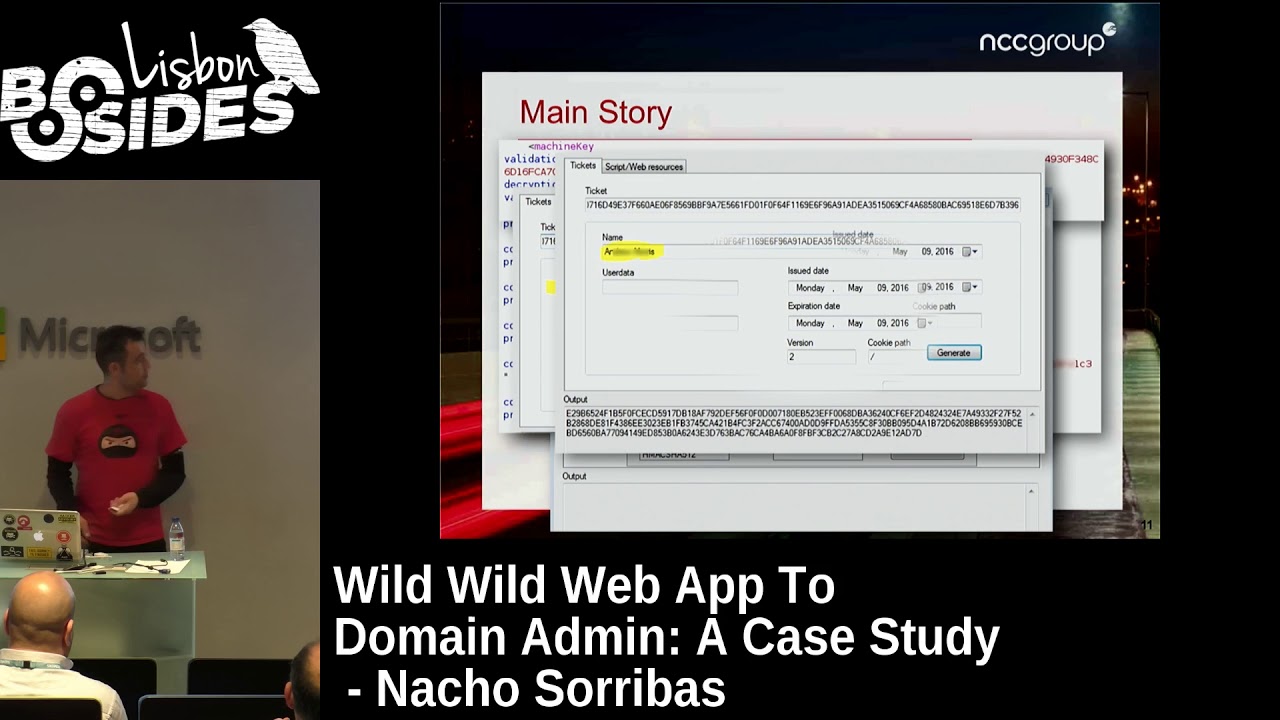
it's this one, the machine key. Machine key has validation key, decryption key, and then you have the validation algorithm and the encryption algorithm. So those information is the one that use ASP.NET applications to encrypt the NetView state. If someone knows about this kind of application, they had a... you have cookies and then with the parameters of the URL, usually you have an encrypted view state and then you have a a ticket in the cookies, that's the session ticket that is used for the authorization in the application. So ASP.NET application uses those keys to generate that ticket. And with this information, I used a, well, this is a tool that developed one teammate from NCC group.
developed an ASP application just to encrypt and decrypt information having those keys. So you can put validation key, decryption key, the validation algorithm and decryption algorithm. You have different options. I choose the options that was used in my application. And once configured, you can put your ticket and the application automatically decrypt the ticket. the ticket has the username. In user data there was nothing. Sometimes there are some information there. And then you have the issue date, expiration date, and all that stuff. The important one was the name. That was the name of the user they gave me to make the penetration test. So, well, I thought, OK, that's my username. What happened if I changed that username for admin or for a user with
more privileges than me. As you can see, you have here a button, a generate button, because the tool allows you to change all that information and generate another ticket using the validation key and the encryption key that I found. So I changed the name of the user. In this case, I used the name of the developer or the account manager that was in contact with me from the client just to try it. And that generated a new ticket. And with that ticket, I was able to access the application with his rights. He was an admin of the platform, so I got more. I have to say that I already had an admin user for the test. Okay,
so I know what an admin user saw in the application when they accessed it, and knowing that information when I accessed with this user, I showed that he was an admin too. That's the advantage of being a penetration tester and not an attacker. So I got some information about it. Well, once I have access Here I have a proof of how you can escalate privileges within the application. So then I start digging the application as an admin, looking for more issues. And the system was a custom content management system. So it was an application made to publish content. So usually they
they have an HTML editor just to publish your content. So admins can publish content. I tried just to put a, I don't know, it's like a book XSS. It's really easy, so the XSS worked. So I got one more finding. And there was an upload button there, but it was disabled. Developers of the application know that allowed to upload content to the server could be dangerous, so they disabled the button. So I researched a little bit more on the application, and I found this. This is an HTML comment on the source code that just said that the HTML editor they were using in the application,
we used to report this like a low or informational issue because you don't have to... Not informational, low. Because it's not a good practice to publish those kind of information, so it's too much information for an attacker. And well, knowing this, I tried to just googling for vulnerabilities on future Xbox, and I found an exploit DB exploit, okay, of another CMS, nothing to do with the application I was testing, but they were using the same HTML editor. So I just take a look at the exploit to see if I can find something useful, and I saw that the file
where they found the upload, my application was not using that file. But I thought, well, they had installed the editor, they disabled the upload button, but I don't know, maybe if they just have a default installation, maybe that file is in my application too. They didn't use it, but maybe it's there. was there. That was a gallery and there was an upload button too and that upload button worked. So that allowed me to upload a web shell, a simple web shell, to
have remote code execution on the server. And well, now what?
I got remote code execution, so I can start the fan with the application.
What I really want is an interactive shell on the server because I don't like to play with web shells. Well, it's more tedious to get information and things like that. I try to upload a reverse TCP interpreter.
Well, I used to work from home. I work in remote. I used a VPN from my company and then I had the internet.
My internet exit address is one address from NCC. It's not mine. But that doesn't allow me to make reverse connections to me because it's NATED. We have client machines that we call client machines on internet that we can use to make those things. So I just put on one of our machines, I just put a meterpreter listener. Then I create a payload, a meterpreter payload, making a reverse connection to my server on port 80 if I don't remember.
No, port 443. Okay. On port 443, I use port 443 or port 80 usually because if servers in corporate networks are behind the firewall, they usually have port 80 or port 443. They have allowed connections because HTTP and HTTPS work on that port, and if you need access to internet, you need to allow that output traffic to that port.
I use that and, well,
sorry. I use my web shell to upload the executable. This one, the meterpreter, it was in executable format. So I use the web shell to upload it to the server, and I use the same web shell to just run the payload. and I get my session
on the server. Once I have the session, well, the
first step is to have a look to see what user you have access to. In this case, it was a domain user used for services. Well, that's what I think about it. And it was Windows 2012, X64, and well, and it was in a domain, probably a test domain. And well, now what? The first thing you need to do when you have access to one of the system is try to escalate. OK? If you don't have an admin user or system user or something with some rights, you cannot retrieve credentials, get tokens. You can use Mimic ads to try to see passwords in clear text and things like that, but you need rights on that. So you have to escalate. There are a lot of
paths to escalate on Windows systems, how they are configured. Some of them are really hard to escalate, some others are easy. There are, I don't know, misconfigured services, local exploits, there are a lot of paths. In this case, my first shot was to just type get system. Okay, Metrepreter has a common, it's a get system that uses four different ways to try to escalate privileges to system. And I was really surprised because this was a Windows 2012 server, but the first shot worked. And well, I got the system user on the server. I thought, well, it's a test server, so probably they did not patch it properly or things like that. Okay, so once I have
my system user, then I need to find a path
to get more deeper on the network. Okay. Well, later I'm going to explain something about this. My first thing, I try to get some credentials. I run hash dump and I get the local administrator hash. Some of you may know that you can use those hashes to access other boxes if they have the same password using pass the hash. You can use, as I said before, Mimikatz to get clear text passwords if someone has logged on on the server before and the server was not rebooted. You can use Incognito, too, to get hashes of people that, the same way Mimicat gets the clear text passwords, with Incognito you can get the hashes of those, the tokens, sorry, the delegation tokens and impersonation tokens of those users. Those tokens are
used by Windows machines to create trust between machines. So, when you access on a Windows network, you access other machine via SMB or other services when you share folders and all that stuff, you don't have usually to put your password every time. So, once you are authenticated, Windows machine used those tokens to authenticate the users. In this case, my first step was this one, get the password or the hash of the LM hash of the administrator.
Now, the logical step for an attacker would be to find more boxes on the network and try to pivot to other boxes and compromise the network. Remember that my engage was just a web application test. So I had to ask permission to the client I sent an email to the client and I told him, well, I have this and I think that I can go further with all that stuff, but I need your permission because I just have permission to test your web application and right now I'm owning the server and I think I can try to go more deeper in your network. So the client allowed me to do it. Okay. That's something that I have to
highlight. We are penetration testers, not attackers, so we need permission to do these things. Once he gave me permission, my first
step was for finding more boxes. It was just to look for the DNS servers of the machine. Usually, DNS servers are domain controllers.
Remember that this box was in a domain. You can use other techniques to find more boxes on a Windows network. You can just type from the console of the server. You can just type net view and you can view all the shares that they had on the or use a tool called MBT scan. There are other tools. My first shot was this one. just find the DNS servers that usually are domain controllers and try the hash that I have on the domain controller. And as happened with the get system command before, on the first shot I got another meter per session, this time on the DNS server. They were using the same administrator password on the test server and on the domain
controller. As I told you before, I thought that was a test domain controller too. Too many test machines, but that was my thought. And well, pass the hash gives you access as empty authority system, so you are system on the local box, and if that box is a domain controller, then you are system on the domain. So right now I already own the domain controller, but that's not the kind of evidence or screenshot that I want to take and show the client because they don't understand about black consoles with white characters and all that stuff. So my goal was to to show the client how can access his domain controller from home and what better
than show him the Windows desktop with the Active Directory and all that stuff. So my goal right now was to connect using terminal services or remote desktop to the domain controller. So first of all, I create my own domain admin account. That's a couple of line commands on Windows. Just add a user and then add that user to the domain admins. And once I had my account, remember that I was connecting to the target box using another client client box we had on internet. So I just from my home SSH to my client machine and then I had the Metasploit there with the Metaerpreter. So right now I want to connect using RDP from home. So I have to configure all the
network to access the client network from home. Okay. First of all, I have to configure my routes to access the the network of the client, his local network. So that's a command that allows you on Metasploit to add a route to the target network. The second parameter is the net mask and the last parameter, the number one, is the session. So I'm telling the Metasploit that when I try to access those networks, they route the traffic through the session one. Okay, and
When I had this, I used a SOX module that Metasploit has.
I put it on the port 6969, and that's because I want to use it as a proxy to connect from home. That's the configuration of the module. You just put the IP address, the port, and just run. So right now, there's a handler listening on the port 6969, a SOX handler. And then I use my local machine from home and my laptop. I use proxy change. I configure proxy change to use that SOX server on that port. And then simply from home, from my computer in home, I just proxy change your desktop, the IP address of the of the domain controller. Well, this screenshot is from another domain controller. If you see here, this is
50, this one is from 41, but this one is from 50. And that was the screenshot that I wanted to put on my report. So right now, when the client saw that screenshot, they understand that I had access his domain controller but my my surprise here was that i'm all the talk talking about my test environment and my test domain controller and all that stuff and finally this was not a test domain controller it was production one so they put a test machine in their production environment but i got access access to the whole network of the company from a simple web application. And well, this is the end of the tale, the hacks that I changed to get my company
compromised. And well, where did my client in this case? in this case, fail.
First of all, issues on the web application lead me to remote code execution.
Then, going deeper, using running the Internet Information Server on the test server has too many writes. So they were using a user, a service account that has too many writes on the
on the local machine, and that was the reason because the get systems work using the first technique that has.
All the servers, so the test servers had access to the production environment, even though they were in different VLANs. I know that because I asked the client, I told him, hey, you need to to make segmentation of your network because all of that stuff is. And they told me, no, we got segmentation. We use different VLANs for different things, and your server is in another VLAN. Yeah, well, they had different VLANs, but they didn't have filtering rules between them. So every VLAN had access to every other VLAN.
All boxes in the networks In the network, workstations, servers, domain controllers use the same administrator password. So that's a big mistake on a corporate Active Directory network.
At least you need for the... Well, the best is to have different passwords for every box, All of us know that that's impossible on large networks. So at least I usually recommend to have three different set of administrator passwords, one for workstations, one for servers, and another one for the Active Directory, the domain administrator. So at least if someone can access the administrator passwords of a workstation, they cannot five of them on servers or on domain controllers. They still can go through all workstations, but they cannot go further with hashes at least. There are other ways like tokens and clear text passwords and things like that. But at least using hashes, they cannot. There are
also really good papers from Microsoft about mitigating pass the hash techniques. There are PDF a big PDF explaining techniques. Some of them are a little bit hard to implement, but most of them can be implemented in every network, and there are really good steps to avoid the pass attack. And also, I was talking about administrator credentials, but also I used to recommend companies that they, users have, needs to have the least privileged account needed. So if some users doesn't need administrator rights on his machine or in the domain, they don't need to have it. So you don't have to give accounts with rights. And even for the people that need some rights, like I don't know, IT personnel or
something like that. It's a really good practice to have two different accounts, one for the day-to-day work or just seeing your email and navigating through internet, and other administration account for administration tasks.
Well, and this one, the server that I compromised did not have Antivirus and well the domain controllers did not have Antivirus 2. If they had Antivirus at least the first pass the hash attack would flag the Antivirus because it's a really no attack. There are then ways to encode the payload and things like that to avoid Antivirus, but I don't need anything of these because they don't have Antivirus. So that's another and well Why the tiles matter?
Issues that we usually report as informational or low, like the information disclosure, sometimes are more important than it seems. Well, chaining individual vulnerabilities sometimes is possible to achieve a higher goal,
like in this example. It is important to review all the issues, even the low ones. Okay. And then look at the bigger picture. Why I said this? Because if you remember the path that allowed me to gain remote code execution, it was just an HTML comment on the page. So one HTML comment that gives me a clue that what HTML editor they were using. And then they got that file that developers didn't know that had that vulnerability or probably they didn't even know that the file was there because the other HTML editor had the upload button disabled but that gallery wasn't touched and it was. And this is the added value of professional penetration testing over a
point-and-click vulnerability assessment. So those kinds of things are the things that you cannot do with an ESUS scan or an Expose or whatever.
And that's all. Thanks to, well, Manuel Fernandez is my teammate who developed the CryptoNet tool and gives me a lot of tips, the compilation in C Sharp. Juan Garrido Triana is another teammate that gives me a lot of useful tips on Windows servers because he knows a lot about Windows and is a Microsoft MVP and things like that. And he pointed me to the right file when I found
the physical parts of the applications. And well, to Bernardo Damele because of the title of the talk was another title, the first. It was from zero to hero or something like that. And he changed me. And that's it. Any question?
No? Of course. Thank you.
Related talks
 18:17
18:17 39:00
39:00 53:15
53:15 41:19
41:19 33:27
33:27 1:02:49