BSidesRDU 2022 - Understanding and Securing Containerized Environments: A Peek Under the Lid - M.L.
Show transcript [en]
Manny landren here uh Manny's their principal information security consultant with Align Technology Group extensive experience building securing and monitoring high value and well-regulated applications and platforms on premises and in the cloud he's LED teams that implemented the Greenfield information security programs for IE IAT insurance as which is a specialty Insurance Group with about 2 billion in underwritten premium underwritten premiums premiums excuse me and also for Citrix sharefile which is a Gartner magic water leading content collaboration solution hosted with AWS and Azure uh Maine is a graduate of Virginia Tech another Virginia Tech tie this morning and a veteran of the US Army he enjoys spending time with his family and playing his violin and also
hiking in Umstead so with that I'm going to turn it over to Manny and uh let's get started thank you Chuck appreciate it uh so so thank you besides for the opportunity to present today and thanks to all of you for attending so I'm Mandy Lander and I help organizations secure and monitor their information psychology platforms and applications on premises and Cloud uh today we'll be covering a talk called understanding and securing containerized environments as far as agenda is concerned that's right here so we'll provide you with an overview of container security with an emphasis on the fundamentals uh and differences between containerized environments and virtualization the pros and cons of containerization from a security perspective and the
challenges associated with securing and monitoring containers throughout their life cycle from from container registry on through production we're also going to explore the concepts of container Escape review the role of Kernel namespaces and control groups and the role they play to enforce segmentation and control resource allocation and then we're going to gain an understanding of uh container runtime Behavior and the importance of implementing safeguards including lease privilege access to promote container isolation so a container image you know differs somewhat from an actual container you build a container from a text-based script of instructions usually a Docker file an image executes code in a container so think of a container as running an instance of an image
a runtime environment is the environment in which the program or application is executed it loads the application and runs it with all the resources necessary for the program to run independently of the operating system and then simplistically it's software that's designed to where before it actually installs
so containers and virtual machines have similar resource isolation allocation benefits but function a little bit differently because a container virtualizes the operating system instead of the hardware containers are also much more portable and efficient than virtual machines because containers are typically much smaller in size and therefore take up less space containers are abstraction really of the app layer that packages code and dependencies together so multiple containers can run on the same machine and share the operating system kernel with other containers and then each is isolated an isolated process rather in user space so virtual machines or VMS are an abstraction of the physical layer uh and you have one server running on on rather you have many servers rather
virtualized running on one server one one hot one server the hypervisor allows multiple VMS to run on a single machine and each VM includes a full copy of the operating system along with the application and any necessary binaries uh and libraries as well VMS are typically much larger uh than containers and traditional VMS can be really slow to boot there are new VMS like Amazon's fire firecracker and the Katha that are lightweight VMS that do start in in milliseconds rather than minutes but typically they're much uh they take a lot longer to boot um I'd like to highlight a couple of terms uh in the event we have some folks in the audience that are not familiar with them so user
space refers to the code in an operating system that lives outside the kernel the operating system kernel is a central module of an operating system uh that's really responsible for managing all the resources of memory processes devices the disk itself system calls and more and the fundamental difference between containers and virtual machines is that virtual machines run an entire copy of the operating system including the kernel while containers share the hosts kernel as a result container isolation is technically weaker than that provided by hypervisor in a virtual machine use case so Engineers create managed containers run applications relying on a combination of continuous integration continuous delivery or continuous deployment pipelines popular contamination Solutions such as
kubernetes Docker swarm Amazon elastic clouds container service rather ECS to name a few so Amazon elastic container service is fully managed it's a fully managed container orchestration service so Amazon elastic kubernetes service or eks for short is a managed service that makes it easy for you to run kubernetes on AWS without installing an operating system owning your own kubernetes control plane or work nodes worker nodes worker nodes basically is a machine that hosts one or more containers and then you can build and deploy container images using traditional virtual machines as well as serverless Computing engines such as AWS fargate so AWS fargate is a serverless compute engine for containers that works with both Amazon ECS and Amazon eks each
fargate task has its own isolation boundary and does not share the underlying kernel CPU resources memory resources or network interface with another disk so I credit Liz rice the author of securing containers for this image and list this slide represents a uh she she wrote that book it's published by O'Reilly if you haven't read it if you haven't if you have a copy of that please get it it's well worth the read she's very succinct with uh with her writing um I think the whole the book and it's an entirety is about 160 pages and covers a lot of great detail this slide represents a high level overview of the common risk associated with containerized workloads so you know
software vulnerability is in the host operating system and third-party apps as well as all the misconfigurations and the host operating system and container they introduce exploitable vulnerabilities that may lead to privileged escalation and container Escape it's also important to consider the security and trustworthiness of the build environment and the container registry you want to ensure that the integrity and trustworthiness of the container images used to instantiate The Container applications in production and to avoid introducing untrusted and unauthorized images so managing Secrets also remains a challenge but orchestration platforms like kubernetes and Docker swarm along with secret vaults like Hashi core Vault and AWS KMS they've introduced the capability to more securely manage Secrets throughout their life cycle as
well so Accra to Julie Evans she's at work on Twitter she published she publishes zines rather on wizardseans.com herzine how containers work goes for about 12 bucks and is entertaining uh entertaining rather introduction to how containers work um recall that applications uh do not run in user space and need to communicate with the kernel right the the Linux kernel using system calls to do things like read and write data to a file open or change the owner of a file execute another program Creator kill a process and remember that a Docker container or a container period is a process there are hundreds of possible system calls depending on the version of the Linux kernel that's running and
applications don't really need all the system calls at their disposal therefore evaluate the profile of the system of the system calls in the in the application that the application makes rather throughout its life cycle to determine whether the appropriate system calls are present and they adhere to the principle of least privilege so next we'll use S trace or at least I'll show you how I used s-trace at Linux debugging utility that monitors interactions between processes and Linux analytics kernel itself which includes system calls to observe what occurred when a container is terminated okay so a little setup is required to use S trace and again s Trace is primarily a debugging tool it's very capable this
isn't intended as a I'm not proposing that sjs be the primary tool that you use there are several third-party Solutions commercial off the shelf or open source that provides similar capability this is just a readily available tool rather in the Linux toolbox that you can use to evaluate what sort of system calls are made whether for educational or academic purposes or um for for to evaluate whether a container is is uh you know making proper system calls to the kernel so again a little setup is required to use s-trace you run pseudo doctor PS to list all the containers running on the host note that the process ID isn't listed by default when you run Dr PS so
to obtain the process ID take note of the container ID and run the the docker inspect command you see on the screen to look up the process ID and you'll get copies of this slide I'm sure these slides I'm sure so you don't have to take a picture right write it down next run sudo Trace with the p switch for process with the associated process ID um uh which in this case is four six nine one in another terminal I terminated the running container and estrace captured the raw output listing all the system calls made to the kernel uh it's cut off but in a second I'll show you the summary of those system calls
um let's see what else is important here um so again s Trace is just a it's really a debugging tool that you can use to at least evaluate what sort of system calls a container is making or any process for that uh whether it be PWD for your present working directory LS it doesn't matter if you're interested in doing that it's really easy to do just make sure that it's installed and then you can go ahead and start using S Trace at your at your liking so uh here we use um s Trace to view system calls and and put in a table format using the C switch note that the process ID changed because
I instantiated a new version of the containerized application this application wasn't doing much it was a pixie vulnerable API uh I I as much as I tried to interact with it I couldn't get it to actually make a system call until I actually terminated the the the container itself uh so we used uh s trays to provide you with an idea of what occurs under the covers but bear in mind that s-trace while capable you know does have its limitations however there are open source Solutions again like like Tracy Tracy is one that you can use in place of the S Trace that serve a similar purpose and then open source and Commercial solutions that
rely on their capability to observe and filter calls to Monitor and secure the host and containerized applications these are typically bundled with Cloud native Apple application protection platforms some that come into mind are Aqua systig Trend micros you know Cloud one that sort of thing so while I'm not prepared to give you a primer on Linux permissions today please note that Linux or at least in Linux everything's a file and file permissions do dictate who or what can access that file and what actions they can perform on those files understand that containerized applications run as a process and most run as root albeit with limited capabilities consider that there are rootless alternatives right that you can use to
host containers um that are emerging that promise to eliminate the need to run a container as root so be sure to review the containerized workload to determine if it's running as root and if it's an absolute requirement for it to run this route otherwise take steps to effectively limit permissions as necessary you can also run sandboxes on the host to filter those those system calls as well and then you can review those capabilities and we'll show you how to do that in a second to determine whether those capabilities are are necessary note that the set uid flag can be pretty dangerous because it might give an unauthorized user root access or at least access to run a program under
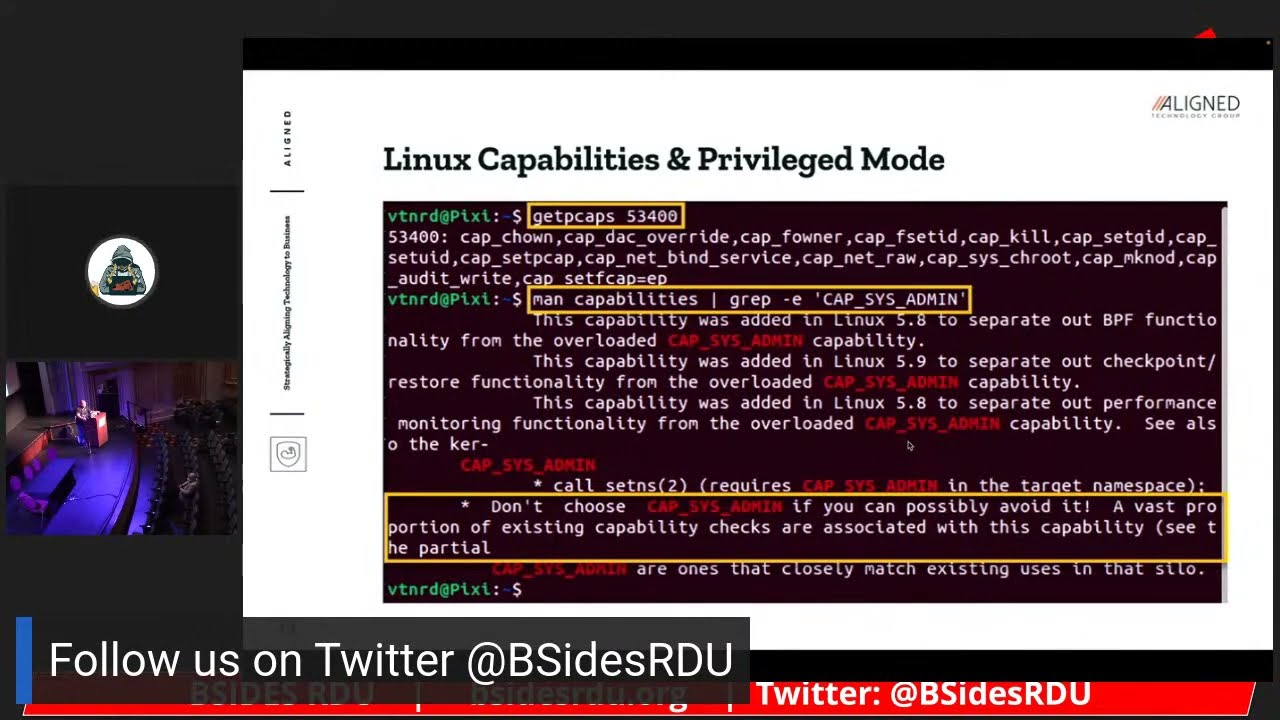
another user consider that the set uid sets the effective user ID of the calling process and a container is typically running as root so Linux divides the Privileges traditionally associated with super user into distinct units known as capabilities would be independently enabled and disabled the capabilities can be independently granted to processes including container processes you can use the getcaps command along with the process ID of the container to identify the list of capabilities that are enabled you can reference the capabilities man page to learn more about each capability provides a definition of what the capability uh what sort of privileges that capability grants well this container doesn't have the capsys admin capability enabled I highlight it here because it should be
avoided as it enables many of the privileged capabilities associated with you'll see later when we talk about container skate briefly that the capsis admin capability is is typically what is leveraged through a vulnerability in a kernel to one escalate Privileges and then to escape the container itself you also want to avoid running containers and in privilege mode or root mode with the dash dash privilege flag although a container may run as root by default again several of the capabilities are not granted by default privilege mode means that if you are root in the container then you you essentially have full privileges of root on the host system itself uh recall that containers run as a
process right they are a process uh even though they have an application running even though they have dependencies in libraries they do run as a process there are three essential Linux kernel mechanisms to limit a processes access to host resources control groups namespaces and then changing the route so control groups are a feature of Linux that limits account and accounts for uh isolation so isolated it isolates resources including CPU memory disk i o and network and any really any process that any process can consume namespaces are a feature of Linux and it partitions kernel resources such that one of the set of processes doesn't see other resources that other processes have access to you can also view the namespaces
available on your host operating system by using the ls and S command there and I highlighted for example the process ID namespace there are several namespaces and one example is the PID namespace which provides processes with an independent set of process IDs including process IDs that Spawn from the from the parent process ID so as child process IDs another example full space this one's important because it provides a mechanism uh to map the root user inside a container to a limited privileged user on the host itself you can see the hosts or rather you cannot see the host entire root or rather the file system from a container typically because a root directory is changed during container creation
this effectively limits the set of files and directories that a container can view so this particular vulnerability cve 2022-0185 was identified in January of 22. and um recall that capsys admin you know is largely a catch-all capability it can easily lead to additional capabilities or full root typically granting access to all capabilities so this container Escape vulnerability materialized because of an issue in a Linux kernel but container Escape can also result from issues with misconfiguration as well doesn't have to be a vulnerability in the kernel or in the operating system typical mitigation steps include you know obviously patching the kernel applying the necessary patch but compensating controls can include minimizing the use of capsys admin the
capsis admin capability using a Sandbox like SEC comp to effectively filter system calls the default set comp profile is usually enough and a more recent Docker implementation is actually Implement set comp by default so here we start talking about each of the um security considerations for a containerized environment I listed them out so that when we do share the slides they they're they're readable they're they're digestible so you do want to scan images in the registry for vulnerability for vulnerabilities right so Registries especially public Registries can be untrusted so do you take great care in evaluating the images that you use the best approach in certain cases especially when you're considering posting sensitive workloads is to create
those images yourself apply available updates to third-party libraries including applications before you introduce it to the bill or at build rather so before you introduce it a production you don't want to do that at one time cryptographically sign the images to ensure its integrity and trustworthiness once you create an image it's important that you take steps to validate and preserve its integrity and also admission control emission control safeguards that are largely part of orchestration solutions like Docker and kubernetes uh Dr swarm and kubernetes rather they depend on that they can depend on that signature to evaluate to trustworthy image before they actually introduce it to the build site in production so keep Registries private if it doesn't need right and do
you take great care when you um evaluate and select images that are in public repositories as they can contain malware they can contain a vulnerable third-party libraries dependencies and of course you need to evaluate do code reviews to evaluate what the code is actually doing um secure the build process again to protect the image of the uh the Integrity image but uh only allow approved images um to deploy in production so then you want you want to secure the host just as you have been doing um uh for years right this is really the one constant um build a host from scratch if you if you need to right there are certain workloads sensitive workloads that you
should uh rely on a build from scratch um host or use a trusted Baseline the center for Internet Security benchmarks do a great job however they don't produce benchmarks for every single operating system version configure the host operating system according to CIS benchmarks but again if it's available right use a minimal operating system purpose built to host containers such as Alpine or core OS these operating systems typically remove unnecessary libraries dependencies functionality and you reduce the attack surface uh and of course they're much more lightweight as well um consider using a minimal operating system like sorry scan the host operating system for patch config and configuration related vulnerabilities uh obviously before you introduce it to
production and then of course in production uh consider refreshing the host operating system as opposed to patching it if you can uh work with your engineering team to figure out a way to automate and take advantage of you know immutability ephemerality immutability meaning that if you agree for example to enforce of immutability in a production environment that means that anything in production doesn't really change you're not patching you're not adding any any third-party software you're not making any configuration changes the preference would be to introduce an entirely new operating system host right an entirely new container that has been patched in the in the application delivery process to ensure that it's easier to man image
and to ensure that you don't have a lot of you know basically uh configuration drift [Music] um apply available updates to the host operating system as usual and then leverage a Sandbox or Linux security module to enhance isolation um these come in the form of SEC comp uh app armor SC Linux G visor though G visor is really a hybrid between a virtual machine and a Linux security module or a Sandbox rather analyst it you know there are there are ways now to host uh containers in very lightweight very fast um virtual machines again Kata comes to mind uh AWS firecracker comes to mind these are really lightweight virtual machines that operate just like uh
typical virtual machines but they they load much faster in milliseconds rather than minutes and they're much smaller so if you have a sensitive workload that you need to ensure the isolation for and look virtual machine isolation is for the most part tried and true it's proven and it does add another layer of defense for very sensitive workloads as opposed to relying only on the Kernel within the operating operating system itself you can argue that the kernel has been around for a while too however uh the kernel occasionally does reflect uh or produce some materialize some vulnerabilities as well secure the container you know run containers as non-root users if possible or a paired down version of root right
remember the capabilities we talked about not all containers need every single capability and they don't need every single namespace either right so avoid running containers in the privilege mode as we talked about because essentially that overrides all Security checks you are true root in the container when you're running this privileged mode right so you you override any uh sandboxing any Linux security modules those kinds of checks you basically get a get a pass remove unnecessary Linux capabilities as I just discussed and then leverage a runtime protection solution to ensure that only authorized executables run these come in very in various forms it could be a traditional anti-malware solution or it can be a anti-malware solution that also incorporates some
degree of syscall filtering perform continuous Cloud security posture management leveraging you know open source or commercial off-the-shelf Solutions these continue these Cloud security posture Management Solutions not only evaluate how well your environment typically your Cloud platform is configured but also the services within those within that cloud platform as well uh run containers on hosts dedicated to running containers right don't mix and match workloads on a on a operating system host um avoid mixing sensitive and non-sensitive workloads on the same host because there's always the possibility of container escape the isolation boundary with the kernel is not as strong as it is with a with a hypervisor and in a virtual traditional virtual machine use case so and then also while
not listed here do consider uh hosting workloads or or containers rather that communicate parties or external third parties outside of the network with those that are only communicating internally so very much like we segment our existing on-prem networks you should also segment your containerized environment then add executables to the container at image build time not runtime alluded to this earlier because you do want to you do want to ensure that the Integrity of your containerized application and then you also want to avoid uh drift you know configuration drift right you end up with an environment that's using different versions of a library you know different versions of a dependency um and ultimately it's really hard to
secure an environment like that it's really frustrating uh to try to identify which containers are vulnerable in fact work with your engineering team if you're in this particular situation to embrace ephemerality even though ephemerality can be a bit uh frustrating as well ephemerality means that you know the instance isn't treated as an ongoing concern um it it's temporary right and it's meant to be refreshed uh and if you can automate that um that that if you can automate that process at refresh time you're essentially introducing a container or a host operating system that is patched configured to the latest requirements and then you avoid that configuration drift as well and then uh run immutable containers to
avoid configuration drifts we talk about immutability not changing a production workload in production uh make that change in the continuous integration continues deliver your deployment pipeline apply the patches change any configuration that you have to update any containers and then redeploy them and do that on a periodic basis it uh it'll it's I I think that the work is well worth the effort to ensure that that environment is much easier to Monitor and ultimately much easier to secure so securing Communications between components um my observation is that this is an area that isn't really typically enforced or or you know it's not emphasized so you have containers that are talking that can talk to any container in the
environment that can talk to any component in the environment usually it's unencrypted right there's no Mutual authentication right so enforced Mutual TLS typically either through an orchestration solution or through what they call a service mesh like istio one of the byproducts of a service mesh that does control communication at the application layer is enforcing you know Mutual TLS TLS being the protocol that is used to encrypt HTTP or https traffic consider using certificates to enable Mutual authentication as well so not only encrypting that traffic in but also ensuring that only machines that should be talking to each other are talking to each other and then use Network policies to control which components can communicate very
similar to to what you would do in a traditional Network again a service mesh can do that for you at the application layer but doesn't really handle the network layer so you do need some capability at the network layer including you know things like iptables to uh to enforce that those connectivity requirements and that segmentation so treat containers is ephemeral as I mentioned earlier refresh often and update the hosts and containers and then check for sensitive directories mounted on the host because any sensitive directory is mounted on the host especially if the container is running as root are visible to the container when you have uh protecting secrets in transit at rest and this is one of the
most significant challenges today so don't hard code secrets in an image at any stage of the image creation process because those an image is created by layering files and if you introduce and hard code a credential at any layer you're not really removing that layer right and so you can actually decompress the image and and actually see those credentials when it decompresses so please avoid doing that if you do find that you have to really rebuild the image from scratch don't Define secrets and environment variables either because if a if a container is running is rude it has access to those environment variables and then of course if the application crashes though typically those environment variables
are are displayed right and they're also captured in in log files as well encrypt secrets in purpose-built secret vaults as we talked about hashicorp Vault um uh and other vaults are purpose built to manage secrets and to uh encrypt them at rest and in transit and then leverage features and orchestration platforms like kubernetes and Docker swarm to manage Secrets as well if that capability exists and then consider encrypting uh don't consider I mean do encrypt secrets in transit and don't pass Secrets over the network unencrypted and and really avoid sending secrets to the network interface that's just a bad practice it's better to uh the optimal approach rather is to pass Seekers by writing them to a a file
accessed through a temporary directory held in memory and the key word is temporary right does it live persistently in memory it basically instantiates in memory when it's required and then of course it's ephemeral and then avoid writing secrets to disk even in encrypted because at some it's it's unencrypted when you're writing it to disk um and so uh and also you have to figure out a way to decrypt it right and so that that introduces another challenge all right so that's all I have today um we are a line Technology Group we are local we are built and founded here all of us are from Raleigh we focus on um securing monitoring um uh you know technology platforms uh
whether they're in the cloud whether or not we're an AWS technology partner and again I appreciate your time thank you for coming [Applause] throughout the time got questions we have them yes sir
I haven't I haven't reviewed them but I think because you're the NSA they're probably spot on yeah I haven't reviewed them and uh and so there is a fundamental difference between the actual container and the container orchestration solution um I will take a look though yeah not my area yeah yeah I haven't reviewed them either anybody else yes sir
uh I think the question is around performing forensics both online and offline with containers is that fair um so a container is going to produce uh well first let's let's face it in a lot of environments containers are ephemeral right here today gone tomorrow and so you may not have the container or even the host operating system to evaluate uh if that isn't if that is an important component then as I mentioned earlier you may want to um host that particular workload in a lightweight you know virtual machine and maybe treat it as more persistent otherwise you're going to be relying on the collection of all the system calls that the container made um when it was when it was uh
when it was exploited right one privileged escalation occurred uh and then of course one container Escape occurred on the host itself and so I would also evaluate the extent to which you're collecting the the information you need on the host operating system because the host operating system is the one that's uh the kernel is one that's uh uh evaluating those system calls as well does that make sense yes sir
um
yeah um obviously it really depends on your needs right I mean most third-party application patch repositories are a pay for Play service I can't recall any of them off the top of my bed even though I've used several of them um but you what you would do is evaluate the kinds of third-party applications that you're running in your environment and then determine the extent to which that third-party patch repository supports uh the the applications right and then obviously the host operating systems that you're running as well um one thing uh I want to I want to mention though is that you know it's a lot easier to patch in the application delivery process as than it is to patch
in production it just introduces a lot of overhead um and a lot of uncertainty too right you know having been embedded with engineering teams uh I've I've caused my share of problems when I patched you know even if I patched using the the proper patch management process you know going from test stage to prod inevitably something happens in prod so um going off on a little tangent here do consider uh you know patching in a non-prot environment leveraging a source that you know satisfies all of the requirements that you know you're using in your environment
where oh it's like
uh it's not there's there isn't one that I prefer um it obviously has it has a lot to do with you know the technology you're using right so a lot of orchestration solutions are introducing the capability to manage Secrets they may not be full featured though um Hashi core Vault you know seems to be a very popular one if you're in AWS and secrets manager or KW KMS rather or Key Management Service is is going to help so my answer is it really depends on the platform and the solutions that you rely on uh to deploy manage your containerized environment or any technology for that matter that relies on Secrets right but ultimately you want
to avoid you know writing those secrets to environment variables you want to avoid writing the secrets of disk um and uh you do want to leverage a purpose-built vault and then you want to encrypt those secrets and Transit at rest in between components that leverage those secrets you're welcome yeah and I want to emphasize like none of this is easy right and I even underestimated um I even underestimated the the overhead associated with you know securing a containerized environment once you start to really evaluate the permutations of what could possibly happen in this kind of environment the operating system itself on the host whether it's in the container it gets really complicated so it's a matter of
really taking a risk-based approach making some trade-offs you know and then of course negotiating those trade-offs with the engineering team but then emphasizing with the engineering team that the more efficient approach is really to automate as much of that in the application delivery process as opposed to production I think they will be very amenable to doing that any other questions foreign last plug uh you know for for Liz Rice's book uh securing containers have been very influential um very informative uh really is the tip of the iceberg though um and so I do encourage you to read that book if you're interested in container security uh read some of the docker uh uh documentation the
kubernetes documentation um it's still evolving even though it's about you know 10 tennis years old um and then a lot of solutions are out there that are you know coming along that are purpose built to help you manage this environment uh to monitor it and ultimately secure it thank you [Applause] for you oh thank you very much sorry there's nothing in there
Related talks
 39:04
39:04 21:35
21:35 24:50
24:50 8:40:16
 8:30:57
 43:08
43:08