DarkEngine: Conducting Research into a Highly Orchestrated Phishing Campaign
Show original YouTube description
Show transcript [en]
Um today I would like to introduce uh Liam Wilkinson who is talking Dark Engine conducting research onto a highly orchestrated fishing campaign. Thank you Liam. >> Thank you. >> Hi everyone. Uh just a quick mic check. Uh can everyone hear me? That's fine. The mic's okay. Y thank you. Awesome. Um so yeah, thank you for being here. It's awesome turnout for after lunch. I know the after lunch session can be a little bit rough. Um but hi to everyone in those other rooms as well if you're around. Um so welcome to Dark Engine uh conducting research into a highly orchestrated fishing campaign. So first of all a little bit about myself. So uh as for my name is Liam
Wilkinson. I go by Nullify Security Online. Uh and this is my first security conference presentation. So uh apologize I'm a little bit nervous. Uh I haven't presented before. So uh in my day job I work as a senior capability developer for at DFIR for CyberCx and I architect build and maintain our internal incident response tooling and also help out investigations as well. I have a keen interest in software engineering and dev sec ops and I also hold the GCFA GCSA and GPCS certifications. Uh outside work I am a basist and a vocalist. Uh so if you are in Melbourne and you are looking for an emo band member, it wasn't a phase. Um hit me up after this. Uh, I
can also be found playing arcade rhythm games from time to time as well. Awesome. So, just some of the topics we'll be covering today. So, first of all, we'll go through what actually is Dark Engine. Uh, no, it's not something that someone's going to try and sell you. Uh, how did we discover it? Uh, a bit about the research process and then what was the actual objective of the attacker? Uh, and then we'll kind of summarize everything at the end. Uh, so first up, well, what actually is dark engine? So, uh, Dark Engine is a campaign utilizing SEO poisoning to harvest the credentials of WP Engine users with the intent of compromising their hosted WordPress sites to deliver
clickfix in the form of fake capture pages. And there's lot a lot of words in there. Um, the report uh, this is a report that we compiled over two months of research and was released by CyberCX in June 2025. I've got a QR code up there. It's not malware, I swear. Uh, and it's scary in in security cons. We were like, don't scan anything. Um but I'll also have this at the end as well if you know suddenly it's something peak your interest you want to have a look. Um I'll have a look some quick stats about the campaign itself. So we identified that it was active since at least June 2024. Uh and there were we
also identified there at least 2353 unique uh affected websites. So 82 of those belong to Australian and New Zealand organizations. We also identified 28 compromised credentials for WP Engine. Uh but this is likely to be quite high considering the number of uh affected websites. We also identified 24 fishing domains that were masquerading as WP Engine and then 32 content delivery domains that were injecting pages uh with fake capture. So the campaign itself, so I've got a little diagram here from the actual report. So you can kind of split it down into like three uh steps I suppose. So at a high level uh the thread actor sets up the fishing pages masquerading as WP Engine. uh these get delivered by SEO uh
and then victims uh the victim's WP engine credentials are then stolen by the thread actor and then they use these credentials to compromise their managed WordPress websites with a malicious plug-in and that plug-in provides a threat actor with uh backdoor access to their website and injects a script uh to serve fake capture content and this often leads to delivery of credential stealer malware. So the actual report itself goes into a lot more uh detail about this and I'll also cover a lot of that in this presentation but if it is interest interesting to you uh I do recommend checking out the the full report. Awesome. So how did we end up discovering this in the first place?
Well in April 2025 uh we were uh approached by a client who was experiencing unusual activity on their website and that kind of led to the discovery of a malicious plugin and scripts associated with this campaign. So we provided the client with some initial uh remediation actions and collected some evidence and then got them back in business while we were investigating. So initially we kind of looked uh at the client's WordPress logging. So I preord I didn't say what WordPress is. So WordPress is sort of a as a a website like a blog hosting site that a lot of a lot of uh companies use to host their website. Um so we got things from this
like the access logs the server snapshot. uh and we can see that the thread actors activity there but we weren't really able to identify what the initial access vector is for uh for them. So we spent a lot of time kind of looking at uh whether they had vulnerable plugins or outdated plugins or any vulnerabilities in their website and we couldn't really find anything. So uh while we're investigating this about a week later well it happened again and so this red came back pretty much the same thing happened again. And so we were like, "Okay, great. Well, now we need to kind of go deeper." And that was when we learned that the client was
using uh WP Engine for uh their hosting. So WP Engine is a uh management platform that allows companies to manage their or easier management of their WordPress website. So you can manage multiple WordPress websites in a single platform. Gives you a lot of nice auditing and a lot of um management functionality. So we looked at that audit logging and uh some SFTP logging from that and we identified some unusual activity from one of their third party uh users. So this was things like login from unexpected locations and some kind of out ofplace SFTP activity uh that that would later then conveniently line up with the additional research that we performed. So after discovering that we approached
this third party provider uh to see if we could perform forensics on the laptop of that user and in this case it turned out to be a MacBook. So we ran some standard collections on this. So kind primarily focusing on web activity uh and potential credential compromise um considering that WF engine is is a web application. Uh and that's when we found the initial access fester. So fishing was the initial access for this one. So uh we had a look through the Google Chrome history on that device. Uh and here we see the user performing a Google search for WP-ine. Uh and then we saw Google ad services deliver them a fishing page. And so we
identified this through the inclusion of some Google ad service specific uh query parameters. So there's uh G ad source and G-click ID which are both associated with those. Uh we then see them access the fishing pages. There's two of them there. Uh and then they subsequently enter their credentials including their two-factor authentication into this website as well. Uh and this is kind of what the so this is what the actual uh WP engine website sorry looks like. So, um, here's a comparison of the two. Kind of no surprise to anyone here. I think that thread actors have gotten really, really good, uh, at creating credible fishing and cloning pages. Um, so this one is actually a complete working clone. So,
all the links work and they were even able to successfully mimic the authentication flow. It's pretty much almost a seamless clone. Um, I used URL scan, which is my one of my favorite open source tools. Shout URL scan. Um, to kind of get these comparisons, uh, and a lot of the other ones as well. So we also noted from one of some of the older sites that the X thread actor was able to uh actually keep up with the changes on the WP Engine website. Uh so as it evolved over time they would also change their website to affect that. Uh so here are the 26 fishing domains that we identified through the campaign. So you can kind of see here a lot of
these are common typo squatting or or looking similar to the website. So replacing like P's with Q's, uh G's with Q's, those kind of things. Uh and I used URL scan, a combination of URL scan, uh virus total, uh reverse CNS and word list scanning to identify these. So I kind of generated a just a big list of misspells for WP Engine and then tried to DNS resolve all of them and then had to check through them all. Uh it was a bit of a process. Um so some about these the earliest identified domain was in June 2024 and we observed an increased activity in December 2024 and April 2025 and uh that was around the time of this
investigation. We noted that many of these uh domains were also using bulletproof hosting such as BL networks and proton 66. Uh and the fishing pages themselves used multiple techniques for defense evasion. So things like B 64 encoding the content so it didn't look like it to search engines uh and then unic code in the page titles as well. The uh fishing site and the and the thread actor were actually also able to successfully mimic the authentication and authorization flow used by WP Engine and they performed kind of like an attacker in the middle technique here to proxy the actual authentication to the real WP Engine. uh and this kind of seen in the screenshot at the bottom there
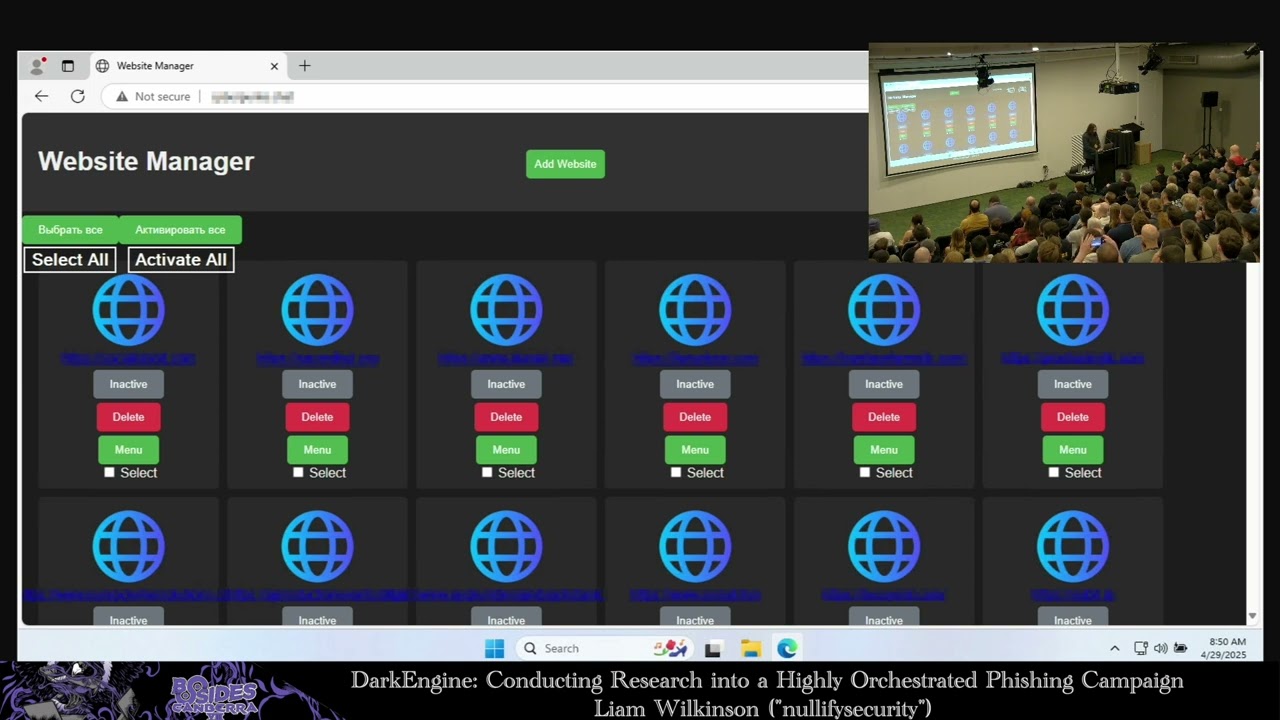
where we see two recorded successful loginins around the time that the attacker uh sorry that the user entered their credentials uh from the web from web proxies. So let's have a quick chat about the research process after this. So initially we we found the uh fishing pages and so what can we learn from that now? So first thing we'll talk about here is the the website manager. So this was identified through the referer in WordPress in the access logging and was a direct IP address. So it kind of stood out pretty quickly. So the website manager uh as was contained in the the page title uh serves as the management portal for the thread actor to view
their compromised websites in in interact with their malicious plug-in and then submit compromised WP engine credentials for processing. So by using open source intelligence things like showden, census and faux uh we then went on to discover uh uh five total addresses serving this management portal to the internet. And this is kind of what it looks like. So this is what we refer to as version one of the portal that they use. So you can see here that it displays all the compromised websites uh and has the ability to select multiple websites and then inject script content into them. And that button is not shown, but it's at the very bottom. And you'll notice that the scroll bar
for this uh goes quite a way down. Um the add website button at the top displays a modal for them to enter more SFTP credentials to compromise. Uh the scripts button at the top goes to a notepad style site containing scripts the thread actor can inject into these sites. Uh and then having a look at the source code of this uh this website, there's a pretty high indication that AI was used to generate this. So there's lots of comments everywhere. Uh pretty excessive use of emojis as well. Um, and we also noted that a lot of the comments, and you can probably see here, a lot of this is also in Russian as well. So, potentially goes to identify
the the attribution, but attribution is hard, so it could be a false flag. Uh, this is what it looks like. So, when you select one of those websites and you click on the panel, uh, this is what it looks like when you do that. So, there's a fetch and save button, which is used to manually fetch information from that compromised website. And this is primarily used to fetch uh, injected back doors. The admin button requests a special endpoint that was registered by the plug-in that actually logs the thread actor in as an administrator directly. Uh the backd door button displays the total number of back doors that have been planted on this site and then when clicked accesses one of those
uh back doors at random. Uh and then uh they also have the ability to add comments. We didn't see too much use of this. Uh so this one here is what we refer to as version two of the portal. So a little bit more cleaner looking, a little little bit more fancier. uh we see two buttons at the top of this one. So there's an add WP and add WP plus cookies and this kind of represents a bit more of a sophistication here. So this now we're see now seeing them use um cookies and grabbing those those authentication session tokens as well. So it has a drop down on the right hand side that actually allows them to select
a particular compromised credential and then actually will display all the websites that that user owns. So that displays it in the the work or the not work uh panel here. And these panels uh kind of have a special functionality. So the actctor is actually able to drag and drop between the two to actually reprocess those sites and check if they're working. And pretty similar to that version one, we see uh when you click on the site actions, you've got the admin uh and the backd door as well. So great. So now we've got this kind of website uh that the thread actor is using to manipulate their their plugin and their website. So, um, how deep does
this really go? So, uh, we've got a list of comp, so on on the website, sorry, on the management portal, uh, we've got a list of compromised websites we can look at, uh, potentially list of compromised accounts the thread actor has access to and a list of scripts that they can inject into their website. Um, because this is, uh, just a standard website as well, the thread actor conveniently uses REST API with kind of no authentication, uh, to query these things. So we were able to just uh identify some API endpoints of interest to us um which I've got displayed here. So we've got some that displays all the websites they have access to the accounts uh and then
the API notes. So internally the thread actor refers to these scripts as as notes. So now we've got some kind of cool things to look at. Uh we need a way to continuously query these. So the easiest solution for us to do that was to spin up a new EC2 instance. Um, I used US East1 for this uh to kind of blend in with other AWS traffic from a pretty popular region. Uh, and I wrote some Python scripts to periodically scrape these endpoints of interest uh and then dump those into timestamped files. So you can see an example of that uh on the slide here. I think this is from the API websites endpoint. Uh, and we would do
this uh every couple of hours. So initially this script actually as well use kind of rotating user agents and proxies to kind of mask the activity. Uh but I ended ultimately ended up just scrapping this as it wasn't really providing any benefit. Uh didn't look like it had much sophistication to kind of block it anyway. Um and those free proxies were pretty flaky at best to be honest. Uh so this provided us a way to monitor the campaign now for any new compromised websites uh any new credentials the thread actor had access to. Uh and then kind of track the campaign over time to see what the thread actor was actually up to. So after a little while of doing this,
we're like, "Okay, great. So we've got all these kind of data points." Um, well, I decided to get a little bit more creative with my research. Um, so since it's open to the internet and scanning it isn't really a crime, right? It's it's a gray area. Um, I mean, there's scanners out there all the time just kind of scanning me and scanning everything else. So why can't I just do that? Uh, so I'm not really a penetration tester. I don't know too much about this. So I was googling. I was like, "Okay, great. Well, I need to scan this web server. Um, that's where Nikto comes in. So, uh, if you haven't heard of Nikto before, it is a popular
web server scanning tool that performs a number of checks against a web server. So, for the research in this particular project, um, the inbuilt plugins and kind of word list look pretty good. So, I just kind of fire that off and see where we went. So, after a few minutes of that scanning, uh, we hit the jackpot on this one. There was an open directory at the slashserver endpoint and this is what that looks like. So, uh, this is kind of, uh, what the the index page of that looks like. So, there's some really interesting files here. Uh, a lot of these are kind of temp files, uh, that the threat actor is using to migrate some things around. Uh,
but there's five or so files of real interest here. So, we've got database.db uh, which contains details about compromised websites, including links to their back doors. Uh, and these back doors as well are encrypted. So, it also has their key and their initial initialization vector there as well. Uh the WP Engine_data DB file contains information about compromised WP Engine credentials and this includes the victim's email address and their password as long as the as well as the path to their cookie file that they have. And we also noted that many of these compromised credentials actually belong to SEO or marketing companies as well uh as they commonly have access to a number of managed websites. And this does
indicate kind of a higher level of targeting by this thread actor. So there are three other serverside JavaScript files of interest here. So these are served on different ports and used to different services. So the thread actor uses uh Express.js to to serve these. Uh the server.js is exposed on port 3000 and primarily handles compromised sites and the injection of the malicious plug-in. Server 2 is exposed on 3001 and primar primarily handles the compromised user credentials and their associated sites. And the SFTP handler contains the malicious plug-in code uh and utility functions for uploading the plug-in via SFTP. So as you can see here, this open directory kind of provided us a pretty big wealth of information about how the
thread actor's operation worked. Uh and this revealed uh after going through this file, this revealed a significant complexity in their operation. So uh that included basically complete automation of the compromise uh from accessing the victim's WP engine account all the way through to injecting the malicious plugin. So we noted that the thread actor made a heavy use of the puppeteer framework which is a headless browser automation framework to automate their activities. Uh this included automatically logging into the victim's account on the legitimate WP Engine website, scraping details about the websites that they managed and then creating an STP user to upload the malicious plugin. uh they upload this uh plugin to the WP cron file which is a legitimate file
used for word in in WordPress for scheduling uh and then they see them request that file as well which actually executes the PHP and so once this is done the uh plugin is activated so uh this creates the back doors and injects a script into the header of every site. Speaking of which, uh, the malicious plugin. So, it's gone by multiple names over the course of the campaign, but initially when we found this, uh, and the one for the client we're looking at was called WP Anti-malwarebot. Uh, which is a fun one there. It's they were kind of trying to masquerade as a security plugin, but maybe just didn't know how to spell very well. I mean,
they like Yeah. Um, and I've listed here some of its capabilities. So uh it registered as an emergency login endpoint uh that when provided a specific query parameter uh automatically logs the thread actor in as the first administrator user it finds. Uh it also dynamically injects a script into the header of every page by hooking into the built-in WordPress template redirect function and that's fired whenever the page is going to be rendered. Uh and this is what the thread actor was using to deliver those uh fake capture pages. They also uh register a custom admin command endpoint that they could also use to update that injected script as well. So it wasn't just a one-time thing. They could uh change on
the fly if they needed to. Uh the plug-in hides itself from any plug-in list. So this makes it significantly more difficult for uh regular administrators of website to actually see that it even exists. And then finally it uh registers a check plug-in endpoint which returns whether the plug-in is active or not. and they make extensive use of this uh in their management portal to determine whether the the uh website is still compromised. So uh Word Fence, who is a popular WordPress security company, they make probably the most popular um WordPress security plug-in. They have a really really great technical write up on this plug-in if you are interested in having a look at that. Uh it's also linked in
the report as well. So now we've got information kind of about what the uh threat how the threat actor compromises these websites and what they're doing. So what's what's their objective? What what is the end goal here? So at the time of our research, we found that the threat actor's main goal was to inject fake capture prompts into legitimate websites used by the campaign. So uh fake capture uh click or click fixes is also known uh can become has become an incredibly common tactic by thread actors uh over the past year or so. Uh it's frequently encountered by users becoming more and more obscure every day. for example, clicking the traffic lights, rearrange the shapes,
you know, click this 3D moving thing, like users will do anything for to for these fake captures. Um, and this particular campaign abuses the trust in legitimate websites that users are inherently uh trusting when they visit. So instead of going to a random domain or being delivered domain through ads um that a threat actor controls, it's actually served through a potentially a website they would visit on a daily basis. So they're they're more likely to inherently trust this. Uh and we also find that click fix often leads to the execution of credential stealer malware. Uh which is commonly sold to initial access brokers and can lead to further compromise of individuals and organizations. Uh so this is what a fake capture looks
like if you haven't seen one before. Uh and this is what this will look like specifically for this campaign. So it looks like your standard kind of hey click here to confirm you're a robot prompt. Uh so you click that uh prompt and then a little box pops up and says, "Hey, I want you to press Windows R." And what this does is actually opens up a Windows command prompt. Uh and then they're like, "Hey, I want you to paste in this validation code." Uh and then the user does that. And surprise surprise, that validation code is actually uh PowerShell that is executed on the end user's device. Uh so this is just one kind of example of one of
these. Um there's been so many variants of this observed in the wild and they're actually getting more and more complex every day. This is actually quite an old uh tactic now. There's a whole bunch of other ones like they'll get you to paste it into like the explorer bar. Like as soon as the defenders find something to to figure it out, they'll they'll pivot as most thread actors do. So speaking of which, how do you kind of defend yourself against this? So awareness is really important. So you really want to educate our users on how to identify potential clickix pages and social engineering attacks. Uh information stealers are a really prevalent initial access vector. Uh and
so you want to make sure that you're using unique passwords and 2FA wherever possible. Uh and as I mentioned before, these attacks are uh constantly evolving and the tactics are constantly changing and they're becoming more and more difficult to detect. So as defenders um pick up on them, the attackers are already three steps ahead. Uh there's lots of technical mitigation advice out there and lots of uh detection advice. It's really difficult to keep up with the evolving threat. Um, but ultimately your defense comes down to a good security posture and user awareness. So I've got some just some some small detections, possible detections here. So you can use the run miu registry key, which is the run dialogue key to uh look
for suspicious PowerShell commands. Uh you can use PowerShell logging as well uh and process execution if you're if you're logging that. And some mitigations are limiting that run dialogue using application control. And EDR/XDR has gotten it's pretty okay at kind of picking this stuff up as well. So uh that's the bulk of it. So we'll kind of go through just some quick uh summary of what we talked about today. So uh this particular campaign used SEO poisoning to compromise the WP engine credentials uh of uh SEO SEO or marketing company users and that enabled the widespread delivery of clickfix in the form of fake capture. The research that we performed was able to identify a significant number of
potentially affected websites uh and uncover how the shredded actor's operations worked under the hood. Uh and all of this was enabled by open source intelligence and and tooling that was available online. Uh clickfix is still really prevalent. Uh it's really important to educate your users on identifying this and other social engineering attacks. Uh and website owners should be vigilantly looking at their audit logging as well and use scanning tools to identify threats early. So, it's a pretty big blind spot these days of people who are owning who are running websites is a lot of them aren't looking at these logs and aren't really scanning to check whether they've got these kind of vulnerabilities or these kind of the malware on there. Uh,
and Azure learn uh through this the conference today and in general the threats are only getting more and more complex to detect. They're getting kind of crazy. Um, so stay safe out there everyone. And uh that is uh Dark Engine. Thank you so much for coming. AWESOME.
UH, so you can find me, uh, probably LinkedIn is the best place to find me. I have some tags on handles online like nullify security on X or whatever they're calling it these days. Um, I've also got that QR code up there. So, if you did, you're interested in the report. It's there. There's no kind of marketing in this one. So, you don't have to put your email address or anything in. You can just access that and get straight to the report. Um, and yeah, if it I don't know how we going for time. We got like a couple minutes. >> Probably >> three. >> We've probably got time for a question or two. >> Yeah. Anyone has any questions?
>> Hello. >> I have two questions. That's all right. First one real quick. So the website manager like the management portal. Was that completely unorthodosed to the internet? >> Correct. Yes. That none at all. Not whatsoever. So So that's why kind of why I didn't uh give you any information about it as well? Uh cuz some of them are still online. Uh, and you could, any user could just go to it and they could just start wreaking havoc on thousands of websites. >> That's crazy. Second question I had was, did you notice that any of the compromised sites uh were being used to stage the malware for the other sites like Clickfig Capture Delivery? >> Not particularly. So, we did notice that
the the actual scripts that they were injecting and the domains they were injecting were hosted elsewhere. So, they still hosted on similar providers. Um, but they actually weren't using the compromised websites themselves uh to deliver it to other websites. So, yeah, it was was all basically from uh a lot of those like Proton 66 and like BL networks kind of like bulletproof stuff. They was spinning those up and they had a whole bunch of registered domains. Those >> cool. Also, another question. Sorry. >> Three. >> Um, so did did it look like the actor was running like a malware delivery as a service model? like were they deploying a whole bunch of different malware across all the sites or was it their own
kind of credentials deal they were doing? >> Yeah. So uh in the report we kind of go to talk about uh some more of the attribution in terms of uh what campaigns. So there's a couple different campaigns that were kind of tied to this one uh that they were delivering malware for. But a lot of them were like primarily like that kind of click fix fake captury kind of stuff. >> Um >> yeah. Cool. Thank you. I'll pass off to someone else. >> Thank you. Yeah. >> Thank you. Thank you everybody. >> Thank you
Related talks
 52:36
52:36 27:37
27:37 51:34
51:34 40:17
40:17 29:48
29:48 8:00:21