Evaluating Password Managers
Show original YouTube description
Show transcript [en]
um and and by that i'm going to introduce evan johnson he's been working at lastpass before now he's a cloudflare and again another talk i'm looking forward to a little bit about password managers evan thank you
hello cool okay so my talk is called evaluating a password manager but it should say lots of password managers and how people should evaluate them um it's kind of supposed to be give people a holistic view on password managers so about me i work at cloudflare as a security systems engineer so i wear a lot of different random hats there i'm kind of the company's de facto apsec person besides that i like hunt vulnerabilities in our products and our infrastructure and everything and then i i kind of either fix them or come up with plans to fix them or um push them off on someone else who can fix them and and i've kind of
been working on the website too as well i've since we were just talking about accounts and account management i rewrote all of the account management stuff for the cloudflare website and how it does sessions how it does all these different cryptographic tokens like sea surf tokens and stuff and i also wrote um pass go which is a password manager written in go and it's command line based uh the whole reason i wrote it was because uh i wanted a password manager with more modern crypto for some systems systems things i do like i use it for protecting my ssh keys and um and whatnot oh and i i previously worked at lastpass as an engineer
i worked there for a year and wrote a lot of code so if you use lastpass and you like it i helped with that okay so so trigger warning we're going to talk about password managers and the reason i put this slide is because password managers online are super polarizing if you've ever read a hacker news or reddit thread or twitter thread about people talking about password managers it generally goes nowhere and it's um it's just kind of a lot of people arguing uh and basically everybody in those threads is an expert and they should be the ones speaking you are in the right place now so uh so a lot of people love lastpass they
loved keepass they loved one password they hated they hated all those same things different people hate lastpass different people hate keepass keep past x uh and that's not what this talk is about this talk is supposed to be really general and something that can that's unbiased and you can kind of step back from from what you like and what you don't like and kind of be able to evaluate um what is good and so i'm not going to be throwing bad password managers under the bus yet and we'll we'll talk about that
okay so about the talk we're going to i have a couple goals so i want to define the properties that all password managers that regular people should have this talk is mostly geared towards regular people um point out some things that are really good that password managers that some of them do and uh and talk about some technical details about some of them as well we'll dive into a little technical stuff and so uh which password manager so if you're unfamiliar which maybe you are or you're not if you're in this room um one password is like i would describe it as the apple juggernaut of password managers it's uh it was for a long time considered really
apple centric and but great password manager lastpass uh windows and linux people liked it these two are probably the oldest the two at the top lastpass and one password and lastpass is also got really pat got really popular the android ux was really great for uh they really did well on android and linux and windows and kind of not apple for a while and then there's dashlane dashlane is pretty pricey and they've they've raised a ton of venture capital i think i just checked before this talk and it was like 52 million they've raised a series c which is an absurd amount of money for password managers um keeper which is from it i first heard of it at lastpass
and it kind of got its start on mobile i think and it it's it kind of developed from there and they took off from mobile then there's keepass keepassx these are the whole keepass environment like ecosystem really confuses me and i don't fully understand it uh there's lots of them and then password box rest in peace they got end of life they got bought by intel a couple years ago and they just got end of life pass uh is a command line password manager written by uh this really good systems programmer guy it's written in bash it's get backed and gpg based and then so i put these two at the bottom these are the most
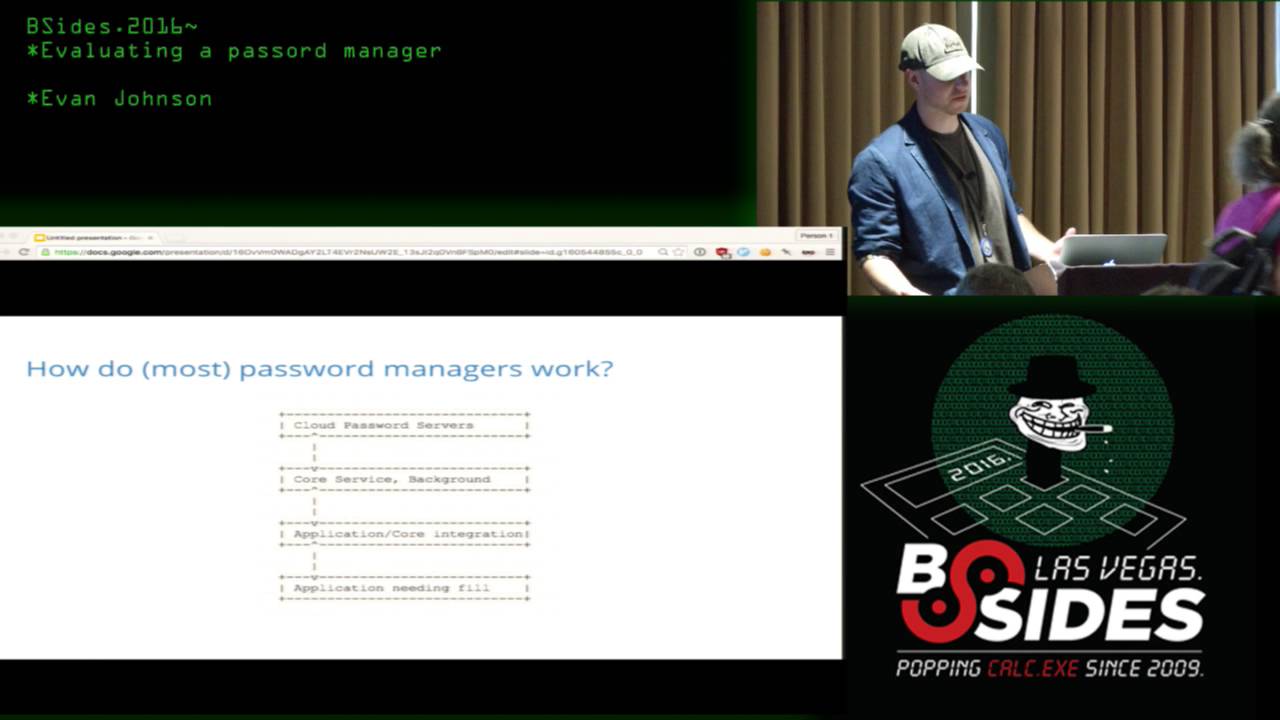
interesting uh excel spreadsheets and password journals these are things people might be using that we want to all we want to compare all of these together so this is kind of a generic design diagram of the it might be hard to see high-level parts of a password manager so i put four of them and there might not be four of them and maybe some of them are more tightly coupled than others you have the cloud servers where if it's if the password manager syncs you have servers that the password managers or the passwords are stored on then you have uh kind of the backend core of a password manager so if you use one password there's a fit
client there and lastpass it's all extension based and this is the part that talks to these servers and gets down the passwords and decrypts them and then you have uh the application core integration i just this is the ui the part all the features that are built on top of this decryption all this all the junk that gets decrypted all the features that you see and then i don't know why i put this last one it's not really a part of the password manager just the application that the password goes into that's where that's a final resting place for the the password uh goes into hopefully the correct application uh and like i said some some password managers
might have all four of these some might not so the first part is the servers and this is going to be missing from things that don't sync and the important thing here when you're evaluating a password manager it the first is really obvious that your passwords should not be on the server in plain text and there are actually some like enterprise password management solutions where it is in plain text and uh it's uh not just enterprise these these are like really big business like 100 million in revenue doing password password uh management at that i i've heard of and it's kind of insane um but what else should be encrypted here it's uh everybody kind of does it different
all the password managers so the big two things that generally differ is some password managers don't encrypt urls and some other ones don't encrypt usernames and the uh i don't think there's a right answer here about whether or not that's good or bad or i think it's could there's room for improvement for both of them but i don't really see a a huge reason why uh why having everything encrypted or i'm not sure how to weigh this and so i came up with two tick boxes for uh evaluating what's stored and it's whether it's encrypted which pretty much all password managers encrypt uh what they have on their server and then whether the passwords that are on the
server and then whether or not the the they encrypt all site data so if a url is if a url isn't encrypted then they wouldn't get that second tick box here the password manager wouldn't so what else is on this slide all right and you generally have a back end part of an application that does all this heavy lifting of fetching encrypted blob data and uh decrypting it and uh this is pretty boring that all it does is kind of consume api get a bunch of data prompt you for your password and decrypt it and sometimes so this is where all most of the crypto lives so it'll uh all the crypto primitive choices live
here and uh i guess that's significant because all the crypto lives there and the all the features that users see autofills passwords contains all the bells and whistles contains user interface so the this might manifest itself in different ways like autofill uh most password managers will have an autofill feature where you just press a button in it paste your password in or uh maybe not paste maybe it'll just modify the dom on a html page and that all lives here and all the flows of generating a new password and saving it and uh and then communicating with this back-end process that then talks to the api to save this new encrypted blob that's that all starts at at this layer
user facing and then one of the most important features that you'd see from that user see is security details about their password so if they're reusing a lot of passwords if their weak passwords are everywhere in their password vault uh good password managers will tell users that they have bad password hygiene and uh though they might be really loud about it okay so what what actually matters uh and i think this breaks down into two things what features should all password managers have and what are security critical and need actual technical eyes to look at and and and kind of evaluate and i think the first one is more about usability and the second one is security because
that's kind of all there is in in this in this world okay so what should they have high level really fast um they're the most important features that i came up with is password manager or password generator to create to create different kinds of passwords if a password manager doesn't have that it's pretty bad just duplicate password finder security finding security details like we mentioned if you have duplicate passwords if you have weak passwords your password manager should notify you strong crypto this is a interesting one which we'll talk about in a minute but your password manager should be should have strong crypto just having crypto doesn't doesn't really help uh it has to be strong and uh not all
not all password managers are vetted as as such and i think you won't have you won't have as big of a problem with the big names that i listed at the beginning but there are hundreds of password managers and once you get out in the weeds and you may find something that works for you it's kind of scary if if nobody's actually looked at the technical details under under the hood and then import export you should be able to jump ship if you hate your password manager and the most important one that i think in 2016 is a password manager having mobile good mobile user experience and um what did i put on this slide password
managers within mobile yeah so in in 2016 like so many users are mobile first and that is getting more and more prevalent and if if you're if you just download uh keepass xyz and it's somebody just forked keepass and made some changes in it you can't actually use it on your phone even if it's really cool and open source it it like is not going to help you that much uh and so so here is like a snapchat signup screen and i pick snapchat because i kind of picture snapchat as kind of the next well it's already arrived the next social network like uh and i also picked it because at the beginning of twitter people were
like this is really stupid and it kind of became something really big and so people signing up on twitter they might choose a stupid password like that my first password on snapchat was really horrific i'll tell you but uh but like who knows snapchat might be really important like a year from now people might be getting their news from from news clips on snapchat who knows and so if you if a password manager can't reach their mobile users that's like that's really bad and also just outside of password managers authentication on mobile devices is just atrocious uh people have tried like federated credentials in apps like pokemon go came out and they had the google
the google sign up and besides the fact that like the you could sign up with your pre-existing google account uh and besides the fact that the permissions were uh way too permissive on what you actually allowed pokemon go to do it's it was just bad ux like you had to completely re-enter your username and password you didn't get anything for free so password managers are the best we have in mobile ux right now uh so this is the this kind of shows off on uber who uses the agile bits uh the one password they have a way for apps to integrate with a password manager and i feel strongly that this is if your password manager
does not have this option if you use ios so obviously it's different for android but on on ios if if you're not taking your password manager seriously and you and you are working at a password manager company like this is super important this little uh it's in the red not my email blurred out but the the little uh lock icon uh that will allow you to just click that and paste your password into the password field and or it's not paste um i'm not sure about the details but it it allows you to get this this icon and utilize a password manager from inside of an app and the other thing in mobile is browser
support and while while most apps have not figured this out most password managers have figured browser support out and pretty much all of them will will support different pretty much all password managers support this way to be presented in a in a safari browser which is good and so the the important reason why i mention mobile and really focus on mobile is i think it's the way to win an argument on the internet since that's the only place good import good important arguments are fought uh with people who use people who use excel spreadsheets and and password journals and stuff i got in an argument with somebody on a slack channel and this guy said he
all of his passwords were too sensitive for a password manager and he could never trust software and he kept an excel spreadsheet or he kept something that he wouldn't he refused to tell me because it was too high security and i was like first of all this is just absurd but second like uh the mobile case the mobile case just i feel like completely trounces his argument because uh because who knows where this guy will be he might not be at home when he signs up for uber or for snapchat and if he if he doesn't choose a good password that's like bad password hygiene and his his system fails um so uh the scary part of password managers is
go to the apple app store and type in password manager and there are like hundreds of results and who knows who knows what these things are doing okay so what what's what features actually need security evaluation and uh i think after last week we all know browser filling logic needs security evaluation uh uh integration with the between the browser extension and the and what whatever background uh no integration between uh like what the user is doing and the how the user interface talks to the the backend system that decrypts all the passwords because in in dashlane and and one password it's uh they talk over a websocket and uh and it's not tightly coupled like
different password managers all have a different software architecture where some are more monolithic where you might they might only be extension based but some really rely on this thick client on your machine uh crypto primitives so uh this is all came from browser world and crypto primitives don't exist that well in javascript so basically everybody just copies and pastes in uh crypto their crypto primitives that they need and who knows who's looked at these i have no idea and then http headers random regular appsec kind of things uh so how to dive in and look under the hood we're uh so the the parts you're going to be looking at is the api the crypto the browser
extension and if you are an appsec person and you've always wanted to learn about how to dive in we're about to look at it quickly so here is an example of how you could examine the api for lastpass and how it works so for lastpass password box most of the monolithic extensions where they don't have this client on the machine lastpass does now but all the logic is still in the extension you can just go to this extension screen in chrome chrome colon slash extensions and load up the background page and start diving in that's you have to click a that there's a check box in the top corner that says enabled you have to click that then you can
click background.html and you can start diving into the technical details of how the extension communicates with the api for for a lot of extensions actually and here is uh my lastpass vault and you can see all the once you click background.html it'll pop up a a chrome debugging window and there's a network tab you click the network tab and you can see all the requests that are being made and uh you just click on them and you can see all the technical details it's amazing and apps that don't do that this it's a little harder to kind of dive in and reverse engineer because uh you have to reverse engineer a thick client instead you uh who knows like
maybe they do uh h like public key pinning inside their their thick client and it's a little harder to dive in this is really nice because chrome gives you a debugger it's amazing uh next is examining the crypto and uh pretty much all password managers use have pretty similar crypto primitives that they've chosen uh most of them have chosen like aes cbc um and similar encryption and pbk df2 sha-1 for deriving a key and i think this is mostly because of difficulty getting primitives into the javascript world where they might need them and whatever but this i think that the best practice now is to use an aad cipher and it's really hard one challenge that you
kind of realize when you're working as a software engineer on a password manager is let's say tomorrow you wanted to switch from aes cbc mode to a different crypto primitive let's say you wanted to go way back and way weaker and pick des which we don't use anymore and please don't ever use and it's really hard because you start you can't just flip a switch and everybody's passwords are encrypted with something different moving moving forward is is not easy once you've chosen a primitive it's really sticky
who said why why is it sticky just be just because so you encrypt all your all your passwords you have a thousand passwords in your vault and we chose let's just pick something really weak des and we want to move to aes and you would have to download new code from whatever update process the extension has and the client has and that all your things have to be decrypted and encrypted again or you can wrap them uh and that's that's kind of weird where you start encrypting a cipher text and it's it's just kind of a not an easy
their process across different clients and that that data synchronization problem and getting this working for all clients and makes changing data formatted yeah it's it's not easy and so uh now we want authenticated encryption and pretty much no password managers uh have authenticated encryption just because of this problem like if it was easy everybody would do it but uh it's not and so examining the browser extension thanks is tavis ormindy he found a really bad bug in lastpass last week and he's looking at more now more password managers so i put his face up
and so uh finally uh examining the browser extension uh so the part that he found the bug in is in lastpass was their autofill logic and this is fairly easy to dive into because of chrome dev tools again just right clicking on a page and clicking inspect element and then you can click the you pop open the developer tools then you can click sources and then content scripts which is right here and then you can just browse javascript all the javascript fill logic this is one passwords fill logic lastpass fill logic right next door it'll format everything for you it'll uh it's really easy to dive in and start reading their code and evaluating it
and so out of this talk um i kind of came up with an idea where if you've ever heard of uh the eff and a lot of people have created scorecards for things like encrypted messengers and and whatnot i want to come up with a password manager scorecard where there is a lot of properties that i define and password managers either get a green check or a red check or red i don't know what that's called actually a red no and i think this would be really useful just to have something where non-technical users can kind of come see and get a non-biased way to evaluate a password manager that suits their needs and i want to i got this idea while i
was working on this talk and so i have not made it but i want to publish it in the next couple weeks and work on this so maybe you'll see it i hope you see it but i plan on publishing it soon so does anybody have questions sure so for those of us who work with users all the time oh for those of us who work with users all the time where will you publish it uh so i have no idea i wanted to work at cloudflare our pr people have good contacts and i was hoping to get it somewhere that it might get visibility i plan on putting it on my twitter on ejcx underscore and
hacker news or something i don't know hacker news in my twitter are places that you might expect to see it so do you know of a personal password manager that syncs where you can run your own server uh yeah so uh pass pass which i mentioned at the very beginning the website for it is passwordstore.org it is get backed and it's if you like gpg and command line the reason the reason i recommend pass is because there's kind of been an ecosystem built around it where you can use ios app to to access your passwords as well and it's it uses git as the back end and so you can just host a git server and have
your passwords last one jeff goldberg from agile bits makers of one password at the risk of pushing of pushing um self-serving criteria i was a bit surprised at the extent to which you downplayed the not having the urls encrypted particularly if that is actually stored or available to the operators of the system i mean now for a long time i mean i understand the technical reasons why it's difficult to get those encrypted and when we made the transition to a new data format in which we actually managed to encrypt that we have been hammered by our users for making that transition too slowly so um so what i'm gonna do i'm gonna ask both evan and jeff to join me for dinner and
i would put them on the upside sides of the table uh oh no no no um i don't think you need and anybody who wants to come and watch i'm more than welcome to do that but now i will have to say again thanks evan yep thank you
Related talks
 45:26
45:26 32:06
32:06 48:39
48:39 41:53
41:53 21:10
21:10 14:37
14:37