Demystifying DNS Security – Practical Steps for Reducing Exposure and Detecting Compromise
Show transcript [en]
[Music]
great conference so this is my promise for today so first things we have to have to two definitions so we're all on the same page what is a recursive DNS resolver recursive resolver is one that answers questions for clients it's not authoritative it queries route and authoritative servers and caches the answers for the clients an authoritative server is one that hosts zone records and provides answers for recursive resolvers and authoritative server usually has to be registered with a domain registrar to let the world know that that domain at that server or that authoritative server is able to serve up records for a particular TLD and there's a nice little article from umbrella there if you want to learn more about
recursive and authoritative nameservers so if we want to look at the detail overview of how DNS works Sly's getting cut off a little bit there sorry about that there's only eight different steps in a DNS query so there's probably no room for anything to ever go wrong right works every time all the time right well not really so I'm gonna talk about some exploits and vulnerabilities in DNS I'm gonna categorize them based on the CIA triad this is something that most security practitioners recognize and I'm doing this just so that you can go back to your company and say hey these kinds of things fit into our risk model for this and here is why these exploits could be
categorized in many categories I'm just doing it the way I did just to make it a little bit simpler but first of the exploits we're gonna look at is actually exploits against confidentiality these are the kinds of exploits where DNS can be used to basically exfiltrate data from your network the first of the things that we see and we actually see this in our DNS all the time data exfiltration via DNS this is an example just from a log graph but basically what you see here is the domain at the bottom that's right here by my this domain here is the domain that's actually legitimate this part here is the data that's being exfiltrated this section so if you saw in DNS you
might see a ton of lookups for these this domain with a subdomain that varies across all of the lookups and that's what you're seeing in the histogram there it's basically what happens is the malware will take strip data off of your drive encode it in some way break up that encoded data and send it through DNS to a DNS resolver these resolvers are legitimate resolvers they have legitimate name servers and the answer with legitimate answers the only thing they do at the other end is they re a granade the data that they've taken from your network the second thing we see in DNS exploits our botnet command and control this is an example of how botnet
command control information can be encoded inside a DNS text record but it could be done in any kind of record this is really a DNS tunnel it is a two-way street so what we see here is a compromised machine or device would send out DNS requests to a DNS resolver botnet command control the botnet command control would take that command and send back data to the requester but that actual data would be the command that's supposed to be executed on the infected or compromised machine these are often very difficult to detect because you can't always see the domain names that they're using to do this button and command and control and the next thing we see a lot of times with that or
something called domain generation algorithms and what this is this is something that a lot of malware has built in to basically obfuscate DNS it'd be really easy to find rogue DNS in your logs and in your dns lookups if the malware we're only doing those kinds of dns lookups so what the malware does is it creates these random domain generations and since DNS lookups for these out to your network problem is they never resolved they come back as an X domain but you see them as normal DNS lookups going through your network problem is what they do is are you doing this to obfuscate the real botnet command and control domain so that you don't see them so easily in your DNS
look ups this is an example malware writers don't always do things correctly so you can use this to your advantage this is an example of some of these DGA domains that they forgot to make fit the employed qualified domain name format and they stick out like a sore thumb in DNS who are able to see these in our DNS logs and mitigate them accordingly the last exploit that we see against confidentiality this is something I talked about at Def Con most people aren't aware that this information is out there but the e DNS zero option codes are ways in which vendors can use DNS extended options to send data back and forth through DNS that doesn't mean
that they're all legitimate queries going out the evildoers can use these options as well there's 65535 options that you can use most of them are unassigned some are assigned for example if you use Open DNS for the Umbrella product you would see this in your DNS lookups going from a machine that has this client installed on it and this can also be used to exfiltrate data from your network and basically eliminate or put out data that you may or may not expect to be leaving your network alright get this right here there we go alright so now we're a look at some exploits against DNS integrity one of the most well known ones my screens not
showing the whole screen there is DNS cache poisoning this was first talked about in Def Con of blackhat talked by Dan Kaminsky back in 2008 the talk was entitled it's the end of the cache as we know it since what this exploit basically you could flood a DNS server with responses quicker than the DNS servers that were supposed to respond to that DNS and flood the cache with incorrect information this is no longer much of an exploit because most DNS servers have been fixed so that these kinds of attacks are less likely to happen they're much harder to do but they still can and do happen a variation on this TAC actually there's an article here if
you want to look at this that's in the slide deck and I'll put this up on the schedule when I'm done this article here talks a great deal about these DNS vulnerabilities with the cache poisoning one of the things we've been seeing a lot lately are these DNS rebinding attacks they first started out as people visiting malicious websites through phishing emails whatever drive-by downloads through adware they would get directed to a website that would download JavaScript that JavaScript would then go and attack your local router they did this on home routers at first well when people don't set their usernames and passwords on these routers the routers then have their DNS change so that you know everything going out of
that network uses the malicious actors DNS server instead of the one that they would think they should be using so these of these attacks have gotten more sophisticated now and we can actually see attacks happening where there's DNS rebinding combined with cross-site request forgeries that allow an attacker to basically through DNS send one DNS request back to the client change the second request send it back quickly to the client and are able to tunnel there have a reverse shell basically through the client browser that's infected through these rebinding attacks so it's really really something you have to look out for on your networks another exploit for DNS is man the middle attacks you hear about these right this is why you
don't browse Wi-Fi in the coffee shops but this is possible on wired networks as well any compromised machine on a wired network could initiate an ARP poisoning cat attack and redirect either your client machine to a different router that's one way of doing it but what if the attack were something like this it networks compromised that the ARP figures out which the MAC address goes to your DNS servers on your network they are poison your machines on the network to send DNS requests to a rogue machine on the network or something else machine off the network and now they've taken your DNS and redirected it in a way that you may not be able to catch so
these things can be very very dangerous if you're not sure if you don't have things mitigations in place to stop them this is an interesting one that came up last year I think in July Matthew Bryant posted an article about taking over a name server TLD this is a kind of an interesting attack actually the gist the post centered around the fact that the io top-level domain had authoritative nameservers those name servers in the delegation chain one of the domains expired so he could go register that domain name you see where I'm going with this so now he owned the domain for the top-level name server for the top-level domain for IO so every domain that was
whatever dot IO was sending DNS lookups to his name servers to resolve who the name servers were for all of the rest of the dot IO name servers this could be very very bad all he had to do was send back name servers one his name server and then set a really long TTL and over time everybody in the IOT LD would be using his name servers to do their lookups and ignoring the rest in the tree so he would effectively have taken over that whole IOT LD he didn't do it because he was not out to do that but that's what can happen and this can happen at any level in the domain tree
so for example if your domain mydomain.com has three different name servers authoritative name servers through three different domains and one of those domains expires and somebody finds out it expires and BRE registers that domain and takes over that name server how would you know this happened who monitors their name server registrations for the name servers on their domains probably nobody all right you might want to think about doing that one of the other things that we see through DNS this is kind of a secondary add-on DNS is probably the key factor in ransomware attacks these domain generation algorithms are used again I said obvious gate domains but they also generate domains that are legitimate through a different set of commands or a
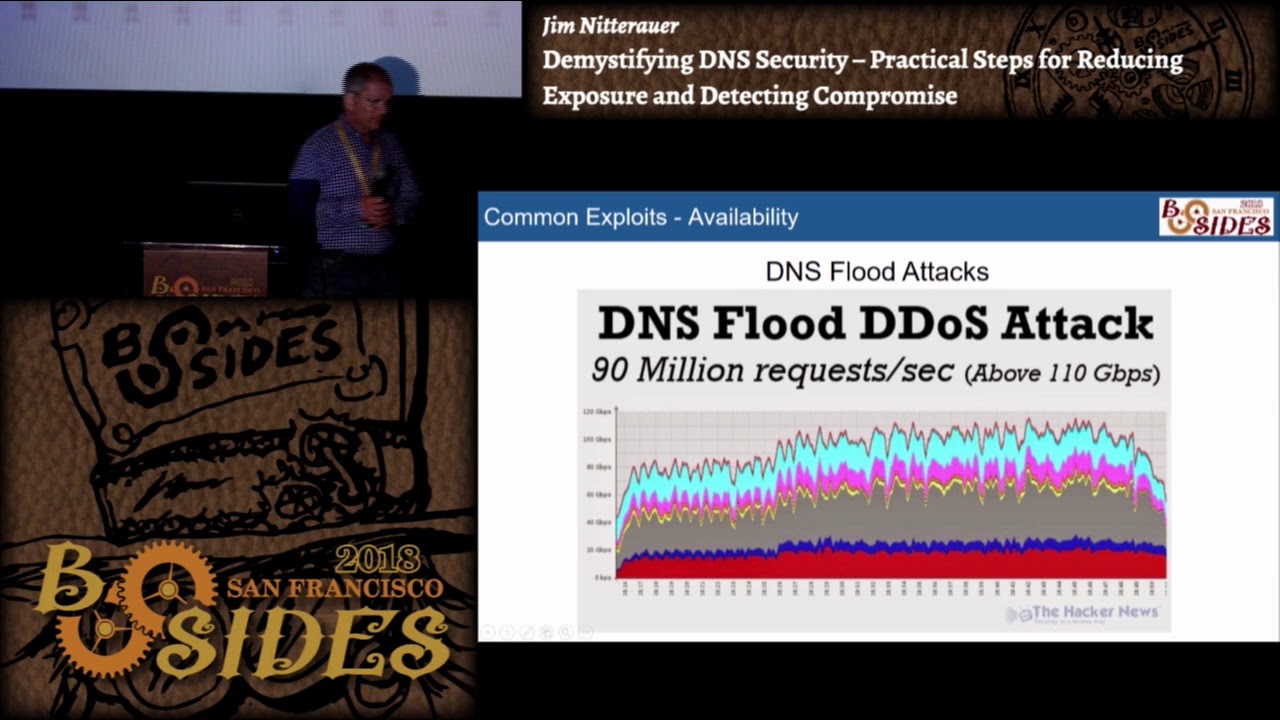
different set of criteria within the malware this ransomware then makes dns called back and sends data via these DNS calls back to the master commanding control center so DNS can be used in many many cases to mitigate or stop cryptolocker and other ransomware type infections by simply locking down a computer or device so that it cannot query DNS servers other than ones that are approved I want to go over that here a little bit when we talk about ways to secure your DNS the third type of DNS attacks we see are attacks against availability so the first one we used to see a lot of we don't see so much of this anymore where DNS flood attacks
where somebody would just simply roll up a few VMs just start pounding a DNS server with requests more requests than the DNS server could handle the DNS server would quit and I so a few years ago in 2015 playboy announced that they were changing content of their magazine there were a few people on the internet that were I was guess you would say cyber protesting and they initiated a flood attack against Ultra DNS and took them down for four hours and I don't know if you know who else Ultra DNS hosted at that time Microsoft Outlook com a couple other domains they were out for about four hours in afternoon on that day it wasn't a pleasant day for
anybody that was hosting any DNS attacks we see more on DNS now our DNS amplification attacks these are very effective because you can take a very small DNS request most DNS requests are 50 60 bytes hit a resolver with a request for a very long record a text record and a record right then then spoof the IP address it's a UDP connection so you can put any IP address you want in the UDP packet and then the DNS server that receives a request will send the request back to the IP that's in the header not the machine in the Senate so on a 200 bit network you could generate a 12 gigabit attack against somebody with one computer so if you
wanted to you could spread this out across a botnet Network moriah networks something like that and generate tera bits of attack with only Giga bits of connectivity the problem in these kinds of attacks is our two victim right the one that's reflecting the attack the DNS server and then the endpoint is actually receiving the attack these things are easy to detect sometimes not so easy to mitigate but this this graphic here shows an attack that was happening that's the domain there it was in a record that was getting sent I'm gonna said any record was getting sent and over here we have some rules in place to block that and we could actually tell from our rules we're
actually blocking all of those attacks --is that came in so we just chose not to play so how did we mitigate amplification attacks well DNS servers were then equipped with this option where you could tell a DNS server that if certain types of records were requested of that DNS server you the DNS server would respond with a TCP reply in other words it would say I'll answer that question but you got to ask that question on TCP not UDP so anybody's initiating an attack won't typically answer because they don't want to see that two-way handshake go between them and the DNS server so this is great it eliminates amplification attacks not so great because now it opens up a whole
other vector for an attack through DNS malicious client can still spoof the IP address of the source IP in a TCP packet send a syn packet to a DNS server on 453 TCP with the targets IP in it and then what will happen is let's say it's my DNS server it'll send back the data back to the target IP as a syn ACK there's a target does the target IP ever respond it doesn't respond right so my server sits there and waits well the malicious guy sends me hundreds of thousands of these packets suddenly now I'm initiating a syn ACK attack against the target that I don't even know who they are so you have to be very careful when
you're looking at mitigations and DNS and how things how you mitigate certain types of attacks because the mitigation for one attack could open you up to other kinds of attacks the last attack that we see on availability are what I call malformed packets typically if you see malformed packets in your DNS this is an indication that somebody's tunnelling some thing through DNS on your network and you really need to investigate which device on your network is doing this because there should never be more than a few mile form packets on DNS coming through your network unfortunately the only way to get at these is through packet capture and Wireshark so all right so we looked at I saw this on a
tweet the other week and I thought this was appropriate for the talk so I put it in there so now I've talked about the OSI model and cats in the same slide so I think I get bonus points for that so so I put this up here not because we want to memorize the OSI model but think in terms of the OSI model when you're trying to figure out ways to mitigate attacks all right where are we going to gather data what kinds of information can we get at these various layers and what kinds of mitigating controls can we put in place for these different layers so now I'm going to talk about some of
the things that you can do from a DNS perspective and you're not going to get all these down but what I'm going to do is I'm gonna put a couple of blog posts out at tripwire and peer list and I'll document all of the stuff and give you much more detail because we really don't have a ton of time today to do that so what I want to do is just go over them one of the things that you can do with your firewalls how many restrict outside DNS servers in other words do you allow your firewall to let your internal clients query any DNS server on the Internet not a good idea right why malware on a machine can
query a DNS server aside from anything that's on a network card or network device on your machine it can query DNS directly so what you want to do ideally is restrict where DNS can get through your firewall so what we do is in our case we use Active Directory or Active Directory servers or the cache servers the resolvers for our internal clients and only those servers can get out to the internet and only to specific DNS servers to do the lookups right so we use a security filtering service our own and then we don't forward to route and I'll tell you why about that and the second here firewall should also inspect DNS traffic so would you ever accept a
DNS request coming in that didn't originate on the inside no right so you want to ensure statefulness on your firewalls do not allow DNS from the outside to come back in that will prevent those DNS spoofing attacks from happening I lost my mouse your mouse so firewall should also be configured to rate limit DNS queries so that if your outbound machine lets a machine gets infected and wants to start participating in a DNS amplification attack if you don't rate limit the outbound queries on your network you could be participating in those attacks and not even know it so the other thing we also need to look at is what we can do in Active Directory
and our Active Directory servers we use our secure server filtering service you may use other services but in our case in Active Directory DNS you're able to forward DNS requests so your Active Directory will service all the requests that it knows how to handle internally and then forward the other requests out to the internet if you don't set up forwarders on your Active Directory server it will use the route servers to answer those queries just a normal DNS query in our case we're using our filtering servers so what we have done is we've turned off forwarding to route so if you're using some sort of DNS filtering service why would you do this you would rather fail safe than fail
open right so what can happen if you are using a filtering service and forwarding to those and somebody realizes that by sniffing traffic on your network what are they going to do they're going to block active access to those DNS servers right because they want your security for your DNS to fail if you have your forwarders set to forward on fail to the route they're not going to block the root servers the root servers are going to work and they're going to answer for anything so any DNS will get resolved so you will have no level of security if that DNS gets blocked you would rather fail closed and fail open the other thing we look at is on Group Policy we
make sure that we set group policy so that people cannot change the network settings on their network cards I no mean evil bad me right we don't want them saying old and it works slow I'm gonna change the 8.8.8.8 rye that new cool DNS server we don't want that happening so we lock them down we take it even one step further we push firewall rules out to every device on the network that says you cannot query anything but our approved list of DNS servers from that device so remember earlier I told you what malware can do right a lot of malware is written so that it will first try the DNS that's on whatever network devices on your device
that's infected that doesn't work it's going to query directly to some DNS server that's pre coded in the malware so if you by blocking DNS to anywhere but your local Active Directory servers block those DNS requests from that malware that malware can't make direct calls out to the internet so that's something you really want to consider when you're when you're dealing with group policy there's some links on here and what I'm going to do is I'm going to write all this up a little bit more in detail again on a couple of blogs so the other thing I recommend for DNS resolution is that you separate your recursive and authoritative functions all right so if you're using how many
how many of you use Active Directory DNS for authoritative DNS on the public Internet you don't have to raise your hand if you do that your homework is to not do that anymore that would be a very bad thing all right because if somebody can compromise that DNS server they can get access to every zone on your internal network and that's not a very good thing so separate your recursive and authoritative functions what we recommend is that you use your Active Directory servers those Active Directory servers query some sort of internal cache servers I would recommend setting up a pool of unbound servers it's a great caching server has pre-emptive caching you can put some rules in it
that will block certain kinds of malicious IPs it's a very good middleman and then let only those unbound servers out to the internet for DNS that way you can control everything and you'll see where I'm going with this when we talk about how we're going to log that information again I would employ the firewall rules on the edge that we discussed earlier and I we do something on our network and you may or may not agree with this but we and I'll explain why we do it we enforce a standard TTL of five minutes on every dns request okay there's a method to this right so the assumption is if somebody compromises your DNS record checked a record that's bad into
your DNS cache once they do that what are they going to do they're going to set a really long TTL because they don't want you to look that up again they want that to be persistent in DNS so by setting your TTL s to always be five minutes on your DNS server the DNS server won't honor anything over five minutes and it will go back and refresh from the root or wherever it's supposed to do these lookups so that means if you have some sort of rogue DNS in your cache it's only going to persist for at most five minutes or ten minutes or whatever that number is that you said our last thing that I recommend is
monitor the crap out of your DNS and I'll show you some tricks on how to do that for authoritative DNS for your domains right they're important you want your websites up you want their MX records up you don't want them to go down what happened on it was October 26 1916 anybody remember or 2016 I'm sorry say it's euro H yeah so dine DNS was taken down so the backstory on that this was a gamer that was on Xbox he'd gotten violated terms of services account was terminated early June July something like that saved up his money running some time of the botnet network and said screw you Xbox I'm gonna take you down that's what he did
unfortunately nine hosts Xbox Twitter some Facebook domains a whole bunch of other pretty important and pretty heavily trafficked domains so the lesson learned that day was don't put your authoritative nameservers with one provider okay if you're if it's that important that your site stays up get multiple providers use providers that support any caste and any caste basically is simply advertising the same ip block from multiple locations taller connected peers so that you have multiple sites with the same IP address BGP routing figures out the best route to that site so you might get an isolated outage but you won't take down your whole site if you're using any cast routing to get your data out to the
internet I would routinely validate all of your name server domain registrations do that on a regular basis ok the Whois stuff sometimes it's hidden and with the gdpr coming down it's probably gonna get harder to find that information you might have to subscribe to the service to do that but know who owns the domains that you're using for your name servers when they're registered when they expire and make sure the IP addresses that those were solved to don't change on a regular basis so set up some monitoring to monitor those also I would monitor for their uptime their latency and test for correct resolution some of the things you can use site 24/7 works well
web metrics PRTG is a good internal monitoring tool that you can use but all of those will will work well and I would probably your website's important retain some sort of DDoS mitigation service with your DNS if you can do that be can afford to do that as a service provider again your your IPS that you put out in the public should be used with any cast in our case we use multiple machines behind load-balanced VIPs throughout data centers all over the world in our case we also use some load balancer rules to filter all of the incoming requests for DNS so we have DNS cache VIPs that are open to the world anybody can query them you can query them if you
want to but you can't query them too much that makes any sense if you were to hit a DNS cache server our cache server and started hitting it with 10 any requests in a second we would say yeah we don't like that that's not cool there's no reason you have to look up the same domain within any request 10 times in a second something's not right here so we put these rules in place that limit by the type of record the source the domain etc we're able to put rules in place to keep that keep that in line and we can monitor those and adjust those limits based on what we see from our customers
so we've talked about some things about security how do we know what to look for in our security right without insight into what's happening it's all kind of pointless so and the problem becomes when we really really need data it's usually when we're trying to drink out of a firehose right you know you know what's hit the fan things aren't working we have to figure this out people are barking at us the Internet's down the Internet's down the world's coming to an end what are we gonna do it's DNS right so what we do is we use a variety of different logging tools in our case we use grey log but there's a good number of them out there that will
work just as well how lovely is a cloud-based service bunk works well kiwi not so much but that's a syslog server which is great for grabbing syslog data but what we do is we set up ways that we can actually import the data and see if I can tell you what this this is here this is actually one of our our ad servers export logs how many of you have ever looked at Microsoft's 80 DNS debug logs they're beautiful aren't they yeah they're terrible so what we did is there's some tricks you can do in PowerShell you can tell the 80 DNS server to rotate the logs then we use something called NX log to ship those
logs to a gray log server and then we wrote a custom Java input for those to break up I don't know if you can see on here the fields all the field names are over here on the side but these correspond to all the data that's in the Microsoft debug logs so we can actually go back and look on our network and we can look at things like how many action domains are we getting how many failed domain lookups do we see any domains that are being looked up an inordinate number of times those sorts of things are able to be seen through these logs so what kinds of things do we log we log
all of our internal cache servers or unbound servers you can what we use for that is packet beat so there's elastic search has a thing called beats and there's a bunch of different types of input outputs that you can use to basically log shippers and packet beats is one that you can set up the ship DNS data off of a server directly to some remote source they're basically log routers and you enable this input on gray log which has a built in in gesture for the packet feed data and you can actually see the data in gray log see what's happening on your servers the cool thing about it is you can set alerts gray log has some things
where you can import different kinds of reputation lists so you can see if certain IPAs are being hit certain domain names that sort of thing and set alerts on them also what we monitor our changes to DNS zones right how many people monitor those changes on your DNS servers on your primary zones right how do you know if somebody's gone in and made a change to that zone reloaded in DNS how do you know your DNS is serving up what it's supposed to serve up if you don't log these changes there's no way to really tell what's happening we also log device login attempts on Cisco devices some other things we also do failed ad login attempts and this is
kind of an aside but I was talking to Dave Kennedy about this one day and he said one of the best things you can do in your Active Directory you go and create a domain admin account on your Active Directory server give it a hunk and long password and promptly forget the password never log into that machine or any machine with that account go to your ad controllers and the event log your failed logins there's a specific ID that you can look in and look for that domain look for that username if you see that username pop up in a log that failed you've got trouble alright but that's just a quick way that you can
actually secure an ad server to make sure that you can see if somebody's trying root force attempts to get into your network so how do we ship logs our logs are shipped we use an X log and we use packet beats but these are some other log shippers that you could use to ship data this is an example of how we analyze some of our logs remember I was telling you about the different error codes that you can get out of Microsoft debug logs so you can see them all up here there's some useful information there you can see what annex domains are happening what kinds of servers are failing on the other end all of that sort of thing
gray logs pretty quick it analyzing this stuff and you want to see a demo I could show you a whole bunch of information I'll let you see how we work with our stuff internally I can't show you that here in public but I can show it to you privately this is just a heat map that shows you where DNS queries are originating around the globe or one of our services and our one of the last things that we have to learn how to do to be able to monitor DNS is learn how to read packet captures so when you're capturing packets you can use TCP dump or Wireshark I would definitely recommend you use an
input filter for TCP dump or Wireshark so you're not capturing all the traffic on given machine but in this case what this shows here this is a little bit interesting you probably didn't know this was happening but this is a Google a query from a DNS server to Google looking up Google comm are you say anything weird in this DNS packet this section right here this is in the e DNS zero options this is option eight it's called client subnet and right here is the way an IP address the person making the request so you can be in a network thinking you're completely hidden from the world and your DNS server upstream supports e DNS client subnet and the IP
address of your LAN port is passed every DNS server in the query chain so you have to kind of know what's going on in your DNS the point of this is that you have to examine packet captures to be able to see what's going on in in your network this is a list of which the tools that we use again I just put this on a slide here so you can see what they are one of the best places to go to look up for DNS amplification attacks is this link over here this honeypot site he does a pretty good job of catching them we actually report to him sometimes we catch them before he does but it's a
good list of what domains you should never see in your DNS or you should be blocking and with that I think my time is probably up five minutes early but if you have any questions feel free to ask I will be around I'm happy to talk about D&S show you any demos I can answer any questions you know that was a lot of information but if you have any questions sure I'm gonna get away from get away from the light man I either did a really terrible job and put you to sleep or you all got everything down good deal well thanks for attending [Applause]
Related talks
 28:29
28:29 29:24
29:24 32:13
32:13 30:17
30:17 38:53
38:53 32:39
32:39