The NSM Ouroboros: Embracing The Endless Cycle Of Network Security Monitoring
Show transcript [en]
okay thank you okay I don't have any chocolate for fun videos I hope this will be interesting um can you all hear me okay yeah um so I've entitled this the NSM uberis or auraboris about the continuous um life cycle of network security monitoring so a bit about myself Kimberly Hendry I work as the sock team lead at that security dot company on the pocket scene managed Services side so we um we produce low-cost scenes using security Union for small medium-sized Enterprises and I'm the co-lead of the Northeast ladies hacking society and a member of cyber North up in Newcastle so my plan is to do a basic explain of what's network security monitoring is
and then show you some examples so the whole show don't tell um thing as well and hopefully we'll have some time for some questions um and I thought I'd do some disclaimers if like this is not this is my opinion this is not my worst opinion and also this is not my methodology this is um I think quite a standard methodology of network security monitoring and also I'll be referring to a scene quite a lot because that's the one we use security engine and is a monitoring and visualization as well okay so just so everyone's on the same page very basic when I'm discussing networks I'm talking about computer networks so um Internet devices sharing resources
and communication and then the security monitoring side um so we're looking to detect and prevent any breaches and authorized access and cyber threats as well and a good way to do that offices in a scene if you can do that and then the data that's shared if you're looking to secure your network and monitor it we're looking at including firewall logs and so I've got some little um a diagram here of the typical what is the very basic point of security engine and so there's a security scene in the middle and the logs that are coming in from servers firewalls and so here we've got firewall logs so you can track your network traffic and any access attempts and get
to ingest your server logs as well so system activities and errors and any audit logs as well for users so then use actions and access privileges as well this is so bring it all together this is the way to um identify any incidents that are occurring and analyze vulnerabilities in your environment and try and ensure the Network's integrity and content and confidentiality and I guess if you're preventing things like a denial of service that keeps your availability going as well so looking at the kind of stuff you'd collect into the theme um obviously Network stuff well about your net flow so going back to that previous diagram of your Ingress and egress what's going on the Internet or
um internal traffic as well so um your East-West serve to server traffic it's good to capture that if you can and tools that we use with security Union so there's the intrusion detection system we use suricata and that's um going back to the previous diagram use that in a couple span Port which is a sensor in your network um and that's the signature based IDs also in Security in the seats that used to be called bro and that's a network metadata analyzer so that tracks and analyzes different ports and protocols and what's coming in through your network um good visibility as well through getting full packet capture from stenographer so sonographer captures um the P caps and obviously if you're
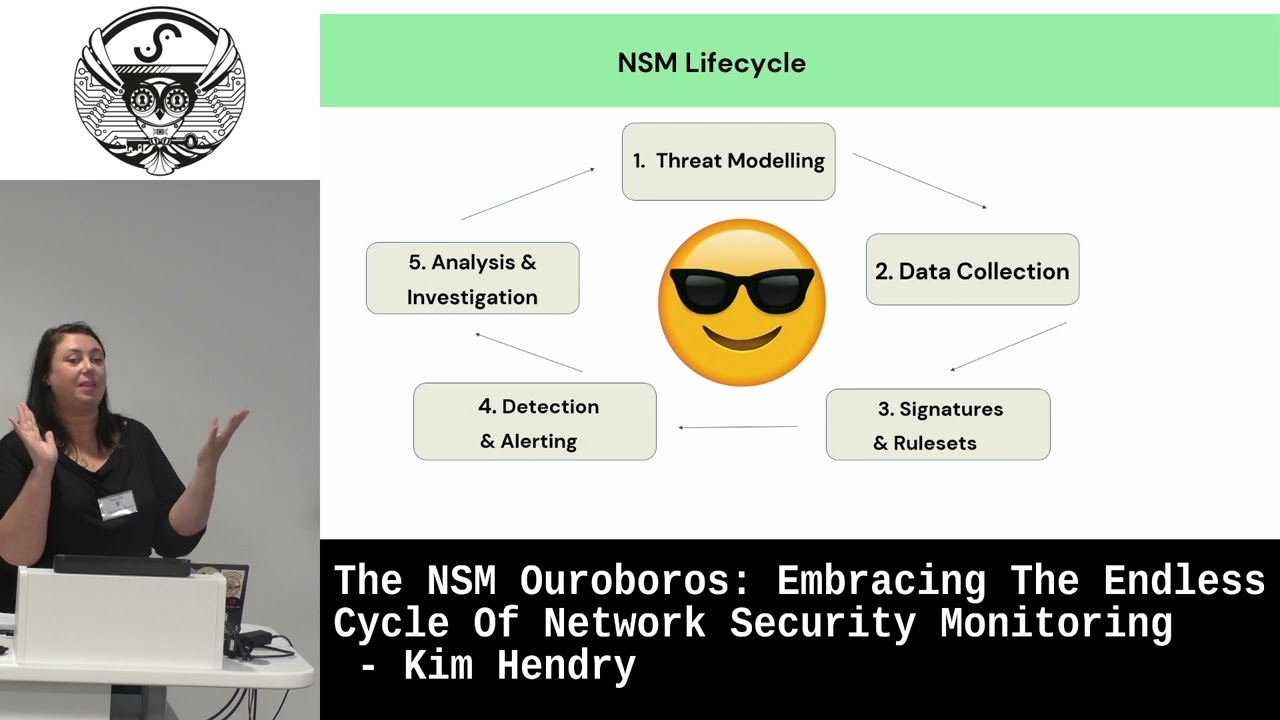
triaging you can analyze it using things like Wireshark and network minor to dig deeper and also file analysis can be done by Sarah Carter and Zeke and that looks for um file content and structure looks for any anomalies there as well so I'm going to do a little diagram there's a basic overview and then do some examples so the first step in the five-step life cycle would be do some direct modeling and so that would be sort of um trying to assess what What You're vulnerable to and what threats are there in your own environment so via um pen test and vulnerability scans as well so starting off with what do you have what assets do you have and what
are you vulnerable to and then next look at what data collection needs to go into your scene so going back to the previous slides about the different logs see what kind of logs you should be ingesting and make sure you've got good visibility of um those different parts of the environment thank you and then from there you could um either if you're using security Union and sorocati that feeds from emerging threats that um threatened Health feed and you can just download quite generic rule sets there and it uses signature based database rules or also you can create your own rules as well in something like um Playbook detection as well as security at the end
and then so like say you've studied throughout modeling you know what logs you're ingesting um what rules you've got set up and then once it's all plugged in and set away this will then trigger any alerts if any known um iocs have been seen um and you can start doing your detection in your network and then from there analyze what the alerts that you're seeing current conducts investigation hopefully motivate any threats as well and then feed that information back into your threat model to then check you're getting the right logs update your rules um check the signatures arrived and again carry on the life cycle and then happy days hopefully I was gonna make a joke about then you're 100
secure but obviously a continuous cycle of updating stuff as well so I thought I'd use a couple of examples um to to show you this so a fishy example so so you threat modeling for fishing um you think so yeah you look at um if you've been susceptible to previous phishing campaigns um something about like a real world example so you've said a certain department has had an influx of um phishing emails and maybe they've like failed efficient awareness campaign and being clicking on stuff that shouldn't and you've not seen it so that's a part of your threat to modeling to find out what's happened already so then you can make sure you're getting the right logs so um obviously network
data traffic your traffic data your mess is ingested also your email logs that endpoint logs as well so you can see if anything has been clicked on and downloaded um also SAS logs as well you can bring those in and then so you create rules like I say emerging threats with security unions and Sarah Carter that has quite lots of generic rules that do pick up things but you can create your own ones if you're susceptible to any particular attack um and so kind of rules for email phishing would be any checking out suspicious email headers um connections to know and phishing domains as well which are constantly updated and any known keywords that are
you often getting pushing emails
and so then if um so you're getting those logs through to your network sensors as well and if those gets triggered you get an alert to come through which give you information about the email and any possible attachments and any metadata as well so that's your detection part as well so then your analysts will then look into this and decide do some investigation see if it's a false positive or A real threat and analyze assess the severity check the content as well see if anything needs to be blocked or um investigate the threat and then also possibly some move that until more training and awareness for certain departments and again like I say you'd feed that
back in back into your threat model to then update um update your playbooks if needs be or it will expose maybe What's um you're not getting the correct logs that you thought you were or some endpoints aren't sending their data across so then like I say you just constantly updating
foreign so I thought I'd use the log4 shell vulnerability as well as an example of this so again going back to that life cycle start with your threat modeling so um in the case of this local shelf and ability identify watery critical assets and who actually running Vlog 4J and versions as well so that would be from your vulnerability scanning and see which kind of machines are susceptible to remote code execution attacks or data exfiltration so do you like any threat modeling test it and denial of service attacks as well and so the next step would be to check you getting the right logs from those so can you see network traffic for those critical assets are you receiving the
system logs um are you being adjusted into your theme and the application logs as well so um you're looking out for known indicate indicates that compromise in the rules and but like I say emerging threats is quite fast at updating their threat Intel feed and I do remember from the log4 shell vulnerability I remember I think it's a Friday um we started seeing this and we I don't think we're seeing the alerts in the scene we were hearing about it just on the threatened Health speeds and Things by about it's not Saturday night definitely Sunday morning the alerts were coming through into the theme from emerging threats with those indicates of compromise so that's um that jndi string and also
known domains that were being used in those attacks so if um if you don't have access to some sort of threatened healthy like that you can update the rules yourself and create bespoke ones and so yeah so your rule sets make sure they're up to date and relevant for this and so then you like I say either move on to once your rules are in place and triggering okay there's your alerts and so you can detect what's going on um and hopefully they'll trigger in real time to give you time to investigate this [Music] and then this moves on to the analysis part investigation so again analyze this check if it's a false positive or pulse
negative or any of those ones um check it it'll show you if um the critical asset actually is running the version that's vulnerable or not and see if it's a real threat then obviously then you can investigate and escape the threat so either depending blocking the system blocking malicious traffic and isolating the affected system or updating those servers and then like I say and you feed it back in and Carry On Again it's um so yeah so in conclusion um I'd say this is not my methodology this is just a quite well taught methodology in an investigation and triaging and building themes and I'd say it's an iterative approach you constantly um feeding into the next
phase and um yeah just and it all doesn't have to be done by certain teams or projects it can just be done actually naturally as you're triaging we often obviously if you find a false positive alert we'd make a note of that then use that to tune out um or update our playbooks um data threat modeling as well so yeah so um thank you very much for your time I hope you enjoyed this thank you [Applause]
oh yes if anyone has any questions yeah hi foreign
I wasn't trying to claim that um this is my idea um I've I've looked online I've done a few security courses and they teach it in their analysts and triage courses um and then when I looked online there was some Sans horses seemed to follow this this procedure as well hi with the security installation is that your home room display on similar various sizes or you have to use any of the Universal manufacturers
um yes they do I think you can buy actually um servers with it installed from security engine and you know I know where I work we're in mssp and so we um build security only in customers environments mainly in the clouds there's only a couple of customers now that have um on-premises like data centers most of them it's all Cloud environments and so you can just pop it up from the cloud there um virtual sensors have you got any experience using Security on any internet kubernetes oh no I actually haven't but we've got a new engineer brought in for that because I think that's um important apparently by lots of people and so I've done a bit
of the engineering and building sensors but I mainly work on the front end um in the analysis and triaging side hi there's uh
it is yeah
oh it's really helpful because um obviously you see the alert and you see um so you see the socket and you see um the inwards and outbound connections and why it's been triggered and often in the story Carter alerts you'll see a payload and why it's been triggered but then if you can actually view the full packet caption full of either full transcript you see the full conversation and you can quite false positive or if it's been like 404 response you know actually not to be concerned so it's really really helpful to have that visibility hi
um oh that's a good question encryption so yeah I think it was on a talk with uh watched with Doug Burks who is the inventor of security at the end and he was saying how um encryption is great for network security but a bit of a pain for network security monitoring because obviously and we can't see it as well but that's why things like um having seek for Network um metadata analysis is really helpful and so it means um even though you can't see necessarily the payload and you can see the connections and any lateral movement as well as I say with the pcaps as well and so that's why the network data is so
valuable because you can't actually see what's possibly been been downloaded or is in the payload you can see what connections like correlate from there so that's a way of getting around it and [Music] we don't use it we've never needed to to be honest um we usually get enough information just out of um Sarah Carter alerts like I say looking through the P CAP um any endpoint data as well that's usually enough to make a decision to sort of isolate a machine or wipe it um like I say because then you can see the lateral movement from other indicators and other logs interesting clock into that oh hi confidentiality privacy issues conversations [Music] is okay
yeah I know that's that's a good question about pii and um well the way we work everything's held in the customer environment and we just sort of SSH into it and we all sign like ndas and um so yeah so I don't know if if you mean it as an external person investigating for someone I don't know if you mean that but I guess I've drugs though she's somewhere else
are you meaning um in a compromise or as in part of an investigation someone else in general
um if you if you're meeting in the sea then it's it's not because it's still definitely in the customer environment um but if if you're meaning with this alert on something like data exfiltration and that this Stephanie word there's actual alerts that would show that yeah that's um for the triaging side everything's held in the customer environment and we just can view that we can't actually download um their files or um or anything like that but yeah I don't think anyone's brought it up with me yeah it is yeah
I think we usually try and keep it for 30 days we recommend Thursdays or most customers want it maybe for their own compliance 30 days most logs and ecaps with 30 days retention it depends what size discs you've got and resources for what you can afford to keep freely um I think most I mean most Services we do of either 9 or 5 or 24 7 triaging and um you wouldn't really want to be going far back past 30 days I think for any investigation if you've missed something from 30 days previous that's a bit of a problem already so um usually Thursday is more than enough customer has their own one I'm trying to
think a recent one wanted 60 days that's just part of their compliance and their contracts what they say for their customers themselves they keep security data for 60 days so I
guess yeah oh that's that's a good question um I guess it's continuous but I know when we on board a new customer we do um um probably about a couple of days at least with different analysts doing some threat modeling with them and use like miter attack Frameworks right and threaten tell reports and then constantly refer back to them and update them as necessary um so yes there's no we don't have any like defined time things like that hi
so if you didn't hear the question about what's a security incident what's operational um I mean yes my boss tells me off lots for um trying to flag informational alerts to customers and just say that's that's not a security incident we're not there to tell them that um but sometimes it's just helpful to to know I guess because lots of customers don't get to see their own environment so I think if that's helpful for them I'll pop that at the end of a report so yeah so with my boss is constantly saying to me just focus on especially if it's a quieter customer that doesn't really it's quite locked down it actually doesn't have many alerts that
we can use it to show them I think things like what service are running versions of TLS and um so I think that classes a security thing but um we get lots of Opera um informational alerts as well in the scene that aren't necessarily security related but might be interested to see the engineers and so yes it's a bit [Music] it's a bit of a few more questions okay well thank you for your time [Applause]
Related talks
 22:47
22:47 47:59
47:59 29:06
29:06 1:00:30
 57:48
57:48 48:48
48:48