It, Do it Live (PowerShell Digital Forensics)
Show transcript [en]
all right how's everybody doing you guys ready to do it live with power show just I gave this talk previously in London and I didn't know if they would understand a bill reference so I need something different but I could do it live yes
recal in poell and without these people I wouldn't have been able to do it so I just want to make sure that I gave the recognition to each person basically I have on the right what they what they did that kind of helped me out favor for field uh who am I so I'm Jared ainson I work for bars group so if any of you went to the previous talk over in the other room that Matt Nelson and will schroer gave I work with those guys on the token defensive guy that works for the company right now and so uh I constantly am trying to convin them that def cool and sexy and they're constantly
trying to take my defensive work and turn it into some way that they can leverage it offensively um I was the 2015 black hat mind sweeper Champion probably the proudest moment of my life so I uh after I won I called my dad and told him you need to take back all those mean and hurtful things you said about my mind sweeper past you know because I'm technically a professional mind sweeper player I won $2,000 so that was pretty pretty proud moment I'm the uh moderator of the power shell security form and this opened up like a week ago we have one post on there so um if you have yeah so we're we're really making
our way um if you have questions about infos SEC and how power shell can apply to that the different tools and Concepts please feel free to come on there and we'll make sure that we get you in touch with possibly the tool author somebody that's going to give you a good answer um I'm the developer of our forensics upu IDs which is a wmi based uh intrusion protction system for host Bas and then wmi vinting which actually the concept of those permanent wmi EV subscriptions to be used with upro and then uh I researched forensic file artifa or format and so if you um as you as you're going to see in this presentation I have a couple cool
posters at least I think they're cool um that show kind of how those file formats are actually broken down what what the bites in the in the files actually mean and then uh kind of my history my background is that I just separated from the US Air Force I was on the hunt team for the past five years and kind of helped them stand out that concept and then I have a number of different certifications that make me relevant I guess or somebody you should maybe listen to um and so uh to to begin the talk I really want to I mentioned the word hunt multiple times during my intro and so I kind of want to kind of give
everybody an idea of what I mean when I say hunt and how that's relevant to why I actually created the tool that I created so to hunt or not to hunt um we've all we've all seen in the news all these different intrusions right JP Morgan anthm opan which is something that me somewhat personally um because I did this in London previously I threw in British Airways to make it relevant to them um Target all these different organizations right everybody's hacked right so um the way at vars that we really kind of run this uh hunt construct is using a Microsoft idea of the assume breach or assume compromise mentality and so um kind of going
forward um the guys that Walky Martin wrote a white paper that talks about the Cyber kill chain so um I kind of stole this from s but the idea they they took the Cyber kill chain and made this little or uh continum down at the bottom very similar to The Hacker methodology and so as you can see there's a number of different uh steps in the hacker methodology and by the end you get data exfiltration and ultimately that's what we're trying to stop right so um groups like OPM if they would have stopped if everything would have happen and they would have stopped data exfiltration and they probably would have been okay and so uh in the military we would use this
concept of F2 T2 EA or F fixed Target tracking G assess in order to basically stop an adversary from continuing down this kill chain right so at any points if you break break the kill chain and they have to start over and uh and you're you you're a step ahead and so going forward originally back in the you know '90s 2000s probably even before that we were really focused on this concept of prevention and so uh the idea is is that we're going to stop the exploitation phase right so we build up our Network boundary we put firewalls all these different things in place and the idea was that you know we're going to have this impenetrable Network that
nobody's going to be able to get access access to um the problem is is that uh server side exploits aren't really cool anymore right so it's all about client side exploits I'm just going to send you a fishing email or get you to go to some website that I've that I've uh packed into and I'm going to get you on client side exploit and so this no matter how strong your perimeter is um if you have a a dumb user in your organization which everybody does um they're going to click on the fishing email that I send them and uh and they're going to infect your network right so once I'm in the network as you saw with Empire previously once
I'm inside the network you're basically completely done for right and so um this uh Verizon of course puts out their annual report and they said that some somewhere around 2third of all um incidents have featured fishing and so that kind of lends Credence to this idea that F side exploits are are really high up and so um the blue dot represents kind of where this prevention mechanism is actually trying to stop them on Continuum going forward um kind of in 2000s 2010 we saw you know kind of the rise of mandans and CR strike these types of organizations uh to where they're really trying or originally were really trying to stop this data exfiltration right so it's incident
response right so Something's Happened they've been notified by a third party that uh you've been you've been hacked you call in the incident responders they come and try to figure out what was taken how the how the breach occurred all that kind of stuff well the the reality is is by the time that happens obviously you need to address it but you've already lost the war right somebody's already stolen you know gigabytes of data or terabytes of data whatever it is and so uh you you obviously want to be somewhere between that exploitation phase and that data exfiltration phase and so this is where the dod kind of came out with this idea of hunting to where ultimately um kind
of giving up on the idea that you're going to stop all exploitation together right so like I said One fish is going to get you um but the idea that in between uh exploitation and data exfiltration there's a number of different things that adversary has to do and you know most of these nation state adversaries that we see aren't going to do it you know just like bam they're going to take you know months or years to actually process through their attack so uh we see things like trying to detect C2 installation or privilege escalation attacks or uh you know persistence and all that kind of stuff and looking for these different anomalies or indicators to compromise
throughout the network and so proactively taking that um going into a network and trying to detect some sort of indicator of compromise um whether that's a signature or something that's kind of more Broad and going to detect things that are a little bit less brittle and so uh the idea that I've kind of come up with is this uh detection investigating response cycle so constantly you are going into your network trying to detect some sort of uh you know anomaly to some degree you're going to investigate it and then respond to it if it is it boy if it is indeed uh some sort of attack right so most times when you're in this investigation you
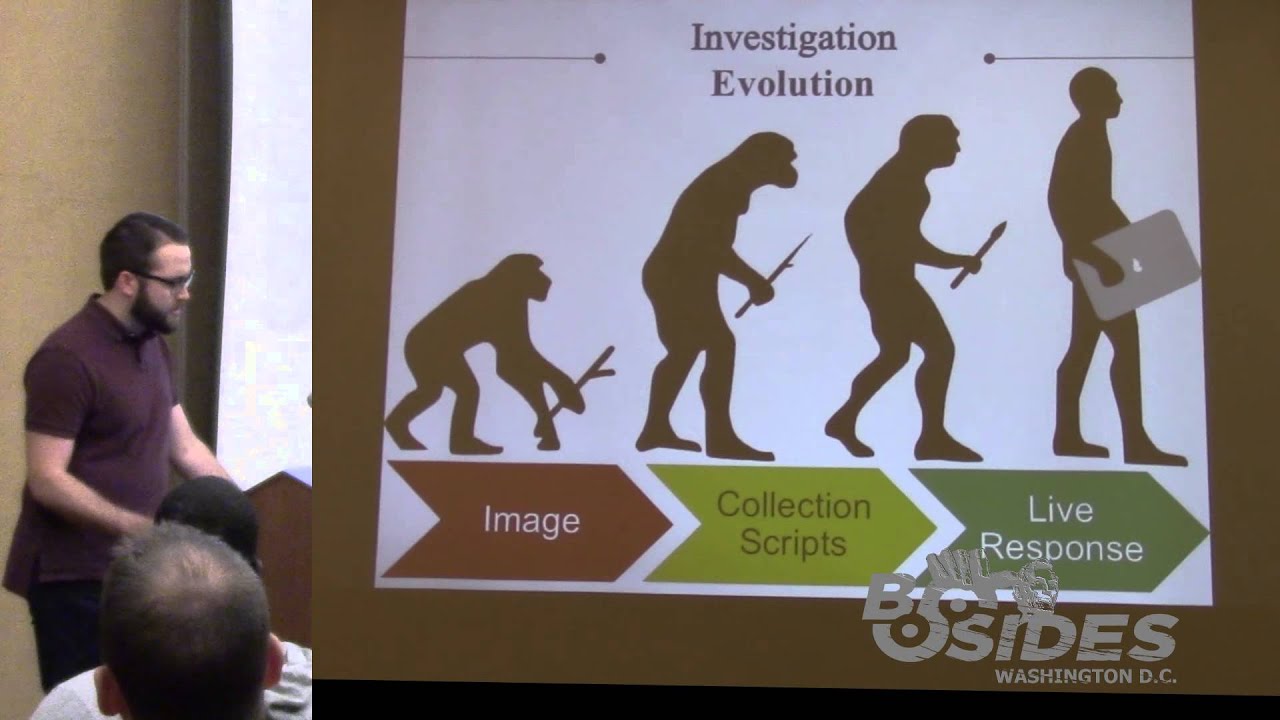
might find that uh the indicator of compromise the the nine indicator and so you kind of start over keep looking for that detection cycle uh sometimes you will find that it truly is something that you need to go in deeper and maybe remediate to some degree and so that's where the response come from all right so uh now kind of set the stage for how what I think hunting is um kind of talking about the evolution of forensics as we've gone through gone through time um and so uh this picture basically sums it up originally we were monkeys with sticks uh in the forensics world and now we're humans with MacBook Pros and that's how we you know kind of
the evolution but uh ultimately it's really uh originally it was this image very law enforcement focused forensics concept and so I mean the word forensics in general means is like very innately tied to law enforcement activities um but it's also somewhat of a colloquial term for doing investigations on you know digital forensics digital investigations kind of concept um then we've gone into these collection scripts where we actually try to automate out um this process and then now what I'm kind of uh saying we should do is this live response concept so uh what is Imaging so anybody that has been involved in forensics is probably seeing something very similar to this uh this little device over here
the right blocker and so the idea is that we're making a bit forbit copy of a hard drive onto another hard drive that I'm then going to perform some sort of Investigation on and so when we're talking about you know law enforcement type activities they're going to need things that uh they're able to like have chain of custody and prove that they didn't alter the data all this kind of stuff um but ultimately uh the law enforcement idea of forensics is a very drawn out process we're talking weeks or maybe even months for a single host right so when you're talking about a network that is over 100,000 nodes or like the Air Force for example 300,000
noes uh a twoe investigation on one system is obviously not going to solve your problem right and so um you need something that's going to speed that up some of the some of the pros like I like I said here the gold standard so over the past two plus decades you know this bit forbid copying and taking a forensic image is the way that like through forensic people do do things it's very repeat um it allows for thorough analysis the problem is is that um your bit forbit image isn't going to have volatile data things like the arcache and process table and memory and all those kinds of things it's also very slow like they
said so in order to kind of move forward we uh we kind of went towards this collection script idea and this was really that first first attempt at uh automating the collection or investigation process right so uh you've probably seen a lot of like batch scripts or uh even poell scripts that will go out uh grab a bunch of different uh files bring them back and then maybe parse them on the back end um the the kind of good things about this is that it's very uh very fast or relatively fast and it's also scalable the bad things are that they're often messy meaning they're not forensically sound they're legitimately going out and grabbing a file and maybe altering time
stamps things of that nature um they require third party uh dependencies often so the the script itself is not doing you know the remoting process they may use PS EXA something like that um file access so something like the nft if you want to pull that back you can't legitimately access that through the operating system and so you might need something like raw coffee or another third party tool to do that and then artifact parsing so um things like the usn journal there's uh tools like jb. exe from uh from TZ works that allows you to parse the usn journal but it's not inherently built into the tool so there's a lot of different dependencies
and they're not necessarily built to work together and then this idea of live response to where um you are able to remotely go to a system start parsing uh artifacts of the most forensic relevance such as the mft or the usn journal um pull back that data and then allow that data to kind of lead you to start looking at different different files or different artifacts and so uh that's kind of that intelligent analysis that I'm that I'm talking about it's very uh very fast very scalable um it's forensically sound um at least my method I think is pretty sound self-contained everything works with built specific to work together the cons are that often times you're not actually pulling the
entire file back you're doing all the analysis on your remote system and so it's not necessarily repeatable and so this may not be the best best option for somebody that's doing like a very law enforcement s investigation but if you're doing like AP investigation I don't know who's going to you know get a Chinese hacker and bring them back to the us and then you know charge them in court with something that they have to prove forensically uh sound investigation practices and all that kind of stuff so um if you're doing if you're defending against an AP type case that you probably are resp all right so kind of getting into Power forensics so uh my old the other
presentation is called Old Dog Matrix forensics with power shell and so the idea was that forensic is the old dog and Powershell is the nut Trix right being able to actually use leverage Powershell in a way to do this investigation and so power forensics specifically kind of answers this investigation part of the cycle right so so um uproot the IDS that I was talking about is more of the detection piece as to where power does more of the investigation so u a lot of people still aren't real familiar with pow shell so I kind of wanted to give a good uh introduction of what Powershell is um Power shell is the the replacement for the Windows command shell and so this
came around uh Windows XP Service Pack 3 it became available and now it's pretty much standard across the board um it's it's built on the Net Framework so everything is completely object oriented not because Powershell is object oriented but because net is object oriented it also uh gives you full access to the windows API and so one of the things that I do is I uh in my tool is I call the create file API call to get a handle to the hard drive and so uh in bash I don't know of a way that you would be able to do that um but in Powershell you're able to use a concept called platform and vobe or even
reflection to access those windows apis and call them and then leverage them in your scripts um it also has an expensable interface so Microsoft was smart enough to to realize that they the shipped product for power shell doesn't have everything that you would ever need and so they made it to where you can build they call modules and that's what power par instance is um that basically allow you to extend the capabilities of the shell or at least make kind of discreet what they call command LDS um to allow you to do different tasks all right so when I was uh building power forensics I wanted to kind of come out with a list of
different require that I was trying to uh solve and so the idea was that I wanted a centralized for instex tool set or investigation tool set I wanted it to be forensically sound which was probably one of the more important things and so by forensically sound I actually have a quote on the next slide but the idea is that you're going to parse the raw dis structures yourself and then you're not going to alter the NTFS time stamp so you want to use the operating system as little as possible Right you want to use your own code um to do it I want to execute on a live of running host a lot of forensic tools have to do like off
offline analysis and that's not ideal in the like large scale investigation um it has to be operationally fast originally I had relatively fast and then all my coworkers was like what the hell does that even what does it relatively fast mean and so uh it basically means collect data within seconds or minutes as opposed to weeks or months um or hours uh it needs to be modular so command lists perform very discrete tasks and then they're able to be linked together to to perform much larger um complicated test and then needs to be capable capable of working remotely which at this point is uh proof concept stage um if you have a tool like f
response or which is a relatively inexpensive uh commercial tool that allows remote access to hard drives um then it's going to work 100% uh remotely but the proof of concept part is the open source implementation of an F response like tool and so I'll show I'll show an example of that going forward so this is what uh this is kind of how I see most people spr tool set right so it's this messy tool box that has in this case he has two tape measures right so maybe he just didn't remember that he had a tape measure there's gloves that are hanging out you can't even close the toolbx in fact I think I probably have a
tool box that looks just like this at home um but this is what I want your uh tool boox to look like you know using power forensics or this is what it would look like using power forensics right um what do I mean by forensically sound so Richard bck and harl Harvey are two relatively well-known names um in the network security monitoring in or forensics field um the manner used to obtain the evidence must be documented and should should be justified to the extent possible right and or applicable and so the idea is not to be 100% you know you have to be by the book uh in your AP investigation you need to at
least have like a a relevant reason for why you did what you did in your investigation and so um it gives you a little bit more flexibility during your investigation to the forensically all right so um show up real awesome but yeah so this is the master boot record right so um the master boot record represents the first 512 bytes of of a hard drive and so uh when I'm talking about being forensically sound I kind of want to walk through the process of what how I do that right so um the first thing that I do is I use that create file API call to get access to the hard drive itself and then uh basically I have to
understand every single file structure in order to parse it out and uh not have to rely on the operating Sy come so um the master boot record the the relevant part of the master boot record for uh my purposes is the partition table right so um you know systems can have multiple partitions that have multiple multiple different formatted uh volumes all that kind of stuff and so uh what this green this green mess is the boot code so it's all simply code that's telling the OS to do a certain function um ultimately what's happening is it's finding where the partition table is and then looking for the partition that has uh the status bootable flag right so the way that it
sees that is that that bite is hex 80 which represents that it's bootable if you look above that you see a non-bal partition which is hex zero and so that's just a Data Drive doesn't have an OS on it um after it finds that it's going to look and say hey where is where is the data for that partition where is that volume in this case it' be like a c volume on Windows OS um and so it's going to go to the relevant start sector which is 636 a hex and then it's going to know that it's 96,000 hex bytes in length right so now we know not only where our volume is but how large that
volume is all right so then uh once you get to in this case an NTFS volume what I what I didn't point out is that um there's a partition type field um and so yeah you can see that Z hex7 represents NTFS so we know that this is an NTFS volume that we're dealing with so the very first uh 512 Byes of the NTFS volume is the volume boot record which uh contains a lot of information about how that that volume is actually formatted and so the things that are relevant to us um are the amount of btes in a sector the amount of sectors in a cluster which tells us how large a cluster is in in
bytes in this case 496 bytes um and that's going to be the case most of the time how many uh where the where the master file table is based on clusters and so c 000000 x offset and then also the Clusters per file record and so um F6 seems weird right and so um what happens is this is a signed integer and so signed integer means that F6 would be a negative number -1 and so what they what they do is they actually take two raised to the absolute value of -10 in this case and that's the amount of byes in nft record so now not only do we know how many btes are in a sector in a
cluster we now can use that information to determine where the master file table is and and I'll talk about that in a second um and then we determine how many bytes are in master file table record right and so now we can figure out where the master file table is and start parsing it all the way out right based on the volume boot record so this is the master file table it's uh 10 24 bytes for there's tons of different records each record is 10 24 bytes and uh what the master file table is is it's a it's a actual file on the on the hard drive that gives you metadata about every single other file
including itself and so uh it has things like um for example standard information and file name attributes are going to contain the actual files name and a reference to its parents so like C window system 32 the file name would be or C window system 32 cmd.exe the uh file name would be cmd.exe and then it's going to have a reference to the mft record for system 32 right and so it's kind of goes all the way back um but it also has this dollar data attribute and so um dollar data is the actual contents of a file and so now now we're able to start with that handle to uh to the mft but we're able to say hey I want the
btes that represent cmd.exe and it's going to come back and say the bites that represent cmd.exe are located at cluster 1,000 and they go for three clusters in length and so now without ever referencing the operating system except for getting the handle to the hard drive we can now read you know read the bites that represent cm. um so when I'm when we're talking about relatively fast this is like my humble brag I guess um get file record which is the uh Commandment that parses the master file table we're talking in this case 200,000 records uh it takes 2.8 seconds so um a researcher Bas just put out a post about mft parsing and I think
the out of four tools that she looked at the fastest was 7 minutes so 2 seconds is order magnitude faster and then uh the get us in journal get us the US in journal is the uh the file change journal or anytime that you hear that NTFS is a journaling file system um that means that it's keeping track in the background of all the file operations that occur a file was created an alternate data stream was created a file was deleted um file was updated all that kind of stuff um it's it's all stored in the US in journal so that can become very relevant in your investigation we're talking uh 450,000 records and that took 6 seconds so um I think that's
pretty pretty cool all right so let me take a I just uh just got back from derbycon a couple of weeks ago and I got the con flu while I was there and so my voice is tired from all the cing that I've been doing all right so um just kind of going through all the different command lists that are in power forensics at this point um when you start off you have get MDR get GPT get boot sector get partition table so literally it extracts all the crap that I just talked about and you type in get boot sector and pass it a NVR Master boot record formatted drive and it will give you the partition
table so that's what this top top guy is so it happens to be a Windows 6 6.1 OS so that would be I think Windows 8 um this signature which is just a individual signature for this drive and then the partition table there happens to be one NTFS formatted partition on this on the system and then uh g boot sector is smart enough to determine whether you're using a guid partition table or a master boot record so that second example is get Bo seor run against the go partition table formatted drive and so that happens to have three different partitions on it and that's just just wanted to show kind of what that looked like then we have uh get volume boot
record get file record get file record index these are NTFS specific command lits and so get file record allows you like I said to parse out the entire Master file table or um in this example you can say hey I just want cmd.exe and so it will parse out the cmd.exe record uh specifically just kind of going through and picking out a few samples um then we have a bunch of different NTFS has a number of different system files so the master file table is a system file um the usn journal is another one but they also have things like the dollar bitmap file basically any file that you've ever seen that has dollar sign in front of it
is going to be one of the system files um dollar bitmap is pretty cool this is one of those examples of my co-workers uh trying to figure out how they can do bad things with my research so uh dollar dollar bit map is a file that has a bit that represents every cluster on the drive right so if that bit is set at one that means that the file system is using that cluster the representative cluster um to store data right if it's set at zero that means that the file system it's unallocated cluster and nobody's using it so they're like oh hey why don't we uh figure out how to change the bit map and like store bad data in
clusters that file systems not using and so uh it's a pretty cool data hiding technique to be able to alter the bitmat file um in a forensically sound Manner and then go in and hide your data in files that or in clusters that the file system thinks are being used right so might be a cool project down the line in this case this is what the uh usn journal entry looks like so and uh here we have engine root store lock. which is just some random uh random file that's created when you're using visual studio and uh here you see that it was created so there's a file create uh stamp and it was created on 9:21 2015 at 10248 a.m.
and so imagine if you have a record of every file operation going forward and how how valuable that could be so then um I decided to write a registry parser and this this has happened probably in the past month or so I spent like three months just looking at it and being scared to deal with it and then one day it just magically made sense in my head and uh and so I wrote it and so you have things like get registry key you pass it a path to a hive and then it will parse out all the structures of the hive so literally what's happening is you're all the stuff that I talked about earlier you're
finding the raw bites of that Hive and then you're parsing out the actual structures of the keys inside the registry H um then you have get registry value which will print out the values and then I've uh abstracted out a couple of forensically uh relevant uh registry keys things like the amach um the time zone there's a registry key that stores what time zone you're in so that might be interesting um network list which will print out like every every Wi-Fi or network uh that it's been connected to and then user assist which is uh on Windows 7 when you click on the start menu and has like a list of different applications and it magically knows what
applications you've been using the most um that's all stored in the registry in the user assist type and so now what I can do is I can say hey what files you know how many times and what files have been used by this user and that might be of interest to some degree and then uh a bunch of utility commandlets so invoke DD is uh my attempt at making like a DD type utility simil to the Unix DD command and uh and it's basically the same thing I'll show an example of how it's used um get content raw so get content is similar to cat or type and um is the Powershell version of CER type and so get content
raw just um does the same thing as cat in Unix but it will do it from that forensically sound perspective G will print out a directory listing from the like based on the master file table structures um get alternate data streams so earlier I talked about that dollar data attribute inside the mft record what an alternate data stream actually is is a second dollar data attribute right so what I'm able to do is uh basically parse out the mft and say anybody that has two2 dollar data attributes I want you to return them and tell me what what those dollar data attributes are and so um you you'll be able to find all data ATT or
alternate data SCS in a relatively fast and then like the preet and scheduled job like part out as well and then uh so poers shell everybody always thinks that you're limited to just Windows right but if you have a tool like f response and you get remote access to a Linux uh a Linux like a ext4 ext3 formatted drive then uh as long as power foric understands how ext4 works then we can parse it out right so um I kind of did a little bit of proof of concept stuff and so get super block super block is the ext4 and ext3 version of that volume boot record that I talked about um and then get I note is probably
more more relevant um that allows the ioe table is basically the master file table on the extended file system and so you can print out specific iodes like uh for example the grot directory is iode number two on EX4 and so You' be able to say hey get I know number two and it will print out the information about that so it's pretty pretty nifty all right so um I'm doing an investigation previously I had I have uh the attack that occurred and then I have the investigation previously I showed them in that order so attack and an investigation but I thought it was a little bit more compelling to show the investigation and then kind of follow up
with the attack and so uh we got some notification remember power forensics is an investigation tool not a detection tool and so something else detected at uh on 13 of October 2015 at 1831 UTC uh the host uh when was over that that is IP address 1023 1887 called out to a previously unseen domain or in this case IP address over Port 80 um during this and number of additional connections they saw a sizable amount of data transferring from the internal asset to external system right so a lot of times people will use Network detection to where uh the first time that that organization has ever seen a domain that might be some sort of indicator and so
in this case that's what we're kind of going off of and so I have a so in this case I'm using uh Power or I'm using F response to get remote access to uh the hard drive the the remote system so the way that I like to do this is all based on like building some sort of uh investigation time frame and so here what I'm doing is saying hey 2015 October uh 13th at 8 or 630 that's my start time so start window usually you're going to have a bigger start window than I'm going to have but uh for the demo it makes more sense so I'm giving it a 30 minute window right
so now I have a start and end time here they are and so this is the coolness of pow shell right it's all net is what I'm doing creating net objects that represent times so now I'm running a get file record against the volume physical Drive 4 which represents that remote hard drive so physical Drive 4 is how F response allows me to get access to that remote so in this case it's the C drive of the remote system and so in that period of time par out 200,000 is records and so what I want to do is I don't want to look through 200,000 records I want to kind of narrow that down and so going to go
ahead and say hey I want to look at any mft record where the born time is greater than the start time and the born time is less than the end time right so now I'm only looking at mft records that were created within that window that I that I created at the beginning and so I didn't I didn't expect this good of uh a window but it's going to be relatively small 15 records right so there are 15 files created in that 30 minute window so now Powershell is smart enough to understand daytime U stuff and so I can say hey sort based on born time so now all the objects are going to be in
uh chronological order and the very first thing I see during that time is that an AB was created right and so this is the Windows 7 box ad jobs are kind of not really what Windows 7 uses and so initially that's kind of my first indicator that I want to Pivot off of and so I can do get schedule job raw say hey physical physical drive four and it will parse out all the schedule jobs that are on that system in this case we see that launcher. bat was executed from my desktop at 2:31 p.m. right which happens to line up pretty pretty nicely with that uh indicator so now what I'm going to do is I'm going
to see if we can find that uh mft record for launcher dobat or everybody gets excited it's not there anymore so the mft when you when you delete a file it just marks the mft record as not in use anymore meaning that the next time a file is created it searches through the master file table for a a non-allocated mft entry and it will overwrite something that's been deleted but uh if a file is not created in that time then uh then that file will still be there for reference now I'm parsing out the usn journal just to kind of show the type of information that you can get from that I'm going to do the
same Concepts so here we have 500,000 us and journal entries doing the same filtering to create that window in this case it's called time stamp not war time Us in joural only has one time stamp as opposed to the the numerous time stamps in the master file table
you never know how slow you type until you're planing it on a video in bu
people and of course if you're recording your demo you don't want to make much typo to be extra cautious so there's 171 us journals that entries that fall within that period so again we're going to sort them based on uh the time stamp and then pipe it into more and so we see initially at 630 net net one exe was run based on a pre-etch file so we're going to see a bunch of entries for the net commands same time 6:30 13 keep going there's a bunch of I mean so this this is monitoring every single file operation so there's going to be a lot of non-relevant data but um here at 63031 we see a file create record for
one.job which means that that is truly the indicator for when that ad job was created we also see a second there's an ad job or. exe prefetch file as well second yeah so at. exe we see that that application was executed at 6:30 and so prefetch is a memory management uh capability built into windows and so what happens when you execute an application a prefetch file is created or we can use that to show proof of execution here at 631 we see that that at job was uh overwritten and we see also that launcher. bat was deleted and so that gives us an idea that launcher. bat was a self-d deleting batch file that was launched via that app job at
631 um we we then see some references to Powershell hh. exe off the top of my head I don't know what that is but seems interesting possibly power shell ISC so I don't know why Empire does something with power shell ISC but it does we actually so will and Matt use this to like basically make Empire less reliant on the OS it's interesting so every time I show this they they make Empire better y so then we see uh calls to wmi so uh somebody's using wmi at 63116 so this is part of the staging process for uh Empire we also see rights to the windows power
event more power shell event log stuff so this is three 3 minutes in at this point then you see conhost.exe so conhost.exe is the console hosting application so that means that U you know command shell or po shell was run then we see this is somewhat relevant xill uh is created at 63457 right we don't know if that's a directory or file at this point but we were able to say um the record number is 43082 right so that's something that we should remember so hope possibly your bad guys won't be naming their stuff xill but just contrive a little bit then we see hamburger recipe. text being created um inside of 4382 that's the Parent
Directory so that that means that xville is a directory and it now contains hamburger recipe. text which uh I forgot to tell well you'll know who it is by the what company we are um finances. CSV also got put into that directory and then one more password. text of course got put into that and so now we know that there there's some sort of file like staging xill staging going on then we see x.z was created which uh is a relatively good indicator that something's about to get sent out a parent record is 350 if we look that up that's the Jared ainson user profile and then you see a bunch of stuff with xl. zip this is the process
of creating that zip file so there's a lot of like t files that are associated with it and all that kind of
stuff you see all these files be start getting deleted right x.z is deleted you see passwords hamburger recipes everything everything's deleted so basically the end of all right so now um we tried to get that launcher. badge to kind of show us a stag or what that looked like that we we failed to recover that but uh what if we are able ever xill that's it we have we have a reasonable idea that those three files hamburger recipes um finances and passwords are were within that zip but we don't know for sure so we need to recover it um to be able to show proof I guess and so um what happened here is xv. zip had a file
record index of 4387 so what I'm doing is I'm specifically getting the file record for xv. zip and so that's what the record looks like um you're able to see here I'm going to I think I'm going to highlight it but uh x z the name and then you see that the deleted flag is set to true meaning that that file is is deleted um and then what I'm going to do here is I'm going to uh select the data attribute for um for that xill doz file so basically what I'm saying hey where the name of the attribute is data I want you to store that in variable this is what the data attribute
looks like basically has combination of the size of the data and then the data runs are the references to where the data is actually stored on this um so now we store the the data run into a variable called Dr and so we see that start cluster is 3248 and it goes for one cluster in length and then we also know that it's actually 754 bytes all right so uh remember we don't know how big of a how big a cluster is that's a variable that can be changed on us so the volume boot record contains that information and so here we see hey there's 4096 bytes in the cluster which is which is the default and that's the the normal
thing but we got to be safe and make sure that we know that so now we're using invoke DD to uh query the physical Drive 4 um as the in file the out file is going to be our evidence directory XL lzip it kind of gets cut off here but the offset is going to be the volume boot Record Times bites uh in clusters or volume the bites bites in clusters and then the start cluster are multiplied together and then uh the block size is going to be one cluster basically and then the count is the amount of clusters in the data run and so now in theory we should have a file called xf. zip in the evidence directory
and there it is and so now we can open it up and see that there are in fact finances do CSV passwords posted very fast so uh there's also kind of an AB raed way within power friend to do this so all I have to do is say copy file for the uh for the mft record object and I have to this is going to error because I didn't put quotes um but you give it the directory that you want to xill or that you want to copy that file too and so now I I should have xfill one doit as well in the evidence directory so there it is um so just an alternate
or easier way to do that info PD stuff that I just showed so here's the uh not um here's the the hamburger recipe so my my boss is like a cheeseburger kind of guy that's all he eats ever and so uh we constantly try to make hamburger jokes um but the idea this is the crabby patty recipe so Mr Crab got hacked so that's that all right all right so uh now we can give our customer some sort of report of what happened right so in this case an ad job or between 1830 and 1838 UTC an that job was ele or executed to elevate uh something into system context it executed launcher. bat um the implant
that that launched had some sort of Powershell or wmi type uh activity built in and then uh they created a station directory called xville which they compress three files into a file called x.z the three files were hamburger p. text finances. CSV and password. text so now we can go see what the attack look like and so here's ire and so we're going to this is just kind of showing that we did the proper investigation so we have uh this is the agent that's running on the remote system I didn't show the part about the uh scheduled job but just trust that that happened so then they're they're running mcats getting all the so we we were recently at Microsoft and
will ran MIM cats on one of my VMS and I was definitely afraid uh that my actual password was in there he didn't he didn't confer with me before he ran that luckily it was just password password well everybody knows all right so here's the credit store so we see jared. ainson has the password as password security gr security yeah so then uh they they happen to know that uh all the good stuff is on Jed aon's desktop because uh just like all of you my my directories are called secrets and more secrets and then they make the directory xville on the desktop
there's and then they're going to do a directory listing of more secrets and
secrets so Secrets has finances and Ember recipe and then more secrets as
passwords now we're copying all the secrets to xville we sh with some sort of time stamp so that we can compare the times with the US
internal now we're just checking to make sure all the copy file copies went into xville it did there's the time stance there that's not right time then uh Empire has a built-in uh ZIP function or cap IL so it's going to create a zip file for
us so we're going to zip up the EXO
file and the output will be ex. zip and execute
and just make sure that our ZIP file was created there it is then just downloading downloading out xill that's so I would say besides the mimat part we did a pretty good job of figuring out what happened so that's that's basically the demo um the idea that we were able to determine what files were staged into a directory and tell our customer what they actually lost I think that's relatively valuable piece of information so moving forward what do I want to do in with power forensics so more artifacts obviously and so one of the things that really has caught my eye is the concept of the ESC database which is a Microsoft proprietary database that's
really poorly documented um and it things like the ntds.dit are formatted using this uh es database format or the uh on Windows 8 one of the cooler artifacts is the system resource utilization Monitor and so what that does is it keeps track of how many bytes a an application either sent or received among other things and so for example like notepad.exe if you ever see that in the system resource utilization monitor database that's probably not a good thing because my notepads don't send out data any want I hope they don't and then uh support for alternate file systems so the idea of that extended file system I would like to build that out for HFS
plus and fat and all these different different guys um online documentation so power forensics has tons of custom objects that have different methods and properties and all kinds of things and so I would like to basically document that out so that other people besides me know what capabilities are there um Community involvement if anybody is interested in uh in forensics or writing file system parsers which is you know my favorite pastime um feel free to reach out to me and I'd be happy to help you get started with that and then uh building that organic remoting concept um do I do I still have time for minut video got so this is the um organic remoting
so this is super proof concept right now but the idea is is uh reimplementing Network block device protocol in Windows so it's a Linux well it's a protocol that is implemented via a client and server in Linux but it's not um in in Windows and so 51 is the is the client um and so or actually it' be the server in this case it's the victim or the the machine that is going to be investigated and so start MBD server. PS1 is the script that I have and so when you run it um you can give it a client's IP and basically say hey only allow connections from uh the client so 49 in this case
I'm going to give it a verose flag so it tells us hey we're cing out physical Drive zero over 6,249 so physical Drive zero is just the the first hard drive so now we're on 49 and so um ultimately I would like all of power forensics to understand the nbe protocol right now get G Master boot record is the only one so when you uh store that into a variable dollar MBR now we I did a really poor job on this uh video but just trust that that is the master boot record from the remote system because I didn't actually do anything to prove that to you but the idea is that uh what happens is get
master boot record you give it a computer name flag it sends a an MVD packet to the remote system that says hey I'm interested in the first 512 bytes of the of the file that you have a handle to and then that that uh the server will send back those 512 bytes to you and you parse those out and now you have a master food record on so ultimately I would like for all of our forensics to understand the MBD protocol Just Master food record is uh very very easy to find it's always in a static place and so that was an easy start just Haven to yet all right so that's that's what I
got um does anybody have any questions I think we have five minutes
yep yeah so I haven't worked on doing any of that yet that'll be oh so he was asking if I have any ability to deal with like ASL or anything anything along those lines um for especially for Linux everything has been at the like it's I've barely done a lot very much and so literally it's like parsing out the io table and that's it uh so the question was have you done anything with memory and no um just so one of the reasons that I've kind of stayed away from memory is just because the volatility project is so well known and I think it's better than anything that I would ever do and so um I just basically left that to them
because they they know what they're doing kind of doing the file system stuff so I think I saw I don't know a lot about what can you do in commands to run on computers yeah so uh you so invo command is a Powershell commandlet that allows you to run remote commands on a system the requirement for that is that the remote system has those commands on it um the reason why I don't do it here is because um this allows you to access files that basically I don't I don't parse out permissions and so it would allow you to access files that you're not supposed to access in theory and so I don't recommend pushing out power the power
forensics dll to every single system I I'd rather you push out something that provides data to you and you run it from like an investigation machine have any question all right well thank you guys I appreciate your time [Applause]
Related talks
 32:24
32:24 35:42
35:42 55:38
55:38 47:55
47:55 44:22
44:22 35:21
35:21