Attacking & Defending Supply Chains: How we got Admin in your Cloud, Again
Show transcript [en]
with no further Ado Mike Ruth thanks everybody yeah thanks for coming so my name is Mike um I'm a security engineer over at ripling and today we are talking or I will try to talk I apologize ahead of time for my voice we're going to be talking uh about attacking and defending uh software Supply chains how we got admin in your Cloud environments again and I say again because this is actually an extension of a talk that I gave in 2022 uh it was focused um mostly on terraform so we're going to actually be extending that to a handful of other tools in our cic pipeline so let's get into it so um what I want to start with is really why do we
use software Supply chains and uh why do we use CI and CD tools at all and the reason ultimately it stems uh from the growth of our engineering Workforce as a forcing function to continue to maintain productivity and success so a company of M they can get away with having things like production credentials on their engineering laptops they can get away with building the artifacts that they need and deploying those into their prod environments you know they can get away with actually taking those images and deploying them in into the environments as well but as a company grows 100 500 thousand employees this becomes kind of impossible to do without teams stomping over one another and the need to have
these actions performed through automation right through our cicd tools uh become required with this we get a couple of security benefits and one of them is that we can take those you know credentials that have been sprawled across all of our engineering endpoints and we can remove them and we can have these uh individuals focus on working with the tools that they're most familiar with right which is things like GitHub Version Control things like that now usually when we talk about software Supply chains and software supply chain security uh we usually speak to the Upstream uh open source contrib the libraries and the software that we pull in to our organization from those sources but the scope of this talk takes
a slightly different approach this approach instead looks at the most common services that we use in our cic tools and the organizations that use them and how we take software from source to production with those tools so to start let's talk about the reference architectures for these tools and we'll start with GitHub I won't spend too much time here I think most of us are probably pretty familiar with GitHub um one thing I really want to call out uh we spend a lot of time working with repositories right and our repositories are this logical boundary that holds all of the source code for a given service or product um we have another logical boundary if we use
something like GitHub Enterprise right and that's our organizations and organizations are this superet right of all of our engineers and all of our repositories that exist in one place this is relevant because we have access control for our Repository these are um you know things like managing um collaborators who can write push create new branches things like this but we also then have scalable mechanisms on our org for all of our repositories and that's what organizations allow us to do um if we think about how we use GitHub in these pipelines uh we spend the most time interacting with repositories themselves and so in creating a repository here are some things to take into consideration first
and foremost um if you are are in sort of the beginning stages of your uh engineering function and your engineering maturity 50 100 so employees chances are your repositories are going to be um allowed to be manually created by most of your users right this is good for developer experience it means they can create any repository that they want they can move quickly in doing so this gives them the ability to configure all the settings for that repository this is things like manage collaborators who can get access uh configuring web hooks protection rules right making sure that you can't Force push to main things like this the other thing it means is it can actually configure how you connect to
the rest of the tools in these environments so uh with that we'll move to the next set of tools that we're going to look at which is GitHub actions probably the easiest tool to use with GitHub since it's just natively supported and the way that this works is through workflows so workflows run a set of jobs on a repository basis each job runs in its own GitHub worker so that's like it's compute dedicated compute and it's configured on a reserved file path in that repository the do GitHub workflows repository so anyl files that exist there uh they are going to run as jobs for those workflows to be able to do anything they need to reach out to
the outside world right and so they do that with an identity of the worker so this is a GitHub token that actually gets provisioned and put in the um the GitHub worker itself sorry the GitHub actions uh worker and so this allows them to get access to things like GitHub Secrets repository Secrets org Secrets things like this but perhaps um more recently in a a bit more elegant of a pattern it allows you to actually Federate between your GitHub repositories into your Cloud environments using things like oidc and the Integrations that exist there the GI up action workflows are triggered through uh specific events that you might be familiar with on push on pull request on merge things like
this we can see an example of that on the right so this is saying hey U whenever you see a PO request to this given repository and it modifies the specific paths that are defined go and check who's actually performing that change and if it's one of these individuals like these robots uh allow it otherwise let them know hey we shouldn't be actually modifying these paths they're reserved uh this is probably good for like an open source uh contribution an open source for ball story okay let's look at another continuous integration Tool uh build kite build kite very similar to to get actions uh it instead of using workflows it uses pipelines and pipelines are
configured in much the same way you'll have a yl file known as a step file deployed in a reserved path this is the build kite path in your repository also triggers based on the same types of events unlike GitHub actions uh it does require integration so you do need to set up a web hook for this to work and it uses an identity much like uh GitHub actions uh workers do or workflows do in this case it's an agent so the agent is the identity for a build kite Pipeline and it has access to all of the secrets that you would expect that that GI up action token does you get thing access to things like I IM
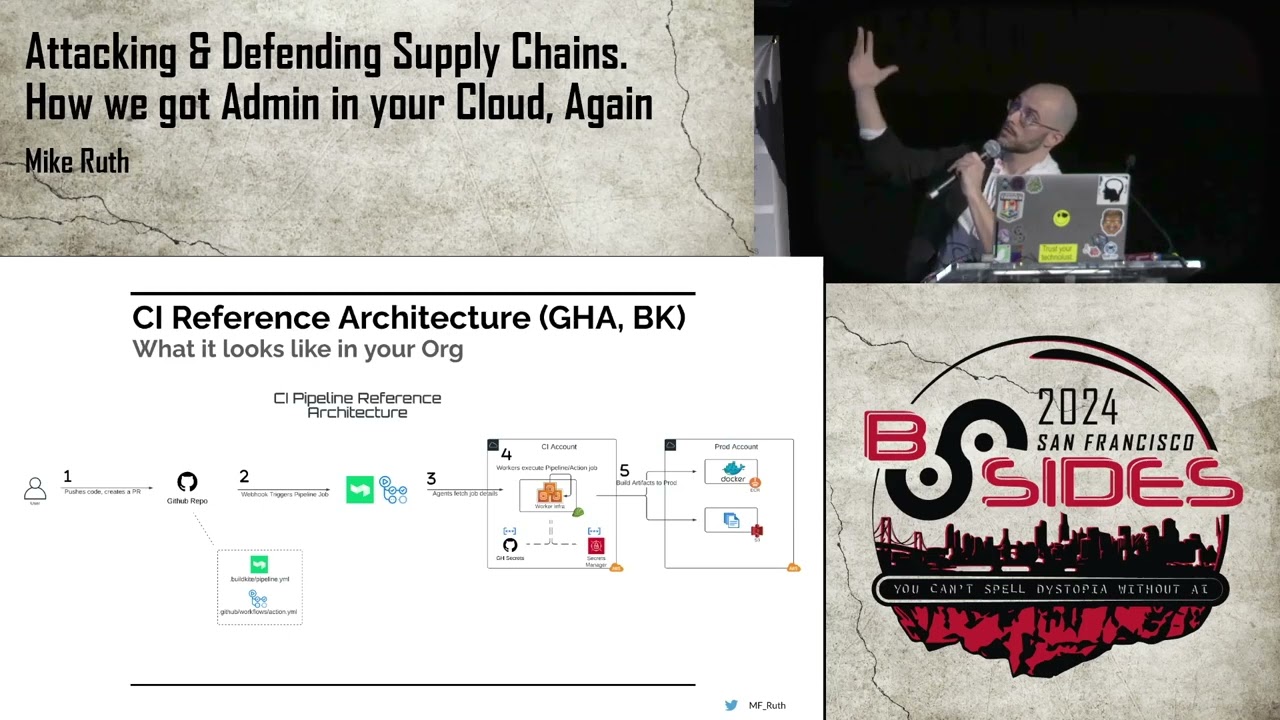
roles service accounts any sort of secrets that exist in the secrets manager of your choice um and we can see an example of uh how a build kite pipeline looks on the right this is just an example where you can see that the agent is defined the deploy artifact to a prod agent and that allows you to then assume a specific role and then run uh some sort of script that will build your image and push it so let's go over our reference architecture after we've gone through some of these tools so this is sort of a step-by-step flow that you might see a user uh perform to actually use some of these tools to deploy from source to
production so step one uh you have a user and they want to perform some sort of uh modification so they submit a PR to your given Repository based on the configuration files that exist the build cut yaml the uh get up action workflow yaml they may trigger a job or a web hook of some kind which then is fetched and run on a given worker so that's steps three and four here the workers then have their identities that can go and fetch all of the secrets that allow them to perform any sort of actions that they need to perform at step four this is sort of the pre-plan phase so these are things like Ci linting U testing
integration things like this at this point there's some sort of code review that's going to occur on the pr they're going to look at all of the builds that have run given a plus one to make sure that everything is is working correctly and then once it gets merged we'll see step five some type of uh right based action will occur like building artifacts and pushing them say to a artifact repository or objects into object storage the next tool in our uh reference architecture is related to continuous deployment that's probably worth noting that g of actions and build Kate can also be used as continuous deployment but I think more often they are associated with continuous
integration here we have terraform and uh this is how terraform works at least for the paid versions if you're using a free version like Atlantis it will have most of these things in common um the first thing actually is something that doesn't have in common so we can sort of see a pattern with all of these tools that they have some sort of logical boundary that exists organizations workspaces and so with workspaces uh in terap form they're responsible for maintaining State and all of the resources that you want to change so if you're trying to modify um AWS resources you might have a workspace that's dedicated for doing that and those workspaces are associated to a given
repository one: one or maybe a subdirector in your repository so you might have a terraform repo subdirectory for Dev a workspace for that you might have a subdirectory for prod workspace for that and so on and so forth in these workspaces you have state files the state files are responsible for as the name implies uh managing state so it will know the last known good configuration that your workspace has pushed up so that any incoming changes will then provide you a diff when you perform something like a dry run or a plan this is very good for code review next are providers providers are doing all the heavy lifting here for terraform so this is a plugin it's a
binary that runs on the worker and it knows how to interact with all of your um the resources that you're trying to manage so if you're managing AWS or gcp or Azure or kubernetes these providers are going to know the endpoints that they need to reach out to they're going to know the parameters uh for all of the resources that need to be configured so on and so forth and then last we have permissions these are how you interact with terraform it's also how you know people and say the Upstream Integrations like from your Version Control are going to uh do so as well very similar uh reference architecture right PR is Created from a
user goes to the sh form repository that PR triggers a plan dryon occurs some sort of code review happens you get the plus one resources are then managed inside of your environments okay so we have a couple of assumptions based off of the um reference architectures that we've described here and so one thing that I like to do uh on this slide because this is the second time that I've uh presented it I want uh to pull the audience show of hands how many people have either currently worked at or at some worked at at some point in the past an organization that allows all of their Engineers to push pull requests or just push code to any of the repositories in
their environments show fans I would say probably 2third the majority at least right and I think that makes sense maybe some of you are being lazy and not raising your hands I don't know um but most of us I think and and it makes sense because it's good developer experience you want people to be able to quickly make changes have and go through this sort of code review process to be able to quickly iterate all right second assumption um our most for most repositories and most organizations our branching strategy is largely flat what that means is you tend to have one protected repository Maine for example and then everything else so no sort of complex feature branches um
just one primary repository and then any sort of review to to push code up to it after a merge and then the last assumption is that it is predominantly up to service owners to manage their own workflows and pipelines what this really means is that we are not expecting our infrastructure teams to be performing White Glove services for deploying all of these resources there's an expectation that you might need to perform some actions or Engineers might need to perform some actions to to manage them themselves okay so with all of this preface here's my problem statement Engineers have access to create repositories PRS cicd resources unilaterally in our organizations and as such they can create and Trigger dry
runs for new and existing workflows pipelines and plans for all of our environments so why is this a problem and here are let's get into some findings but first I need a drink just just a regular drink not a drink drink that's later
[Music] all right findings so uh to illustrate the findings that I'm going to talk about we're going to walk through the creation of some of these resources that we talked about in our reference architectures so we're going to go through the creation of a repository we're going to look at get up actions and then we're going to go through the creation of a Bill Kite Pipeline and how we connect those two things and then we can see some of the the issues that might stem from that so to start we have the creation does that look okay yeah that looks okay this is such a huge screen that like sometimes it just gets stretched out you
know but I think that's okay anyway okay on the left side we have the the process of creating a new repository so this is an example of me going and creating a Technologic temp repo and then on the right side once we've created this and gone into the uh GitHub actions uh section and then looked at the secrets we can see that just by default it has ACT uh access to a couple of things one repo Secrets by default they won't exist so you just have to create them and that's fine but by default it also gets access to all of the GitHub organization Secrets inside of your org so any secret that's defin is given to all repos by
default so and you might see where I'm going with this but uh we'll see why that could be a problem later next we're going to go and create a build guite uh Pipeline and so what we're going to do is uh start by uh going into the dashboard uh for pipeline creating that or for um for Bill Kite and creating that pipeline that's going to give us admin to be able to manage it um again you have a repository that we've just created we're going to then connect the two right and so we do that through that web hook that we talked about one thing that the pipeline then needs to do is it needs to be able to
fetch the uh the configuration yl that you we've defined in the repository to know what sort of jobs needs to run and to be able to do that it needs permission to read to the repo and you can do that in a couple different ways you create a deployment key you could create maybe a personal access to token those aren't particularly good ways to do that you could also go and create a GitHub app and then allow that GitHub app to be a collaborator to read and then you can give that to your pipelines to go and get access so um what does that look like uh starting with step one we see that we
have this Technologic temp pipeline that we've created we see that it's associated with our GitHub repository step number two on the right here we see the conditions for how the pipeline triggers basically just on pull request and any sort of changes to a pull request step three is the setting that shows you how to fetch the the pipeline uh configuration and then step four is uh showing the web hook on the GitHub repo that connects the two okay by now you're probably like hello what's the problem right if you're any sort of Catty Shack fans maybe I'm dating myself I don't know but uh we're waiting right so let's get into that so going back to
our GitHub actions use case we're going to talk a little bit about secret sex filtration so we we mentioned how the uh org secrets are just readily available for by default for any new repositories which means that you can just go and create a GitHub actions configuration file in this case uh I'm calling it innocent uh looking file a spoiler alert not so innocent um and one of the jobs that it's trying to do is actually exfiltrate or push Secrets uh to the the terminal in two ways one in Orange which is just echoing like this org secret and we can see get up does a pretty good job identifying that you shouldn't be doing
that and they mask it but the second thing in red we can actually see we can actually do a memory dump and once we perform a memory dump we can fetch those Secrets base 64 and code them and now then we have access to it and if we decoded this little blob here on the right uh what we would find is two things one the value of the prod you know org secret and two the identity the GitHub token of the the GitHub actions worker uh and whatever it can do and get access to so that's problem number one a similar type of problem in the bill cut is well so what we can see here on lines
one and two is that we can arbitrarily Define the agent for our build kite pipeline so by default any agent for any other repository can be leveraged with any other repository so here we're trying to use a PR agent which typically isn't accessible or you know shouldn't is has no relevance to the the um repository that we've just created but then we can go and assume all of the roles that that agent has access to and in this case we can perform some sort of arbitrary um uh code in this case we're performing a get caller identity to prove that we have in fact assumed that role and we can see the output of that
uh down down at the bottom here so you might say Mike we don't actually allow the engineers in my org to create repositories and pipelines in my org though and at which point I would say okay excellent uh let's P it up I think we're done here right no uh if that were true uh I would probably be about as helpful as Tuxedo Mask is to Sailor Moon for any of you Sailor Moon fans so the next finding which I think is where we're going to spend most of our time is on what I've been talking uh calling pre-merge remote code execution um and remember back to our first slide where we talked about when we Implement
our cicd pipelines one of the benefits that we get is we can pull all of those credentials that existed originally on our all of our engineering endpoints we can remove them and instead have uh teams interact with our pipelines themselves safe through Version Control what we see here is documentation from GitHub that says hey if an individual has access right access to your repository they in fact have read access to all of the secrets in your repository so by allowing everyone to actually have uh read access to the repository what we're doing is we're effectively removing the intended security boundaries and the the intended security uh controls for implementing these cic tools in the first place so to my
surprise and also to Pikachu's clearly uh GitHub is implicitly saying hey this problem is sort of outside of our threat [Music] model so what does this mean this means that instead of needing to create your own repositories and create and make those connections so long as you have the ability to push PRS to any other repository that exists you can do all of the things that we just looked at and then a couple of other things too so GitHub actions you can modify existing workflow files in an existing repository uh and or create new ones and then trigger on push all of the attacks and the reason that this works is because when you go and create a new Branch the
configuration files exist in that repository so if you modify those configuration files and do something malicious with them they're honored in the pull request itself they'll just run whatever code you tell it to and so you can do whatever you you know the whatever the permissions are on the identities for those workers you can actually use those to to get access to whatever you need to get access to so this opens up two new use cases for us one is the Federated uh oidc uh mechanism that we talked about before so using um oidc Federation from existing um repositories and then also uh being able to use unsafe built-in functions in terraform like no resource run command if you're uh using
something like terrant um any sort of thirdparty marketplace or remote based uh Pro providers um there's a bunch of sort of nasty things that you can you can do with terraform resources and that allows you to exfiltrate Secrets access State files which themselves might have secrets and escape to the underlying file system and actually perform terraform applies one thing you'll probably know you know recognize here right is that terraform because they need to manage Cloud resources they have admin already right and that means that you can get access to those admin credentials to do you know whatever uh you want to do with those admin credentials all right so let's talk about that new use case that we talked
about here with oidc based Federation and how that works so to set up uh Federation between your GitHub actions um workers inside of a given repository in your clouds you first need to create a provider for that and we can see that with step number one here um so this is you know infrastructure as code you could do this manually uh this is just how you want to configure um this is for AWS you'll know because on step number two once you've created an I am role that you want your GitHub actions um worker to assume and get access to the way that you do that is you actually create a trust policy because when your GitHub actions worker
is created and that GitHub token is provisioned for it what you allow it to do is actually create a JWT a jot and then you can actually um translate that into STS credentials for the I am Ro that's what this provider is allowing you to do and the way that this works is you actually set conditions that say inside of the subscriber claim of that JWT allow a given repository and a given GitHub org to be able to assume this role and so it actually Honors that that configuration and so that's what the trust policy and number two is here number three down at the bottom then shows you what permissions you need to put inside of the um the GI up actions
workflow for this to work we can see that here so on the left side we have an example of how um uh GI up actions workflow will allow you to assume a a particular role and then in this case we're just going to show a get caller identity that actually demonstrates that we have become this actual get up actions role and again we can see the the trust policy down below okay so that's uh our first new example our second new example is what I call a apply on plan bypass and so the way this works is that we can actually use the permissions of the terraform a worker to and then the no uh the
resources that we've uh the unsafe built-in functions and resources that we talked about on a couple slides ago to actually escape from the context of a plan and go underneath to the underlying file system and perform and apply and so the I'm going to show you how that works uh on the next slide but what I really want to do is just kind of show you a fake demo company and the reference architecture that they've implemented so um this is you know a sort of fake company crypto exchange Co and they're using terraform Cloud to manage uh their Dev and prod instances of their website you can see that uh as changes come in from GitHub uh that triggers plans and
once the plans have been reviewed plus one and merged they will deploy resources uh either to the dev environment or the prod environment based on um the um the uh you know the environment that's configured so uh I have a demo of this uh that we can see on the next slide here okay so what we're going to try and do is we're going to try and create an S3 bucket and we can see that the name of this S3 bucket is called remove this test bucket right here and so we can first go into our aw's account and confirm that it doesn't currently exist you can see that it didn't so we're going to go and create a PR to our
terraform repository we've created this pull request and then that's kicked off a plan and when we go into this plan we can actually see that our malicious no resource is being created or the dry run is is being running it and inside of that we actually are performing a terraform apply and this apply is complete you can see that the resources were created and then we go back into the AWS account and here it is right so remove this test bucket all within the context of a plan so there was no code review there's no merging nothing need to happen we just went and created this resource so when we go back to our problem statement anyone who can push or
create PRS to a repository can create uh exfiltrate secrets from GitHub actions build kite pipelines and terraform plans they can bypass Access Control to apply this arbitrary code from unmerged non-code review PRS and they can perform ex you know secret exfiltration pesque lateral movement uh to any of the other environments using permissions of RCI infrastructure okay we've gone over some findings let's talk about some potential remediations hopefully we can do a little bit better than our squirrel friend here uh in I
he's trying okay all right so um using the Assumption uh here that um it's up to service owners right to manage their own CI and CD uh workflows and pipelines one thing that we want to do right the goal is to make sure that we can continue to keep a good developer experience while also removing sort of the manual creation process by adding some sort of uh technical gate so the best way to do this is probably with config as code this could be you know infrastructure as code this could be a developer portal of some kind if you use something say like backstage a wizard right whatever it is um removing the ability to uh create those resources
themselves by um you know modularizing it so that it can be scalable andse secure by default will allow us to maintain that that good developer experience the next thing we can do is use GitHub environments and so this is particular for GitHub actions GitHub environments have been around for a couple years now and the goal of using GitHub environments is to create an affinity between Secrets the GitHub Branch uh that we want the action to run on in the actual GitHub actions uh workflow contents inside the file itself and so the way that this works is we can actually Define GitHub um Secrets inside of an environment and then we pin in that environment to the branch and say
hey only allow this environment to be cross referenced and leveraged and then thereby the these secrets based on that so what we can sort of see here is in the picture we have two different types of environments we're calling it post-merge and pre- merge right where post merge can only um and the secrets in post merge are only accessible by protected uh branches which means they can only be accessible in Maine or in whatever feature Branch you might uh you know that you might have pre premerge then is accessible by anyone anyone who can create a PR can then get access to these secrets inside of these environments and and we'll see a little bit more what this looks like
in a couple slides so we want to do similar for build kite so we have perhaps a way to mitigate these things using uh GitHub environments instead let's take a look at build kite and its pipelines similarly the goal is to mitigate the ability to arbitrarily choose any agent in all the IM am and secrets that those agents get access to by establishing some Affinity between the repository the build kite Pipeline and the agent that uh it's running as and prior to February 2024 this was not easy to do it was only in February of 2024 that buildkite created um this functionality in G called clusters which does actually exactly that we talked about where we can actually create a
cluster and in that cluster have uh agents and the pipelines that can use those agents so then we actually create this Affinity like like we talked about so with GitHub environments and with buil kite clusters the next thing we want to do is create this opinionated branching strategy and we talked a little bit about it right where if you have pre a a set of pre-merge environments and a set of post-merge uh environment or uh in this case they can also be pipelines excuse me we can also then set the credentials and the Privileges inside of those um all of the branches that make up those pre merges post-merge uh locations so that pre merge only has
readon access and those are accessible by nonprotected branches and post-merge has more privilege credentials and are only accessible by protected branches and we can see sort of an update of what our reference architecture might look like by implementing these changes using build kite as an example two things to call out here number four uh and number three are kind of where things change where typically you could sort of Define any sort of agent that uh you wanted here and you could sort of cheat and cut the line right and you could actually perform these um build steps and privilege steps and go straight to seven without any sort of code review plus one or merging uh with this implementation
you you can no longer do that and so with step and the same is true for step number three you can't arbitrarily choose a new uh agent and then cut the line and go down to to seven here okay uh and then this is a bit more of a closer look for good up environments we can see we saw the uh top piece of this already now looking down below what we can see is um an example of the post post merge environment where we say hey uh we have a protected uh this can you know the secrets that are inside of this post-merge environment uh can only be accessible from Maine right and this is
what it looks like so if we go back to our GitHub actions workflow this innocent looking file that wasn't so innocent we try to perform the same type of attack right but in this case we can only access the secrets by defining the environments so if we want access to those privileged secrets we have to use the post-merge environment and we see that in red here that we try to and now we the GitHub environments uh on the top right which shout out to whoever worked on the UI for GitHub environments I love these little like Rockets and the color coding for whether or not they were successful or not uh it's very cool and
we can see for post merge the red rocket indicates that it was not successful and when we go into the details of why it failed we can actually see here down at the bottom right that uh our code was no longer allowed to get access to the post merge environment because of the protection roles that are in place so that means that our uh Branch uh can no longer go and get access to the secrets that allowed us to to perform secret exfiltration that we were worried about this can also be applied to the oidc um Federation uh use case that we talked about as well so we can actually Define environments for our I IM roles
and uh for the record if you aren't using AWS that's okay if you're using gcp Azure other clouds they all support this Federated use case it's just you know gcp service accounts Azure service accounts uh they're all supported I'm just using a AWS here and so we can see this in the premerge use case where our trust policy is updated here on the right where we have two dedicated roles right now we have a readon role and we have maybe an admin role and on the right side we can see uh on the far right that inside of the claim is a new uh piece of information that dictates the environment itself and the same is true for post
merge as well in this case we're trying to get access to admin but we can only do so on specific branches and in specific [Music] environments okay so we went through get up actions we went through build kite what about terraform um the best way to limit the terraform plan attacks is to check for Dangerous resources defined in the code prior to performing a terraform plan I'm not going to get into the Enterprise and Cloud use cases uh immediately we'll see a little bit later but if you're using uh an open source version something like Atlantis the best way to do this since you're kind of control the whole pipeline is to serialize all of the web hooks here so
prior to a plan running you should be checking for these dangerous resources like null resources and uh you know remote providers that are being used unsafe uh built-in functions like that run command that we looked at right and we can create custom code to check for that or static code analysis tools um and then we have this sort of pipeline that will actually stop um your plans from running if found you can also then establish a mechanism uh for admins actually look to see hey was that resource legitimate did someone actually need to go and use that resource for a legitimate use case if so uh then uh allow it to to move through okay uh elephant in the room
here um we put some mitigations in place to reduce the impact of our pre merge rce use cases but we didn't actually stop it did we only the read-based uh credentials are accessible now but they are still accessible uh so if we had the opportunity to sort of think and snap our fingers or find ourselves uh in the um seat of the engineers building these tools uh what else could we do and I have some ideas uh so for the GitHub side of things uh how great would it be to have granular access control for the repository settings such that what we what we could say is hey if anyone's trying to go and make changes
to those protected um file paths GitHub workflows buildkite pipelines uh and they're not part of a given set of collaborators don't allow any sort of configs from from actually working block those things right and we' have to block them on push which is not something that is actually supported today um well is not actually supported at the time of this slide that I made spoil alert um so we know that GitHub supports on push events because if you were to use something like um github's Advanced security their secret scanning tools are actually using on push functionality so we know that it's supported we just don't have access to actually right uh on push based event triggers and the
last thing I'll say is um on the the last bullet here for granular scoping of GitHub Secrets One thing I didn't U mention is your org Secrets by default are accessible to all repositories but you can actually create an affinity on a repo by repo basis however if you're going to be using GitHub environments there is no scoping of existing secrets to those environments which basically means you have to rotate all of your secrets to migrate to using them and it's not a great quality of life why don't we have the ability to sort of say hey this existing repo secret is actually only allowed in this environment um that would be a great addition to
have seems true for Bill Kut we just talked about that okay and this is actually something that uh I thought was pretty interesting and pretty novel uh it's taking a page from kubernetes uh so if you're familiar with admission control the way that this works in kubernetes is hey any sort of resources that are being deployed to your environment can instead be sent to this service that runs and it actually checks the configuration to see whether or not it should be deployed um the opportunity to create admission controller like functionality for our cicd tools I think exists at least for all the ones that we've looked at and we can see some of the examples
of them here so for GitHub actions you can use custom deployment protection rules you can use uh run tasks from terraform which have existed for a while but did not support pre-plan based functionality run tasks are Bas basically like Sentinel policies if you're familiar with those and they would always run prior to an apply but not to a plan they do now and with build kite uh we can use agent hooks so uh what would this look like hypothetically um on what we can use is this uh custom deployment protection rule like I mentioned works with uh GitHub environments such that when you go and create change like uh push to you know to a given repository like we've
seen in our sort of workflows on push it will send that request to wherever you want so in this case it could be a GitHub app that you've deployed and that GitHub app could then make some sort of custom logic that says hey is the user who's making this change allowed to make this change and if the answer is yes allow that to move through and if no deny it in the same way that we saw the environment fail with this uh innocent looking file uh example that we saw a couple slides ago similar kind of functionality does exist in build kite it's not as nice I'll say it's um using all of the sort of
bootstrapping um layers that exist when you create a a runner so this is basically how you've had to do all this functionality in in build guite prior to clusters existing uh and so this is basically like using a nit D for all of your functionality which is not great uh and I would probably urge a better uh way to manage this stuff but if you needed to you could probably do analogous type functionality with life cycle hooks here's an example of the Run tasks that exist uh this is pulled from Hashi Corps documentation we can see that now pre-plan does exist so if we actually could create our own um uh run task or uh look to the industry for actually
having something that can go and look for unsafe policies there are a lot of security companies that do have run task-based modules um most of them are behind pay walls and I could not uh try them myself but uh all the documentation to suggest of the ones that I looked at that they still run only prior to um an apply and not prior to plan uh if such things do exist I'd love to hear about them if anyone knows um but this is actually where we can actually put this implementation for our terraform Enterprise and terraform Cloud deployments all right um the last thing that I want to talk about is just days old um and had me scrambling uh
scrambling to put this slide in um so it it doesn't look quite as good but basically if we go back a couple slides here to this suggestion of granular access control and event trigger support back in April we actually got something from GitHub that is now in beta called push rule sets and push rule sets actually do basically that what it allows you to do either at the repo or org level is Define restricted file paths so for example GitHub workflows or or build kite um paths and you can set approvers that can actually uh make changes to those uh file paths so in this case we can see the bypass list allows repo admins and org admins to be
able to make changes to this location and then once you activate it anyone else it will fail and you actually won't be able to go and Trigger GitHub actions or or trigger anything based on that in fact you won't even be able to push changes that violate this so it's even before any of the other triggers that might occur now if you're uh afraid of that breaking anything which is quite reasonable because it's still in beta uh you can put things in evaluate mode and you can actually see over time what uh things would fail so that you can go back and take a look and create granular um onetoone based rule sets that say Hey
this team or this set of individuals can go and um make changes to this specific GitHub actions workflow or this specific Pipeline and that way you can create this sort of granular Access Control Ro uh that that we're looking for okay um only a couple minutes left here so um kind of the main takeaways uh first and foremost findings are still exploitable today we do have some mitigations in place uh so if you're not actually using those mitigations uh definitely take a look at uh how best they fit in your organization and you can do so obviously by reading the documentation I'm not the first person to find all of these problems um but seeing that they are
applicable across all of the tools that we've talked about and probably more that I haven't looked at uh kind of indicates to us right that um our industry and the vendors that are supplying these Services have not yet found a clear paved path forward for solving these problems and it's up to us as practitioners I think uh to innovate here and kind of actually find out the right way for for dealing with these problems um and so with that uh I would say thank you very much for coming okay thank you very much Mike really appreciate it we do have time for questions we have about four minutes for questions awesome so I will share them
here um first from uh an anonymous questioner the risk here seems to be stemming primarily from malicious insiders do you see an external threat as well the external threat is probably in the open source Community um where any sort of configuration you might have on open source repos or public repos um I do think that this is very applicable to The Insider though right when all of your engineering force can do something it means it's much easier for an attacker to get access to any engineer versus one targeted admin or or something along those lines okay okay next question from Frenchie how would pack work in environments with merged cues or stacked branches so if I understand how merge
cues work they are particularly for queuing um merges themselves and not necessarily prior the PRS and things that are triggering beforehand so I don't think that changes anything there for feature branches it might change a little bit in that like the feature Branch to another protected branch is probably a bit more locked down and that's probably safer probably not applicable to this use case but I do think that the individual who's pushing to an unprotected Branch prior to the merge queue or prior to the protected Branch probably still capable of doing whatever is is possible there thank you and next question um if you already have access to the repo to the edit the terraform file what's to
stop you from just editing say a Jenkins file um H well I'm not sure necessarily I mean maybe the question applies to like is Jenkins impacted here maybe is is the question and um Perhaps it is it's not one of the tools that I've looked at um but the terraform files themselves uh don't follow the same pattern as the GitHub actions and build kite configs you're not actually modifying a configuration file for terraform you're just changing you're just adding new resources for terraform and that's creating dry runs so it's a little different than the GitHub actions in the uh GitHub or and the build kite use cases um whoever asked that if you want to catch me outside and that sound
like a threat uh Stephen s Stephen if you wanted to chat more uh in the hallway uh I'd love to learn more about that and then finally Frenchie asks have you always had such a husky Baron Voice or have you received professional voice coaching yes last three days it's come to to fruition here thank you Frenchie for that question all right thanks everybody for being here thank you so much Mike for this awesome talk I have a prize for you a special Parting Gift not a Parting Gift a special thank you gift thank from socket security please go to their booth oh
Related talks
 50:02
50:02 30:54
30:54 39:30
39:30 42:51
42:51 55:55
55:55 32:51
32:51