IAM in the AWS Cloud
Show transcript [en]
networks and um we can keep this informal just stop and ask questions um this talk is um this talk is just about i am just like getting in the nitty-gritty and the json of it all so let's get started who would mind what do i do i code i teach i hack uh i'm not a petitioner more ways than one my day job of course is being a full-time penetration tester i just break people's web apps but i also am a full-time developer as well so i'm also built constantly building and creating stuff in aws so under sort of fluctuating between builder and breaker style and when i'm not doing either of those things of course
doing talks presentations and teaching people the inner workings of aws so this is the things that we are planning on covering um there are a couple of things i just had to nix and not put in uh because oh my goodness i am expensive and sprawling and that is vpc endpoints and federated identities if you're interested in other like security controls for aw desk outside of im we actually have a webinar that's already recorded and out there it's freely available called nice security controls that you should be using in aws i am in particular is just one of them but first we just go into the cloud sec problem and before we do um how many of you actually are working
in aws or maybe you're multi-cloud or have different workflows how many of you actually have to either protect or build against a production aws environment
i can't see most people aren't on we're in azure shop myself okay i've got one i've got one two all right three oh yeah that's all right so a lot of these terminologies a lot of these things should be very familiar um especially the rat's nest that is you know just trying to organize i am so i'm pretty sure all of you have embraced the cloud sec problem um you or someone in your organization uh decision maker thought it would be awesome to just soar into the clouds and going 100 into cloud adoption and what you get when you first interact with these platforms is that you've got a whole bunch of pieces and part of the cloud problem is you're just
in the beginning of your cloud adoption process you're just sort of slapping things together to make work and the problem is it will work so like when you've got technical evangelists and people doing presentations it's usually i like to use the term demo where because that's what it is um these full proof of concept making this putting these policies together will make it work however no one was going to do is going to be far more complicated doing some doing something similar in a production based environment so for example what i have in here is how do you get store how do you get storage to s3 storage to connect to an ec2 instance just create the im roll attach the
policy and then set up and launch an ec2 instance it's really that easy for full at but you notice that it's the full access policy so maybe you don't need that particular ec2 instance to access all the s3 buckets in the world um then you're in not in the world but in your particular environment and so one of the beautiful things about aws is that it's really easy and one of the horrendous things about aws is insecure use is easy and so understanding i am and resource policies in general helps to leave helps to keep functionality going while addressing security concerns so what is so complicated about i am policies well when you say an i am policy you're
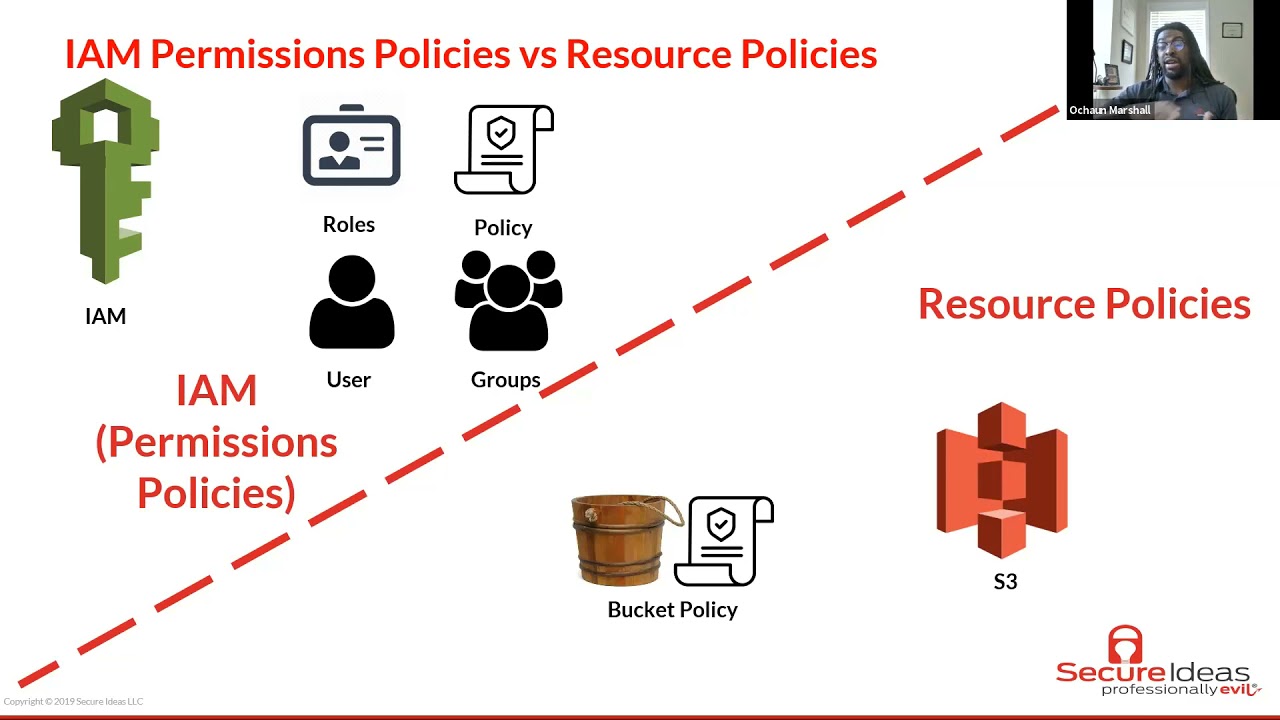
really talking about two different types a types of policies there's permissions policies versus resource policies now the permissions policies you have focused on users and services so the policy is just a json document that says all right these are the things that are these are the things that this particular user this group this particular role or this aw s is allowed to access and what it is not allowed to access and with the resource policies is sort of different s3 is a notable example of resource policies but as we go in and dive a little deeper we'll see that the concept of a resource policy is used in multiple places other than s3 but these things are far but both of
these things are far similar than they are different a resource policy in particular is just a bucket with its own locks so at the resource level you can determine what fight you can access to what principles what other entities can have access to it and where the criteria for those access if you're running a production aws environment chances are you'll be using both of these the reason there are some will go into flame war and tell you oh im is the only way or s3 if you're you working s3 it all has to be in the bucket policy but there are just some things that are just easier to do and i am and there are some things that are
easier to do in s3 for example like basic read write determining which users can access which file storage access which aws multiple different aws resources im is a go-to i am is really easy but enforcing things like um only encrypted uploads or an mfa check on all api calls that is some then you want to do that for anyone that access is a particular bucket those things are really easy are much easier to do at the bucket level so um probably best way to illustrate it is just simple examples as a developer i also i have access i can access some code projects with aws code commit as a consultant i'm also able to spin up
ec2 instance or is to crack passwords so and non-human and non-human things like amazon services also have their own roles and permissions and what they're allowed to access as well and so when we actually look at the json it is under the park model so principal action resource and condition and you see that these things they look different but they really are the same the difference is is that for and i am permissions the principle isn't listed because it's already implied so if i have a policy attached to my user role at oshawn at secureids.com the principle is already defined there's no need to add that little prince that principle line at the at the top
for everything else the arc at a is for the action of course are for the particular resource that you're pointing to and then c is for criteria and conditions with which access is okay you can in this case this is an allow statement but you can also craft policies of course to deny access so the goal the job of anyone who's running an aws environment the job of the users within aws is and when i say users i mean more system administrators as well as people who are building projects and infrastructure you have to decide your the goal is to define which principles um i think in the cbk the the concept of a subject really works
here what principles are allowed to perform what actions under what specific aws resources and under which conditions and so this is how aws evol evaluates your policies in the back end it really is just pattern matching on json and so when the spokesperson says oh aws is secure by default what they really mean is that when they're evaluating permissions the implicit decision is deny the default state of aws is nothing talks to anything else and nothing works that's how that's the beginning of the process and then afterward and then part of it you evaluate all relevant policies so relevant policies meaning okay which principle what entity is trying to communicate or do a specific action on a different resource
and so it will gather in all of the im policies that are focused that are dealing with this particular interaction and this happens on every request so whether you're doing the cli whether you're using like photo 3 or any one of the apks or rather you're just clicking through the console the process here is the same and so you gather around all your relevant policies and then you check first hey is the statement if you deny if you if there is a deny statement that's an explicit deny and and game over that's the end of it and i say explicit deny with the symbols because um actually uh while building some more building out an administrative portal
for first secure ideas uh i actually screwed myself over while trying to troubleshoot but policies actually wrote a deny statement in the s3 bucket policy and i put uh principal star on that and what that did was it locked me out so bad that console errors it's like access level error like i couldn't see not only could i see any of the objects or the files within the s3 bucket i couldn't even access the policy to change it i couldn't access the name actually could not did not have permission to actually list the bucket by name and so when you get to that broken state at that point you would need like the root user
to come in and actually remove the policy so it will work again so that's the power of a deny statement it takes precedent over any allow if there is no explicit deny statement then you move on to the allow statements and is there an allow if there's an allow statement that matches for a particular action and all the conditions are met hey it's allowed otherwise you just go back into that default or implicit deny and troubleshooting permissions can get complicated because this process is straightforward start at deny just check for deny statements check for a lot if not check for allow statements and then continue on this gets complicated as you're connecting between multiple aws services
so a lot of this is trial and error it can be tedious it's thing that you can slap on governance at the last minute before pushing into production it has to be tackled like during the building phase and while you're and while you're building things in aws for example well troubleshooting permissions this picture is how you would traditionally do it if you didn't have the policies and things memorized but one of the things that could lead to an s3 access denied error even though you have the right i am policies and the right s3 policies is kms like at the bucket level if you have the objects in there encrypted with the kms key the aws service also that me any aws
service that has access to that bucket also needs to have decrypt access access to the decrypt action on that kms key and so you can get an access denied error when all the policy when all the policies work but if you don't have if you don't have access to the kms key to decrypt objects it will just access deny as an s3 error and that and i've spent like days and hours trying to tackle issues like that so as you incorporate more aws services this sort of process get this sort of manual process gets exponentially more difficult there are two resources that are really useful rather than trying to plug and pray into the console or
through cloud formation i'm used i'm a huge fan of cloud formation but while i'm working in those templates i use the aws policy generator and also the policy simulator making sure okay would this actually work before i move on before i move on to actually adding it in to the code base now we move on to permissions boundaries so a permission boundaries or for a specific use case and that use case is hey i trust i trust users to set i am roles or they have to set i am be able to set i am roles but you do not necessarily trust them not to abuse their privileges and escalate and so what a permissions boundary is it
it sort of limits it sort sets a limit of okay this is the maximum amount of permissions that this particular user this group or this role is allowed to access and but you have to for a permissions boundary for in order for someone to have access they have to have the intersection of it the permissions boundary as well as an im permission policy that will allow that and so let's go through a practical example in this case we've got a permissions bank statement and then a permission and then here is a permissions policy something that would be attached to a user group or a role now the permissions boundary says all right you can do whatever on s3 you can
do whatever in cloudwatch and you can do whatever in ec2 hence the wildcard star on any of those resources but that does that alone does not grant access what does grant access is the permissions policy on the right so here you've got to you've got permissions to upload a a an object which is aws notation for a file or a directory so you've got the ability to upload files to this to a bucket with the name some bucket and so it is the combination of the permissions boundary and the now the permissions boundary is in place the permissions policy all the only permissions granted or things that are within the intersection of the permissions boundary and the
permissions policy so for example one service that you don't see listed here is cloud9 for example so the permissions policy could grant all sorts of actions to cloud9 but all of those will be rejected because they're not allowed within the permissions boundary so if you're dealing with people is just like oh i need admin for i need admin for this all right another level of governance and security and depth is so you can apply a permissions boundary to limit things so that you don't have the keys to the kingdom all right that moves us into the simple token service so sds is awesome it is amazing and it's absolutely critical for cross account access so
one of the things use cases that you will have and like production workflows is all right you've got now multiple separate accounts like full-on separate aws accounts and for some reason you would need one thing one users from one account to access resources or do things on another account and so this is what sts is really useful for so you can create limited time access for that and it re something credentials that will constantly refresh that way you don't have to store multiple aws profiles and secrets locally on your machine and it has the benefit of auto rotating one service that does this automatically is cloud9 which is a sort of ide developer environment it really is an ec2 instance with
it really is an ec2 instance with fancy ide in it but it's configured in a way so that the credentials are within the ide constantly fresh like every hour or so and so in order for account a let's say account a is the big overall manager account and account b to manage some resource or users or whatever on account b uh account a needs to actually have a policy within it allowed to allow itself to assume a role within b but that's not unnecessary that's not enough at the second account b um it needs to set account a as a trusted entity and so b needs to say all right account a as the the root user of
account a is allowed to assume rule and do things within account being and so this is how you do cross account access so for an account a here is the i am policy is all right you have the ability to do sts assume role as the action and then we're going to assume it allow it to assume an administrative role in account b now at the account b level here's where you've got the trust policy this trust policy is looks very similar it has that it has that uh it looks it has a principle defined it looks a lot similar to that s3 policy that we had before trust policies are and another example another instance where you're doing
resource based policies where you have to define a principle and define who is allowed to explicitly define who is allowed to do the thing to do the thing so for example this trust policy is saying all right in production account id which is account a we're saying that that root user is allowed to assume the role within it within account b so long as that we've got multi-factor authentication present and so that is like sts and that is cross account access and so the and now i'm going to introduce you aws organizations and that's to talk about the final part of what we're like diving into and that's scps and so that's the nitty-gritty that's at the
low-level small policy now we're thinking uh scps are big governance tools using from one account to manage multiple aws accounts and so the beauty of scp is that they take precedent over even the i am policies and the resource policies and there are ways to set guard whales to block at the service level so let's highlight an example and i'm not sure how many of you are a fan of um uh of online collaborative horror fiction um but it's not that kind of scp it's more guardrails so here here's an scp where these are the only app these are the it here we're adding a deny statement at the scp level so all right fine we have to have admins in this
account we have to have people be able to let's say you've got a sandbox developer aws account all right we can have admins we can have them because they have to find permissions and build the things in that environment anyway all right well one thing that we do not want a couple of things that we do not want them to do is that we don't want them to create users and we do not want them to stop to say stop logging on cloudtrail um so here they have they this deny statement doesn't block them from creating or doing creating policies or doing or changing things but we're telling them hey we don't create use we don't want them
to create users and we don't want them to like erase the audit trail or stop logging on cloudtrail and we're saying that as an explicit deny statement at the resource this is actually a powerful statement because at if you apply this s level at the scp not even the root user like the aws root user cannot stop blogging or cannot create a user that's how the that's how powerful the scp is because normally when you're doing i am it's for users groups and other things but at scp level you have um at the sap level not everyone is a plot everyone within that account every entity within that account is applied to that rule so
here's how the all of the policies sort of fit together so at the first level you've got the service control policy scp normally when you create an account there's already an scp statement or like already embedded in there and that scp statement at that account level for a fresh brand new account is all right we we're not denying anything and that's the default scp um then that has to cooperate and if you're and if you are um and you can pick from either an i am or a resource-based policy so if you um for example any aws services any any aws service like for example an ec2 instance ec2 instances don't have resource-based policies so there you're
only working in i am if you have a permissions boundary in play and you have a permission policy that's managed or in or in line and you have a scope down policy then you can get that to work and these parts are only in play if you use them so if you don't have a permissions boundary and you just have a permissions policy to say okay starting you're allowed to start an instance then you're allowed to do it um if you have a permissions boundary that factors in and comes into play you have to check the permissions boundary and the permission policy if you're using s3 and where you have a um where you have a permissions boundary
permission policy and a scope down policy then you would have to com then you'd have to check all three so and these and the or is not an exclusive or anything either of these things can grant access so if you're not if you don't have an im policy in place for an s3 and you're just managing it exclusively from a resource-based policy and that and the scp is fine with it the resource-based policy is fine with it then it goes if you're using an aws um i gotta take a phone call later on so um if if uh you have an scp in place like saying all right we do not allow for some reason that you
think s3 is too complicated we don't want to use s3 and you say at the scp level all right do not uh all right we don't allow s3 at all then it doesn't matter what either of these two policy says s3 access is for ben does that make sense so that's how all of these policies that's how all of the i am and this is a high level overview of all the things to do with i am and so to recap we solve part of the cloud sec problem problem is is that you're just putting a lot the problem is is that when you're working in the cloud you're working with configuration tools and you're just
trying to put things together there's the first level of getting things to work and communicate with one another and then there's the higher threshold of getting things to work securely the next part is that i am policies follow the park model in which here the permissions the um i'm sorry i i will have to take this call immediately after uh immediately after this meeting um because this seems very important um the i am policies follow the park model so that principles are defined or subjects or define what actions they can perform on what resource and under what conditions that is the responsibility as administrators as builders as well as assist admins that's the responsibility we have as
users in aws and aws responsibility is just to evaluate is to do the evaluation of policies that we've created then we've covered permissions boundaries this one way to set guard rails from within an aws account we've covered sts which is temporary credentials and security token service and we've also covered scp which is a useful tool for service control policies through to govern multiple separate aws accounts and so that's it [Music] so any questions anything about like i am in general anybody have any particular questions i had a couple few follow-ups if if you have time it sounds like you might need to go take that phone call um uh i will um let's keep it to five minutes and
then i'll just hop on and take this call because this is very important it seems very important all right so this one actually came up on my security briefing for the company on wednesday how would you define that security in the cloud has gotten better than on-prem so that's the wonderful thing of it depends i hate that answer i hate that um the difference is is that in the cloud you have multiple different services to you have multiple different services like access analyzer there are tools within that come with any aws account services that you can use to check for configuration mismanagement and governance if you've got like bare metal server that you've stood up
um maybe on your on-prem environment you don't necessarily you may not have necessarily have those tools on hand you may have installed those tools but they but for my understanding and this is coming from bit please bear with me i'm in my 20s i don't know i.t outside of on-prem world but i test a lot of people who do have on-prem environments and so from an on-prem situation you've got to find which tools for audit and governance and that sort of thing with a cloud provider those tools and services they they are available for use now not now so a lot of them are free some of them are not does that make sense it does it's it's a perpetual question
though so it's one of those that i wanted to bounce back at you because it does come up with you know industry professionals all the time thank you yeah yeah all right well it sounds like you better go take that phone call yes i do yes i need to um thank you for uh yeah for coming i was gonna so for uh yeah you go thanks again and hopefully we'll see you soon hopefully we'll see you besides yeah we'll talk to you later thanks good take care bye i was just going to mention for um because a couple of us i know a couple students are on so um yeah definitely uh especially if and
if you're gonna do recaps for class uh definitely do research on on what i am is and uh and then we talk a little bit about it in the the cyber security intro course but do a little research and and get a little bit more background information i think this one this topic kind of snuck up on us but uh so i know it's a much more you know high level or technical talk than especially a lot of the students are used to so but definitely look at i am and kind of get a little bit more background uh from there so it was a great overview of it though and how all the parts
interplay or don't interplay well definitely it's just i think if you're coming in without a knowledge of iam in general or azure or sorry sorry amazon cloud services yeah it's it's like it's all talking uh greek probably in fact like like i mentioned we're an azure shop so everything you know i understand like sc s3 buckets and you know everything at a high level but the nuts and bolts you know underneath the hood is is definitely all foreign to me but the nice thing is anything you see like in azure really translates to amazon and vice versa so which makes it nice so that's actually the gift of jedi though so azure implemented a lot of their security
features based on amazon to meet the dod's requirements i could see that that makes sense yeah the the jedi contract that they might or might not end up with who knows well i think it's officially dead after the last lawsuit so it'll probably go back out to rebid if they don't just do their own thing yeah right yeah i think they well i think they did that yeah they killed it and then they yeah i think they're re-bidding it at like twice the size it was or something wow cloud first is still active so yeah yeah not stop yeah yeah it's crazy that's a great question joan i say could we sometimes do a basic cloud security class uh
potentially and if somebody wanted to you know i'm starting to do one um for the school um we actually had a summer class that um because we don't we don't really do any cloud security at greenville tech and i realized when i took out the last half of that class and it's going to be cloud security the problem with that is is i think that you know there's the two main camps that are out there so you have the amazon world and the azure world and then when you really talk about cloud security it's like what aspect of cloud security are you really talking about because there is so much that's there so it is hard but
um there's probably actually a ton of great resources out there i don't know has anybody come across any free online resources around uh cloud security that they could suggest yeah michael check check the chat box oh are those the uh the tiny urls ones you had up there yep so this all came from an instructor from infosec and those are all available for all the different certifications and i've gotten his permission to actually give this out to people okay very cool so the um [Music] are any of those cloud related uh they're certification related right so i see the yeah the the auditor the uh security manager the cast that's the comptia cast so kind of
the analyst the scada so i'm assuming that's ics uh even though i guess most people in ics wouldn't say scada but it's all good and that's the issp of course so uh all right all right not cloud security related but all right i'm great uh great resources and and free is always great so hope to check those out all right well it's good seeing everybody or a bubble for the few of you that have uh your uh cameras on congratulations on the new job jonathan so very cool exciting so all right well yeah yeah the cloud security alliance also has some free training as well um i know we have uh ali and others sometimes
participating in that from that organization but they have some stuff on their website uh around cloud security training it's less less it's less vendor specific and kind of intentionally vendor neutral but yeah yeah oh very cool you know i yeah that's a great point i didn't even think with yeah the cloud security alliance and and ali i should have yeah don't tell them so that that makes complete sense yeah so definitely check that out yeah and thanks for putting the link out there so yeah that definitely would be a great place to start jim for sure so all right well yeah thanks again for everybody for coming uh hopefully we'll see you guys at these signs i will
actually now have in probably a couple hours the final uh schedule out there for everybody to check it out so we'll see everybody on october 9th and then uh still still shooting for in person in april or may next year so uh with everything uh hopefully it goes much better than it has been likely so all right thanks again for coming stay safe out there everybody and uh we'll see you next month thank you thank you michael all right bye
Related talks
 34:38
34:38 35:30
35:30 23:15
23:15 46:38
46:38 28:50
28:50 39:30
39:30