Unraveling the Threat of Chrome Based Malware
Show transcript [en]
Awesome, thank you so much. Thanks everybody for coming as well. We're here to talk to you today about a malware campaign we tracked using Chrome extensions and some of the different research we did into these extensions. To start off, my name is Justin Warner. I'm a security engineer with a tech startup out of Seattle named Iceberg. We do network security analytics, we're a SaaS company, so I get to play with lots and lots of network data. Get called in and worked on lots of different incident response scenarios, threat hun engagements, and various cases from the blue team perspective. I'm a reformed red teamer that commonly unreformed, so frequently when working blue team incidents, I think
evil thoughts and want to dive in more on the research side there. Spent three and a half years doing consulting, doing red team work, and co-developer and co-founder on PowerShell Empire, Python Empire, and some of the toolkits used there. My name is Spencer. I graduated from UW just this past summer with a bachelor's degree in informatics. While I was there, I did some research for the computer science and engineering department, specifically the networks lab, where I worked on a project called uProxy, which was actually, funnily enough, a Chrome extension. And then I did an internship with Iceberg and went full time there. after my school. I really like malware. I think it's really cool. I get to play with it
a lot at work and yeah, it's a lot of fun. I like the just kind of back and forth between red team and blue team. Yeah.
So before we get into just talking about malicious Chrome extensions, I just kind of want to go over what Chrome extensions are and how they work, right? So basically I just took this from the
Google developer page. It's just like web content files. You basically make a directory, put in whatever JavaScript, HTML, et cetera that you want and then you zip it up. You can use all the different APIs that you can use on any web page, but you can also have access to different Google Chrome APIs, which allow you to do things like mess with bookmarks, tabs, et cetera. Yeah, so here's kind of an example Chrome extension. It's just a folder. You have different files that you want in there, like logo of your extension, whatever, but really,
Yeah, so really it's all about the manifest file. And that's all you actually need in order to have a Chrome extension is just a folder with a manifest.json file. So the manifest file, it basically describes the UI, UX of your Chrome extension, right? So like what logo it's using. And then you also have the metadata, so like what version of your Chrome extension it is. But the really important things here, I think, are the permissions, so what different Chrome APIs you wanna have access to, and the registration, which is basically you have to say what JavaScript files you want to run and in what context you want them to run. And you can also specify the content security policy.
So that allows for, you know, basically some of the malicious stuff that we saw in the wild was allowing for unsafe evaluation of code. So this allows you to use functions like eval to run different JavaScript code. And there's a lot of interesting permissions that you can ask for. So for example, you can ask to talk to all different URLs, which is incredibly common in Chrome extensions, but it also allows for, you know, malicious, like C2, right?
There's also the background permission, which I thought was super interesting. Here's a picture of it on, a blurry picture of it on Windows, where it actually allows your Chrome extension to run without Chrome actually being open, which I thought was super interesting. Here's the taskbar, you don't see Chrome open, but in Process Explorer here, you actually see the different Chrome processes there. And there's no indication of what extension's keeping it open either, and in the process, like arguments, which I thought was interesting.
Yeah, so Google actually does do stuff to make sure that there is no malware in the store. They have, automated processes to look through what gets uploaded to make sure that it's complying to their policies and to make sure that it's not malicious. So here's an example. It's uBlock got taken down for obfuscation, because that looks super sketchy and basically you have to enable permissions nine times out of 10 to be able to do stuff, but the problem with this is that it puts that responsibility onto the user. So if the user allows you to access all URLs, you can always access all the URLs and it's not gonna prompt you every time your extension wants to talk to C2.com, right? Yeah, so,
this is a real problem, because Chrome extensions aren't going to be limited to, excuse me, they're not going to be limited to Chrome anymore. A lot of different browsers are actually implementing the same API that Chrome has to basically, you can make an extension that's gonna work on all different browsers. And the browser runs on pretty much every computer in an enterprise. Every client machine is gonna be running the browser. I pretty much never close my browser, so if you have a malicious Chrome extension in there, it can do a lot of bad stuff. So, show of hands, how many people work on the blue team or defensive side of the house? Okay, handful. What about red team, offensive side, pen testing? Awesome. So we're gonna start
by kind of diving in on what we saw in the wild and specifically what we went through. I can tell you as a network security analyst, the last thing I thought I'd be diving into on one random weekday was Google Chrome extensions. Has so far tangential to what we normally see and do day to day. Essentially we were investigating a normal, you know, we go through a process of investigating anomalies inside of networks. We do this via manual hunting and follow up through an investigation. Essentially what we saw was a very sudden burst of high amounts of low volume traffic. So lots of requests, low volume, zero request posts going out, and it started very
suddenly, and it was isolated to a single device. Looks pretty much like standard C2 profiles, and we decided to work with our client to follow up and investigate. What ended up being discovered was an expansive click fraud campaign leveraging Chrome extensions. The funny part to me as a former red teamer is the social engineering aspect of this, because I always felt when I was sending phishing pages that it was impossible to get them to work. No one ever wanted to click on them, and I never got creds, and I always had to make our client really sad. But these guys, they have a Chrome extension that's based on changing the Google logo to a Neon cat, and they get a half million downloads. over a series of months.
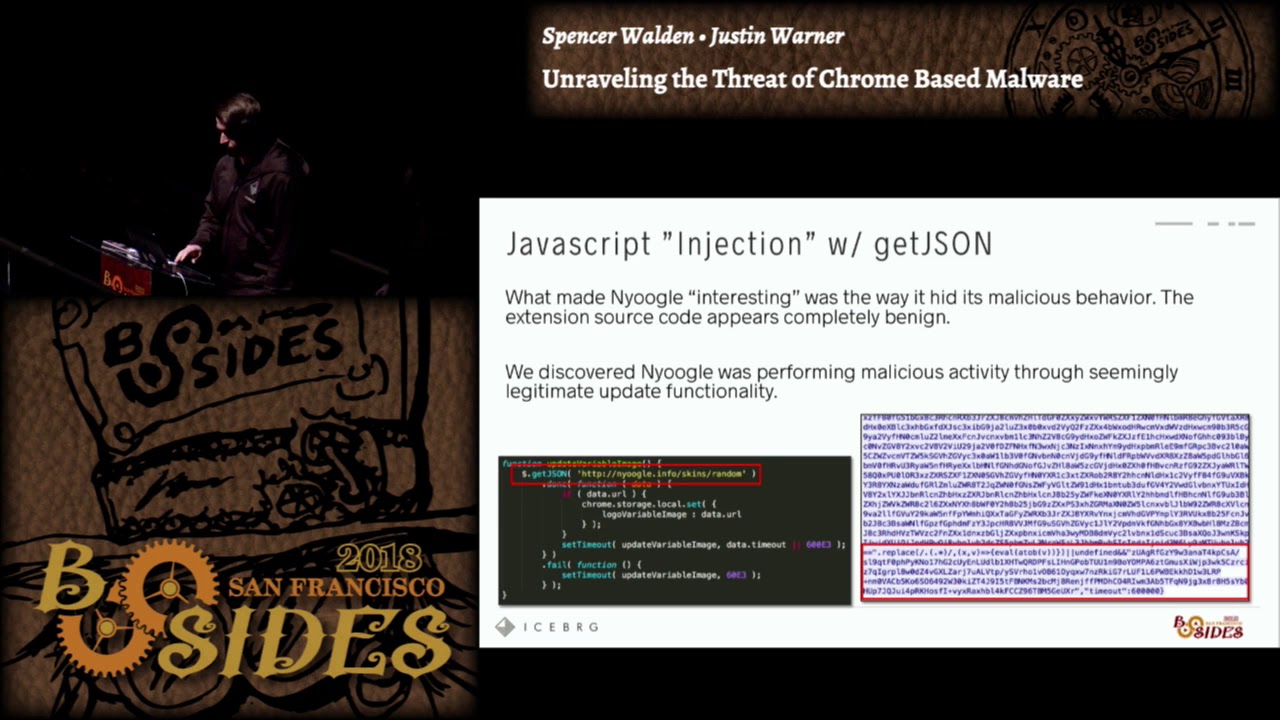
And so really, I think I overcomplicated things, and social engineering is really easy. And the forum posts are even better when doing research into these extensions. Lots of good laughs with people installing them on their friends' laptops and their families' laptops, all for good sake of practical jokes. So how did this specifically work? So upon installation of the extension and every time the extension would boot up, essentially the extension would make a JSON request using the getJSON function out to a, presumably a command and control server. They were masquerading it as configuration updates. And so inside the code, inside comments, it all looked like it belonged to a configuration update if you weren't looking at
what was being returned. And so essentially static analysis would not reveal any malice. There was nothing malicious in these extensions when you downloaded them from the store. What they utilized was the unsafe eval permission, which allows you to append JavaScript to a JSON string, and when the getJSON call returns, it'll actually evaluate whatever that JavaScript is. Yay, never knew that worked. And so you can see here in a very large blurry picture on the right, that there's the configuration update that the C2 server would return would contain a small staging blob, which would essentially evaluate a obfuscated stage. The next step was that obfuscated stage would do the normal Russian dolls, so it would download a bunch of more obfuscated stages, and
eventually it would execute a full JavaScript RAT inside of the context of the extension. And this RAT was essentially being used exclusively for this idea of browser pivoting. And so essentially they would leverage your browser to make requests to external sites for their purposes. They also had capabilities to do geolocation and victim tracking. So the first request you would always see go out from the extension was IPFI, and they would presumably store that off and track and control what was being done based on geolocation. And then the next thing that came was just endless hours of click fraud. And so when we were analyzing these, we spent enormous amounts of time sandboxing all these extensions, taking PCAP, trying to watch to see if we could identify
anything more than this. But why do you need anything more? So if I'm a threat actor with a half million victims, I'm getting 10 cents per click, and I'm doing about six hours at a whack of click fraud extensions at a request a second, presumably these guys could be easily making millions and millions of dollars in the life cycle of this campaign. and fairly low risk and fairly low profile. So we talked a little bit about how widespread it was. In January we actually coordinated, disclosed this to Google, they took it down really fast for us. They worked with us to do some additional analysis. They were great. And then we went ahead and released this to the community. So we worked and disclosed this through Threat Intel
channels, the various trust groups, as well as publicly on the blog eventually. You can see we have a little over half million downloads, but there was only four extensions, pretty small number of extensions. for how easy this was, we kind of thought there would be more. So over the last couple months, we worked to continue profiling and writing detections in our environments and doing tracking of this. And just last week, we were able to coordinate an additional 35 extensions that were located performing the same activity. A lot lower victim counts on these extensions. Most of them were updated or upgraded in September. So fairly recent, but a little over 153,000 victims were still vulnerable to
this. Again, we coordinated this. Many, many thanks to anyone who's in here from Google, specifically Safe Browsing Operations. They've been great coordinating and taking stuff like this, which is never a good thing to get on a Friday, and working with us to take it down quick. So for me, when I'm analyzing stuff like this, my thought goes back to when I was red teaming, and the first question I asked was, why didn't I use Chrome extensions? Because that's a really, really great idea. So what makes it so good for offense? Frankly, you're taking advantage of people's trust in everything Google. I mean, Google doesn't want you to do that. They have permission pop-ups, they tell you what the developer did, but users don't always consider
that. And so by taking advantage of people's trust in Google and Google's want for open development and extensibility in their platform, you essentially gain the trust of the victims. And you can abuse that trust in many, many different ways. Specifically, kind of walking through an attack chain with this, how do we even start? How do we deliver and install a Google Chrome extension? Well, it's really, really simple. There are a number of different ways. The ones I'll highlight are phishing. So I, as a person doing phishing, I can very easily send a link to the Chrome store, and that link would just download straight to my extension. There's no malicious links going off to my C2 server, nothing of the sorts. You could also do things like, my
favorite is post exploitation installation via the registry. So maybe I gain access in some other vector, stolen credentials, VPN, however I'm able to break into the environment. I could use a Google Chrome extension as a persistence technique by simply setting a single reg key. So what does that look like? If I drop my reg key in this location with the extension ID and the name of the update URL, it's pretty simple. What will happen is the browser will actually just add this extension for you. purely via the registry. Now this does have to be an extension in the store, so this is not in developer mode and therefore you've had to have gone through all
the checks as well as been tracked by Google as submitting this extension. So for post-exploitation, this is really my hobby and interest, so I was curious what I could all do. I wanna start by just calling out that this research is by no means ground-shattering. I think there's not much awareness around it. So BEEF has been around for a really long time, really, really early days. BEEF is used for browser exploitation to do a lot of the same stuff you can do inside of an extension. Additionally, there's been several white papers on this. I'll start by saying when we did this research, so what you're gonna be seeing here today, we utilized the same exact
injection technique that the bad guy did. So we essentially built an extension that did this call out using getJSON and set up a C2 server to stage a JavaScript rat. For the purposes of the research, we just dev'd our own lightweight JavaScript rat because we didn't wanna use all the stuff. It's much more fun to play with your own stuff. So we'll start with a demo. The first one I'm gonna show is hooking form submission. So a post exploitation technique where I want to steal information that is being submitted via a form on a specific webpage. So the video's gonna run here, you can see that essentially we have a controller set up and we're
communicating with our C2 server, I'm issuing a tasking to a particular victim. That victim is then gonna go submit their Facebook information, and you'll see that when I come back here, I'm able to quickly ask the C2 server for the results of the tasking, which will result in it giving me the Facebook form information.
The way this actually works is it injects, essentially my extension uses the execute script tech function within the Chrome APIs to add a JavaScript blob to this web page. That JavaScript blob essentially hooks that form submission using events, and then I communicate the results of that form submission back up to the Chrome extension via the Chrome's messaging API. And so essentially I have a small stub of code that's malicious inside the submission, which communicates to my extension for me. Continuing the trend, the next one was key logging. Technically this is a very similar technique. I essentially use execute script to insert a small JavaScript stager that does key logging inside of that webpage. I run
it for 60 seconds and at the end of the 60 seconds I take the results of the key logger and I send it using messages up to my extension, which then I exfiltrate to the C2 server. So you'll see here I type something into my personal Gmail box and then when I ask the C2 server for the results of that key logging, will actually get that information back for whatever I typed. So anything you're typing inside of the browser could essentially be keylogged pretty simply using JavaScript. Assuming no JavaScript blockers. So typing a sensitive message was revealed. So the next one, this is one of my favorite ones, tab screenshots. I think all red teamers, They like spying on people. It's one of the reasons you
get into red teaming. And so being able to watch what people are browsing is very useful in terms of an adversary. Being able to watch what they're going through in their day-to-day business, getting context on who this person is, what they do for a potential business. And so in this case, we actually use the Chrome API. It's the capture visible tab function, which will return a data blob representing the image of the active visible tab within Chrome. And so we can use our Chrome extension to execute this function straight from our extension, no need to inject or evaluate JavaScript in the page. And you can see here I'm able to get back a screenshot of
the whatever page was being browsed at the time, which in this case was our friend Sparrow sitting at a desk at work. The next one's one of my personal favorites. It's called browser pivoting, or otherwise known as man in the browser. It's a technique that allows you to essentially leverage whatever cookies or session values are already instantiated by the browser and issue a page request to the same page you already have open. And so by browser pivoting, I can submit a request from your browser to Gmail. And if you've already authenticated to Gmail, I'll essentially get back the authenticated Gmail page, which will be your inbox. and so I don't need to have your credentials,
I can essentially pivot into whatever accounts you have sessions open on. In this case, you'll see that I have a tasking file created. I was able to tell the tasking file I wanted to target Gmail, and the results I got back from this particular one, I'm able to get a snippet of all the small emails, essentially the preview page of Gmail, which totally not realistic in the real world, a password was sitting plain talks in the inbox, that was done via password reset. but I've never seen that in the wild. And the last one, this was kind of the crown jewel for me, it was like can we actually gain full code execution via our
rat inside of Gmail? And so this is a little bit hand wavy, there would be a lot more work to go into this to actually make this work. I will comment that this is possible and we've done work like this in the field when I was doing consulting. Essentially with this one we're doing browser pivoting, but we're using and targeting a Java deserialization vulnerability. So if I can browse, I can do Java deserialization. It's basically all the exploit is. And so I submit a serialized Java object to a vulnerable web server. In this case it was a JBoss 1.6 web server, which we see all the time in enterprises still. And that web server will
execute our serialized Java blob, which results in a file being created in this case, but in the real world could be a shell getting spawned, a malware getting dropped, things getting installed for persistence. So purely via Google Chrome extension installed on a single user, you could get code execution inside of an enterprise. Cool, so let's talk about defense. So MITRE ATT&CK is a framework, I basically see it as an exhaustive list of, or an attempt at an exhaustive list of everything an attacker can do on a system, maliciously, right? So we, like a lot of different organizations use this to evaluate different products that they have in their environment, right? So does antivirus cover this? Does it, okay, you know, does firewall cover this? Great.
So we actually worked with the MITRE guys to get browser extensions and demand on the browser added to this list, so now different organizations will go through and make sure that they have coverage on these things. which is really important. So browser extensions live both in collection and in persistence and then man in the browser just lives in the collection component.
So for hunting, extensions live in three, well, one location on a given operating system. So here are the different locations for that. And so if you ever wanna see what extensions are on a system, you can just go to these places. And they have the same format. It's just extensions and then the extension ID, and then under that is each version of the extension followed by just the files for the extension. So you can look through there for weird looking manifest files or whatever.
So on the network, You can see the cores header gets added, the origin header, which will actually call out the exact Chrome extension making a request. OS query can be used for hunting on the host. They actually expose a table for Chrome extensions specifically, which is awesome. So you can look through there and then basically, you know, cross the fleet, look for any you know, small amount of extensions installed, right? So if you only have one system with an extension installed, then maybe you want to look at that. For the network, for detecting things, there's the emerging threats signature set, and they have a couple signatures for this exact activity that we found, which are
nice, but they're, keying off of things that an attacker could easily change. And then if you want to do hunting on the network, we noticed that the malware was using one specific ASN. They all had info or pro TLDs, and you can basically just look for these things.
For controlling Chrome extensions, Google has really awesome GPOs that they give you for Chrome for Enterprise, so you can install those and you can blacklist all, like Chrome extensions for example, from being installed if you want to. Users will see this pop up if they try to install an extension and aren't allowed to by their administrator, which is super handy. They have really good, easy to follow along documentation on all of these group policy objects. Highly recommend those.
So kind of tying it together and wrapping it up, I think there's a common view with how you handle situations that involve client-side exploitation or client-side vulnerabilities, aka the human or the user. One common way I saw people handle it is educate the users because we're never gonna be allowed to turn everything off. Like the executives, they like their Chrome extensions, cute puppies in the background pages, and so we're not gonna be allowed to turn off Chrome extensions, and therefore I must make sure that my users are ultra-educated security professionals with all the background of an IR person. I think the other way I've seen it, the other extreme would be you control the users, you lock them down, you prevent them from having any
usability, turn off all Chrome extensions, turn off all methods of installing third-party code, whitelist processes, et cetera, et cetera. I think it can be effective as long as you're okay having very grumpy users and having lots of process involved with how you support that user when they have a business need that allows them to accomplish their job. At the end of the day, security is a business component and business must go on. I think there's a happy medium somewhere in there where you do a little bit of both, where you create user control, you protect them from things they might not be aware of, but you also educate them, and more importantly, make them buy
into and value security. And so it's not so much just education, it's making it personal for them and making them understand how devastating an enterprise compromise could be for the organization, making them care. So what's kind of next? We had some natural extensions of this research we wanted to do, as the enemy of all projects is time. We have a lot of different ideas where this could go. Looking at other browsers, we mentioned that the extension is gonna be a common language or a common format for all browsers. It'd be great to see if you could get a cross-browser piece of malware working reliably. Sad for defense, really happy for offense, but the research needs
to be done to see if it's possible and to see what that looks like. Continued surveying of extensions, I highly doubt that we got them all. an expansive campaign at this time. And you could continue looking for these extensions. We encourage anyone who finds them to put them out, work with Google to get them shut down. Don't let this activity continue. It's only gonna become worse. And then various code execution methods. Is there other ways that we could gain code execution inside of an environment? If you're an offensive guy, a pentester, or a red team, or if you use Chrome extensions, I would love to hear your feedback. I never got to do this. I
know several Red team friends of mine who are now thinking about trying this in a campaign, it would be really interesting to do a developer mode extension or use a private extension for your enterprise that isn't actually uploaded widespread in the Chrome store and test this out or do it in a control testing scenario. What could you do with one box in your enterprise, what's possible? Put it on the tabletop per se. So that's it for us, I think we wanna say thanks to B-Sides, it's an awesome event and thanks for having us. We should have a couple minutes for questions before, and if we have to, we'll meet outside. Thank you.
Yes. So if I remove all my permissions from my users, it sounds like I would be doing some protection, but a lot of this is client side. You won't need any permissions to install or? So the question was if I remove all my permissions from users, a lot of this sounds like client side, you don't need permission to install essentially, how effective would that be? So specifically with the GPO control is how I'd recommend controlling this for users. The GPO that they provide for Google allows you to control extensions themselves, so you, by
controlling the extension and what can be installed as an extension. You essentially prevent the installation method of the threat actor. So if they can't put their extension on your workstation, they never gain access. This relies on that extension piece. So that's the one control that I would say we tested extensively to be effective and looked at. The question is the most secure browser, and as a vendor standing up here, I'm not gonna answer that for fear. I use Chrome, I love Chrome. I don't know if that means it's the most secure. I do dumb things just like every user of a computer. Any other questions?
The question was, is there a good whitelist out there for known good extensions? To my knowledge, I did not find one when researching it. I think every enterprise has done their own work. Some enterprises have done their own work in this sector and built some of these, but they're not overly public. I think at the end of the day, it's gonna have to baseline partially based on the business because different Chrome extensions do enable different business units. There might be ones specific for hospitals or doctors or medical professionals that people do find useful. It's a great question. I wish there was more of an answer there and I wish there was more whitelists available online honestly. Would it be a good area for research follow on to start building
a trusted whitelist? On the Chrome web store they actually do point out that certain ones are made by Google. So I figure you could probably trust those ones uploaded by Google to the Google store. A lot of the extensions will say who they're offered by like a developer or something so you can kind of go by that. As far as I know, there's no like white list out there. Feel free to make one. Put it on GitHub, everyone can use it. I think it's great. All right. Well, thank you, Spencer and Justin. I really appreciated it.
Related talks
 29:24
29:24 32:41
32:41 31:58
31:58 25:39
25:39 42:09
42:09 28:25
28:25