Reversing F5 Service Password Encryption
Show original YouTube description
Show transcript [en]
Okay, we'd like to welcome everyone to our second day of Passwords Con. Uh, it's been going very well so far. It's nice to see the room so full as well. And, uh, as Dustin mentioned, remember to hydrate with some something that's preferably got little to no alcohol in it. Just want to thank our sponsors, Diamond sponsors, Adobe and Aikido. And then our gold sponsors, Formal and Drop Zone AI. Then a reminder about cell phones. Just please put them on silent so that when Dustin speaking, we don't have phones ringing or worst case Baby Shark playing as a ringtone or something like that. I'm >> Yep. And then um also when it comes to taking photos, Dustin doesn't mind you
taking photos of him or of his slides, but obviously adhering to to the besides policy. Not any photos of any of the attendees without their consent, both in this room or anywhere else. So we can get started. Um I'm trying to think I think I know Dustin Evil almost 10 years now. >> Yeah, sounds right. >> 10 years now. And uh when it comes to cracking passwords algorithms, working with hashcad, working with anything to do with uh what passwords con's about, I think Dustin's one of the most uh authoritative figures that we have. So you're going to learn a lot today. So pay a lot of attention. It's great that he's here to give us this talk. So
without further ado, we're going to hand over to evil monk Dustin.
>> All right. Good morning everybody. Um, this talk was interesting. Um, we'll get into the fun stuff here in my intro in a second. So, obviously this is F5 load balancer service account decryption. Um, an F, who here knows what an F5 is. Excellent. You're all in the right room then. So, who am I really? He already went through a bunch of it. You know, I collect black badges, church of Wi-Fi. I'm a senior technical staff member. At one point, I used to be a network engineer, and that's the important part. I used to maintain, build, and manage F5s for a living for a bank. So that's where this magic comes all about. And obviously if you want to find
me on socials, I'm evil_mog on Twitter, evilmog on LinkedIn, and then mog.evil.af on blue sky. And yes, I had to go bribe some people to get an Afghanistan domain name. That was a whole different story. So what is an F5? This is the important part. An F5 is a load balancer. So what does a load balancer do? It takes packets in, presents a virtual IP out to the world, and it dispatches things in the back end to alternate servers anywhere from layer four all the way up to layer 7, and they can do funky mangling. They can do similar stuff such as uh what's in EngineX. In fact, engine X is now owned by F5. So, it's kind of
cool. The F5, the important part, will store credentials. Um things like LDAP, for example, are stored in there. So say I need to go authenticate users talking to the F5 or talking to the application against active directory. I need to store a LDAP bind password. So who here remembers 2022 when all the F5 started getting popped? Who here had to work IR cases on that? Probably a few of you. So the question came up, if someone pops an F5 and has a full disc image or command line injection into an F5, what can they do with this? Well, the cool part about this is actually back in the cool part about this whole thing is
you can actually get service account passwords out and do dirty things. But anyways, the important part back to my little slide deck is I go on a divergent rant. Um, you basically hide servers behind a virtual IP and a pool. And a lot of these functionality requires what's called local traffic manager and then APM, whatever that stands for, gives access to advanced mangling. So anyways, F5s are always installed in pairs. You have an active, you have a standby, and they need to be able to transfer their configurations between the two, including their encrypted data back and forth. This is why this attack even works in the first place. The F5s encrypt their stored service account
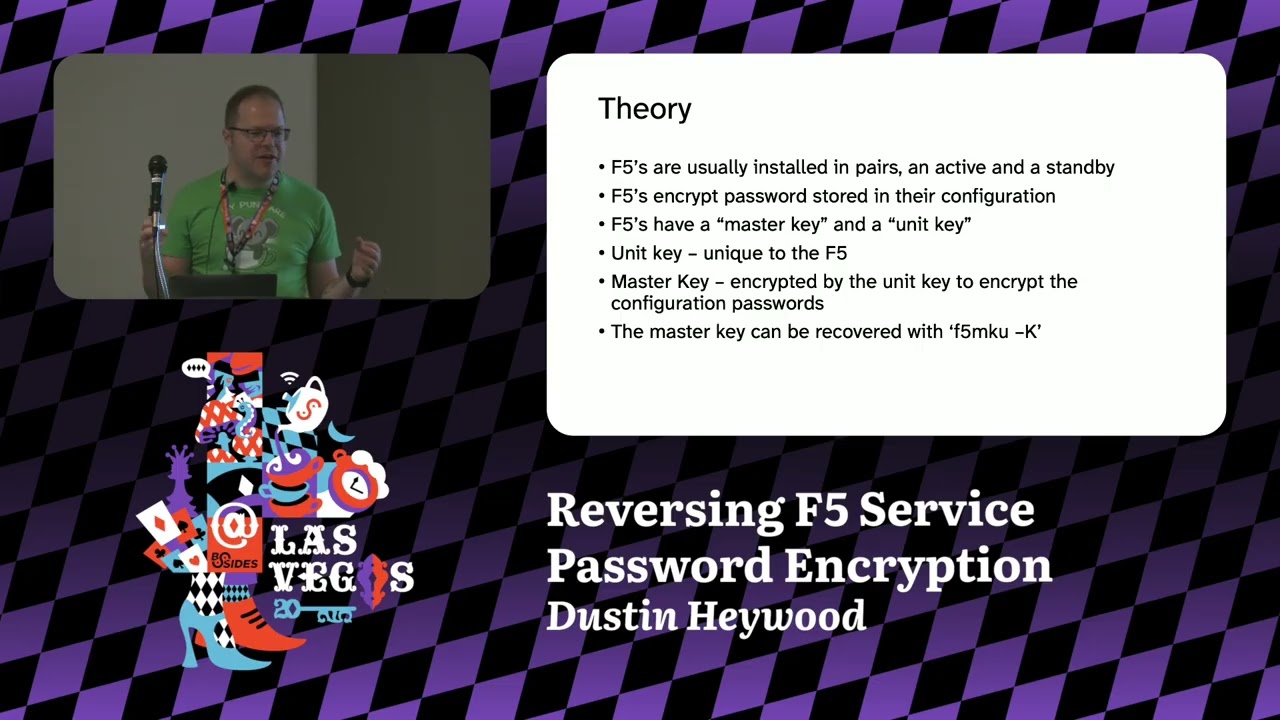
passwords in their configuration file. It's like dollars m dollar sign, uh, two character salt, a dollar sign, and then a bunch of base 64 characters, which I'll show in a second. Now, F5s have a master key and a unit key. So the unit key in the case of a physical device is normally stored in the EPROM. They don't persist it to the file system. In the case of a virtual device, they store it on the file system. This unit key encrypts the master key. I know it's weird. With AES 256 electronic codebook mode, that's how you can retrieve the ma the master key out. So the unit keys are unique to the F5s. The master keys are
unique to the configuration pair. Um and you typically install them in pairs. And so then you use that master key to encrypt the c the configuration passwords. Now the secret that no F5 tech will tell you but it is actually documented barely is there's a command called F5 MKU. This is designed for manipulating the master key files. This command is documented. The uppercase K flag is not documented except for in one very tiny thing for synchronizing master keys between units when you're doing an HA recovery. If you go type the help command as an example on an F5 F5 MKU help, there is no dashuppercase K even mentioned in the command file. But if you type F5 MKU-K as an example, there's
a B 64 configuration key. So this is how we can go do some very nefarious things. And by I talked to F5ERT, they're like, "Hey, this is okay doing the talk. You're not really revealing anything public or not public. We're just, you know, you're making people aware that if a service account password on is it stored in an F5 and F5 gets popped, please just rotate that service account password because it's been compromised. It's that's the whole gist of this talk. So anyways, the next part we're going on to as you can see here on this command, that's why it went to black and white on white doesn't look that great. So for the password extraction, we use this
really cool command. So in F5 it has two shells. You have bash and you have what's called TMSH, the traffic management shell. So from a bash shell, you can run TMSH commands. So F5s have these things called partitions. So I can store like a partition for one app, partition for another app, and make an F5 appear as multiple partitions. If you compromise one, you can tell it show me all of the commands for a partition, for example, or just give me the that's what the recursive is on that show running configuration. allows us to see everything in an F5, which is great for when you're doing a compromise assessment or running a red team. So,
what that looks like here, I'm gonna make this easier for you guys to see. Oops, wrong one. Aha. So, what we can do is we actually GP for service account passwords right from the command line. So, we're doing tms quiet, you know, cd into the root directory, show the running config recursive, and then GP it for dollars, dollar sign. Looks something like this. So when you're looking at um there we go. Here is like an example of a bind dn and bind password. It's a dollars m dollar sign a two character salt and then base 64 encoded. You know fairly easy and straightforward. Now the cool part about this the decryption is relatively simple. So
pardon my terrible color coding. I tried to do this because I don't like using pointers. So you have your dollar m dollar sign your salt base 64 encoded. So you take the prefix. We're going to remove this later, but you store it for in your script to go strip it out. You then base 64 decode that string at the end for the dollars m dollar sign. That gives you the raw bytes. Grab your um the as key using F5 MKU and this is AES 128 electronic code book. Every Python library speaks this. OpenSSL speaks it. Say B 64 decode your AES key. Decrypt the cipher bytes of the AS key. remove QD from the decrypted password. That's
it. That took me, you know, a little bit to go figure out, but it wasn't terrible. So, the example, now it's demo time. Let's see how great my demo skills are today. Um, Python 3 F5 py. So, we're going to grab the master key from this box. F5 MKU-K. And where's my cursor? Oh, there we go. Found you. It's the only curse of doing light mode. So, we're going to paste you. Oh, come on. Command V. Now, we're going to grab the encrypted password. So, in this case, let's grab Oh, this is also handy because you can decrypt the uh keys used to go talk to F5 to go pull firmware updates and other status updates down as well because
every five gets their own. So, if you want to do some research later, bonus research activity. Anyways, we'll go copy you. You're going to copy you. And congratulations, Evilmog. Besides LV 2025. Now, the other way you can do this. Thank you. Thank you. Now, the other way we can do this, if I remember correctly, we can grab the unit key out using some entertainment. So, here is the unit key. Um, it's just stored in hex on the box. It's on the config big IP K store unit key. We're going to copy you. Ah, damn it. I can't type today. And there we go. Copy. So, I have another tool here, Python 3. One sec. I wrote this tool like on the plane, so
I apologize. We put our unit key down that I just copied out and the master key and it will give you the output of the M5 MKU. I discovered this from another researcher that gave you some more details, but that is in a gist how this actually operates. And the good news is here is your QR code that I swear is not fishing. It just goes to that URL. I promise I will not hack you. You're not paying me enough for this. And I will upload these slide decks to the um repo for you so you can go through with your heart's content. If you want to play with this, you can get an F5 demo um license. They give them up
for about a month. You need to use your corporate email to go do the request. They do approve it. These download the OVA and um activate the LTM and go play with one just to go see how they operate. So, you can recreate this to your heart's content and do some more research on what that magical other F5 key does. With that, questions. >> Yeah. Uh it looks like, you know, this uh recovers the password used for the the cloud safe. Uh what about like in the uh BIPS enabled system? Does it >> Oh, yeah. Uh sorry. Uh just looking at the the decryption there, looks like you're you're getting the the the sync group uh password so it can get the the
configuration. I'm just wondering if it uh behaves the same in a FIPS enabled system. >> I've never tested it in FIPS to be honest. We don't do FIPS up in Canada. So um it in theory, and this is just me postulating, if they store the key in um in EPROM and they make it so you can't do like an and you can't recover the key, it might not work. But the thing is, every F5 needs to synchronize with another pair. So if a FIPS enabled F5 backup node dies or primary node dies and you swap it out, you have to get the config file moved over somehow. And that's the master password is this synchronization
key between the two. So in theory, this should work. If you get that master key, one of your texts will eventually have it or Yeah. But if someone wants to test on FIPS, let me know. >> Yeah, sounds good. Thank you. I talk. >> It's coming. It's coming. >> You make him get his exercise. >> I would throw it, but I don't want to buy them a new one. >> Okay. So, this problem of synchronous bind passwords isn't unique to F5s, right? You run into this in like SSSD. Basically, anytime you're a LDAP, a common mitigation we've seen for this is instead of using a bind password, just stick a certificate on the box and then
run your LDAP server so that it uses MTLS to authenticate, right? Are are you does uh similar problems apply if you're using that mode? Does F5 even support that like other than a bind password? >> F5 does support storing password or certificates. I don't know if the configuration allows you to do MTLS to a LDUP system. Um it also depends if the active director let you go do it. But the answer is that you can probably configure it that way. But then the private keys are all stored on the box anyways. So if they're popped, you still have the same >> Right. Right. Right. If your box gets popped, you're dead. Right. And yeah, >> and that's where this whole piece came
from was someone's like, "RF5s should be fine. We don't need to cycle all our passwords. They were popped, but like they're encrypted, so don't worry about the codes." No. The one thing I want you to take away from this, if your box gets popped, everything that's on there, even if it's encrypted, is compromised. Please cycle.
>> Any other questions? It doesn't even have to be about this life, the universe, anything. Hashcat, good sushi restaurants on the strip. >> Sake. >> Okay. So, the - K option was slightly documented someplace. >> Yes. >> Um, what about doing digital forensics to try to dig it out of the binary if it was not documented? You know, we didn't attempt to do that because we just knew the command was documented as a like an F5 tech because they have a whole policy on here's how you replace your box. So, I didn't bother. But yeah, you could reverse this thing. All it is is the Linux system under the hood. Thanks.
Going. Going. And again, that font was the Atkinson hyperledible font. I swear I love it. I mean, what's everyone thought? Was it fairly readable? >> Cool. Thank you for being my UI testers. [laughter] >> Okay, >> awesome. Thank you all. Uh, feel free to hit me up on the socials. In fact, there is my socials again. If you want them all, feel free. I don't bite. I happily answer questions on Discord. Uh, hashlife universe everything and sake of all things. Okay, before everyone disappears, how many users of Hashcat here? Okay, awesome. How many of you know Hashcat version 7's been just been released? >> Oh, dude, Hashcat 7 is amazing. There's so many little cool things that are now
in it. Like, I'm very excited. First release in two years. >> Yeah. Yeah. I've got a bit of a summary from Jens from Atom. So, uh, over 900,000 lines of code have changed in Hashcat. Uh, this will, by the way, I'll put a QR code up now that you can just scan to get to the Hashcat, uh, wiki and see all all all of this. Um, new features that are interesting, a simulation bridge, so you can now integrate external resources into Hashcad like FPGAs on the fly. There's a Python bridge. So if you want to write a custom algorithm or you want to support some changes to an algorithm on Hashcat, you can now do
it in Python without having to rewrite uh any or recompile any code. Hash mode auto detection. Okay, for those of us who uh who struggle to identify what it is that we're working with. >> Now, this doesn't work on things like NLM, MD5, and anything else 32 hex, but it works on almost everything else. >> Yeah. And then new hash modes, Argon 2, Lux 2 with full GPU acceleration, MetaMask, Microsoft online accounts, GBG, Open SSH, SNMP version 3, and 60 plus more that you're welcome to read about on the wiki. New compute API support. So, it's no longer only for Open CL and CUDA. You can now also use it on Apple Metal optimized for the M1
and M2 chips and AMD HIP which is their GPU version of CUDA and of course uh improved performance across all the hash types. So I'll put the QR code up. Um but yeah download hashgate version 7. It's been a part of passwords con since I think inception. There's been talk >> thereabouts. Yeah, this new version is really amazing with all the things because you also like send out certain parts different parts of a pipeline. It's great for automation of your entire workflow. I'm just so excited. >> Yeah. Cool. So download it, try it out. I'll put the code up now. And finally, once again, thanks very much to Dustin to Elmog for his talk today. [applause]
Related talks
 45:26
45:26 43:27
43:27 52:16
52:16 44:07
44:07 34:59
34:59 34:16
34:16