Hacking Embedded Devices - From Black Box to UID 0
Show transcript [en]
okay so welcome back after lunch hope you had a good time and we'll move forward with the next talk by Z other going to be hacking in bed devices so thank you hello uh Welcome to our presentation devices from blackbox to yd Z this is an overview of our research that we did together I'm Z ades I'm independent security researcher mainly I work as a pen tester but on my free time I like to research ineda devices and artware aing hello everyone I'm David I'm a software engineer uh professionally I developed typescript applications and deploy them to the cloud I've known Z others for several years already and we like to Hangouts together and sometimes
break some devices and this was no exception so if you are like us you were probably born in the late 80s or 90s uh and you most likely have a lot of VHS tapes from your childhood that are rotting over time this is because as you know uh VHS is not forever and this was what was happening to a lot of tapes that I had stored at my parents home um and as you most likely have guessed there is a solution to this problem which is to convert this tapes to a digital format uh and with the advantage that we can take take them with us almost everywhere and play them in almost all of the devices that we
have um so to convert a VHS type to a digital format you need a capture card uh and I went on the market to try to find some that would be suitable and I opted to use this one uh it supports both component and HTMI input uh has a local hard drive for storage so this means that to capture videos I don't need to have it connected to my computer I can just take out the hard drive uh but one thing that I noticed is that it also has ethernet and a USB port and on an acur perspective these are very interesting parts to have uh lastly uh it also has this app uh and I was curious to know if I could
use this app to download the videos remotely so instead of having to detach the hard drive every time that I wanted to get my videos out of the the PVR if I would be able to use the app for this purpose so let's do a small recap we have this personal video recorder it can capture HTMI and composite um it supports storing videos in both its internal storage and on USB flash drives as long as they are formatted as NTFS um it can play videos that we're captured by the box and doesn't seem to offer any option to download this over the network uh the box also exposes three TCP ports but there are no login
services available as for the app I tried to find it on the store and on the vendor's website there was this notice saying that c app is no longer available but fortunately this is not a problem because there are other ways to go around this limitation like using mirrors so I downloaded the app and install it to my device and like the box it it is able to list directories but it only lists the files that were that that were captured by the Box we tried to insert some additional videos in the USB flash drive and it didn't display those um the app also allows the user to remotely control recordings and Playback and the interesting part here
is that it shows this small preview that you can see in the picture on the right of the videos that that that the user recorded uh and I was wondering if there was any way I could take advantage of this uh so I reached out to zadash and his reaction was more or less this that you can see here and we were during the covid lockdown uh so we had nothing else to do like literally uh each of us were in a different city we couldn't meet physically I was the one with the device in Lisbon there others was in Port uh so most of the research that you'll see here actually happened over a video
call so the first thing that we tried uh was the simple test to see if there was any place in the UI where we could input our own text and have it executed as code uh this sometimes happens due due to some oversights by the developers uh we found this option that allowed us to assign watermarks to videos and that allowed us setting up a custom text so this is what we did we Tred to execute the ID command um if we were lucky we would be able if this if we were lucky and this executed we were would be able to prove ourselves that we were able to execute any commands that we wanted plus with this with the output
of this ID command we would be able to know what user we are running on and if we had if we were even more lucky and were running as root that would be the cherry on top of the cake but this didn't work um or at least at the time we thought this didn't work uh the Box just echoed the same text that we inputed and there was nothing else to to research from here so it was time for a different approach so we tried the easiest payloads that that we we could so we need to do um some Recon about this box so for now it's a black box for us uh we know that that it has
an app we have tested some of the features and some of the capabilities but we still uh are missing some of the information so for example we don't know the operating system usually on in devices it runs Linux so we may have a guess uh we also don't have any information about the CPU but usually on embeda devices it's running MBS or arm and for the ship set we have no information about it so we did a physical Recon on this device and we found this test Point uh exposed under the HDD slot and of course our first guess is that it could be a Serial interface and usual the serial interface or the wart allow us to communic Comm
unicate with the box to read the messages and also to to execute uh and send some commands so it could be very interesting um on this but sadly the box was with David on his house and David didn't get the the hardware to to test this test point so uh it's like a dead end for for now and also opening the the case will viid the warranty which which is something that we want to to avoid so we went on the the vendor website to to find some more information and we found the open source notice um we can see here some of the software being used and we can read here that it's using the
Linux kernel so our guess at some point is correct and we can also read for example the U boot boot loader which is a boot loader used on beta devices which totally makes sense in here and it's basic like um a grub that we have on our Linux computers and thinking around on the vendor website we we found the firmwares with a change log and that can be really useful if we are able to extract the files so if you are able to to unpack the firmware we can have access to all the files and binaries inside the box and it could we could uh open the the scope for for this and searching for new
vulnerabilities but sadly for us this firmware was encrypted so been W try to find some of the the Eds uh but with no look with no luck we see that it's using op SSL encryption and of course we don't have the key to decrypt this firmware so what we know by now we know the app we have tested some of the functionalities we know that it's running through Linux we don't know the the version neither the Dr but we are sure that it's running Linux and we still don't have any information about the CPU or the ship set and now we have another unknown variable which is the key to decrypt the frameware so we went to reverse Android
application in order to to find more information and more endpoints and some of the features that could be hidden from um the user interface so to start reversing the Droid application we use jadex qy which is a Android Java uh compiler and we are expecting to read uh most of the code in Java because it's a right application but um on this context there was not uh much code um in Java because instead of having the the code mostly in Java this application using a native Library maybe uh basically it's like a do SEO that we usually see on our Linux devices and we can't use the Andro um jaab compiler to to read them we can
see on the line 54 that it's loading that native library with that LBP so so someone forgot to change the the example name so for this native Library uh we used GAA I guess like some of you already know this software and um looking at the screenshots on the right we can read the strings inside this binary we can recognize that some of these strings relate to the API endpoints and that's really useful because we now have more information about the features um of this API and on the left we can see the the assembly and code and it's very interesting to see that the this native rout library is not stripped so we can read the symbols and
the names so it's very useful to understand how the functions work uh so what we tried immediately was to start to use the methods that we just uncovered from our research uh we start with the API authentication because it was required by most of the methods the way this works is that the application sends a request to the box to start the pairing process the Box displays a code on the screen the user uh writes down that code using the app and then it's authenticated uh which is which will be needed for other endpoints so once you are uh able to to authenticate on this API we can now um first the the end points and start to to
look at them so looking at this reverse we found some interesting functions here so the first one that caught our attention was cat files info that would suggest that it will be able to to list the the files on on on the device um and actually it can but it's like before we are still limited to only be able to list the files that are videos that were created by the device itself so this end point is is a little bit um it's not no useful so we can kept reversing and then we found this endpoint get de list that would suggest that it would um list the directories inside the device and it does list the directories
it lists everything actually so you can see here the the the the the base of the root file system and with this we were able to replicate the directory structure of the device locally uh but still uh though it's this is very useful it's not as useful as it could be because remember we can list all the directories that exist but we don't know which files exist in those directories so we can list uh the directories but we cannot uh list files so while we can list some of the folders We don't know uh what's inside this folder so we kept digging on on these endpoints and we found the snapshot path CET that would suggest that it will
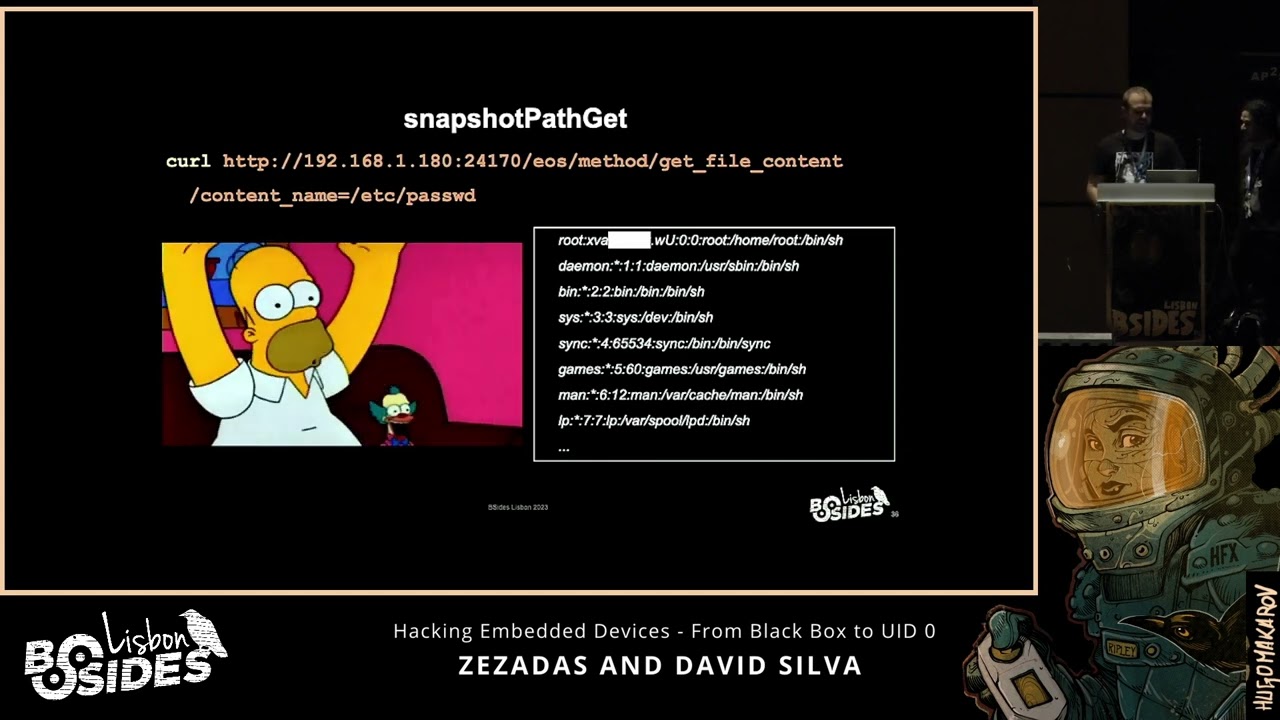
download the thumbnail from the the videos on the device it actually does download thumbnails but more than that that uh it is able to download any file that exists on the device uh and in this case uh we try to download PD which contains the the password the ashed passwords of all the users cool so now we have an ash it's not the the plain text password so we need to crack this so uh I guess most of you use ashcat that's what we did and it looks like the password it's not very complex it took us about 3 hours on a low-end VPS that's pretty cool but we still don't have any place to to insert
these credentials so what we know by now so we know that we can list folders um we cannot properly list files only the ones that were created by the box so it's not useful for us and while we can download some of the files using this path transversal um it's not um there is some restrictions such as symbolic links we cannot download symbolic links and for example the pro FS files um are also restricted so we cannot use uh those kind of gadgets to to get more content and we still don't have uh a way to to log in on the the device with the credentials that we cracked so what's the plan for now so we
know the functionalities of this um API we know some of the endpoints so let's try to to find more information um AB abusing this endpoint so we know that we can download files from inside the box and it's running Linux so let's use uh a Linux word list uh to to enumerate other files uh on the device so of course we did that we downloaded some of the the files but they were not interesting um for this context and while doing this we also found uh some reference that lead us to the yo project and basically yop project is um a tool to build custom Linux builds for embedded devices which totally makes sense for this context so
we also use some of the word lists uh of yo project in order to to find more information but sadly um it didn't lead do to to anything uh very use useful so we kept testing the the end points and while we were testing the endpoints uh this constant sending of these attempts at sending uh different parameters and whatnot together with some guy navigation led to these Mega Crush and uh when the device crashed uh it had this USB flash drive connected at the time which had this this LED light that started to Blink and I was curious why it was blinking on on on Startup so I removed the pen drive and connected it
to my computer uh there were some password protected seven zip files um so this means that this box uh is using the the the flash drive to store its logs when it crashes uh and yeah you you may say yeah but they are password protected sure uh they are uh but uh this does and at the time they weren't uh and this doesn't necessarily mean that we we would be able to to retrieve them using some recovery tools but it was highly it was extremely likely that the files were uh available in PL Tex before uh being archived with a password so if we try to use some um some recovery tools we would be able to recover them before they got
deleted and this is was exactly what we did so after using these for6 tools we were able to to get the F in PL Tex because the the WB pen drive was was used as a cache so we were able to to read all the the crash temps in PL text so here we can see um one of the crash temps we can read here some assembly some function names and also some memory ofets so we have now more information to understand what's happening inside the box and from there we also found some more useful information such as the the CPU being used so we now know that it's using armv5 CPU it's a 32-bit little
Indian um CPU so we found some more information and we are also liking the the ship Set uh and by looking at the strings of this cordum we could find the Linux version and also the Dr being used Da Vinci and that uh keyword lead us to to this Texas instrument ship that is it is used for digital media systems which is which make totally makes sense for for this context so we now have found the the ship scent and also by looking again at the Yoko project we could find some repositories with Source related to to this to this shipet so we are uh in the right direction our cords also showed us some
very interesting thing which is the the the the commands that were executed to start commands and environment variables that were used to start this binary named encode and as well as the directory where it was uh remember that we already knew that this directory existed because we were able to list all the directories that existed on the file system but we didn't know the name of the binary and now we have some clue here so we used path trans transversal that we had to download this binary and we we were able to get this 7 megabyte uh binary that we we for sure we're going to analyze and see uh what could give us so let's recap on the status of our
research uh we already investigated the app uh we know this is a uh uh Linux and we know the dro that that is running here um and we know the CPU and the chip set of the device uh we are still missing the key for decrypting the firmware uh and we also don't have the password to extract the seven zip cordum that we had before uh and lastly there is no way on the system for us to run a shell uh even though we have the root passwords as well so for a binary with 7 megabytes uh we have um a good guess that this is this is the the main binary and if um
there is a update feature for this uh there is a big chance that this um upate is running inside this binary so this binary should have uh have the all of the information to decrypt the firmware and to extract it so we went of course just searching for the the update um function and we can read here some assembly U sorry some s code H and basically this function uh will go on each offset of the the partitions and we'll extract all the partitions from inside the firmware and then it will go a partition by partition and it will decrypt it and you can see here the the decryption uh function and if we dig deeper in this function
basically it's just a Chell command calling op SSL with the the encryption key in PL in plain text so cool we have now um more information about the device so we have all the previous information that we found from the app from the operating system the CPU the ship set and now we have the key to thep the the firmware but uh we still don't have um shell on on this device we have the credentials but no way to to use them and we are still missing the the password to extract the the cord them so um let's have a look inside this firmware so basically uh we reproduce the the logic inside this binary but in
Python so we could um extract all the partitions and then go on each of the partition decrypting it so we could get access to to the root file system and be able to to read the the files inside it so after unpacking all the files we can see that we now have the the root file system in plain text and as a bonus uh the vendor also left us some source code because we never know when it could be useful so it's pretty cool now we have the the firmware um we can list all the files um so uh there is still some information missing uh such as the the password to to decrypt the cordum and
digging in the the files inside this Ro file system we can see the crash analysis um binary which handles the the cord the cord dump and here by just doing a a string so you can we can read the password in plain text so so we have way way more information that we had at the beginning so uh we have some more information about the the hardware we now have the the key to decrypt the firmware we have the key to extract the the camp and um we still don't have a way to use the credentials that we had to achieve shell on this device so um of course we could create a custom firmware for this device so we
know the key to decrypt the firmware and it will be the same key to inp the firmware but uh first it will be too easy and second it will there is a risk of breaking the device so we still missing shell access on this device and after a few times a few few days um the the co lockdown was um left and we were able to to be together so the first thing that I wanted to try on this device of course it will be the the test the the test Point uh which are um exposed from the the case and something weird here is that while the the W um serial only needs four pins There is
five pins here and looking [Music] um and um we tested these uh test points and using some of the tools that I had um I didn't find any serial interface or any useful protocol in here so our guess is that these test points are used only for debugging purposes so for example if some of the pins uh measures less than 5 volts that it means some component is broken inside the PCB and for our setup of course we wanted to to to find the the serial interface and we are searching for four pins in a row and that uh would mean that it could be a seral um interface we can see here the the the PCV uh we
already have um found the the serial interface you can see for example that we are using this FTD uh converter this one is pretty cheap like $2 um on online store uh the the picture that I've showed you uh before it's the the fukasha board this is the the Myer the device because it's it's very cheap like $5 for the the chip and then the the PCV you can print it and solder it by yourself so it gets pretty cheap and uh it's very useful because it's able to to do several protocols and for the wart serial Port usually there are four pins but you only need three so usually we have the the VCC or the voltage voltage
which which is not needed uh for this scenario then we have ground uh the ground is really easy to find using the multimeter in continuity mode and then we have the RX and the TX and uh this seems a little bit weird but the RX needs to connect to the TX and the TX x to the RX so once we find the the ground there is a 50/50 shot of guessing it right uh of course this is just a simple way to to explain you there is other ways to to be sure that we are connecting to to the right test points uh that was actually pretty cool uh but the only thing that we can do now
is to read logs um uh you'll see here that uh in the screenshot that we've highlighted that hit any key to stop auto boot so this is the uh uboot allows us to interrupt the Regular Boot process usually and by interrupting it we would be able to tell the device to load another a different firmware for example that we had stored on a USB flash drive or something like that and that we could use to to run our own code uh unfortunately we reverse the ubut code and the there is no um uh there is no code to handle user inputs at this stage so even though the string uh is outputed uh it's not waiting for any user input
at all um and after the system boots um uh it starts the encode binary that we showed you before uh but and remember that we have a way to crash it every time that we wanted and we thought that by crashing it we would now be able to to have shell access but unfortunately uh when we crash it by sending this this comment uh it it just restarts again so we still have no way to access the shell so we went on the file system and found the init service that is responsible for starting this encode command uh and there is a fallback for Recovery purposes so when the Box the Box crashes five times in a row row and each crash
happens in less than 10 Mill milliseconds be between the previous crash then uh it will stop trying to to restart encode and just send us straight to the Shell so there is a scape here but um doing a crash in less than 10 millisecs it's really short we tried it we tried to optimize um our exploit but we got it three times in a row and that's the maximum that we got um and we need to to do it like five times so it's not enough to to break the this Loop condition um so 10 milliseconds it's too short to do this uh so we were a little bit stuck uh in here so we had all of this and we are
still missing just one piece of the puzzle and uh we don't have the the abilities to to bend the time or or do we and that made me think and I went again on this en code binary and I found this uh function that handles the the time update so it basically does a HTTP request to to Google and it looks at the response headers on the the date header and will update the the time um with this information but if we look with some attention we see that it's using HTTP instead of using https so I guess that we all know that uh we could intercept this so if we do a request to
Google this is the the response that we expect so we see that's the the time that the box is expecting so our scenario for this is that uh we will intercept the Box we we will be doing a man in the middle so instead of the boxing of the Box being communicating with um with Google it's communicating with us and now we can control the time so picture this scenario so the Box will boot for for the first time and you try to update the time with Google or in this case with us and we'll reply with the fake time so it will be late: for the box and we are able to crush the box
so we send the crash command and the Box will crush and the encode binary will run again and once it runs runs again it will try to update the time again and now we will reply with the time in a past so minus 10 minutes then before and we'll crash the Box again and and we'll be do that uh until we we achieve like five crashes and if we do the maths we can see that 1327 minus L it will be minus 10 minutes and our condition will be minus 10 10 minutes is way way less than positive 10 milliseconds so that will fit this condition and it will increment the counter and once the counter gets to
five we know that we it will break the the while loop and we will fall back to to the login so um as a demo so this this is this is what will happen so on the left we have the our exploit that will fake the time on the right we will have um the the serial interface from the box we can see that the box is booting now we can read the logs so once the the encode starts it will it will update the time and you'll see the the request on the left and then um we need to to pair because we haven't paired yet with the box and we need to to be paired to to be able to
to call um the end points that crash the box so of course we want to pair and authentication is so good on this device that we can insert any pin that it will accept so it's very useful this authentication so we authenticate and now we'll crash the box of course we want to crash the box and the Box crashes and for now we have a positive time in there so is is way way bigger than 10 milliseconds but at the second time that we run this and we force it for the second time the times have been updated and now you can see that the running time is negative and the counter one is being incremented and we do it
for the second time and we do it for the third time and the fourth time sorry and we can see here um this is our time we have the device here um with us and we can read here all the logs all the the fake times that have been sent to the box after that we can see that here fourth time and the fifth time all of them with negative times and it will break the while condition and it will fall back to the login and we have um cracked the password so we know our password for this and we are in and wait we are [Applause] root uh so it's over right we we have
everything that we wanted from the beginning and including including shell access great but uh a few days later I I I was at my parents house and I was teaching them how to use the PVR to recover our our old VHS types because remember it was the this was the the initial purpose of why I bought it in the first place uh and uh while I was uh while I was telling them how they could use the playback functionality uh I noticed a watermark that I wasn't EXP expecting now do you remember when we set this up in the beginning uh apparently uh this actually worked but because we didn't have any HDMI uh input connected we weren't able
to see it working so all the videos now have on on it on their top left corner the the root user information uh so in conclusion if we try to use the device for the purposes that it was designed to in the beginning we wouldn't have to go through all of these steps and we would have ADD shell from the uh from the first moment hopefully uh this demonstration has given you motivation to explore the devices that you have at home uh as you can see all we did was putting together several technical Concepts uh not only is it a very interesting puzzle but it's also rewarding experience that uh can lead you uh to have to to to to get a device
that is way more capable than it was before or a briak sometimes things can go wrong uh but don't don't give up uh even if you don't succeed at your first first try uh try something that you're more comfortable with try a different challenge uh the important part is to continue studying and trying again and again until you succeed thank you very much
any questions we have one over there hello hello congratulations uh quick question if you had the key to the firmware why didn't you change it to launch SSH or something like that uh that that would mean that we need to to create a custom firmware and we said that uh that will be too easy at first and then there is a a risk of breaking the device and at the time that we're doing this research we had we didn't add the the recordings yet so we didn't wanted to to break this any more
questions thank you for the presentation so regarding the security of this product I'm surprised you didn't find any vulnerabilities on the endpoint sorry kind of common injection on the web interface uh on the endpoints we didn't find any common injection or something more direct but we had all all of these path transversal uh that lead us to to the um to being able to download files from the box and as also uh to list all the the folders inside the the Box okay are you going to report the vulnerabilities to the vendor uh I can I can answer this one so we tried uh we every year we send them an an email at the same date telling
them that we want to reach out to them uh because we have something to to disclose to their security team but they never reply to any of our emails so let's see if next year is the year if you keep one year Loop you will think are a b anyone else okay thank you both for your presentation thank [Applause] you
Related talks
 37:53
37:53 46:55
46:55 35:41
35:41 1:01:58
 36:51
36:51 47:26
47:26