WHOIS Calling the 80s to Get Their Finger Back
Show transcript [en]
good afternoon everyone we have our net session and let's welcome back Joakim Kennedy who's gonna speak about who is calling the 80s to get their finger back lol with old TCP services welcome thank you everyone so I'm a my name is Hakim Kennedy I'm a senior principal security researchers and I worked for a company called anomaly and I'm a part of a team that's focused on threat intelligence so we research and gather threat intelligence and provide that to our customers so the agenda for today is first we're gonna go over and look at what does it mean to be live off the land and what sort of shells are and then we're gonna take a trip back to
1982 and look into some tools from the back then and then we're gonna take a look at how we can use a technology from 1977 and how that can be misused in 2019 and maybe some litigations so the motivation behind this the idea behind this presentation sort of came from after seeing a presentation from last year from Patrick Wardle it's focusing on how to build a firewall and then break it from Mac OS and in that talk he sort of presented one way of getting around this was to use for example binaries provided by the operating system and they all sort of this example he gave was who is but sort of who is you can actually do some data
exfiltration and because the binary is signed by Apple hit the firewall sort of trusted the binary so I have to see in that I wanted to look into what other ways can you actually sort of use these tools to get reverse shells on and the way sort of how I wanted to restrict my research was to I wanted to make sure that I'm using binaries the drawer coming with the operating system and they are the ones that should open up the socket and do the network part and the only thing that I'm doing is basically sending and sort of receiving from by interacting with this binary so no sort of writing my own implementation of the protocol etc so living after land
small of a sort of terminology this sort of coming from the land of Windows and the idea is to sort of use what's provided by the operating system and for example you can use a WMI or schedule tasks or just sort of the net command to sort of move around around in the environment and when you're sort of looking at a UNIX system this technique is kind of much easier most UNIX system provide a pretty functional shell by default and it's very powerful and so why wouldn't might you want to do this and it's not just for the fun but it may also be a way of bypassing application whitelisting and the other way could be to be more
stealthy and using binaries there already exists and they kind of do what they were designed to do other case it could be that this is sort of like a last resort of what you can use to sort of whatever needs to be done if it is to exfiltrate data or to download they're stating like other parts of malware is tougher so in terms of shells and mm and back doors they're essentially two different kinds the the first one is we call like a bind shell or a passive implant and this is more what you've what you're familiar with in terms of like a telnet server or an SSH server so they listen on a port and waiting for
connections to connect and then provoke sort of provide the shell where a reverse shell or an active implant is constantly leaking out to a command and control server or another sort of service and once that connections have been established then sort of the shell environment can be provided so there are multiple ways this can be done in sort of simple or one-liner script the most classic one is to use netcat and where you tell basic in that clip just to open up a socket to a host and it's port and then sort of forward input and output to a given binary can also do this with for example Python and there pretty much any programming language you can do this
these do require obviously the tools to be installed on the host and so that's sort of like where the restriction comes down and even if you didn't know bash on its own can actually open up the TCP sockets so it's you can actually open up by using sort of this kind of command this will open up a TCP socket to prescribe host and the port and then redirect a standard and standard up and to bash essentially you can't actually disable this it is not it is on by the default and so if you want a hardening bash this might be a good sort of configuration flag to provide when you're compiling it to disable this
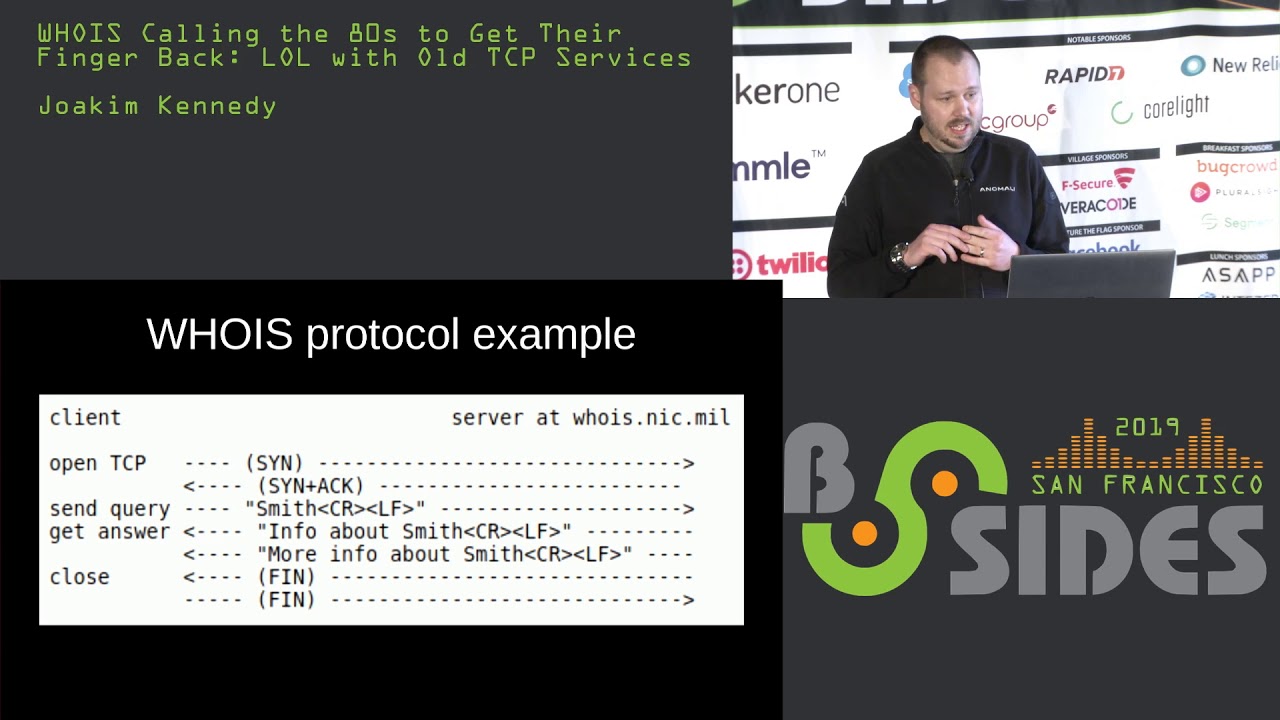
functionality and older versions I think prior to for dotto does not included but on by default so if you get on an older box it may not have it so let's introduce who is so who is is a TCP based transaction-oriented sort of a query response protocol it's pretty old the latest RFC is from as our 39 12 so this is a while back and it was initially sort of designed as a white pages service to provide information about the register domain mainly what's important that should need to be included is the name server that's used its listens by default on port 43 so the protocol is very very simple the client opens up a TCP socket by a syn
and the server open up it replies with a syn ACK and then and the client sends a query this query has the end with a carriage return in a line feed and once the service sees that it will send back data and each line will end with a carriage return line feed and there's no limit on how much can be returned and the way the server is signaling that it's end of transmission is by closing the socket and which is kind of problematic if you want to try to do this in a reverse shell because every time you send the command down you have to close the socket and the client will not have the socket back to send the
reply back so you have to kind of work around that a little bit so let's sort of see take a look at a demo of how we can use who is so just to walk through so what we have on left over here is just a TCP dump so we can just display packets being sent down to the right is a just a simple netcat server that's listening and then we're just gonna use who is to send sort of data and the way you can do this on a command line is you've just provided with two dashes and then anything after will be sent as the query so you can see it's returned back on the server side and the server can
reply at this point sorry about that right after the server has sent the you have to close the socket to tell the client that this is the end of the message and so if I sent right there's the client is still really sort of waiting for more response and until you actually send the fin packets now the way to sort of get a reverse shell using this technique is gonna have to wrap it around a little bit so here's the initial sort of information the similarly from the hello world demo and so first just creating a simple variable and and then I'm kicking off a infinite loop and here we have some just basically nested calls so we do a this initial
call that will send the value of the the variable and then the output for that is then evaluated and then that is assigned to the variable and then loop back again so doing that we kind of get a shell type terminal we can type anything we want and it will reply back we can list folders essentially I kind of have a reverse shell using who is so using kind of this approach the problem on the server side is that we always have two Court of close the socket which is not that sort of user friendly from a user's perspective it's easy to sort of work around you can write a simple sort of server that essentially would read in
and read the response from the server from the client print it out and then once it finds at the end that it doesn't get anything more and you can read from the standard and send it to the socket and I close it and then just loop back and wait for the client to come back again and serious it's a simple little demo on approaching that the similar setup in this way we get to read the terminal again and we simply just commands and I don't have to sort of worry about closing any sockets and it just straight up just prints out stuff out so let's go back to 1977 so finger is a very it's an
older protocol and it's kind of like who if you familiar with that but for remote so it was sort of designed as a way of clearing systems to see who is on the system and then you can also query a finger server with a specific user name and a user can essentially return a message or have like a default message there and these are sort of screen shots from the RFC and people would put their office location their office hours and stuff like that so it's a way of figuring out where people were and you know how to get ahold of them the protocol is sort of similar to who is it uses port 79 by default it's also the
same kind of query response type using the same end line characters sequence and the server has to close the socket so kind of the same problem again and it apparently also has sort of that if you want to add finger server to your vending machine there's a specification in the RFC for that make sure it and it shouldn't take it and sort of eat any money so be cautious on that so
it's a slightly different so we have top right top left sir and TCP dump and then on the bottom I'm just gonna set up a new let's just say netcat server yeah and if you you may not have been aware but finger comes pre-installed by Windows since Windows XP and so what we have on the top right is just a net stat output there just cycling through every day every eight second and just to show what is causing what's open sockets on the machine and the in the bottom right we have the sort of a one-line bash or a one-line reverse shell over so if you run you can see in the top to say that
fingers open up a socket and we can sort of retrieve each message line by line from the server and you can sort of list the C Drive just so that kind of work and just to show proof that it's sort of running on that you can get character pop on the Windows machine so the way this is sort of implemented from windows side it's a similar in the way it said two nested for loops and that executes finger and then from the output on that evaluate it and then each lines basically open up a new socket to send it back the UNIX system version is a little bit simpler very similar to the and who is there's a few quirks to it so
finger put out a status message message the first two lines before that and so you can either you can bypass that by using grep and some said that would sort of put a charactered for recognition where you where your command starts and then just strip it out before you execute it you
can also sort of taken this stuff can you sort of use it as a downloader for for example macros so you can imagine this sort of being popped into a and a word file and this is just a POC downloader it's pretty much copied verbatim from the previous slide just a few quirks to handle how strings is handled in VBA and if you run so this is just a macro that will execute once you open up word and if you check that in virustotal when i first put this up it was a about 10% detection rate so to the vendors that actually did detect it thumbs up so someone thought ahead of it which is great so from my sort of obtuse
or blue team's perspective how do we sort of mitigate this kind of scenarios they are using some standards on default ports and for its particularly finger on Windows did not have a a flag to sort of tell the client to use another port so you can if you don't need port 79 to go out outside your perimeter pocket you should definitely do some command-line logging and there's definitely some anomaly and type of how the command line is structured it should be able to be picked up and you can also look at on the network traffic if you're seeing a bunch of who is requests going out or finger requests there may be some things strange going on and there's also a lot
of other strange activity and especially the one with the finger each time it sends the response back for each line he does execute the binary again so you have a lot of new processes bond and sort of conclude with this and sort of the lessons learn and UNIX tools no matter how old they are you can sort of find them anywhere and I think one good lessons learn is also if you can if the service can sort of do a network request there's definitely a way you can misuses for something that it's not intended to do and so in general I would say in mitigating against living off the land is not an easy task and hopefully we can
improve on that thank you everybody and I can take questions if you have any we have like 10 minutes for questions so I
go over there I have to laugh a lot of the the rules they see specially up in AWS for instances like security groups nobody blocks outgoing it's yeah it's like wide open but I have seen in the past dns used for control channels yep rats and I was just curious if you've got any thoughts on that so there's definitely a lot of stuff you can do with DNS the I didn't want to go that route because it's already been done a bunch I wanted to look into something new and obviously DNS is hard in the way because it's hard to block and the requests are not it's basically relayed to where you need it so it has sort of
that benefit over this kind of a technique so yeah I mean I've seen it I've come across it a lot and yeah but that's kind of why I didn't go into that approach any other questions thank you besides a finger who is are there any other older tools you've been looking at there's there's a couple of them trying to remember which one I've looked at um [Music] it's just escaped me I'm sorry but yeah I mean the slide is you know if you can do an outbound connection and there's a way of squeezing information in and and it will come back with what the server replies you can say in theory use it it's all about how you manipulating the
stuff that comes back in general it's easier on UNIX because you have more shell tools to do it brining command-line like a reverse shell in Windows command line is not straightforward looks very very weird because you can't assign stuff to variables in an easy way and things like that so I think you could now I think I think you can do with LDAP it was one other tool so
no more questions actually that brings to mind what about what comes to mind is ike for example is there any way to piggyback on that maybe have you looked at that or anything similar to that i mean like these encrypted protocols or some of the bleak i know so I didn't look into it but that can be it's it's all about you know if I can control what I can send and then it gets back into a possible way for the client yeah so that's really the limitation so if you find another binary just try it and see a couple of examples of how to do it I know there's a there's a there's a project that was hosted on github that
is listing off a bunch of binaries you can use for exfiltration and stuff like that a bunch of them do not give you a response back which is problematic because you've missing that half but you can definitely upload stuff yeah the same with like download there's the question online for the audience actually can we can we get hands for who is login processes execution and command line that's a good question few hands couple good yeah login command line locks yeah if you guys don't have any more questions thank you joking for your presentation
Related talks
 26:38
26:38 28:29
28:29 29:24
29:24 32:13
32:13 30:17
30:17 38:53
38:53